Page 2 - Be sure to follow the instructions; WARNING; If you notice any abnormality; PRECAUTIONS
2 En Please read these precautions carefully before proceeding. Be sure to follow the instructions Please carefully read and observe the following precautions to avoid harm to people or damage to your personal property.After reading this document thoroughly, please retain it in a location that anyon...
Page 4 - CAUTION
4 En CAUTION These precautions alert you to the possibility of physical injury to yourself or others. Power supply • If the power cord plug inserted into the AC outlet is wiggly or loose, do not use that outlet.Otherwise, fire, electrical shock or burns may be caused. • When removing the power cord ...
Page 5 - NOTICE; Power supply; NOTE; Disposal or transfer; Precautions for use; Model Name
En 5 NOTICE Follow the precautions below to avoid malfunction and damage to this product and to prevent the loss of data. Power supply • If you plan not to use this product for a long period of time, remove the power cord plug from the AC outlet. Even when [ A ] (Power) on the front panel is turned ...
Page 7 - CONTENTS; BEFORE USING THE UNIT
En 7 CONTENTS BEFORE USING THE UNIT 8 Features . . . . . . . . . . . . . . . . . . . . . . . . . . . . . . . . . . . . . . . . . . . . . . . . . . . . . . . . . 8 About this manual. . . . . . . . . . . . . . . . . . . . . . . . . . . . . . . . . . . . . . . . . . . . . . . . 8 Accessories . . . . . ...
Page 8 - Features
8 En BEFORE USING THE UNIT • Optical digital output • Coaxial digital output • Supports playback of CD-R and CD-RW discs • Supports playback of files stored on USB flash drives or data CDs (MP3/WMA/AAC/ WAV/FLAC) • Random-sequence playback (page 14) • Repeat playback (page 14) • Program playback (au...
Page 9 - Accessories
En 9 • Remote control • Power cord • RCA stereo cable • Batteries (AA, R6, UM-3) (x2) • Owner’s Manual (this manual) Accessories Inserting batteries into the remote control Insert the batteries in the proper orientation. Remote control operating range Point the remote control toward the remote contr...
Page 10 - PREPARATION; Connecting to an amplifier
10 En PREPARATION CAUTION • Do not plug the power cord of this unit and other connected devices into AC outlets until all non- power connections are complete. After all the connections are complete, connect the supplied power cord to the AC IN connector on this unit, and then plug the other end into...
Page 11 - Turning on the power
En 11 To turn on the power to the unit, press A (Power) on the front panel. Note • If you press A (Power) on the remote control while the power to the unit is on, the unit will enter Standby mode. • The power indicator on the unit operates as follows: Brightly lit: Power is on Dimly lit: Standby mod...
Page 12 - PLAYING AUDIO; Playing an audio CD
12 En CD/USB OPEN/CLOSE PLAYING AUDIO This unit enables you to play data CDs as well as audio CDs. For information on the type of CDs that can be played on this unit, please refer to “Supported file formats/discs/USB flash drives” (page 20). 1 If the USB indicator on the front panel is lit, press CD...
Page 13 - Playing music files stored on your USB flash drive
En 13 CD/USB You can play music files (stored on your USB flash drive) on this unit. For information on the supported USB flash drives, please refer to “Supported file formats/discs/USB flash drives” (page 20). 1 If the USB indicator on the front panel is off, press CD/USB to switch to USB mode. The...
Page 14 - Random-sequence playback; Repeat playback; Advanced functions
14 En RANDOM CLEAR ENTER REPEAT PROGRAM You can configure playback mode and display settings using advanced functions. Random-sequence playback Press RANDOM to play tracks in random order. Pressing RANDOM repeatedly will change the Random-sequence playback setting as follows: Note • To cancel Random...
Page 15 - Switching information on the display; Changing the display brightness
En 15 A/B PUREDIRECT DISPLAY DIMMER Playing a specified part repeatedly (A-B Repeat playback) You can specify the start and end points of a track during audio CD playback to play the specified part repeatedly. 1 Play an audio CD. 2 Press A/B at the point you want to start Repeat playback. 3 Press A/...
Page 16 - APPENDIX; Front panel; Part names
16 En APPENDIX Front panel 1 A (Power) (page 11) 2 Power indicator (page 11) 3 USB jack (page 13) 4 USB indicator (page 13) 5 CD/USB (pages 12, 13) 6 PURE DIRECT (page 15) 7 PURE DIRECT indicator (page 15) 8 Disc tray (page 12) 9 (Open/Close) (page 12) 0 Remote control sensor (page 9) A (Skip backwa...
Page 18 - Remote control
18 En Remote control 1 A (Power) (page 11) 2 Remote control signal transmitter (page 9) 3 OPEN/CLOSE (page 12) 4 PROGRAM (page 14) 5 REPEAT (page 14) 6 DIMMER (page 15) 7 RANDOM (page 14) 8 A/B (page 15) 9 DISPLAY (page 15) 0 Numeric keys (pages 12, 14) A CLEAR (page 14) B ENTER (page 14) C (Search ...
Page 19 - Advanced settings
En 19 This section explains how to configure various advanced functions. You can configure most of these settings from the front panel. (Some settings require remote control operation.) 1 Place the unit in Standby mode (page 11). 2 Press and hold PURE DIRECT, (Open/Close), and (Play), simultaneously...
Page 20 - Supported file formats/discs/USB flash drives
20 En ❑ Supported file formats * Linear PCM format only. Note • Files on a data CD or USB flash drive will be played in chronological order based on date of creation. • This unit supports ISO9660 format discs. • If the unit is playing a VBR (variable bitrate) file, an accurate elapsed time might not...
Page 21 - Audio section; Laser section; Specifications; Output jacks; Other jacks
En 21 ❑ Handling a disc • Handle a disc carefully so as not to scratch the recorded surface. Do not bend a disc. • If there are any fingerprints or dust on the recorded surface, use a soft cloth to wipe the surface straight from the center toward the perimeter. • Never use a vinyl record cleaner, an...
Page 22 - Troubleshooting
22 En Refer to the table below if the unit fails to function properly. If your problem is not listed below, or if the symptoms persist after you follow the instructions below, turn off the power to the unit by pressing A (Power) on the front panel, disconnect the power cord, and contact your nearest...
Page 24 - AVERTISSEMENT; En cas d’anomalie; PRÉCAUTIONS D’USAGE
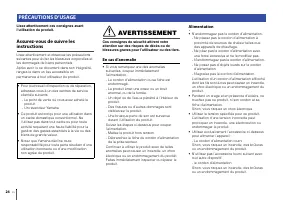
24 Fr Lisez attentivement ces consignes avant l’utilisation du produit. Assurez-vous de suivre les instructions Lisez attentivement et observez les précautions suivantes pour éviter les blessures corporelles et les dommages de biens personnels.Après avoir lu ce document dans son intégralité, rangez-...
Page 26 - ATTENTION; Alimentation
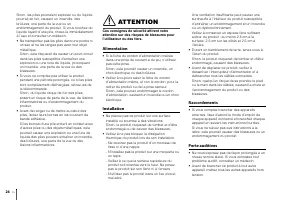
26 Fr Sinon, les piles pourraient exploser ou du liquide pourrait en fuir, causant un incendie, des brûlures, une perte de la vue ou un endommagement du produit. Si vous touchez du liquide fuyant d’une pile, rincez-le immédiatement à l’eau et consultez un médecin.• Ne transportez pas les piles dans ...
Page 27 - AVIS; Précautions d’emploi
Fr 27 Sinon, cela pourrait causer une perte auditive, un choc électrique ou un endommagement du produit. • Quand vous mettez votre système audio sous tension, veillez à toujours mettre l’amplificateur de puissance sous tension EN DERNIER. Quand vous mettez votre système audio hors tension, veillez à...
Page 28 - Mise au rebut ou transfert; Informations importantes
28 Fr NOTE Cette section décrit des précautions à observer durant l’utilisation, des restrictions de fonctionnalité et des informations complémentaires utiles. Mise au rebut ou transfert • Avant de transférer la propriété de ce produit, veillez à inclure ce document et les accessoires fournis avec l...
Page 29 - Sommaire; AVANT D’UTILISER L’APPAREIL
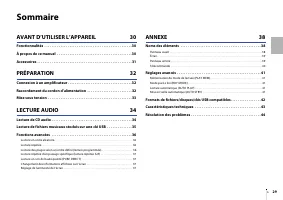
Fr 29 Sommaire AVANT D’UTILISER L’APPAREIL 30 Fonctionnalités . . . . . . . . . . . . . . . . . . . . . . . . . . . . . . . . . . . . . . . . . . . . . . . . . 30 À propos de ce manuel . . . . . . . . . . . . . . . . . . . . . . . . . . . . . . . . . . . . . . . . . . 30 Accessoires . . . . . . . . ...
Page 30 - Fonctionnalités
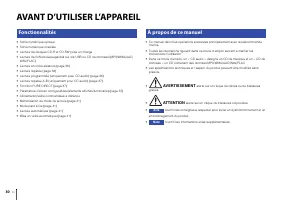
30 Fr AVANT D’UTILISER L’APPAREIL • Sortie numérique optique • Sortie numérique coaxiale • Lecture de disques CD-R et CD-RW prise en charge • Lecture de fichiers sauvegardés sur clé USB ou CD de données (MP3/WMA/AAC/ WAV/FLAC) • Lecture en ordre aléatoire (page 36) • Lecture répétée (page 36) • Lect...
Page 31 - Accessoires
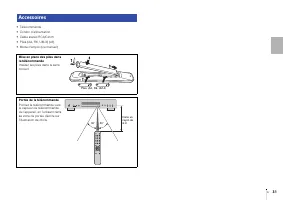
Fr 31 • Télécommande • Cordon d’alimentation • Câble stéréo RCA/Cinch • Piles (AA, R6, UM-3) (x2) • Mode d’emploi (ce manuel) Accessoires Mise en place des piles dans la télécommande Insérez les piles dans le sens correct. Portée de la télécommande Pointez la télécommande vers le capteur de télécomm...
Page 32 - PRÉPARATION; Connexion à un amplificateur
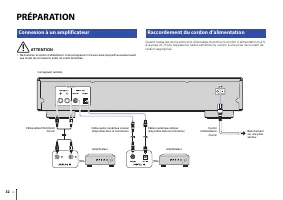
32 Fr PRÉPARATION ATTENTION • Ne branchez le cordon d’alimentation ni de cet appareil ni d’aucun autre dispositif au secteur avant que toutes les connexions audio ne soient terminées. Quand toutes les connexions sont effectuées, branchez le cordon d’alimentation fourni à la prise AC IN de l’appareil...
Page 33 - Mise sous tension
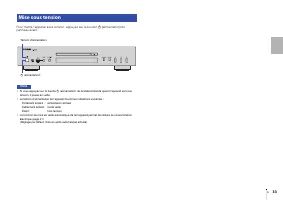
Fr 33 Pour mettre l’appareil sous tension, appuyez sur le bouton A (alimentation) du panneau avant. Note • Si vous appuyez sur la touche A (alimentation) de la télécommande quand l’appareil est sous tension, il passe en veille. • Le témoin d’alimentation de l’appareil fournit les indications suivant...
Page 34 - LECTURE AUDIO; Lecture de CD audio
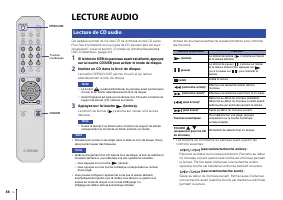
34 Fr CD/USB OPEN/CLOSE LECTURE AUDIO Cet appareil permet de lire des CD de données et des CD audio. Pour des informations sur les types de CD pouvant être lus avec cet appareil, voyez la section «Formats de fichiers/disques/clés USB compatibles» (page 42). 1 Si le témoin USB du panneau avant est al...
Page 35 - Lecture de fichiers musicaux stockés sur une clé USB
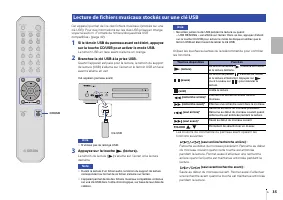
Fr 35 CD/USB Cet appareil permet de lire des fichiers musicaux (stockés sur une clé USB). Pour des informations sur les clés USB prises en charge, voyez la section «Formats de fichiers/disques/clés USB compatibles» (page 42). 1 Si le témoin USB du panneau avant est éteint, appuyez sur la touche CD/U...
Page 36 - Lecture en ordre aléatoire; Lecture répétée; Fonctions avancées
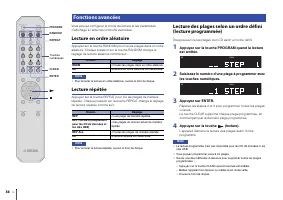
36 Fr RANDOM CLEAR ENTER REPEAT PROGRAM Vous pouvez configurer le mode de lecture et les paramètres d’affichage à l’aide des fonctions avancées. Lecture en ordre aléatoire Appuyez sur la touche RANDOM pour lire les plages dans un ordre aléatoire. Chaque pression sur la touche RANDOM change le réglag...
Page 37 - Réglage de luminosité de l’écran
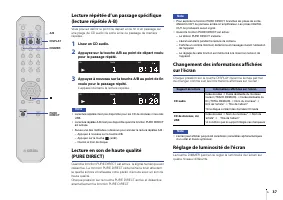
Fr 37 A/B PUREDIRECT DISPLAY DIMMER Lecture répétée d’un passage spécifique (lecture répétée A-B) Vous pouvez définir le point de départ et de fin d’un passage sur une plage de CD audio de sorte à lire ce passage de manière répétée. 1 Lisez un CD audio. 2 Appuyez sur la touche A/B au point de départ...
Page 38 - ANNEXE; Panneau avant; Noms des éléments
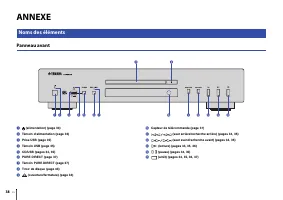
38 Fr ANNEXE Panneau avant 1 A (alimentation) (page 33) 2 Témoin d’alimentation (page 33) 3 Prise USB (page 35) 4 Témoin USB (page 35) 5 CD/USB (pages 34, 35) 6 PURE DIRECT (page 37) 7 Témoin PURE DIRECT (page 37) 8 Tiroir de disque (page 34) 9 (ouverture/fermeture) (page 34) 0 Capteur de télécomman...
Page 39 - Écran; Panneau arrière
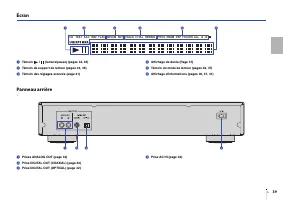
Fr 39 Écran 1 Témoin / (lecture/pause) (pages 34, 35) 2 Témoin de support de lecture (pages 34, 35) 3 Témoin des réglages avancés (page 41) 4 Affichage de durée (Page 37) 5 Témoin du mode de lecture (pages 36, 37) 6 Affichage d’informations (pages 36, 37, 41) Panneau arrière 1 Prises ANALOG OUT (pag...
Page 40 - Télécommande
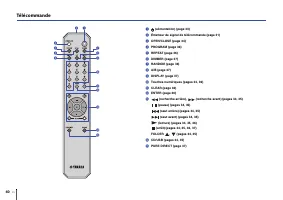
40 Fr Télécommande 1 A (alimentation) (page 33) 2 Émetteur de signal de télécommande (page 31) 3 OPEN/CLOSE (page 34) 4 PROGRAM (page 36) 5 REPEAT (page 36) 6 DIMMER (page 37) 7 RANDOM (page 36) 8 A/B (page 37) 9 DISPLAY (page 37) 0 Touches numériques (pages 34, 36) A CLEAR (page 36) B ENTER (page 3...
Page 41 - Mémorisation du mode de lecture (PLAY MEM); Réglages avancés
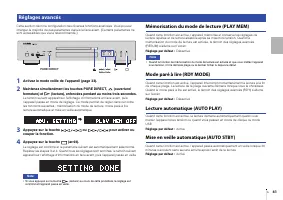
Fr 41 Cette section décrit la configuration des diverses fonctions avancées. Vous pouvez changer la majorité de ces paramètres depuis la face avant. (Certains paramètres ne sont accessibles que via la télécommande.) 1 Activez le mode veille de l’appareil (page 33). 2 Maintenez simultanément les touc...
Page 42 - Formats de fichiers/disques/clés USB compatibles
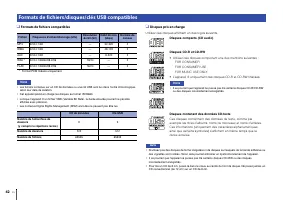
42 Fr ❑ Formats de fichiers compatibles * Format PCM linéaire uniquement. Note • Les fichiers contenus sur un CD de données ou une clé USB sont lus dans l’ordre chronologique, selon leur date de création. • Cet appareil prend en charge les disques au format ISO9660. • Lorsque l’appareil lit un fichi...
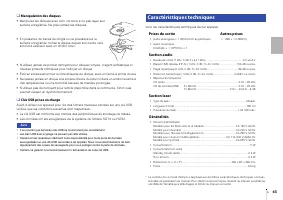
Page 43 - Section audio; Section laser; Caractéristiques techniques; Prises de sortie; Autres prises
Fr 43 ❑ Manipulation des disques • Manipulez les disques avec soin, de sorte à ne pas rayer leur surface enregistrée. Ne pliez jamais les disques. • En présence de traces de doigts ou de poussière sur la surface enregistrée, frottez le disque depuis son centre vers son bord extérieur avec un chiffon...
Page 44 - Résolution des problèmes
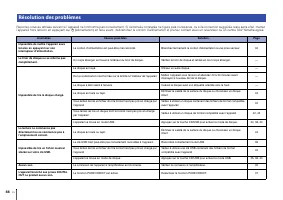
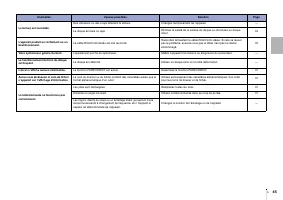
44 Fr Reportez-vous au tableau suivant si l’appareil ne fonctionne pas correctement. Si l’anomalie constatée ne figure pas ci-dessous, ou si la correction suggérée reste sans effet, mettez l’appareil hors tension en appuyant sur A (alimentation) en face avant, débranchez le cordon d’alimentation et ...
Page 46 - Software licenses; Licences de logiciel
46 Software licenses This product uses the following software. Licences de logiciel Ce produit utilise le logiciel suivant. FLAC Copyright © 2000–2009 Josh CoalsonCopyright © 2011–2021 Xiph.Org Foundation Redistribution and use in source and binary forms, with or without modification, are permitted ...





 Yamaha BD-S671 User Manual
 Yamaha BD-S1067 User Manual
 Yamaha CD-C603BL User Manual
 Yamaha CD-S300 User Manual
 Yamaha CDC-685 Manual
 Yamaha CDR-D651 Manual
 Yamaha CDR-HD1300 Manual
 Yamaha CDX-397MK2 User Manual
 Yamaha DVD-S530 Manual
 Yamaha DVD-S663 User Manual
 Yamaha DVD-S796 Manual
 Yamaha DVD-S1800 User Manual
 Yamaha DVD-S2300 User Manual
 Yamaha GT-5000 User Manual
 Yamaha TT-S303BL User Manual
-dlf-and-txnlf-User-Manual/webp/1.webp)


