Page 3 - WARNING; If you notice any abnormality; PRECAUTIONS
En 3 PLEASE READ CAREFULLY BEFORE USE. BE SURE TO FOLLOW THESE INSTRUCTIONS. The precautions listed below are to prevent risk of harm to the user and others, as well as to prevent property damage, and to help the user use this unit properly and safely. Be sure to follow these instructions.After read...
Page 4 - CAUTION; This content indicates “risk of injury.”
4 En Do not disassemble • Do not disassemble or modify this unit. Failure to observe this may cause a fire, electric shocks, injury, or malfunctions. Water warning • Do not expose the unit to rain, use it near water or in damp or wet conditions, or place on it any containers (such as vases, bottles ...
Page 6 - Notice
6 En Notice Indicates points that you must observe in order to prevent product failure, damage or malfunction and data loss. Power supply • If you plan not to use this product for a long period of time, remove the power cord plug from the AC outlet. Even when A (Power) on the front panel is turned o...
Page 7 - CONTENTS; BEFORE USING THE UNIT
En 7 CONTENTS BEFORE USING THE UNIT 8 FEATURES . . . . . . . . . . . . . . . . . . . . . . . . . . . . . . . . . . . . . . . . . . . . . . . . . . . . . . . 8 About this manual. . . . . . . . . . . . . . . . . . . . . . . . . . . . . . . . . . . . . . . . . . . . . . . . 8 Accessories . . . . . . . ...
Page 8 - FEATURES
8 En BEFORE USING THE UNIT • 5-Disc Carousel Auto-changer • PLAYXCHANGE function (page 17) • REMOTE IN/OUT jacks (page 10) • Supports playback of CD-R and CD-RW discs • Supports playback of files stored on USB flash drives or data CDs (MP3/WMA/AAC/ WAV/FLAC) • Convenient playback functions Random-se...
Page 9 - Accessories
En 9 • Remote control • Power cord • RCA stereo cable • Batteries (AA, R6, UM-3) (x2) • Owner's Manual (this manual) Accessories Inserting batteries into the remote control Insert the batteries in the proper orientation. Remote control operating range Point the remote control toward the remote contr...
Page 10 - PREPARATION; Connecting to an amplifier
10 En PREPARATION CAUTION • Do not plug the power cords for this unit and other connected devices into AC outlets until all other connections are complete. Note • If you connect the REMOTE IN/OUT jacks to an infrared transmitter/receiver or the IN/OUT jacks for remote signals on another audio device...
Page 11 - Connecting the power cord
En 11 After all the connections between audio devices are complete, connect the supplied power cord to the AC IN connector on this unit, and then plug the other end into an AC outlet. To turn on the power to the unit, press A (Power) on the front panel. Notice • If you plan not to use this product f...
Page 12 - PLAYING AUDIO; Place a disc on the disc tray.; Playing CDs
12 En MODE OPEN / CLOSE CD / USB PLAYING AUDIO This unit enables you to play data CDs as well as audio CDs. For information on the type of CDs that can be played on this unit, please refer to “Supported file formats/discs/USB flash drives” (page 23). 1 If the USB indicator on the front panel is lit,...
Page 13 - Press
En 13 4 Press (Play). The indicator appears on the information display and playback starts. Note • The disc slot indicator for the currently-playing or selected CD lights up as follows: • During data CD playback, the playback media indicator corresponding to the file format lights up. CAUTION • Do n...
Page 14 - Connect the USB flash drive to the USB jack.; Playing music files stored on your USB flash drive
14 En CD / USB You can play music files (stored on your USB flash drive) on this unit. For information on supported USB flash drives, please refer to “Supported file formats/discs/USB flash drives” (page 23). 1 If the USB indicator on the front panel is off, press CD/USB to switch to USB mode. The U...
Page 15 - Random-sequence playback; Repeat playback; Advanced functions
En 15 REPEAT RANDOM PURE DIRECT Random-sequence playback Press RANDOM to play tracks in random order. Pressing RANDOM repeatedly will change the Random-sequence playback setting as follows: Note • Extending the disc tray will cancel Random-sequence playback. Repeat playback Press REPEAT to play trac...
Page 17 - Press DISC SCAN while playback is stopped.
En 17 Replacing discs during CD playback (PLAYXCHANGE) You can replace discs during CD playback. 1 Press PLAYXCHANGE on the front panel while a CD is playing. The disc tray extends. 2 Replace discs. Notice • Do not place a disc in the slot marked with in the figure below (farthest from the front edg...
Page 18 - Switching information on the display; Changing the display brightness
18 En Switching information on the display Pressing DISPLAY repeatedly during playback will switch the information on the display as follows: Note • The information display indicates up to 28 characters (1-byte alphanumeric characters and several symbols). Changing the display brightness Press DIMME...
Page 19 - APPENDIX; Front panel; Part names
En 19 APPENDIX Front panel 1 A (Power) (page 11) 2 Power indicator (page 11) 3 DISC 1-5 (page 13) 4 PURE DIRECT (page 15) 5 PURE DIRECT indicator (page 15) 6 Disc tray (page 12) 7 (Open/Close) (page 12) 8 PLAYXCHANGE (page 17) 9 Display 0 Remote control sensor (page 9) A USB jack (page 14) B USB ind...
Page 20 - Rear panel
20 En Display 1 Disc slot indicators 2 Playback media indicator (pages 13, 14) 3 Advanced setting indicator (page 22) 4 Time indicator (page 18) 5 PROG (PROGRAM) indicator (page 16) 6 RNDM (RANDOM) indicator (page 15) 7 REP (REPEAT) indicator (page 15) 8 FOLDER indicator (page 15) 9 ALL indicator (p...
Page 21 - Remote control
En 21 Remote control 1 STANDBY/ON (page 11) 2 Remote control signal transmitter (page 9) 3 CD/USB (pages 12, 14) 4 PROGRAM (page 16) 5 DIMMER (page 18) 6 Numeric keys (pages 13, 14, 16) 7 (Search backward), (Search forward) (pages 13, 14) (Pause) (pages 13, 14) (Skip backward), (Skip forward) (pages...
Page 22 - Advanced settings
22 En This section explains how to configure various advanced functions. You can configure these settings from the front panel. 1 Turn off the power to the unit (page 11). 2 While pressing and holding PURE DIRECT and (Open/Close) simultaneously, press A (Power). The following indicator appears on th...
Page 23 - Supported file formats; Supported discs; Supported file formats/discs/USB flash drives
En 23 ❑ Supported file formats * Linear PCM format only. Note • Files on a data CD or USB flash drive will be played in chronological order based on date of creation. • This unit supports ISO9660 format discs. • If the unit is playing a VBR (variable bitrate) file, an accurate elapsed time might not...
Page 24 - Handling a disc; Supported USB flash drives; Moving this product
24 En ❑ Handling a disc • Handle a disc carefully so as not to scratch the recorded surface. Do not bend a disc. • If there are any fingerprints or dust on the recorded surface, use a soft cloth to wipe the surface straight from the center toward the perimeter. • Never use a vinyl record cleaner, an...
Page 25 - Audio Section; Specifications; Output Jacks
En 25 The specifications of this unit are as follows. Audio Section • Output Level (1 kHz, 0 dB, Fs 44.1 kHz) ........................................................ 2.0±0.3 V • S/N Ratio (IHF-A Network) (1 kHz, 0 dB, Fs 44.1 kHz) ...................... 105 dB or higher • Dynamic Range (1 kHz, 0 dB...
Page 26 - Troubleshooting
26 En Refer to the table below if the unit fails to function properly. If the problem is not listed below, or if the symptoms persist after you follow the instructions below, turn off the power to the unit by pressing A (Power) on the front panel, disconnect the power cord, and contact your nearest ...
Page 29 - AVERTISSEMENT; Alimentation
Fr 29 LISEZ ATTENTIVEMENT AVANT DE PROCÉDER À TOUTE UTILISATION. VEILLEZ À SUIVRE CES INSTRUCTIONS. Les mises en garde énumérées ci-dessous sont destinées à prévenir les risques pour l'utilisateur et les tiers, à éviter les dommages matériels et à aider l'utilisateur à se servir de l'appareil correc...
Page 30 - ATTENTION; Ce contenu indique « un risque de blessures ».
30 Fr • Si vous entendez le tonnerre gronder ou sus- pectez l'imminence d'un éclair, mettez immé-diatement l'appareil hors tension et débranchez la fiche d'alimentation de la prise secteur. Le non-respect de cette consigne peut entraîner un incendie ou des dysfonctionnements. • Si vous prévoyez de n...
Page 32 - Avis
32 Fr • Ne conservez pas les piles dans une poche ou un sac contenant des pièces en métal et évitez de transporter ou de stocker des piles avec des éléments métalliques. Cela pourrait court-circuiter les piles, les faire exploser ou déverser leur liquide et provoquer un incendie ou des blessures. • ...
Page 33 - SOMMAIRE; AVANT D’UTILISER L’APPAREIL
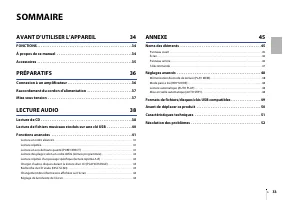
Fr 33 SOMMAIRE AVANT D’UTILISER L’APPAREIL 34 FONCTIONS . . . . . . . . . . . . . . . . . . . . . . . . . . . . . . . . . . . . . . . . . . . . . . . . . . . . . 34 À propos de ce manuel . . . . . . . . . . . . . . . . . . . . . . . . . . . . . . . . . . . . . . . . . . 34 Accessoires . . . . . . . ...
Page 34 - FONCTIONS
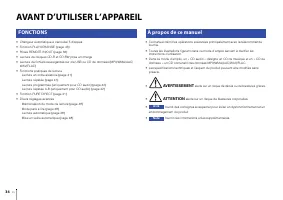
34 Fr AVANT D’UTILISER L’APPAREIL • Changeur automatique à carrousel 5 disques • Fonction PLAYXCHANGE (page 43) • Prises REMOTE IN/OUT (page 36) • Lecture de disques CD-R et CD-RW prise en charge • Lecture de fichiers sauvegardés sur clé USB ou CD de données (MP3/WMA/AAC/ WAV/FLAC) • Fonctions prati...
Page 35 - Accessoires
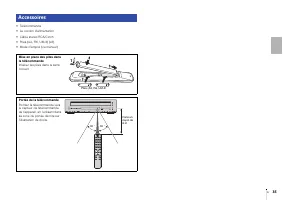
Fr 35 • Télécommande • Le cordon d’alimentation • Câble stéréo RCA/Cinch • Piles (AA, R6, UM-3) (x2) • Mode d’emploi (ce manuel) Accessoires Mise en place des piles dans la télécommande Insérez les piles dans le sens correct. Portée de la télécommande Pointez la télécommande vers le capteur de téléc...
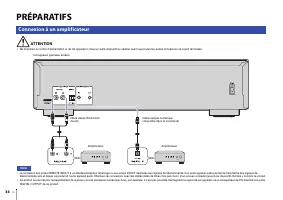
Page 36 - PRÉPARATIFS; Connexion à un amplificateur
36 Fr PRÉPARATIFS ATTENTION • Ne branchez le cordon d’alimentation ni de cet appareil ni d’aucun autre dispositif au secteur avant que toutes les autres connexions ne soient terminées. Note • La connexion des prises REMOTE IN/OUT à un émetteur/récepteur infrarouge ou aux prises IN/OUT destinées aux ...
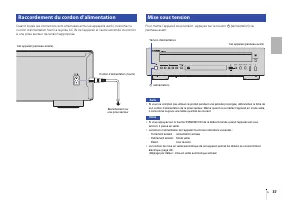
Page 37 - Raccordement du cordon d’alimentation
Fr 37 Quand toutes les connexions sont effectuées entre les appareils audio, branchez le cordon d’alimentation fourni à la prise AC IN de l’appareil et l’autre extrémité du cordon à une prise secteur de tension appropriée. Pour mettre l’appareil sous tension, appuyez sur le bouton A (alimentation) d...
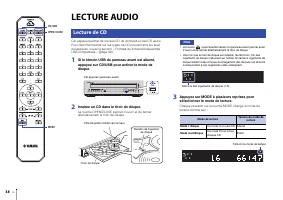
Page 38 - LECTURE AUDIO; Insérez un CD dans le tiroir de disque.; Lecture de CD
38 Fr MODE OPEN / CLOSE CD / USB LECTURE AUDIO Cet appareil permet de lire des CD de données et des CD audio. Pour des informations sur les types de CD pouvant être lus avec cet appareil, voyez la section « Formats de fichiers/disques/clés USB compatibles » (page 49). 1 Si le témoin USB du panneau a...
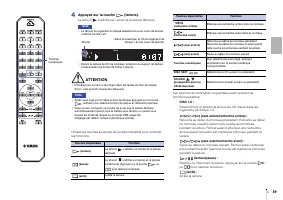
Page 39 - Appuyez sur la touche
Fr 39 4 Appuyez sur la touche (lecture). Le témoin s’affiche sur l’écran et la lecture démarre. Note • Le témoin du logement du disque sélectionné ou en cours de lecture s’affiche comme suit : • Durant la lecture de CD de données, le témoin du support de lecture correspondant au format de fichier s’...
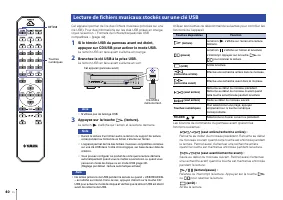
Page 40 - Branchez la clé USB à la prise USB.; Lecture de fichiers musicaux stockés sur une clé USB
40 Fr CD / USB Cet appareil permet de lire des fichiers musicaux (stockés sur une clé USB). Pour des informations sur les clés USB prises en charge, voyez la section « Formats de fichiers/disques/clés USB compatibles » (page 49). 1 Si le témoin USB du panneau avant est éteint, appuyez sur CD/USB pou...
Page 41 - Lecture en ordre aléatoire; Lecture répétée; Fonctions avancées
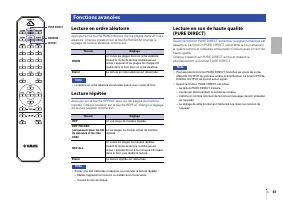
Fr 41 REPEAT RANDOM PURE DIRECT Lecture en ordre aléatoire Appuyez sur la touche RANDOM pour lire les plages dans un ordre aléatoire. Chaque pression sur la touche RANDOM change le réglage de lecture aléatoire comme suit : Note • La lecture en ordre aléatoire est annulée quand vous ouvrez le tiroir....
Page 42 - ou; Appuyez sur
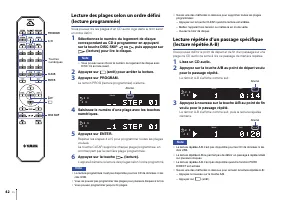
42 Fr Lecture des plages selon un ordre défini (lecture programmée) Vous pouvez lire les plages d’un CD audio logé dans le tiroir selon un ordre défini. 1 Sélectionnez le numéro du logement de disque correspondant au CD à programmer en appuyant sur la touche DISC SKIP ou , puis appuyez sur (lecture)...
Page 43 - Changez les disques voulus.; Appuyez sur PLAYXCHANGE.; Appuyez sur DISC SCAN ou
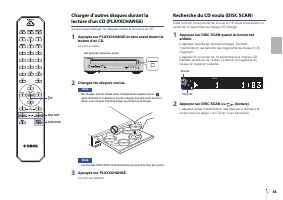
Fr 43 Charger d’autres disques durant la lecture d'un CD (PLAYXCHANGE) Vous pouvez changer de disques durant la lecture d’un CD. 1 Appuyez sur PLAYXCHANGE en face avant durant la lecture d'un CD. Le tiroir s’ouvre. 2 Changez les disques voulus. Avis • Ne chargez pas de disque dans l’emplacement repé...
Page 44 - Réglage de luminosité de l’écran
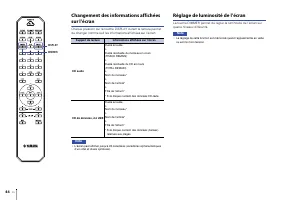
44 Fr Changement des informations affichées sur l’écran Chaque pression sur la touche DISPLAY durant la lecture permet de changer comme suit les informations affichées sur l’écran : Note • L’écran peut afficher jusqu’à 28 caractères (caractères alphanumériques d’un octet et divers symboles). Réglage...
Page 45 - ANNEXE; Panneau avant; Noms des éléments
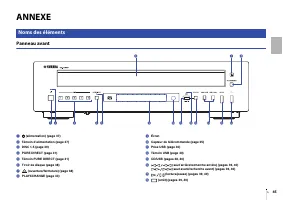
Fr 45 ANNEXE Panneau avant 1 A (alimentation) (page 37) 2 Témoin d’alimentation (page 37) 3 DISC 1-5 (page 39) 4 PURE DIRECT (page 41) 5 Témoin PURE DIRECT (page 41) 6 Tiroir de disque (page 38) 7 (ouverture/fermeture) (page 38) 8 PLAYXCHANGE (page 43) 9 Écran 0 Capteur de télécommande (page 35) A P...
Page 46 - Panneau arrière
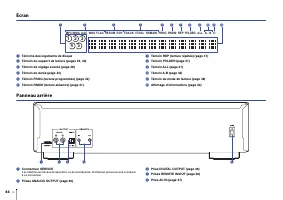
46 Fr Écran 1 Témoins des logements de disque 2 Témoin du support de lecture (pages 39, 40) 3 Témoin de réglage avancé (page 48) 4 Témoin de durée (page 44) 5 Témoin PROG (lecture programmée) (page 42) 6 Témoin RNDM (lecture aléatoire) (page 41) 7 Témoin REP (lecture répétée) (page 41) 8 Témoin FOLD...
Page 47 - Télécommande
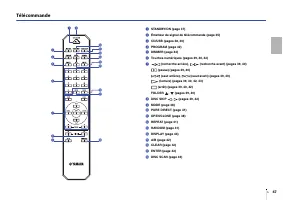
Fr 47 Télécommande 1 STANDBY/ON (page 37) 2 Émetteur de signal de télécommande (page 35) 3 CD/USB (pages 38, 40) 4 PROGRAM (page 42) 5 DIMMER (page 44) 6 Touches numériques (pages 39, 40, 42) 7 (recherche arrière), (recherche avant) (pages 39, 40) (pause) (pages 39, 40) (saut arrière), (saut avant) ...
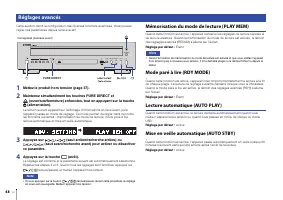
Page 48 - Mémorisation du mode de lecture (PLAY MEM); Réglages avancés
48 Fr Cette section décrit la configuration des diverses fonctions avancées. Vous pouvez régler ces paramètres depuis la face avant. 1 Mettez le produit hors tension (page 37). 2 Maintenez simultanément les touches PURE DIRECT et (ouverture/fermeture) enfoncées, tout en appuyant sur la touche A (ali...
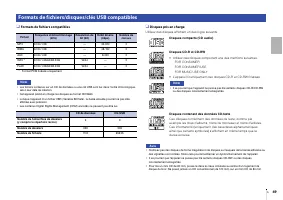
Page 49 - Formats de fichiers compatibles; Disques pris en charge; Formats de fichiers/disques/clés USB compatibles
Fr 49 ❑ Formats de fichiers compatibles * Format PCM linéaire uniquement. Note • Les fichiers contenus sur un CD de données ou une clé USB sont lus dans l’ordre chronologique, selon leur date de création. • Cet appareil prend en charge les disques au format ISO9660. • Lorsque l’appareil lit un fichi...
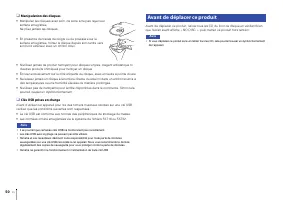
Page 50 - Manipulation des disques; Clés USB prises en charge; Avant de déplacer ce produit
50 Fr ❑ Manipulation des disques • Manipulez les disques avec soin, de sorte à ne pas rayer leur surface enregistrée. Ne pliez jamais les disques. • En présence de traces de doigts ou de poussière sur la surface enregistrée, frottez le disque depuis son centre vers son bord extérieur avec un chiffon...
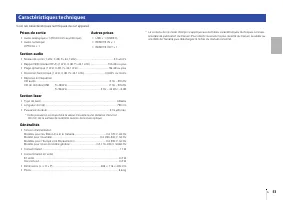
Page 51 - Section audio; Caractéristiques techniques; Prises de sortie
Fr 51 Voici les caractéristiques techniques de cet appareil. Section audio • Niveau de sortie (1 kHz, 0 dB, Fs 44,1 kHz) ................................................. 2,0 ±0,3 V • Rapport S/B (réseau IHF-A) (1 kHz, 0 dB, Fs 44,1 kHz) ....................... 105 dB ou plus • Plage dynamique (1 kH...
Page 52 - Résolution des problèmes
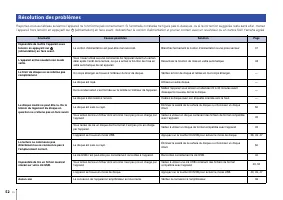
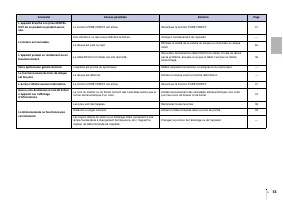
52 Fr Reportez-vous au tableau suivant si l’appareil ne fonctionne pas correctement. Si l’anomalie constatée ne figure pas ci-dessous, ou si la correction suggérée reste sans effet, mettez l’appareil hors tension en appuyant sur A (alimentation) en face avant, débranchez le cordon d’alimentation et ...
Page 54 - Software licenses; Licences de logiciel
54 Software licenses This product uses the following software. Licences de logiciel Ce produit utilise le logiciel suivant. FLAC Copyright © 2000–2009 Josh CoalsonCopyright © 2011–2023 Xiph.Org Foundation Redistribution and use in source and binary forms, with or without modification, are permitted ...






 Yamaha BD-S671 User Manual
 Yamaha BD-S1067 User Manual
 Yamaha CD-S300 User Manual
 Yamaha CD-S303BL User Manual
 Yamaha CDC-685 Manual
 Yamaha CDR-D651 Manual
 Yamaha CDR-HD1300 Manual
 Yamaha CDX-397MK2 User Manual
 Yamaha DVD-S530 Manual
 Yamaha DVD-S663 User Manual
 Yamaha DVD-S796 Manual
 Yamaha DVD-S1800 User Manual
 Yamaha DVD-S2300 User Manual
 Yamaha GT-5000 User Manual
 Yamaha TT-S303BL User Manual
-dlf-and-txnlf-User-Manual/webp/1.webp)


