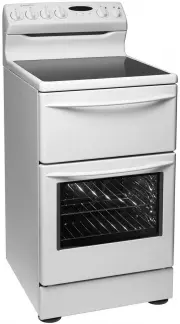
Page 2 - Rear control electric cookers
2 general warnings CondItIons of Use this appliance is intended to be used in household and similar applications such as: • staff kitchen areas in shops, off ices and other working environments • farm houses • By clients in hotels, motels and other residential type environments • Bed and breakfast t...
Page 3 - Contents; warning; WARNING; caution; ENVIRONMENTAL TIPS; environmental tips
contents 3 Installation 4 Controls 7 Understanding the cooker 13 Using the hotplates 14 Understanding the functions 15 Cooking guide for ovens 18 Get to know your oven 19 Handling baking & grilling problems 20 Clocks 21 Cleaning and caring for the cooker 23 Cleaning and caring for the oven 24 So...
Page 4 - Installation
Plastic clip Plastic clip securing points 4 installation This appliance must be installed by an authorised person in compliance with local municipal building codes and any other relevant statutory regulation. Wiring connections must be made in accordance with: new Zealand & Australian Requiremen...
Page 6 - Step 3: Stability bolt
6 installation Installation Step 3: Stability bolt • fasten the stability bolt bracket to the front frame with the 2 screws supplied. • Reposition the cooker back into the anti-tilt bracket and then mark the position of the stability bolt hole. • Pull the cooker back out and drill the bolt location ...
Page 7 - Controls; Do not place ANY object on the oven floor
Thermowave Grill - In oven Maxi Grill Base Heat(Heat comes from element below the food) Defrost Separate Compartment Bake(Heat comes from 2 elements one above and below the food) Ceramic Hob Rapid Heat Fan Grill Grill - in oven Thermowave Grill - In oven Maxi Grill Base Heat(Heat comes from element ...
Page 13 - Removable Shelf Side Support; Understanding the cooker
1 10 6 7 11 12 8 9 2 3 4 5 understanding the cooker 13 1 Hob (Ceramic or Radiant hotplates)2 Grill Door (fitted on selected models only) 3 Removable Shelf Side Support (fitted on selected models only) 4 Removable Shelf5 Removable Oven Door6 Control Panel7 Grill Element (fitted on selected models onl...
Page 14 - Using the hotplates
GOOD BAD (moisture on hotplate) BAD (convex base) BAD (oversize) BAD (recessed base) BAD (undersize) BAD (no utensil) GOOD BAD (moisture on hotplate) BAD (convex base) BAD (oversize) BAD (recessed base) BAD (undersize) BAD (no utensil) GOOD BAD (moisture on hotplate) BAD (convex base) BAD (oversize)...
Page 15 - Understanding the functions
warning understanding the functions 15 Understanding the functions CAUTION: Do not line the bottom of the oven with foil or place anything on bottom surface of oven liner as trapped heat will crack or craze oven liner. Always remove unnecessary trays or dishes from oven when baking or roasting. Preh...
Page 18 - Cooking guide for ovens
18 cooking guide for ovens food Bake thermowave Base Heat Grill fan Grill Maxi Grill Rapid Heat Baked Products single trays R R A A 3 trays R A 2 trays R scones/small cakes R R R R Muffins R R R slices R R A R Cakes R A A fruit Cakes R R A egg Recipes Baked Custards R R Pavlova A A Meringues A R Pie...
Page 19 - Get to know your new oven with this; Get to know your oven
get to know your oven 19 Get to know your new oven with this ‘Simple Test Cake’ Although we strive for a perfect performing oven, it’s possible that there will be some variation in colour when baking. therefore, we suggest this simple, easy and delicious to make simple test Cake, it can help you und...
Page 20 - Handling baking & grilling problems
20 handling baking & grilling problems PRoBLeM CAUses ReMedIes Uneven cooking: • Incorrect shelf position. - select shelf that puts food in the centre of the oven. • oven tray too large. - experiment with other trays or dishes. • trays not centralised. - Centre trays. • food has not been rotated...
Page 21 - Operating the; button programmable clock; Clocks
clocks 21 Before operating your appliance for the first time 3 button programmable clock After the appliance has been switched on “12.00“ will bedisplayed and the “clock indicator“ will flash.1. to set the time of day in hours and minutes, press the – or + buttons. 5 seconds after the last change, t...
Page 22 - Operating your
22 clocks Setting the cooking duration 1. Check the clock displays the correct time of day.2. select the desired oven function and temperature. the oven indicator light will glow and the heating source will come on. 3. Press the “mode“ button until the “cook time” indicator begins flashing. 4. set t...
Page 23 - Cleaning and caring for the cooker
IMPoRtAnt: Always make sure that the appliance is turned off before you clean it.All surfaces should be kept clean to reduce the risk of damage or fire. Cleaning Enamel and Glass Doors Panels Keep it clean by wiping it regularly with a soft cloth dipped in warm soapy water. Rub persistent stains vig...
Page 24 - Cleaning and caring for your oven
Cleaning and caring for your oven warning warning warning warning warning 24 cleaning and caring Removing the Oven Shelves slide the oven shelves towards you until they reach the front stop. tilt them up at the front to clear the side supports. Lift them clear. Wash the shelves in hot soapy water. f...
Page 25 - Solving problems
Solving problems solving problems 25 Faults If you have a problem with your oven and/or grill, please:• Check the points listed below before calling for service. You may be able to avoid a service call by fixing the problem yourself - and so continue cooking. Note: We may charge you for service even...
Page 26 - Notes
Page 27 - Warranty
This document sets out the terms and conditions of the product warranties for Electrolux Appliances. It is an important document. Please keep it with your proof of purchase documents in a safe place for future reference should you require service for your Appliance. 1. In this warranty (a) ‘acceptab...