Page 3 - ENGLISH; DESCRIPTION
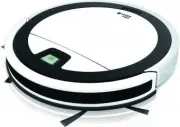
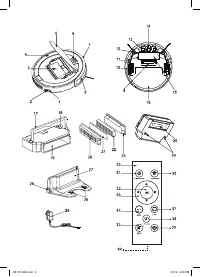
3 ENGLISH ROBOTIC VACUUM CLEANER VT-1803The robotic vacuum cleaner is intended for room cleaning in automatic mode. DESCRIPTION 1. AC/DC adapter connection socket 2. Power switch «I/0» 3. Dust bin 4. Body 5. Lid 6. Start/stop button «AUTO » 7. Front bumper 8. Sensor window 9. Suction nozzle 10. Driv...
Page 4 - This unit is not intended for usage by children.
4 ENGLISH Attention! The unit contains a lithium battery. Prevent children from swallowing the lithium bat-tery. If your child has swallowed a battery, immediately see your doctor. • Close supervision is necessary when chil-dren or people with disabilities are near the operating unit. • This unit is...
Page 5 - » illumination will be flash-; Charging station
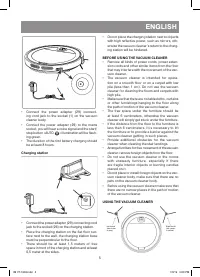
5 ENGLISH • Connect the power adapter (29) connect-ing cord jack to the socket (1) on the vacuum cleaner body. • Connect the power adapter (29) to the mains socket, you will hear a voice signal and the start/stop button «AUTO » illumination will be flash- ing green. • The duration of the first batte...
Page 6 - the water tank capacity is 100 ml.; Using of the remote control; » on the remote control.; Automatic room cleaning mode; » again to switch the vacuum cleaner on and; Vacuum cleaner manual operation; » to direct the
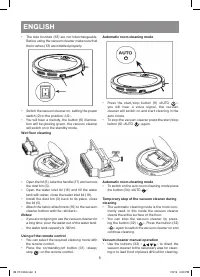
6 ENGLISH • The side brushes (12) are not interchangeable. Before using the vacuum cleaner make sure that the brushes (12) are installed properly. • Switch the vacuum cleaner on, setting the power switch (2) to the position «I/0». • You will hear a melody, the button (6) illumina-tion will be glowin...
Page 7 - «Along the wall» cleaning mode; «Zigzag» cleaning mode; » on the remote; Switching voice signals on/off; » to switch voice; CLEANING AND MAINTENANCE
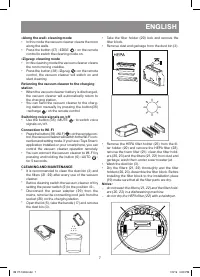
7 ENGLISH «Along the wall» cleaning mode • In this mode the vacuum cleaner cleans the room along the walls. • Press the button (37) «EDGE » on the remote control to switch the cleaning mode on. «Zigzag» cleaning mode • In this cleaning mode the vacuum cleaner cleans the room moving crablike. • Press...
Page 9 - STORAGE; Remove the battery from the remote control.; Possible troubles and troubleshooting; The sensors on the front bumper are dirty. Wipe the front bumper.
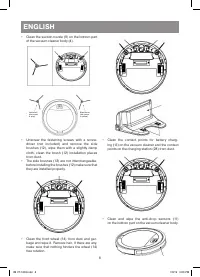
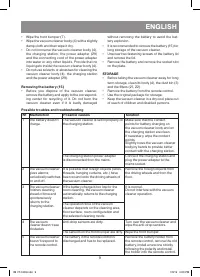
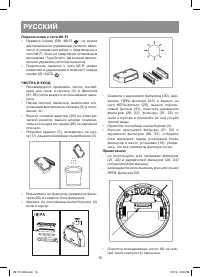
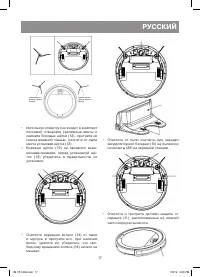
9 ENGLISH • Wipe the front bumper (7). • Wipe the vacuum cleaner body (4) with a slightly damp cloth and then wipe it dry. • Do not immerse the vacuum cleaner body (4), the charging station, the power adapter (29) and the connecting cord of the power adapter into water or any other liquids. Provide ...
Page 10 - No Malfunction; » and then switch the vacuum cleaner on again. If the prob-; RECYCLING; The unit operating life is 3 years
10 ENGLISH № Malfunction Possible causes Solution 5 The vacuum cleaner doesn‘t respond to the remote control. The vacuum cleaner is switched off or the vacuum cleaner battery is discharged. Make sure that the battery is fully charged and the vacuum cleaner is switched on. The signal from the remote ...
Page 11 - РУССКИЙ; ОПИСАНИЕ
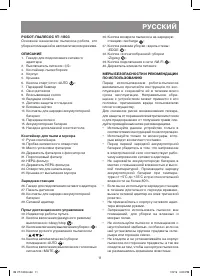
11 РУССКИЙ РОБОТ-ПЫЛЕСОС VT-1803Основное назначение пылесоса-робота, это уборка помещений в автоматическом режиме. ОПИСАНИЕ 1. Гнездо для подключения сетевого адаптера 2. Выключатель питания «I/0» 3. Контейнер-пылесборник 4. Корпус 5. Крышка 6. Кнопка старт/стоп «AUTO » 7. Передний бампер 8. Окно да...
Page 12 - И С П О Л ЬЗ О В А Н И Е
12 РУССКИЙ • Запрещается включать устройство, если воздухозаборное отверстие пылесоса заблокировано посторонним предметом. • Следите за тем, чтобы волосы, а также сво-бодно висящие элементы одежды и инте-рьера не находились на пути движения пылесоса. • При уборке лестничных площадок, устано-вите доп...
Page 13 - Сохраните заводскую упаковку.; Зарядная станция
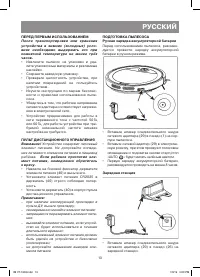
13 РУССКИЙ ПЕРЕД ПЕРВЫМ ИСПОЛЬЗОВАНИЕМПосле транспортировки или хранения устройства в зимних (холодных) усло-виях необходимо выдержать его при комнатной температуре не менее трёх часов. • Извлеките пылесос из упаковки и уда-лите упаковочные материалы и рекламные наклейки. • Сохраните заводскую упако...
Page 14 - ПЕРЕД ИСПОЛЬЗОВАНИЕМ ПЫЛЕСОСА
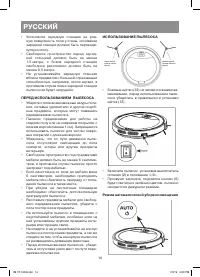
14 РУССКИЙ • Установите зарядную станцию на ров-ную поверхность пола у стены, основание зарядной станции должно быть перпенди-кулярно полу. • Свободное пространство перед заряд-ной станцией должно быть не менее 1,5 метра, с боков зарядной станции свободное расстояние должно быть не менее 0,5 метра. ...
Page 15 - Влажная уборка пола; ёмкость резервуара 100 мл воды.; Режим автоматической уборки помещения; » вы можете остановить; Режим уборки «Вдоль стены»; » на пульте
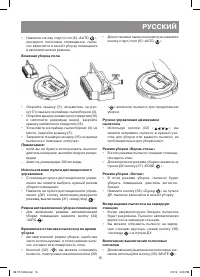
15 РУССКИЙ • Нажмите кнопку старт/стоп (6) «AUTO », прозвучит голосовое оповещение, пыле-сос включится и начнёт уборку помещения в автоматическом режиме. • Для остановки пылесоса повторно нажмите кнопку старт/стоп (6) «AUTO ». Влажная уборка пола • Откройте крышку (5), возьмитесь за руч- ку (17) и в...
Page 16 - Подключение к сети WI-FI; » на пульте; ЧИСТК А И УХОД
16 РУССКИЙ Подключение к сети WI-FI • Нажмите кнопку (39) «WI-FI » на пульте дистанционного управления, пылесос вклю-чится в режим настройки и подключения к сети WI-FI. Если на смартфоне установлена программа «Tuya Smart», вы можете дистан-ционно управлять работой пылесоса. • Подключить пылесос к се...
Page 18 - ХРАНЕНИЕ
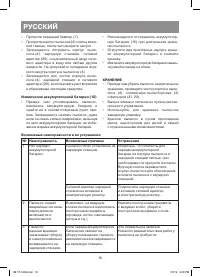
18 РУССКИЙ • Протрите передний бампер (7). • Протрите корпус пылесоса (4) слегка влаж-ной тканью, после чего вытрите насухо. • Запрещается погружать корпус пыле-соса (4), зарядную станцию, сетевой адаптер (29), соединительный шнур сете-вого адаптера в воду или любые другие жидкости. Не допускайте по...
Page 19 - No Неисправность; Протрите передний бампер.
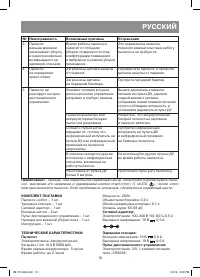
19 РУССКИЙ № Неисправность Возможные причины Устранение 3 Пылесос раньше времени заканчивает уборку и самопроизвольно возвращается на зарядную станцию. Время работы пылесоса зависит от площади уборки, поверхности пола, конфигурации помещения и выбранного режима уборки помещения. Это нормальное явлен...
Page 20 - УТИЛИЗАЦИЯ; Срок службы устройства – 3 года
20 РУССКИЙ УТИЛИЗАЦИЯ В целях защиты окружающей среды, после окончания срока службы прибора и элемен-тов питания (если входят в комплект), не выбрасывайте и вместе с обычными быто-выми отходами, передайте прибор и эле-менты питания в специализированные пункты для дальнейшей утилизации.Отходы, образу...
Page 21 - Инструкция по использованию
1 2 9 VT-1803 Robotic vacuum cleaner Робот-пылесос Инструкция по использованию программы TUYA SMART APP IM VT-1803.indd 1 7/3/19 11:43 AM
Page 22 - – Your device must support Android 4.0 /
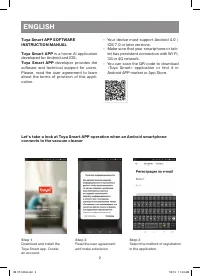
2 ENGLISH Tuya Smart APP SOFTWARE INSTRUCTION MANUAL Tuya Smart APP is a home AI application developed for Android and IOS. Tuya Smart APP developer provides the software and technical support for users. Please, read the user agreement to learn about the terms of provision of this appli-cation. – Yo...
Page 23 - Create your virtual home.
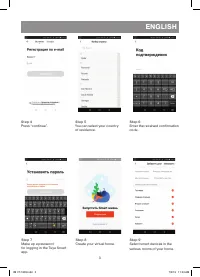
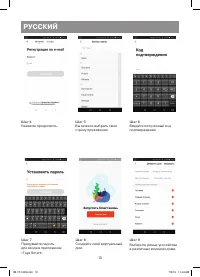
3 ENGLISH Step 6 Enter the received confirmation code. Step 4 Press “continue”. Step 7 Make up a password for logging in the Tuya Smart app. Step 5 You can select your country of residence. Step 8 Create your virtual home. Step 9 Select smart devices in the various rooms of your home. IM VT-1803.ind...
Page 24 - Enter the name for your home.
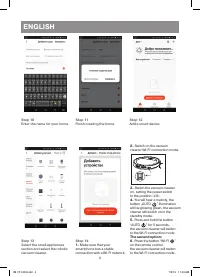
4 ENGLISH Step 12 Add a smart device. Step 10 Enter the name for your home. Step 13 Select the small appliances section and select the robotic vacuum cleaner. Step 11 Finish creating the home. Step 14 1. Make sure that your smartphone has a stable connection with a WI-FI network. 2. Switch on the va...
Page 25 - The device search will start.; Connection to the vacuum cleaner via “access point”
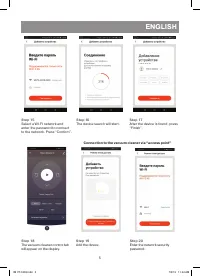
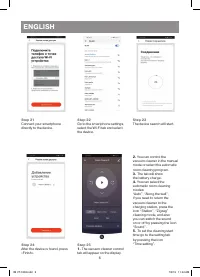
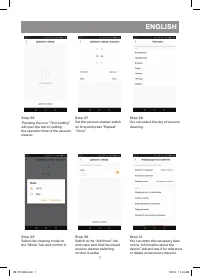
5 ENGLISH Step 15 Select a WI-FI network and enter the password to connect to the network. Press “Confirm”. Step 16 The device search will start. Step 17 After the device is found, press “Finish”. Step 18 The vacuum cleaner control tab will appear on the display. Step 19 Add the device. Step 20 Ente...
Page 29 - – Ваше устройство должно поддержи-
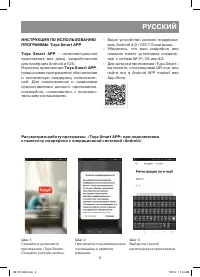
9 РУССКИЙ ИНСТРУКЦИЯ ПО ИСПОЛЬЗОВАНИЮ ПРОГРАММЫ Tuya Smart APP Tuya Smart APP – интеллектуальное приложение для дома, разработанное для платформ Android и IOS. Издатель приложения Tuya Smart APP, предоставил программное обеспечение и техническую поддержку пользовате-лей. Для ознакомления и правилами...
Page 31 - Добавьте умное устройство.
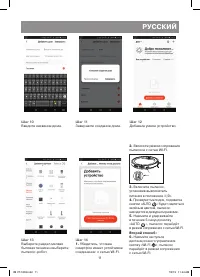
11 РУССКИЙ Шаг 12 Добавьте умное устройство. Шаг 10 Введите название дома. Шаг 13 Выберите раздел мелкая бытовая техника и выберите пылесос-робот. Шаг 11 Завершите создание дома. Шаг 14 1. Убедитесь, что ваш смартфон имеет устойчивое соединение с сетью WI-FI. 2. Включите режим сопряжения пылесоса с ...
Page 32 - Начнётся поиск устройства.; Соединение с пылесосом через «точку доступа»
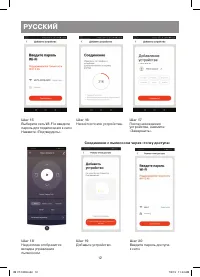
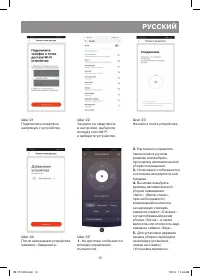
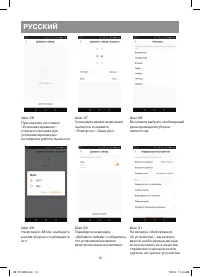
12 РУССКИЙ Шаг 15 Выберите сеть WI-FI и введите пароль для подключения к сети.Нажмите «Подтвердить». Шаг 16 Начнётся поиск устройства. Шаг 17 После нахождения устройства, нажмите «Завершить». Шаг 18 На дисплее отобразится вкладка управления пылесосом. Шаг 19 Добавьте устройство. Шаг 20 Введите парол...
Page 35 - ИЗГОТОВИТЕЛЬ: СТАР ПЛЮС ЛИМИТЕД; КНР; МЕСТОНАХОЖДЕНИЕ И ПОЧТОВЫЙ; СДЕЛАНО В КНР
15 РУССКИЙ УТИЛИЗАЦИЯ В целях защиты окружающей среды, после окончания срока службы прибора и эле-ментов питания (если входят в комплект), не выбрасывайте их вместе с обычными быто-выми отходами, передайте прибор и эле-менты питания в специализированные пункты для дальнейшей утилизации.Отходы, образ...