Page 3 - ENGLISH; The unit contains a lithium battery.
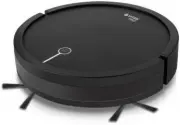
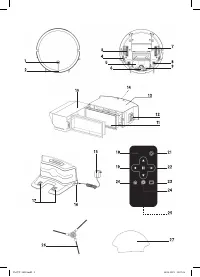
3 ENGLISH ROBOTIC VACUUM CLEANER VT-1802 The robotic vacuum cleaner is intended for room cleaning in automatic mode. DESCRIPTION 1. Start/stop button « » 2. Anti-bump sensors 3. Driving wheels 4. Anti-drop sensors 5. Rechargeable battery 6. Front wheel 7. Suction nozzle 8. Side brushes 9. Contact po...
Page 4 - Danger of; BEFORE THE FIRST USE; Keep the original package.; REMOTE CONTROL; If your child has swallowed a battery,; ASSEMBLING THE VACUUM CLEANER
4 ENGLISH • The unit is not intended for usage by physi-cally or mentally disabled persons (including children) or by persons lacking experience or knowledge if they are not under supervision of a person who is responsible for their safety or if they are not instructed by this person on the usage of...
Page 5 - Turn over the vacuum cleaner body and install two side brushes (8).; BEFORE USING THE VACUUM CLEANER
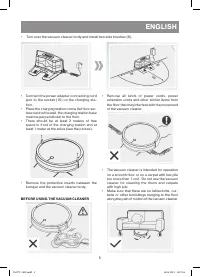
5 ENGLISH • Turn over the vacuum cleaner body and install two side brushes (8). • Connect the power adapter connecting cord jack to the socket (16) on the charging sta-tion. • Place the charging station on the flat floor sur-face next to the wall, the charging station base must be perpendicular to t...
Page 6 - USING THE VACUUM CLEANER; Plug the power adapter into the mains socket.; Automatic room cleaning mode; the attachment (27) is intended for
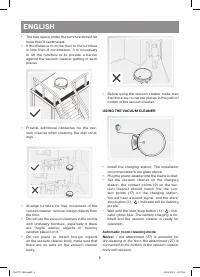
6 ENGLISH • The free space under the furniture should be more than 8 centimeters. • If the distance from the floor to the furniture is less than 8 centimeters, it is necessary to lift the furniture or to provide a barrier against the vacuum cleaner getting in such places. • Provide additional obstac...
Page 7 - » or the; » on the; » on the; Cleaning mode selection; - after you switch the vacuum cleaner; » indication flashes blue, it means
7 ENGLISH • Press the start/stop button (1) « » or the button (18) «AUTO» on the remote control. The vacuum cleaner will switch on and start cleaning in the automatic mode. • During cleaning the vacuum cleaner makes a short stop to calculate the area of the sur-face to clean. • Do not interfere with...
Page 8 - «Spiral» cleaning mode; ». The vacuum cleaner will; «Along the wall» cleaning mode; » on the remote; Scheduling the room cleaning; uum cleaner in the charging station.; CLEANING AND CARE
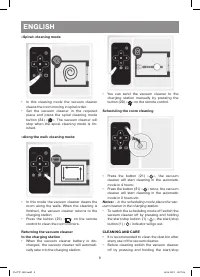
8 ENGLISH «Spiral» cleaning mode • In this cleaning mode the vacuum cleaner cleans the room moving in spiral order. • Set the vacuum cleaner in the required place and press the spiral cleaning mode button (24) « ». The vacuum cleaner will stop when the spiral cleaning mode is fin-ished. «Along the w...
Page 9 - indicator will go out.
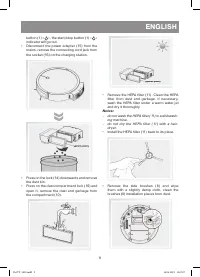
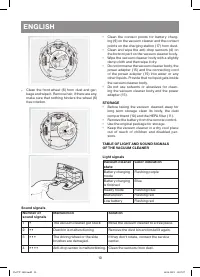
9 ENGLISH button (1) « », the start/stop button (1) « » indicator will go out. • Disconnect the power adapter (15) from the mains, remove the connecting cord jack from the socket (16) on the charging station. • Press on the lock (14) downwards and remove the dust bin. • Press on the dust compartment...
Page 11 - Possible troubles and troubleshooting; The battery is fully discharged.
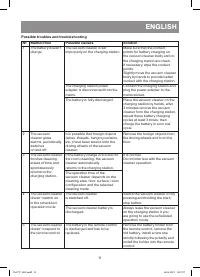
11 ENGLISH Possible troubles and troubleshooting № Malfunction Possible causes Solution 1 The battery doesn‘t charge. The vacuum cleaner is set improperly on the charging station. Make sure that the contact points for battery charging on the vacuum cleaner body and on the charging station are clean....
Page 12 - » and then switch the vacuum cleaner on again.
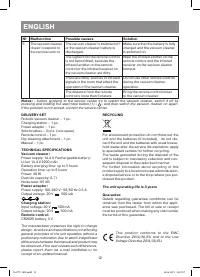
12 ENGLISH № Malfunction Possible causes Solution 5 The vacuum cleaner doesn‘t respond to the remote control. The vacuum cleaner is switched off or the vacuum cleaner battery is discharged. Make sure that the battery is fully charged and the vacuum cleaner is switched on. The signal from the remote ...
Page 13 - русский
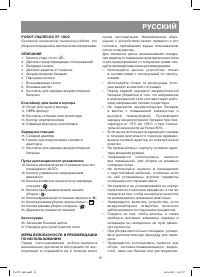
13 русский РОБОТ-ПЫЛЕСОС VT-1802 Основное назначение пылесоса-робота, это уборка помещений в автоматическом режиме. ОПИСАНИЕ 1. Кнопка старт/стоп « » 2. Датчики предотвращения столкновений 3. Ведущие колеса 4. Датчики защиты от падения 5. Аккумуляторная батарея 6. Переднее колесо 7. Всасывающее сопл...
Page 14 - Устройство содержит литиевый; ПЕРЕД ПЕРВЫМ ИСПОЛЬЗОВАНИЕМ; Сохраните заводскую упаковку.
14 русский Запрещается использование пылесоса в местах хранения таких жидкостей. • Запрещается с помощью пылесоса соби-рать горящие или дымящиеся сигареты, спички, тлеющий пепел, а также тонкоди-сперсную пыль – например, от штукатурки, бетона, муки или золы. • Запрещается использовать пылесос, если:...
Page 15 - ПУЛЬТ ДИСТАНЦИОННОГО УПРАВЛЕНИЯ; СБОРК А ПЫЛЕСОСА
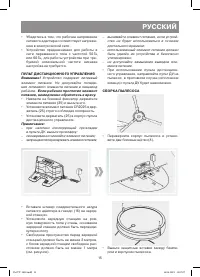
15 русский • Убедитесь в том, что рабочее напряжение сетевого адаптера соответствует напряже-нию в электрической сети. • Устройство предназначено для работы в сети переменного тока с частотой 50 Гц или 60 Гц, для работы устройства при тре-буемой номинальной частоте никакая настройка не требуется. ПУ...
Page 16 - ПЕРЕД ИСПОЛЬЗОВАНИЕМ ПЫЛЕСОСА
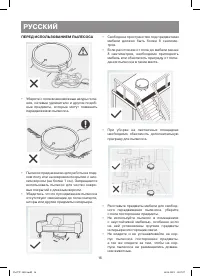
16 русский ПЕРЕД ИСПОЛЬЗОВАНИЕМ ПЫЛЕСОСА • Уберите с пола всевозможные шнуры пита-ния, сетевые удлинители и другие подоб-ные предметы, которые могут помешать передвижению пылесоса. • Пылесос предназначен для работы на глад-ком полу или на ковровом покрытии с низ-ким ворсом (не более 1 см). Запрещает...
Page 17 - ИСПОЛЬЗОВАНИЕ ПЫЛЕСОСА; » будет мигать; » на пульте дистанционного управления,
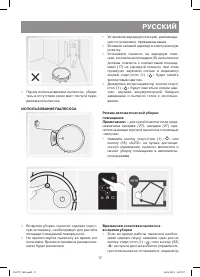
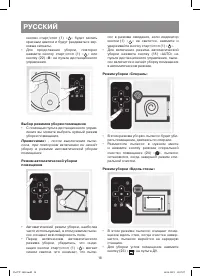
17 русский • Перед использованием пылесоса, убеди-тесь в отсутствие узких мест по пути пере-движения пылесоса. ИСПОЛЬЗОВАНИЕ ПЫЛЕСОСА • Установите зарядную станцию, рекоменда-ции по установке, приведены выше. • Вставьте сетевой адаптер в электрическую розетку. • Установите пылесос на зарядную стан-ц...
Page 19 - » на пульте дистанционного управ-; Планирование уборки помещения; - в режиме планирования; ЧИСТК А И УХОД
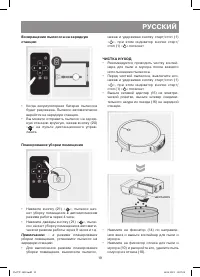
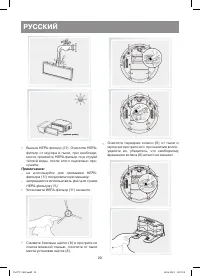
19 русский Возвращение пылесоса на зарядную станцию • Когда аккумуляторная батарея пылесоса будет разряжена. Пылесос автоматически вернётся на зарядную станцию. • Вы можете отправить пылесос на заряд-ную станцию вручную, нажав кнопку (20) « » на пульте дистанционного управ- ления. Планирование уборк...
Page 22 - No Неисправность
22 русский № Неисправность Возможные причины Устранение 1 Нет зарядки аккумуляторной батареи. Аккумуляторная батарея полностью разряжена. Вручную поместите пылесос на зарядную станцию, через 3 минуты снимите пылесос с зарядной станции, повторите такие циклы зарядки аккумуляторной батареи не менее 3 ...
Page 23 - Приблизьте пульт ДУ к пылесосу.
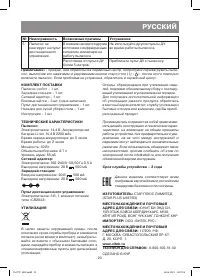
23 русский № Неисправность Возможные причины Устранение 5 Пылесос не реагирует на пульт дистанционного управления. В комнате находятся другие источники с инфракрасным сигналом, влияющие на работу пылесоса Не используйте другие пульты ДУ во время работы пылесоса. Расстояние от пульта ДУ более 5 метро...
Page 24 - RUS
GB A production date of the item is indicated in the serial number on the technical data plate. A serial number is an eleven-unit number, with the first four figures indicating the production date. For example, serial number 0606ххххххх means that the item was manufactured in June (the sixth month) ...