Page 2 - ENGLISH; Tuya Smart APP
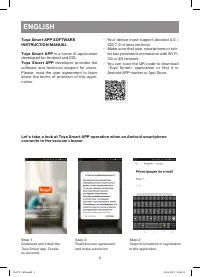
2 ENGLISH Tuya Smart APP SOFTWARE INSTRUCTION MANUAL Tuya Smart APP is a home AI application developed for Android and IOS. Tuya Smart APP developer provides the software and technical support for users. Please, read the user agreement to learn about the terms of provision of this appli-cation. – Yo...
Page 3 - Create your virtual home.
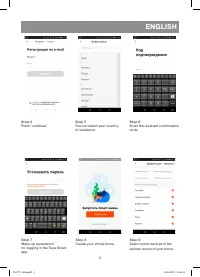
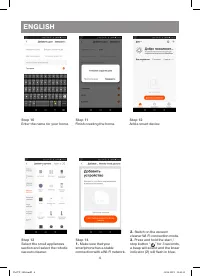
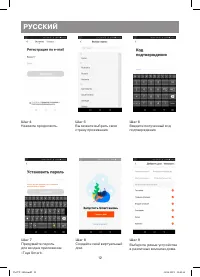
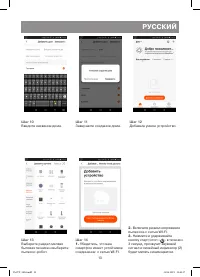
3 ENGLISH Step 6 Enter the received confirmation code. Step 4 Press “continue”. Step 7 Make up a password for logging in the Tuya Smart app. Step 5 You can select your country of residence. Step 8 Create your virtual home. Step 9 Select smart devices in the various rooms of your home. IM VT-1804.ind...
Page 5 - The device search will start.
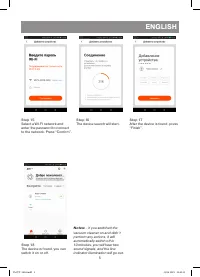
5 ENGLISH Step 15 Select a WI-FI network and enter the password to connect to the network. Press “Confirm”. Step 16 The device search will start. Step 17 After the device is found, press “Finish”. Step 18 The device is found, you can switch it on or off. Notes: - if you switched the vacuum cleaner o...
Page 7 - Select the tab «VolumeSet»
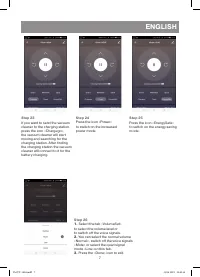
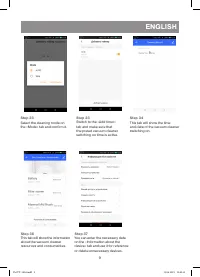
7 ENGLISH Step 25 Press the icon «EnergySafe» to switch on the energy saving mode. Step 24 Press the icon «Power» to switch on the increased power mode. Step 26 1. Select the tab «VolumeSet» to select the volume level or to switch off the voice signals. 2. You can select the normal volume «Normal», ...
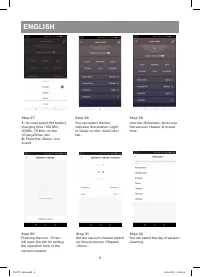
Page 8 - You can select the battery
8 ENGLISH Step 27 1. You can select the battery charging time «100 Min, 30 Min, 70 Min» on the «ChargeTime» tab. 2. Press the «Done» icon to exit. Step 28 You can select the line indicator illumination «Light or Deep» on the «LineColor» tab. Step 29 Use the «Schedule» tab to use the vacuum cleaner a...
Page 10 - RECYCLING; The unit operating life is 3 years; Guarantee
10 ENGLISH RECYCLING For environment protection do not throw out the unit and the batteries (if included), do not discard the unit and the batteries with usual household waste after the service life expira-tion; apply to specialized centers for further recycling.The waste generated during the dispos...
Page 11 - русский; – интеллектуальное; Tuya Smart APP; – Ваше устройство должно поддержи-
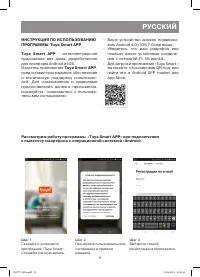
11 русский ИНСТРУКЦИЯ ПО ИСПОЛЬЗОВАНИЮ ПРОГРАММЫ Tuya Smart APP Tuya Smart APP – интеллектуальное приложение для дома, разработанное для платформ Android и IOS. Издатель приложения Tuya Smart APP , предоставил программное обеспечение и техническую поддержку пользовате-лей. Для ознакомления и правила...
Page 14 - Начнётся поиск устройства.
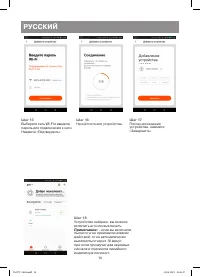
14 русский Шаг 15 Выберите сеть WI-FI и введите пароль для подключения к сети.Нажмите «Подтвердить». Шаг 16 Начнётся поиск устройства. Шаг 17 После нахождения устройства, нажмите «Завершить». Шаг 18 Устройство найдено, вы можете включить его или выключить. Примечание: - если вы включили пылесос и не...
Page 15 - Открывается следующая
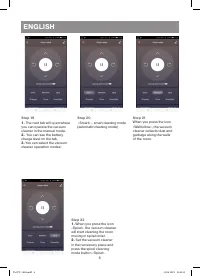
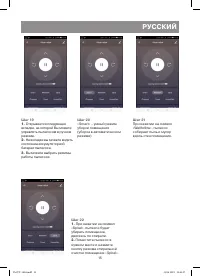
15 русский Шаг 19 1. Открывается следующая вкладка, на которой Вы можете управлять пылесосом в ручном режиме. 2. На вкладке вы можете видеть состояние аккумуляторной батареи пылесоса. 3. Вы можете выбрать режимы работы пылесоса: Шаг 20 «Smart» – умный режим уборки помещения (уборка в автоматическом ...
Page 16 - Для выбора громкости или
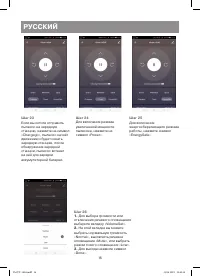
16 русский Шаг 25 Для включения энергосберегающего режима работы, нажмите символ «EnergySafe» Шаг 24 Для включения режима увеличенной мощности пылесоса, нажмите на символ «Power». Шаг 26 1. Для выбора громкости или отключения речевого оповещения выберите вкладку «VolumeSet». 2. На этой вкладке вы мо...
Page 17 - На вкладке «ChargeTime»,
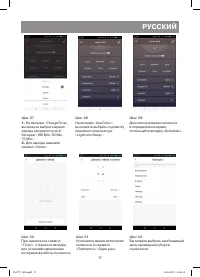
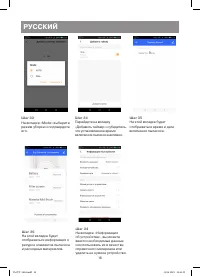
17 русский Шаг 27 1. На вкладке «ChargeTime», вы можете выбрать время заряда аккумуляторной батареи «100 Min, 30 Min, 70 Min». 2. Для выхода нажмите символ «Done». Шаг 28 На вкладке «LineColor», вы можете выбрать подсветку линейного индикатора «Light или Deep». Шаг 29 Для использования пылесоса в оп...
Page 19 - УТИЛИЗАЦИЯ; Срок службы устройства – 3 года; КНР; МЕСТОНАХОЖДЕНИЕ И ПОЧТОВЫЙ; СДЕЛАНО В КНР
19 русский УТИЛИЗАЦИЯ В целях защиты окружающей среды, после окончания срока службы прибора и эле-ментов питания (если входят в комплект), не выбрасывайте их вместе с обычными быто-выми отходами, передайте прибор и эле-менты питания в специализированные пункты для дальнейшей утилизации.Отходы, образ...
Page 20 - RUS
Gb A production date of the item is indicated in the serial number on the technical data plate. A serial number is an eleven-unit number, with the first four figures indicating the production date. For example, serial number 0606ххххххх means that the item was manufactured in June (the sixth month) ...
Page 25 - Do not use the vacuum cleaner if:; REMOTE CONTROL
5 ENGLISH solvents. Do not use the vacuum cleaner in places where such liquids are stored. • Do not use the vacuum cleaner for collecting burning or smoking cigarettes, matches, cin-ders as well as fine dust, for example, of plas-ter, concrete, flour or ashes. • Do not use the vacuum cleaner if: – t...
Page 26 - use only the «AAA» batteries; ASSEMBLING THE VACUUM CLEANER
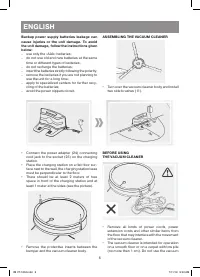
6 ENGLISH Backup power supply batteries leakage can cause injuries or the unit damage. To avoid the unit damage, follow the instructions given below: – use only the «AAA» batteries; – do not use old and new batteries at the same time or different types of batteries; – do not recharge the batteries; ...
Page 27 - USING THE VACUUM CLEANER
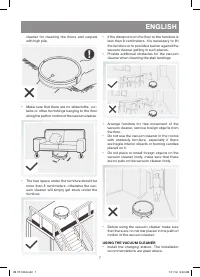
7 ENGLISH cleaner for cleaning the floors and carpets with high pile. • Make sure that there are no tablecloths, cur-tains or other furnishings hanging to the floor along the path of motion of the vacuum cleaner. • The free space under the furniture should be more than 8 centimeters, otherwise the v...
Page 28 - Wet floor cleaning; the water tank capacity is 270 ml.; Vacuum cleaner manual operation; » for; Automatic room cleaning mode; » for 3 seconds. You will hear a
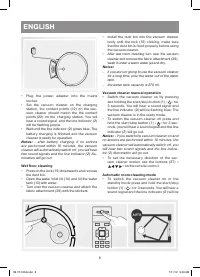
8 ENGLISH • Plug the power adapter into the mains socket. • Set the vacuum cleaner on the charging station, the contact points (12) on the vac-uum cleaner should match the the contact points (22) on the charging station. You will hear a sound signal, and the line indicator (2) will be flashing purpl...
Page 29 - » on the
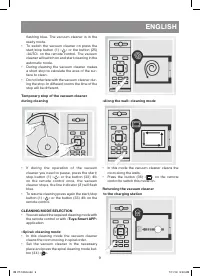
9 ENGLISH flashing blue. The vacuum cleaner is in the ready mode. • To switch the vacuum cleaner on press the start/stop button (1) « » or the button (25) «AUTO» on the remote control. The vacuum cleaner will switch on and start cleaning in the automatic mode. • During cleaning the vacuum cleaner ma...
Page 30 - » on the remote control.; SCHEDULING THE ROOM CLEANING; trol, the time «hours» will start flashing.; Cancelling the scheduling
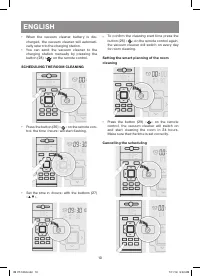
10 ENGLISH • When the vacuum cleaner battery is dis-charged, the vacuum cleaner will automati-cally return to the charging station. • You can send the vacuum cleaner to the charging station manually by pressing the button (28) « » on the remote control. SCHEDULING THE ROOM CLEANING • Press the butto...
Page 31 - each setting is confirmed with a sound signal; Current time setting
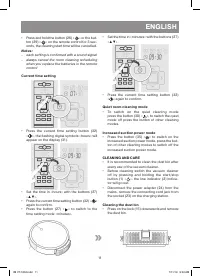
11 ENGLISH • Press and hold the button (26) « » or the but- ton (29) « » on the remote control for 3 sec- onds, the cleaning start time will be cancelled. Notes: – each setting is confirmed with a sound signal – always cancel the room cleaning scheduling when you replace the batteries in the remote ...
Page 32 - Make sure that the dust bin is fixed properly.; Cleaning the brushes
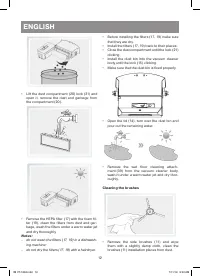
12 ENGLISH • Lift the dust compartment (20) lock (21) and open it, remove the dust and garbage from the compartment (20). • Remove the HEPA filter (17) with the foam fil-ter (19), clean the filters from dust and gar-bage, wash the filters under a warm water jet and dry thoroughly. Notes: – do not wa...
Page 35 - No Malfunction; » and then switch the vacuum cleaner on again.; DELIVERY SET
15 ENGLISH № Malfunction Possible causes Solution 2 The vacuum cleaner gives alarms, periodically switches on and off. It is possible that foreign objects (wires, threads, hanging curtains, etc.) have been wound onto the driving wheels of the vacuum cleaner. Remove the foreign objects from the drivi...
Page 36 - Power adapter; Output voltage: 20 V; Remote control
16 ENGLISH TECHNICAL SPECIFICATIONSVacuum cleaner Power supply: 14,4 V, rechargeable battery – Li-Ion 14,4 V 2200 mAhBattery charging time: up to 3,5 hoursOperation time: up to 2 hoursPower: 30 WDust bin capacity: 0,45 LWater tank container: 0,27 LNoise level: 65 dB Power adapter Power supply: 100-2...
Page 37 - РУССКИЙ; Контейнер для пыли и мусора
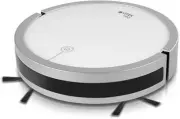
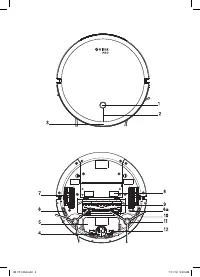
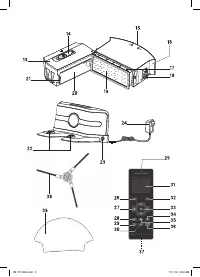
17 РУССКИЙ РОБОТ-ПЫЛЕСОС VT-1804 Основное назначение робота-пылесоса, это уборка помещений в автоматическом режиме. ОПИСАНИЕ 1. Кнопка старт/стоп « » 2. Линейный индикатор 3. Бампер 4. Переднее колесо 5. Аккумуляторная батарея 6. Датчики защиты от падения 6a. Кнопка переустановки Wi-Fi 7. Ведущие ко...
Page 39 - Сохраните заводскую упаковку.; ПУЛЬТ ДИСТАНЦИОННОГО УПРАВЛЕНИЯ; не допускайте замыкания зажимов питания.; СБОРК А ПЫЛЕСОСА
19 РУССКИЙ ПЕРЕД ПЕРВЫМ ИСПОЛЬЗОВАНИЕМПосле транспортировки или хранения устройства в зимних (холодных) условиях необходимо выдержать его при комнатной температуре не менее трёх часов. • Извлеките пылесос из упаковки и уда-лите упаковочные материалы и рекламные наклейки. • Сохраните заводскую упаков...
Page 40 - ПЕРЕД ИСПОЛЬЗОВАНИЕМ ПЫЛЕСОСА
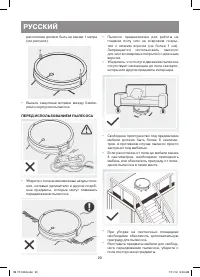
20 РУССКИЙ расстояние должно быть не менее 1 метра (см. рисунок). • Выньте защитные вставки между бампе-ром и корпусом пылесоса. ПЕРЕД ИСПОЛЬЗОВАНИЕМ ПЫЛЕСОСА • Уберите с пола всевозможные шнуры пита-ния, сетевые удлинители и другие подоб-ные предметы, которые могут помешать передвижению пылесоса. •...
Page 41 - ИСПОЛЬЗОВАНИЕ ПЫЛЕСОСА; батареи; Влажная уборка пола; ёмкость резервуара 270 мл воды.; Ручное управление движением пылесоса; в течение 3 секунд, при этом прозвучит
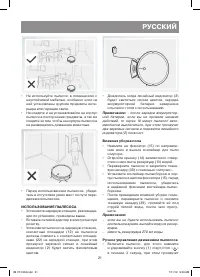
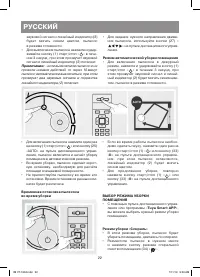
21 РУССКИЙ • Не используйте пылесос в помещениях с неустойчивой мебелью, особенно если на ней установлены хрупкие предметы инте-рьера или горящие свечи. • Не кладите и не устанавливайте на корпус пылесоса посторонние предметы, а так же следите за тем, чтобы на корпусе пылесоса не размещались домашни...
Page 42 - » на пульте дистанционного управ-; Режим автоматической уборки помещения; » в течение 3 секунд, при; » на пульте дистанционного управле-; II; » на пульте дистанционного
22 РУССКИЙ звуковой сигнал и линейный индикатор (2) будет мигать синим цветом, пылесос в режиме готовности. • Для выключения пылесоса нажмите и удер-живайте кнопку (1) старт/стоп « » в тече- ние 3 секунд, при этом прозвучит звуковой сигнал и линейный индикатор (2) погаснет. Примечание: - если вы вкл...
Page 43 - Режим уборки «Вдоль стены»; » на пульте дистанционного управления.; ПЛАНИРОВАНИЕ УБОРКИ В ПОМЕЩЕНИИ; » установите время
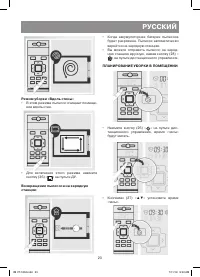
23 РУССКИЙ Режим уборки «Вдоль стены» • В этом режиме пылесос очищает помеще-ние вдоль стен. • Для включения этого режима нажмите кнопку (36) « » на пульте ДУ. Возвращение пылесоса на зарядную станцию • Когда аккумуляторная батарея пылесоса будет разряжена. Пылесос автоматически вернётся на зарядную...
Page 44 - Отмена планирования уборки помещения
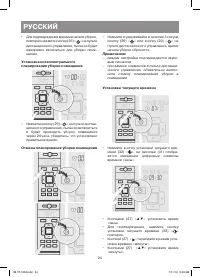
24 РУССКИЙ • Для подтверждения времени начала уборки, повторно нажмите кнопку (26) « » на пульте дистанционного управления, пылесос будет ежедневно включаться для уборки поме-щения. Установка интеллектуального планирования уборки помещения • Нажмите кнопку (29) « » на пульте дистан- ционного управле...
Page 45 - Режим тихой уборки помещения
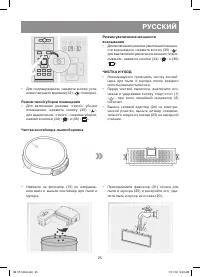
25 РУССКИЙ • Для подтверждения, нажмите кнопку уста-новки текущего времени (32) « » повторно. Режим тихой уборки помещения • Для включения режима «тихой» уборки помещения, нажмите кнопку (30) « », для выключения «тихого « режима уборки, нажмите кнопки (34) « » и (36) « ». Режим увеличения мощности в...
Page 46 - Чистка щёток
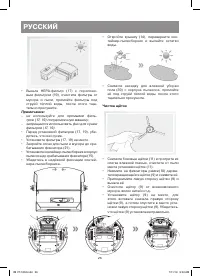
26 РУССКИЙ • Выньте НЕРА-фильтр (17) с поролоно-вым фильтром (19), очистите фильтры от мусора и пыли, промойте фильтры под струёй тёплой воды, после этого тща-тельно просушите. Примечания: – не используйте для промывки филь-тров (17, 19) посудомоечную машину; – запрещается использовать фен для сушки...
Page 47 - ХРАНЕНИЕ
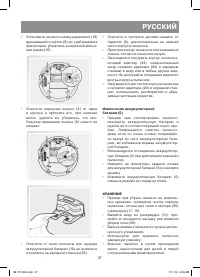
27 РУССКИЙ • Установите на место рамку держателя (10) вращающейся щётки (9) до срабатывания фиксаторов, убедитесь в надёжной фикса-ции рамки (10). • Очистите переднее колесо (4) от пыли и мусора и протрите его, при наличии волос, удалите их, убедитесь, что сво-бодному вращению колеса (6) ничего не м...
Page 49 - », после этого повторно
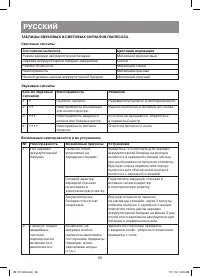
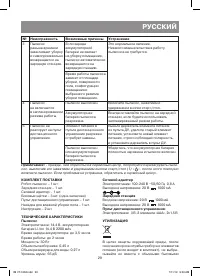
29 РУССКИЙ № Неисправность Возможные причины Устранение 3 Пылесос раньше времени заканчивает уборку и самопроизвольно возвращается на зарядную станцию. Если заряда аккумуляторной батареи не хватает на уборку помещения, пылесос автоматически возвращается на зарядную станцию. Это нормальное явление. Н...