TCL S522W - User Manual
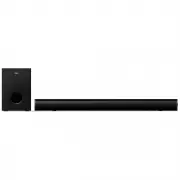
TCL S522W Sound Bar – User Manual, read for free online in PDF format. We hope this helps you resolve any issues you may have. If you have further questions, please contact us through the contact form.


Table of Contents:
- Page 2 – Contents
- Page 3 – Before you begin
- Page 4 – Important safety instructions; CAUTION; RISK OF ELECTRIC SHOCK
- Page 5 – Warnings; Safety
- Page 8 – Welcome; Congratulations on the purchase of your new TCL Sound
- Page 9 – Overview of the Sound Bar; Button and jack definition:; Buttons and jacks are defined as follows:; long press to power off; Function indicator light:
- Page 10 – Overview of the Remote Control; :Press to play previous song under Bluetooth and USB
- Page 11 – Install/replace the remote control batteries
- Page 13 – Position Your Sound Bar and Subwoofer
- Page 14 – Mount your Sound Bar on the wall; TV
- Page 15 – Take out the screws from the rear of the sound bar, 2
- Page 17 – Connect with the AC power adapters; Connect with the HDMI cable
- Page 19 – Connect with the optical cable; Remove the protective caps from the optical cable when; activate the PCM signal output on your TV or device. For
- Page 20 – check the user manual of your TV or device.; Direction for setting up your Sound Bar; Audio option; Settings; TV speaker enabled; Connect with USB disk; • Press
- Page 21 – Operation instruction; Bluetooth Mode
- Page 23 – Volume and Sound effect regulation
- Page 25 – Specification
- Page 26 – Trademarks
- Page 27 – Bluetooth paired, connection cannot be completed; Volume of Bluetooth playback is low
- Page 28 – Plays no sound
2.1 Channel Sound Bar with Wireless Subwoofer
User Manual
S522W
"Loading the manual" means you need to wait until the file loads and becomes available for online reading. Some manuals are very large, and the time they take to appear depends on your internet speed.
Was this manual helpful?
About this manual
- Brand
- TCL
- Model
- S522W
- Document type
- User Manual
- Category
- Sound Bar
- Language(s)
- English
- Pages
- 29
- File size
- 2 MB
- Format
Summary
Contents 1 Before you begin ....................................................... 1 Important safety instructions ...................................... 2 Disposal of your old product and battery ................... 5 2 Welcome 6 What's in the box .....................................................
1 1 Before you begin • Carefully read and observe all safety instructions in the safety leaflet. • This sound bar is intended for indoor use only. In case it accidentally gets in contact with small amounts of water, unplug immediately and use a dry cloth to remove the water. • Unplug the sound bar i...
2 Important safety instructions Make sure you read all the safety information before you use this product. TCL Overseas Marketing Limited bears no responsibility for accidents or damages caused by unauthorized changes, modifications or improper use of the product. CAUTION RISK OF ELECTRIC SHOCK DO N...
Ask a question
Related manuals
More TCL Sound Bars models

Other TCL appliances
 TCL 30SE User Manual
 TCL 32D2900 User Manual
 TCL 32S525 User Manual
 TCL 32S615 User Manual
 TCL 32S615-AU User Manual
 TCL 32S5400A User Manual
 TCL 32S6000S User Manual
- TCL 40S615 User Manual
 TCL 40S615-AU User Manual
- TCL 40S5400A User Manual
 TCL 40S6000FS User Manual
 TCL 43P1FS User Manual
 TCL 43P617 User Manual
 TCL 43P725 User Manual
 TCL 43P728 User Manual
 TCL 43S6000FS User Manual
 TCL 43S6500FS User Manual
 TCL 49C6US User Manual
 TCL 49S6000FS User Manual