TCL 32S5400A - User Manual
TCL 32S5400A TV – User Manual, read for free online in PDF format. We hope this helps you resolve any issues you may have. If you have further questions, please contact us through the contact form.
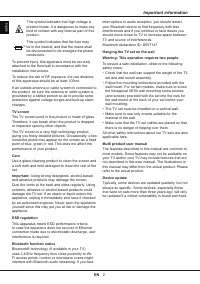
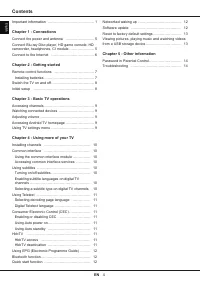
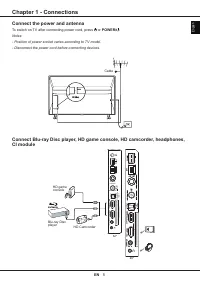
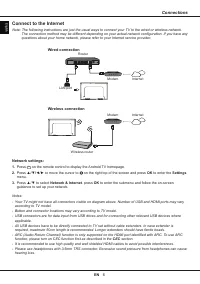
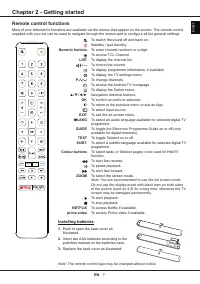
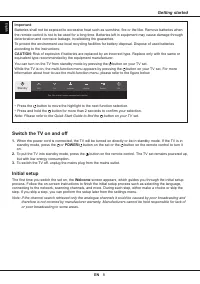
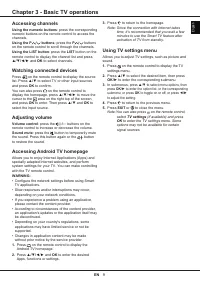
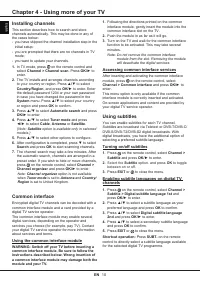
Table of Contents:
- Page 2 – Important information
- Page 3 – Information for Users on Disposal of; prevent potential negative effects on; [Other Countries outside the European; Declaration of Conformity
- Page 4 – Chapter 1 - Connections; Switch the TV on and off; Chapter 3 - Basic TV operations; Turning on/off subtitles; Chapter 5 - Other information; Password in Parental Control; Contents
- Page 5 – Connect the power and antenna; To switch on TV after connecting power cord, press or; CI module
- Page 6 – Connections; according to TV model.; Connect to the Internet; Wired connection; Press; OK; to enter the; Settings; to enter the submenu and follow the on-screen
- Page 7 – Remote control functions; Chapter 2 - Getting started; Note: You are recommended to use the full screen mode.; Installing batteries
- Page 8 – Getting started; Important; Press the; To switch the TV off, unplug the mains plug from the mains outlet.; Initial setup; The first time you switch the set on, the; Welcome; or poor broadcasting in some areas.
- Page 9 – Accessing channels; Note: Since the connection with Internet takes; Using TV settings menu
- Page 10 – Chapter 4 - Using more of your TV; Installing channels; Satellite; Common interface; Using the common interface module; WARNING: Switch off your TV before inserting a; Note: Do not remove the common interface; Accessing common interface services; Using subtitles; Select the; Subtitle; to toggle; Enabling subtitle languages on digital TV
- Page 11 – Using more of your TV; Using Teletext; toggle between on or off; EXIT; Using Auto power on; Using Auto standby; standby mode when you turn off the TV with the TV; HbbTV
- Page 12 – Using EPG (Electronic Programme; Programme filter; Bluetooth function; audio reception, you should restart your; Quick start function; Quick start; Software update
- Page 13 – upgrade is completed.; Reset to factory default settings; Viewing pictures, playing music and; Your TV is fitted with USB connectors that enable
- Page 15 – Other information
EN
1
English
Important information
Safety
Ensure that your domestic mains supply voltage
matches the voltage indicated on the identification
sticker located at the back of your set. Where the
mains plug, AC inlet or an appliance coupler is used
as disconnect device, it shall remain readily operable.
On certain models, the light indicator is located at the
side of the TV set. The absence of a light indication
at the front does not mean that the TV set is fully
disconnected from the mains. To disconnect the TV
set completely, the mains plug must be pulled out.
The TV set’s components are sensitive to heat. The
maximum ambient temperature
should not exceed
35º
Celsius. Do not cover the vents at the back or
sides of the TV set. Leave sufficient space around it to
allow adequate ventilation. Install the appliance away
from any source of heat (fireplace, etc.) or appliances
creating strong magnetic or electric fields.
Moisture
in rooms where the set is installed should
not exceed
75%
humidity. Moving the set from a cold
place to a warm one can cause condensation on the
screen (and on some components inside the TV set).
Let the condensation evaporate before switching the
TV set on again.
The or
POWER/
button on the TV set or the
button on the remote control can be used to switch it
on and put it into standby mode. If you are
not going
to be watching the TV for a lengthy period of time
,
switch it off completely by removing the plug from the
mains power socket.
During
thunderstorms
, we recommend that you
disconnect the TV set from the mains and aerial so
that it is not affected by electrical or electromagnetic
surges that could damage it. For this reason, keep the
mains and aerial sockets
accessible so they can be
disconnected
, if necessary.
Unplug
the TV set immediately if you notice it giving
off a
smell of burning
or
smoke
. You must never,
under any circumstances, open the TV set yourself,
as you run the risk of an
electric shock
in doing so.
WARNINGS
This appliance is intended for domestic household
use only and should not be used for any other
application, such as for non-domestic use or in a
commercial environment.
If the external flexible cable or cord of this product is
damaged, it shall be replaced by the manufacturer or
his service agent or a similar qualified person in order
to avoid a hazard.
Leave more than 10cm clearance around the
television to allow adequate ventilation. The
ventilation should not be impeded by covering the
ventilation openings with items, such as newspapers,
table-cloths, curtains, etc.
The apparatus shall not be exposed to dripping or
splashing and no objects filled with liquids, such as
vases shall be placed on the apparatus.
Batteries (battery pack or batteries installed) shall not
be exposed to excessive heat such as sunshine, fire
or the like.
To reduce the risk of fire or electric shock, do not
expose this apparatus to rain or moisture.
A television set may fall, causing serious personal
injury or death. Many injuries, particularly to children,
can be avoided by taking simple precautions such as:
• ALWAYS use cabinets or stands or mounting
methods recommended by the manufacturer of the
television set.
• ALWAYS use furniture that can safely support the
television set.
• ALWAYS ensure the television set is not
overhanging the edge of the supporting furniture.
• ALWAYS educate children about the dangers of
climbing on furniture to reach the television set or its
controls.
• ALWAYS route cords and cables connected to your
television so they cannot be tripped over, pulled or
grabbed.
• NEVER place a television set in an unstable
location.
• NEVER place the television set on tall furniture
(for example, cupboards or bookcases) without
anchoring both the furniture and the television set to
a suitable support.
• NEVER place the television set on cloth or other
materials that may be located between the television
set and supporting furniture.
• NEVER place items that might tempt children to
climb, such as toys and remote controls, on the top
of the television or furniture on which the television
is placed.
If the existing television set is going to be retained
and relocated, the same considerations as above
should be applied.
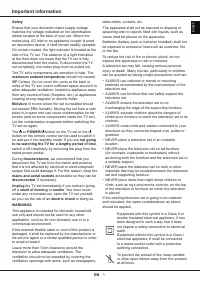
Equipment with this symbol is a Class II or
double insulated electrical appliance. It has
been designed in such a way that it does
not require a safety connection to electrical
earth.
Equipment without this symbol is a Class I
electrical appliance. It shall be connected
to a mains socket outlet with a protective
earthing connection.
To prevent the spread of fire, keep candles
or other open flames away from this product
at all times.
"Loading the manual" means you need to wait until the file loads and becomes available for online reading. Some manuals are very large, and the time they take to appear depends on your internet speed.
Was this manual helpful?
About this manual
- Brand
- TCL
- Model
- 32S5400A
- Document type
- User Manual
- Category
- TV
- Language(s)
- English
- Pages
- 15
- File size
- 1.2 MB
- Format
Summary
EN 2 English This symbol indicates that high voltage is present inside. It is dangerous to make any kind of contact with any internal part of this product. N This symbol indicates that the fuse may be in the neutral, and that the mains shall be disconnected to de-energize the phase conductors. To pr...
EN 3 English Figures and illustrations in this User Manual are provided for reference only and may differ from actual product appearance. Product design and specifications may be changed without notice. Important information Information for Users on Disposal of Old Equipment and Batteries[European U...
EN 4 English Important information ………………………………… 1 Chapter 1 - Connections Connect the power and antenna …………………… 5Connect Blu-ray Disc player, HD game console, HD camcorder, headphones, CI module ………………… 5Connect to the Internet ……………………………… 6 Chapter 2 - Getting started Remote control functions ……...