Page 2 - Table of contents
2 Dear customer! Thank you for purchasing our product. For safety, it is strongly recommended to read this manual carefully before connecting, operating and/or adjusting the product and keep the manual for reference in the future. Table of contents TABLE OF CONTENTS ....................................
Page 3 - Important safeguards
3 Important safeguards Read carefully through the manual to familiarize yourself with this unit. Keep this manual handy as a reference for operating procedures and precautions. Do not allow persons who have not read through this manual to use this unit. “CLASS 1 LASER PRODUCT” This product contains ...
Page 4 - Accessories
4 Accessories 1. Receiver 1 pc 2. Front panel 1 pc 3. Protective case 1 pc 4. Remote controller 1 pc 5. ISO connector 1 pc 6. Mounting parts: Nut 1 pc Spring washer 2 pcs Flat washer 2 pcs Screw M5 1 pc Screw M5x5 1 pc Metal strap 1 pc Release key 2 pcs 7. Instruction manual 1 pc 8. Warranty card 1 ...
Page 5 - Installation/Connections
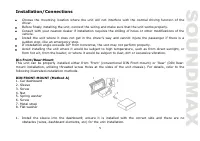
5 Installation/Connections Choose the mounting location where the unit will not interfere with the normal driving function of the driver. Before finally installing the unit, connect the wiring and make sure that the unit works properly. Consult with your nearest dealer if installation requires the d...
Page 6 - Trim frame installation
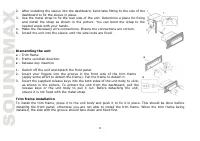
6 2. After installing the sleeve into the dashboard, bend tabs fitting to the size of the dashboard to fix the sleeve in place. 3. Use the metal strap to fix the rear side of the unit. Determine a place for fixing and install the strap as shown in the picture. You can bend the strap to the needed an...
Page 7 - The outer trim frame and mounting sleeve are not used for method of; Detachable front panel
7 2. DIN REAR-MOUNT (Method B) For this method, use the screw holes in the lateral sides of the unit. Fix the unit with the help of the factory radio mounting brackets. 1. Select a position in which the screw holes of the brackets (3) are aligned with the screw holes in the unit body, and screw in t...
Page 8 - Connection diagram
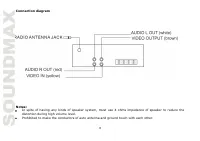
8 Connection diagram Notes: In spite of having any kinds of speaker system, must use 4 ohms impedance of speaker to reduce the distortion during high volume level. Prohibited to make the conductors of auto antenna and ground touch with each other.
Page 9 - Using the ISO Connector
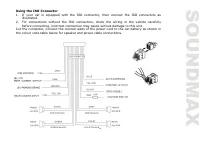
9 Using the ISO Connector 1. If your car is equipped with the ISO connector, then connect the ISO connectors as illustrated. 2. For connections without the ISO connectors, check the wiring in the vehicle carefully before connecting, incorrect connection may cause serious damage to this unit. Cut the...
Page 10 - “PARKING BRAKE” message will appear on the LCD screen.; Panel controls; Front panel
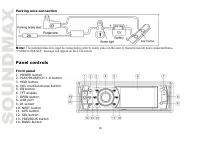
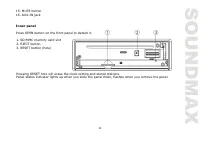
10 Parking wire connection Note: The parking brake wire must be connected in order to watch video on this unit. If that wire has not been connected then a “PARKING BRAKE” message will appear on the LCD screen. Panel controls Front panel 1. POWER button 2. PLAY/PAUSE/CH 1-6 button 3. MOD button 4. VO...
Page 12 - FAST FORWARD button; Changing the battery
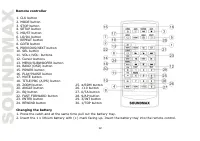
12 Remote controller 1. CLK button 2. MODE button 3. STOP button 4. SETUP button 5. MO/ST button 6. LO/DX button 7. REPEAT button 8. GOTO button 9. PREVIOUS/NEXT button 10. SEL button 11. VOL+/VOL- buttons 12. Cursor buttons 13. MENU/SUBWOOFER button 14. BAND (OSD) button 15. POWER button 16. PLAY/P...
Page 13 - General operations
13 General operations Opening the front panel Press the OPEN button to flip down the front panel. Now you can insert CDs into the CD compartment and eject them by pressing EJECT button. Reset the unit Operating the unit for the first time or after replacing the car battery, you must reset the unit. ...
Page 15 - Radio operations; Band select
15 AUX-in jack is intended for connecting external audio equipment to amplify the sound. If connection is made correctly, the audio signal from the external source will be translated through the acoustics of the head unit. This enables to adjust the volume and quality of the sounding. For example, y...
Page 16 - This system can keep in 6 memory slots up to 30 stations.; RDS operations
16 There are six numbered preset buttons, under which you can store and recall stations for each band. Select the needed frequency, then press and hold a preset button. The station will be saved in the memory under the corresponding number. To recall a stored station, press the corresponding preset ...
Page 17 - PTY operation; Press; AUX operation; Press MODE button repeatedly until you select AUX mode.; Selecting tracks/chapters
17 PTY operation Press and hold MU/PTY button to select the type of the program (NEWS, POP etc.) DISC/USB/SD/MMC operations AUX operation Connect your external device to the AUX input on the front panel via AUX cable. Press MODE button repeatedly until you select AUX mode. You can adjust volume with...
Page 18 - Intro playback; For digital video/MP3 this function is not available.; Random playback
18 For MP3: REPEAT button on the RC to select the repeat mode as follows. REPEAT ONE => REPEAT FOLDER(or DIR) => REPEAT ALL => REPEAT OFF. Intro playback For CD: Press and hold 3/INT button on the RC to activate introduction playback function. 10 seconds of each track/chapter will be played...
Page 19 - Title and menu are only available if the disc has these functions.; ID3 Tag function
19 This function is only available for the VCD with PBC function. Press TITLE/PBC button on the RC to set PBC on/off; when PBC is off, the screen will show PBC menu if you switch PBC on. If the menu consists of a list of titles, you can select a desired one using number buttons on the RC. Changing a...
Page 20 - Entering menu; Press SETUP button on the RC during the playback; System setup
20 USB format supports 2.0. Capacity: up to 16 Gb. For correct and satisfactory operation, licensed SD/MMC memory cards of famous brands should be used with this unit. Avoid using memory cards of unknown brands. Capacity: up to 8 Gb. According to the USB 1.1/2.0 Standard, usage of a USB device with ...
Page 22 - Handling compact discs; Do not insert anything other than a CD into the CD loading slot.; Cleaning; Cleaning the cabinet
22 Select DRC and adjust the dynamic range of a Dolby Digital encoded program. Handling compact discs Do not insert anything other than a CD into the CD loading slot. Do not use cracked, chipped, warped, or otherwise damaged discs as they may cause skipping or noise damage the player. Handle the dis...
Page 23 - Troubleshooting guide; Symptom
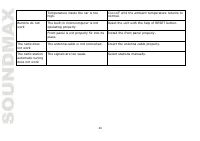
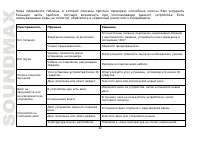
23 Troubleshooting guide Below is a table describing simple measures that can help you eliminate most problems likely to emerge when this unit is in use. If below measures do not help, turn to a service center or to the nearest dealer. Symptom Cause Solution No power The car ignition is not on. If t...
Page 25 - Specification
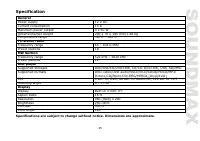
25 Specification General Power supply 12 V DC Current consumption 15 A Maximum power output 4 x 50 W Dimensions/Net weight 200 x 70 x 185 mm/1.48 kg Temperature range -20 0 C - +60 0 C FM stereo radio Frequency range 65 – 108.0 MHz Preset stations 18 MW Section Frequency range 522 kHz – 1620 kHz Pre...
Page 26 - Уважаемый покупатель!; Содержание
26 Уважаемый покупатель! Благодарим Вас за покупку нашего изделия. Для обеспечения безопасности рекомендуется тщательно изучить настоящее руководство перед подключением, эксплуатацией и/или регулировкой изделия, и сохраняйте руководство для использования в будущем. Содержание СОДЕРЖАНИЕ ...............
Page 27 - Меры предосторожности
27 Меры предосторожности Внимательно изучите данное руководство, чтобы ознакомиться с устройством. Держите данное руководство под рукой в качестве справочника по правилам эксплуатации и мерам предосторожности. Не допускайте к использованию устройства посторонних лиц, не ознакомившихся и не усвоивших...
Page 29 - Комплект поставки
29 Комплект поставки 1. Ресивер 1 шт 2. Передняя панель 1 шт 3. Защитный футляр 1 шт 4. Пульт дистанционного управления 1 шт 5. ISO-коннектор 1 шт 6. Детали для установки: Шестигранная гайка 1 шт Ключ-съемник 2 шт Опорная планка 1 шт Плоская шайба 2 шт Пружинная шайба 2 шт Винт М5X5 1 шт Винт М5 1 ш...
Page 30 - Установка/Подключение
30 Установка/Подключение Перед окончательной установкой устройства временно подключите все провода и убедитесь, что все соединения выполнены верно, а устройство и система работают правильно. Для обеспечения правильной установки устройства используйте только те детали, которые входят в комплект. Испо...
Page 31 - Установка устройства
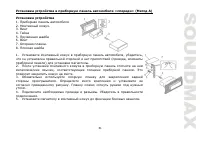
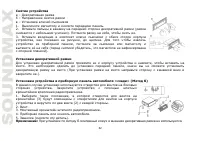
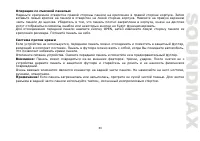
31 Установка устройства в приборную панель автомобиля «спереди» (Метод А) Установка устройства 1. Приборная панель автомобиля 2. Монтажный кожух. 3. Винт 4. Гайка 5. Пружинная шайба 6. Винт 7. Опорная планка. 8. Плоская шайба 1. Установите монтажный кожух в приборную панель автомобиля, убедитесь, чт...
Page 34 - Схема подключения
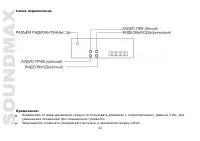
34 Схема подключения Примечания: Независимо от вида динамиков следует использовать динамики с сопротивлением, равным 4 Ом, для уменьшения искажений при повышенной громкости. Запрещается соединять провода авто антенны и заземления между собой.
Page 35 - Использование разъема ISO; показано на рисунке.
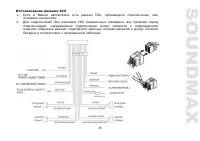
35 Использование разъема ISO 1. Если в Вашем автомобиле есть разъем ISO, произведите подключение, как показано на рисунке. 2. Для подключений без разъемов ISO внимательно проверьте все провода перед подключением, неправильное подключение может привести к повреждениям изделия. Обрежьте разъем, подклю...
Page 36 - Подключение парковочного провода
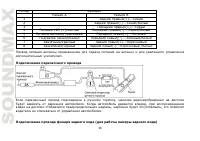
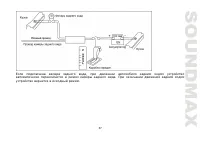
36 Номер Функция Разъем A Разъем B 1 - Задний правый(+)---Синий 2 - Задний правый(-)---Синий/Белый 3 - Передний правый(+)---Серый 4 Питание 12В (+)/желтый Передний правый(-)---Серый/Белый 5 Питание антенны/оранжевый Передний левый(+)---Зеленый 6 Подсветка панели/Белый Передний левый((-)---Зеленый/Бе...
Page 38 - Элементы управления; Передняя панель
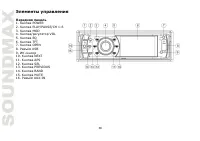
38 Элементы управления Передняя панель 1. Кнопка POWER 2. Кнопка PLAY/PAUSE/CH 1-6 3. Кнопка MOD 4. Кнопка/регулятор VOL 5. Кнопка EQ 6. Кнопка TFT 7. Кнопка OPEN 8. Разъём USB 9. ИК сенсор 10. Кнопка NEXT 11. Кнопка APS 12. Кнопка SEL 13. Кнопка PREVIOUS 14. Кнопка BAND 15. Кнопка MUTE 16. Разъём A...
Page 39 - Внутренняя панель
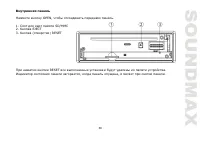
39 Внутренняя панель Нажмите кнопку OPEN, чтобы отсоединить переднюю панель. 1. Слот для карт памяти SD/MMC 2. Кнопка EJECT 3. Кнопка (отверстие) RESET При нажатии кнопки RESET все выполненные установки будут удалены из памяти устройства. Индикатор состояния панели загорается, когда панель опущена, ...
Page 40 - Кнопка FAST FORWARD; Замена батареи
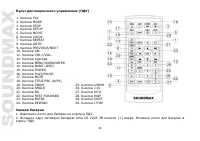
40 Пульт дистанционного управления (ПДУ) 1. Кнопка CLK 2. Кнопка MODE 3. Кнопка STOP 4. Кнопка SETUP 5. Кнопка MO/ST 6. Кнопка LO/DX 7. Кнопка REPEAT 8. Кнопка GOTO 9. Кнопка PREVIOUS/NEXT 10. Кнопка SEL 11. Кнопка VOL+/VOL- 12. Кнопки курсора 13. Кнопка MENU/SUBWOOFER 14. Кнопка BAND (OSD) 15. Кноп...
Page 41 - Общие операции; Сброс настроек устройства
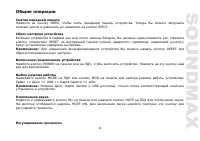
41 Общие операции Снятие передней панели Нажмите на кнопку OPEN, чтобы снять переднюю панель устройства. Теперь Вы можете загружать компакт-диски и извлекать их нажатием на кнопку EJECT. Сброс настроек устройства Включая устройство в первый раз или после замены батареи, Вы должны переустановить его....
Page 44 - Операции с радио; Выбор диапазона радио
44 Операции с радио Выбор диапазона радио Нажимайте кнопку BND на панели или кнопку BAND на ПДУ для выбора диапазона радиовещания. Доступны 3 FM-поддиапазона: FM1, FM2, FM3 и 2 МW (AM) поддиапазона: AM1 (MW1), AM2 (MW2). Поиск радиостанций Поиск вручную: Нажимайте кнопки курсора на ПДУ, чтобы настро...
Page 45 - Подсоедините внешнее устройство с помощью 3.5 мм аудиокабеля.
45 Достичь улучшения дистанционного сигнала можно, включив режим моно, что позволяет убрать лишние звуковые шумы. Поиск локальных радиостанций Нажмите кнопку LO/DX на ПДУ, на дисплее отобразится надпись LOCAL (DX). Функции RDS Функция TA: нажмите кнопку TA/AF, чтобы включить/выключить эту функцию. К...
Page 47 - Отображение информации на дисплее; как; Изменение масштаба
47 меню параметров и кнопки с цифрами для ввода нужных значений. Нажмите кнопку кнопку ENTER на ПДУ, воспроизведение начнется с учетом введенных параметров. Отображение информации на дисплее Нажимайте кнопку OSD на ПДУ для отображения различной информации о текущем воспроизведении, такой как номер т...
Page 48 - Выбор системы видео
48 Выбор системы видео При воспроизведении видео нажимайте кнопку SETUP на ПДУ для выбора системы видео (NTSC/PAL/ Авто). Меню разделов (для DVD) Нажмите кнопку MENU/SW на ПДУ, чтобы активировать меню диска. В меню диска Вы можете выбрать нужный пункт с помощью кнопок курсора, затем запустить его во...
Page 49 - Настройка системы; Вход в меню; Нажмите кнопку SETUP на ПДУ во время воспроизведения.; Система
49 Загрузка USB/SD/MMC-носителя Установите USB носитель или карту памяти в соответствующий слот на передней панели. Устройство автоматически переключится в режим USB или SD/MMC карты. Если устройство находится в другом режиме, нажимайте кнопку MOD на панели или кнопку MODE на ПДУ, чтобы выбрать режи...
Page 50 - Вы можете назначать дискам следующие возрастные рейтинги:; По умолчанию
50 Пароль Введите старый пароль (фабричный пароль 0000). Введите новый пароль и нажмите кнопку ENTER для подтверждения. Рейтинги Вы можете назначать дискам следующие возрастные рейтинги: KID SAFE G PG PG-13 PG-R R NC-17 ADULT По умолчанию Восстановить заводские настройки. Настройки видео Вы можете р...
Page 51 - Не прикасайтесь к стороне, не имеющей маркировки.; Чистка и уход; Чистка корпуса
51 Диски должны храниться в их чехлах после использования, чтобы не поцарапать их поверхность. Не подвергайте диски воздействию прямого солнечного света, повышенной влажности, повышенным температурам или пыли. Продолжительное влияние предельных температур может изогнуть диск (например, пребывание ди...
Page 53 - Технические характеристики; Общие
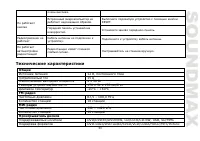
53 очень высокая. Не работают кнопки Встроенный микрокомпьютер не работает надлежащим образом. Выполните перезапуск устройство с помощью кнопки RESET. Передняя панель установлена некорректно. Установите заново переднюю панель. Радиоприемник не работает Кабель антенны не подключен к устройству. Подкл...
Page 54 - Дисплей
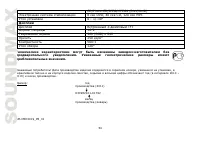
54 CD/Photo-CD/JPEG/MPEG4 (DivX/XviD) Электронная система стабилизации 8 сек DVD, 40 сек CD, 120 cек MP3 Угол установки 0 - +/-30 0 Дисплей Дисплей Встроенный 3-дюймовый TFT Формат матрицы 16:9 Разрешение экрана 960 (RGB) х 240 Яркость 250 кд/м 2 Контрастность 500:1 Угол обзора 120° Технические хара...