Page 2 - Table of contents
2 Dear customer! Thank you for purchasing our product. For safety, it is strongly recommended to read this manual carefully before connecting, operating and/or adjusting the product and keep the manual for reference in the future. Table of contents TABLE OF CONTENTS ....................................
Page 3 - Important safeguards
3 Important safeguards Read carefully through this manual to familiarize yourself with this high-quality sound system. The beginning of operation is the moment of the unit installation. Before use the device in winter it is recommended to heat up the passenger compartment during 20 seconds or to the...
Page 4 - Accessories
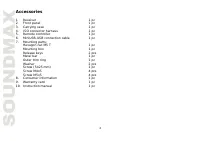
4 Accessories 1. Receiver 1 pc 2. Front panel 1 pc 3. Carrying case 1 pc 4. ISO connector harness 1 pc 5. Remote controller 1 pc 6. MiniUSB-USB connection cable 1 pc 7. Mounting parts: Hexagon nut M5 T 1 pc Mounting box 1 pc Release keys 2 pcs Metal bar 1 pc Outer trim ring 1 pc Washer 2 pcs Screw (...
Page 5 - Installation/Connection; General notes; correct side and there are no obstacles (wires, dashboard
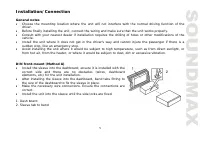
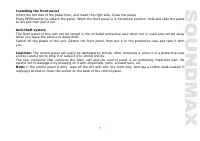
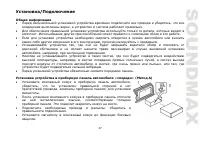
5 Installation/Connection General notes Choose the mounting location where the unit will not interfere with the normal driving function of the driver. Before finally installing the unit, connect the wiring and make sure that the unit works properly. Consult with your nearest dealer if installation r...
Page 6 - Dismantling the unit
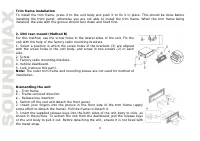
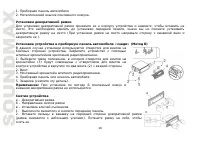
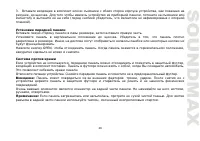
6 Trim frame installationTo install the trim frame, press it to the unit body and push it to fix it in place. This should be done before installing the front panel; otherwise you are not able to install the trim frame. When the trim frame being installed, the side with the groove should face down an...
Page 8 - Connection diagram; distortion during high volume level.
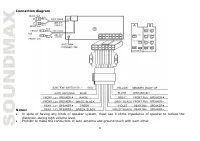
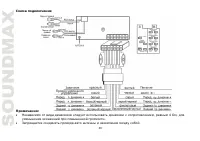
8 Connection diagram Notes: In spite of having any kinds of speaker system, must use 4 ohms impedance of speaker to reduce the distortion during high volume level. Prohibit to make the conductors of auto antenna and ground touch with each other.
Page 9 - Connector A
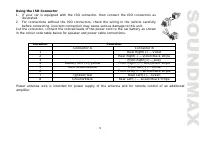
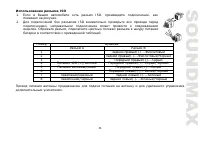
9 Using the ISO Connector 1. If your car is equipped with the ISO connector, then connect the ISO connectors as illustrated. 2. For connections without the ISO connectors, check the wiring in the vehicle carefully before connecting, incorrect connection may cause serious damage to this unit. Cut the...
Page 10 - Panel controls; Front panel
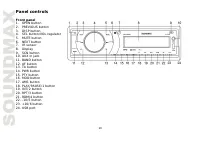
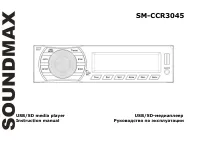
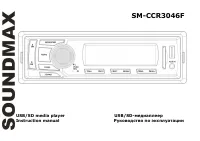
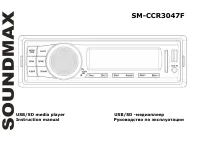
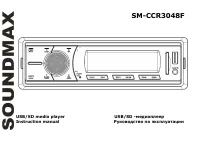
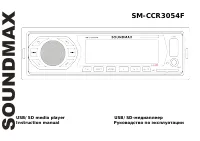
10 Panel controls Front panel 1. OPEN button 2. PREVIOUS button 3. DISP button 4. SEL button/VOL regulator 5. MUTE button 6. NEXT button 7. IR sensor 8. Display 9. SCN button 10. AUX in jack 11. BAND button 12. AF button 13. TA button 14. PWR button 15. PTY button 16. MOD button 17. AMS button 18. P...
Page 11 - Inner panel; Press OPEN button on the front panel to detach it.
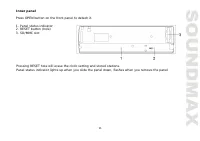
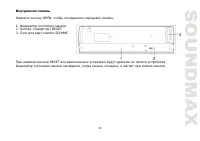
11 Inner panel Press OPEN button on the front panel to detach it. 1. Panel status indicator 2. RESET button (hole) 3. SD/MMC slot Pressing RESET hole will erase the clock setting and stored stations. Panel status indicator lights up when you slide the panel down, flashes when you remove the panel.
Page 12 - Remote controller
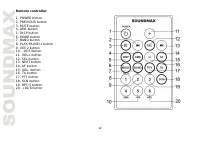
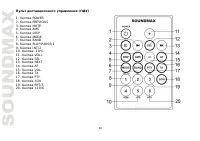
12 Remote controller 1. POWER button 2. PREVIOUS button 3. MUTE button 4. AMS button 5. DISP button 6. MODE button 7. BAND button 8. PLAY/PAUSE/1 button 9. INT/2 button 10. -10/5 button 11. VOL+ button 12. SEL button 13. NEXT button 14. AF button 15. VOL- button 16. TA button 17. PTY button 18. SCN ...
Page 13 - Changing the battery; Insert the battery tray into the remote control.
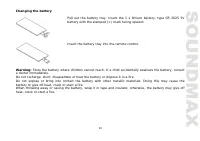
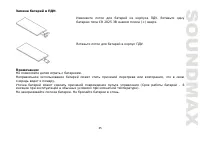
13 Changing the battery Pull out the battery tray. Insert the 1 x lithium battery, type CR 2025 3V battery with the stamped (+) mark facing upward. Insert the battery tray into the remote control. Warning: Store the battery where children cannot reach. If a child accidentally swallows the battery, c...
Page 14 - LCD layout
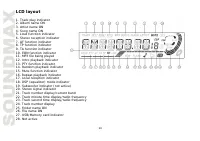
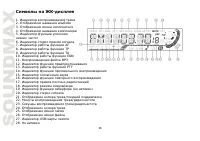
14 LCD layout 1. Track play indicator 2. Album name ON 3. Artist name ON 4. Song name ON 5. Loud function indicator 6. Stereo reception indicator 7. AF function indicator 8. TP function indicator 9. TA function indicator 10. EON function indicator 11. MP3 file being played 12. Intro playback indicat...
Page 15 - General operations
15 General operations Power button Press PWR button on the panel or POWER button on the RC to switch the unit on. Press and hold this button to switch the unit off. Volume control Rotate VOL regulator on the front panel or press VOL+/VOL- buttons on the RC to adjust volume level. Mute Press MUTE but...
Page 16 - Clock; clockwise or press VOL- button to set minutes.; Loudness control; to listen to tracks using the car acoustic system.
16 Clock Press DISP button to switch between clock display and current mode display. Press and hold DISP button; clock will blink. Rotate VOL regulator clockwise or press VOL+ button to set hours; rotate VOL regulator anti- clockwise or press VOL- button to set minutes. Loudness control Press and ho...
Page 17 - Radio operations; Band selection; Scan: Press AMS button once to scan the saved stations in each band.; Programming stations
17 Radio operations Band selection Press repeatedly BAND button to select your desired radio band in radio mode: FM1, FM2, FM3, MW1 (AM1), MW2 (AM2). Each band can store 6 preset stations, for a total of 30 preset memory stations. Tuning Press and hold PREVIOUS or NEXT button; the unit will automati...
Page 18 - Radio Data System; Press AF button to turn the AF function on or off.
18 Radio Data System Note: RDS (Radio Data System) service availability varies with areas. Please understand if RDS service is not available in you area, the following service is not available, either. AF (Alternative Frequencies) function Press AF button to turn the AF function on or off. When the ...
Page 19 - Press PTY button for the 3rd time to switch the PTY function off.
19 PTY (Program Type) This radio will allow you to select the type of program required, and will search for a station broadcasting that type of program. Press PTY button to show the music type. Then press 1 - 6 number buttons to choose different music programs available. Press PTY button twice to sh...
Page 20 - panel. Unit starts playback automatically.; USB port; front panel. Unit starts playback automatically.; Intro playback; stop intro and listen to track.
20 USB/SD/MMC operations MMC/SD card slot Detach the front panel. Carefully insert the SD/MMC card into the card slot on the inner panel. Attach the panel. Unit starts playback automatically. USB port Carefully connect a USB driver to the miniUSB-USB cable included and then insert it into the USB ja...
Page 21 - Repeat playback; repeat mode is cancelled by pressing RPT/3 button again.; Random
21 Repeat playback When RPT/3 button is pressed, playback of the selected track will be continually repeated until the track repeat mode is cancelled by pressing RPT/3 button again. Random When RDM/4 button is pressed, each track on the storage is played in random instead of normal order. To cancel ...
Page 22 - Troubleshooting guide; Symptom
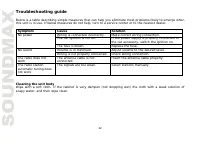
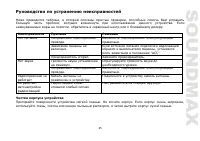
22 Troubleshooting guide Below is a table describing simple measures that can help you eliminate most problems likely to emerge when this unit is in use. If below measures do not help, turn to a service center or to the nearest dealer. Symptom Cause Solution Wiring is connected incorrectly. Make cor...
Page 23 - Specification
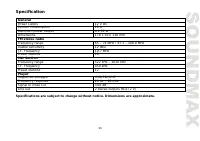
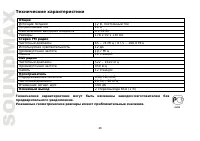
23 Specification GeneralPower supply 12 V DC Current consumption 10 A Maximum power output 4 x 50 W Dimensions 178 x 50 x 130 mm FM stereo radioFrequency range 65 – 74 MHz / 87.5 - 108.0 MHz Usable sensitivity 12 dBu I.F. Frequency 10.7 MHz Preset stations 18 MW SectionFrequency range 522 kHz – 1620...
Page 31 - ISO
31 ISO 1. ISO, , . 2. ISO , . , . A B 1 (+)--- 2 (-)--- 3 (+)--- 4 12 (+)/ (-)--- 5 (+)--- 6 ((-)--- 7 (+)--- 8 (-)--- .
Page 33 - RESET
Page 38 - AUX
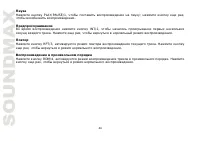
38 DISP . DISP; . VOL VOL+, ; VOL-, . SEL, DSP OFF (DSP ON). VOL VOL+/VOL- : POP M => ROCK M => CLASSICS => FLAT => DSP OFF ( ). ( ) RESET ( , ). : , . . ERROR ( ). AUX AUX . . . , MP3- .
Page 39 - FM; STEREO
39 BAND, : FM1, FM2, FM3, MW1 (AM1), MW2 (AM2). 6 , 30. PREVIOUS NEXT; . . , PREVIOUS NEXT. PREVIOUS/NEXT, . : AMS; . : AMS, . 6 , . , . . . ( FM ) SEL, STEREO (MONO). VOL VOL+/VOL- , (STEREO) (MONO). , , .