Page 2 - Table of contents
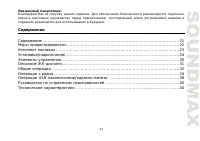
2 Dear customer!Thank you for purchasing our product. For safety, it is strongly recommended to read this manual carefully before connecting, operating and/or adjusting the product and keep the manual for reference in the future. Table of contents Table of contents .....................................
Page 3 - Important safeguards
3 Important safeguards Read carefully through this manual to familiarize yourself with this high-quality sound system.The beginning of operation is the moment of the unit installation. Before use the device in winter it isrecommended to heat up the passenger compartment during 20 seconds or to the o...
Page 4 - Accessories
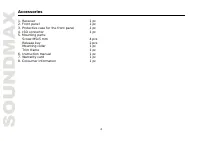
4 Accessories 1. Receiver 1 pc 2. Front panel 1 pc 3. Protective case for the front panel 1 pc 4. ISO connector 1 pc 5. Mounting parts: Screw M5x5 mm 4 pcs Release key 2 pcs Mounting collar 1 pc Trim frame 1 pc 6. Instruction manual 1 pc 7. Warranty card 1 pc 8. Consumer information 1 pc
Page 5 - Installation/connection; General notes
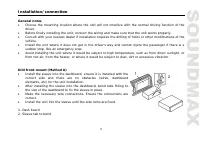
5 Installation/connection General notes Choose the mounting location where the unit will not interfere with the normal driving function of thedriver.Before finally installing the unit, connect the wiring and make sure that the unit works properly.Consult with your nearest dealer if installation requ...
Page 6 - Dismantling the unit
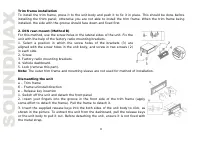
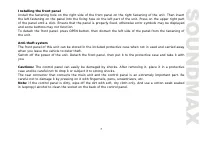
6 Trim frame installationTo install the trim frame, press it to the unit body and push it to fix it in place. This should be done beforeinstalling the front panel; otherwise you are not able to install the trim frame. When the trim frame beinginstalled, the side with the groove should face down and ...
Page 8 - Connection diagram
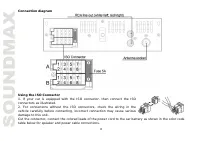
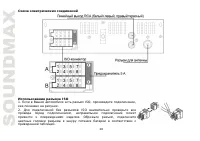
8 Connection diagram Using the ISO Connector1. If your car is equipped with the ISO connector, then connect the ISOconnectors as illustrated.2. For connections without the ISO connectors, check the wiring in thevehicle carefully before connecting, incorrect connection may cause seriousdamage to this...
Page 9 - Power Antenna - Orange
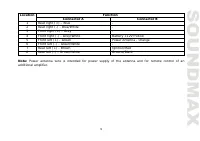
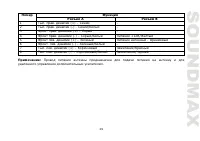
9 Function Location Connector A Connector B 1 Rear right (+) – Blue - 2 Rear right (-) - Blue/White - 3 Front right (+) - Grey - 4 Front right (-) - Grey/White Battery +12V/Yellow 5 Front left (+) - Green Power Antenna - Orange 6 Front left (-) - Green/White - 7 Rear left (+) - Brown Ignition/Red 8 ...
Page 10 - Control elements; Front panel
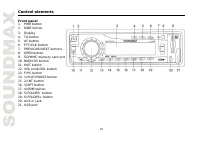
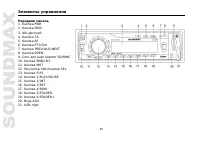
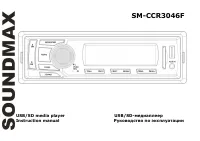
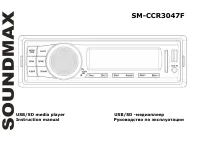
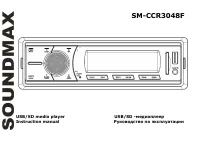
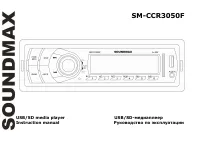
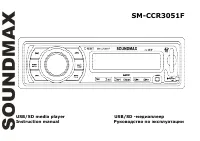
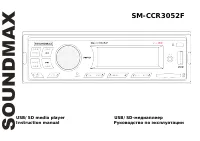
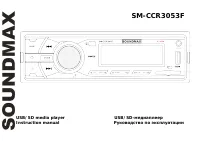
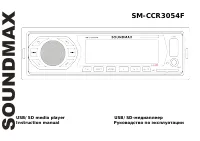
10 Control elements Front panel 1. PWR button2. MOD button3. Display4. TA button5. AF button6. PTY/CLK button7. PREVIOUS/NEXT buttons8. OPEN button9. SD/MMC memory card slot10. BND/ID3 button11. MUT button12. VOL knob/SEL button13. F/PS button14. 1/PLAY/PAUSE button15. 2/INT button16. 3/RPT button17...
Page 11 - LCD outline; Loudness indicator
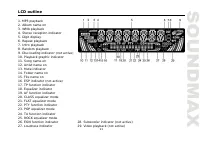
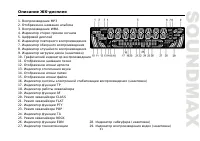
11 LCD outline 1. MP3 playback2. Album name on3. WMA playback4. Stereo reception indicator5. Digit display6. Repeat playback7. Intro playback8. Random playback9. Disc loading indicator (not active)10. Playback graphic indicator11. Song name on12. Artist name on13. Mute indicator14. Folder name on15....
Page 12 - General operations
12 General operations Turning the unit on/offPress PWR button to turn the unit on. Press the button again to turn the unit off. Mode selectPress MOD button repeatedly to select between Radio, auxiliary input, USB or Memory Card modes. Modesof operation are indicated on the display. Memory card and U...
Page 14 - Radio operations; Manual/automatic tuning
14 Radio operations Band selectIn Radio mode press BND/ID3 button to select a radio band: FM1, FM2, FM3 and AM1, AM2. 6 stations canbe saved in each band. Manual/automatic tuning Press and hold PREVIOUS/NEXT buttons to display MANUAL. Now you can press these buttonsrepeatedly to adjust the needed fr...
Page 16 - Classics
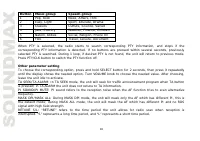
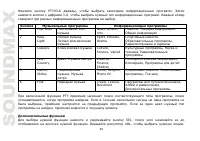
16 Button Music group Speech group 1 Pop, Rock News, Affairs, Info 2 Easy, Light Sport, Educate, Drama 3 Classics Culture, Science, Varied 4 Jazz, Country Weather, Finance, Children 5 Nation, Oldies Social, Religion, Phone IN 6 Folk Travel, Leisure, Document When PTY is selected, the radio starts to...
Page 17 - Track select
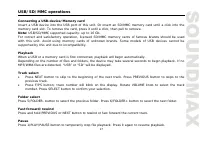
17 USB/SD/MMC operations Connecting a USB-device/Memory cardInsert a USB device into the USB port of this unit. Or insert an SD/MMC memory card until a click into thememory card slot. To remove the card, press it until a click, then pull to remove.Note: USB/SD/MMC supported capacity: up to 16 Gb.For...
Page 19 - Troubleshooting guide; Symptom
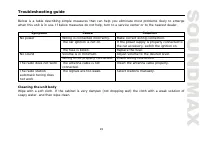
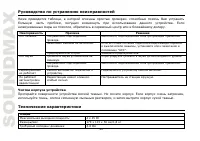
19 Troubleshooting guide Below is a table describing simple measures that can help you eliminate most problems likely to emergewhen this unit is in use. If below measures do not help, turn to a service center or to the nearest dealer. Symptom Cause Solution Wiring is connected incorrectly. Make corr...
Page 20 - Specification; Temperature range
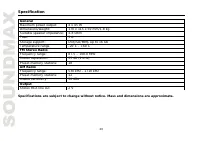
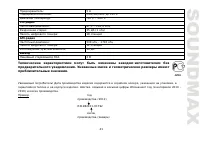
20 Specification GeneralMaximum power output: 4 x 45 W Dimensions/weight: 170 x 115 x 50 mm/1.8 kg Suitable speaker impedance: 4-8 OhmFuse: 5 A Storage support: USB/SD/MMC up to 16 Gb Temperature range -20 0 C - +60 0 C FM Stereo RadioFrequency range: 87.5 – 108.0 MHz Stereo separation: 35 dB (1 kHz...
Page 28 - ISO
Page 33 - Beep; SEL; AUX
33 : . SEL EQ OFF. VOL : FLAT, CLASS, ROCK POP. Beep SEL BEEP ON (OFF). VOL ON ( ) OFF ( ). PTY/CLK . ; . NEXT, ; PREVIOUS, . PTY/CLK . SEL, P-VOL. VOL, , . AUX AUX . . . , MP3- .
Page 34 - FM
34 BND/ID3, : FM1, FM2, FM3, AM1 AM2. 6 . PREVIOUS NEXT SCN . . . PREVIOUS NEXT MANUAL. . : . ; , . . F/PS 6 . , 6 , F/PS . ( FM ) SEL, STEREO MONO. VOL, (STEREO) (MONO) . , , .
Page 35 - RDS
35 RDS RDS ( ) . , RDS , . AF ( ) , , . . AF, AF. AF , RDS . , . RDS , AF. . AF , , AF RDS. , , RDS . AF , , AF . TA ( ) TA. . , . , TA; ; TA. , . PTY ( ) FM- , RDS, . PTY/CLK, . 1-6, .