Page 2 - Table of contents
2 Dear customer! Thank you for purchasing our product. For safety, it is strongly recommended to read this manual carefully before connecting, operating and/or adjusting the product and keep the manual for reference in the future. Table of contents Table of contents ....................................
Page 3 - Important safeguards
3 Important safeguards Read carefully through the manual to familiarize yourselves with this unit.Keep this manual handy as a reference for operating procedures and precautions. Do not allow personswho have not read through this manual to use this unit.“CLASS 1 LASER PRODUCT”This product contains a ...
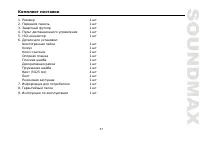
Page 4 - Accessories
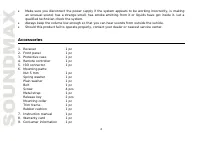
4 Make sure you disconnect the power supply if the system appears to be working incorrectly, is makingan unusual sound, has a strange smell, has smoke emitting from it or liquids have got inside it. Let aqualified technician check the system.Always keep the volume low enough so that you can hear sou...

Page 5 - Installation/connection
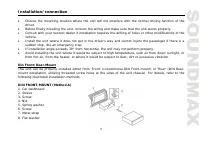
5 Installation/connection Choose the mounting location where the unit will not interfere with the normal driving function of thedriver.Before finally installing the unit, connect the wiring and make sure that the unit works properly.Consult with your nearest dealer if installation requires the drill...
Page 6 - the dashboard to fix the sleeve in place.; Dismantling the unit; some effort to detach the frame). Pull the frame to detach it.
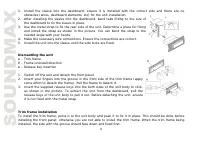
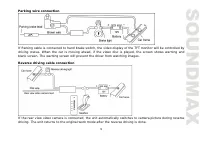
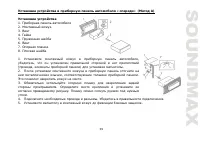
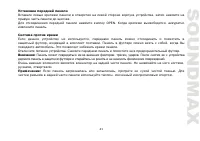
6 1. Install the sleeve into the dashboard; ensure it is installed with the correct side and there are no obstacles (wires, dashboard elements, etc) for the unit installation. 2. After installing the sleeve into the dashboard, bend tabs fitting to the size of the dashboard to fix the sleeve in place...
Page 10 - Unit controls; Front panel; buttons
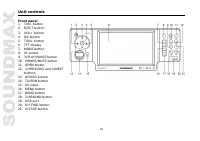
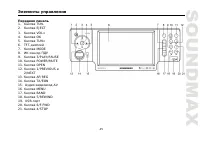
10 Unit controls Front panel 1. TUN- button2. EJECT button3. VOL+ button4. OK button5. TUN+ button6. TFT display7. MODE button8. IR sensor9. 3/PLAY/PAUSE button10. POWER/MUTE button11. OPEN button12. 1/PREVIOUS and 2/NEXT buttons 13. AF/REG button14. TA/EON button15. AV input16. MENU button17. BAND ...
Page 11 - when front panel detached)
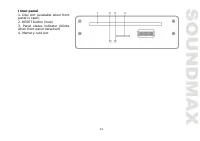
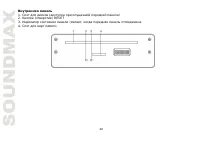
11 Inner panel1. Disc slot (available when front panel is open) 2. RESET button (hole) 3. Panel status indicator (blinks when front panel detached) 4. Memory card slot
Page 14 - General operations
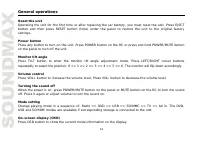
14 General operations Reset the unitOperating the unit for the first time or after replacing the car battery, you must reset the unit. Press EJECTbutton and then press RESET button (hole) under the panel to restore the unit to the original factorysettings. Power buttonPress any button to turn on the...
Page 19 - Radio operations; Manual/automatic tuning
19 Radio operations Band selectionSelect the RADIO mode. Press BAND button on the panel or BND/RDM button on the RC to select thedesired band: FM1, FM2, FM3 (OIRT), AM (MW). Manual/automatic tuning Manual tuning: press TUN-/TUN+ buttons on the panel or SEEK-/PREVIOUS and SEEK+/NEXT on theRC and hold...
Page 21 - Note: TV image cannot be displayed on the external monitor.
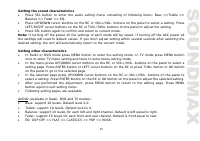
21 TV-tuner operations Connect the TV antenna to the TV antenna jack on the rear of the unit. Select TV mode. To access the TVmode menu, press MENU button. To select a menu page (Auto Program or Manual Program) pressUP/DOWN cursor buttons on the RC or VOL+/VOL- buttons on the panel. To enter the sel...
Page 25 - Programming the playback
25 Programming the playback Press PTY/PROG button to open program menu.Use cursor buttons to select the program position and use number buttons to input the desiredtrack/title/chapter (depending on the disc type).Press PLAY/PAUSE button on the RC or 3/PLAY/PAUSE button on the panel to start program ...
Page 27 - DVD setup menu; System setup
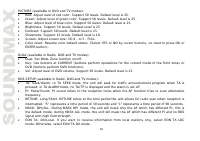
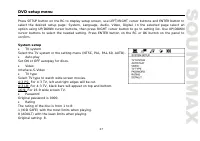
27 DVD setup menu Press SETUP button on the RC to display setup screen, use LEFT/RIGHT cursor buttons and ENTER button toselect the desired setup page: System, Language, Audio, Video, Digital. In the selected page select anoption using UP/DOWN cursor buttons, then press RIGHT cursor button to go to ...
Page 29 - Digital setup; Dynamic range
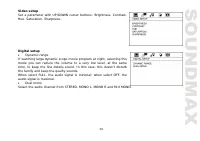
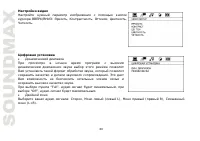
29 Video setupSet a parameter with UP/DOWN cursor buttons: Brightness, Contrast,Hue, Saturation, Sharpness. Digital setup Dynamic range If watching large dynamic scope movie program at night, selecting thismode you can reduce the volume to a very low level, at the sametime, to keep the fine details ...
Page 30 - Handling and cleaning discs; Cleaning
30 Handling and cleaning discs Dirty, scratched or warped discs may cause skip ping or noise.Handle the disc only by the edges. To keep clean do not touch its surface.Discs should be stored in their cases after use to avoid scratches.Do not expose discs to direct sunlight, high humidity, high temper...
Page 31 - Troubleshooting guide; Symptom
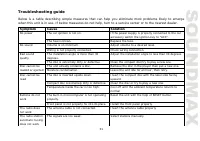
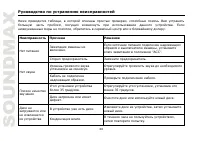
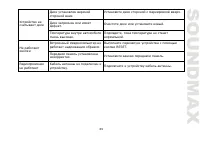
31 Troubleshooting guide Below is a table describing simple measures that can help you eliminate most problems likely to emerge when this unit is in use. If below measures do not help, turn to a service center or to the nearest dealer. Symptom Cause Solution The car ignition is not on. If the power ...
Page 32 - Specification; Maximum power output:
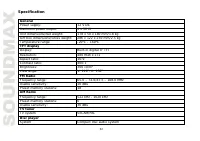
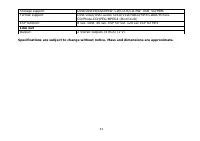
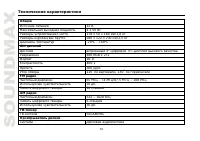
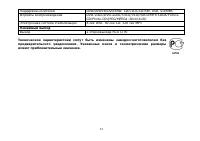
32 Specification GeneralPower supply: 12 V DC Maximum power output: 4 x 50 W Unit dimensions/Net weight: 178 x 50 x 180 mm/1.8 kg Gift box dimensions/Gross weight: 286 x 122 x 230 mm/2.5 kgTemperature range: -20 0 C - +60 0 C TFT displayDisplay: Built-in digital 4” TFT Resolution: 480 RGB x 272 Aspe...
Page 38 - DIN
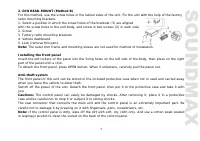
38 , , . , . . , . , , , . 30°, . , , , , , , , , . . « » « » « » ( DIN ), « » ( DIN, , ). .
Page 43 - ISO
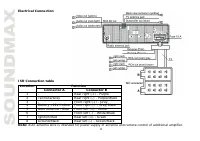
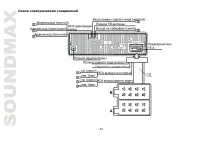
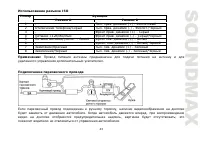
43 ISO A B 1 - . . (+) - 2 . . (-) - ./ 3 - . (+) - 4 +12 . (-) - 5 . - . (+) - 6 - . . (-) - 7 . . (+) - 8 . . (-) - : . , . , , ; .
Page 55 - BAND
55 BND/RDM BAND : FM1 - FM2 - FM3 (OIRT) – MW (AM). : SEEK-/PREVIOUS SEEK+/NEXT TUN+/TUN- . SEEK-/PREVIOUS SEEK+/NEXT TUN+/TUN- . : SEEK-/PREVIOUS SEEK+/NEXT TUN+/TUN- ; . , . 6 , (18 FM, 6 AM). , . . . : P.SCN/RPT , . 6 6 . , .
Page 56 - RDS
56 : , . : , P.SCN/RPT ; , . RDS RDS ( ) . , RDS , . AF ( ) AF AF/REG AF. , , . . : AF , RDS. RDS , AF. TA (Traffic Alarm) /EON ( ) TA. , , TA. , , TP , ). , . TP, TA, TP , TA ; TP, TA, . , . .
Page 61 - INT
61 SEEK-/PREVIOUS 1/PREVIOUS ; . SEEK+/NEXT 2/NEXT . (0-9) . SEEK-/PREVIOUS SEEK+/NEXT 6/F.FWD 5/REWIND . DVD/VCD . PLAY/PAUSE 3/PLAY/PAUSE . : , . ( ) A-B/ZOOM, . , ; . . P.SCAN/RPT, . ( , , , ). INT , . . , .
Page 64 - DVD; SETUP
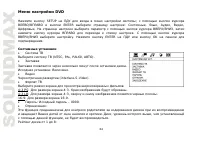
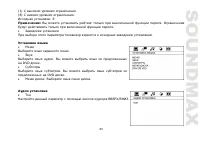
64 DVD SETUP ; ENTER : , , , , . , . . ENTER OK . (NTSC, PAL, PAL60, ). . : . (interlace-S-Video). . 4:3 PS: 4:3. . 4:3 LB: 4:3, . 16:9: 16:9. : – 0000. : . , , , . 1 8: