Page 2 - Table of contents
2 Dear customer! Thank you for purchasing our product. For safety, it is strongly recommended to read this manual carefullybefore connecting, operating and/or adjusting the product and keep the manual for reference in the future. Table of contents Table of contents......................................
Page 3 - Important safeguards
3 Important safeguards Using the device at temperature below -10º may cause the breakage of the device. Before using please heat up the passenger compartment to the recommended temperature! Disconnect the vehicle's negative battery terminal while mounting and connecting the unit. When replacing the ...
Page 4 - Accessories; Rear Mounting Bolt
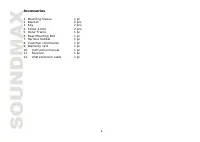
4 Accessories 1. Mounting Sleeve 1 pc 2. Bracket 2 pcs 3. Key 2 pcs 4. Screw 2.6X4 2 pcs 5. Outer Frame 1 pc 6. Rear Mounting Bolt 1 pc 7. Harness Rubber 1 pc 8. Customer information 1 pc 9. Warranty card 1 pc 10. Instruction manual 1 pc 11. Receiver 1 pc 12. USB extension cable 1 pc

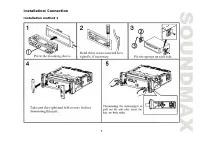
Page 5 - Installation/Connection; Installation method 1
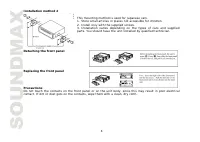
Page 6 - Installation method 2; This mounting method is used for Japanese cars.; Detaching the front panel
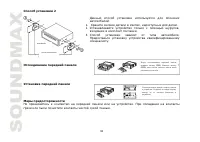
6 Installation method 2 This mounting method is used for Japanese cars. 1. Store small articles in places not accessible for children. 2. Install only with the supplied screws. 3. Installation varies depending on the types of cars and supplied parts. You should have the unit installed by qualified t...
Page 7 - Electrical connection
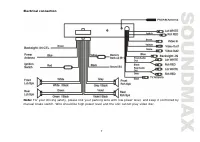
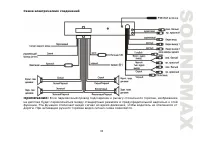
7 Electrical connection Note: For your driving safety, please link your parking wire with low power level, and keep it controlled by manual brake switch. Wire should be high power level and the unit cannot play video disc.
Page 9 - Panel controls; Front panel
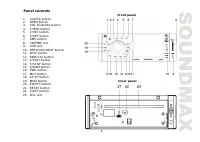
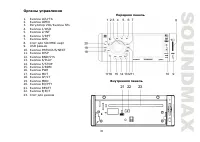
9 Panel controls Front panel 1. LOU/TA button 2. OPEN button3. VOL knob/SEL button4. 1/OSD button5. 2/INT button 6. 3/RPT button7. AMS button8. SD/MMC slot9. USB jack 10. PREVIOUS/NEXT button11. DISP button12. BND/SYS button13. 6/PLAY button14. 5/STOP button 15. 4/RDM button16. PWR button17. MUT but...
Page 10 - ENTER button
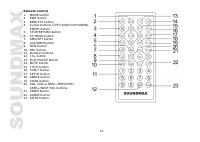
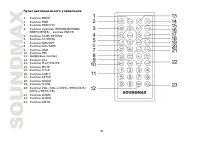
10 Remote control1. MODE button2. PWR button3. BND/SYS button 4. Cursor buttons (LEFT/RIGHT/UP/DOWN), ENTER button 5. STOP/RETURN button6. ST/PROG button 7. AMS/RPT button8. LOC/RDM button9. OSD button10. PBC button 11. Number buttons12. 10+ button13. PLAY/PAUSE button14. MUTE button15. TITLE button...
Page 11 - Changing the battery; Press the catch and at the same time pull out the battery tray.
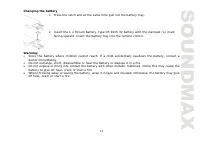
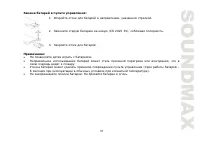
11 Changing the battery 1. Press the catch and at the same time pull out the battery tray. 2. Insert the 1 x lithium battery, type CR 2025 3V battery with the stamped (+) markfacing upward. Insert the battery tray into the remote control. Warning: Store the battery where children cannot reach. If a ...
Page 12 - General operation; Reset the unit; erase the clock setting and some memorized functions.; Volume control
12 General operation Reset the unit Operating the unit for the first time or after replacing the car battery, you must press OPEN button to flipdown the front panel. Press RESET button with a pointed object to restore the unit to the original factorysettings.Note: When some errors occur in the displ...
Page 13 - Clock setting; Press SEL button, the minute will change its color.; LOUD function
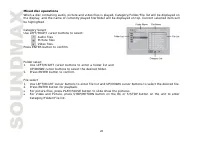
13 Mode controlPress MODE button on the panel or MOD button on the RC to select different source modes: TUNER =>DISC (the type of disc in the unit if there is any) => USB (if a USB device is inserted) => CARD (if aSD/MMC card is inserted) => AUX => TV. Clock setting 1. Press and hold ...
Page 14 - Radio operation; Band selection; appears on the display.
14 Radio operation Band selection Press BND/SYS button repeatedly to select FM1, FM2, FM3, AM1, AM2. Display will show the wave band,frequency and preset station number if already stored. Manual/Automatic tuning Manual tuning: Press PREVIOUS/NEXT buttons on the panel or SEEK+/SEEK- buttons on the RC...
Page 17 - pause the playback. Press again to resume the playback.; Playing the previous/next track
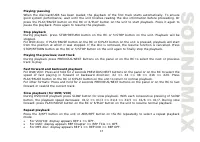
17 Playing/pausingWhen the disc/card/USB has been loaded, the playback of the first track starts automatically. To ensuregood system performance, wait until the unit finishes reading the disc information before proceeding. Orpress the PLAY/PAUSE button on the RC or 6/PLAY button on the unit to start...
Page 18 - Programming the playback; Press ST/PROG button on the RC to enter program list.
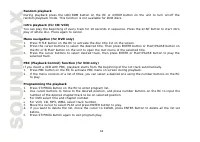
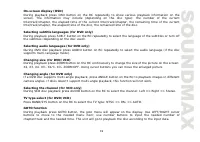
18 Random playbackDuring playback press the LOC/RDM button on the RC or 4/RDM button on the unit to turn on/off therandom playback mode. This function is not available for DVD discs. Intro playback (for CD/VCD)You can play the beginning of every track for 10 seconds in sequence. Press the 2/INT butt...
Page 21 - MP3 overview; Notes on creating your own CD-R or CD-RW containing MP3 files:
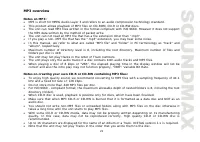
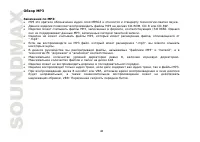
21 MP3 overview Notes on MP3: MP3 is short for MPEG Audio Layer 3 and refers to an audio compression technology standard.This product allows playback of MP3 files on CD-ROM, CD-R or CD-RW discs. The unit can read MP3 files written in the format compliant with ISO 9660. However it does not supportthe...
Page 22 - System setup menu; System setup; This unit is suitable for all kinds of TV systems. You can select:; TV type; screen image shows on the full screen, but some part is cut off.; Password; Reset to the initial factory setups.
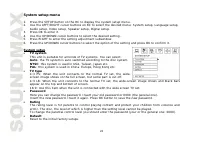
22 System setup menu 1. Press the SETUP button on the RC to display the system setup menu.2. Use the LEFT/RIGHT cursor buttons on RC to select the desired menu: System setup, Language setup, Audio setup, Video setup, Speaker setup, Digital setup. 3. Press OK to enter it. 4. Use the UP/DOWN cursor bu...
Page 23 - Select the OSD language.; Audio language; Select the audio language (if DVD disc supports several audio; Audio setup; Setup basic music tone.; Video setup; according to your preference.
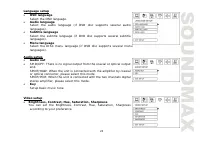
23 Language setup OSD language Select the OSD language. Audio language Select the audio language (if DVD disc supports several audio languages).Subtitle language Select the subtitle language (if DVD disc supports several subtitle languages).Menu language Select the DISC menu language (if DVD disc su...
Page 24 - Digital setup; TV Operation
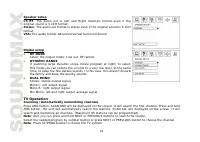
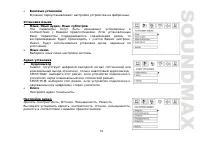
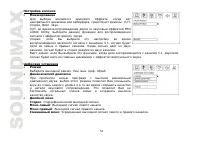
24 Speaker setupLT/RT: The audio out is Left and Right channels format even if the original sound is 5.1CH format.Stereo: The audio out format is stereo even if the original sound is 5.1CHformat.VSS: The audio format Advanced Virtual Surround Sound Digital setup OP MODESelect the output mode: Line o...
Page 25 - Cleaning discs
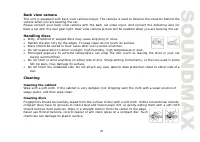
25 Back view camera This unit is equipped with back view camera output. The camera is used to observe the situation behind the vehicle when you are backing the car.Please connect your back view camera with the back car video input. And connect the detecting wire forback a car with the rear gear ligh...
Page 26 - Troubleshooting guide; No power
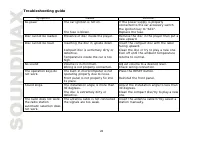
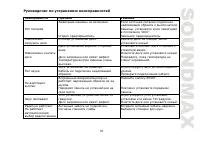
26 Troubleshooting guide Symptom Cause Solution No power The car ignition is not on. The fuse is blown. If the power supply is properly connected to the car accessory switchthe ignition key to “ACC”.Replace the fuse. Disc cannot be loaded. Presence of disc inside the player. Remove the disc in the p...
Page 27 - Specification; Maximum power output:
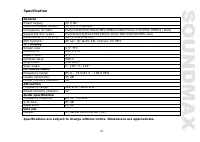
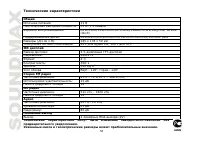
27 Specification GeneralPower supply: 12 V DC Maximum power output: 50 W x 4 channels Compatible formats: DVD/SVCD/VCD/HDCD/MP3/WMA/CDDA/Picture-CD/JPEG/ MPEG4 (DivX) Supported disc types: DVD/DVD±R/DVD±RW/CD/CD-R/CD-RW/USB/SD/MMC card Dimensions (L x W x H): 165 x 178 x 50 mm ESP function: 40 sec. ...
Page 30 - USB
30 1. 1 pc 2. 2 pcs 3. 2 pcs 4. 2.6X4 2 pcs 5. 1 pc 6. 1 pc 7. 1 pc 8. 1 pc 9. 1 pc 10. 1 pc 11. 1 pc 12. USB 1 pc
Page 34 - ISO
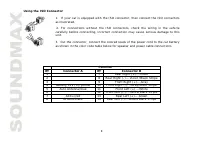
34 ISO 1. ISO, , . 2. ISO , . 3. ISO ( ). A B 1 7 (+) - 2 8 (-) - 3 9 (+) - 4 12 (+)/ 10 (-) - 5 / 11 (+) - 6 12 (-) - 7 ACC+/ 13 (+) - 8 14 (-) -
Page 39 - LOUD
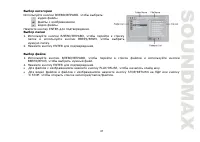
39 MODE MOD , : TUNER ( ) => DISC ( ) => USB ( SUB ) => CARD ( SD/MMC ) => AUX => TV. 1. 3 DISP; , , . 2. VOL VOL+/- , . 3. SEL; , , . 4. VOL VOL+/- , . LOUD LOU/TA , LOUD. , . 3 EQ/PTY, : POP => ROCK => CLAS. .
Page 40 - AMS
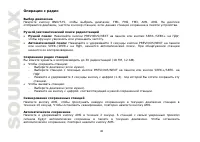
40 BND/SYS, : FM1, FM2, FM3, AM1, AM2. , , . : PREVIOUS/NEXT SEEK-/SEEK+ , . : 3 PREVIOUS/NEXT SEEK-/SEEK+ , . . 30 (18 FM, 12 AM). : - ( ). - PREVIOUS/NEXT SEEK+/SEEK- . - 3 (1-6), . : - ( ). - , . AMS, 10 . , AMS. AMS 2 . 6 . , AMS.
Page 46 - ZOOM; DVD; ANGLE
46 ( DVD/VCD) ZOOM . : X2, X3, X4, X1/2, X1/3, X1/4, . . ( DVD ) DVD- , ANGLE . , , . ( VCD) VCD AUDIO , : Left ( ) => Right ( ) => Stereo ( ). ( DVD/VCD) BAND/SYS , : NTSC => PAL => AUTO. GOTO ( ) GOTO, . ; . . , , , , . .
Page 50 - SETUP
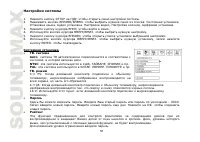
50 1. SETUP , . 2. , : , , , , , . 3. , . 4. , . 5. , . 6. , , ENTER, . . : , . NTSC: , , . PAL: , , . . 4:3 PS: , , . 4:3 LB: , , . 16:9: , . . – 0000. . . OK, . . , , , . .
Page 52 - PRO
52 , , : , , . . : PRO LOGIC Dolby, . : 5.1, . , . . : , 5.1, . : . , . . , . . : . : . : . : .