Page 2 - Table of contents
2 Dear customer!Thank you for purchasing our product. For safety, it is strongly recommended to read this manual carefullybefore connecting, operating and/or adjusting the product and keep the manual for reference in the future. Table of contents Table of contents ......................................
Page 3 - Important safeguards; period or during a thunderstorm.
3 Important safeguards - Read carefully through this manual to familiarize yourself with this high-quality sound system. - Disconnect the vehicle's negative battery terminal while mounting and connecting the unit. - When replacing the fuse, be sure to use one with an identical amperage rating. Using...
Page 4 - Installation/Connections; Installation method
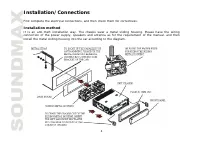
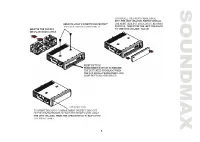
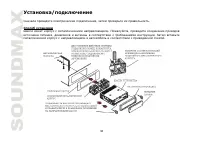
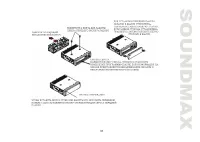
4 Installation/Connections First complete the electrical connections, and then check them for correctness. Installation method It is an anti-theft installation way. The chassis wear a metal sliding housing. Please have the wiringconnection of the power supply, speakers and antenna as for the require...
Page 6 - Attaching the control panel; Push the panel to the right and insert the left side of it; Detaching the front panel; Press the REL button on the front panel. The panel will go
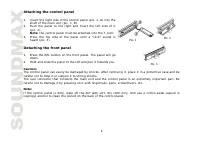
6 Attaching the control panel 1. Insert the right side of the control panel (pic. 1, A) into the shaft of the main unit (pic. 1, B). 2. Push the panel to the right and insert the left side of it (pic. 2).Note: the control panel must be attached into the T-Joint. 3. Press the top side of the panel un...
Page 7 - Connection diagram
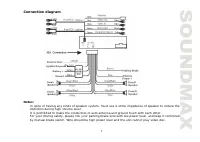
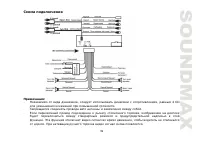
7 Connection diagram Notes: - In spite of having any kinds of speaker system, must use 4 ohms impedance of speaker to reduce thedistortion during high volume level. - It is prohibited to make the conductors of auto antenna and ground touch with each other. - For your driving safety, please link your...
Page 8 - Panel controls; Press it to turn the power on. Press again to turn the power off.
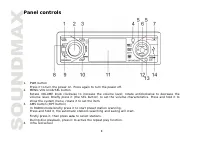
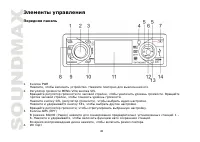
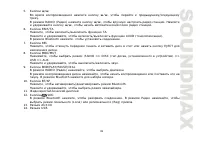
8 Panel controls 1. PWR button Press it to turn the power on. Press again to turn the power off. 2. MENU-VOL knob/SEL button Rotate VOLUME knob clockwise to increase the volume level; rotate anticlockwise to decrease thevolume level. Briefly press it (the SEL button) to set the volume characteristic...
Page 9 - Inner panel
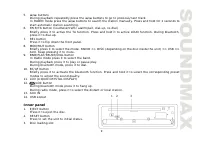
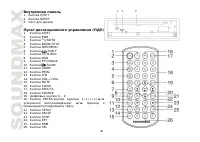
9 5. / buttons During playback repeatedly press the / buttons to go to previous/next track. In RADIO mode press the / buttons to search the station manually. Press and hold for 2 seconds to start automatic station searching. 6. PAIR/TA button (loudness/traffic alarm/pair, dial-up, re-dial) Briefly p...
Page 11 - General operations; Power button; setting adjustment window.
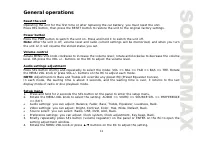
11 General operations Reset the unitOperating the unit for the first time or after replacing the car battery, you must reset the unit.Press REL button, then press the RESET button to restore the unit to the original factory settings. Power button Press the PWR button to switch the unit on. Press and...
Page 13 - Radio operations; BAND selection
13 Radio operations Note: RDS (Radio Data System) service availability varies with areas. Please understand if RDS service isnot available in you area, the following service is not available, either. BAND selection Repeatedly press the BAND/TITLE button on the RC or BND/PLAY/PAUSE/DIAL on the panel ...
Page 14 - Radio setup menu; Press ENTER to open the mode settings list.
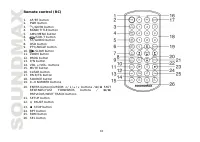
14 Preset scanSelect a band. Press AMS button to scan all preset stations in the memories of the current band and stay oneach memory stations for about 7 seconds. To stop preset scan, press the button again. Number ButtonsDuring radio mode, number buttons from 1 to 6 can help you store your favorite...
Page 17 - Playing/pausing playback
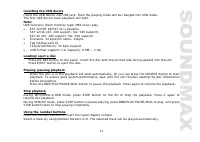
17 Inserting the USB deviceInsert the USB device into USB jack. Then the playing mode will be changed into USB mode.The first USB device track playback will start.Note: USB functions (flash memory type) MP3 music play FAT 12/FAT 16/FAT 32 is possible, - FAT 12/16 (dir: 200 support, file: 500 support...
Page 18 - Slow playback
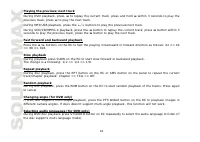
18 Playing the previous/next trackDuring DVD playback, press to replay the current track, press and hold within 3 seconds to play the previous track, press to play the next track. During MP3/USB playback, press the / buttons to play the previous/next track. During VCD/CD/MPEG-4 playback, press the b...
Page 21 - MP3 overview; Notes on MP3; The unit may not play tracks in the order of Track numbers.
21 MP3 overview Notes on MP3 - MP3 is short for MPEG Audio Layer 3 and refers to an audio compression technology standard. - This product allows playback of MP3 files on CD-ROM, CD-R or CD-RW discs. - The unit can read MP3 files written in the format compliant with ISO 9660. However it does not supp...
Page 22 - Notes on creating your own CD-Rs or CD-RWs containing MP3 files; DO NOT store more than 256 MP3 files per disc.
22 Notes on creating your own CD-Rs or CD-RWs containing MP3 files - To enjoy high quality sound, we recommend converting to MP3 files with a sampling frequency of 44.1kHz and a fixed bit rate o f 128 kbps. - DO NOT store more than 256 MP3 files per disc. - For ISO 9660 - compliant format, the maxim...
Page 23 - TV tuner operations; Note: This function can only be operated by the RC.
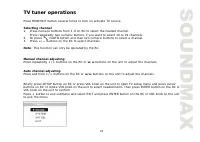
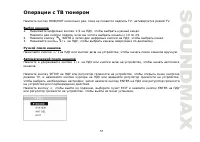
23 TV tuner operations Press MOD/MUT button several times to turn on activate TV source. Selecting channel1. Press numeric buttons from 1-9 on RC to select the needed channel. Press repeatedly two numeric buttons if you want to select 10 to 29 channels. 2. Or press /GOTO button and then two numeric ...
Page 24 - Press; Note: Press and hold OSD button it to show the current source.
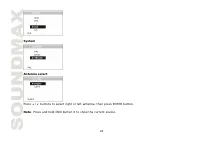
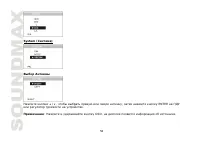
24 System Antenna select Press / buttons to select right or left antenna, then press ENTER button. Note: Press and hold OSD button it to show the current source.
Page 25 - Bluetooth operations; Pairing in Handsfree Mode
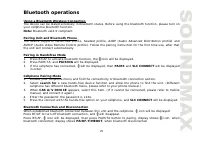
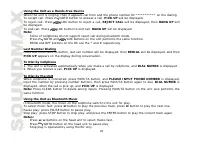
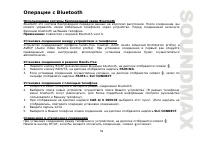
25 Bluetooth operations Using a Bluetooth Wireless ConnectionThe device can be dialed wirelessly in bluetooth status. Before using the bluetooth function, please turn onyour cellphone bluetooth function. Note: Bluetooth ver2.0 compliant. Pairing Unit and Bluetooth PhoneThe device supports hands-free...
Page 27 - System setup; Note: The setup is memorized and kept after power off.; General setup page; TV DISPLAY
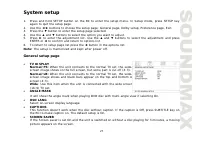
27 System setup 1. Press and hold SETUP button on the RC to enter the setup menu. In Setup mode, press SETUP key again to quit the setup page. 2. Use the buttons to choose the setup page: General page, Dolby setup, Preference page, Exit. 3. Press the button to enter the setup page selected. 4. Use t...
Page 28 - Dolby digital setup; Use the; Preference setup; TV TYPE
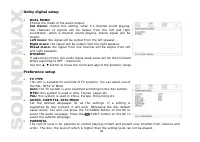
28 Dolby digital setup DUAL MONOChoose the mode of the audio output:Set stereo: choose this setting, when 5.1-channel sound playing, two channels of signals will be output from the left and rightsoundtrack; when 2-channel sound playing, stereo signal will beoutput.Left mono: the signal will be outpu...
Page 29 - Reset to the initial factory setups.; Exit; Select the Exit page to exit the Setup menu.
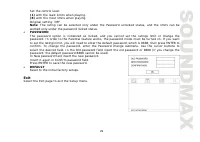
29 Set the control level:(1) with the least limits when playing.(8) with the most limits when playing.Original setting: OFF. Note: The rating can be selected only under the Password unlocked status, and the limits can beworked only under the password locked status.PASSWORDThe password option is init...
Page 30 - Press the top side of the panel until a “click” sound is heard.
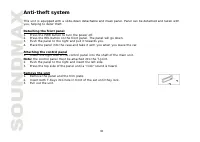
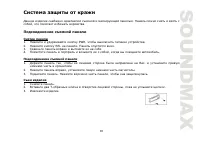
30 Anti-theft system This unit is equipped with a slide-down detachable and mask panel. Panel can be detached and taken withyou, helping to deter theft. Detaching the front panel 1. Press the PWR button to turn the power off.2. Press the REL button on the front panel. The panel will go down.3. Push ...
Page 31 - Handling compact discs; Cleaning; damage its plastic surface.
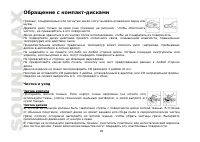
31 Handling compact discs Dirty, scratched or warped discs may cause skip ping or noise.Handle the disc only by the edges. To keep clean do not touch its surface.Discs should be stored in their cases after use to avoid scratches.Do not expose discs to direct sunlight, high humidity, high temperature...
Page 32 - Troubleshooting guide
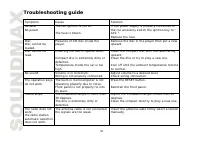
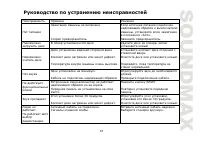
32 Troubleshooting guide Symptom Cause Solution GeneralNo power The car ignition is not on. The fuse is blown. If the power supply is properly connected tothe car accessory switch the ignition key to "ACC ". Replace the fuse. DiscDisc cannot beloaded. Presence of CD disc inside theplayer. Re...
Page 33 - Specification
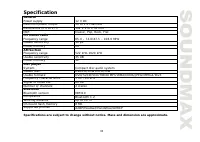
33 Specification GeneralPower supply 12 V DC Maximum power output 50 W x 4 channels Dimensions (L x W x H) 192 x 178 x 50 mm DSP: Classic, Pop, Rock, Flat FM stereo radioFrequency range 65.0 – 74.0/87.5 – 108.0 MHz Usable sensitivity 10 V Preset memory 24 AM SectionFrequency range 522 kHz-1620 kHz U...
Page 38 - REL
38 1. , , ) ( ) ( . 1). 2. ( . 2), . 3. . , ( . 3). 1. REL . . 2. . : : , . . . , , . : , . , . . 1 . 2 . 3
Page 45 - EJECT
45 P/N , : PAL, NTSC, AUTO ( ). , MOD/MUT , 3 EJECT .
Page 50 - USB; USB
50 P3 : 32 - 320 ( 128 ). : *.ACC, *.DLF, *.M3U, *.PLS, MP3 PRO, DRM. . USB USB USB. USB. . USB : FAT 12/FAT 16/FAT 32, - FAT 12/16 ( 200 , 500 ), - FAT 32 ( 200 , 500 ), : 32 : 32 . (id3tag ver 2.0) - : 32 . USB 2.0. : 8 M ~ 1 . - REL, . . - EJECT , . - . SOURCE, . , , , . - BND/PLAY/PAUSE/DIAL, . ...
Page 52 - ZOOM; DVD; ENTER
52 ( DVD ) DVD- , PTY/ANGLE . , . ( DVD ) DVD- , ST/AUDIO , . ( CD/VCD ) ST/AUDIO , : Left channel ( ) => Right channel ( ) => Stereo ( ). ( DVD ) DVD- , /SUB-T , . ( DVD/VCD ) ZOOM . : 2 => 3 => 4 => . , . OSD , : – – – – . OSD . DVD - BAND/TITLE , . - / / / . , , . . - ENTER PLAY/PA...
Page 53 - VCD
53 PBC ( ) ( VCD ) VCD PBC, 1- . 1. PBC , . 2. , . 3. , BND/PLAY/PAUSE/DIAL, . 4. PBC, . 1. DVD/VCD /GOTO , . 2. / / / , : => => . => => . 3. ENTER, . 4. , . ( / ). 5. . 6. /GOTO, . ( VCD/CD ) PROG , . . ENTER, . / ENTER, . ENTER. ENTER.
Page 59 - Bluetooth; Bluetooth
59 Bluetooth Bluetooth Bluetooth . , . bluetooth . : Bluetooth ver2.0. hands-free, headset, A2DP (Audio Advanced Distribution profile) AVRCP (Audio Video Remote Control profile). ; . Hands-free 1. BT/AF bluetooth, . 2. PAIR/TA, PAIRING. 3. , , PAIRS SLC CONNECT. 1. bluetooth. 2. ; . ( bluetooth ; )....
Page 61 - PAUSE
61 Bluetooth , bluetooth. / . PAUSE /GOTO . STOP ; ENTER .
Page 63 - DOLBY; FULL
63 , , . DOLBY : . c : , 5,1- , . .: . .: . . : . FULL . OFF ( .) . . . PAL: , , . NTSC: , , . : , . , , . , . , . ST/AUDIO , – /SUB-T .
Page 67 - CD
67 . . , « ». . CD . , . . . . . . , . . . . . . . RESET. . 30 . . , 30 . . . . . . .
Page 68 - DSP; FM
68 . . 12, 50 4 ( ) 192 178 50 DSP Classic, Pop, Rock, Flat FM 65,0 – 74,0/87,5 – 108,0 10 24 AM 522-1620 35 12 : DVD±R/±RW CD-R/-RW : DVD/SVCD/VCD/HDCD/MP3/WMA/CDDA/JPEG/MPEG4/DivX5 - 20 CD 60 2 Bluetooth Bluetooth 310 Bluetooth 1.2 10 . 8 A2DP/Headset/Handsfree/AVRCP