Page 2 - Table of contents
2 Dear customer!Thank you for purchasing our product. For safety, it is strongly recommended to read this manualcarefully before connecting, operating and/or adjusting the product and keep the manual forreference in the future. Table of contents Table of contents .......................................
Page 3 - Important safeguards
3 Important safeguards Read carefully through the manual to familiarize yours with this high-quality sound system.Disconnect the vehicle's negative battery terminal while mounting and connecting the unit.When replacing the fuse, be sure to use one with an identical amperage rating. Using a fuse with...
Page 4 - Installation/Connections
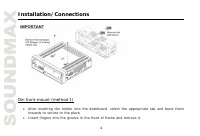
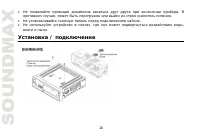
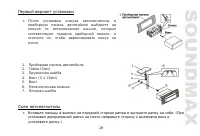
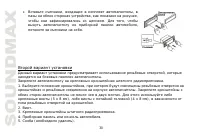
4 Installation/Connections Din front-mount (method 1) After inserting the holder into the dashboard, select the appropriate tab and bend theminwards to secure to the placeInsert fingers into the groove in the front of frame and remove it.
Page 6 - Detachable control panel; Detaching the control panel
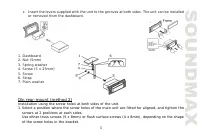
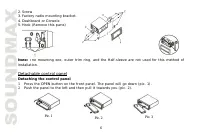
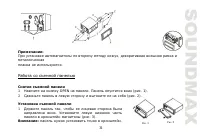
6 Pic. 1 2. Screw3. Factory radio mounting bracket.4. Dashboard or Console5. Hook (Remove this parts) Note: The mounting box, outer trim ring, and the Half-sleeve are not used for this method ofinstallation. Detachable control panel Detaching the control panel 1. Press the OPEN button on the front p...
Page 7 - Attaching the control panel
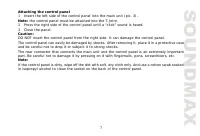
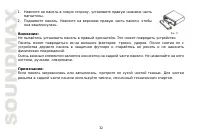
7 Attaching the control panel 1. Insert the left side of the control panel into the main unit (pic. 3). Note: the control panel must be attached into the T-Joint. 2. Press the right side of the control panel until a “click” sound is heard. 3. Close the panel. Caution:DO NOT insert the control panel ...
Page 8 - Electrical connections
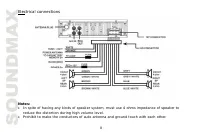
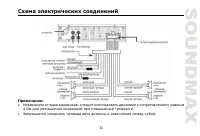
8 Electrical connections Notes: In spite of having any kinds of speaker system, must use 4 ohms impedance of speaker toreduce the distortion during high volume level.Prohibit to make the conductors of auto antenna and ground touch with each other.
Page 9 - Using the ISO Connector; Location
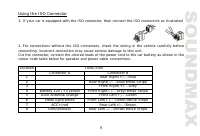
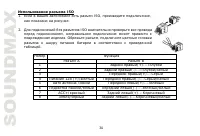
9 Using the ISO Connector 1. If your car is equipped with the ISO connector, then connect the ISO connectors as illustrated. 2. For connections without the ISO connectors, check the wiring in the vehicle carefully beforeconnecting, incorrect connection may cause serious damage to this unit.Cut the c...
Page 10 - Accessories
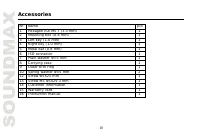
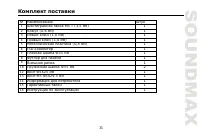
10 Accessories Name pcs 1 Hexagon nut M5 T (3.5 mm) 1 2 Mounting box (0.6 mm) 1 3 Left key (1.0 mm) 1 4 Right key (1.0 mm) 1 5 Metal bar (0.8 mm) 1 6 ISO connector 1 7 Plain washer =5 mm 1 8 Carrying case 1 9 Outer trim ring 1 10 Spring washer =5 mm 2 12 Screw 5X25 mm 1 13 Screw M5 5X29.3 mm 1 14 Cu...
Page 11 - Panel controls
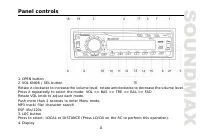
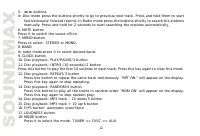
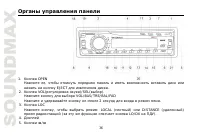
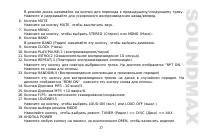
11 Panel controls 1. OPEN button2. VOL KNOB / SEL buttonRotate it clockwise to increase the volume level; rotate anticlockwise to decrease the volume level.Press it repeatedly to select the mode: VOL => BAS => TRE => BAL => FADRotate VOL knob to adjust each mode.Push more than 2 seconds ...
Page 13 - seconds to power off.; Inner panel; Press the OPEN button on the front panel to flip it down.
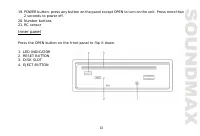
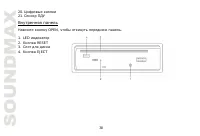
13 19. POWER button: press any button on the panel except OPEN to turn on the unit. Press more than 2 seconds to power off. 20. Number buttons21. RC sensor Inner panel Press the OPEN button on the front panel to flip it down. 1. LED INDICATOR2. RESET BUTTON3. DISK SLOT4. EJECT BUTTON
Page 14 - Remote Control
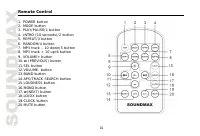
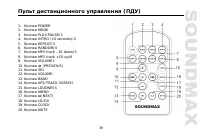
14 Remote Control 1. POWER button2. MODE button3. PLAY/PAUSE/1 button4. INTRO (10 seconds)/2 button5. REPEAT/3 button6. RANDOM/4 button7. MP3 track – 10 down/5 button8. MP3 track + 10 up/6 button9. VOLUME+ button10. (PREVIOUS) button11. SEL button12. VOLUME- button13. BAND button14. APS/TRACK SEARCH...
Page 15 - Menu Function; to indicate
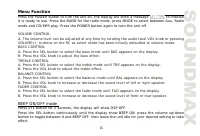
15 Menu Function Press the POWER button to turn the unit on, the display will show a message to indicate it is ready to use. Press the BAND for the radio mode, press MODE to select between Aux, Radiomode and CD/MP3 play. Press the POWER button again to turn the unit off. VOLUME CONTROLA. The volume ...
Page 16 - Press the CLK button anytime to view the time clock display.; DSP mode
16 LOUD mode Press the LUD to emphasize the Bass output, the word LOUD ON shows on the display indicates thatthe loudness function is on. Press again to cancel. Time clock setting The time clock can be set anytime when the power is on.Press the CLK button and then press and hold CLK button for 3 sec...
Page 17 - Radio Tune/ Seek Function; In Radio Mode, press and hold; Save Your Preset Stations; Press
17 Radio Tune/ Seek Function In Radio Mode, press and hold / buttons for more than 3 second to manually adjust the radio frequency.Rotate volume knob for less than 1 second, the radio will seek to the next up or down strong andclear frequency station. Repeat this action to seek for other desired sta...
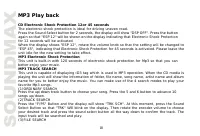
Page 18 - MP3 Play back; CD Electronic Shock Protection 12or 45 seconds; The electronic shock protection is ideal for driving uneven road.; MP3 Electronic Shock Protection; better enjoy your music.; MP3 TRACK SEARCH; input track will be searched and play.
18 MP3 Play back CD Electronic Shock Protection 12or 45 seconds The electronic shock protection is ideal for driving uneven road. Press the Sound Select button for 2 seconds, the display will show "DSP OFF". Press the button again so that "ESP 12" will be shown on the display indicat...
Page 19 - MP3 Overview; Notes on MP3
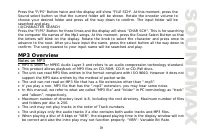
19 Press the "F/PS" Button twice and the display will show "FILE SCH". At this moment, press the Sound select button so that the current folder will be shown. Rotate the encoder volume to choose your desired folder and press all the way down to confirm. The input folder will be searc...
Page 20 - Notes on creating your own CD-Rs or CD-RWs containing MP3 files
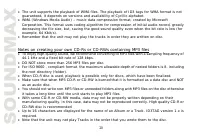
20 The unit supports the playback of WMA files. The playback of ID3 tags for WMA format is notguaranteed, it depends on versions and availability of Cyrillic alphabet.WMA (Windows Media Audio) – music data compression format, created by MicrosoftCorporation. This format uses coding algorithm for com...
Page 22 - Cleaning the cabinet
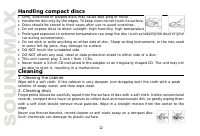
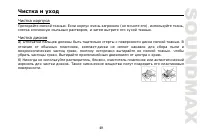
22 Handling compact discs Dirty, scratched or warped discs may cause skip ping or noise.Handle the disc only by the edges. To keep clean do not touch its surface. Discs should be stored in their cases after use to avoid scratches.Do not expose discs to direct sunlight, high humidity, high temperatur...
Page 23 - Troubleshooting guide; General
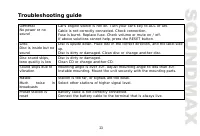
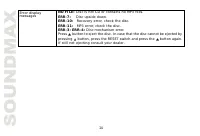
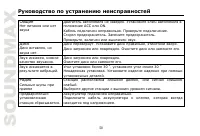
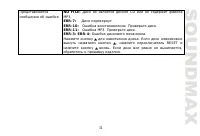
23 Troubleshooting guide General No power or nosound Car's engine switch is not on. Turn your car's key to ACC or ON.Cable is not correctly connected. Check connection.Fuse is burnt. Replace fuse. Check volume or mute on / off.If above solutions cannot help, press the RESET button. Disc Disc is insi...
Page 25 - Specification; FM stereo radio Frequency range
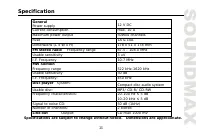
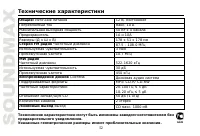
25 Specification Specifications are subject to change without notice. Dimensions are approximate. GeneralPower supply 12 V DC Current consumption max. 10 A Maximum power output 50Wx4 channels Fuse 1A & 10A Dimensions (L x W x H) 178 x 51 x 178 mm FM stereo radio Frequency range 87.5 - 108.0 MHz ...
Page 31 - OPEN
31 : , . 1. OPEN . ( . 1). 2. ( . 2). 1. , . ( . 3). : . . 1 . 2
Page 34 - ISO
34 ISO 1. ISO, , . 2. ISO , . , . A B 1 (+)--- 2 (-)--- 3 (+)--- 4 12 (+)/ (-)--- 5 / (+)--- 6 ((-)--- 7 ACC+/ (+)--- 8 (-)---
Page 50 - ACC
50 . ACC ON. . . . . , . , . . , . . . , . . . . 30 , 30 . . , . . . . , .
Page 52 - CD
52 : 12 , . 10 50 4 10 ( ) 178 51 178 FM 87.5 - 108.0 3 10.7 MW 522-1620 30 450 MP3/ CD-R/ CD-RW20-100 5 10-20 5 CD 50 (1 ) 2 CD . 1000 . .