Page 2 - Table of contents
2 Dear customer! Thank you for purchasing our product. For safety, it is strongly recommended to read this manual carefully before connecting, operating and/or adjusting the product and keep the manual for reference in the future. Table of contents Important safeguards .................................
Page 3 - Important safeguards
3 Important safeguards • Read carefully through the manual to familiarize yourself with this unit. • Keep this manual handy as a reference for operating procedures and precautions. Do not allow persons who have not read through this manual to use this unit. • Do not allow this unit to come into cont...
Page 4 - Accessories
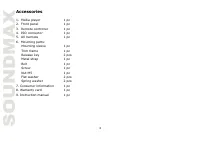
4 Accessories 1. Media player 1 pc 2. Front panel 1 pc 3. Remote controller 1 pc 4. ISO connector 1 pc 5. AV harness 1 pc 6. Mounting parts: Mounting sleeve 1 pc Trim frame 1 pc Release key 2 pcs Metal strap 1 pc Bolt 1 pc Screw 1 pc Nut M5 1 pc Flat washer 2 pcs Spring washer 2 pcs 7. Consumer info...
Page 5 - Installation/Connections
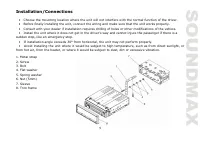
5 Installation/Connections • Choose the mounting location where the unit will not interfere with the normal function of the driver. • Before finally installing the unit, connect the wiring and make sure that the unit works properly. • Consult with your dealer if installation requires drilling of hol...
Page 6 - Mounting; Install the unit into the sleeve until the side locks are fixed.
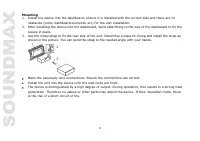
6 Mounting 1. Install the sleeve into the dashboard; ensure it is installed with the correct side and there are no obstacles (wires, dashboard elements, etc) for the unit installation. 2. After installing the sleeve into the dashboard, bend tabs fitting to the size of the dashboard to fix the sleeve...
Page 7 - the panel until a click. Ensure the panel is fixed properly.
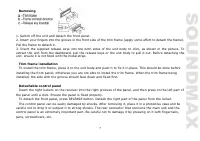
7 Removing 1. Switch off the unit and detach the front panel. 2. Insert your fingers into the groove in the front side of the trim frame (apply some effort to detach the frame). Pull the frame to detach it. 3. Insert the supplied release keys into the both sides of the unit body to click, as shown i...
Page 9 - Connection diagram
Page 10 - Using the ISO Connector; Location
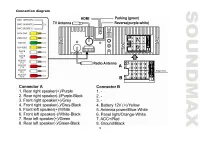
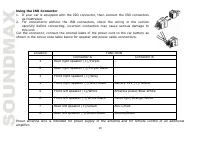
10 Using the ISO Connector 1. If your car is equipped with the ISO connector, then connect the ISO connectors as illustrated. 2. For connections without the ISO connectors, check the wiring in the vehicle carefully before connecting, incorrect connection may cause serious damage to this unit. Cut th...
Page 12 - AV Input; Subwoofer Output
12 AV Input The AV Input jack is a set of composite inputs on the rear of the unit. Press the MOD button to choose AUX. You can use it to connect any portable audio/video devices such as a DVD player or VCD player to the unit. Refer to the Connection diagram for more details. Backup Camera Input The...
Page 13 - Panel controls; Front panel
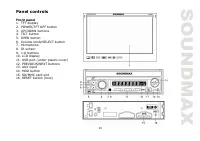
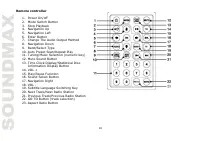
13 Panel controls Front panel 1. TFT display 2. POWER/TFT OFF button 3. UP/DOWN buttons 4. TILT button 5. OPEN button 6. Volume knob/SELECT button 7. Microphone 8. IR sensor 9. 1-6 buttons 10. LCD display 11. USB port (under plastic cover) 12. PREVIOUS/NEXT buttons 13. AUX input 14. MOD button 15. S...
Page 15 - Changing the battery
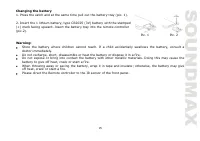
15 Changing the battery 1. Press the catch and at the same time pull out the battery tray (pic. 1). 2. Insert the 1 lithium battery, type CR2025 (3V) battery with the stamped (+) mark facing upward. Insert the battery tray into the remote controller (pic.2). Warning: Store the battery where children...
Page 16 - General operations; Touch screen; the options you need.; Turning the unit on/off; button to turn the unit off.; Sliding out the monitor; erase the clock setting and some memorized functions.
16 General operations Touch screen The touch screen enables you to carry out most functions not only by pressing buttons but also by touching the options you need. Turning the unit on/off Press POWER/TFT OFF button on the panel or button on the RC to turn the unit on. Press and hold the button to tu...
Page 17 - Additional audio settings; listening to music at low volumes.
17 TFT display on/off When the unit is on, press POWER/TFT OFF button on the panel to switch off the display. When the display is off, the video out signal will be available so that the connected monitor will show the screen of the unit. Press this button again to resume the image. Mode selection • ...
Page 19 - Bluetooth; “0000” as password to establish connection.
19 Bluetooth PAIRING At BT mode, search bluetooth device by the phone and “BT CAR STEREO” will appear in your phone. Input “0000” as password to establish connection. DIAL PAD Touch the dial pad to dial the number you would like to call. Touch the CALL (green) button to send the number. CALL RECORD ...
Page 20 - VIEW MISSED CALLS; VIEW DIALED CALLS; for you to view them one by one.; PLAYING MUSIC ON YOUR CELLPHONE
20 Touch the RECEIVED CALLS button, the received calls will be displayed. There will be up/down arrows displayed for you to view them one by one. VIEW MISSED CALLS Touch the MISSED CALLS button, the missed calls will be displayed. There will be up/down arrows displayed for you to view them one by on...
Page 21 - Radio operations; Band select
21 Radio operations Band select In Radio mode press the BAND button onscreen to choose among the five radio bands - three FM Bands (FM1, FM2, and FM3) and two AM Bands (AM1, and AM2). Each of the five bands can store up to six preset stations, for a total of 30 preset memory stations. Auto/Manual tu...
Page 23 - TV tuner operations; SCAN
23 Press LIST button to show the function list; tap PTY to select PTY ON or PTY OFF. When PTY is selected, the radio starts to search corresponding PTY information, and stops if the corresponding PTY information is detected. If no buttons are pressed within several seconds, previously selected PTY i...
Page 24 - the above extensions and codecs will be read by this unit.
24 AUDIO To switch the audio system, tap the AUDIO button on the right of the screen. The sequence will be shown as follows: PAL BG---PAL I---PAL DK ENTER When TV is playing, tap the screen anytime to come back to the TV menu. Press ENTER to resume playing. USB/SD operations USB/SD/MMC notes USB for...
Page 25 - the unit or damage to the software.; Playback
25 Warning: usage of external USB drives containing BIN files in the root directory may cause malfunction of the unit or damage to the software. Playback When a USB or a memory card is first connected, playback will begin automatically. Depending on the number of files and folders, the device may ta...
Page 27 - Smartphone mirroring by HDMI; and any devices with HDMI output.; List of Android Smartphone’s with MHL support
27 Smartphone mirroring by HDMI This unit is equipped with an HDMI input for connection with smartphones, DVBT-2 receivers, media players and any devices with HDMI output. CONNECTION WITH ANDROID PHONE (MHL) Connect any Android phone with MHL (Mobile High Definition Link) support. You need to have a...
Page 28 - Cleaning; Cleaning the cabinet
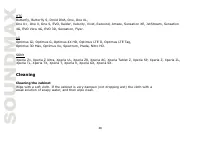
28 HTC Butterfly, Butterfly S, Droid DNA, One, One XL, One X+, One X, One S, EVO, Raider, Velocity, Vivid, Rezound, Amaze, Sensation XE, JetStream, Sensation 4G, EVO View 4G, EVO 3D, Sensation, Flyer. LG Optimus GJ, Optimus G, Optimus 4X HD, Optimus LTE II, Optimus LTE Tag, Optimus 3D Max, Optimus V...
Page 29 - Troubleshooting guide
29 Troubleshooting guide Below is a table describing simple measures that can help you eliminate most problems likely to emerge when this unit is in use. If below measures do not help, turn to a service center or to the nearest dealer. Symptom Cause/Solution No Power Check whether the fuse is blown,...
Page 30 - Specifications; Specifications are subject to change without notice.
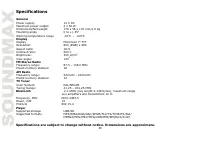
30 Specifications General Power supply: 12 V DC Maximum power output: 4 x 50 W Dimensions/Net weight 178 x 58 x 170 mm/1.6 kg Mounting angle 0 to +/-35 0 Working temperature range -10 0 С - +60 0 С Display Display Motorized 7” TFT Resolution: 800 (RGB) x 480 Aspect ratio: 16:9 Contrast ratio: 500:1 ...
Page 31 - Уважаемый покупатель!; Содержание
31 Уважаемый покупатель! Благодарим Вас за покупку нашего изделия. Для обеспечения безопасности рекомендуется тщательно изучить настоящее руководство перед подключением, эксплуатацией и/или регулировкой изделия, и сохраняйте руководство для использования в будущем. Содержание Меры предосторожности ....
Page 32 - Меры предосторожности; или стать причиной возгорания или поражения лазерным лучом.
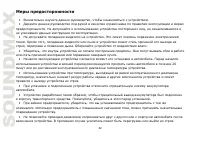
32 Меры предосторожности • Внимательно изучите данное руководство, чтобы ознакомиться с устройством. • Держите данное руководство под рукой в качестве справочника по правилам эксплуатации и мерам предосторожности. Не допускайте к использованию устройства посторонних лиц, не ознакомившихся и не усвои...
Page 33 - устройством в течение длительного времени или во время грозы.
33 • Убедитесь, что источник питания и антенна отключены, если Вы не будете пользоваться устройством в течение длительного времени или во время грозы. • Убедитесь, что источник питания отключен, если обнаружена неправильная работа устройства, устройство издает нехарактерные звуки, запах, выделяет ды...
Page 34 - Комплект поставки
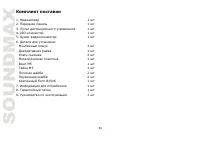
34 Комплект поставки 1. Медиаплеер 1 шт 2. Передняя панель 1 шт 3. Пульт дистанционного управления 1 шт 4. ISO-коннектор 1 шт 5. Аудио-видеоконнектор 1 шт 6. Детали для установки: Монтажный кожух 1 шт Декоративная рамка 1 шт Ключ-съемник 2 шт Металлическая пластина 1 шт Винт M5 1 шт Гайка M5 1 шт Пл...
Page 35 - Установка/Подключение
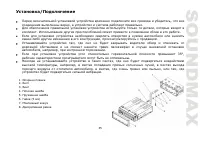
35 Установка/Подключение Перед окончательной установкой устройства временно подключите все провода и убедитесь, что все соединения выполнены верно, а устройство и система работают правильно. Для обеспечения правильной установки устройства используйте только те детали, которые входят в комплект. Испо...
Page 36 - Установка устройства в приборную панель
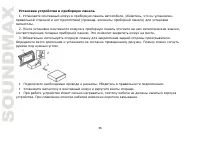
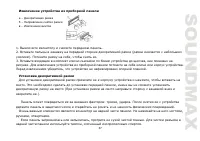
36 Установка устройства в приборную панель 1. Установите монтажный кожух в приборную панель автомобиля, убедитесь, что он установлен правильной стороной и нет препятствий (провода, элементы приборной панели) для установки магнитолы. 2. После установки монтажного кожуха в приборную панель отогните на...
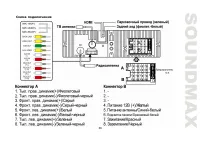
Page 39 - Схема подключения
Page 40 - Использование разъема ISO; показано на рисунке.
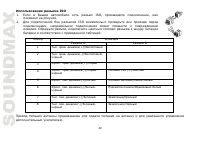
40 Использование разъема ISO 1. Если в Вашем автомобиле есть разъем ISO, произведите подключение, как показано на рисунке. 2. Для подключений без разъемов ISO внимательно проверьте все провода перед подключением, неправильное подключение может привести к повреждениям изделия. Обрежьте разъем, подклю...
Page 41 - Подключение парковочного провода
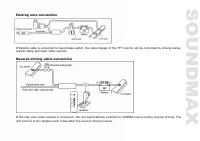
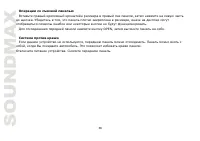
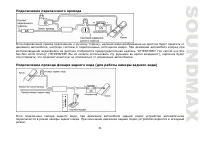
41 Подключение парковочного провода Если парковочный провод подсоединен к ручному тормозу, наличие видеоизображения на дисплее будет зависеть от движения автомобиля, настроек системы и подключенных источников видео. При движении автомобиля вперед при воспроизведении видеофайла на дисплее отобразится...
Page 42 - Аудиовидеовход; Линейный выход
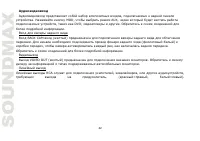
42 Аудиовидеовход Аудиовидеовход представляет собой набор композитных входов, подключаемых к задней панели устройства. Нажимайте кнопку MOD, чтобы выбрать режим AUX, через который будет вестись работа подключаемых устройств, таких как DVD, медиаплееры и другие. Обратитесь к схеме соединений для боле...
Page 43 - Элементы управления; Передняя панель
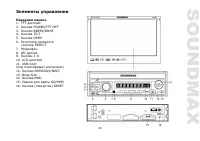
43 Элементы управления Передняя панель 1. TFT дисплей 2. Кнопка POWER/TFT OFF 3. Кнопки ВВЕРХ/ВНИЗ 4. Кнопка TILT 5. Кнопка OPEN 6. Регулятор громкости /кнопка SELECT 7. Микрофон 8. ИК-датчик 9. Кнопки 1-6 10. LCD дисплей 11. USB-порт (под пластиковым колпачком) 12. Кнопки PREVIOUS/NEXT 13. Вход AUX...
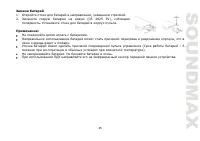
Page 45 - Замена батарей; Откройте отсек для батарей в направлении, указанном стрелкой.
45 Замена батарей 1. Откройте отсек для батарей в направлении, указанном стрелкой. 2. Замените старую батарею на новую (CR 2025 3V), соблюдая полярность. Установите отсек для батарей в корпус пульта. Примечание: Не позволяйте детям играть с батареями. Неправильное использование батарей может стать п...
Page 46 - Общие операции; Сенсорный дисплей; прикосновения к сенсорным кнопкам дисплея.; Включение/выключение устройства; удерживайте эту кнопку, чтобы выключить устройство.; Выдвижение дисплея; повреждению механизма.
46 Общие операции Сенсорный дисплей Данное устройство оснащено сенсорным дисплеем, позволяющим выполнять многие операции путем прикосновения к сенсорным кнопкам дисплея. Включение/выключение устройства Нажмите кнопку POWER/TFT OFF на панели или кнопку на ПДУ, чтобы включить устройство. Нажмите и уде...
Page 48 - низких частот при прослушивании музыки на низкой громкости.; Вход AUX; Операции с Bluetooth
48 • Тонкомпенсация: выберете ВКЛ или ВЫКЛ. Включение этой функции улучшит звучание высоких и низких частот при прослушивании музыки на низкой громкости. Когда эквалайзер находится в любом режиме кроме OFF, настройка высоких и низких частот невозможна. Вход AUX Разъем AUX предназначен для подключени...
Page 49 - зеленую кнопку ВЫЗОВ для звонка.; Операции с радио; Выбор диапазона; чтобы менять частоту пошагово.
49 ЭКРАН НАБОРА НОМЕРА Подключив телефон, можно осуществлять телефонные вызовы. Введите нужный номер и нажмите на зеленую кнопку ВЫЗОВ для звонка. ИСТОРИЯ ВЫЗОВОВ Нажмите на кнопку ИСТОРИЯ для просмотра принятых, пропущенных и набранных вызовов. A2DP Нажмите на кнопку МУЗЫКА для перехода на экран A2...
Page 51 - Функция TA (программы о дорожном движении)
51 Функция AF (альтернативные частоты) При слабом сигнале функция альтернативных частот позволяет приемнику настраиваться на другие станции с тем же идентификационным кодом, что и текущая станция, но с более сильным сигналом. При этом вместо частоты на дисплее появится название станции. Нажмите кноп...
Page 52 - Операции с ТВ-тюнером; Поиск
52 Операции с ТВ-тюнером Подключите ТВ-антенну к соответствующему разъёму на задней панели устройства. Поиск Нажмите на кнопку SCAN на сенсорном дисплее, чтобы запустить поиск каналов с наиболее сильным сигналом для дальнейшего сохранения. Нажимайте на кнопки НАЗАД /ВПЕРЕД для поиска следующего кана...
Page 53 - Аудио; переключаться в следующем порядке:; Возврат в меню
53 Аудио Чтобы изменить систему аудио, нажимайте кнопку АУДИО (AUDIO) справа на экране. Системы будут переключаться в следующем порядке: PAL BG---PAL I---PAL DK. Возврат в меню Во время просмотра телеканала нажмите на экран, чтобы вернуться в меню. Нажмите кнопку ENTER на сенсорном дисплее, чтобы ве...
Page 55 - Передача данных через HDMI; медиаплеерами и другими устройствами, имеющими выход HDMI.
55 Управление кнопками руля (SWC) Вы можете подключить к устройству руль автомобиля и выполнять определенные функции кнопками на руле. См. схему подключения для более подробной информации. Необходимо сначала подключить коричневый провод (SWC 1), затем белый и серый (SWC 2A и 2B), в зависимости от ко...
Page 56 - спецификации смартфона.
56 изображение в телефоне будут дублироваться на экране устройства, это может быть удобно для таких задач, как навигация, обмен фото- и видеоматериалами и проведение презентаций. Чтобы определить, поддерживает ли Ваш смартфон технологию MHL, изучите технические спецификации смартфона. Устройством по...
Page 57 - Чистка и уход; Чистка корпуса
57 SONY Xperia Z1, Xperia Z Ultra, Xperia UL, Xperia ZR, Xperia AC, Xperia Tablet Z, Xperia SP, Xperia Z, Xperia ZL, Xperia TL, Xperia TX, Xperia T, Xperia V, Xperia GX, Xperia SX. Чистка и уход Чистка корпуса Протирайте мягкой тканью. Если корпус очень загрязнен (не мочите его), используйте ткань, ...
Page 58 - Руководство по устранению неисправностей
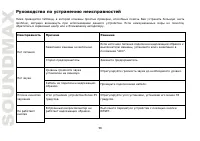
58 Руководство по устранению неисправностей Ниже приводится таблица, в которой описаны простые проверки, способные помочь Вам устранить большую часть проблем, могущих возникнуть при использовании данного устройства. Если нижеуказанные меры не помогли, обратитесь в сервисный центр или к ближайшему ав...
Page 59 - Технические характеристики; Общие
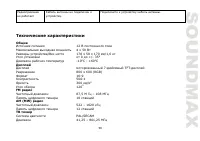
59 Радиоприемник не работает Кабель антенны не подключен к устройству. Подключите к устройству кабель антенны. Технические характеристики Общие Источник питания 12 В постоянного тока Максимальная выходная мощность 4 х 50 Вт Размеры устройства/Вес нетто 178 х 58 х 170 мм/1,6 кг Угол установки от 0 до...
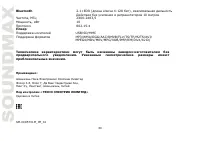
Page 60 - Действия без усиления и ретрансляторов 10 метров; Плеер; Поддержка носителей
60 Bluetooth 2.1+EDR (длина ключа 4-128 бит), максимальная дальность Действия без усиления и ретрансляторов 10 метров Частота, МГц 2400-2483,5 Мощность, мВт 10 Протокол 802.15.4 Плеер Поддержка носителей USB/SD/MMC Поддержка форматов MP3/WMA/OGG/AAC/RMVB/FLV/TS/TP/M2TS/AVI/ MPEG4/MOV/MKV/MPG/VOB/PMP...