Page 3 - Important safeguards
3 Important safeguards • Read carefully through the manual to familiarize yourself with this unit. • Keep this manual handy as a reference for operating procedures and precautions. Do not allow persons who have not read through this manual to use this unit. • Do not allow this unit to come into cont...
Page 4 - Accessories
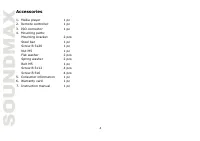
4 Accessories 1. Media player 1 pc 2. Remote controller 1 pc 3. ISO connector 1 pc 4. Mounting parts: Mounting bracket 2 pcs Steel bar 1 pc Screw B 5x20 1 pc Nut M5 1 pc Flat washer 2 pcs Spring washer 2 pcs Bolt M5 1 pc Screw B 5x12 4 pcs Screw B 5x6 4 pcs 5. Consumer information 1 pc 6. Warranty c...
Page 5 - Installation/Connections
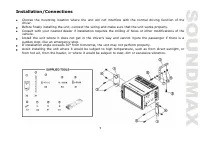
5 Installation/Connections Choose the mounting location where the unit will not interfere with the normal driving function of the driver. Before finally installing the unit, connect the wiring and make sure that the unit works properly. Consult with your nearest dealer if installation requires the d...
Page 6 - Mounting
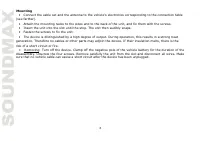
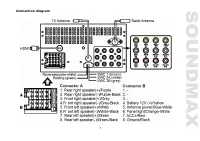
6 Mounting • Connect the cable set and the antenna to the vehicle’s electronics corresponding to the connection table (see farther). • Attach the mounting racks to the sides and to the back of the unit, and fix them with the screws. • Insert the unit into the slot until the stop. The unit then audib...
Page 7 - Connection diagram
Page 8 - Using the ISO Connector; Location
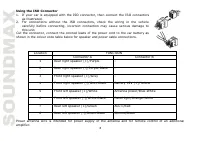
8 Using the ISO Connector 1. If your car is equipped with the ISO connector, then connect the ISO connectors as illustrated. 2. For connections without the ISO connectors, check the wiring in the vehicle carefully before connecting, incorrect connection may cause serious damage to this unit. Cut the...
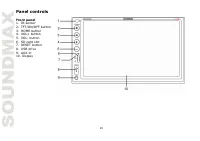
Page 10 - Panel controls; Front panel
10 Panel controls Front panel 1. IR-sensor 2. TFT/ON/OFF button 3. HOME button 4. VOL+ button 5. VOL- button 6. SD card slot 7. RESET button 8. USB drive 9. AUX-in 10. Display
Page 12 - Changing the battery
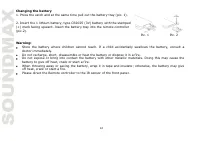
12 Changing the battery 1. Press the catch and at the same time pull out the battery tray (pic. 1). 2. Insert the 1 lithium battery, type CR2025 (3V) battery with the stamped (+) mark facing upward. Insert the battery tray into the remote controller (pic.2). Warning: Store the battery where children...
Page 13 - General operations; Touch screen; erase the clock setting and some memorized functions.; Setting the sound characteristics; When EQ is ON, bass control is not available.
13 General operations Touch screen Due to the touch screen, you can fulfill most functions not only by pressing buttons but also by touching the options you need. Turning the unit on/off Press the POWER Button to turn the unit on. When the unit is on, press the POWER Button once to turn the TFT off....
Page 14 - Mute function
14 • Balance: Press SEL Button on the RC until the display shows “BAL”, then use the VOL +/- Button to adjust the balance between the left & right speakers. • Fader: Press SEL Button on the RC until the display shows “FAD”, then use the VOL +/- Button to adjust the balance between the front &...
Page 15 - Subwoofer
15 Subwoofer The Subwoofer Output is on the wire harness. (Refer to Wiring Diagram) This output is designed for connecting up to 2 subwoofers to the unit. Follow the amplifier’s installation instructions. You can turn the subwoofer on/off by pressing the icon in the main menu. Rear view camera funct...
Page 16 - Radio operations; Band select
16 Radio operations Band select In Radio mode press the BAND button onscreen to choose among the five radio bands - three FM Bands (FM1, FM2, and FM3) and two AM Bands (AM1, and AM2). Each of the five bands can store up to six preset stations, for a total of 30 preset memory stations. Auto/Manual tu...
Page 18 - TV tuner operations; SCAN
18 PTY (Program Type) Press LIST button to show the function list; tap PTY to select PTY ON or PTY OFF. When PTY is selected, the radio starts to search corresponding PTY information, and stops if the corresponding PTY information is detected. If no buttons are pressed within several seconds, previo...
Page 19 - the unit or damage to the software.; Inserting an SD card/USB device
19 AUDIO To switch the audio system, tap the AUDIO button on the right of the screen. The sequence will be shown as follows: SECAM BG => SECAM DK ENTER When TV is playing, tap the screen anytime to come back to the TV menu. Press ENTER to resume playing. USB/SD operations USB/SD/MMC notes USB for...
Page 21 - Other settings
21 Other settings During playback, you can adjust other settings including random/repeat play, and sub-title/audio channel, etc, by tapping on the menu list on the button of the screen. During video playback, tap the screen once and the menu list will show up. Steering wheel control (SWC) Refer to t...
Page 22 - Smartphone mirroring by HDMI; and any devices with HDMI output.; List of Android Smartphone’s with MHL support
22 Smartphone mirroring by HDMI This unit is equipped with an HDMI input for connection with smartphones, DVBT-2 receivers, media players and any devices with HDMI output. CONNECTION WITH ANDROID PHONE (MHL) Connect any Android phone with MHL (Mobile High Definition Link) support. You need to have a...
Page 23 - Cleaning; Cleaning the cabinet
23 Glide, Epic 4G Touch, Galaxy S II HTC Butterfly, Butterfly S, Droid DNA, One, One XL, One X+, One X, One S, EVO, Raider, Velocity, Vivid, Rezound, Amaze, Sensation XE, JetStream, Sensation 4G, EVO View 4G, EVO 3D, Sensation, Flyer. LG Optimus GJ, Optimus G, Optimus 4X HD, Optimus LTE II, Optimus ...
Page 24 - Troubleshooting guide
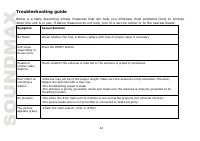
24 Troubleshooting guide Below is a table describing simple measures that can help you eliminate most problems likely to emerge when this unit is in use. If below measures do not help, turn to a service center or to the nearest dealer. Symptom Cause/Solution No Power Check whether the fuse is blown,...
Page 25 - Specifications; Specifications are subject to change without notice.
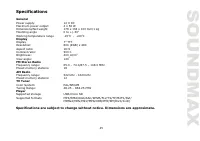
25 Specifications General Power supply: 12 V DC Maximum power output: 4 x 50 W Dimensions/Net weight 178 x 138 x 100 mm/1 kg Mounting angle 0 to +/-30 0 Working temperature range -20 0 С - +60 0 С Display Display 7” TFT Resolution: 800 (RGB) x 480 Aspect ratio: 16:9 Contrast ratio: 500:1 Brightness:...
Page 26 - Уважаемый покупатель!; Содержание
26 Уважаемый покупатель! Благодарим Вас за покупку нашего изделия. Для обеспечения безопасности рекомендуется тщательно изучить настоящее руководство перед подключением, эксплуатацией и/или регулировкой изделия, и сохраняйте руководство для использования в будущем. Содержание Меры предосторожности ....
Page 27 - Меры предосторожности; или стать причиной возгорания или поражения лазерным лучом.
27 Меры предосторожности • Внимательно изучите данное руководство, чтобы ознакомиться с устройством. • Держите данное руководство под рукой в качестве справочника по правилам эксплуатации и мерам предосторожности. Не допускайте к использованию устройства посторонних лиц, не ознакомившихся и не усвои...
Page 28 - устройством в течение длительного времени или во время грозы.
28 • Убедитесь, что источник питания и антенна отключены, если Вы не будете пользоваться устройством в течение длительного времени или во время грозы. • Убедитесь, что источник питания отключен, если обнаружена неправильная работа устройства, устройство издает нехарактерные звуки, запах, выделяет ды...
Page 29 - Комплект поставки
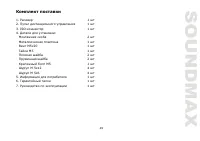
29 Комплект поставки 1. Ресивер 1 шт 2. Пульт дистанционного управления 1 шт 3. ISO-коннектор 1 шт 4. Детали для установки: Монтажная скоба 2 шт Металлическая пластина 1 шт Винт M5х20 1 шт Гайка M5 1 шт Плоская шайба 2 шт Пружинная шайба 2 шт Крепежный болт М5 1 шт Шуруп М 5х12 4 шт Шуруп М 5х6 4 шт...
Page 30 - Установка/Подключение
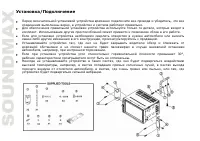
30 Установка/Подключение Перед окончательной установкой устройства временно подключите все провода и убедитесь, что все соединения выполнены верно, а устройство и система работают правильно. Для обеспечения правильной установки устройства используйте только те детали, которые входят в комплект. Испо...
Page 31 - Установка устройства в приборную панель
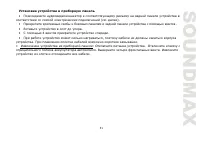
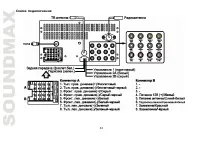
31 Установка устройства в приборную панель • Подсоедините аудиовидеоконнектор к соответствующему разъему на задней панели устройства в соответствии со схемой электрических подключений (см. далее). • Прикрепите крепежные скобы к боковым панелям и задней панели устройства с помощью винтов . • Вставьте...
Page 32 - Схема подключения
Page 33 - Использование разъема ISO; показано на рисунке.
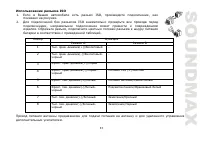
33 Использование разъема ISO 1. Если в Вашем автомобиле есть разъем ISO, произведите подключение, как показано на рисунке. 2. Для подключений без разъемов ISO внимательно проверьте все провода перед подключением, неправильное подключение может привести к повреждениям изделия. Обрежьте разъем, подклю...
Page 34 - Подключение парковочного провода
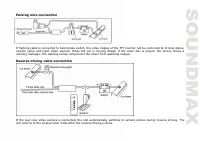
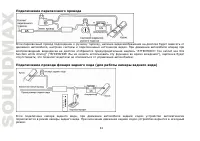
34 Подключение парковочного провода Если парковочный провод подсоединен к ручному тормозу, наличие видеоизображения на дисплее будет зависеть от движения автомобиля, настроек системы и подключенных источников видео. При движении автомобиля вперед при воспроизведении видеодиска на дисплее отобразится...
Page 35 - Элементы управления; Передняя панель
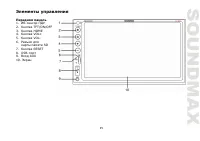
35 Элементы управления Передняя панель 1. ИК-сенсор ПДУ 2. Кнопка TFT/ON/OFF 3. Кнопка HOME 4. Кнопка VOL+ 5. Кнопка VOL- 6. Разъем для карты памяти SD 7. Кнопка RESET 8. USB-порт 9. Вход AUX 10. Экран
Page 37 - Замена батарей; Откройте отсек для батарей в направлении, указанном стрелкой.
37 Замена батарей 1. Откройте отсек для батарей в направлении, указанном стрелкой. 2. Замените старую батарею на новую (CR 2025 3V), соблюдая полярность. Установите отсек для батарей в корпус пульта. Примечание: Не позволяйте детям играть с батареями. Неправильное использование батарей может стать п...
Page 38 - Общие операции; Сенсорный дисплей; прикосновения к сенсорным кнопкам дисплея.; Включение/выключение; это повлечёт за собой сброс часов и установленных настроек.; Установки звука; регулировать уровень громкости кнопками на сенсорном дисплее.
38 Общие операции Сенсорный дисплей Данное устройство оснащено сенсорным дисплеем, позволяющим выполнять многие операции путем прикосновения к сенсорным кнопкам дисплея. Включение/выключение Нажмите кнопку POWER, чтобы включить устройство. Когда устройство включено, нажмите на кнопку POWER, чтобы вы...
Page 40 - Сабвуфер
40 Сабвуфер Выход для сабвуфера расположен на задней панели устройства. (см. схему подключения). Он рассчитан на подключение до 2х сабвуферов. При установке руководствуйтесь инструкцией к сабвуферу. Нажмите и держите кнопку BND/NP/SUB, чтобы включить/выключить эту функцию. Также Вы можете включить е...
Page 41 - Операции с радио; Выбор диапазона; радиостанций. Нажмите на кнопку для ручной настройки частоты.; Сохранение радиостанций
41 Операции с радио Выбор диапазона Нажмите на значок BAND на дисплее, чтобы выбрать один из пяти диапазонов - трёх FM (FM1, FM2, and FM3) и двух AM (AM1, and AM2). Каждая из пяти ячеек может хранить до шести станций. Поиск радиостанции В режиме радио нажмите и держите кнопки PREVIOUS /NEXT, чтобы з...
Page 42 - Линия связи; радио на сенсорном дисплее.; Возврат на главную страницу; Операции с ТВ-тюнером
42 Линия связи Чтобы переключаться межу локальными и удалёнными станциями, нажмите кнопку LOC в режиме радио на сенсорном дисплее. Управление RDS (опционально) AF, TA, PTY являются функциями RDS. Они доступны лишь в некоторых странах. Если в Вашем регионе RDS недоступен, данные функции будут неактив...
Page 44 - ещё раз, чтобы восстановить воспроизведение.
44 директории, может привести к сбоям в работе устройства или к повреждению программного обеспечения. Подключение USB-устройств/карт памяти. Вставьте карту памяти micro SD в слот. Откройте заглушку USB-разъёма на и подключите USB- носитель. Кнопка HOME Нажмите кнопку HOME во время воспроизведения дл...
Page 45 - Перемотка вперёд/назад; вернуться к нормальному воспроизведению, отпустите кнопку.; Обзорное воспроизведение
45 Перемотка вперёд/назад Нажмите и держите значки перемотки на сенсорном дисплее во время воспроизведения. Чтобы вернуться к нормальному воспроизведению, отпустите кнопку. Когда трек отмотается к началу/концу, воспроизведение возобновится в нормальном режиме. Обзорное воспроизведение Нажмите на кно...
Page 46 - Передача данных через HDMI; медиаплеерами и другими устройствами, имеющими выход HDMI.
46 Передача данных через HDMI Устройство оснащено входом HDMI для соединения со смартфонами, DVBT-2 ресиверами, медиаплеерами и другими устройствами, имеющими выход HDMI. СОЕДИНЕНИЕ СО СМАРТФОНОМ НА ANDROID (MHL) К устройству можно подключить любой телефон на платформе Android с поддержкой MHL (Mobi...
Page 47 - Чистка и уход; Чистка корпуса
47 крупнейших производителей (если Вы не нашли свой телефон в списке, изучите его технические спецификации на предмет поддержки MHL): SAMSUNG Galaxy Note 3, Galaxy Tab 3 8”, 10.1”, Galaxy S4, S4 Active, S4 Zoom, Galaxy Mega 6.3/5.8 Galaxy Note 8, Galaxy Express, Galaxy Note II, Galaxy S III, Galaxy ...
Page 48 - Руководство по устранению неисправностей
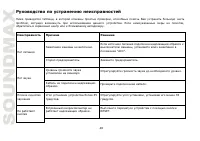
48 Руководство по устранению неисправностей Ниже приводится таблица, в которой описаны простые проверки, способные помочь Вам устранить большую часть проблем, могущих возникнуть при использовании данного устройства. Если нижеуказанные меры не помогли, обратитесь в сервисный центр или к ближайшему ав...
Page 49 - Технические характеристики; Общие
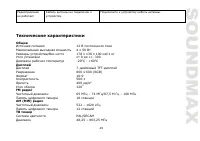
49 Радиоприемник не работает Кабель антенны не подключен к устройству. Подключите к устройству кабель антенны. Технические характеристики Общие Источник питания 12 В постоянного тока Максимальная выходная мощность 4 х 50 Вт Размеры устройства/Вес нетто 178 х 138 х 100 мм/1 кг Угол установки от 0 до ...
Page 50 - Плеер; Поддержка носителей
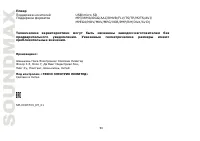
50 Плеер Поддержка носителей USB/micro SD Поддержка форматов MP3/WMA/OGG/AAC/RMVB/FLV/TS/TP/M2TS/AVI/ MPEG4/MOV/MKV/MPG/VOB/PMP/RM(DivX/XviD) Технические характеристики могут быть изменены заводом-изготовителем без предварительного уведомления. Указанные геометрические размеры имеют приблизительные ...