Page 2 - Owner’s Record; Battery pack; English
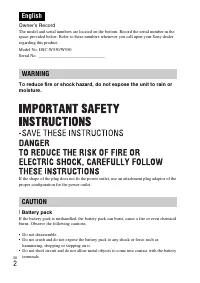
GB 2 Owner’s Record The model and serial numbers are located on the bottom. Record the serial number in the space provided below. Refer to these numbers whenever you call upon your Sony dealer regarding this product. Model No. DSC-W530/W550 Serial No. ______________________________ To reduce fire or...
Page 3 - Battery charger
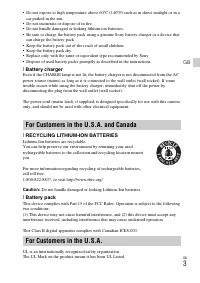
GB 3 GB • Do not expose to high temperature above 60°C (140°F) such as in direct sunlight or in a car parked in the sun. • Do not incinerate or dispose of in fire.• Do not handle damaged or leaking lithium ion batteries.• Be sure to charge the battery pack using a genuine Sony battery charger or a d...
Page 4 - Regulatory Information
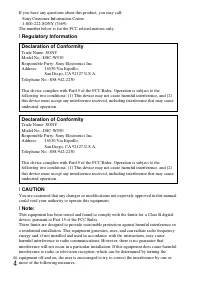
GB 4 If you have any questions about this product, you may call: Sony Customer Information Center1-800-222-SONY (7669). The number below is for the FCC related matters only. [ Regulatory Information [ CAUTION You are cautioned that any changes or modifications not expressly approved in this manual c...
Page 5 - Notice for the customers in the countries applying EU Directives; For Customers in Europe
GB 5 GB – Reorient or relocate the receiving antenna.– Increase the separation between the equipment and receiver.– Connect the equipment into an outlet on a circuit different from that to which the receiver is connected. – Consult the dealer or an experienced radio/TV technician for help. The suppl...
Page 6 - Notice for customers in the United Kingdom
GB 6 [ Disposal of waste batteries (applicable in the European Union and other European countries with separate collection systems) This symbol on the battery or on the packaging indicates that the battery provided with this product shall not be treated as household waste.On certain batteries this s...
Page 7 - Start “User Guide” from the shortcut on the desktop.; Checking the accessories supplied
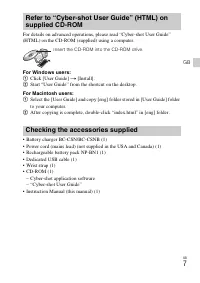
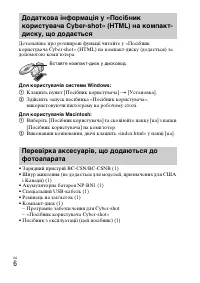
GB 7 GB For details on advanced operations, please read “Cyber-shot User Guide” (HTML) on the CD-ROM (supplied) using a computer. For Windows users: 1 Click [User Guide] t [Install]. 2 Start “User Guide” from the shortcut on the desktop. For Macintosh users: 1 Select the [User Guide] and copy [eng] ...
Page 8 - Identifying parts
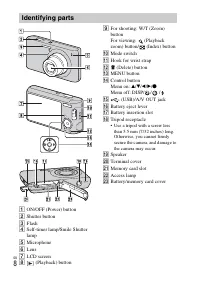
GB 8 A ON/OFF (Power) button B Shutter button C Flash D Self-timer lamp/Smile Shutter lamp E Microphone F Lens G LCD screen H (Playback) button I For shooting: W/T (Zoom) buttonFor viewing: (Playback zoom) button/ (Index) button J Mode switch K Hook for wrist strap L (Delete) button M MENU button N ...
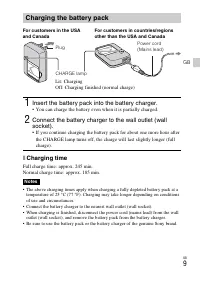
Page 9 - Charging time; Charging the battery pack; Insert the battery pack into the battery charger.; • You can charge the battery even when it is partially charged.
GB 9 GB x Charging time Full charge time: approx. 245 min.Normal charge time: approx. 185 min. • The above charging times apply when charging a fully depleted battery pack at a temperature of 25 °C (77 °F). Charging may take longer depending on conditions of use and circumstances. • Connect the batt...
Page 10 - Note
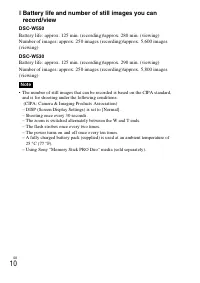
GB 10 x Battery life and number of still images you can record/view DSC-W550 Battery life: approx. 125 min. (recording)/approx. 280 min. (viewing)Number of images: approx. 250 images (recording)/approx. 5,600 images (viewing) DSC-W530 Battery life: approx. 125 min. (recording)/approx. 290 min. (view...
Page 11 - until it clicks into place.; Insert the battery pack.
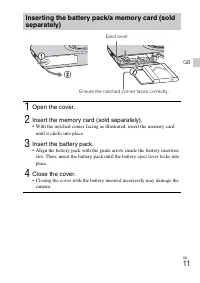
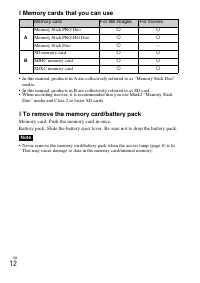
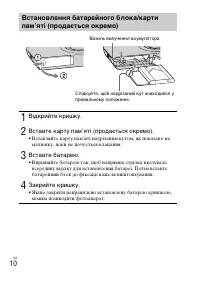
GB 11 GB Inserting the battery pack/a memory card (sold separately) 1 Open the cover. 2 Insert the memory card (sold separately). • With the notched corner facing as illustrated, insert the memory card until it clicks into place. 3 Insert the battery pack. • Align the battery pack with the guide arr...
Page 13 - Setting the date and time
GB 13 GB Setting the date and time 1 Press the ON/OFF (Power) button. Date & Time setting is displayed when you press the ON/OFF (Power) button for the first time.• It may take time for the power to turn on and allow operation. 2 Set [Date & Time Format] and [Date & Time], then press [OK...
Page 14 - Shooting still images/movies; Press the shutter button halfway down to focus.; When the image is in focus, a beep sounds and the; Press the shutter button fully down.; • Use the zoom button to adjust the zoom before recording.
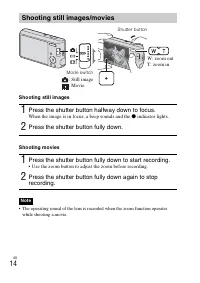
GB 14 Shooting still images Shooting movies • The operating sound of the lens is recorded when the zoom function operates while shooting a movie. Shooting still images/movies 1 Press the shutter button halfway down to focus. When the image is in focus, a beep sounds and the z indicator lights. 2 Pre...
Page 15 - Viewing images; Press the
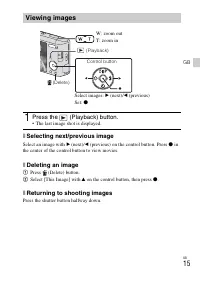
GB 15 GB x Selecting next/previous image Select an image with B (next)/ b (previous) on the control button. Press z in the center of the control button to view movies. x Deleting an image 1 Press (Delete) button. 2 Select [This Image] with v on the control button, then press z . x Returning to shoot...
Page 17 - DISP; Menu Items; Shooting; Introduction of other functions
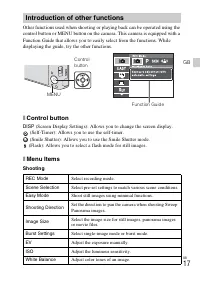
GB 17 GB Other functions used when shooting or playing back can be operated using the control button or MENU button on the camera. This camera is equipped with a Function Guide that allows you to easily select from the functions. While displaying the guide, try the other functions. x Control button ...
Page 18 - Viewing; Setting items; If you press the MENU button while shooting or during playback,
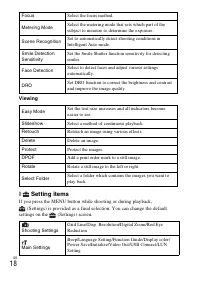
GB 18 Viewing x Setting items If you press the MENU button while shooting or during playback, (Settings) is provided as a final selection. You can change the default settings on the (Settings) screen. Focus Select the focus method. Metering Mode Select the metering mode that sets which part of the s...
Page 19 - Still images; The table below shows the approximate maximum recording times.
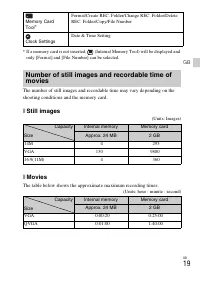
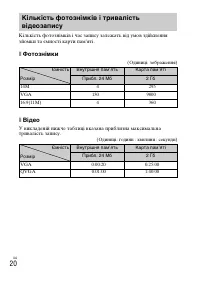
GB 19 GB * If a memory card is not inserted, (Internal Memory Tool) will be displayed and only [Format] and [File Number] can be selected. The number of still images and recordable time may vary depending on the shooting conditions and the memory card. x Still images (Units: Images) x Movies The tab...
Page 20 - Notes on using the camera
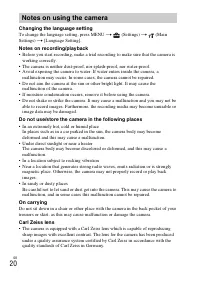
GB 20 Changing the language setting To change the language setting, press MENU t (Settings) t (Main Settings) t [Language Setting]. Notes on recording/playback • Before you start recording, make a trial recording to make sure that the camera is working correctly. • The camera is neither dust-proof, ...
Page 21 - Cleaning the camera surface
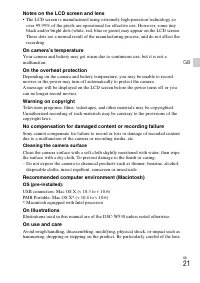
GB 21 GB Notes on the LCD screen and lens • The LCD screen is manufactured using extremely high-precision technology so over 99.99% of the pixels are operational for effective use. However, some tiny black and/or bright dots (white, red, blue or green) may appear on the LCD screen. These dots are a ...
Page 22 - Camera; Specifications
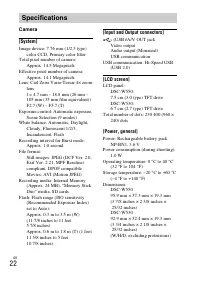
GB 22 Camera [System] Image device: 7.76 mm (1/2.3 type) color CCD, Primary color filter Total pixel number of camera: Approx. 14.5 Megapixels Effective pixel number of camera: Approx. 14.1 Megapixels Lens: Carl Zeiss Vario-Tessar 4× zoom lensf = 4.7 mm – 18.8 mm (26 mm – 105 mm (35 mm film equivale...
Page 23 - Trademarks
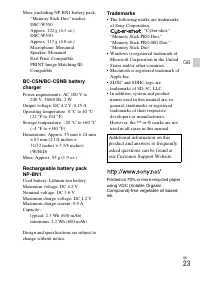
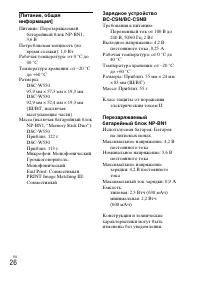
GB 23 GB Mass (including NP-BN1 battery pack, “Memory Stick Duo” media): DSC-W550Approx. 122 g (4.3 oz.)DSC-W530Approx. 113 g (4.0 oz.)Microphone: MonauralSpeaker: MonauralExif Print: CompatiblePRINT Image Matching III: Compatible BC-CSN/BC-CSNB battery charger Power requirements: AC 100 V to 240 V,...
Page 25 - Батарейный блок; Зарядное устройство; ПРЕДУПРЕЖДЕНИЕ
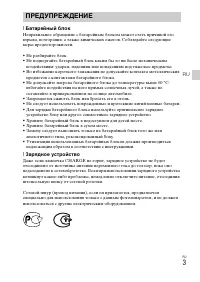
RU 3 RU [ Батарейный блок Неправильное обращение с батарейным блоком может стать причиной его взрыва, возгорания, а также химических ожогов. Соблюдайте следующие меры предосторожности. • Не разбирайте блок.• Не подвергайте батарейный блок каким бы то ни было механическим воздействиям: ударам, падени...
Page 26 - Дата изготовления изделия.
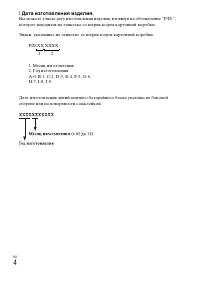
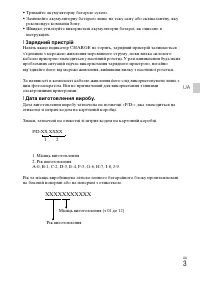
RU 4 [ Дата изготовления изделия. Вы можете узнать дату изготовления изделия, взглянув на обозначение “P/D:”, которое находится на этикетке со штрих кодом картонной коробки. Знаки, указанные на этикетке со штрих кодом картонной коробки. P/D:XX XXXX 1. Месяц изготовления2. Год изготовленияA-0, B-1, C...
Page 27 - Для покупателей в Европе
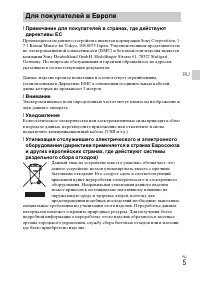
RU 5 RU [ Примечание для покупателей в странах, где действуют директивы ЕС Производителем данного устройства является корпорация Sony Corporation, 1-7-1 Konan Minato-ku Tokyo, 108-0075 Japan. Уполномоченным представителем по электромагнитной совместимости (EMC) и безопасности изделия является компан...
Page 29 - Проверка прилагаемых предметов
RU 7 RU Для получения подробных сведений об усовершенствованных операциях прочтите “Руководство пользователя Cyber-shot” (HTML) на диске CD-ROM (прилагается) с помощью компьютера. Для пользователей Windows: 1 Щелкните по [Руководство пользователя] t [Установка]. 2 Запустите инструкцию “Руководство п...
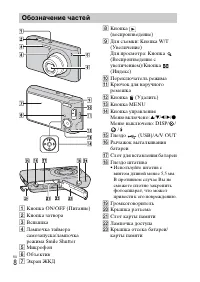
Page 30 - Обозначение частей
RU 8 A Кнопка ON/OFF (Питание) B Кнопка затвора C Вспышка D Лампочка таймера самозапуска/лампочка режима Smile Shutter E Микрофон F Объектив G Экран ЖКД H Кнопка (воспроизведение) I Для съемки: Кнопка W/T (Увеличение)Для просмотра: Кнопка (Воспроизведение с увеличением)/Кнопка (Индекс) J Переключате...
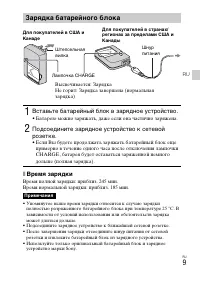
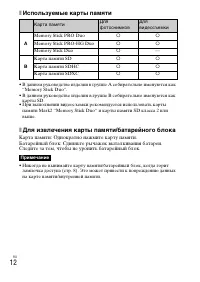
Page 31 - Время зарядки; Зарядка батарейного блока; Вставьте батарейный блок в зарядное устройство.; • Батарею можно заряжать, даже если она частично заряжена.
RU 9 RU x Время зарядки Время полной зарядки: приблиз. 245 мин.Время нормальной зарядки: приблиз. 185 мин. • Упомянутое выше время зарядки относится к случаю зарядки полностью разряженного батарейного блока при температуре 25 °C. В зависимости от условий использования или обстоятельств зарядка может...
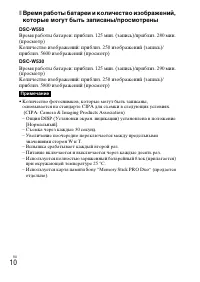
Page 32 - Примечание
RU 10 x Время работы батареи и количество изображений, которые могут быть записаны/просмотрены DSC-W550 Время работы батареи: приблиз. 125 мин. (запись)/приблиз. 280 мин. (просмотр)Количество изображений: приблиз. 250 изображений (запись)/приблиз. 5600 изображений (просмотр) DSC-W530 Время работы ба...
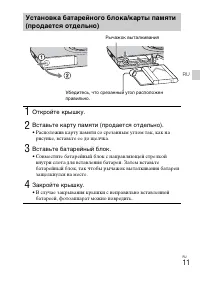
Page 33 - • Расположив карту памяти со срезанным углом так, как на; Вставьте батарейный блок.; • Совместите батарейный блок с направляющей стрелкой
RU 11 RU Установка батарейного блока/карты памяти (продается отдельно) 1 Откройте крышку. 2 Вставьте карту памяти (продается отдельно). • Расположив карту памяти со срезанным углом так, как на рисунке, вставьте ее до щелчка. 3 Вставьте батарейный блок. • Совместите батарейный блок с направляющей стр...
Page 35 - Установка даты и времени; фотоаппарата может потребоваться некоторое время.
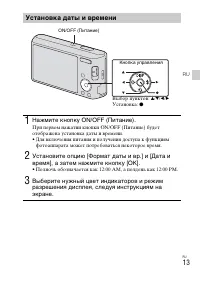
RU 13 RU Установка даты и времени 1 Нажмите кнопку ON/OFF (Питание). При первом нажатии кнопки ON/OFF (Питание) будет отображена установка даты и времени.• Для включения питания и получения доступа к функциям фотоаппарата может потребоваться некоторое время. 2 Установите опцию [Формат даты и вр.] и ...
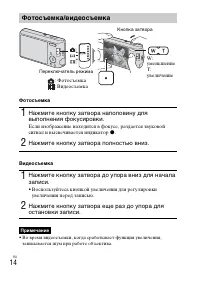
Page 36 - Фотосъемка/видеосъемка; Нажмите кнопку затвора полностью вниз.; • Воспользуйтесь кнопкой увеличения для регулировки
RU 14 Фотосъемка Видеосъемка • Во время видеосъемки, когда срабатывает функция увеличения, записывается шум при работе объектива. Фотосъемка/видеосъемка 1 Нажмите кнопку затвора наполовину для выполнения фокусировки. Если изображение находится в фокусе, раздается звуковой сигнал и высвечивается инди...
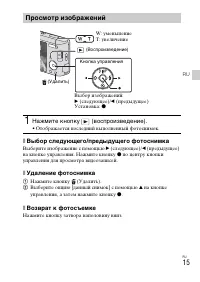
Page 37 - Просмотр изображений; Нажмите кнопку
RU 15 RU x Выбор следующего/предыдущего фотоснимка Выберите изображение с помощью B (следующее)/ b (предыдущее) на кнопке управления. Нажмите кнопку z по центру кнопки управления для просмотра видеозаписей. x Удаление фотоснимка 1 Нажмите кнопку (Удалить). 2 Выберите опцию [данный снимок] с помощью ...
Page 40 - Пункты меню; Съемка; Введение в другие функции
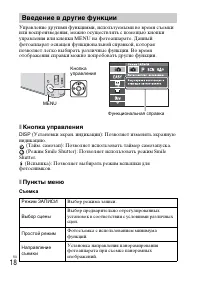
RU 18 Управление другими функциями, используемыми во время съемки или воспроизведения, можно осуществлять с помощью кнопки управления или кнопки MENU на фотоаппарате. Данный фотоаппарат оснащен функциональной справкой, которая позволяет легко выбирать различные функции. Во время отображения справки ...
Page 42 - Просмотр; Пункты установки
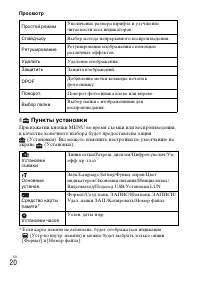
RU 20 Просмотр x Пункты установки При нажатии кнопки MENU во время съемки или воспроизведения, в качестве конечного выбора будет предоставлена опция (Установки). Вы можете изменить настройки по умолчанию на экране (Установки). * Если карта памяти не вставлена, будет отображаться индикация (Устр-во в...
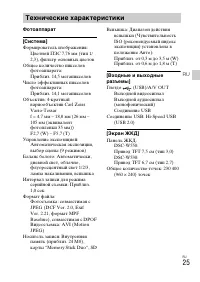
Page 47 - Фотоаппарат; Технические характеристики
RU 25 RU Фотоаппарат [Система] Формирователь изображения: Цветной ПЗС 7,76 мм (тип 1/2,3), фильтр основных цветов Общее количество пикселов фотоаппарата: Приблиз. 14,5 мегапикселов Число эффективных пикселов фотоаппарата: Приблиз. 14,1 мегапикселов Объектив: 4-кратный вариообъектив Carl Zeiss Vario-...
Page 49 - Торговые марки
RU 27 RU Торговые марки • Следующие знаки являются торговыми марками Sony Corporation. , “Cyber-shot”, “Memory Stick PRO Duo”, “Memory Stick PRO-HG Duo”, “Memory Stick Duo” • Windows является зарегистрированным товарным знаком Microsoft Corporation в Соединенных Штатах Америки и/или других странах. ...
Page 50 - Акумуляторна батарея; Українська
UA 2 Щоб знизити ризик займання або ураження електричним струмом, не піддавайте виріб впливу дощової води або вологи. ВАЖЛИВІ ВКАЗІВКИ З ТЕХНІКИ БЕЗПЕКИ-ЗБЕРЕЖІТЬ ЦЮ ІНСТРУКЦІЮНЕБЕЗПЕКАЩОБ ЗМЕНШИТИ РИЗИК ВИНИКНЕННЯ ПОЖЕЖІ АБО УРАЖЕННЯ ЕЛЕКТРИЧНИМ СТРУМОМ, СЛІД РЕТЕЛЬНО ВИКОНУВАТИ ЦІ ВКАЗІВКИ Якщо фо...
Page 51 - Зарядний пристрій; XXXXXXXXXXX
UA 3 UA • Тримайте акумуляторну батарею сухою.• Замінюйте акумуляторну батарею лише на таку саму або еквівалентну, яку рекомендує компанія Sony. • Швидко утилізуйте використані акумуляторні батареї, як описано в інструкціях. [ Зарядний пристрій Навіть якщо індикатор CHARGE не горить, зарядний пристр...
Page 52 - Для споживачів з Європи
UA 4 [ Примітка для покупців у країнах, де діють директиви ЄС Цей виріб виготовлено компанією Sony Corporation, 1-7-1 Konan Minato-ku Tokyo, 108-0075 Japan (Японія). Уповноваженим представником з питань електромагнітної сумісності та безпеки виробу є компанія Sony Deutschland GmbH, Hedelfinger Stras...
Page 55 - Визначення частин
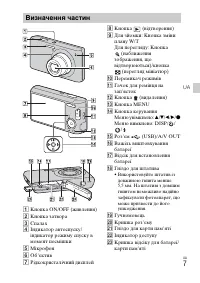
UA 7 UA A Кнопка ON/OFF (живлення) B Кнопка затвора C Спалах D Індикатор автоспуску/індикатор режиму спуску в момент посмішки E Мікрофон F Об’єктив G Рідкокристалічний дисплей H Кнопка (відтворення) I Для зйомки: Кнопка зміни плану W/TДля перегляду: Кнопка (наближення зображення, що відтворюються)/к...
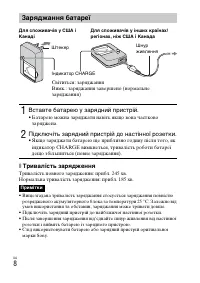
Page 56 - Тривалість зарядження; Заряджання батареї; Вставте батарею у зарядний пристрій.; • Батарею можна заряджати навіть якщо вона частково; Підключіть зарядний пристрій до настінної розетки.; • Якщо заряджати батарею ще приблизно годину після того, як
UA 8 x Тривалість зарядження Тривалість повного зарядження: прибл. 245 хв.Нормальна тривалість зарядження: прибл. 185 хв. • Вищезгадана тривалість заряджання стосується заряджання повністю розрядженого акумуляторного блока за температури 25 °C. Залежно від умов використання та обставин, заряджання м...
Page 57 - Примітка
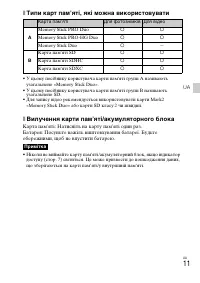
UA 9 UA x Тривалість роботи батареї та кількість зображень, які можна записати/переглянути DSC-W550 Тривалість роботи батареї: прибл. 125 хв. (запис)/прибл. 280 хв. (перегляд)Кількість зображень: прибл. 250 зобр. (запис)/прибл. 5600 зобр. (перегляд) DSC-W530 Тривалість роботи батареї: прибл. 125 хв....
Page 60 - Налаштування дати й часу; знадобитися деякий час.
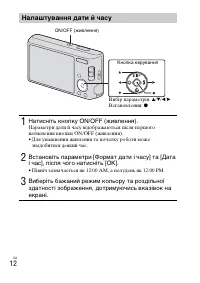
UA 12 Налаштування дати й часу 1 Натисніть кнопку ON/OFF (живлення). Параметри дати й часу відображаються після першого натиснення кнопки ON/OFF (живлення).• Для увімкнення живлення та початку роботи може знадобитися деякий час. 2 Встановіть параметри [Формат дати і часу] та [Дата і час], після чого...
Page 61 - Натисніть кнопку спуску до кінця.; • За допомогою кнопки масштабування налаштуйте
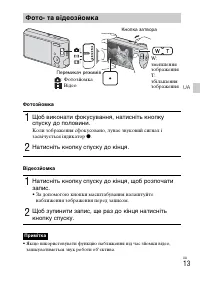
UA 13 UA Фотозйомка Відеозйомка • Якщо використовувати функцію наближення під час зйомки відео, записуватиметься звук роботи об’єктива. Фото- та відеозйомка 1 Щоб виконати фокусування, натисніть кнопку спуску до половини. Коли зображення сфокусовано, лунає звуковий сигнал і засвічується індикатор z ...
Page 62 - Перегляд зображень; Натисніть кнопку
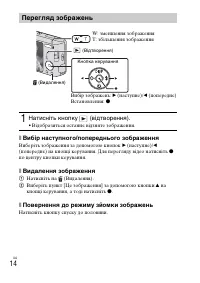
UA 14 x Вибір наступного/попереднього зображення Виберіть зображення за допомогою кнопок B (наступне)/ b (попереднє) на кнопці керування. Для перегляду відео натисніть z по центру кнопки керування. x Видалення зображення 1 Натисніть на (Видалення). 2 Виберіть пункт [Це зображення] за допомогою кнопк...
Page 65 - Пункти мeню; Зйомка; Знайомство з іншими функціями
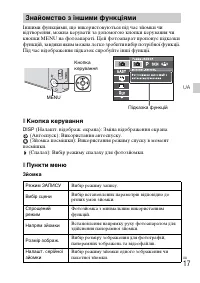
UA 17 UA Іншими функціями, що використовуються під час зйомки чи відтворення, можна керувати за допомогою кнопки керування чи кнопки MENU на фотоапараті. Цей фотоапарат пропонує підказки функцій, завдяки яким можна легко зробити вибір потрібної функції. Під час відображення підказок спробуйте інші ф...
Page 66 - Перегляд
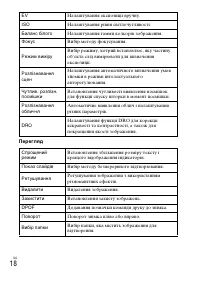
UA 18 Перегляд EV Налаштування експозиції вручну. ISO Налаштування рівня світлочутливості. Баланс білого Налаштування гамми кольорів зображення. Фокус Вибір методу фокусування. Режим виміру Вибір режиму, котрий встановлює, яку частину об’єкта слід вимірювати для визначення експозиції. Розпізнавання ...
Page 67 - Пункти налаштування; екрані
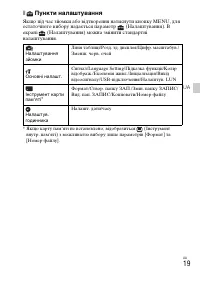
UA 19 UA x Пункти налаштування Якщо під час зйомки або відтворення натиснути кнопку MENU, для остаточного вибору надається параметр (Налаштування). В екрані (Налаштування) можна змінити стандартні налаштування. * Якщо карту пам’яті не встановлено, відобразиться (Інструмент внутр. пам'яті) з можливіс...
Page 69 - Примітки щодо використання фотоапарата
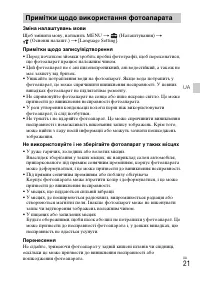
UA 21 UA Зміна налаштувань мови Щоб змінити мову, натисніть MENU t (Налаштування) t (Основні налашт.) t [Language Setting]. Примітки щодо запису/відтворення • Перед початком зйомки зробіть пробні фотографії, щоб переконатися, що фотоапарат працює належним чином. • Цей фотоапарат не є ані пилонепрони...
Page 72 - Фотоапарат; Технічні характеристики
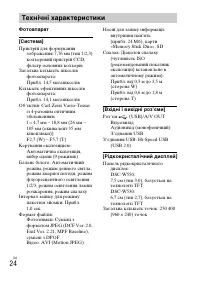
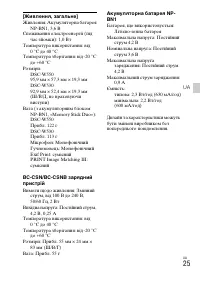
UA 24 Фотоапарат [Система] Пристрій для формування зображення: 7,76 мм (тип 1/2,3) кольоровий пристрій CCD, фільтр основних кольорів Загальна кількість пікселів фотоапарата: Прибл. 14,5 мегапікселів Кількість ефективних пікселів фотоапарата: Прибл. 14,1 мегапікселів Об’єктив: Carl Zeiss Vario-Tessar...
Page 74 - Товарні знаки
UA 26 Товарні знаки • Подані далі знаки є товарними знаками компанії Sony Corporation. , «Cyber-shot», «Memory Stick PRO Duo», «Memory Stick PRO-HG Duo», «Memory Stick Duo» • Windows є зареєстрованим товарним знаком корпорації Microsoft Corporation в Сполучених Штатах та/або інших країнах. • Macinto...
Page 80 - Printed in China