Page 2 - on the unit until the display
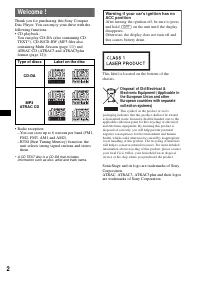
2 Welcome ! Thank you for purchasing this Sony Compact Disc Player. You can enjoy your drive with the following functions.• CD playback: You can play CD-DA (also containing CD TEXT*), CD-R/CD-RW (MP3 files also containing Multi Session (page 11)) and ATRAC CD (ATRAC3 and ATRAC3plus format (page 12))...
Page 3 - Table of Contents; Getting Started
3 Table of Contents Getting Started Resetting the unit . . . . . . . . . . . . . . . . . . . . . . . . 4Setting the clock . . . . . . . . . . . . . . . . . . . . . . . . 4DEMO mode . . . . . . . . . . . . . . . . . . . . . . . . . . . 4Detaching the front panel . . . . . . . . . . . . . . . . . 4 At...
Page 4 - Resetting the unit; DEMO mode; Caution alarm; Attaching the front panel
4 Getting Started Resetting the unit Before operating the unit for the first time, or after replacing the car battery or changing the connections, you must reset the unit.Detach the front panel and press the RESET button with a pointed object, such as a ballpoint pen. NotePressing the RESET button w...
Page 5 - Insert the disc label side up.; Ejecting the disc; Push down the shutter until it clicks.; Click
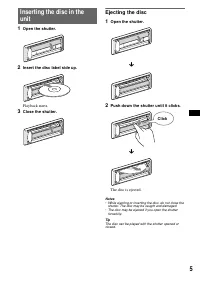
5 Inserting the disc in the unit 1 Open the shutter. 2 Insert the disc label side up. Playback starts. 3 Close the shutter. Ejecting the disc 1 Open the shutter. 2 Push down the shutter until it clicks. The disc is ejected. Notes• While ejecting or inser ting the disc, do not close the shutter. The ...
Page 6 - Location of controls and basic operations; Main unit
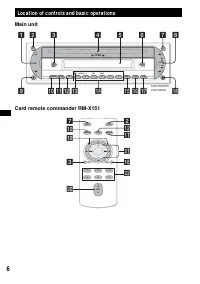
6 Location of controls and basic operations Main unit Card remote commander RM-X151 ATT OFF SOURCE MODE SEL SEEK 1 2 3 4 5 6 SENS REP – GP/DISC + SHUF BTM SCRL DSPL DIM EQ3 OPEN SEEK 1 2 3 4 5 6 7 8 CDX-R3350EECDX-R33EE 9 0 qa qs qd qf qg qh qj qk OFF DSPL SCRL SEL SOURCE MODE 1 3 2 4 6 5 ATT VOL + ...
Page 8 - Caution; Select
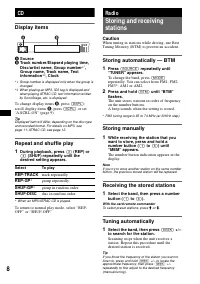
8 CD Display items A Source B Track number/Elapsed playing time, Disc/artist name, Group number * 1 , Group name, Track name, Text information * 2 , Clock *1 Group number is displayed only when the group is changed. *2 When playing an MP3, ID3 tag is displayed and when playing ATRAC CD, text informa...
Page 9 - Other functions
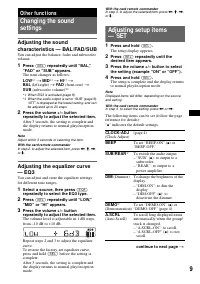
9 Other functions Changing the sound settings Adjusting the sound characteristics — BAL/FAD/SUB You can adjust the balance, fader and subwoofer volume. 1 Press (SEL) repeatedly until “BAL,” “FAD” or “SUB” appears. The item changes as follows: LOW * 1 t MID * 1 t HI * 1 t BAL (left-right) t FAD (fron...
Page 10 - Using optional equipment; Rotary commander RM-X4S; Attaching the label; • PRESET/DISC control; The same as; Changing the operative direction; LPF
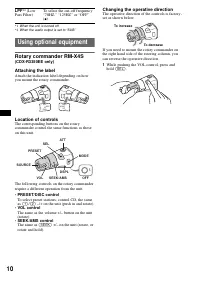
10 *1 When the unit is turned off. *2 When the audio output is set to “SUB.” Using optional equipment Rotary commander RM-X4S (CDX-R3350EE only) Attaching the label Attach the indication label depending on how you mount the rotary commander. Location of controls The corresponding buttons on the rota...
Page 11 - Additional Information; Precautions; Moisture condensation; Notes on discs; continue to next page; Note on DualDiscs
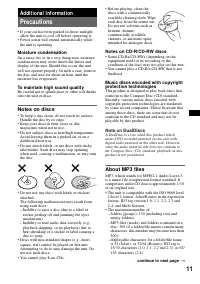
11 Additional Information Precautions • If your car has been parked in direct sunlight, allow the unit to cool off before operating it. • Power aerial will extend automatically while the unit is operating. Moisture condensation On a rainy day or in a very damp area, moisture condensation may occur i...
Page 12 - Playback order of MP3 files; About ATRAC CD; ATRAC3plus format; • The characters for a folder/file name and text; Maintenance; Fuse replacement; WARNING
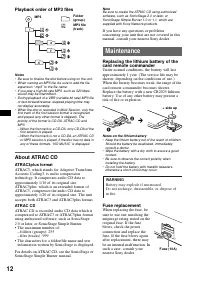
12 Playback order of MP3 files Notes• Be sure to finalize the disc before using on the unit.• When naming an MP3 file, be sure to add the file expansion “.mp3” to the file name. • If you play a high-bit-rate MP3, such as 320 kbps, sound may be intermittent. • During playback of a VBR (variable bit r...
Page 13 - Cleaning the connectors; Removing the unit; Remove the protection collar.; Pull the release keys to unseat the unit.; Specifications; CD Player section; FM; Power amplifier section
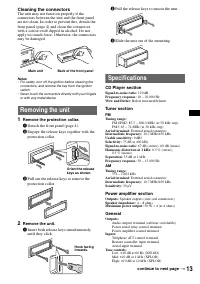
13 Cleaning the connectors The unit may not function properly if the connectors between the unit and the front panel are not clean. In order to prevent this, detach the front panel (page 4) and clean the connectors with a cotton swab dipped in alcohol. Do not apply too much force. Otherwise, the con...
Page 14 - Troubleshooting; General
14 Power requirements: 12 V DC car battery (negative earth) Dimensions: Approx. 178 × 50 × 179 mm (w/h/d) Mounting dimensions: Approx. 182 × 53 × 161 mm (w/h/d) Mass: Approx. 1.2 kgSupplied accessories: Card remote commander: RM-X151Parts for installation and connections (1 set) Optional accessory: ...
Page 15 - Error displays/Messages; Radio reception
15 Error displays/Messages If these solutions do not help improve the situation, consult your nearest Sony dealer.If you take the unit to be repaired because of CD playback trouble, bring the disc that was used at the time the problem began. The display items do not scroll. • For discs with very man...
Page 17 - Содержание; Начало работы
Содержание 3 Начало работы Сброс параметров устройства . . . . . . . . . . 4Установка часов . . . . . . . . . . . . . . . . . . . . . . 4Режим DEMO . . . . . . . . . . . . . . . . . . . . . . . . 4Снятие передней панели . . . . . . . . . . . . . . . 4 Установка передней панели . . . . . . . . . 5 Ус...
Page 18 - Установка часов; Отобразится дисплей установок.; Режим DEMO; Предупреждающий сигнал; Устройство выключится.
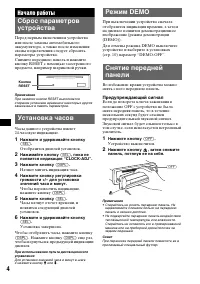
4 Начало работы Сброс параметров устройства Перед первым включением устройства или после замены автомобильного аккумулятора, а также после изменения схемы подключения следует сбросить параметры устройства.Снимите переднюю панель и нажмите кнопку RESET с помощью заостренного предмета, например шарико...
Page 19 - Установка передней панели; Прикрепите часть; Начнется воспроизведение.; Извлечение компакт-диска; Щелчок
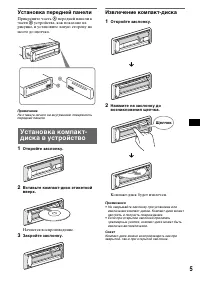
5 Установка передней панели Прикрепите часть A передней панели к части B устройства, как показано на рисунке, и установите левую сторону на место до щелчка. Примечание Не ставьте ничего на внутреннюю поверхность передней панели. Установка компакт-диска в устройство 1 Откройте заслонку. 2 Вставьте ко...
Page 20 - Расположение органов управления и основные операции; Основное устройство
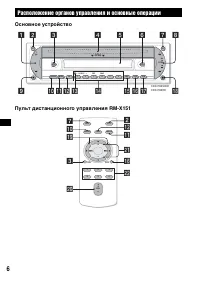
6 Расположение органов управления и основные операции Основное устройство Пульт дистанционного управления RM-X151 ATT OFF SOURCE MODE SEL SEEK 1 2 3 4 5 6 SENS REP – GP/DISC + SHUF BTM SCRL DSPL DIM EQ3 OPEN SEEK 1 2 3 4 5 6 7 8 CDX-R3350EECDX-R33EE 9 0 qa qs qd qf qg qh qj qk OFF DSPL SCRL SEL SOUR...
Page 22 - Индикация на дисплее; Для смены индикаций; Радиоприемник; Предупреждение; Автоматическое сохранение; Выберите
8 Компакт-диск Индикация на дисплее A Источник B Номер композиции/время с начала воспроизведения, название компакт-диска/имя исполнителя, номер группы * 1 , имя группы, название композиции, текстовая информация * 2 , часы *1 Номер группы отображается только при смене группы. *2 При воспроизведении к...
Page 23 - Автоматическая настройка; Другие функции
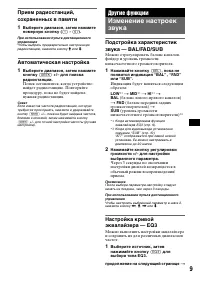
9 Прием радиостанций, сохраненных в памяти 1 Выберите диапазон, затем нажмите номерную кнопку ( (1) - (6) ). При использовании пульта дистанционного управления Чтобы выбрать предварительно настроенную радиостанцию, нажмите кнопку M или m . Автоматическая настройка 1 Выберите диапазон, затем нажмите ...
Page 24 - ” указывает значения по умолчанию.; – “REAR”: для вывода на
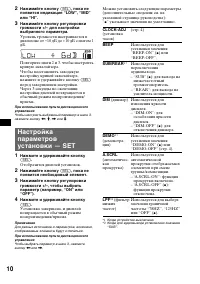
10 2 Нажимайте кнопку (SEL) , пока не появится индикация “LOW”, “MID” или “HI”. 3 Нажимайте кнопку регулировки громкости +/– для настройки выбранного параметра. Уровень громкости настраивается в диапазоне от – 10 дБ до +10 дБ с шагом 1 дБ. Повторите шаги 2 и 3, чтобы настроить кривую эквалайзера.Что...
Page 25 - Наклейка ярлычка; • Регулятор PRESET/DISC; Соответствует кнопке; Смена направления вращения
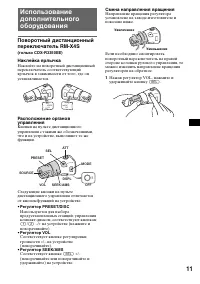
11 Использование дополнительного оборудования Поворотный дистанционный переключатель RM-X4S (только CDX-R3350EE) Наклейка ярлычка Наклейте на поворотный дистанционный переключатель соответствующий ярлычок в зависимости от того, где он устанавливается. Расположение органов управления Кнопки на пульте...
Page 26 - Меры предосторожности; Конденсация влаги
12 Дополнительная информация Меры предосторожности • Если автомобиль был припаркован в солнечном месте, не включайте устройство до тех пор, пока оно не охладится. • При работе устройства автоматически выдвигается приемная антенна. Конденсация влаги В дождливый день или при нахождении в месте с повыш...
Page 27 - О файлах MP3; • Максимальное количество:; О компакт-дисках ATRAC CD; Формат ATRAC3plus
13 Музыкальные компакт-диски, закодированные с помощью технологий защиты авторских прав Этот продукт предназначен для воспроизведения компакт-дисков, отвечающих требованиям стандарта Compact Disc (CD).В последнее время некоторые фирмы звукозаписи выпускают музыкальные компакт-диски, закодированные с...
Page 28 - Компакт-диск ATRAC CD; • Отображение символов в названии; Уход за устройством; Замена
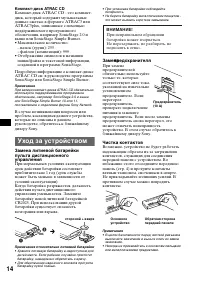
14 Компакт-диск ATRAC CD Компакт-диск ATRAC CD - это компакт-диск, который содержит музыкальные данные сжатые в формате ATRAC3 или ATRAC3plus, записанные с помощью поддерживаемого программного обеспечения, например SonicStage 2.0 и выше или SonicStage Simple Burner.• Максимальное количество: – папок...
Page 29 - Проигрыватель компакт-дисков; Тюнер; AM; Усилитель мощности; Общие; продолжение на следующей странице
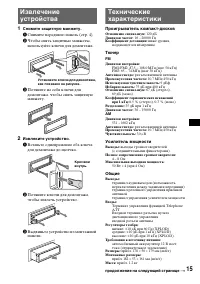
15 Извлечение устройства 1 Снимите защитную манжету. 1 Снимите переднюю панель (стр. 4). 2 Чтобы снять защитные манжеты, используйте ключи для демонтажа. 3 Потяните на себя ключи для демонтажа, чтобы снять защитную манжету. 2 Извлеките устройство. 1 Вставьте одновременно оба ключа для демонтажа до щ...
Page 30 - На устройство не подается питание.; Воспроизведение компакт-дисков
16 Входящие в комплект принадлежности: пульт дистанционного управления: RM-X151детали для установки и подключений (1 комплект) Дополнительные принадлежности: поворотный дистанционный переключатель RM-X4S (только CDX-R3350EE) Технические характеристики и конструкция могут быть изменены без предварите...
Page 31 - Прием радиостанций
17 Невозможно воспроизвести файлы MP3. Данные на компакт-диске не соответствуют формату MP3 и версии (стр. 13). Для начала воспроизведения файлов MP3 требуется больше времени, чем для других файлов. Может потребоваться больше времени до начала воспроизведения следующих компакт-дисков:– компакт-диск,...