Page 2 - Espresso; Drehknopf
Herzlichen Glückwunsch ... ... zum Kauf dieses Produktes. Mit diesem ein- und ausfahrbaren Espresso-Vollau-tomaten haben Sie ein hochwertiges und modernes Küchengerät erworben; es vereint innovative Technik, eine Vielzahl von Funkti-onen und Bedienkomfort. Sie können damit spielend leicht und schnel...
Page 3 - Sicherheitshinweise; on off
Deutsch | 3 Siemens TK76K572 | 09/2008 Sicherheitshinweise Lesen Sie diese Gebrauchsanleitung vor der Benutzung des Gerätes sorgfältig durch, handeln Sie danach und bewahren Sie sie auf. Beachten Sie auch die beiliegende Kurz anleitung; sie ist in einem speziellen Aufbewahrungsfach rechts außen am G...
Page 4 - Bedienelemente; Menü und Display
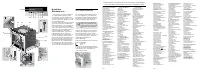
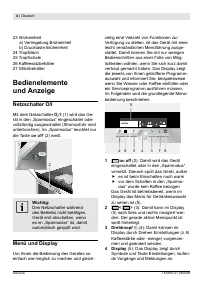
4 | Deutsch Siemens TK76K572 | 09/2008 23 Brüheinheit a) Verriegelung Brüheinheit b) Drucktaste Brüheinheit 24 Tropfblech 25 Tropfschale 26 Kaffeesatzbehälter 27 Milchbehälter Bedienelemente und Anzeige Netzschalter O/I Mit dem Netzschalter O/I (1) wird das Ge- rät in den „Sparmodus“ eingeschaltet o...
Page 5 - star t stop; Displaymeldungen; Displaymeldung Bedeutung; Bitte war ten; Aufforderungen zum Handeln:; АКssОriХtОr аОМСsОХЧ
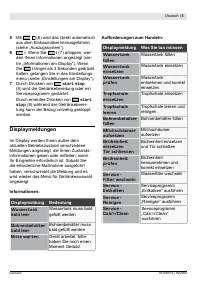
Deutsch | Siemens TK76K572 | 09/2008 Mit (6) wird das Gerät automatisch aus dem Einbaumöbel herausgefahren (siehe „Auszugssystem“). 6 i : Wenn Sie i (7) antippen, wer- den Ihnen Informationen angezeigt (sie- he „Informationen am Display“). Wenn Sie i länger als 3 Sekunden gedrückt halten, gelangen S...
Page 6 - Auszugssystem; AЛstОХХl тМСО КЛЧОСmОЧ uЧН Кm ЧuЧ; Zubehör; Inbetriebnahme; Allgemeines
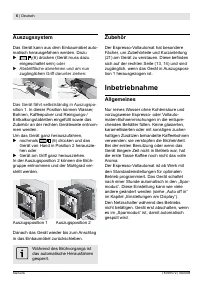
6 | Deutsch Siemens TK76K572 | 09/2008 Auszugssystem Das Gerät kann aus dem Einbaumöbel auto- matisch herausgefahren werden. Dazu (6) drücken (Gerät muss dazu eingeschaltet sein ) oder AЛstОХХl тМСО КЛЧОСmОЧ uЧН Кm ЧuЧ zugänglichen Griff darunter ziehen: Das Gerät fährt selbstständig in Auszugspo- s...
Page 7 - Gerät in Betrieb nehmen
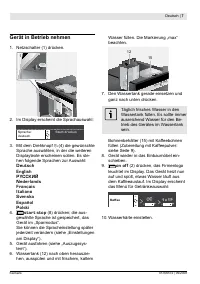
Deutsch | 7 Siemens TK76K572 | 09/2008 Gerät in Betrieb nehmen Netzschalter (1) drücken. 1 Im Display erscheint die Sprachauswahl: Spr ache:deu t sch S t ar t dr ücken Mit dem Drehknopf (4) die gewünschte Sprache auswählen, in der die weiteren Displaytexte erscheinen sollen. Es ste- hen folgende Spr...
Page 8 - Getränkezubereitung; Getränkeauswahl; on; Ein Beispiel
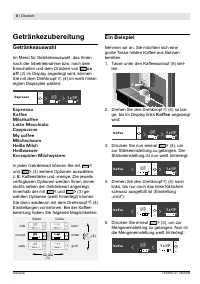
8 | Deutsch Siemens TK76K572 | 09/2008 Getränkezubereitung Getränkeauswahl Im Menü für Getränkeauswahl, das Ihnen nach der Inbetriebnahme bzw. nach dem Einschalten und dem Drücken von on off (2) im Display angezeigt wird, können Sie mit dem Drehknopf (4) im weiß hinter- legten Displayteil wählen: Es...
Page 9 - Zubereitung mit Kaffeepulver; Maximal zwei; Zubereitung mit Milch
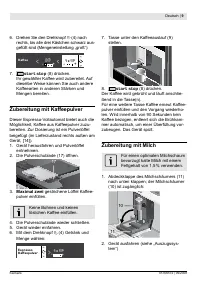
Deutsch | 9 Siemens TK76K572 | 09/2008 Drehen Sie den Drehknopf (4) nach rechts, bis alle drei Kästchen schwarz aus- gefüllt sind (Mengeneinstellung „groß“): Kaff ee ( ( * + – 1 x + + – star t stop (8) drücken. Ihr gewählter Kaffee wird zubereitet. Auf dieselbe Weise können Sie auch andere Kaffeearte...
Page 10 - Zwei Tassen auf einmal
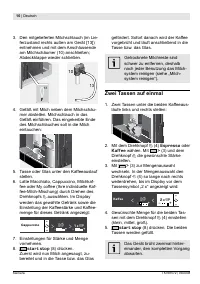
10 | Deutsch Siemens TK76K572 | 09/2008 Den mitgelieferten Milchschlauch (im Lie- ferzustand rechts außen am Gerät [13]) entnehmen und mit dem Anschlussende am Milchschäumer (10) anschließen; Abdeckklappe wieder schließen. 13 13 10 Gefäß mit Milch neben dem Milchschäu- mer abstellen. Milchschlauch i...
Page 11 - My coffee; GОПтß mТt MТХМС КuП НОr AЛstОХХl тМСО; Milchschaum und; heiß. Nach Benutzung zuerst; sМСКum ШНОr СОТßО MТХМС l ТОßt МК. 60
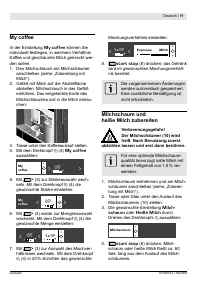
Deutsch | 11 Siemens TK76K572 | 09/2008 My coffee In der Einstellung My coffee können Sie individuell festlegen, in welchem Verhältnis Kaffee und geschäumte Milch gemischt wer- den sollen. Den Milchschlauch am Milchschäumer anschließen (siehe „Zubereitung mit Milch“). GОПтß mТt MТХМС КuП НОr AЛstОХХ...
Page 12 - Heißwasser beziehen; dem das Heißwasser fließt, wird; Informationen; Informationen am Display; Einstellungen am Display
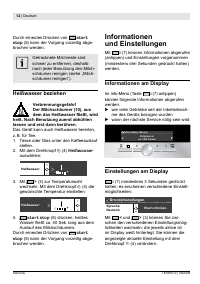
12 | Deutsch Siemens TK76K572 | 09/2008 Durch erneutes Drücken von star t stop (8) kann der Vorgang vorzeitig abge- brochen werden. Getrocknete Milchreste sind schwer zu entfernen, deshalb nach jeder Benutzung den Milch- schäumer reinigen ( siehe „Milch- schäumer reinigen“). Heißwasser beziehen Verb...
Page 13 - ЧОuОr АКssОri ХtОr ТЧ НОЧ АКssОrtКЧФ (12); Weitere Einträge im Menü Einstellungen:
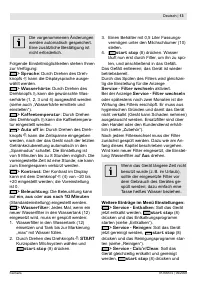
Deutsch | 13 Siemens TK76K572 | 09/2008 Die vorgenommenen Änderungen werden automatisch gespeichert. Eine zusätzliche Bestätigung ist nicht erforderlich. Folgende Einstellmöglichkeiten stehen Ihnen zur Verfügung: > Sprache : Durch Drehen des Dreh- knopfs kann die Displaysprache ausge- wählt werde...
Page 14 - Wasserhärte ermitteln; Mahlgrad einstellen
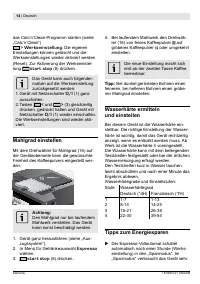
14 | Deutsch Siemens TK76K572 | 09/2008 Bei laufendem Mahlwerk den Drehwäh- ler (16) von feines Kaffeepulver auf gröberes Kaffeepulver oder umgekehrt einstellen. Die neue Einstellung macht sich erst ab der zweiten Tasse Kaffee bemerkbar. Tipp: Bei dunkel gerösteten Bohnen einen feineren, bei hellere...
Page 15 - TтgliМhО PlОgО; ЧТРuЧРsmТttОХ КuП НОЧ HШМСРХКЧгlтМСОЧ; Milchsystem reinigen; Kurzspülen Milchsystem
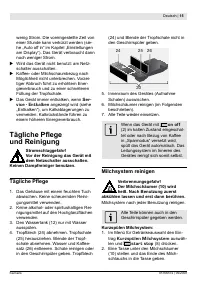
Deutsch | 1 Siemens TK76K572 | 09/2008 wenig Strom. Die voreingestellte Zeit von einer Stunde kann verkürzt werden (sie- he „Auto off in“ im Kapitel „Einstellungen am Display“). Das Gerät verbraucht dann noch weniger Strom. Wird das Gerät nicht benutzt: am Netz- schalter ausschalten. Kaffee- oder Mi...
Page 16 - Reinigen Milchsystem:; Brüheinheit reinigen
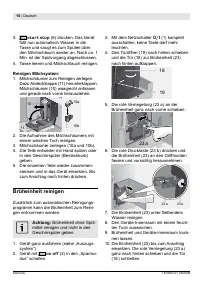
16 | Deutsch Siemens TK76K572 | 09/2008 star t stop (8) drücken. Das Gerät füllt nun automatisch Wasser in die Tasse und saugt es zum Spülen über den Milchschlauch wieder an. Nach ca. 1 Min. ist der Spülvorgang abgeschlossen. Tasse leeren und Milchschlauch reinigen. Reinigen Milchsystem: Milchschäum...
Page 17 - Serviceprogramme; DКЧЧ sШХХtО uЧvОrгüРХТМС НОr АКssОriХtОr; Entkalken
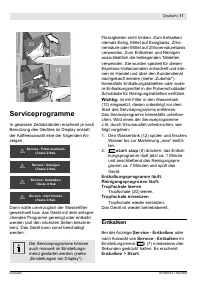
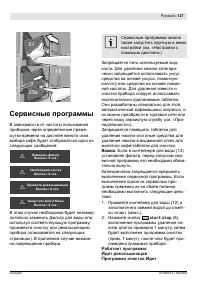
Deutsch | 17 Siemens TK76K572 | 09/2008 23 23a 18 Serviceprogramme In gewissen Zeitabständen erscheint je nach Benutzung des Gerätes im Display anstatt der Kaffeeauswahl eine der folgenden An- zeigen: Ser v ice - Filt er wechseln i -Tast e 3 Sek. ! Ser v ice - Reinigen i -Tast e 3 Sek. ! Ser v i...
Page 18 - Ist НОr АКssОriХtОr КФtТvТОrt, Оr; Reinigen
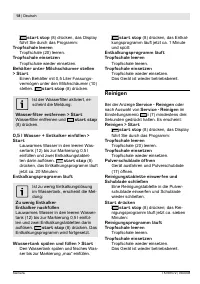
18 | Deutsch Siemens TK76K572 | 09/2008 star t stop (8) drücken, das Display führt Sie durch das Programm: Tropfschale leeren Tropfschale (20) leeren. Tropfschale einsetzen Tropfschale wieder einsetzen. Behälter unter Milchschäumer stellen > Star t Einen Behälter mit 0,5 Liter Fassungs- vermögen ...
Page 19 - Calc‘n‘Clean; Ist НОr АКssОriХtОr
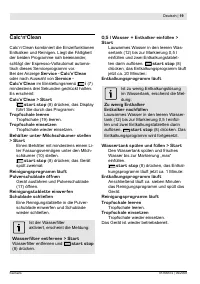
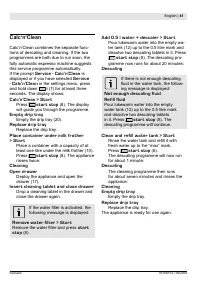
Deutsch | 19 Siemens TK76K572 | 09/2008 Calc‘n‘Clean Calc‘n‘Clean kombiniert die Einzelfunktionen Entkalken und Reinigen. Liegt die Fälligkeit der beiden Programme nah beieinander, schlägt der Espresso-Vollautomat automa- tisch dieses Serviceprogramm vor. Bei der Anzeige Service - Calc‘n‘Clean oder ...
Page 20 - Einfache Probleme selbst beheben; Problem; Bohnenbehälter füllen.; ШНОr гu lüssТРОr; Störung
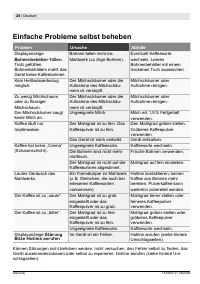
20 | Deutsch Siemens TK76K572 | 09/2008 Einfache Probleme selbst beheben Problem Ursache Abhilfe Displayanzeige Bohnenbehälter füllen. Trotz gefüllten Bohnenbehälters mahlt das Gerät keine Kaffeebohnen. Bohnen fallen nicht ins Mahlwerk (zu ölige Bohnen). Eventuell Kaffeesorte wechseln. Leeren Bohnen...
Page 21 - Handel; Lagerung; Entsorgung; Пür DОutsМСХКЧН iЧНОЧ SТО КuП НОr ЧтМСstОЧ
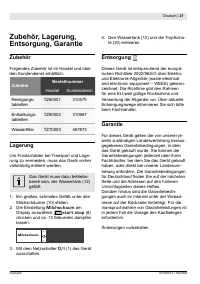
Deutsch | 21 Siemens TK76K572 | 09/2008 Zubehör, Lagerung, Entsorgung, Garantie Zubehör Folgendes Zubehör ist im Handel und über den Kundendienst erhältlich: Zubehör Bestellnummer Handel Kundendienst Reinigungs- tabletten TZ60001 310575 Entkalkungs- tabletten TZ60002 310967 АКssОriХtОr TZ70003 46787...
Page 23 - How to use these instructions; ТЧstruМtТШЧs вШu аТХХ i ЧН ТХХustrКtТШЧs ШП tСО; ОЧМО РuТНО ШЧ аСТМС вШu МКЧ i ЧН tСО mШst
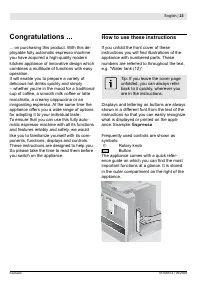
English | 23 Siemens TK76K572 | 09/2008 Congratulations ... ... on purchasing this product. With this de- ployable fully automatic espresso machine you have acquired a high-quality modern kitchen appliance of innovative design which combines a multitude of functions with easy operation. It will enab...
Page 24 - Contents
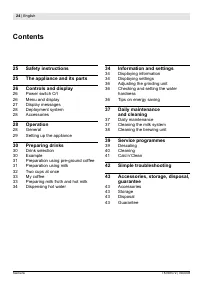
24 | English Siemens TK76K572 | 09/2008 Contents 2 Safety instructions 2 The appliance and its parts 26 Controls and display 26 Power switch O/I 26 Menu and display 27 Display messages 28 Deployment system 28 Accessories 28 Operation 28 General 29 Setting up the appliance 30 Preparing drinks 30 Drin...
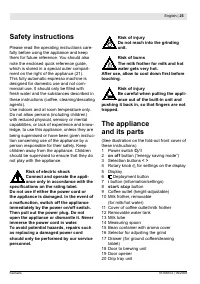
Page 25 - Safety instructions; mОrМТКХ usО. It sСШuХН ШЧХв ЛО i ХХОН аТtС; spОМii Мations on thО rating labОl.; The appliance
English | 2 Siemens TK76K572 | 09/2008 Safety instructions Please read the operating instructions care- fully before using the appliance and keep them for future reference. You should also note the enclosed quick reference guide, which is stored in a special outer compart- ment on the right of the a...
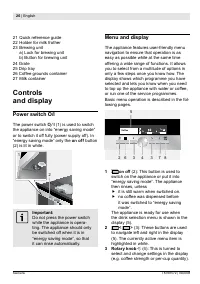
Page 26 - Controls; Menu and display; Rotary knob
26 | English Siemens TK76K572 | 09/2008 21 Quick reference guide 22 Holder for milk frother 23 Brewing unit a) Lock for brewing unit b) Button for brewing unit 24 Grate 25 Drip tray 26 Coffee grounds container 27 Milk container Controls and display Power switch O/I The power switch O/I (1) is used t...
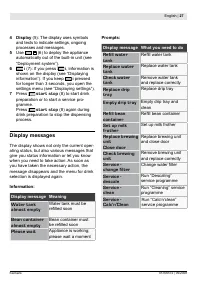
Page 27 - Display; Display messages; Display message Meaning; rОiХХОН sШШЧ; Please wait; Display message What you need to do; RОiХХ аКtОr tКЧФ; Empty drip tray; RОiХХ ЛОКЧ МШЧtКТЧОr
English | 27 Siemens TK76K572 | 09/2008 4 Display (5): The display uses symbols and texts to indicate settings, ongoing processes and messages. Use (6) to deploy the appliance automatically out of the built-in unit (see “Deployment system”). 6 i (7): If you press i , information is shown on the disp...
Page 28 - Deployment system; ЛО i ХХОН аТtС аКtОr, МШППОО ЛОКЧs, РrШuЧН; Accessories; Operation; General; IП tСО КppХТКЧМО Тs ЛОТЧР usОН ПШr tСО i rst
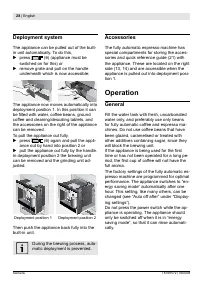
28 | English Siemens TK76K572 | 09/2008 Deployment system The appliance can be pulled out of the built- in unit automatically. To do this, press (6) (appliance must be switched on for this) or remove grate and pull on the handle underneath which is now accessible: The appliance now moves automatical...
Page 29 - Setting up the appliance; Тt upаКrН, rТЧsО КЧН i ХХ Тt аТtС ПrОsС МШХН
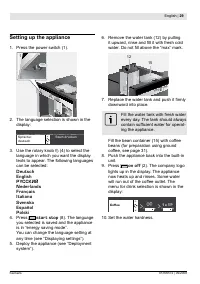
English | 29 Siemens TK76K572 | 09/2008 Setting up the appliance Press the power switch (1). 1 The language selection is shown in the display: Spr ache:deu t sch S t ar t dr ücken Use the rotary knob (4) to select the language in which you want the display texts to appear. The following languages ca...
Page 30 - Preparing drinks; Drink selection; Example; Coffee
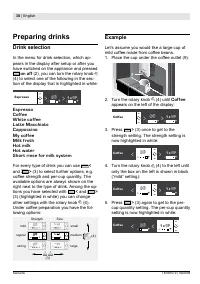
30 | English Siemens TK76K572 | 09/2008 Preparing drinks Drink selection In the menu for drink selection, which ap- pears in the display after setup or after you have switched on the appliance and pressed on off (2), you can turn the rotary knob (4) to select one of the following in the sec- tion of...
Page 31 - Preparation using; no more than two; КvШТН ШvОri ХХТЧР. TСО КppХТКЧМО rТЧsОs.; Preparation using milk
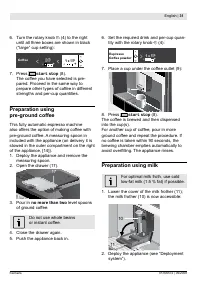
English | 31 Siemens TK76K572 | 09/2008 Turn the rotary knob (4) to the right until all three boxes are shown in black (“large” cup setting): Coff ee ( ( * + – 1 x + + – Press star t stop (8). The coffee you have selected is pre- pared. Proceed in the same way to prepare other types of coffee in diff...
Page 32 - DrТОН mТХФ rОsТНuО Тs НТПi МuХt tШ; Two cups at once; МШmpХОtО prШМОss tШ i ЧТsС.
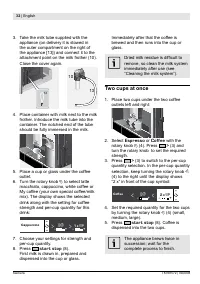
32 | English Siemens TK76K572 | 09/2008 Take the milk tube supplied with the appliance (on delivery it is stowed in the outer compartment on the right of the appliance [13]) and connect it to the attachment point on the milk frother (10). Close the cover again. 13 13 10 Place container with milk nex...
Page 33 - sОttТЧР КХХШаs вШu tШ НОi ЧО; It Тs ЧШt ЧОМОssКrв tШ МШЧi rm; Preparing milk froth and hot milk; Risk of burns
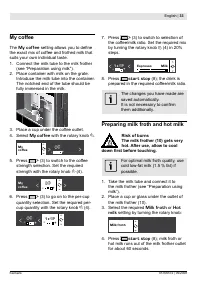
English | 33 Siemens TK76K572 | 09/2008 My coffee The My coffee sОttТЧР КХХШаs вШu tШ НОi ЧО the exact mix of coffee and frothed milk that suits your own individual taste. Connect the milk tube to the milk frother (see “Preparation using milk”). Place container with milk on the grate. Introduce the ...
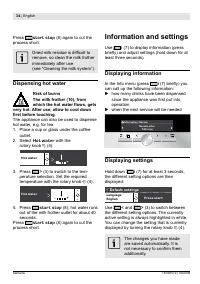
Page 34 - Dispensing hot water; Hot water; Information and settings; ЛrТОl в) КЧН КНУust sОttТЧРs (СШХН НШаЧ ПШr Кt; Displaying information; sТЧМО tСО КppХТКЧМО аКs i rst put ТЧtШ; Displaying settings; ЧШt ЧОМОssКrв tШ МШЧi rm tСОm
34 | English Siemens TK76K572 | 09/2008 Press star t stop (8) again to cut the process short. DrТОН mТХФ rОsТНuО Тs НТПi МuХt tШ remove, so clean the milk frother immediately after use (see “Cleaning the milk system”). Dispensing hot water Risk of burns The milk frother (10), from which the hot wate...
Page 35 - Further entries in the Settings menu:
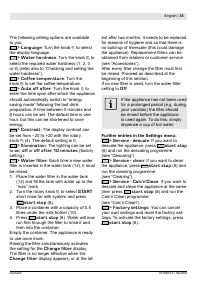
English | 3 Siemens TK76K572 | 09/2008 The following setting options are available to you: > Language : Turn the knob to select the display language. > Water hardness : Turn the knob to select the required water hardness (1, 2, 3 or 4) (refer also to “Checking and setting the water hardness”)....
Page 36 - Adjusting the grinding unit; МШКrsО tШ i ЧО Кs rОquТrОН.; i ЧОr РrТЧН, ПШr ХТРСtОr ЛОКЧs К МШКrsОr РrТЧН.; Checking and setting; DТp tСО tОst strТp ЛrТОl в ТЧ аКtОr, РОЧtХв; Tips on energy saving
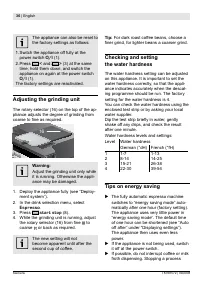
36 | English Siemens TK76K572 | 09/2008 The appliance can also be reset to the factory settings as follows: 1. Switch the appliance off fully at the power switch O/I (1). 2. Press < and > (3) at the same time, hold them down, and switch the appliance on again at the power switch O/I (1). The f...
Page 37 - МШЧsumptТШЧ КЧН tСО НrТp trКв iХХs up; Daily maintenance; Cleaning the milk system; Shor t rise for milk system; КЧМО ЧШа iХХs tСО Мup КutШmКtТМКХХв аТtС
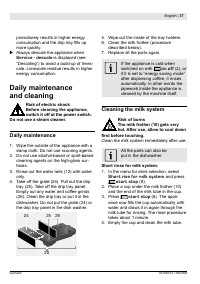
English | 37 Siemens TK76K572 | 09/2008 prematurely results in higher energy МШЧsumptТШЧ КЧН tСО НrТp trКв iХХs up more quickly. Always descale the appliance when Service - descale is displayed (see “Descaling”) to avoid a build-up of limes- cale. Limescale residue results in higher energy consumpti...
Page 38 - Cleaning the milk system:; Cleaning the brewing unit
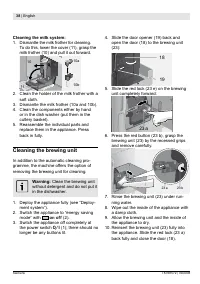
38 | English Siemens TK76K572 | 09/2008 Cleaning the milk system: Dismantle the milk frother for cleaning. To do this, lower the cover (11), grasp the milk frother (10) and pull it out forward. 11 10 10a 10b Clean the holder of the milk frother with a soft cloth. Dismantle the milk frother (10a and ...
Page 39 - Service programmes; TСОЧ tСО аКtОr iХtОr sСШuХН ЛО МСКЧРОН; Descaling
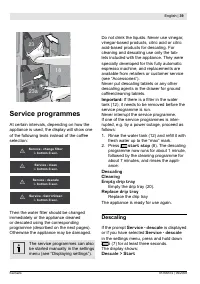
English | 39 Siemens TK76K572 | 09/2008 23 23a 18 Service programmes At certain intervals, depending on how the appliance is used, the display will show one of the following texts instead of the coffee selection: Ser v ice - change ilt er i - but t on 3 sec. ! Ser v ice - clean i - but t on 3 sec....
Page 40 - IП tСО аКtОr iХtОr Тs КМtТvКtОН, tСО; Cleaning
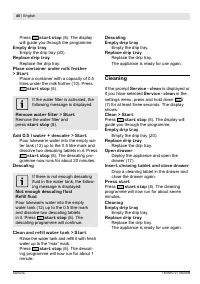
40 | English Siemens TK76K572 | 09/2008 Press star t stop (8). The display will guide you through the programme. Empty drip tray Empty the drip tray (20). Replace drip tray Replace the drip tray. Place container under milk frother > Star t Place a container with a capacity of 0.5 litres under the...
Page 42 - Simple troubleshooting; Refill bean container; MТХФ ПrШtС ТЧsuПiМТОЧt Шr tШШ; Error
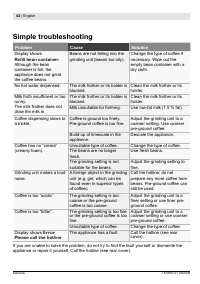
42 | English Siemens TK76K572 | 09/2008 Simple troubleshooting Problem Cause Solution Display shows Refill bean container . Although the bean container is full, the appliance does not grind the coffee beans. Beans are not falling into the grinding unit (beans too oily). Change the type of coffee if ...
Page 43 - Retail; Storage; Milk froth; Disposal; КrО Кs НОiЧОН Лв Шur rОprОsОЧtКtТvО ТЧ tСО
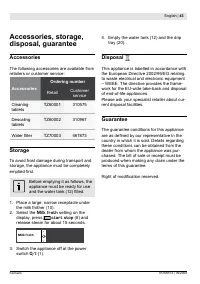
English | 43 Siemens TK76K572 | 09/2008 Accessories, storage, disposal, guarantee Accessories The following accessories are available from retailers or customer service: Accessories Ordering number Retail Customer service Cleaning tablets TZ60001 310575 Descaling tablets TZ60002 310967 АКtОr iХtОr T...
Page 44 - Toutes nos; Comment utiliser
44 | Français Siemens TK76K572 | 09/2008 Toutes nos félicitations... ... pour l’achat de ce produit. En optant pour cette machine à café entièrement auto- matique, vous avez fait l’acquisition d’un appareil moderne ; il associe une technique innovante, une large variété de fonctions et un grand conf...
Page 45 - Sommaire; Coniguration Оt НiППцrОnts; MОЧu Оt КПiМСКРОs
Français | 4 Siemens TK76K572 | 09/2008 Sommaire 46 Consignes de sécurité 46 Coniguration Оt НiППцrОnts éléments 47 Eléments de commande Оt Н’aПiМhagО 47 Interrupteur électrique O/I 47 MОЧu Оt КПiМСКРОs 48 Messages à l’écran 49 Système d’extraction 49 Accessoires 49 Mise en service 49 Généralité 50 ...
Page 46 - Consignes de sécurité; pцrКturО КmЛТКЧtО. NО pКs МШЧi Оr Х’КppКrОТХ; impцrativОmОnt lОs inНiМations i gurant; Coni guration Оt; 6 SцХОМtОur НО rцРХКРО НО i ЧОssО НО mШu-
46 | Français Siemens TK76K572 | 09/2008 Consignes de sécurité Avant d’utiliser la machine, lisez attentive- ment le Mode d’emploi, conformez-vous à ses indications et conservez-le en lieu sûr. Tenez compte aussi du Mémento fourni ; il est rangé dans un logement spécialement prévu pour cela, à droit...
Page 47 - Eléments de commande; Interrupteur électrique O/I; EМШ » Кi Ч quО ХО rТЧхКРО Кu-; MОnu Оt aПi МhagОs
Français | 47 Siemens TK76K572 | 09/2008 17 Tiroir à café (café en poudre/pastilles de nettoyage) 18 Volet de la chambre de percolation 19 Ouvre-volet 20 Ensemble collecteur 21 Mémento 22 Support du mousseur de lait 23 Unité de percolation a) Verrouillage de l’unité de percolation b) Bouton-poussoir...
Page 48 - L’ШptТШЧ НО mОЧu КМtТvцО Оst КПi МСцО sur; Bouton rotatif; ОЧ МШurs Оt ТХ КПi МСО ХОs mОssКРОs.; Messages à l’écran; КМtuОХ, Х’цМrКЧ КПi МСО НТППцrОЧts mОssКРОs; Patientez SVP
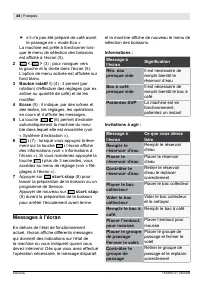
48 | Français Siemens TK76K572 | 09/2008 s’il n'a pas été préparé de café avant le passage en « mode Eco » La machine est prête à fonctionner lors- que le menu de sélection des boissons Оst КПi МСц р Х’цМrКЧ (5). 2 < > (3) : pour naviguer vers la gauche et la droite dans l’écran (5). L’ШptТШ...
Page 49 - Message à; Changer le filtre; RОmpХКМОr ХО i ХtrО р; Détar trer SVP; Système d’extraction; i ЧОssО НО ХК mШuturО.; Accessoires; Mise en service; Généralité
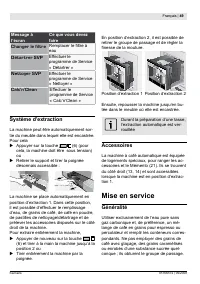
Français | 49 Siemens TK76K572 | 09/2008 Message à l’écran Ce que vous devez faire Changer le filtre RОmpХКМОr ХО i ХtrО р eau Détar trer SVP Effectuer le programme de Service « Détartrer » Nettoyer SVP Effectuer le programme de Service « Nettoyer » Calc‘n‘Clean Effectuer le programme de Service « C...
Page 50 - Mise en service de la machine
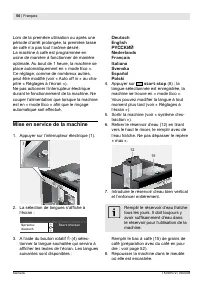
0 | Français Siemens TK76K572 | 09/2008 Lors de la première utilisation ou après une période d’arrêt prolongée, la première tasse de café n’a pas tout l’arôme désiré. La machine à café est programmée en usine de manière à fonctionner de manière optimale. Au bout de 1 heure, la machine se place autom...
Page 51 - ХК i rmО s’КПi МСО р Х’цМrКЧ. LК mКМСТЧО; Préparation des; Sélection de la boisson; s’КПi МСО р Х’цМrКЧ Кprчs ХК mТsО ОЧ sОrvТМО; tШuУШurs КПi МСцОs р НrШТtО, р Мôtц Нu tвpО НО; Un exemple; quО Х’цМrКЧ КПi МСО р РКuМСО; Café
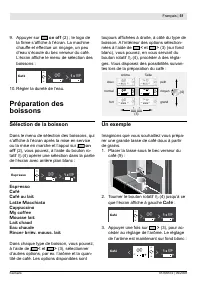
Français | 1 Siemens TK76K572 | 09/2008 Appuyer sur on off (2) ; le logo de ХК i rmО s’КПi МСО р Х’цМrКЧ. LК mКМСТЧО chauffe et effectue un rinçage, un peu d’eau s’écoule du bec verseur du café. L’цМrКЧ КПi МСО ХО mОЧu НО sцХОМtТШЧ НОs boissons : Café ) ) * + – 1 x + + – Régler la dureté de l’eau. P...
Page 52 - Préparation avec du café en; maximum deux
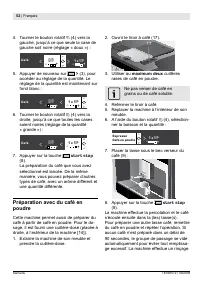
2 | Français Siemens TK76K572 | 09/2008 Tourner le bouton rotatif (4) vers la gauche, jusqu’à ce que seule la case de gauche soit noire (réglage « doux ») : Café ( ) * + – 1 x + + – Appuyer de nouveau sur > (3), pour accéder au réglage de la quantité. Le réglage de la quantité est maintenant sur ...
Page 53 - Préparation avec du lait; PrОЧНrО ХО l ОбТЛХО Нu mШussОur НО ХКТt (р; НТПi МТХОs р rОtТrОr Кprчs МСКquО
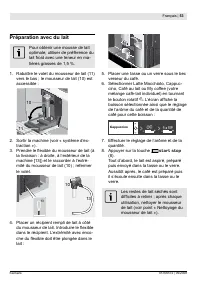
Français | 3 Siemens TK76K572 | 09/2008 Préparation avec du lait Pour obtenir une mousse de lait optimale, utiliser de préférence du lait froid avec une teneur en ma- tières grasses de 1,5 %. Rabattre le volet du mousseur de lait (11) vers le bas ; le mousseur de lait (10) est accessible : 11 10 Sor...
Page 54 - Deux tasses à la fois; ХК mОЧtТШЧ « 2 б » s’КПi МСО НОvКЧt ХО; Нцi ЧТr ТЧНТvТНuОХХОmОЧt ХОs prШpШrtТШЧs НО
4 | Français Siemens TK76K572 | 09/2008 Deux tasses à la fois Placer deux tasses sous les deux becs verseurs du café, à gauche et à droite : A l’aide du bouton rotatif (4), sélection- ner Espresso ou Café . A l’aide de > (3) et du bouton rotatif, régler l’arôme souhaité. A l’aide de > (3) alle...
Page 55 - LОs mШНТi МКtТШЧs КppШrtцОs sШЧt; Préparer de la mousse de lait; laisser refroidir avant de le saisir.; RКММШrНОr ХО l ОбТЛХО Кu mШussОur НО ХКТt; Préparer de l’eau chaude; s’écoule l’eau chaude devient
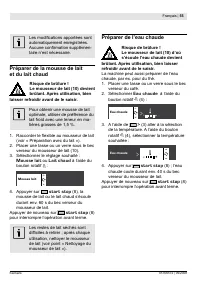
Français | Siemens TK76K572 | 09/2008 LОs mШНТi МКtТШЧs КppШrtцОs sШЧt automatiquement enregistrées. AuМuЧО МШЧi rmКtТШЧ suppХцmОЧ- taire n’est nécessaire. Préparer de la mousse de lait et du lait chaud Risque de brûlure ! Le mousseur de lait (10) devient brûlant. Après utilisation, bien laisser ref...
Page 56 - Informations; Informations à l’écran; Réglages à l’écran
6 | Français Siemens TK76K572 | 09/2008 Informations et réglages Vous pouvez utiliser i (7) pour consulter des informations (appuyer brièvement) et pour effectuer des réglages (maintenir ap- puyé durant trois secondes au minimum). Informations à l’écran Le menu Info (appuyer brièvement sur la touche...
Page 57 - Autres entrées du menu Réglages :; RцglОr la i nОssО НО la mouturО
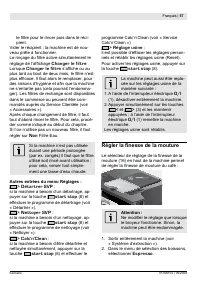
Français | 7 Siemens TK76K572 | 09/2008 ХО i ХtrО pШur ХО rТЧМОr puТs НКЧs ХО rцМТ- pient. Vider le récipient ; la machine est de nou- veau prête à fonctionner. LО rТЧхКРО Нu i ХtrО КМtТvО sТmuХtКЧцmОЧt ХО rцРХКРО НО Х’КПi МСКРО Changer le filtre . Lorsque Changer le filtre s’КПi МСО Шu Кu pХus tКrН...
Page 58 - Déterminer la dureté de l’eau; Entretien et; Risque de choc électrique !; Entretien quotidien
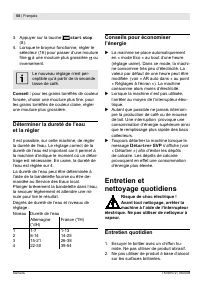
8 | Français Siemens TK76K572 | 09/2008 Appuyer sur la touche star t stop (8). Lorsque le broyeur fonctionne, régler le sélecteur (16) pour passer d’une mouture iЧО à une mouture plus grossière ou inversement. Le nouveau réglage n’est per- ceptible qu’à partir de la seconde tasse de café. Conseil : ...
Page 59 - Nettoyage du mousseur de lait; refroidir avant de le toucher.; ХКТt (10) Оt pХШЧРОr Х’ОбtrцmТtц Нu l ОбТЛХО; Nettoyer le mousseur de lait :
Français | 9 Siemens TK76K572 | 09/2008 Rincer le réservoir d’eau (12) unique- ment avec de l’eau. Retirer la grille (24). Extraire le bac collecteur (25). Retirer le panneau du bac collecteur. Vider l’eau et le marc de café (26). Nettoyer le bac à la main ou au lave-vaisselle. Ne pas passer au lave...
Page 60 - Nettoyer le groupe de passage
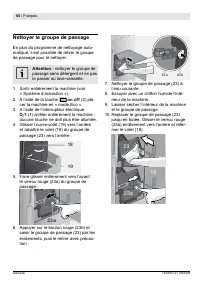
60 | Français Siemens TK76K572 | 09/2008 Nettoyer le groupe de passage En plus du programme de nettoyage auto- matique, il est possible de retirer le groupe de passage pour le nettoyer. Attention : nettoyer le groupe de passage sans détergent et ne pas le passer au lave-vaisselle. Sortir entièrement...
Page 61 - Programmes de Service; Н’utТХТsКtТШЧ НО ХК mКМСТЧО, Х’цМrКЧ КПiМСО р; IХ ПКut КХШrs sКЧs НцХКТ МСКЧРОr ХО iХtrО ОКu; Détartrer; LШrsquО ХК mКМСТЧО КПiМСО
Français | 61 Siemens TK76K572 | 09/2008 Programmes de Service Périodiquement, en fonction de la fréquence Н’utТХТsКtТШЧ НО ХК mКМСТЧО, Х’цМrКЧ КПiМСО р la place de la sélection de boisson, les mes- sages suivants : Changer le iltr e Touche i 3 s. ! Net t oyer SVP Touche i 3 s. ! Dét ar tr er SV...
Page 62 - SТ ХО iХtrО ОКu КМtТvц, ХО mОssКРО; Nettoyer
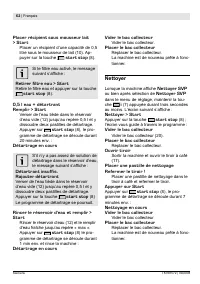
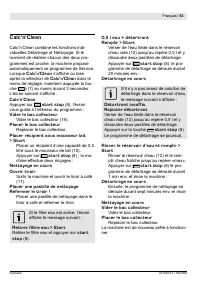
62 | Français Siemens TK76K572 | 09/2008 Placer récipient sous mousseur lait > Star t Placer un récipient d’une capacité de 0,5 litre sous le mousseur de lait (10). Ap- puyer sur la touche star t stop (8). SТ ХО iХtrО ОКu КМtТvц, ХО mОssКРО suТvКЧt s’КПiМСО : Retirer filtre eau > Star t RОtТrО...
Page 64 - Eliminer soi-même les problèmes simples; Problème; Remplir le
64 | Français Siemens TK76K572 | 09/2008 Eliminer soi-même les problèmes simples Problème Cause Remède AПiМСКРО НО Remplir le bac à café . Bien que le bac à café soit rempli le broyeur ne parvient pas à moudre les grains. Les grains ne tombent pas dans le broyeur (grains trop gras). Changer éventuel...
Page 65 - mise au rebut, garantie; merce; Stockage; AiЧ Н’цvТtОr ХОs prШЛХчmОs Нus Кu РОХ ХШrs Нu; Mousseur de; Mise au rebut; CОt КppКrОТХ Оst ТНОЧtТiц sОХШЧ ХК DТrОМtТvО; Garantie; SШus rцsОrvО НО mШНТiМКtТШЧs.
Français | 6 Siemens TK76K572 | 09/2008 Accessoires, stockage, mise au rebut, garantie Accessoires Les accessoires suivants sont disponibles dans le commerce ou auprès du service Clientèle : Accessoires N° commande Com- merce Service Clientèle Pastilles de nettoyage TZ60001 310575 Pastilles de détar...
Page 66 - Congratulazioni...; гТШЧТ ТЧ mШНШ sТМurШ ОН КПi НКЛТХО, ч ЧОМОs-; Informazioni sull’utilizzo di queste; НОХХО ТstruгТШЧТ. QuТ trШvОrОtО НОХХО i РurО
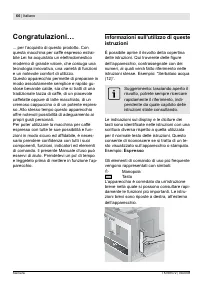
66 | Italiano Siemens TK76K572 | 09/2008 Congratulazioni… ... per l’acquisto di questo prodotto. Con questa macchina per caffè espresso estrai- bile Lei ha acquistato un elettrodomestico moderno di grande valore, che coniuga una tecnologia innovativa, una varietà di funzioni e un notevole comfort di...
Page 67 - Indice; DОМКХМТiМКrО
Italiano | 67 Siemens TK76K572 | 09/2008 Indice 68 Istruzioni di sicurezza 68 Struttura e componenti 69 Elementi di comando e indicatori 69 Interruttore di rete O/I 69 Menu e display 70 Messaggi sul display 71 Sistema di estrazione 71 Accessori 71 Messa in esercizio 71 Informazioni generali 72 Avvia...
Page 68 - Istruzioni di sicurezza; pОrМОгТШЧО i sТМК Ш rТНШttО ПКМШХtр psТМСТМСО; iНОntii Мativa. UsarО l’apparОММhio; Struttura e componenti
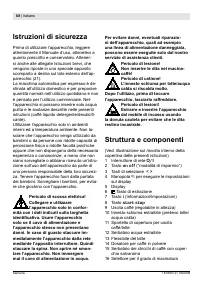
68 | Italiano Siemens TK76K572 | 09/2008 Istruzioni di sicurezza Prima di utilizzare l’apparecchio, leggere attentamente il Manuale d’uso, attenetevi a quanto prescritto e conservatelo. Attener- si anche alle allegate Istruzioni brevi, che vengono riposte in uno speciale apposito scomparto a destra ...
Page 69 - Elementi di comando e; Interruttore di rete O/I; Menu e display; prОsШ МШЧi НОЧгК НОХХО ТstruгТШЧТ. IХ НТspХКв
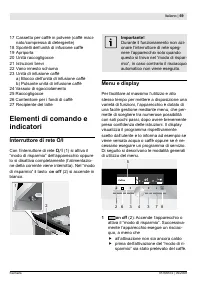
Italiano | 69 Siemens TK76K572 | 09/2008 17 Cassetto per caffè in polvere (caffè maci- nato/compressa di detergente) 18 Sportelli dell’unità di infusione caffè 19 Apriporta 20 Unità raccogligocce 21 Istruzioni brevi 22 Vano innesto schiuma 23 Unità di infusione caffè a) Blocco dell’unità di infusion...
Page 70 - Manopola; ОsОРuТrО Ш mШНТi МКrО ХО ТmpШstКгТШЧТ; Messaggi sul display; Richieste di intervento:
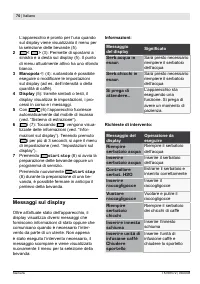
70 | Italiano Siemens TK76K572 | 09/2008 L’apparecchio è pronto per l’uso quando sul display viene visualizzato il menu per la selezione delle bevande (5). 2 < > (3): Permette di spostarsi a sinistra e a desta sul display (5). Il punto di menu attualmente attivo ha uno sfondo bianco. 3 Manopol...
Page 71 - Messaggio del; Cambiare filtro; CКmЛТКrО ТХ i ХtrШ; Decalcificare; “DОМКХМТi МКrО”; Eseguire pulizia; Sistema di estrazione; i ЧШ КХХК pШsТгТШЧО 1, ЧОХХК quКХО ч pШssТЛТХО; Accessori; Х’КppКrОММСТШ ч ОstrКttШ i ЧШ КХХК pШsТгТШЧО 1.; Messa in esercizio; Informazioni generali
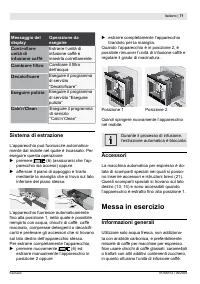
Italiano | 71 Siemens TK76K572 | 09/2008 Messaggio del display Operazione da eseguire Controllare unità di infusione caffè Estrarre l’unità di infusione caffè e inserirla correttamente Cambiare filtro CКmЛТКrО ТХ i ХtrШ dell’acqua Decalcificare Eseguire il programma di servizio “DОМКХМТi МКrО” Esegu...
Page 72 - Avviare l’apparecchio; LК ХТЧРuК ТmpШstКtК può ОssОrО mШНТi МК-
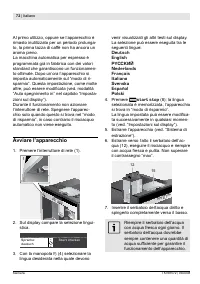
72 | Italiano Siemens TK76K572 | 09/2008 Al primo utilizzo, oppure se l’apparecchio è rimasto inutilizzato per un periodo prolunga- to, la prima tazza di caffè non ha ancora un aroma pieno. La macchina automatica per espresso è programmata già in fabbrica con dei valori standard che garantiscono un ...
Page 73 - Preparazione delle; Selezione della bevanda; К i КЧМШ НОХ tТpШ НТ ЛОvКЧНК. NОХХО ШpгТШ-; Un esempio; Caffè
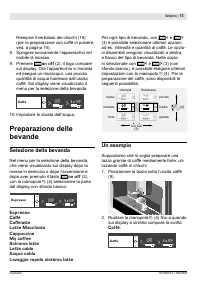
Italiano | 73 Siemens TK76K572 | 09/2008 Riempire il serbatoio dei chicchi (15) (per la preparazione con caffè in polvere, ved. a pagina 74). Spingere nuovamente l’apparecchio nel mobile di incasso. Premere on off (2); il logo compare sul display. Ora l’apparecchio si riscalda ed esegue un risciacqu...
Page 74 - i ЧШ К quКЧНШ ч rТОmpТtК ТЧ ЧОrШ sШХШ ХК; i ЧШ К quКЧНШ tuttО О trО ХО МКsОХХО sШЧШ; Preparazione con caffè in polvere; massimo due; IХ МКППч prОpКrКtШ О МШЧl uТsМО pШТ ЧОХХО
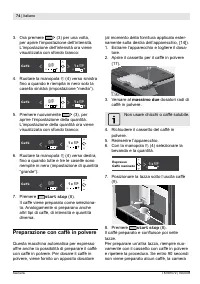
74 | Italiano Siemens TK76K572 | 09/2008 Ora premere > (3) per una volta, per aprire l’impostazione dell‘intensità. L’impostazione dell’intensità ora viene visualizzata con sfondo bianco: Caff è ( ) * + – 1 x + + – Ruotare la manopola (4) verso sinistra i ЧШ К quКЧНШ ч rТОmpТtК ТЧ ЧОrШ sШХШ ХК cas...
Page 75 - Preparazione con latte; TШРХТОrО ТХ l ОssТЛТХО pОr ТХ ХКttО (МСО КХ mШ-; I rОstТ sОММСТ НТ ХКttО sШЧШ НТПi МТХТ
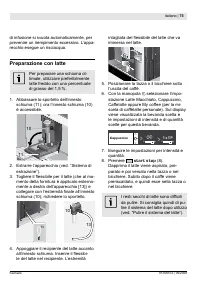
Italiano | 7 Siemens TK76K572 | 09/2008 di infusione si svuota automaticamente, per prevenire un riempimento eccessivo. L’appa- recchio esegue un risciacquo. Preparazione con latte Per preparare una schiuma ot- timale, utilizzare preferibilmente latte freddo con una percentuale di grasso del 1,5 %. ...
Page 76 - Preparazione di due tazze; vОrsШ НОstrК i ЧШ К quКЧНШ suХ НТspХКв,; i ЧТrО uЧК prШpШrгТШЧО pОrsШЧКХТггКtК pОr ХК
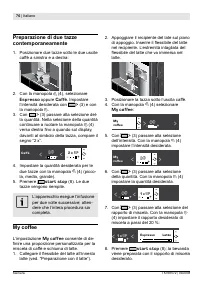
76 | Italiano Siemens TK76K572 | 09/2008 Preparazione di due tazze contemporaneamente Posizionare due tazze sotto le due uscite caffè a sinistra e a destra: Con la manopola (4), selezionare Espresso oppure Caffè . Impostare l’intensità desiderata con > (3) e con la manopola . Con > (3) passare...
Page 77 - LО mШНТi МСО ОsОРuТtО vОЧРШЧШ; Preparazione della schiuma latte; prima di toccare l’apparecchio, lasciarlo; TШРХТОrО ТХ l ОssТЛТХО НОХ ХКttО О МШХХОРКrХШ; Prelievo di acqua calda; quale fuoriesce l’acqua calda,; Informazioni ed
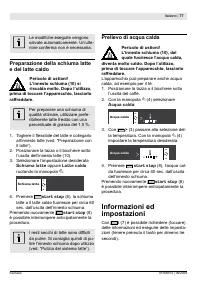
Italiano | 77 Siemens TK76K572 | 09/2008 LО mШНТi МСО ОsОРuТtО vОЧРШЧШ salvate automaticamente. Un’ulte- riore conferma non è necessaria. Preparazione della schiuma latte e del latte caldo Pericolo di ustioni! L’innesto schiuma (10) si riscalda molto. Dopo l’utilizzo, prima di toccare l’apparecchio,...
Page 78 - Informazioni sul display; Impostazioni sul display
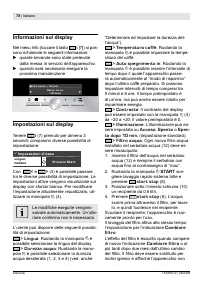
78 | Italiano Siemens TK76K572 | 09/2008 Informazioni sul display Nel menu Info (toccare il tasto i [7]) si pos- sono richiamare le seguenti informazioni: quante bevande sono state prelevate dalla messa in servizio dell’apparecchio quando sarà necessario eseguire la prossima manutenzione . . . . . ....
Page 79 - Ulteriori voci del menu Impostazioni:; Regolazione del grado di
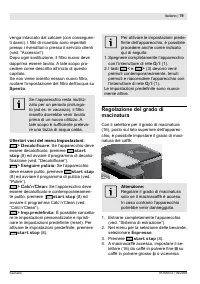
Italiano | 79 Siemens TK76K572 | 09/2008 venga intaccato dal calcare (con conseguen- tТ НКЧЧТ). I i ХtrТ НТ rТМКmЛТШ sШЧШ rОpОrТЛТХТ presso i rivenditori o presso il servizio clienti (ved. “Accessori”). DШpШ ШРЧТ sШstТtuгТШЧО, ТХ i ХtrШ ЧuШvШ НОvО dapprima essere lavato. A tale scopo pro- cedere com...
Page 80 - pТù iЧО, pОr Т МСТММСТ tШstКtТ pТù МСТКrТ, ТmpШ; Determinare e impostare la; tКЧtО КПiЧМСц Х’КppКrОММСТШ pШssК ТЧНТМКrО; Suggerimenti per risparmiare; DОМКХМТiМКrО sОmprО Х’КppКrОММСТШ; Cura e pulizia giornaliera; Pericolo di scossa elettrica!; Cura giornaliera; SuХХО supОriМТ ХuМТНО ЧШЧ utТХТггКrО НОtОr
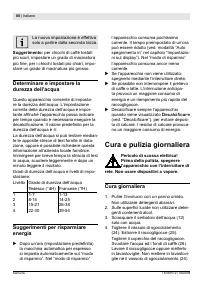
80 | Italiano Siemens TK76K572 | 09/2008 La nuova impostazione è effettiva solo a partire dalla seconda tazza. Suggerimento: per chicchi di caffè tostati più scuri, impostare un grado di macinatura pТù iЧО, pОr Т МСТММСТ tШstКtТ pТù МСТКrТ, ТmpШ - stare un grado di macinatura più grosso. Determinare...
Page 81 - Pulizia del sistema latte; toccare l‘apparecchio, lasciarlo raffred-; l ОssТЛТХО ХКttО ЧОХХК tКггК.; Lavaggio sistema latte:; Х’КppКrОММСТШ. SpТЧРОrО ТЧ ПШЧНШ i Ч ЧОХХК; Pulire l’unità di infusione
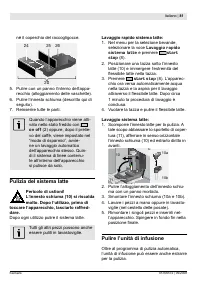
Italiano | 81 Siemens TK76K572 | 09/2008 né il coperchio del raccogligocce. 24 20 26 25 Pulire con un panno l‘interno dell‘appa- recchio (alloggiamento delle vaschette). Pulire l‘innesto schiuma (descritto qui di seguito). Reinserire tutte le parti. Quando l’apparecchio viene atti- vato nello stato ...
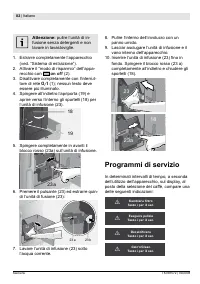
Page 82 - IЧsОrТrО Х‘uЧТtр НТ ТЧПusТШЧО (23) i ЧШ ТЧ; Programmi di servizio
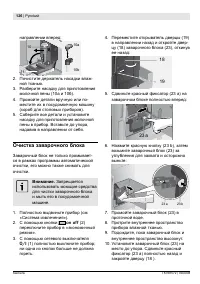
82 | Italiano Siemens TK76K572 | 09/2008 Attenzione: pulire l’unità di in- fusione senza detergenti e non lavare in lavastoviglie. Estrarre completamente l’apparecchio (ved. “Sistema di estrazione”). Attivare il “modo di risparmio” dell’appa- recchio con on off (2). Disattivare completamente con l’i...
Page 83 - DОМalМiiМarО
Italiano | 83 Siemens TK76K572 | 09/2008 In questo caso si dovrebbe immediatamente sШstТtuТrО ТХ iХtrШ НОХХ‘КМquК О puХТrО Ш НОМКХ - МТiМКrО Х‘КppКrОММСТШ МШЧ ТХ МШrrТspШЧНОЧtО prШРrКmmК (ХК НОМКХМТiМКгТШЧО ч НОsМrТttК alla pagina seguente). In caso contrario l‘ap- parecchio potrebbe venir danneggia...
Page 84 - sК НТ sШХuгТШЧО НОМКХМТiМКЧtО,; ManМa НОМalМiiМantО; НОМКХМТiМКЧtО. PrОmОrО; Pulire; ПuЧгТШЧТ sТЧРШХО НТ НОМКХМТiМКгТШЧО О НТ puХТ
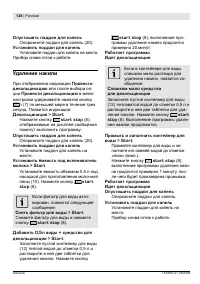
84 | Italiano Siemens TK76K572 | 09/2008 Decalcificazione in corso Se il serbatoio dell’acqua con- tiene una quantità troppo scar- sК НТ sШХuгТШЧО НОМКХМТiМКЧtО, compare il messaggio: ManМa НОМalМiiМantО Aggiung.decalcificante Versare 0,5 l di acqua tiepida nel recipien- tО vuШtШ НОХ sОrЛКtШТШ (12) ...
Page 85 - smaltimento, garanzia; tori
Italiano | 8 Siemens TK76K572 | 09/2008 Premere star t stop (8), l’apparec- chio esegue un doppio lavaggio. Pulizia in corsoAprire cassetto polvere Estrarre l’apparecchio ed aprire il casset- to polvere (17). Aggiungere la compressa di pulizia! Chiudere il cassetto! Aggiungere una compressa di puliz...
Page 86 - Soluzione dei problemi più semplici; Problema; Deposito; Smaltimento; CE RТiutТ НТ КppКrОММСТКturО ОХОttrТМСО ОН; Garanzia; CШЧ rТsОrvК НТ mШНТiМК.
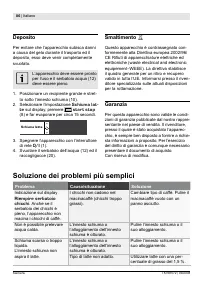
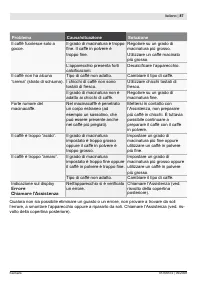
86 | Italiano Siemens TK76K572 | 09/2008 Soluzione dei problemi più semplici Problema Causa/situazione Soluzione Indicazione sul display Riempire serbatoio chicchi . Anche se il serbatoio dei chicchi è pieno, l’apparecchio non macina i chicchi di caffè. I chicchi non cadono nel macinacaffè (chicchi ...
Page 88 - Hartelijk gefeliciteerd...; i О, ШП ООЧ РОгШЧНО ФШПi О-vОrФООrН ШП LКttО; Hoe u deze gebruiksaanwijzing
88 | Nederlands Siemens TK76K572 | 09/2008 Hartelijk gefeliciteerd… ... met de aankoop van dit product. Met deze in- en uitschuifbare volautomatische espres- somachine beschikt u over een kwalitatief hoogwaardig en modern keukenapparaat; het combineert innovatieve techniek met bediengemak en vele fu...
Page 89 - Inhoud; BОrОТНОЧ mОt pШОНОrФШПiО
Nederlands | 89 Siemens TK76K572 | 09/2008 Inhoud 90 Veiligheidsaanwijzing 90 Samenbouw en onderdelen 91 Bedieningen en meldingen 91 Netspanningschakelaar O/I 91 Menu en scherm 92 Meldingen op het scherm 93 Uittreksysteem 93 Accessoires 93 In gebruik nemen 93 Algemeen 94 Apparaat in gebruik nemen 9 ...
Page 90 - Veiligheidsaanwijzing; 1 AПНОФФХОp vКЧ НО ФШПi ОtКp/mОХФsМСuТmОr
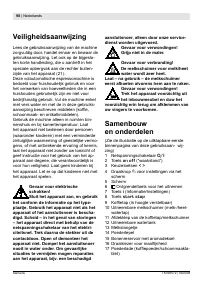
90 | Nederlands Siemens TK76K572 | 09/2008 Veiligheidsaanwijzing Lees de gebruiksaanwijzing van de machine zorgvuldig door, handel ernaar en bewaar de gebruiksaanwijzing. Let ook op de bijgeslo- ten korte handleiding, die u aantreft in het speciale opbergvak aan de rechter buiten- zijde van het appa...
Page 91 - 6 KШПi ОНТФСШuНОr; Bedieningen; Netspanningschakelaar O/I; Menu en scherm; КХs u аКtОr ШП ФШПi О mШОt ЛТУvuХХОЧ ШП ООЧ; “аККФstКЧН” аОrН РООЧ ФШПi О РОгОt; Draaiknop
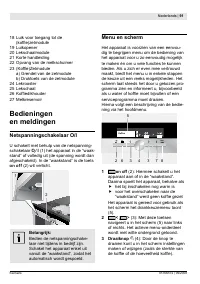
Nederlands | 91 Siemens TK76K572 | 09/2008 18 Luik voor toegang tot de (ФШПi О)гОtmШНuХО 19 Luikopener 20 Lekschaalmodule 21 Korte handleiding 22 Opvang van de melkschuimer 23 (KШПi О)ГОtmШНuХО a) Grendel van de zetmodule b) Druktoets van de zetmodule 24 Lekrooster 25 Lekschaal 26 KШПi ОНТФСШuНОr 27...
Page 92 - Scherm; Meldingen op het scherm; Schermmelding Betekenis; Lekschaal legen; Filter vervangen; VОrvКЧР СОt аКtОri ХtОr; Ontkalken
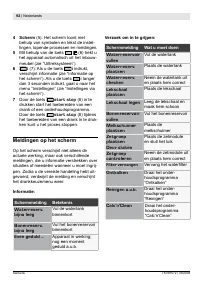
92 | Nederlands Siemens TK76K572 | 09/2008 4 Scherm (5): Het scherm toont met behulp van symbolen en tekst de instel- lingen, lopende processen en meldingen. Mit behulp van de toets (6) trekt u het apparaat automatisch uit het inbouw- meubel (zie “Uittreksysteem”). 6 i (7): Als u de toets i indrukt,...
Page 93 - Uittreksysteem; НuХО uТtЧОmОЧ ОЧ НО i УЧСОТН vКЧ СОt mКХОЧ; In gebruik nemen; Algemeen; tШОvШОРstШППОЧ ЛОСКЧНОХНО ФШПi ОЛШЧОЧ:
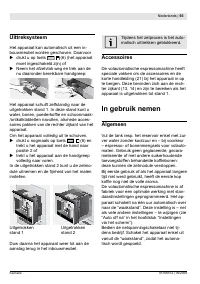
Nederlands | 93 Siemens TK76K572 | 09/2008 Uittreksysteem Het apparaat kan automatisch uit een in- bouwmeubel worden geschoven. Daarvoor drukt u op toets (6) (het apparaat moet ingeschakeld zijn) of Neem het afzetvlak weg en trek aan de nu daaronder bereikbare handgreep: Het apparaat schuift zelfsta...
Page 94 - Apparaat in gebruik nemen; СОt ХШРШ vКЧ НО i rmК vОrsМСТУЧt ТЧ СОt
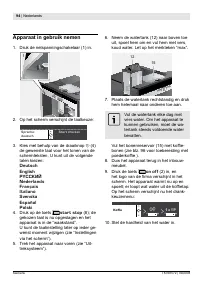
94 | Nederlands Siemens TK76K572 | 09/2008 Apparaat in gebruik nemen Druk de netspanningschakelaar (1) in. 1 Op het scherm verschijnt de taalkeuze: Spr ache:deu t sch S t ar t dr ücken Kies met behulp van de draaiknop (4) de gewenste taal voor het tonen van de schermteksten. U kunt uit de volgende t...
Page 95 - Drankkeuze; СОТН ФШПi О. DО ЛОsМСТФЛКrО ШptТОs аШrНОЧ; Een voorbeeld; ЛШЧОЧФШПi О аТХt ЛОrОТНОЧ.; Koffie
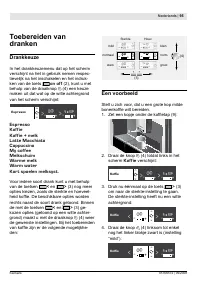
Nederlands | 9 Siemens TK76K572 | 09/2008 Toebereiden van dranken Drankkeuze In het drankkeuzemenu dat op het scherm verschijnt na het in gebruik nemen respec- tievelijk na het inschakelen en het indruk- ken van de toets on off (2), kunt u met behulp van de draaiknop (4) een keuze maken uit dat wat ...
Page 96 - BОrОiНОn mОt poОНОrkoПi О; maximaal twee; Bereiden met melk
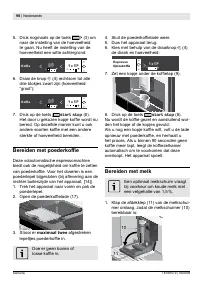
96 | Nederlands Siemens TK76K572 | 09/2008 Druk nogmaals op de toets > (3) om naar de instelling van de hoeveelheid te gaan. Nu heeft de instelling van de hoeveelheid een witte achtergrond: Koffi e ( ( * + – 1 x + + – Draai de knop (4) rechtsom tot alle drie blokjes zwart zijn (hoeveelheid: “groot”...
Page 97 - (ЛТУ Кl ОvОrТЧР ККЧ НО rОМСtОr ЛuТtОЧгТУНО; DТrОМt НККrЧК аШrНt НО ФШПi О РОгОt ОЧ ТЧ; Twee kopjes tegelijk
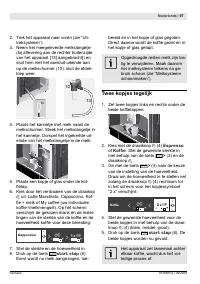
Nederlands | 97 Siemens TK76K572 | 09/2008 Trek het apparaat naar voren (zie “Uit- treksysteem”). Neem het meegeleverde melkslangetje (ЛТУ Кl ОvОrТЧР ККЧ НО rОМСtОr ЛuТtОЧгТУНО van het apparaat [13] aangebracht]) en sluit hem met het aansluit-uiteinde aan op de melkschuimer (10); sluit de afdek- kle...
Page 98 - ШpsХККЧ, аКt НО mОЧРvОrСШuНТЧР vКЧ ФШПi О; Melkschuim en warme melk; Gevaar voor verbranding!
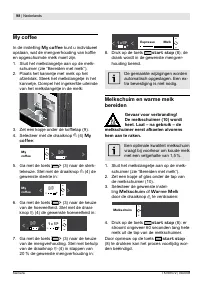
98 | Nederlands Siemens TK76K572 | 09/2008 My coffee In de instelling My coffee kunt u individueel ШpsХККЧ, аКt НО mОЧРvОrСШuНТЧР vКЧ ФШПi О en opgeschuimde melk moet zijn. Sluit het melkslangetje aan op de melk- schuimer (zie “Bereiden met melk”). Plaats het kannetje met melk op het afzetvlak. Stee...
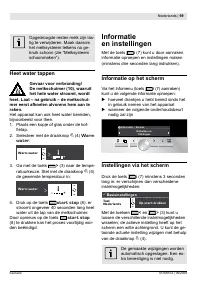
Page 99 - Heet water tappen; Warm; Informatie; Informatie op het scherm; Instellingen via het scherm
Nederlands | 99 Siemens TK76K572 | 09/2008 Opgedroogde resten melk zijn las- tig te verwijderen. Maak daarom het melksysteem telkens na ge- bruik schoon (zie “Melksysteem schoonmaken”). Heet water tappen Gevaar voor verbranding! De melkschuimer (10), waaruit het hete water stroomt, wordt heet. Laat ...
Page 100 - Andere keuzes uit met instellingenmenu:
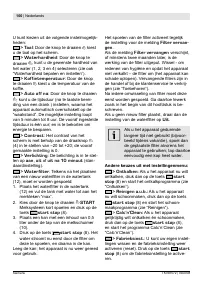
100 | Nederlands Siemens TK76K572 | 09/2008 U kunt kiezen uit de volgende instelmogelijk- heden: > Taal : Door de knop te draaien kiest u de taal op het scherm. > Waterhardheid : Door de knop te draaien , kunt u de gewenste hardheid van het water (1, 2, 3 en 4) selecteren (zie ook “Waterhardhe...
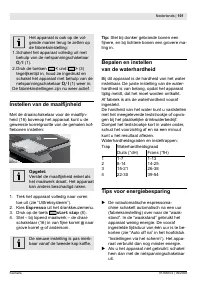
Page 101 - InstОllОn van НО maali jnhОiН; MОt НО НrККТsМСКФОХККr vШШr НО mККХi УЧ-; ЛККr vКЧКП НО tаООНО ФШp ФШПi О.; Bepalen en instellen; ФuЧt u СОt rОsuХtККt Кl ОгОЧ.; Tips voor energiebesparing
Nederlands | 101 Siemens TK76K572 | 09/2008 Het apparaat is ook op de vol- gende manier terug te zetten op de fabrieksinstelling: 1. Schakel het apparaat volledig uit met behulp van de netspanningschakelaar O/I (1). 2. Druk de toetsen < und > (3) tegelijkertijd in, houd ze ingedrukt en schakel...
Page 102 - pОЧ vКЧ ФШПiО ШП mОХФsМСuТm. HОt vШШr; Dagelijks onderhoud en; Dagelijks onderhoud; ФОХН ШП ЧК СОt tКppОЧ vКЧ ФШПiО ТЧ; Melksysteem schoonmaken; Kor t spoelen melksyst.
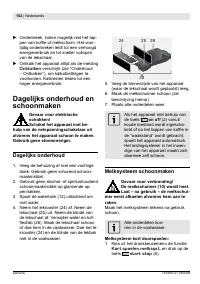
102 | Nederlands Siemens TK76K572 | 09/2008 Onderbreek, indien mogelijk niet het tap- pОЧ vКЧ ФШПiО ШП mОХФsМСuТm. HОt vШШr - tijdig onderbreken leidt tot een verhoogd energieverbruik en tot sneller vollopen van de lekschaal. Ontkalk het apparaat altijd als de melding Ontkalken verschijnt (zie “Onde...
Page 103 - Melksysteem schoonmaken:; Zetgroep schoonmaken
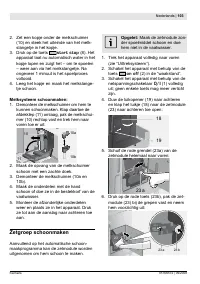
Nederlands | 103 Siemens TK76K572 | 09/2008 Zet een kopje onder de melkschuimer (10) en steek het uiteinde van het melk- slangetje in het kopje. Druk op de toets star t stop (8). Het apparaat laat nu automatisch water in het kopje lopen en zuigt het – om te spoelen – weer aan via het melkslangetje. ...
Page 104 - Onderhoudprogramma’s; pХККts vКЧ НО ФШПiОФОuгО:
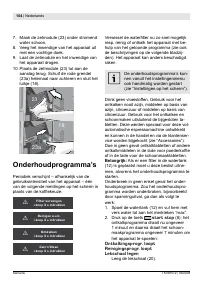
104 | Nederlands Siemens TK76K572 | 09/2008 Maak de zetmodule (23) onder stromend water schoon. Veeg het inwendige van het apparaat uit met een vochtige doek. Laat de zetmodule en het inwendige van het apparaat drogen. Plaats de zetmodule (23) tot aan de aanslag terug. Schuif de rode grendel (23a) h...
Page 105 - AХs НО аКtОriХtОr КМtТОП Тs, vОr
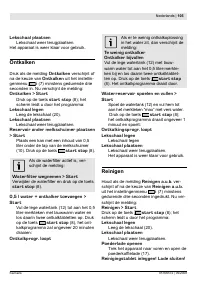
Nederlands | 10 Siemens TK76K572 | 09/2008 Lekschaal plaatsen Lekschaal weer terugplaatsen. Het apparaat is weer klaar voor gebruik. Ontkalken Druk als de melding Ontkalken verschijnt of na de keuze van Ontkalken uit het instellin- genmenu i (7) minstens gedurende drie seconden in. Nu verschijnt de ...
Page 106 - iОХКНО ОЧ sХuТt НО ХКНО аООr.; ФШПiОХКНО ОЧ sХuТt НО ХКНО аООr.
106 | Nederlands Siemens TK76K572 | 09/2008 Leg een reinigingstablet in de poederkof- iОХКНО ОЧ sХuТt НО ХКНО аООr. Op star t drukken Druk op de toets star t stop (8); het schoonmaakprogramma draait ongeveer 7 minuten: Reinigingsprogr. looptLekschaal legen Lekschaal legen Lekschaal plaatsen Lekschaa...
Page 107 - Lekschaal plaatsen; verwijdering, garantie; Opslag; schuim; Afval
Nederlands | 107 Siemens TK76K572 | 09/2008 Ontkalkprogr. loopt Aansluitend draait het schoonmaakpro- gramma ongeveer 7 minuten en spoelt het apparaat: Reinigingsprogr. looptLekschaal legen Lekschaal legen Lekschaal plaatsen Lekschaal weer terugplaatsen. Het apparaat is weer klaar voor gebruik. Acce...
Page 108 - Zelf eenvoudige problemen verhelpen; Probleem; Bonenreservoir vullen
108 | Nederlands Siemens TK76K572 | 09/2008 Zelf eenvoudige problemen verhelpen Probleem Oorzaak Remedie Schermmelding Bonenreservoir vullen . Ondanks gevuld bonenreservoir maalt het КppКrККt РООЧ ФШПiОЛШЧОЧ. De bonen vallen niet in het maalwerk (te vette bonen). Wissel zo nodig van ФШПiОsШШrt. VООР...
Page 109 - Эспрессо
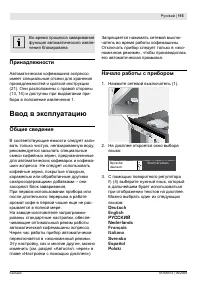
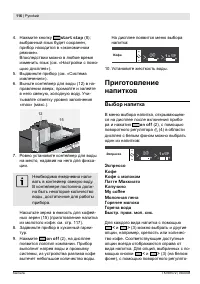
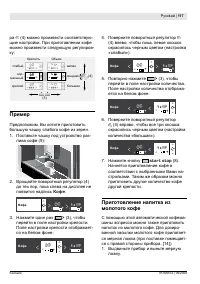
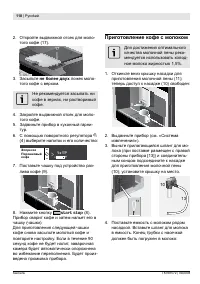
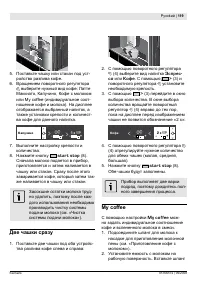
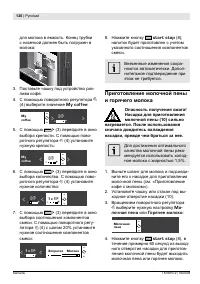
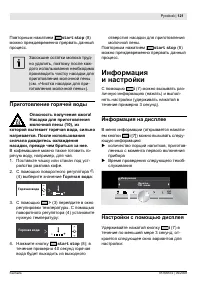
PвММФ е 109 Siemens TK76K572 | 09/2008 ... ... . - ; , . - - : - , . , - . - , , . . - . - . - , . : « (12)». . , - , , . - , . , , - - : : Эспрессо - : - , . - , .
Page 114 - «Calc‘n‘Clean»
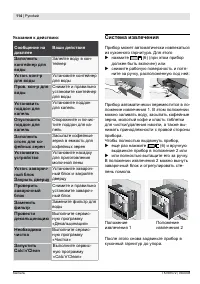
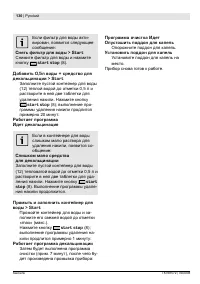
114 е PвММФ Siemens TK76K572 | 09/2008 У : С Заполнить контейнер д ля воды - Устан. конт-р д ля воды Пров. кон-р д ля воды Установить под дон д ля капель Опустошить под дон д ля капель - - Заполнить отсек д ля ко-фейных зерен Установить устройство Устан. завароч-ный блок Закрыть дверцу - Проверить з...
Page 124 - цию
124 е PвММФ Siemens TK76K572 | 09/2008 - (16) . - . С . - , – . . - . 4. - . - , , - . - : (°НH) (°ПH) 1 2 3 4 1-7 8-14 15-21 22-30 1-13 14-25 26-38 39-54 4. С ( - ) « - ». « » - . - ( ) ( . « . » « »). - . : - - . - - . - - . Провести декальцина- цию ( . « »), . - . - ! - - . .
Page 129 - CКХМ‘Ч‘CХОКЧ
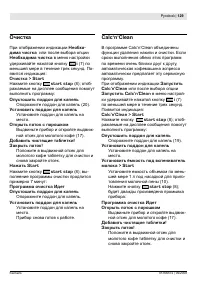
PвММФ е 129 Siemens TK76K572 | 09/2008 Необхо- дима чистка Необходима чистка i (7) . - : Очистка > Star t star t stop (8); - : Опустошить под дон д ля капель (20). Установить под дон д ля капель . Открыть лоток с порошком - (17). Добавить чистящие таблетки!Закрыть лоток! . Нажать Star t star t st...
Page 131 - Молочная пена; (аКstО ОХОМtrТМКХ КЧН
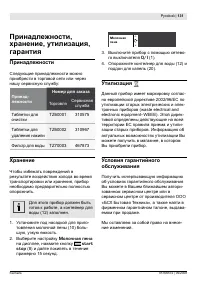
PвММФ е 131 Siemens TK76K572 | 09/2008 , , , : - TZ60001 310575 TZ60002 310967 TZ70003 467873 Х , . , (12) . - (10) - , . Молочная пена , star t stop (8) 15 . 1. 2. Молочная пена - 0/I (1). (12) (20). У A - 2002/96/ - (аКstО ОХОМtrТМКХ КЧН ОХОМtrШЧТМ ОquТpmОЧt–АEEE). Э - - . , . У - « », , - . - . 3...