Shark RV2310AE - User Manual
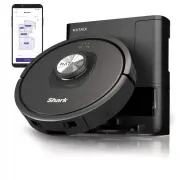
Shark RV2310AE Robot Vacuum – User Manual, read for free online in PDF format. We hope this helps you resolve any issues you may have. If you have further questions, please contact us through the contact form.


Table of Contents:
- Page 2 – WARNING; LASER WARNING; IMPORTANT SAFETY INSTRUCTIONS; SAVE THESE INSTRUCTIONS
- Page 3 – GETTING TO KNOW YOUR; DOCK
- Page 4 – LIVING WITH YOUR ROBOT; PREP YOUR HOME
- Page 5 – ROBOT INDICATOR LIGHTS; INSTALLING THE SIDE BRUSH
- Page 6 – BUTTONS AND INDICATOR LIGHTS; TURN THE ROBOT ON; CHARGING; DOCK BUTTON
- Page 7 – USING; THE; WI-FI TROUBLESHOOTING; How do I use my robot with Amazon Alexa?
- Page 8 – AI LASER NAVIGATIONTM; Explore Run; MANUAL CLEANING MODE; CLEAN; TROUBLESHOOTING
- Page 9 – Dust Bin Release Button; MAINTENANCE; CLEANING THE ROBOT'S FILTER
- Page 10 – CLEANING SENSORS AND CHARGING CONTACTS; CLEAN SENSORS AND CHARGING CONTACTS AS NEEDED.; LIDAR MODULE
- Page 11 – CLEANING THE WHEELS; CLEAN FRONT WHEEL HOUSING PERIODICALLY.; ERROR CODE
- Page 12 – REPLACEMENT PARTS; REPLACEMENT PARTS: ROBOT; Charging Dock; ONLINE HELP AND FAQS:; DON’T RETURN TO THE STORE.; Questions or Problems?; CALL; Toll-free customer support line; Other easy ways to get help RIGHT NOW:; Contact us on social media; SharkClean; Download and install; Robot Dust Bin
- Page 13 – DESCRIPTION OF OTHER RIGHTS AND LIMITATIONS.; END-USER LICENSE AGREEMENT FOR SHARKNINJA SOFTWARE
- Page 14 – SharkNinja; PLEASE READ CAREFULLY AND KEEP FOR FUTURE REFERENCE.; REGISTER YOUR PURCHASE
Robot Vacuum
2300
OWNER’S GUIDE
S E L F - E M P T Y R O B O T
R O B O T
™
"Loading the manual" means you need to wait until the file loads and becomes available for online reading. Some manuals are very large, and the time they take to appear depends on your internet speed.
Was this manual helpful?
About this manual
- Brand
- Shark
- Model
- RV2310AE
- Document type
- User Manual
- Category
- Robot Vacuum
- Language(s)
- English
- Pages
- 15
- File size
- 5.4 MB
- Format
Summary
s u p p o r t . s h a r k c l e a n . c o m s u p p o r t . s h a r k c l e a n . c o m WARNING To reduce the risk of fire, electric shock, injury, or property damage: LASER WARNING THIS PRODUCT HAS A CLASS 1 LASER. IT IS SAFE UNDER REASONABLY FORESEEABLE CONDITIONS (AS DEFINED IN THESE INSTRUCTIONS...
s u p p o r t . s h a r k c l e a n . c o m s u p p o r t . s h a r k c l e a n . c o m GETTING TO KNOW YOUR SHARK MATRIX™ DOCK Button CLEAN Button LIDAR Module Front Bumper Indicator Lights Docking Sensor Cliff Sensors Charging Contact Battery Door Brushroll Drive Wheel Side Brush Robot Dust Bin an...
s u p p o r t . s h a r k c l e a n . c o m s u p p o r t . s h a r k c l e a n . c o m LIVING WITH YOUR ROBOT CAN’T CONNECT TO WI-FI? Restart your phone • Turn off phone, wait a few minutes, then turn it back on and connect to Wi-Fi. Reboot your robot • Take robot off dock and press and hold down t...
Ask a question
Related manuals
More Shark Robot Vacuums models


Other Shark appliances
 Shark AH401 User Manual
 Shark AH450 26 User Manual
 Shark AV752 User Manual
- Shark AV753 User Manual
 Shark AV1010AE User Manual
 Shark AV2610WA User Manual
 Shark AZ913ANZ User Manual
 Shark AZ1002 User Manual
 Shark AZ2002 User Manual
 Shark AZ3002 User Manual
 Shark BU3521 User Manual
 Shark CH901 User Manual
 Shark CH951 User Manual
 Shark CZ351 User Manual
 Shark CZ500ANZ User Manual
 Shark CZ2001 User Manual
 Shark FA222 Manual
 Shark HANDSTAUBSAUGER User Manual