Shark HP202 - User Manual
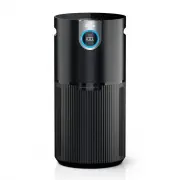
A user manual for the Shark Air Purifier HP200 Series covers essential household operation, safety, and maintenance. The guide highlights electrical safety protocols, proper placement, and usage restrictions while detailing control panel functions–such as adjusting fan speed, monitoring air quality metrics (PM1, PM2.5, PM10), and interpreting real-time indicators like % clean air and colored rings. It also addresses troubleshooting common issues, filter care, remote operation, and replacement parts, ensuring users can optimize performance and maintain the unit effectively.


Table of Contents:
- Page 1 – Safety Instructions and Hazard Warnings
- Page 2 – Air Purifier Setup Procedures
- Page 3 – Control Panel and Air Quality Display
- Page 4 – Air Quality Interpretation and Troubleshooting
- Page 5 – Filter Installation and Maintenance
- Page 6 – Accessories and Filter Options
- Page 7 – Warranty and Product Registration
Air Purifier
HP200 Series
OWNER’S GUIDE
IMPORTANT SAFETY INSTRUCTIONS
HOUSEHOLD USE ONLY
WARNING
TO REDUCE THE RISK OF FIRE, ELECTRIC SHOCK, OR INJURY:
GENERAL WARNINGS
1.
This appliance has a polarized plug (one blade is wider
than the other). To reduce the risk of electric shock, this
plug is intended to fit in a polarized outlet only one way.
If the plug does not fit fully in the outlet, reverse the
plug. If it still does not fit, contact a qualified electrician.
DO NOT
attempt to defeat this safety feature. Unplug
or disconnect the appliance from the power supply
before servicing.
2. DO NOT
operate any fan with a damaged cord or plug.
Discard fan or return to an authorized service facility for
examination and/or repair.
3.
DO NOT
run cord under carpeting.
DO NOT
cover cord
with throw rugs, runners, or similar coverings.
DO NOT
route cord under furniture or appliances. Keep cord
away from high traffic areas and place cord where it will
not be tripped over.
4.
If the power cord is damaged, it must be replaced by
the manufacturer, its service agent, or similarly qualified
persons in order to avoid a hazard.
5.
This appliance is not intended for use by anyone
(including children) with reduced physical, sensory
or mental capabilities, or lack of experience and
knowledge, unless they have been given supervision or
instruction concerning use of the appliance by a person
responsible for their safety.
USE WARNINGS
6.
Children should be supervised to ensure that they
DO
NOT
play with the appliance.
7.
Cleaning and user maintenance shall not be made by
children without supervision.
8.
Prior to cleaning or other maintenance, the appliance
must be unplugged from the electrical outlet.
9.
DO NOT
handle plug or appliance with wet hands.
10. DO NOT
use without filter in place.
11.
Only use Shark® branded filters and accessories.
12. DO NOT
damage the power cord:
a)
DO NOT
pull or carry appliance by the cord or use
the cord as a handle.
b)
DO NOT
unplug by pulling on cord. Grasp the plug,
not the cord.
c)
DO NOT
stand the appliance on the power cord,
close a door on the cord, pull the cord around sharp
corners, or leave the cord near heated surfaces.
13. DO NOT
use with any opening blocked; keep free of
dust, lint, hair, and anything that may reduce airflow.
14. DO NOT
use if airflow is restricted. If the air paths
become blocked, turn the appliance off and unplug from
electrical outlet. Remove all obstructions before you
plug in and turn on the unit again.
15. DO NOT
use if appliance is not working as it should, or
has been dropped, damaged, left outdoors, or dropped
into water.
16. DO NOT
place appliance on unstable surfaces such as
chairs or other furniture.
17.
DO NOT
use in the following areas:
a) Wet or damp surfaces
b) Outdoor areas
c) Spaces that are enclosed and may contain explosive
or toxic fumes or vapors (lighter fluid, gasoline,
kerosene, paint, paint thinners, mothproofing
substances, or flammable dust)
18.
Turn off all controls before unplugging the appliance.
19.
Unplug from electrical outlet when not in use and
before any maintenance or cleaning.
20.
Hand wash with soapy water only. Washing with
cleaning chemicals could damage the unit.
21.
Make sure filter is in place after routine maintenance.
22.
Not suitable for use with solid-state speed controls.
REMOTE BATTERY
23.
Dispose of coin cell batteries according to local
regulations. Keep batteries away from children at all
times. Even used batteries can cause injury.
WARNING: Chemical Burn Hazard. Keep batteries away
from children.
This product contains a lithium button/coin cell battery.
If a new or used lithium button/coin cell battery is
swallowed or enters the body, it can cause severe
internal burns and can lead to death in as little as 2
hours. After changing batteries, always completely close
and secure the battery compartment. If the battery
compartment does not close securely, stop using the
product, remove the battery, and keep it away from
children. If you think battery might have been swallowed
or placed inside any part of the body, seek immediate
medical attention.
SAVE THESE INSTRUCTIONS
"Loading the manual" means you need to wait until the file loads and becomes available for online reading. Some manuals are very large, and the time they take to appear depends on your internet speed.
Was this manual helpful?
About this manual
- Brand
- Shark
- Model
- HP202
- Document type
- User Manual
- Category
- Air Purifier
- Language(s)
- English
- Pages
- 7
- File size
- 3.4 MB
- Format
Other Manuals for Shark HP202
Summary
General safety instructions for household use, electrical precautions, cord handling, child protection guidance, and specific warnings regarding lithium button cell battery hazards.
Step-by-step instructions for setting up the air purifier, including locating parts, placement tips, and operational guidelines.
Explanation of the control panel functions (power, modes, fan speed) and real-time display metrics including clean air percentage, time to clean air, and particle sizes (PM1, PM2.5, PM10).
Ask a question
Related manuals
More Shark Air Purifiers models


Other Shark appliances
 Shark AH401 User Manual
 Shark AH450 26 User Manual
 Shark AV752 User Manual
- Shark AV753 User Manual
 Shark AV1010AE User Manual
 Shark AV2610WA User Manual
 Shark AZ913ANZ User Manual
 Shark AZ1002 User Manual
 Shark AZ2002 User Manual
 Shark AZ3002 User Manual
 Shark BU3521 User Manual
 Shark CH901 User Manual
 Shark CH951 User Manual
 Shark CZ351 User Manual
 Shark CZ500ANZ User Manual
 Shark CZ2001 User Manual
 Shark FA222 Manual
 Shark HANDSTAUBSAUGER User Manual