Sangean DPR-45 - User Manual
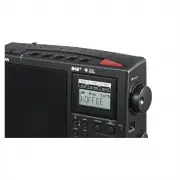
Sangean DPR-45 Radio – User Manual, read for free online in PDF format. We hope this helps you resolve any issues you may have. If you have further questions, please contact us through the contact form.


Table of Contents:
- Page 2 – Table of Contents
- Page 3 – Important Safety Instructions; Follow all operations and use instructions.
- Page 5 – Controls and connections
- Page 9 – Using the digital receiver for the first time; Place your digital receiver on a flat surface.
- Page 10 – Operating your digital receiver – DAB; display will show the station name.
- Page 11 – Selecting a DAB radio station; Adjust the Volume control to set the sound level as needed.; Secondary services
- Page 12 – Display modes – DAB; d. Multiplex Name
- Page 13 – Finding new stations – DAB; to find out which DAB radio stations are available.
- Page 14 – Dynamic Range Control (DRC) settings – DAB
- Page 15 – Operating your digital receiver – Search tuning FM; . Press the Standby button to switch on your digital receiver.
- Page 17 – to select your desired option.
- Page 20 – AM range setting; control to select the option.
- Page 23 – Clock and Alarms; Automatically updating the clock; Manually setting the clock; . Press and hold the Menu/ Alarm button to access the menu setting.
- Page 24 – Setting the time format; flashing on the screen.
- Page 25 – will not function when the display appears NO CLOCK.
- Page 27 – Tuning control to confirm the setting.; Snooze; for five minutes. The snooze symbol will appear in the display.
- Page 28 – Sleep timer; after the preset sleep time has finished.; Timer function; the minute setting during and 0 minutes with minute interval.
- Page 29 – Display and Audio; Brightness control
- Page 30 – Information; System reset; . Press and hold the Info button to enter Advanced Information.; Software version display; . Press and hold the Info button to enter the Advanced Information.
- Page 31 – Key lock function
- Page 32 – USB socket for software upgrade; The default setting is ‘NO’. Otherwise, rotate the Tuning control to
- Page 33 – Specifications; Power Requirements; Mains AC IN 230-240 V; Frequency Range; Circuit Features; Loudspeaker
GB
Version 1
D P R
-
4 5
"Loading the manual" means you need to wait until the file loads and becomes available for online reading. Some manuals are very large, and the time they take to appear depends on your internet speed.
Was this manual helpful?
About this manual
- Brand
- Sangean
- Model
- DPR-45
- Document type
- User Manual
- Category
- Radio
- Language(s)
- English
- Pages
- 33
- File size
- 1.3 MB
- Format
Summary
Table of Contents Important safety instructions .............................................................. 2-3Controls and connections .................................................................. 4-6Display icons ................................................................................
GB Important Safety Instructions . Read and understand all safety and operating instructions before the radio is operated. . Retain instruction: The safety and operating instructions should be retained for further reference. 3. Heed warnings. All warnings on the appliance and operating instructions ...
4 GB Controls and connections . Telescopic Aerial. Power on / off3. Favorite station memory button4. Menu / Alarm button5. Preset button
Ask a question
Related manuals
More Sangean Radios models


Other Sangean appliances
 Sangean 180 Manual
 Sangean ATS-404 Manual
 Sangean ATS-505P Manual
 Sangean ATS-808A Manual
 Sangean ATS909 Manual
 Sangean DT-120 Manual
 Sangean DT-210 Manual
 Sangean DT400W Manual
 Sangean H201 Manual
 Sangean H202 Manual
 Sangean HDR-1 Manual
 Sangean HDT-1 Manual
 Sangean HDT-1X Manual
 Sangean K-200 Manual
 Sangean MMR-77 Manual
 Sangean MMR-99 User Manual
 Sangean PR-D5 User Manual