Page 11 - Installing the wall mount; Installation; Product Specification
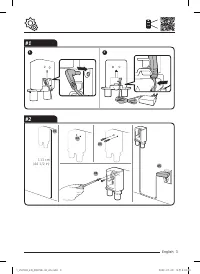
INSTALLA TION Installing the wall mount CAUTION • Install the wall mount on a hard concrete wall. – If you install the wall mount into drywall and there is no stud present, use the drywall anchors to secure the charger. #1 Connecting the cable • To disassemble the wall mount, follow steps in reverse...
Page 12 - Charging the battery; Storing the accessories; Operation
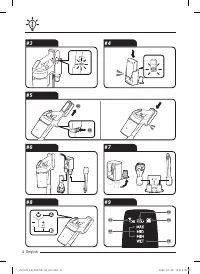
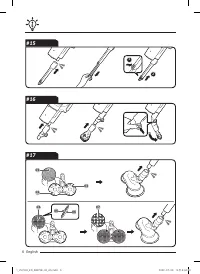
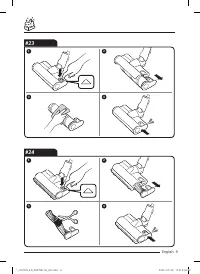
OPERA TION Charging the battery • When the battery level indicator is at its lowest level and blinks( ) charge the battery. • When charging the vacuum, make sure the connection part of the wall mount is correctly connected. • The vacuum cleaner cannot be used while it is charging. CAUTION • Before e...
Page 13 - Using the accessories
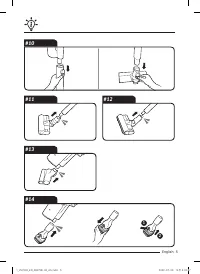
OPERA TION 02 Spinning brush stuck : Something is stuck in the connected spinning brush accessory. ❇ ❇ The spinning brush stuck display will not turn on if the spinning brush motor stops because it has overheated. 03 No Filter : The washable micro filter is not assembled correctly 04 Suction power :...
Page 14 - Cleaning the dustbin; Cleaning the accessories; Maintenance
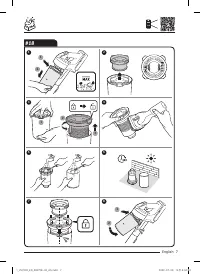
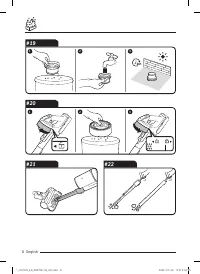
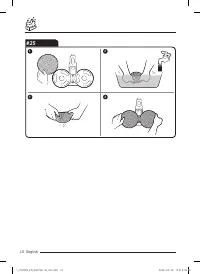
MAINTENANCE ❇ ❇ For detailed information, please refer to the QR code. CAUTION • Turn off the vacuum cleaner before cleaning it. • If the dustbin or filter is filled with dust, the vacuum cleaner may stop to prevent overheating. • You should clean the dustbin or filter before it fills to the MAX lin...
Page 15 - Safety information; Caution/Warning symbols used; Other symbols used; General
P REP ARA TION Safety information • Before operating the appliance, please read this manual thoroughly and keep it for your reference. • Because the following operating instructions cover various models, the characteristics of your vacuum cleaner may differ slightly from those described in this manu...
Page 16 - Wall mount
P REP ARA TION • The battery must be removed from the main unit before cleaning or performing maintenance on the vacuum. • The use of an extension cord is not recommended. • If your vacuum cleaner is not operating correctly, switch off the power supply and consult an authorized Samsung service agent...
Page 17 - Vacuum cleaner; Power related
P REP ARA TION Vacuum cleaner • Do not pick up hard or sharp objects such as glass, nails, screws, coins, etc. • Do not use without a filter in place. When servicing the unit, never put fingers or other objects into the fan chamber in case the unit accidentally turns on. • Do not put any objects int...
Page 20 - Battery usage; Notes and cautions
APPENDIX Battery usage NOTE • If your vacuum cleaner does not work after you charge the battery, change the battery. If it still does not work with the new battery, contact a Samsung service center. • When you purchase a battery in a Samsung service center, check for the genuine Samsung logo on the ...
Page 22 - Troubleshooting
APPENDIX Troubleshooting Before calling for service, review the problems and solutions below. If none of the suggested solutions resolve your problem, please visit our website at www.samsung.com or call Samsung Customer Care. Note that you will be charged for any service calls in which no defects we...
Page 25 - Aspirateur
Aspirateur Manuel d'utilisation Série VS20T755*** / VS20T751*** • Avant d’utiliser cet appareil, veuillez lire attentivement les instructions. • Utilisation en intérieur uniquement 2_VS7000_FR_00875B-03_AA.indd 1 2022-07-06 오전 6:37:35
Page 27 - Installation du support mural; Caractéristiques techniques de l’appareil
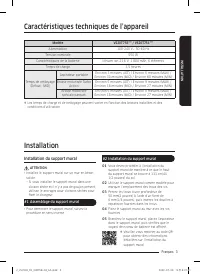
INSTALLA TION Installation du support mural ATTENTION • Installez le support mural sur un mur en béton solide. – Si vous installez le support mural dans une cloison sèche et il n’y a pas de goujon présent, utilisez le ancrages pour cloisons sèches pour fixer le chargeur. #1 Assemblage du support mur...
Page 28 - Charge de la batterie; Rangement des accessoires; Utilisation de l’aspirateur; Fonctionnement
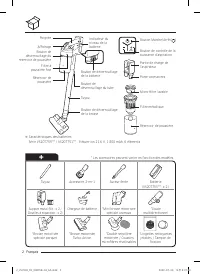
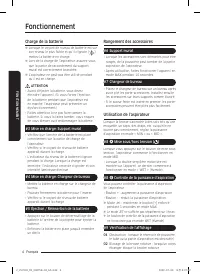
FONCTIONNEMENT Charge de la batterie ❇ ❇ Lorsque le voyant de niveau de batterie est sur son niveau le plus faible et qu’il clignote ( ), mettez la batterie en charge. ❇ ❇ Lors de la charge de l’aspirateur, assurez-vous que la partie de raccordement du support mural est correctement branchée. ❇ ❇ L’...
Page 29 - Utilisation des accessoires
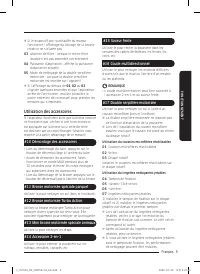
FONCTIONNEMENT ❇ ❇ Si le dispositif anti-surchauffe du moteur fonctionne, l’affichage du blocage de la brosse rotative ne s’allume pas. 03 Absence de filtre : lorsque le micro-filtre lavable n’est pas assemblé correctement 04 Puissance d’aspiration : affiche la puissance d’aspiration actuelle 05 Mod...
Page 30 - Vider et nettoyer le réservoir de poussière; Entretien
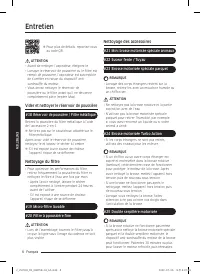
ENTRETIEN ❇ ❇ Pour plus de détails, reportez-vous au code QR. ATTENTION • Avant de nettoyer l’aspirateur, éteignez-le. • Lorsque le réservoir de poussière ou le filtre est rempli de poussière, l’aspirateur est susceptible de s’arrêter en raison du dispositif anti-surchauffe du moteur. • Vous devez n...
Page 31 - Consignes de sécurité; Autres symboles utilisés; Généralités
PRÉPARA TION Consignes de sécurité • Avant d’utiliser cet appareil, veuillez lire attentivement ce manuel et le conserver pour toute référence ultérieure. • Les instructions d’utilisation suivantes concernent plusieurs modèles ; il est donc possible que les caractéristiques de votre aspirateur soien...
Page 32 - Support mural
PRÉPARA TION • Les enfants doivent être sous la surveillance d’un adulte pour s’assurer qu’ils ne jouent pas avec l’appareil. • La batterie doit être débranchée de l’unité principale avant toute opération de nettoyage ou d’entretien sur l’aspirateur. • L’utilisation d’une rallonge n’est pas recomman...
Page 33 - À propos de l’alimentation
PRÉPARA TION À propos de l’alimentation AVERTISSEMENT • Lors de l’installation du support mural, ne courbez pas le chargeur de batterie avec trop de force et ne placez pas non plus d’objets lourds sur celui-ci. – Sinon, il pourrait y avoir un risque d’incendie ou de choc électrique. • S’il y a de la...
Page 36 - Utilisation de la batterie; Remarques et mises en garde
ANNEXE Utilisation de la batterie REMARQUE • Si votre aspirateur ne fonctionne pas après avoir rechargé la batterie, remplacez cette dernière. S’il ne fonctionne toujours pas avec la batterie neuve, prenez contact avec un centre de dépannage Samsung. • Lorsque vous achetez une batterie dans un centr...
Page 38 - Dépannage
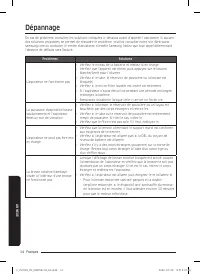
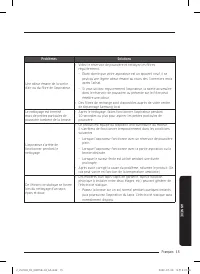
ANNEXE Dépannage En cas de problème, consultez les solutions indiquées ci-dessous avant d’appeler l’assistance. Si aucune des solutions proposées ne permet de résoudre le problème, veuillez consulter notre site Web www.samsung.com ou contacter le centre d’assistance clientèle Samsung. Notez que tout...
Page 41 - Aspiradora; Manual del usuario
Aspiradora Manual del usuario Serie VS20T755*** / VS20T751*** • Antes de poner en funcionamiento esta unidad, lea atentamente las instrucciones. • Para uso en interiores solamente 3_VS7000_MES_00875B-03_AA.indd 1 2022-07-06 오전 6:37:23
Page 43 - Instalación del soporte de pared; Instalación; Especificaciones del producto
INSTALACIÓN Instalación del soporte de pared PRECAUCIÓN • Instale el soporte en una pared de concreto resistente. – Si instala el soporte de pared en paneles de yeso y no hay espárrago presente, use el anclajes para paneles de yeso para asegurar el cargador. #1 Ensamble del soporte de pared • Para d...
Page 44 - Carga de las pilas; Almacenamiento de los accesorios; Funcionamiento de la aspiradora; Funcionamiento
FUNCIONAMIENT O Carga de las pilas ❇ ❇ Cuando el indicador del nivel de la batería está en el valor más bajo y parpadea ( ) cargue la batería. ❇ ❇ Durante la carga de la aspiradora, asegúrese de que el soporte de pared esté conectado correctamente. ❇ ❇ La aspiradora no se puede utilizar durante la c...
Page 45 - Uso de los accesorios
FUNCIONAMIENT O 02 Traba del cepillo giratorio: Cuando materiales extraños obstruyen el cepillo giratorio. ❇ ❇ Si funciona el dispositivo de prevención de sobrecalentamiento del motor, no se encenderá el visor de traba del cepillo giratorio. 03 Sin filtro: Cuando no se ensambla correctamente el micr...
Page 46 - Vaciado y limpieza del contenedor de polvo; Mantenimiento
MANTENIMIENT O ❇ ❇ Para obtener información detallada, consulte el código QR. PRECAUCIÓN • Apague la aspiradora antes de limpiarla. • Si el contenedor de polvo o el filtro está lleno, es posible que la aspiradora deje de funcionar debido al sobrecalentamiento del dispositivo de prevención del motor....
Page 47 - Información sobre seguridad; Otros símbolos utilizados
P REPARA CIÓN Información sobre seguridad • Antes de poner en funcionamiento la unidad, lea detenidamente este manual y consérvelo para su referencia. • Debido a que las siguientes instrucciones de funcionamiento corresponden a diversos modelos, es posible que las características de su aspiradora di...
Page 48 - Soporte de pared
P REPARA CIÓN • No es recomendable usar un cable de extensión. • Si la aspiradora no funciona correctamente, desenchúfela y consulte a un agente de servicio autorizado de Samsung. • Si el cable de alimentación está dañado, debe ser reemplazado por el fabricante, por un agente de servicios o por una ...
Page 49 - Acerca de la alimentación eléctrica
P REPARA CIÓN Acerca de la alimentación eléctrica ADVERTENCIA • Cuando instale el soporte de pared, no doble el cargador de la batería con excesiva fuerza ni coloque sobre este objetos pesados. – De lo contrario, podría producirse una descarga eléctrica o un incendio. • Si hay polvo, agua, etc. en l...
Page 52 - Uso de la batería; Notas y precauciones
APÉNDICE Uso de la batería NOTA • Si la aspiradora no funciona después de cargar la batería, reemplace la batería. Si sigue sin funcionar con la nueva batería, comuníquese con un centro de servicio de Samsung. • Cuando compre una batería en un centro de servicio Samsung, verifique la presencia del l...
Page 54 - Solución de problemas
APÉNDICE Solución de problemas Antes de llamar al servicio técnico, verifique los siguientes problemas y soluciones. Si ninguna de las soluciones sugeridas resuelve el problema, visite nuestro sitio web www.samsung.com o llame al Servicio de Atención al Cliente de Samsung. Tenga en cuenta que se le ...