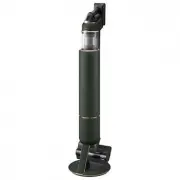
Page 2 - Contents; PREPARATION; Product specification
English 2 Contents PREPARATION Safety information 3 DESCRIPTION Parts overview 12 Accessories 13 OPERATION Clean Station 14 Installing the Clean Station 14 Using the Clean Station 14 Vacuum cleaner 15 Charging the battery 15 Using the vacuum cleaner 16 Using the Accessory Cradle 18 Using the accesso...
Page 3 - retain it for your reference.; Safety information
English 3 P REP ARA TION • Before operating the appliance, please read this manual thoroughly and retain it for your reference. • Because the following operating instructions cover various models, the characteristics of your vacuum cleaner may differ slightly from those described in this manual. Cau...
Page 4 - General
English 4 P REP ARA TION Failure to meet these requirements could cause damage to the internal parts of the vacuum and void your warranty. General • Read all instructions carefully. Before switching the vacuum on, make sure that the voltage of your electricity supply is the same as that indicated on...
Page 5 - • The battery must be removed from the main unit before cleaning or
English 5 P REP ARA TION • The battery must be removed from the main unit before cleaning or performing maintenance on the vacuum. • The use of an extension cord is not recommended.• If your vacuum cleaner is not operating correctly, switch off the power supply and consult an authorized Samsung serv...
Page 6 - Clean Station
English 6 P REP ARA TION Clean Station • Do not modify the polarized plug to fit a non-polarized outlet or extension cord. • Do not use outdoors or on wet surfaces.• Unplug the Clean Station from the outlet when not in use and before servicing. • Use only the Clean Station supplied by the manufactur...
Page 7 - Vacuum cleaner
English 7 P REP ARA TION Vacuum cleaner • Do not pick up hard or sharp objects such as glass, nails, screws, coins, etc.• Do not use without a filter in place. When servicing the unit, never put fingers or other objects into the fan chamber in case the unit accidentally turns on. • Do not put any ob...
Page 8 - Power related
English 8 P REP ARA TION Power related WARNING • Do not bend the power cord with excessive force or put heavy objects on the power cord. – Electric shock or fire may occur. • When the vacuum is used in a veranda or an area where water is used, make sure water does not come into contact with the powe...
Page 9 - Operation
English 9 P REP ARA TION Operation WARNING • The Clean Station should be placed and used on a stable floor. – If the product falls over, an injury or product and floor damage may occur. • Do not place or use the product on an uneven floor, a carpet, a living room table, or a desk etc. – If the produ...
Page 11 - Maintenance
English 11 P REP ARA TION • If the product makes a strange sound or emits a smell or smoke, turn off the product immediately, and then contact a Samsung service center. – Electric shock or fire may occur. Maintenance WARNING • Before removing foreign matter inside the product, turn off the product f...
Page 12 - Parts overview
English 12 DESCRIP TION Parts overview DESCRIPTION 01 Power( ) button 02 Suction power control button 03 Washable Micro Filter 04 Metal Mesh Grille Filter 05 Display 06 Dustbin release button 07 Fine Dust Filter 08 Dustbin 09 Adjustable pipe 10 Handle 11 Battery level indicator 12 Battery release bu...
Page 13 - Accessories
English 13 DESCRIP TION Accessories The accessories with the ' * ' mark may differ depending on the models. Adjustable pipe Pet Tool Combination Tool Extension Crevice Tool Flexible Tool Dust bag: 3 units (Inside the unit: 1, Spare: 2) User manual *Charger Accessory Cradle Clean Station *Jet Dual Br...
Page 14 - Installing the Clean Station
English 14 OPERA TION Clean Station Installing the Clean Station 1 Run the power cord of the Clean Station along the round groove at the bottom. – Make sure the power cord is correctly placed so that the Clean Station stands without tilting. 2 Before plugging in the Clean Station, arrange the power ...
Page 15 - Charging the battery; Inserting the battery; Ejecting the battery
English 15 OPERA TION Vacuum cleaner Charging the battery ❇ ❇ When the battery level indicator turns red or the [Low battery] message appears on the display, charge the battery. ❇ ❇ You cannot use the vacuum cleaner while charging. ❇ ❇ Make sure the back of the battery is correctly placed onto the v...
Page 16 - Using the vacuum cleaner; Control Part
English 16 OPERA TION Using the vacuum cleaner Control Part 01 02 ❇ ❇ Before using the product, you have to select a language for the first time. Use (+) or (-) button to select a language and hold the (+) button for 3 seconds to complete the setting. – Press and hold the (+) button for 3 seconds wh...
Page 17 - Display Part
English 17 OPERA TION Display Part • Suction power mode – Displays the suction power mode you have selected as [MIN], [MID], [MAX] or [JET]. • [WET]: Wet Brush mode – When the Wet Brush is assembled, the Wet Brush mode is displayed. – Press the (+) button to spray water. While holding the (+) button...
Page 18 - Using the Accessory Cradle
English 18 OPERA TION Using the Accessory Cradle Before charging the additional battery, plug in the charger. 3 1 2 4 4 + 3 1 2 or or or ❇ ❇ Accessory Cradle ❇ ❇ Accessory Cradle + Accessory Cradle Holder • When accessories are detached to be stored, dust may fall from the suction part of the vacuum...
Page 19 - Using the accessories; Detaching the accessories; Combination Tool; Extension Crevice Tool
English 19 OPERA TION Using the accessories Detaching the accessories • When detaching the adjustable pipe or the brush, press the release button on the back. • Before detaching the accessories, operate in [MAX] mode for more than 10 seconds to remove foreign matter remaining in the accessories. 1 2...
Page 20 - Wet Brush; Adjusting the pipe length
English 20 OPERA TION 1 2 Water Tank Single-use wet pad Multi-use wet pad <Back> <Front> Attachable pad Velcro Spin disk Wet Brush Use to clean a floor with a wet pad (wood and linoleum). ❇ ❇ The Wet Brush does not have a dust suction function. Using the multi-use wet pad • When attachin...
Page 21 - Cleaning the Clean Station; Replacing the dust bag
English 21 MAINTENANCE Maintenance MAINTENANCE Cleaning the Clean Station Replacing the dust bag When the status indicator turns red, you should replace the dust bag. 1 4 2 5 3 6 Cleaning the Premotor Filter Use the handle to lift the filter off and shake over a bin to remove dust. Cleaning the Fine...
Page 22 - Cleaning the vacuum cleaner; Dustbin/Washable Micro Filter
English 22 MAINTENANCE ❇ ❇ For detailed information, please refer to the QR code. Cleaning the vacuum cleaner Dustbin/Washable Micro Filter 01 02 05 06 07 08 09 24H 04 03 1 2 ‘Click’ ‘Click’ ‘Click’ CAUTION • After cleaning the Dustbin/Washable Micro Filter with water, you should dry them completely...
Page 23 - Fine Dust Filter; Jet Dual Brush
English 23 MAINTENANCE Fine Dust Filter Make sure to turn off the product before cleaning the filter. 24H • Twist and pull off the Fine Dust Filter, and tap it gently to remove the dust.• Wash the filter with running water once a month to maintain the best performance of the filter.• After cleaning,...
Page 24 - Slim Action Brush; Pet Tool
English 24 MAINTENANCE Slim Action Brush PUS H PUSH 01 02 03 04 PUSH PUSH 1 2 2 3 1 PUS H PUSH 01 02 03 04 PUSH PUSH 1 2 2 3 1 PUS H PUSH 01 02 03 04 PUSH PUSH 1 2 2 3 1 PUS H PUSH 01 02 03 04 PUSH PUSH 1 2 2 3 1 ‘Click’ CAUTION • Do not clean the brush with water.• When foreign matter remains on th...
Page 25 - Installation; CAUTION; Battery usage; Notes and cautions
English 25 APPENDIX Installation CAUTION • Do not install the product near water, in an area with excessive moisture, or near window, etc. • Do not place the Clean Station in a place where people pass by frequently, in entrance way or narrow passage. – People may trip over it and be injured, or prod...
Page 30 - Troubleshooting
English 30 APPENDIX Troubleshooting Before calling for service, review the problems and solutions below. Note that you will be charged for any service calls in which no defects were found. Problems Solutions The vacuum cleaner does not work. • Check the battery level and charge the battery.• Check w...
Page 33 - Aspirateur
Aspirateur Manuel d'utilisation Série VS20A95**** • Avant d'utiliser cet appareil, veuillez lire attentivement les instructions. • Utilisation en intérieur uniquement 2_VS9500_CFR_00859E-00_AA.indd 1 2021-11-23 오후 7:27:18
Page 34 - Sommaire; PRÉPARATION; Caractéristiques techniques de l'appareil
Français 2 Sommaire PRÉPARATION Consignes de sécurité 3 DESCRIPTION Présentation des pièces 12 Accessoires 13 FONCTIONNEMENT Clean Station 14 Installation de la Clean Station 14 Utilisation de la Clean Station 14 Aspirateur 15 Charge de la batterie 15 Utilisation de l'aspirateur 16 Utilisation du so...
Page 35 - conserver pour toute référence ultérieure.; Consignes de sécurité
Français 3 P RÉPARA TION • Avant d'utiliser cet appareil, veuillez lire attentivement ce manuel et le conserver pour toute référence ultérieure. • Les instructions d'utilisation suivantes concernent plusieurs modèles ; il est donc possible que les caractéristiques de votre aspirateur soient légèreme...
Page 36 - Généralités
Français 4 P RÉPARA TION Le non-respect de ces instructions risquerait d'endommager les composants internes de l'aspirateur et d'annuler votre garantie. Généralités • Lisez attentivement toutes les instructions. Avant d'allumer l'aspirateur, assurez-vous que la tension de votre alimentation électriq...
Page 37 - contactez un centre de dépannage Samsung agréé.
Français 5 P RÉPARA TION • Les enfants doivent être sous la surveillance d'un adulte pour s'assurer qu'ils ne jouent pas avec l'appareil. • La batterie doit être débranchée de l'unité principale avant toute opération de nettoyage ou d'entretien sur l'aspirateur. • L'utilisation d'une rallonge n'est ...
Page 38 - uniquement par un centre de dépannage Samsung qualifié.
Français 6 P RÉPARA TION • Ne détériorez pas les batteries et ne les faites pas brûler car elles risquent d'exploser à des températures élevées. • N'essayez pas d'ouvrir la Clean Station. Les réparations doivent être effectuées uniquement par un centre de dépannage Samsung qualifié. • N'exposez pas ...
Page 39 - À propos de l'alimentation
Français 7 P RÉPARA TION À propos de l'alimentation AVERTISSEMENT • Ne pliez pas le cordon d'alimentation de manière excessive et ne posez pas d'objets lourds dessus. – Cela pourrait engendrer une électrocution ou un incendie. • Lorsque l'aspirateur est utilisé dans une véranda ou une zone mouillée,...
Page 40 - Fonctionnement
Français 8 P RÉPARA TION Fonctionnement AVERTISSEMENT • La Clean Station doit être placée et utilisée sur un sol stable. – Si l'appareil tombe, il risque d'infliger des blessures corporelles ou des dommages sur le sol ou l'appareil lui-même. • Ne placez pas et n'utilisez pas l'appareil sur un sol in...
Page 42 - • Si l'appareil émet un son étrange ou encore des odeurs ou de la fumée,
Français 10 P RÉPARA TION • Lorsque vous aspirez des objets tranchants tels que du sable avec l'aspirateur, cela pourrait endommager la partie interne du réservoir de poussière. • En cas de fuite de gaz ou d'utilisation de vaporisateurs inflammables tels qu'un dépoussiérant, ne touchez pas la prise ...
Page 44 - Présentation des pièces
Français 12 DESCRIP TION Présentation des pièces DESCRIPTION 01 Bouton Marche/Arrêt ( ) 02 Bouton de contrôle de la puissance d'aspiration 03 Micro-filtre lavable 04 Filtre à grille en maille métallique 05 Affichage 06 Bouton de déverrouillage du réservoir de poussière 07 Filtre à poussière fine 08 ...
Page 45 - Accessoires
Français 13 DESCRIP TION Accessoires Les accessoires accompagnés de la marque « * » peuvent varier en fonction des modèles. Tube réglable Outil pour poils d'animaux Outil de combinaison Suceur plat de rallonge Embout souple Sac à poussière : 3 sacs (À l'intérieur de l'appareil : 1, Rechange : 2) Man...
Page 46 - Installation de la Clean Station; Utilisation de la Clean Station
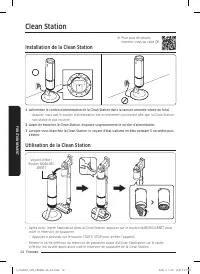
Français 14 FONCTIONNEMENT Clean Station Installation de la Clean Station 1 Acheminez le cordon d'alimentation de la Clean Station dans la rainure arrondie située au fond. – Assurez-vous que le cordon d'alimentation est correctement positionné afin que la Clean Station soit stable et pas inclinée. 2...
Page 47 - Charge de la batterie; Insertion de la batterie; Éjection de la batterie
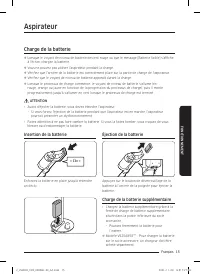
Français 15 FONCTIONNEMENT Aspirateur Charge de la batterie ❇ ❇ Lorsque le voyant de niveau de batterie devient rouge ou que le message [Batterie faible] s'affiche à l'écran, chargez la batterie. ❇ ❇ Vous ne pouvez pas utiliser l'aspirateur pendant la charge. ❇ ❇ Vérifiez que l'arrière de la batteri...
Page 48 - Utilisation de l'aspirateur; Partie de commande
Français 16 FONCTIONNEMENT Utilisation de l'aspirateur Partie de commande 01 02 ❇ ❇ Avant d'utiliser l'appareil pour la première fois, vous devez commencer par sélectionner une langue. Utilisez le bouton (+) ou (-) pour sélectionner la langue et maintenez le bouton (+) enfoncé pendant 3 secondes pou...
Page 49 - Partie affichage
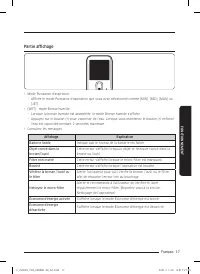
Français 17 FONCTIONNEMENT Partie affichage • Mode Puissance d'aspiration – Affiche le mode Puissance d'aspiration que vous avez sélectionné comme [MIN], [MID], [MAX] ou [JET]. • [WET] : mode Brosse humide – Lorsque la brosse humide est assemblée, le mode Brosse humide s'affiche. – Appuyez sur le bo...
Page 50 - Utilisation du socle accessoire
Français 18 FONCTIONNEMENT Utilisation du socle accessoire Avant de commencer la charge de la batterie supplémentaire, branchez le chargeur. 3 1 2 4 4 + 3 1 2 ou ou ou ❇ ❇ Socle accessoire ❇ ❇ Socle accessoire + Support de socle accessoire • Lorsque les accessoires sont démontés pour être rangés, de...
Page 51 - Utilisation des accessoires; Démontage des accessoires; Outil de combinaison; Suceur plat de rallonge
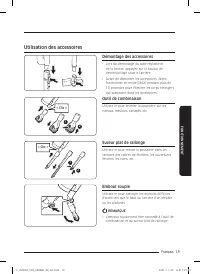
Français 19 FONCTIONNEMENT Utilisation des accessoires Démontage des accessoires • Lors du démontage du tube réglable et de la brosse, appuyez sur le bouton de déverrouillage situé à l'arrière. • Avant de démonter les accessoires, faites fonctionner en mode [MAX] pendant plus de 10 secondes pour éli...
Page 52 - Brosse humide; Réglage de la longueur du tube
Français 20 FONCTIONNEMENT 1 2 Réservoir d'eau Tampon humide à usage unique Tampon humide à usages multiples <Arrière> <Avant> Tampon de fixation Velcro Disque rotatif Brosse humide Utilisez-la pour nettoyer un sol à l'aide d'un tampon humide (bois et linoléum). ❇ ❇ La brosse humide ne d...
Page 53 - Nettoyage de la Clean Station; Remplacement du sac à poussière
Français 21 MAINTENANCE Maintenance Nettoyage de la Clean Station Remplacement du sac à poussière Lorsque le voyant d'état devient rouge, vous devez remplacer le sac à poussière. 1 4 2 5 3 6 Nettoyage du filtre de pré-moteur Utilisez la poignée pour retirer le filtre et secouez-le au-dessus d'une po...
Page 54 - Nettoyage de l'aspirateur; Réservoir de poussière/Micro-filtre lavable
Français 22 MAINTENANCE ❇ ❇ Pour plus de détails, reportez-vous au code QR. Nettoyage de l'aspirateur Réservoir de poussière/Micro-filtre lavable 01 02 05 06 07 08 09 24H 04 03 1 2 « Clic » « Clic » « Clic » ATTENTION • Après avoir nettoyé le réservoir de poussière/micro-filtre lavable à l'eau, lais...
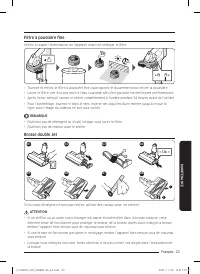
Page 55 - Filtre à poussière fine; Brosse double Jet
Français 23 MAINTENANCE Filtre à poussière fine Veillez à couper l'alimentation de l'appareil avant de nettoyer le filtre. 24H • Tournez et retirez le filtre à poussière fine, puis tapotez-le doucement pour retirer la poussière.• Lavez le filtre une fois par mois à l'eau courante afin d'en garantir ...
Page 56 - Brosse à action mince; Outil pour poils d'animaux
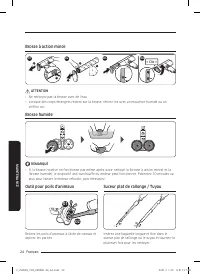
Français 24 MAINTENANCE Brosse à action mince PUS H PUSH 01 02 03 04 PUSH PUSH 1 2 2 3 1 PUS H PUSH 01 02 03 04 PUSH PUSH 1 2 2 3 1 PUS H PUSH 01 02 03 04 PUSH PUSH 1 2 2 3 1 PUS H PUSH 01 02 03 04 PUSH PUSH 1 2 2 3 1 « Clic » ATTENTION • Ne nettoyez pas la brosse avec de l'eau.• Lorsque des corps é...
Page 57 - ATTENTION; Utilisation de la batterie; Remarques et mises en garde
Français 25 ANNEXE Installation ATTENTION • N'installez pas l'appareil près d'une source d'eau, dans un endroit trop humide, près d'une fenêtre, etc. • Ne placez pas la Clean Station à un endroit à fort passage, par exemple dans un hall d'entrée ou un couloir étroit. – Les gens risquent de trébucher...
Page 58 - collecte de piles usagées pour la faire recycler.
Français 26 ANNEXE • La durée d'utilisation de la batterie peut être réduite avec une utilisation accrue de la batterie. Lorsque la batterie ne se charge plus ou s'épuise rapidement, remplacez la batterie usée. • Utilisez uniquement la Clean Station et les batteries fournies par le fabricant.• Avant...
Page 59 - spécialement pour la brosse humide.
Français 27 ANNEXE • Utilisez un tampon humide d'origine fourni par Samsung Electronics spécialement pour la brosse humide. • Si la brosse humide est utilisée sans tampon humide, tout dysfonctionnement de l'appareil ne sera pas couvert par la garantie et des frais de réparation seront facturés. • Lo...
Page 60 - – Ils risqueraient de se blesser ou d'endommager l'appareil et le sol.
Français 28 ANNEXE • Pendant ou après l'utilisation de l'aspirateur, déposez l'aspirateur ou rangez la Clean Station. – L'appareil risque de tomber et de provoquer des blessures ou de sérieux dommages à l'appareil. En outre, vous risquez de pas être dédommagé pour les dommages. • N'utilisez pas l'as...
Page 61 - extrêmement chaud et ne le stockez pas à l'intérieur d'une voiture.
Français 29 ANNEXE • Utilisez l'appareil dans des endroits secs et ne l'utilisez pas dans des endroits humides ou pour aspirer de l'eau. • N'utilisez pas l'appareil dans la lumière directe du soleil ou dans un endroit extrêmement chaud et ne le stockez pas à l'intérieur d'une voiture. • Ne mettez pa...
Page 62 - Dépannage
Français 30 ANNEXE Dépannage En cas de problème, consultez les solutions indiquées ci-dessous avant d'appeler l'assistance. Notez que tout appel déterminant l'absence de défauts sera facturé. Problèmes Solutions L'aspirateur ne fonctionne pas. • Vérifiez le niveau de la batterie et mettez-la en char...
Page 65 - Aspiradora; Manual del usuario
Aspiradora Manual del usuario Serie VS20A95**** • Antes de poner en funcionamiento esta unidad, lea atentamente las instrucciones. • Para uso en interiores solamente 3_VS9500_MES_00859E-00_AA.indd 1 2021-11-23 오후 7:34:24
Page 66 - Contenido; PREPARACIÓN; Especificaciones del producto
Español 2 Contenido PREPARACIÓN Información sobre seguridad 3 DESCRIPCIÓN Descripción general de las piezas 12 Accesorios 13 FUNCIONAMIENTO Estación de limpieza 14 Instalación de la estación de limpieza 14 Uso de la estación de limpieza 14 Aspiradora 15 Carga de la batería 15 Uso de la aspiradora 16...
Page 67 - y consérvelo para su referencia.; Información sobre seguridad
Español 3 P REPARA CIÓN • Antes de poner en funcionamiento la unidad, lea detenidamente este manual y consérvelo para su referencia. • Debido a que las siguientes instrucciones de funcionamiento corresponden a diversos modelos, es posible que las características de su aspiradora difieran ligeramente...
Page 69 - limpieza o mantenimiento en la aspiradora.
Español 5 P REPARA CIÓN • Se deberá vigilar a los niños para asegurarse de que no jueguen con el electrodoméstico. • La batería debe retirarse de la unidad principal antes de realizar tareas de limpieza o mantenimiento en la aspiradora. • No es recomendable usar un cable de extensión.• Si la aspirad...
Page 70 - únicamente en un centro de servicio calificado de Samsung.
Español 6 P REPARA CIÓN • No desenchufe jalando del cable. Para desenchufar, sujete el enchufe, no el cable. • No rompa ni arroje las baterías al fuego, ya que pueden explotar a altas temperaturas. • No trate de abrir la estación de limpieza. Las reparaciones deben efectuarse únicamente en un centro...
Page 71 - Acerca de la alimentación eléctrica
Español 7 P REPARA CIÓN Acerca de la alimentación eléctrica ADVERTENCIA • No doble el cable de alimentación con una fuerza excesiva ni le coloque objetos pesados encima. – Podría producirse una descarga eléctrica o un incendio. • Cuando se usa la aspiradora en una terraza o en un área donde hay agua...
Page 72 - Funcionamiento
Español 8 P REPARA CIÓN Funcionamiento ADVERTENCIA • La estación de limpieza debe colocarse y utilizarse sobre un piso estable. – Si el producto se cae, pueden producirse lesiones personales y daños al producto y al piso. • No utilice ni coloque el producto en un piso desnivelado, una alfombra, una ...
Page 74 - Mantenimiento
Español 10 P REPARA CIÓN • Asegúrese de que los filtros estén bien insertados. – La potencia de succión puede disminuir. – Si entra polvo en el interior del motor de la aspiradora, se pueden producir daños en el producto. – El producto podría no funcionar. • Al recoger objetos cortantes como arena c...
Page 76 - Descripción general de las piezas
Español 12 DESCRIPCIÓN Descripción general de las piezas DESCRIPCIÓN 01 Botón de encendido ( ) 02 Botón de control de la potencia de succión 03 Microfiltro lavable 04 Filtro de la rejilla de malla de metal 05 Visor 06 Botón de liberación del contenedor de polvo 07 Filtro de polvo fino 08 Contenedor ...
Page 77 - Accesorios
Español 13 DESCRIPCIÓN Accesorios Los accesorios marcados con un ‘*’ pueden diferir según el modelo. Tubo ajustable Accesorio para mascotas Accesorio combinado Boquilla extensible para rincones Accesorio flexible Bolsa del polvo: 3 unidades (Dentro de la unidad: 1, Repuesto: 2) Manual del usuario *C...
Page 78 - Estación de limpieza; Instalación de la estación de limpieza; Uso de la estación de limpieza
Español 14 FUNCIONAMIENT O Estación de limpieza Instalación de la estación de limpieza 1 Pase el cable de alimentación de la estación de limpieza a lo largo de la ranura redonda en la parte inferior. – Asegúrese de que el cable de alimentación esté bien colocado de modo que la estación de limpieza s...
Page 79 - Carga de la batería; Modo de insertar la batería; Expulsión de la batería
Español 15 FUNCIONAMIENT O Aspiradora Carga de la batería ❇ ❇ Cuando el indicador de nivel de batería se vuelve rojo o aparece el mensaje [Batería baja] en la pantalla, cargue la batería. ❇ ❇ La aspiradora no se puede utilizar durante la carga. ❇ ❇ Asegúrese de que la parte trasera de la batería est...
Page 80 - Uso de la aspiradora; Pieza de control
Español 16 FUNCIONAMIENT O Uso de la aspiradora Pieza de control 01 02 ❇ ❇ Antes de utilizar el producto, debe seleccionar un idioma por primera vez. Use el botón (+) o (-) para seleccionar un idioma y mantenga presionado el botón (+) durante 3 segundos para completar la configuración. – Mantenga pr...
Page 82 - Uso de la base para accesorios
Español 18 FUNCIONAMIENT O Uso de la base para accesorios Antes de cargar la batería adicional, enchufe el cargador. 3 1 2 4 4 + 3 1 2 o o o ❇ ❇ Base para accesorios ❇ ❇ Base para accesorios + Soporte de la base para accesorios • Cuando los accesorios se extraen para su almacenamiento, puede caer el...
Page 83 - Uso de los accesorios; Extracción de los accesorios; Accesorio combinado; Boquilla extensible para rincones
Español 19 FUNCIONAMIENT O Uso de los accesorios Extracción de los accesorios • Para extraer el tubo ajustable o el cepillo, presione el botón de liberación en la parte posterior. • Antes de conectar los accesorios, haga funcionar la aspiradora en modo [MAX] por más de 10 segundos para eliminar los ...
Page 84 - Cepillo húmedo; Ajuste de la longitud del tubo
Español 20 FUNCIONAMIENT O 1 2 Tanque de agua Panel húmedo de uso individual Panel húmedo multiuso <Atrás> <Frente> Panel acoplable Velcro Disco giratorio Cepillo húmedo Úselo para limpiar un piso con un panel húmedo (madera y linóleum). ❇ ❇ El cepillo húmedo no tiene una función de succ...
Page 85 - Cómo limpiar la estación de limpieza; Reemplazo de la bolsa de polvo
Español 21 MANTENIMIENT O Mantenimiento Cómo limpiar la estación de limpieza Reemplazo de la bolsa de polvo Cuando el indicador de estado se vuelve rojo, debe cambiar la bolsa del polvo. 1 4 2 5 3 6 Limpieza del filtro premotor Use la manija para levantar y extraer el filtro y agítelo sobre un recip...
Page 86 - Limpieza de la aspiradora; Contenedor de polvo/Microfiltro lavable
Español 22 MANTENIMIENT O ❇ ❇ Para obtener información detallada, consulte el código QR. Limpieza de la aspiradora Contenedor de polvo/Microfiltro lavable 01 02 05 06 07 08 09 24H 04 03 1 2 ‘Clic’ ‘Clic’ ‘Clic’ PRECAUCIÓN • Luego de lavar con agua el contenedor de polvo/microfiltro lavable, debe ser...
Page 87 - Filtro de polvo fino; Cepillo doble jet
Español 23 MANTENIMIENT O Filtro de polvo fino Asegúrese de apagar el producto antes de limpiar el filtro. 24H • Gire y extraiga el filtro de polvo fino y golpéelo con suavidad para eliminar el polvo.• Lave el filtro con agua corriente una vez al mes para mantener el mejor rendimiento.• Luego de la ...
Page 88 - Cepillo de acción fino; Accesorio para mascotas
Español 24 MANTENIMIENT O Cepillo de acción fino PUS H PUSH 01 02 03 04 PUSH PUSH 1 2 2 3 1 PUS H PUSH 01 02 03 04 PUSH PUSH 1 2 2 3 1 PUS H PUSH 01 02 03 04 PUSH PUSH 1 2 2 3 1 PUS H PUSH 01 02 03 04 PUSH PUSH 1 2 2 3 1 ‘Clic’ PRECAUCIÓN • No limpie el cepillo con agua.• Si hay materiales extraños ...
Page 89 - Instalación; PRECAUCIÓN; Uso de la batería; Notas y precauciones
Español 25 APÉNDICE Instalación PRECAUCIÓN • No instale el producto cerca del agua, en una zona con exceso de humedad, o cerca de ventanas, etc. • No coloque la estación de limpieza en un lugar por donde pasan personas con frecuencia, en una entrada o un paso estrecho. – Las personas podrían tropeza...
Page 90 - temperatura sea inferior a 5 °C o superior a 45 °C.
Español 26 APÉNDICE • Utilice solo la estación de limpieza y las baterías suministradas por el fabricante. • Antes de insertar la batería, verifique que lo esté haciendo en la dirección correcta. • Cuando deseche una batería gastada, deposítela en el lugar de recolección adecuado. • No deje caer ni ...
Page 93 - • Cuando no use el cepillo húmedo, vacíe el tanque de agua.
Español 29 APÉNDICE • No coloque agua caliente, detergente, etc. en el tanque de agua del cepillo húmedo. – Podría producirse un mal funcionamiento del producto o una degradación del rendimiento. • Cuando no use el cepillo húmedo, vacíe el tanque de agua. Mantenimiento NOTA • A veces la rueda de un ...
Page 94 - Solución de problemas
Español 30 APÉNDICE Solución de problemas Antes de llamar al servicio técnico, verifique los siguientes problemas y soluciones. Tenga en cuenta que se le puede cobrar una tarifa por la llamada de servicio si no se encuentra ningún problema. Problemas Soluciones La aspiradora no funciona. • Revise el...