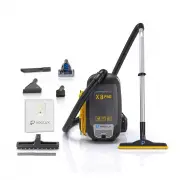
Page 2 - Prolux X8 Backpack Vacuum
Prolux X8 Backpack Vacuum For your safety please read the owner’s manual in its entirety before use. Congratulations on purchasing your very own Prolux X8 Pro Backpack Vacuum Cleaner. This high-end kit is designed to cut cleaning time in half without breaking the bank. Keep your floors clean, and pro...
Page 3 - Table of Contents; Assembly
Table of Contents Quick Assembly 4 Specifications 5 Warranty 6 Safety Precautions 7-9 Description of Parts 10-11 Unpacking and Assembling Assembly 12-14 Operation Using Accessories and Tools 15-17 Vacuum Cleaning 18 Maintenance Replacing the HEPA Dust Bag 19 Replacing the Cloth Bag and Filters 20 Fr...
Page 4 - Quick Assembly; you can find them at the link below, or scan the QR code to go to our
Quick Assembly To view some videos on unboxing, assembling and using your new vacuum you can find them at the link below, or scan the QR code to go to our YouTube page to see all of our videos: https://proluxcleaners.com/pages/prolux-x8-how-to-video-s 4
Page 5 - Specifications; Lightweight – Canister only weighs 10lbs
Specifications ● Lightweight – Canister only weighs 10lbs ● Powerful deep cleaning 10 amp motor with 140 CFM of Airflow (mostvacuums have around 80) ● Dependable – LIFETIME motor warranty and 3-year body warranty(LIFETIME/3 year warranty pertains to registered machines only) ● 4 Stages of Filtration...
Page 6 - WARRANTY; LIFETIME
WARRANTY Here at Prolux we take pride in the quality of our products, so the majority of our time and money isspent on R&D rather than advertising. Because of this we feel very confident in the quality of ourproducts and feel very comfortable being able to offer a LIFETIME motor warranty and a 3...
Page 7 - Read the owner's manual in its entirety before using this product.; WARNING
IMPORTANT SAFETY INSTRUCTIONS Vacuum Safety Read the owner's manual in its entirety before using this product. Failure to do so can result in serious injury or death. Prolux takes no responsibility for damages/injuries due to violations of the following operating instructions. To reduce the risk of ...
Page 8 - SAFETY CONTINUED; Never immerse the appliance in water or other liquids.
SAFETY CONTINUED 6. Do not pull or carry the vacuum by its power cord, do not use the power cord as a handle, do not close the door on the power cord, or pull the power cord around sharp edges or corners.Do not run the vacuum cleaner over the power cord. Keep the power cord away from heatedsurfaces....
Page 9 - Strangulation by cord.
Do not vacuum or clean: - Hair and other parts of the body. They could be sucked in and cause injury. - Pieces of Clothing (e, g, shoe laces, scarves, etc.). They could be sucked in and cause injury. - Water and other liquids, especially moisture from carpet cleaning agents. Moisture inside the appl...
Page 10 - Description of Parts; Squeegee Floor Tool
Description of Parts 1. Main Unit 6. HEPA Bags 2. Hose 7. Squeegee Floor Tool 3. Extendable Wand 8. Mini Turbo Head 4. Floor Tool 9. Duster Brush 5. Tool Adapter 10. Upholstery Tool11. Crevice Tool 10
Page 12 - ASSEMBLING YOUR VACUUM; Important; accessories; NOTE
ASSEMBLING YOUR VACUUM Once all items have been removed from the shipping box first INSERT THE HEPA DUST BAGBEFORE USING Important : For best results do not use the vacuum without all filters, cloth dust bag, and the HEPA dust bag in place. NOTE: Always remove the power plug from the wall outlet bef...
Page 15 - USING THE ATTACHMENTS; This tool is not a grooming tool and should not be used on animals.
USING THE ATTACHMENTS ● DUSTING BRUSH The Dusting Brush is used for all types of furniture (especially delicate surfaces) to remove dust or other debris (Fig 1) ● CREVICE TOOL Use for cleaning radiators, cracks & crevices along corners, baseboards, and in-between cushions. (Fig 2) ● UPHOLSTERY B...
Page 16 - CONNECTING THE ATTACHMENTS TO YOUR WAND; provided with your Backpack Vacuum Cleaner.; Tool Storage
CONNECTING THE ATTACHMENTS TO YOUR WAND NOTE: When using the Duster, Crevice, and Upholstery Tool, make sure to use the adapter provided with your Backpack Vacuum Cleaner. Connecting the tools to your telescopic wand is quick and easy. The tools use a Friction Fit Connection which means you push the...
Page 18 - VACUUM CLEANING; place the unit could fall off your back causing damage or injury.
VACUUM CLEANING 1. Ensure all bags and filters have been installed prior to using the vacuum.2. Connect hose to top lid assuring you have pressed the friction fit hose firmly into place.3. Correctly place shoulder straps on each shoulder and secure the waistband with hook and loopstrips. Caution: If...
Page 19 - Removing & Replacing HEPA Dust Bag; For best performance; DO NOT; use the vacuum without all filters, cloth dust bag, or; HEPA; and filter each time the HEPA dust bag is replaced.
Removing & Replacing HEPA Dust Bag Important: For best performance DO NOT use the vacuum without all filters, cloth dust bag, or without the HEPA dust bag in place. 1. To remove the HEPA dust bag, press on the canister lid latches on each side of the unit to unlock(Fig 1) and lift the canister l...
Page 20 - Cleaning the Cloth Dust Bag Used with the HEPA Bag:; Replace with the clean cloth dust bag and close the canister lid.; Cleaning the HEPA Pre-Motor Filter; The HEPA pre-motor filter will stop most of the tiniest dust; Cleaning the Exhaust Filter
Note: Clean the cloth dust bag outdoors when changing the HEPA dust bag. Optimum filtration is achieved by using the HEPA dust bag in conjunction with the cloth dust bag ● Cleaning the Cloth Dust Bag Used with the HEPA Bag: 1. Remove the cloth dust bag by grabbing the top lip of the bag and lifting ...
Page 21 - Frequently Asked Questions; Vacuum bag is full. Open top of the unit and check bag capacity.; Can I use an electric powerhead with this model?
Frequently Asked Questions 1. Why is my vacuum not picking up? - Vacuum bag is full. Open top of the unit and check bag capacity. - Clog in the hose or wand. Remove the hose from the vacuum. Separate the hose fromthe wand. Check for clog. If clog is found using compressed air at a low pressure isthe...
Page 22 - Troubleshooting
Troubleshooting WARNING : Never use a defective appliance. Always switch off the appliance and disconnect it from the outlet or remove the battery before you start to troubleshoot. Fault Possible Cause(s) Solution The vacuum will not turn on. The plug is not connected to theelectrical wall outlet or...
Page 23 - Why do I have to register my warranty within 90 days to get my; Great question! Do you know what normally kills a vacuum cleaner?; To register for your Lifetime Warranty, go to; scan below with your phone
Why do I have to register my warranty within 90 days to get my Lifetime Warranty? Great question! Do you know what normally kills a vacuum cleaner? 1. Vacuum Bag being overfilled which causes the motor to overheat.2. Improper cleaning and not replacing filters, which overheats the motor.3. Improper ...
Page 24 - LIFETIME LIMITED WARRANTY; What is Not Covered by the Prolux Warranty - Warranty Exclusions:; This limited warranty does not extend to and expressly excludes:
LIFETIME LIMITED WARRANTY When registered, Prolux warranties this product’s motor free from defects in material andworkmanship for the lifetime of the motor, and three (3) years on the body of the cleaner, free frommanufacturer defects in material and workmanship from the original date of purchase, ...