Page 4 - Table of contents
Table of contents Specifications 3 Optional Accessories 4 Safety Precautions 5 Assembly 7 Getting To Know Your Vacuum 7 Using The Accessories & Tools 10 Operation Operating Instructions/Adjusting The Harness 13 Maintenance Emptying The Dust/Dirt Container 14 Changing/Cleaning The Intake Vortex F...
Page 5 - Specifications; Dust Receptacle Capacity
Specifications ● Lightweight – Only weighs 9 lbs. ● Powerful 1400 Watt, 12 amp motor ● Amazing 125 Cubic Feet per Minute of Airflow! (Most vacuums only have 80 CFM) ● 95 Inches of Water Lift ● Motor Bypass valve, which adds years of life to the Motor ● 5 Year motor Warranty and 3 Year body Warranty....
Page 6 - OPTIONAL ACCESSORIES
OPTIONAL ACCESSORIES The Prolux 2.0 Power Nozzle attachment – This attachment is great for areas where the majority of the flooring is carpet or rugs. With its electrically powered spinning brush-roll, this is the perfect attachment to deep clean any carpeted surface. - 4 -
Page 7 - IMPORTANT SAFETY INSTRUCTIONS
IMPORTANT SAFETY INSTRUCTIONS READ ALL INSTRUCTIONS IN THIS OPERATING MANUAL BEFORE USING THIS APPLIANCE. When using an electrical appliance, basic precautions should always be followed, including the following: Keep the operating manual for reference. Include the operating manual if you pass the ap...
Page 8 - Cord Connection; Children
Do not vacuum or clean: - Hair and other parts of the body. They could be sucked in and cause injury. - Pieces of Clothing (e, g, shoe laces, scarves, etc.). They could be sucked in and cause injury. - Water and other liquids, especially moisture from carpet cleaning agents. Moisture inside the appl...
Page 9 - GETTING TO KNOW YOUR BACKPACK VACUUM
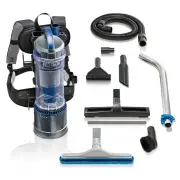
GETTING TO KNOW YOUR BACKPACK VACUUM 1. Main Motor Unit 2. Dust Container 3. Flexible Hose 4. Shoulder Straps 5. Exhaust HEPA Filter 6. Air Inlet Vortex Filter 7. Carpet/Floor Brush 8. Crevice Tool 9. Upholstery/Pet Hair tool 10. Dusting Brush 11. Mini Turbo/Pet Tool 12. Quick Adjusting Telescoping ...
Page 10 - ASSEMBLY AND OPERATING INSTRUCTIONS; ATTACHING THE FLEXIBLE HOSE & TELESCOPIC WAND TO THE
ASSEMBLY AND OPERATING INSTRUCTIONS NOTE: Always remove the power plug from the wall outlet before assembling or removing accessories. ATTACHING THE FLEXIBLE HOSE & TELESCOPIC WAND TO THE VACUUM The flexible hose should be connected before strapping the unit on. 1. To connect the flexible hose...
Page 12 - USING THE ATTACHMENTS
USING THE ATTACHMENTS DUSTING BRUSH The Dusting Brush is used for all types of furniture. (Fig 3) CREVICE TOOL Use for cleaning radiators, cracks & crevices along corners, baseboards, and in-between cushions. (Fig 4) PET HAIR REMOVAL BRUSH The unique design makes it an excellent tool for removin...
Page 13 - CONNECTING THE ATTACHMENTS TO YOUR WAND
CONNECTING THE ATTACHMENTS TO YOUR WAND NOTE: When using the Duster, Crevice, and Upholstery Tool, make sure to use the adapter provided with your Backpack Vacuum Cleaner. Connecting the tools to your telescopic wand is quick and easy. The tools use a Friction Fit Connection which means you push t...
Page 14 - PROPER VACUUMING TECHNIQUE WITH THE PROLUX 2.0 FLOOR TOOL
PROPER VACUUMING TECHNIQUE WITH THE PROLUX 2.0 FLOOR TOOL When vacuuming with your Prolux 2.0, you may vacuum using the standard forward and backwards vacuuming motion as you would with standard vacuum cleaners. However, because of the new Prolux 2.0 floor tool design, you can vacuum an area by vacu...
Page 16 - HOW TO EMPTY THE DUST CONTAINER; HOW TO CLEAN AND REPLACE THE Vortex & HEPA FILTERS
HOW TO EMPTY THE DUST CONTAINER The dust container must be emptied as soon as it reaches the “MAX” mark indicated on the outside of the tank, or if the suction power has dropped. To empty the Dust Container, please follow the instructions below: 1. Switch the vacuum cleaner to the “Off” position and...
Page 18 - Troubleshooting
Troubleshooting WARNING : Never use a defective appliance. Always switch off the appliance and disconnect it from the outlet or remove the battery before you start to troubleshoot. Fault Possible Cause(s) Solution The vacuum will not turn on. The plug is not connected to the electrical wall outlet...
Page 20 - Product Warranty Registration; Environmental tips
Product Warranty Registration Please follow the link below to register your Prolux product: https://proluxcleaners.com/pages/warranty For more information on this product, including warranty info and to contact Prolux Customer Service, follow the link below: https://proluxcleaners.com/collections/ba...