Philips AZ328/37 - User Manual
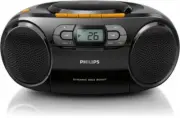
Philips AZ328/37 – User Manual, read for free online in PDF format. We hope this helps you resolve any issues you may have. If you have further questions, please contact us through the contact form.


Table of Contents:
- Page 2 – Release notes; This version has the following updates compared with V2.0 version:
- Page 3 – Contents
- Page 4 – Important; Safety; Notice
- Page 6 – Introduction
- Page 8 – Get started; Connect power; Option 2: Battery power
- Page 9 – Turn on; Turn off; Play; Play a CD
- Page 10 – Play from an external device; Play from USB devices; Play tape
- Page 11 – Tune to FM radio stations
- Page 12 – Play options; Control play; Program tracks; Adjust sound
- Page 13 – Disc; Maintenance
- Page 15 – Troubleshooting
www.philips.com/support
User manual
Always there to help you
Register your product and get support at
AZ328
Question?
Contact
Philips
"Loading the manual" means you need to wait until the file loads and becomes available for online reading. Some manuals are very large, and the time they take to appear depends on your internet speed.
Was this manual helpful?
About this manual
- Brand
- Philips
- Model
- AZ328/37
- Document type
- User Manual
- Language(s)
- English
- Pages
- 16
- File size
- 1.2 MB
- Format
Summary
Release notes This version has the following updates compared with V2.0 version: • Max Output Power changes to Rated Output Power. • Operation Power Comsumption changes to 10W. • Dimensions changes to: 300 x 134 x 240mm. • The weight of the product changes to 1.5 kg.
1 EN Contents 1 Important 2 Safety 2 Notice 2 2 Your CD Soundmachine 4 Introduction 4 What's in the box 4 Over view of the main unit 4 3 Get started 6 Connect power 6 Turn on 7 Turn off 7 4 Play 7 Play a CD 7 Play from an external device 8 Play from USB devices 8 Play tape 8 Tune to FM radio station...
2 EN 1 Important Safety • Read these instructions. • Follow all instructions. • Do not block any ventilation openings. Install in accordance with the manufacturer's instructions. • Do not install near any heat sources such as radiators, heat registers, stoves, or other apparatus (including that prod...
Ask a question
Related manuals
Popular Philips Other


More Philips Other models
 Philips AZ105CD Manual
 Philips AZ127/12 User Manual
 Philips AZ215B/05 Quick Guide
 Philips AZ215B/12 User Manual
 Philips AZ215S/12 User Manual
 Philips AZ318B/12 User Manual
 Philips AZ382 Manual
 Philips AZ700T/12 User Manual
 Philips AZ700T/37 User Manual
 Philips AZ1000 Manual
 Philips AZ1004 Manual
 Philips AZ1008 Manual