Page 5 - Installation
1 Introduction Table of Contents Thank you for purchasing this television set.This handbook has been designed to help you install and operate your TV set.We would strongly recommend that you read it thoroughly.We hope our technology meets entirely with your satisfaction. Installation Presentation of...
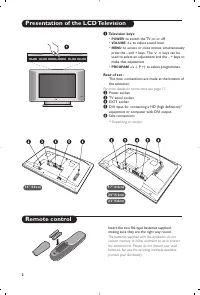
Page 6 - Presentation of the LCD Television; POWER; For more details on connections see page 11.
2 PROGRAM VOLUME 2 3 " / 5 8 c m 1 5 " / 3 9 c m 1 7 " / 4 4 c m 2 0 " / 5 1 c m Presentation of the LCD Television Remote control & Television keys: • POWER : to switch the TV on or off. • VOLUME -/+ : to adjust sound level. • MENU : to access or close menus, simultaneously pres...
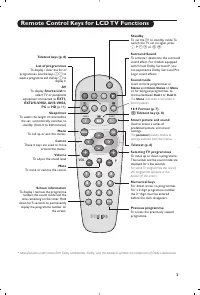
Page 7 - Remote Control Keys for LCD TV Functions; Source List; îÏ
3 1 2 MENU VOL P 5 6 4 8 7 9 0 3 - - + + . [ Á - ª ` ù SMART SMART Ë ¤ ı AV Remote Control Keys for LCD TV Functions Sound mode Used to force programmes in Stereo and Nicam Stereo to Mono or, for bilingual programmes, tochoose between Dual I or Dual II . The Mono indication is red when in forced pos...
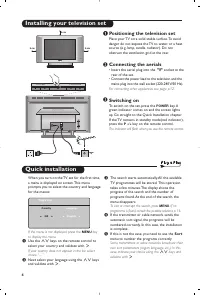
Page 8 - Quick installation; Sort; Positioning the television set; Installing your television set
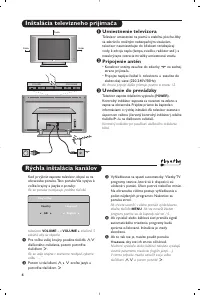
Quick installation When you turn on the TV set for the first time,a menu is displayed on screen. This menuprompts you to select the country and languagefor the menus: If the menu is not displayed, press the MENU key to display the menu. & Use the <> keys on the remote control to select you...
Page 9 - choice; Program sort
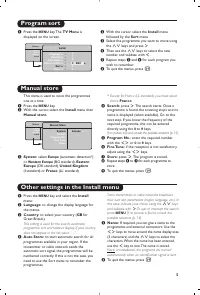
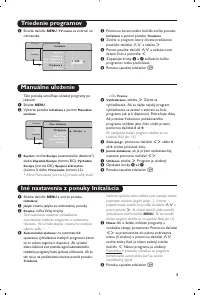
5 Manual store Other settings in the Install menu This menu is used to store the programmesone at a time. & Press the MENU key. é With the cursor, select the Install menu then Manual store : “ System: select Europe (automatic detection*) or Western Europe (BG standard), Eastern Europe (DK standa...
Page 10 - You can also access; Feature settings
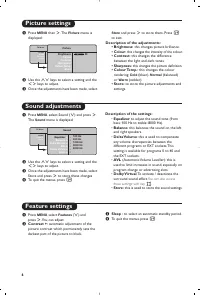
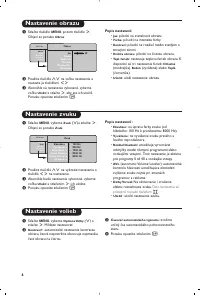
Picture settings Sound adjustments & Press MENU then ≥ . The Picture menu is displayed: é Use the <> keys to select a setting and the ≤≥ keys to adjust. “ Once the adjustments have been made, select Store and press ≥ to store them. Press Ë to exit. Description of the adjustments: • Brightn...
Page 11 - Screen Formats; If your television is equipped with a 4:3 screen.; Press the; Subtitle Zoom; This mode displays images in full screen.
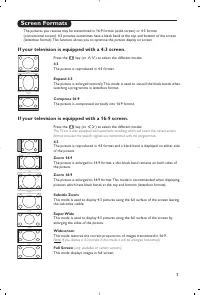
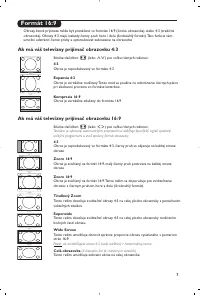
7 Screen Formats The pictures you receive may be transmitted in 16:9 format (wide screen) or 4:3 format(conventional screen). 4:3 pictures sometimes have a black band at the top and bottom of the screen(letterbox format). This function allows you to optimise the picture display on screen. If your te...
Page 12 - Teletext
8 1 2 MENU VOL P 5 6 4 8 7 9 0 3 - - + + . [ Á - ª ` ù SMART SMART Ë ¤ ı AV AV P 9 0 M E N U Ë Ë ¤ ù Teletext Press : You will obtain : Teletext is an information system broadcast by certain channels which can be consulted like anewspaper. It also offers access to subtitles for viewers with hearing ...
Page 13 - Using in PC monitor mode
9 Using in PC monitor mode PC Mode Your TV can be used as a computer monitor. You must first of all connect the computer (seep.13) and adjust the resolution (see below). Choosing PC mode & Press the AV key on the remote control to display the Source List . é Use the cursor < / > key to sel...
Page 14 - (only available for certain signal
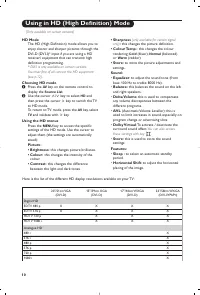
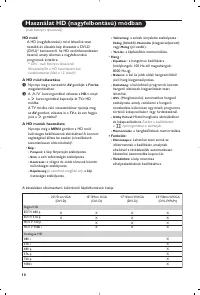
10 Using in HD (High Definition) Mode (Only available on certain versions) Digital HD EDTV 480 p EDTV 576 p HDTV 720 p HDTV 1080 i Analogue HD 480 i 576 i 480 p 576 p 720 p 1080 i 20"/51cm VGA (DVI-D) X X 15"/39cm XGA (DVI-D) X X X X 17"/44cm WXGA (DVI-D) X X X X 23"/58cm WXGA (DVI-I...
Page 15 - Connecting peripheral equipment; key on the remote control to display; and select; TV; or peripheral; HD
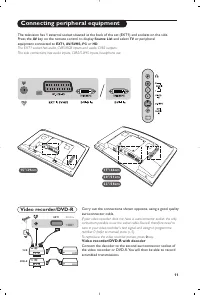
11 Connecting peripheral equipment Carry out the connections shown opposite, using a good qualityeuroconnector cable. If your video recorder does not have a euroconnector socket, the onlyconnection possible is via the aerial cable.You will therefore need totune in your video recorder's test signal a...
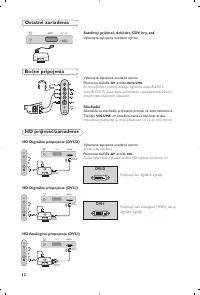
Page 16 - Headphones; keys are used to adjust the volume level.; For more information on using HD mode see page 10.; Side connections; Carry out the connections shown opposite.; Other equipment
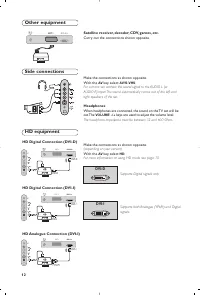
12 Make the connections as shown opposite.With the AV key, select AV/S-VHS . For a mono set, connect the sound signal to the AUDIO L (orAUDIO R) input. The sound automatically comes out of the left andright speakers of the set. Headphones When headphones are connected, the sound on the TV set will b...
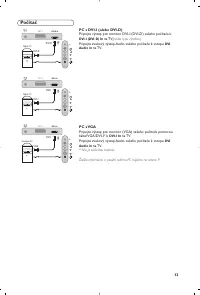
Page 17 - Computer; PC with VGA; Audio out; For more information on using PC mode see page 9.
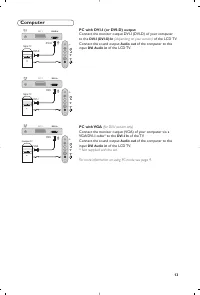
13 Computer PC with DVI-I (or DVI-D) output Connect the monitor output DVI-I (DVI-D) of your computerto the DVI-I (DVI-D) In (depending on your version) of the LCD TV. Connect the sound output Audio out of the computer to the input DVI Audio in of the LCD TV. PC with VGA (for DVI-I version only) Con...
Page 18 - Glossary; Tips; System
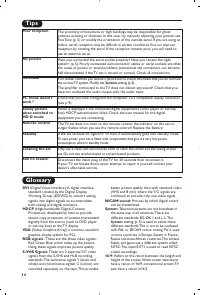
14 Glossary DVI (Digital Visual Interface): A digital interface standard created by the Digital DisplayWorking Group (DDWG) to convert analogsignals into digital signals to accommodateboth analog and digital monitors. HDCP (High-bandwidth Digital-Content Protection): developed by Intel to providesec...
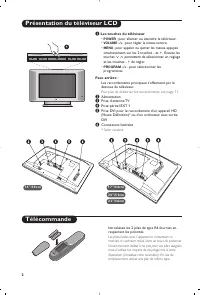
Page 20 - Les touches du téléviseur; Pour plus de détails sur les raccordements, voir page 11.
2 Présentation du téléviseur LCD Télécommande & Les touches du téléviseur • POWER : pour allumer ou éteindre le téléviseur. • VOLUME -/+ : pour régler le niveau sonore. • MENU : pour appeler ou quitter les menus, appuyez simultanément sur les 2 touches - et +. Ensuite, lestouches > < perme...
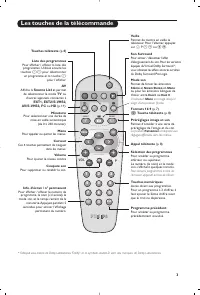
Page 21 - Les touches de la télécommande
3 1 2 MENU VOL P 5 6 4 8 7 9 0 3 - - + + . [ Á - ª ` ù SMART SMART Ë ¤ ı AV Les touches de la télécommande Mode son Permet de forcer les émissions Stéréo et Nicam Stéréo en Mono ou pour les émissions bilingues dechoisir entre Dual I ou Dual II . L’indication Mono est rouge lorsqu’il s’agit d’une pos...
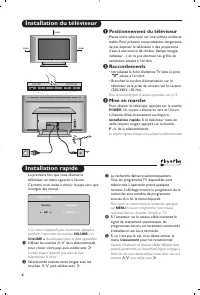
Page 22 - Installation rapide; reportez vous au chapitre conseils p. 14.; Classement; puis valider avec; Positionnement du téléviseur; installation rapide; Le voyant clignote lorsque vous utilisez la télécommande.; Installation du téléviseur
4 L R : PROGRAM VOLUME 5 cm 5 cm 5 cm Installation rapide La première fois que vous allumez letéléviseur, un menu apparaît à l’écran.Ce menu vous invite à choisir le pays ainsi quela langue des menus : Si le menu n’apparaît pas, maintenez appuyéespendant 5 secondes les touches VOLUME - et VOLUME + d...
Page 23 - sélectionner impérativement le choix
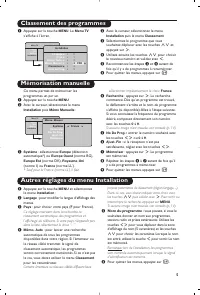
5 Mémorisation manuelle Autres réglages du menu Installation Classement des programmes Ce menu permet de mémoriser lesprogrammes un par un. & Appuyez sur la touche MENU . é Avec le curseur, sélectionnez le menu Installation puis Mémo Manuelle : “ Système : sélectionnez Europe (détection automati...
Page 24 - Description des réglages :; Vous avez également; Réglage des options
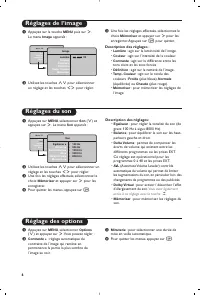
6 Réglages de l’image Réglages du son & Appuyez sur la touche MENU puis sur ≥ . Le menu Image apparaît : é Utilisez les touches <> pour sélectionner un réglage et les touches ≤≥ pour régler. “ Une fois les réglages effectués, sélectionnez lechoix Mémoriser et appuyer sur ≥ pour les enregis...
Page 25 - Plein Écran; (disponible uniquement sur certaines versions)
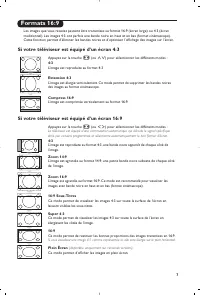
7 Formats 16:9 Les images que vous recevez peuvent être transmises au format 16:9 (écran large) ou 4:3 (écrantraditionnel). Les images 4:3 ont parfois une bande noire en haut et en bas (format cinémascope).Cette fonction permet d’éliminer les bandes noires et d’optimiser l’affichage des images sur l...
Page 26 - Télétexte
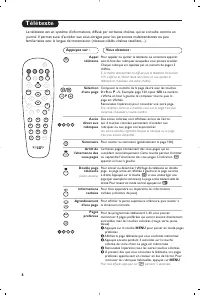
8 Télétexte Appuyez sur : Vous obtenez : Le télétexte est un système d'informations, diffusé par certaines chaînes, qui se consulte comme unjournal. Il permet aussi d'accéder aux sous-titrages pour les personnes malentendantes ou peufamiliarisées avec la langue de transmission (réseaux câblés, chaîn...
Page 27 - Utilisation en mode moniteur PC; Mode PC; (disponible uniquement sur certaines
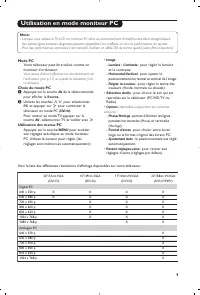
9 Utilisation en mode moniteur PC Mode PC Votre téléviseur peut être utilisé comme unmoniteur d’ordinateur. Vous devez d’abord effectuer les raccordements del’ordinateur (voir p.13) et ajuster la résolution (voirci-dessous). Choix du mode PC & Appuyez sur la touche AV de la télécommande pour aff...
Page 28 - Utilisation en mode HD (Haute Définition); Mode HD
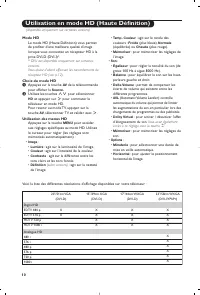
10 Utilisation en mode HD (Haute Définition) Mode HD Le mode HD (Haute Définition) vous permetde profiter d’une meilleure qualité d’imagelorsque vous connectez un récepteur HD à laprise DVI-D (DVI-I)*. * DVI-I est disponible uniquement sur certainesversions.Vous devez d’abord effectuer les raccordem...
Page 29 - Raccordements; de la télécommande pour afficher la; Source; et sélectionner; ou d’autres
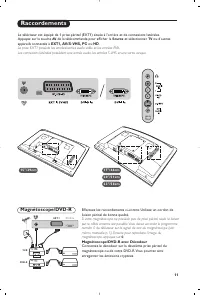
11 Raccordements Effectuez les raccordements ci-contre. Utilisez un cordon deliaison péritel de bonne qualité. Si votre magnétoscope ne possède pas de prise péritel, seule la liaisonpar le câble antenne est possible. Vous devez accorder le programmenuméro 0 du téléviseur sur le signal de test du mag...
Page 30 - Casque; permettent de régler le volume.; Pour plus d’informations sur l’utilisation en mode HD, voir page 10.; Connexions latérales; Autres appareils
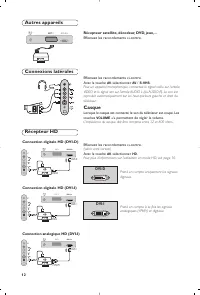
12 Effectuez les raccordements ci-contre.Avec la touche AV , sélectionner AV / S-VHS . Pour un appareil monophonique, connectez le signal vidéo sur l’entréeVIDEO et le signal son sur l’entrée AUDIO L (ou AUDIO R). Le son estreproduit automatiquement sur les haut-parleurs gauche et droit dutéléviseur...
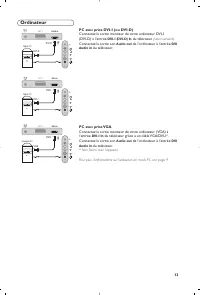
Page 31 - Ordinateur; du téléviseur; PC avec prise VGA; Connectez la sortie son
13 Ordinateur PC avec prise DVI-I (ou DVI-D) Connectez la sortie moniteur de votre ordinateur DVI-I (DVI-D) à l’entrée DVI-I (DVI-D) In du téléviseur (selon versions) . Connectez la sortie son Audio out de l’ordinateur à l’entrée DVI Audio in du téléviseur. PC avec prise VGA Connectez la sortie moni...
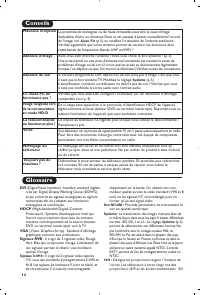
Page 32 - Glossaire; Conseils
14 Glossaire DVI (Digital Visual Interface) : Interface standard digitale crée par Digital Display Working Group (DDWG)et qui convertit les signaux analogiques en signauxnumériques afin de s’adapter aux moniteursanalogiques et numériques. HDCP (High-bandwidth Digital-Content Protection) : Système dé...
Page 33 - Üzembehelyezés
1 Bevezetés Tartalomjegyzék Új televíziót vásárolt. Köszönjük a márkánk iránti bizalmát.Kérjük, a készülék által nyújtott szolgáltatások megismerése érdekébenfigyelmesen olvassa el a használati útmutatót.Reméljük, hogy technológiánkat teljes megelégedéssel fogja használni. Üzembehelyezés Az LCD tele...
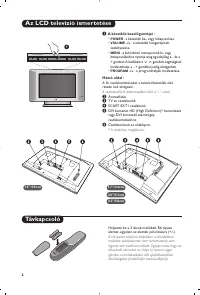
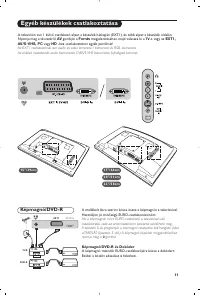
Page 34 - A készülék kez; A csatlakozókról részletesebben lásd a 11. oldalt.
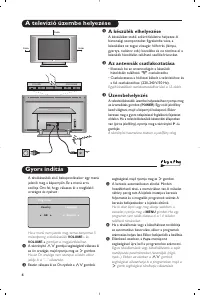
2 Az LCD televízió ismertetése Távkapcsoló & A készülék kez előgombjai : • POWER : a készülék be- vagy kikapcsolása. • VOLUME -/+ : a készülék hangerejének szabályozása. • MENU : a különböző menüpontok ki- vagy bekapcsolásához nyomja meg egyidejűleg a - és a + gombot.A beállítást a > < gom...
Page 35 - A távirányító nyomógombjai
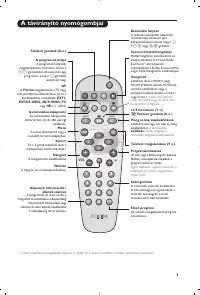
3 1 2 MENU VOL P 5 6 4 8 7 9 0 3 - - + + . [ Á - ª ` ù SMART SMART Ë ¤ ı AV A távirányító nyomógombjai Hangmód Lehetővé teszi a STEREO (vagy NICAM STEREO ) adások MONO -ba történő átalakítását, vagy, akétnyelvű adások esetén a DUAL I vagy DUAL II A kék színű MONO jelzés azt jelenti hogy az adás másh...
Page 36 - Gyors indítás; A készülék elhelyezése; A televízió üzembe helyezése
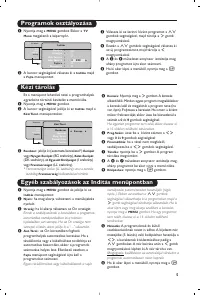
4 L R : PROGRAM VOLUME 5 cm 5 cm 5 cm Gyors indítás A tévékészülék első bekapcsolásakor egy menüjelenik meg a képernyőn. Ez a menü arraszólítja Önt fel, hogy válassza ki a megfelelőországot és nyelvet : Ha a menü nem jelenik meg, tartsa benyomva 5másodpercig a tévékészülék VOLUME - és VOLUME + gombj...
Page 38 - A beállítások leírása:; Ezeket a beállításokat; Az funkciók beállítása
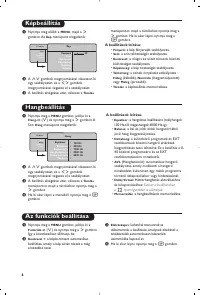
6 Képbeállítás Hangbeállítás & Nyomja meg előbb a MENU , majd a ≥ gombot. Az Kép menüpont megjelenik: é A <> gombok megnyomásával válasszon ki egy szabályozást, és a ≤≥ gombok megnyomásával végezze el a szabályozást. “ A beállítás elvégzése után, válassza a Tárolás menüpontot, majd a tárol...
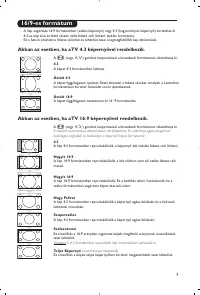
Page 39 - Nagy Felírat; A kép 4:3 formátumban reprodukálódik a képernyő egész felületén.; Szélesvásznú; ) gombot lenyomásával a következő formátumot választhatja ki:
7 16/9-es formátum A kép sugárzása 16:9 formátumban (széles képernyő) vagy 4:3 (hagyományos képernyő) történhet. A4:3-as kép alsó és felső részén néha fekete csík látható (széles formátum).Ez a fukció eltünteti a fekete csíkokat és lehetővé teszi a legmegfelelőbb kép ábrázolását. Abban az esetben, h...
Page 40 - Dupla
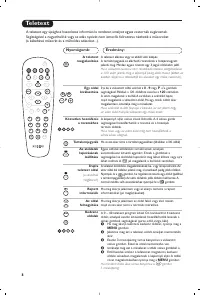
1 2 MENU VOL P 5 6 4 8 7 9 0 3 - - + + . [ Á - ª ` ù SMART SMART Ë ¤ ı AV AV P 9 0 M E N U Ë Ë ¤ ù 8 Teletext Nyomógomb: Eredmény: A teletext egy újsághoz hasonlatos információs rendszer, amelyet egyes csatornák sugároznak.Segítségével a nagyothallók vagy az adás nyelvét nem ismerők feliratozva nézh...
Page 41 - PC üzemmód; Funkciók
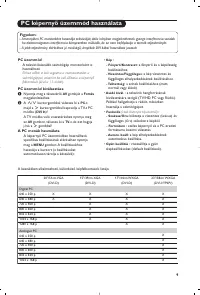
9 PC képerny ő üzemmód használata PC üzemmód A televíziókészülék számítógép monitorként ishasználható. Ehhez előbb el kell végeznie a csatlakoztatást aszámítógéppel, valamint be kell állítania a képernyőfelbontását (lásd a 13. oldalt). PC üzemmód kiválasztása & Nyomja meg a távvezérló AV gombját...
Page 43 - Egyéb készülékek csatlakoztatása; gombját a; Forrás; megjelenítéséhez, majd válassza ki a; vagy
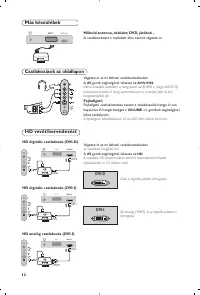
11 Egyéb készülékek csatlakoztatása A mellékelt ábra szerint kösse össze a képmagnót a televízióval.Használjon jó minőségű EURO-csatlakozózsinórt. Ha a képmagnón nincs EURO-csatlakozó, a televízióval valóösszeköttetés csak az antennazsinóron keresztül valósítható meg.A televízió 0-ás programját a ké...
Page 44 - Fejhallgató; gombok segítségével; gomb segítségével válassza az; Csak a digitális jeleket támogatja.; Csatlakozások az oldallapon; A csatlakoztatást a mellékelt ábra szerint végezze el.; Más készülékek
12 Végezze el az itt látható csatlakoztatásokat.A AV gomb segítségével válassza az AV/S-VHS . Monó készülék esetében a hang jelent az AUDIO L (vagy AUDIO R)bemenetre kössük. A hang automatikusan a televízió jobb és balhangszórójából jön. Fejhallgató Fejhallgató csatlakoztatása esetén a tévékészülék ...
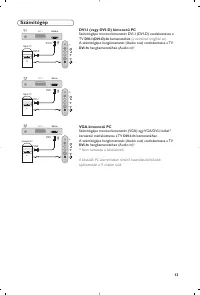
Page 45 - Számítógép; bemenetéhez; VGA kimenetű PC; A számítógépe hangkimenetét (Audio out) csatlakoztassa a TV
13 Számítógép DVI-I (vagy D VI-D) kimenetű PC Számítógépe monitorkimenetét DVI-I (DVI-D) csatlakoztassa aTV DVI-I (DVI-D)-In bemenetéhez (a verziónak megfelel en) . A számítógépe hangkimenetét (Audio out) csatlakoztassa a TV DVI-In hangbemenetéhez (Audio in)! VGA kimenetű PC Számítógépe monitorkimen...
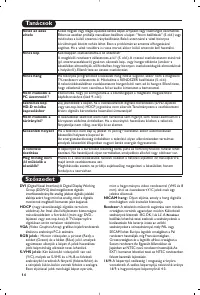
Page 46 - Szószedet; HDCP; Tanácsok; űködik a
14 Szószedet DVI (Digital Visual Interface):A Digital Display Working Group (DDWG) által megalkotott digitálisinterfészszabvány.Az analóg jeleket digitális jelekkéalakítja azért, hogy mind az analóg, mind a digitálismonitorok megfelelő bemeneti jelet kapjanak. HDCP (nagy sávszélességű digitális tart...
Page 47 - ìÒÚ‡Ìӂ͇; PyccÍËÈ
1 ǂ‰ÂÌË é„·‚ÎÂÌË Ç˚ ÔËÓ·ÂÎË ˝ÚÓÚ ÚÂ΂ËÁÓ, ÒÔ‡ÒË·Ó Á‡ ‚‡¯Â ‰Ó‚ÂËÂ.ùÚÓ ÛÍÓ‚Ó‰ÒÚ‚Ó Ô‰̇Á̇˜ÂÌÓ ‰Îfl ÚÓ„Ó, ˜ÚÓ·˚ ÔÓÏÓ˜¸ ‚‡Ï ÛÒÚ‡ÌÓ‚ËÚ¸Ë ÔÓθÁÓ‚‡Ú¸Òfl ‚‡¯ËÏ ÚÂ΂ËÁÓÓÏ.å˚ ÒÓ‚ÂÚÛÂÏ ‚‡Ï ‚ÌËχÚÂθÌÓ ÔÓ˜ËÚ‡Ú¸ Ëı.å˚ ̇‰ÂÂÏÒfl, ˜ÚÓ Ì‡¯‡ ÚÂıÌÓÎÓ„Ëfl ÔÓÎÌÓÒÚ¸˛ Û‰Ó‚ÎÂÚ‚ÓËÚ ‚‡Ò. ìÒÚ‡Ìӂ͇ á̇ÍÓÏÒÚ‚Ó Ò ...
Page 48 - äÌÓÔÍË ÛÔ‡‚ÎÂÌËfl ̇ ÚÂ΂ËÁÓÂ; Çˉ ÒÁ‡‰Ë; ëÂÚ‚Ó ÔËÚ‡ÌËÂ
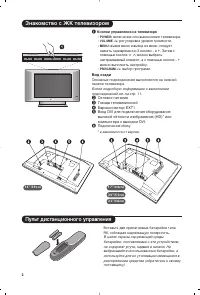
2 á̇ÍÓÏÒÚ‚Ó Ò Üä ÚÂ΂ËÁÓÓÏ èÛÎ¸Ú ‰ËÒڇ̈ËÓÌÌÓ„Ó ÛÔ‡‚ÎÂÌËfl & äÌÓÔÍË ÛÔ‡‚ÎÂÌËfl ̇ ÚÂ΂ËÁÓ • POWER: ‚Íβ˜ÂÌË ËÎË ‚˚Íβ˜ÂÌË ÚÂ΂ËÁÓ‡. • VOLUME -/+ : „ÛÎËӂ͇ ÛÓ‚Ìfl „ÓÏÍÓÒÚË. • MENU : ‚˚ÁÓ‚ ÏÂÌ˛ Ë ‚˚ıÓ‰ ËÁ ÏÂÌ˛; ÒΉÛÂÚ Ì‡Ê‡Ú¸ Ó‰ÌÓ‚ÂÏÂÌÌÓ 2 ÍÌÓÔÍË - Ë + . á‡ÚÂÏ Ò ÔÓÏÓ˘¸˛ ÍÌÓÔÓÍ >...
Page 49 - ä·‚Ë ̄Ë ÔÛÎ ̧Ú‡ ‰ËÒڇ̈ËÓÌÌÓ„Ó ÛÔ‡‚ÎÂÌËfl
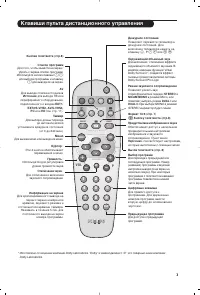
3 1 2 MENU VOL P 5 6 4 8 7 9 0 3 - - + + . [ Á - ª ` ù SMART SMART Ë ¤ ı AV ä·‚Ë¯Ë ÔÛθڇ ‰ËÒڇ̈ËÓÌÌÓ„Ó ÛÔ‡‚ÎÂÌËfl êÂÊËÏ Á‚ÛÍÓ‚Ó„Ó ÒÓÔÓ‚ÓʉÂÌËfl èÓÁ‚ÓÎflÂÚ ÛÒËÎËÚ¸ Á‚ÛÍÒÚÂÂÓÙÓÌ˘ÂÒÍËı Ô‰‡˜ STEREO Ë NICAM MONO ‚ ÂÊËÏ Mono, ËÎË ÔÓÁ‚ÓÎflÂÚ ‚˚·‡Ú¸ ÂÊËÏ DUAL I ËÎË DUAL II . èË ‚˚·Ó MONO ‚ ÂÊË...
Page 50 - Å ̊ÒÚ‡fl ̇ÒÚÓÈ͇; ê‡ÒÔÓÎÓÊÂÌË ÚÂ΂ËÁÓ‡; ìÒÚ‡Ìӂ͇ ÚÂ΂ËÁÓ‡
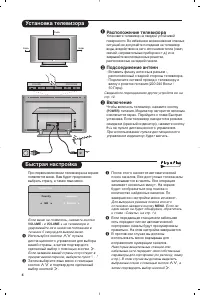
4 L R : PROGRAM VOLUME 5 cm 5 cm 5 cm Å˚ÒÚ‡fl ̇ÒÚÓÈ͇ èË Ô‚ÓÏ ‚Íβ˜ÂÌËË ÚÂ΂ËÁÓ‡ ̇ ˝Í‡ÌÂÔÓfl‚ÎflÂÚÒfl ÏÂÌ˛. Ç‡Ï ·Û‰ÂÚ Ô‰ÎÓÊÂÌÓ‚˚·‡Ú¸ ÒÚ‡ÌÛ, ‡ Ú‡ÍÊ flÁ˚Í ÏÂÌ˛. ÖÒÎË ÏÂÌ˛ Ì ÔÓfl‚ËÎÓÒ¸, ̇ÊÏËÚ ÍÌÓÔÍË VOLUME - Ë VOLUME + ̇ ÚÂ΂ËÁÓÂ Ë Û‰ÂÊË‚‡ÈÚ Ëı ‚ ̇ʇÚÓÏ ÔÓÎÓÊÂÌËË ‚Ú˜ÂÌË 5 ÒÂÍÛ̉ ‰Îfl...
Page 52 - ç‡ÒÚÓÈ͇ ı‡‡ÍÚÂËÒÚËÍ
6 ç‡ÒÚÓÈ͇ ËÁÓ·‡ÊÂÌËfl ç‡ÒÚÓÈ͇ Á‚Û͇ & ç‡ÊÏËÚ ÍÌÓÔÍÛ MENU , ‡ Á‡ÚÂÏ ÍÌÓÔÍÛ ≥ : ̇ ˝Í‡Ì ÔÓfl‚ËÚÒfl ÏÂÌ˛ àÁÓ·‡ÊÂÌË : é àÒÔÓθÁÛÈÚ ÍÌÓÔÍË <> ‰Îfl ‚˚·Ó‡ ̇ÒÚÓÈÍË Ë ÍÌÓÔÍË ≤≥ ‰Îfl ‚˚ÔÓÎÌÂÌËfl ̇ÒÚÓÈÍË. “ èÓÒΠ‚˚ÔÓÎÌÂÌËfl ̇ÒÚÓÂÍ ‚˚‰ÂÎËÚÂÔÛÌÍÚ á‡ÔÓÏÌËÚ¸ Ë Ì‡ÊÏËÚ ÍÌÓÔÍÛ ≥ ‰Îfl ÔÓ‰Ú‚ÂʉÂÌ...
Page 53 - ç‡Ê‡Ú ̧ ̇ Í·‚Ë ̄Ë; òËÓÍÓÙÓχÚÌ ̊È; ùÚÓÚ ÂÊËÏ ÔÓÁ‚ÓÎflÂÚ ÓÚÓ·‡Ê‡Ú ̧ ËÁÓ·‡ÊÂÌËfl ‚ ÔÓÎÌ ̊È ͇̋Ì.
7 îÛÌ͈Ëfl 16/9 àÁÓ·‡ÊÂÌËÂ, ÍÓÚÓÓ ‚˚ ÔÓÎÛ˜‡ÂÚÂ, ÏÓÊÂÚ ·˚Ú¸ Ô‰‡ÌÓ ‚ ÙÓχÚ 16:9 (¯ËÓÍËÈ˝Í‡Ì) ËÎË 4:3 (Ú‡‰ËˆËÓÌÌ˚È ˝Í‡Ì). èË ËÁÓ·‡ÊÂÌËË 4:3 ̇ ˝Í‡Ì ËÌÓ„‰‡ ·˚‚‡˛Ú˜ÂÌ˚ ÔÓÎÓÒ˚ ÒÌËÁÛ Ë Ò‚ÂıÛ (ÙÓÏ‡Ú ÍËÌÓ). ùÚ‡ ÙÛÌ͈Ëfl ÔÓÁ‚ÓÎflÂÚ ‚‡Ï ÛÒÚ‡ÌËÚ¸˜ÂÌ˚ ÔÓÎÓÒ˚ Ë ÓÔÚËÏËÁËÓ‚‡Ú¸ ËÁÓ·‡ÊÂÌË ̇ ˝Í...
Page 54 - íÂÎÂÚÂÍÒÚ
8 íÂÎÂÚÂÍÒÚ ç‡ÊÏËÚÂ: ÑÎfl ÔÓÎÛ˜ÂÌËfl: íÂÎÂÚÂÍÒÚ Ô‰ÒÚ‡‚ÎflÂÚ ÒÓ·ÓÈ ÒËÒÚÂÏÛ ‡ÒÔÓÒÚ‡ÌÂÌËfl ËÌÙÓχˆËË, Ô‰‡‚‡ÂÏÓÈ ÔÓÌÂÍÓÚÓ˚Ï Í‡Ì‡Î‡Ï, ÍÓÚÓÛ˛ ÏÓÊÌÓ ˜ËÚ‡Ú¸ Í‡Í „‡ÁÂÚÛ. Ç ˝ÚÓÈ ÒËÒÚÂÏ Ô‰ÛÒÏÓÚÂ̇ Ú‡ÍÊÂÙÛÌ͈Ëfl ÒÛ·ÚËÚÓ‚ ‰Îfl β‰ÂÈ, Ëϲ˘Ëı ‰ÂÙÂÍÚ˚ ÒÎÛı‡ ËÎË Ì Á̇˛˘Ëı flÁ˚͇, ̇ ÍÓÚÓÓς‰ÂÚÒfl Ô‰‡˜...
Page 55 - àÒÔÓÎ ̧ÁÓ‚‡ÌË ÂÊËχ ÍÓÏÔ ̧ ̨ÚÂÌÓ„Ó ÏÓÌËÚÓ‡; êÂÊËÏ ÍÓÏÔ ̧ ̨Ú‡; ÔÍ; àÒÔÓÎ ̧ÁÓ‚‡ÌË ÏÂÌ ̨ ÍÓÏÔ ̧ ̨Ú‡
9 àÒÔÓθÁÓ‚‡ÌË ÂÊËχ ÍÓÏÔ¸˛ÚÂÌÓ„Ó ÏÓÌËÚÓ‡ êÂÊËÏ ÍÓÏÔ¸˛Ú‡ ùÚÓÚ ÚÂ΂ËÁÓ ÏÓÊÌÓ ËÒÔÓθÁÓ‚‡Ú¸ ͇ÍÍÓÏÔ¸˛ÚÂÌ˚È ÏÓÌËÚÓ. Ċ˜‡Î‡ ÌÂÓ·ıÓ‰ËÏÓ ‚˚ÔÓÎÌËÚ¸ÔÓ‰ÒÓ‰ËÌÂÌËÂ Í ÍÓÏÔ¸˛ÚÂÛ ËÓÚ„ÛÎËÓ‚‡Ú¸ ‡Á¯ÂÌË (ÒÏ. ÒÚ. 13). Ç˚·Ó ÂÊËχ ÍÓÏÔ¸˛Ú‡ & ç‡ÊÏËÚ ÍÌÓÔÍÛ AV ̇ ÔÛÎ˙Ú ‰Û ‰Îfl ‚˚‚Ó‰‡ ÒÔËÒ͇ ËÒ...
Page 56 - àÒÔÓÎ ̧ÁÓ‚‡ÌË ‚ ÂÊËÏ HD (Ç ̊ÒÓ͇fl ófiÚÍÓÒÚ ̇); PÂÊËÏ HD; èË ‚ ̊·Ó ÂÊËχ HD; àÒÔÓÎ ̧ÁÛfl ÏÂÌ ̨; ÂÊËχ HD
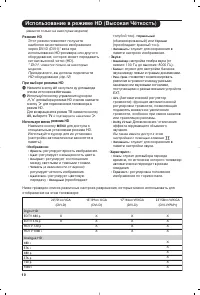
10 àÒÔÓθÁÓ‚‡ÌË ‚ ÂÊËÏ HD (Ç˚ÒÓ͇fl ófiÚÍÓÒÚ˙) PÂÊËÏ HD ùÚÓÚ ÂÊËÏ ÔÓÁ‚ÓÎflÂÚ ÔÓÎÛ˜Ëڂ̇˷ÓΠ͇˜ÂÒÚ‚ÂÌÌÓ ËÁÓ·‡ÊÂÌ˘ÂÂÁ DVI-D (DVI-I)* ‚ıÓa ÔËËÒÔÓÎ˙ÁÓ‚‡ÌËË çD-ÂÒ˂‡ ËÎË ‰Û„Ó„ÓÓ·ÓÛ‰Ó‚‡ÌËfl, ÍÓÚÓÓ ÏÓÊÂÚ Ô‰‡‚‡Ú˙Ò˄̇Π‚˚ÒÓÍÓÈ ˜ÂÚÍÓ (HD). * DVI-I : ËÏÂÂÚÒfl ÚÓθÍÓ Ì‡ ÌÂÍÓÚÓ˚ı ÏÓ‰ÂÎflı. è...
Page 57 - èÓ‰ÍÎ ̨ ̃ÂÌË ÔÂËÙÂËÈÌÓÈ ‡ÔÔ‡‡ÚÛ ̊; ÇˉÂÓχ„ÌËÚÓÙÓÌ/DVD-R Ë ‰ÂÍÓ‰ËÛ ̨ ̆ ÛÒÚÓÈÒÚ‚Ó; ̇ ÔÛÎ ̇Ú ‰Û ‰Îfl ‚ ̊‚Ó‰‡ ÒÔËÒ͇ ËÒÚÓ ̃ÌËÍÓ‚; àÒÚÓ ̃ÌËÍ; Ë ‚ ̊·Ó‡ TB ËÎË
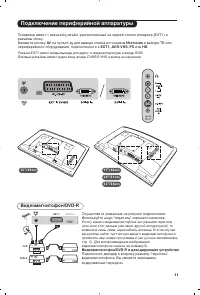
11 èÓ‰Íβ˜ÂÌË ÔÂËÙÂËÈÌÓÈ ‡ÔÔ‡‡ÚÛ˚ éÒÛ˘ÂÒÚ‚ËÚ Û͇Á‡ÌÌ˚ ̇ ËÒÛÌÍ ÔÓ‰Íβ˜ÂÌËfl.àÒÔÓθÁÛÈÚ ¯ÌÛ “ÔÂËÚÂθ” ıÓÓ¯Â„Ó Í‡˜ÂÒÚ‚‡. ÖÒÎË Û ‚‡¯Â„Ó ‚ˉÂÓχ„ÌËÚÓÙÓ̇ ÌÂÚ ‡Á˙Âχ ÔÂËÚÂθ(ËÎË ÂÒÎË ˝ÚÓÚ ‡Á˙ÂÏ ÛÊ Á‡ÌflÚ ‰Û„ÓÈ ‡ÔÔ‡‡ÚÛÓÈ), ÚÓ‚ÓÁÏÓÊ̇ Î˯¸ Ò‚flÁ¸ ˜ÂÂÁ ͇·Âθ ‡ÌÚÂÌÌ˚. Ç ˝ÚÓÏ ÒÎÛ˜‡Â‚˚ ‰ÓÎÊÌ...
Page 58 - èÓ‰ÍÎ ̨ ̃ÂÌËfl Ò·ÓÍÛ; ÑÛ„‡fl ‡ÔÔ‡‡ÚÛ‡
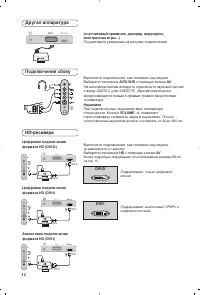
12 Ç˚ÔÓÎÌËÚ ÔÓ‰Íβ˜ÂÌËfl, Í‡Í ÔÓ͇Á‡ÌÓ Ì‡ ËÒÛÌÍÂ.Ç˚·ÂËÚ ÔÓÎÓÊÂÌË AV/S-VHS Ò ÔÓÏÓ˘¸˛ ÍÌÓÔÍË AV . ç‡ ÏÓÌÓÙÓÌ˘ÂÒÍÓÏ ‡ÔÔ‡‡Ú ÔÓ‰Íβ˜ËÚ Á‚ÛÍÓ‚ÓÈ Ò˄̇ÎÍ ‚ıÓ‰Û AUDIO L (ËÎË AUDIO R). á‚ÛÍ ‡‚ÚÓχÚ˘ÂÒÍË‚ÓÒÔÓËÁ‚Ó‰ËÚÒfl ΂˚Ï Ë Ô‡‚˚Ï „ÓÏÍÓ„Ó‚ÓËÚÂÎflÏËÚÂ΂ËÁÓ‡. ç‡Û¯ÌËÍË èË ÔÓ‰Íβ˜ÂÌÌ˚ı ̇ۯÌË͇ı Á...
Page 59 - äÓÏÔ ̧ ̨ÚÂ; ‚‡ ̄Â„Ó TB
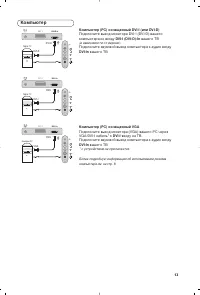
13 äÓÏÔ¸˛Ú äÓÏÔ¸˛Ú (PC) ÓÒ̇˘ÂÌÌ˚È DVI-I (ËÎË DVI-D) èÓ‰Íβ˜ËÚ ‚˚ıÓ‰ ÏÓÌËÚÓ‡ DVI-I (DVI-D) ‚‡¯Â„ÓÍÓÏÔ˙˛Ú‡ ÍÓ ‚ıÓ‰Û DVI-I (DVI-D)-In ‚‡¯Â„Ó TB (‚ Á‡‚ËÒËÏÓÒÚË oÚ ‚ÂÒËË) . èÓ‰Íβ˜ËÚ Á‚ÛÍÓ‚ÓÈ ‚˚ıÓ‰ ÍÓÏÔ˙˛Ú‡ Í ‡Û‰ËÓ ‚ıÓ‰Û DVI-In ‚‡¯Â„Ó TB. äÓÏÔ¸˛Ú (PC) ÓÒ̇˘ÂÌÌ˚È VGA èÓ‰Íβ˜ËÚ ‚˚ıÓ‰ ÏÓÌËÚÓ...
Page 60 - ëÎÓ‚‡ ̧; DVI; ëËÒÚÂχ; ëÓ‚ÂÚ ̊; àÁÓ·‡ÊÂÌË Ò; èÛÎ ̧Ú ‰ËÒڇ̈ËÓÌÌÓ„Ó
14 ëÎÓ‚‡¸ DVI (Digital Visual Interface): ëڇ̉‡Ú ˆËÙÓ‚ÓÈ ËÌÚÂÙÂÈÒ‡, ÒÓÁ‰‡ÌÌ˚È DigitalDisplay Working Group (DDWG) ‰ÎflÔÂÓ·‡ÁÓ‚‡ÌËfl ‡Ì‡ÎÓ„Ó‚˚ı Ò˄̇ÎÓ‚ ‚ˆËÙÓ‚˚ ‰Îfl ËÒÔÓÎ˙ÁÓ‚‡ÌËfl Ë ˆËÙÓ‚˚ıË ‡Ì‡ÎÓ„Ó‚˚ı ÙÓÏ ÓÚÓ·‡ÊÂÌËfl Ò˄̇·. HDCP (Ç˚ÒÓÍÓÔÓÔÛÒÍ̇fl ᇢËÚ‡ ñËÙÓ‚Ó„Ó ëÓ‰ÂʇÌËfl): ê‡Á‡·Óڇ̇ Í...
Page 61 - Instalacja
1 Wstęp Spis treści Dziękujemy za zakup naszego odbiornika telewizyjnego.Niniejsza instrukcja została opracowana aby ułatwić instalację i użytkowanieTwojego odbiornika.Prosimy o szczegółowe zapoznanie się z instrukcją.Mamy nadzieję, że nasza technologia spełnia Twoje oczekiwania. Instalacja Opis tel...
Page 62 - Przyciski telewizora:; ięcej informacji na temat podłączeń - patrz strona 11.
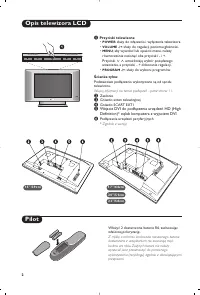
2 Opis telewizora LCD Pilot & Przyciski telewizora: • POWER : służy do włączania i wyłączenia telewizora. • VOLUME -/+ : służy do regulacji poziomu głośności. • MENU : aby wywołać lub opuścić menu, należy równocześnie nacisnąć oba przyciski: - i + . Przyciski > < umożliwiają wybór pożądane...
Page 63 - Przyciski pilota
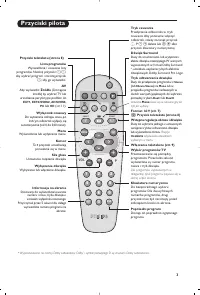
3 1 2 MENU VOL P 5 6 4 8 7 9 0 3 - - + + . [ Á - ª ` ù SMART SMART Ë ¤ ı AV Przyciski pilota Tr yb odtwarzania dźwięku Służy do przełączania programów z Stereo (lub Nicam Stereo ) na Mono lub w przypadku programów nadawanych wdwóch wersjach językowych, do wybraniapomiędzy trybem Dual I lub Dual II ....
Page 64 - Szybkie instalowanie; Aby opuścić menu lub przerwać dostrajanie, naciśnij; . Jeżeli żaden program nie został znaleziony,; Sortowanie; i potwierdzić wybór przyciskiem; Ustawienie telewizora; Przy każdym użyciu pilota lampka migoce.; Instalacja odbiornika
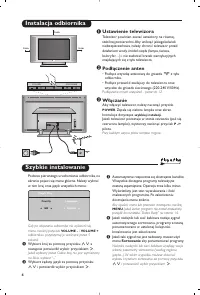
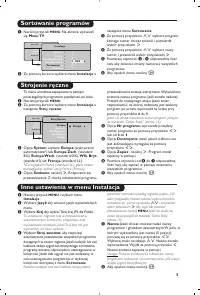
4 L R : PROGRAM VOLUME 5 cm 5 cm 5 cm Szybkie instalowanie Podczas pierwszego uruchamiania odbiornika, naekranie pojawi się menu główne. Należy wybraćw nim kraj oraz język wszystkich menu: Gdy po włączeniu odbiornika nie wyświetli sięmenu, naciśnij przyciski VOLUME - i VOLUME + odbiornika i przytrzy...
Page 66 - Opis poszczególnych ustawień; Dostep; Ustawienia poszczególnych opcji
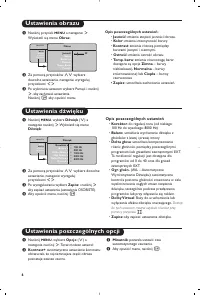
6 Ustawienia obrazu Usta wienia dźwięku & Naciśnij przycisk MENU a następnie ≥ . Wyświetli się menu Obraz : é Za pomocą przycisków <> wybierz dowolne ustawienie, następnie wyregulujprzyciskami ≤≥ . “ Po wykonaniu ustawień wybierz Pamięć i naciśnij ≥ , aby zachować ustawienia. Naciśnij Ë ab...
Page 67 - Jeżeli twój odbiornik posiada ekran 16:9.; Nacisnąć przycisku; Tele; Zoom Napisy; (dostępne wyłącznie w niektór ych wersjach odbiorników); Obraz jest wyświetlany w formacie 4:3; Po
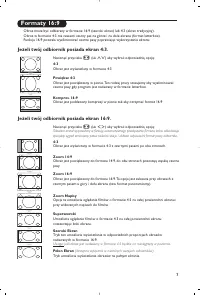
7 Formaty 16:9 Obraz może być odbierany w formacie 16:9 (szeroki ekran) lub 4:3 (ekran tradycyjny).Obraz w formacie 4:3 ma czasami czarny pas na górze i na dole ekranu (format letterbox).Funkcja 16:9 pozwala wyeliminować czarne pasy poprawiając wykorzystanie ekranu. Jeżeli twój odbiornik posiada ekr...
Page 68 - Teletekst; Podwójna strona
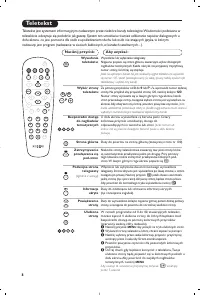
1 2 MENU VOL P 5 6 4 8 7 9 0 3 - - + + . [ Á - ª ` ù SMART SMART Ë ¤ ı AV AV P 9 0 M E N U Ë Ë ¤ ù 8 Teletekst Naciśnij przycisk: Aby uzyskać: Teletekst jest systemem informacyjnym nadawanym przez niektóre kanały telewizyjne.Wiadomości podawane wteletekście odczytuje się podobnie jak gazetę. System ...
Page 69 - Tryb monitora komputerowego; Tryb PC; Źródło; Menu trybu PC; (dostępne wyłącznie w niektór ych
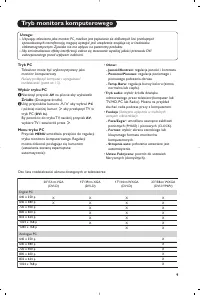
9 Tryb monitora komputerowego Tryb PC Telewizor może być wykorzystywany jakomonitor komputerowy. Należy podłączyć komputer i wyregulowaćrozdzielczość (patrz str. 13). Wybór trybu PC & Nacisnąć przycisk AV na pilocie aby wyświetlíc Źródło (Dostępne źrodła). é Użyj przycisków kursora < / > a...
Page 70 - Używając tyrybu HD (wysokiej rozdzielcz; Tryb HD; dostępne wyłącznie w niektór ych wersjach; Wybierając tryb HD; Używając menu trybu HD; Ciepła
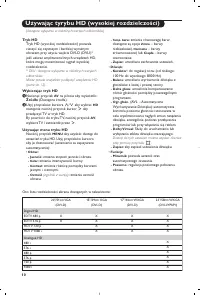
10 Używając tyrybu HD (wysokiej rozdzielcz ości) Tryb HD Tryb HD (wysokiej rozdzielczości) pozwalacieszyć się czystszym i bardziej wyraźnymobrazem przy użyciu wejścia DVI-D (DVI-I)*jeśli użiważ amplitunera/innych urządzzeń HD,które mogą transmitować sygnał wysokiejrozdzielczości. * DVI-I : dostępne ...
Page 71 - Podłączanie urządzeń peryferyjnych; Jeśli Twój magneto; na pilocie aby wyświetlíc; lub urzadzenie
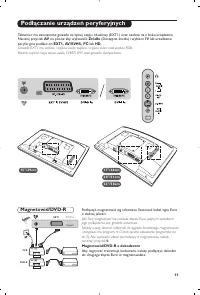
11 Podłączanie urządzeń peryferyjnych Podłączyć magnetowid wg schematu. Stosować kabel typu Euroo dobrej jakości. Jeśli Twój magneto wid nie posiada złącza Euro, jedynym sposobem jego podłączenia jest gniazdo antenowe.Należy wtedy dostroić odbiornik do sygnału kontrolnego magnetowidui przypisać mu p...
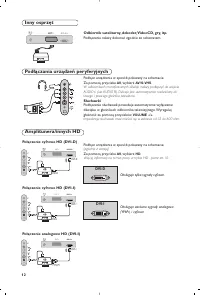
Page 72 - W odbiornikach monof; Słuchawki; Impedancja słuchawek musi mieścić się w zakresie od 32 do 600 ohm.; Więcej informacji na temat pracy w tr ybie HD - patrz str. 10.; Podłączania urządzeń peryferyjnych; Podłączenia należy dokonać zgodnie ze schematem.; Inny osprz
12 Podłącz urządzenia w sposób pokazany na schemacie.Za pomocą przycisku AV , wybierz AV/S-VHS . W odbiornikach monof onicznych dźwięk należy podłączyć do wejścia AUDIO L (lub AUDIO R). Dźwięk jest automatycznie rozdzielany dolewego i prawego głośnika telewizora. Słuchawki Podłączenie słuchawek powo...
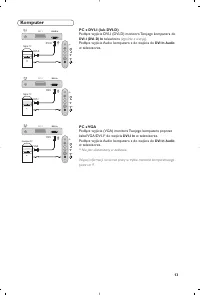
Page 73 - Komputer; telewizora; PC z VGA; Podłącz wyjście Audio komputera z do wejścia do; DVI In Audio
13 Komputer PC z DVI-I (lub DVI-D) Podłącz wyjście DVI-I (DVI-D) monitora Twojego komputera do DVI-I (DVI-D) In telewizora (zgodnie z wer sją) . Podłącz wyjście Audio komputera z do wejścia do DVI In Audio w telewizorze. PC z VGA Podłącz wyjście (VGA) monitora Twojego komputera poprzezkabel VGA/DVI-...
Page 74 - Słowniczek; grafiki dla komputerów klasy PC.; Porady
14 Słowniczek DVI (Digital Visual Interface): Cyfrowy interfejs opracowany przez Digital Display Working Group(DDWG) w celu konwersji sygnałow analogowychw do postaci cyfrowej obsługujacej zarównomonitory cyfrowe i analogowe. HDCP (“High-bandwidth Digital-Content Protection” - Cyfrowe zabezpieczenie...
Page 75 - Nastavení
1 Úvodem Obsah Děkujeme vám, že jste si koupili náš televizor.Tento návod k použití vám má pomoci televizní přijímač nainstalovat a ovládat.Doporučujeme vám, abyste si jej nejprve důkladně pročetli.Věříme, že s naším výrobkem budete bezvýhradně spokojeni. Nastavení Seznámení s televizorem LCD . . . ...
Page 76 - Ovládací prvky televizoru :; stiskněte současně 2 tlačítka
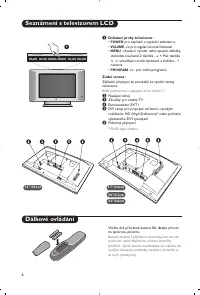
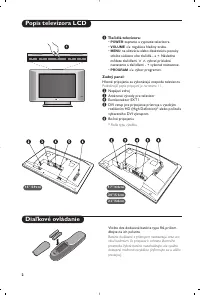
2 Seznámení s televizorem LCD Dálkové ovládání & Ovládací prvky televizoru : • POWER : pro zapínání a vypínání televizoru. • VOLUME -/+ : pro regulaci úro vně hlasitosti. • MENU : chcete-li vyvolat nebo opustit nabídky, stiskněte současně 2 tlačítka - a + . Pak tlačítka > < umožňující zvol...
Page 77 - Tlačítka dálkového ovládání
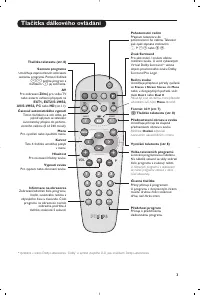
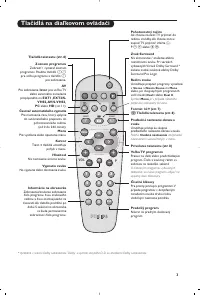
3 1 2 MENU VOL P 5 6 4 8 7 9 0 3 - - + + . [ Á - ª ` ù SMART SMART Ë ¤ ı AV Tlačítka dálkového ovládání Režim zvuku Umožňuje přepnout pořady vysílanéve Stereo a Nicam Stereo do Mono nebo, u dvojjazyčných pořadů, volitmezi Dual I nebo Dual II . Pokud b yl zvuk do režimu mono převeden uživatelem, svít...
Page 78 - Rychlé nastavení; Pokud se menu neobjeví, držte pro jeho vyvolání po; kapitolu Rady na straně 14.; potvrdit ji tlačítkem; Umístění televizoru; Zapojení televizoru
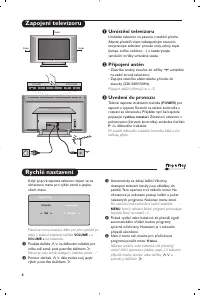
4 L R : PROGRAM VOLUME 5 cm 5 cm 5 cm Rychlé nastavení Když poprvé zapnete televizor, objeví se naobrazovce menu pr o výběr země a jazyka všech menu. Pokud se menu neobjeví, držte pro jeho vyvolání po dobu 5 sekund stisknutá tlačítka VOLUME - a VOLUME + na televizoru. & Použijte tlačítka < &g...
Page 79 - Toto men; Kromě Francie, kde je nezbytně nutné zvolit; případě musíte provést volbu tlačítky
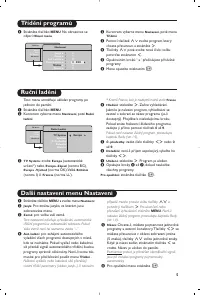
5 Ruční ladění Další nastavení menu Nastavení Třídění programů Toto men u umožňuje ukládat programy po jednom do paměti. & Stiskněte tlačítko MENU . é Kurzorem vyberte menu Nastavení , poté Ruční ladění : “ TV Systém: zvolte Evropa (automatické určení*) nebo Evropa -Západ (norma BG), Evropa - Vý...
Page 80 - K těmto nastavením máte; Nastavení zvláštních funkcí
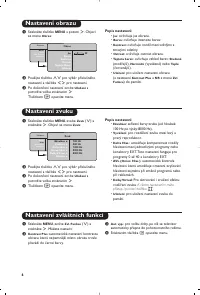
6 Nastavení obrazu Nastavení zvuku & Stiskněte tlačítko MENU a potom ≥ . Objeví se menu Obraz : é Použijte tlačítka <> pro výběr příslušného nastavení a tlačítka ≤≥ pro nastavení. “ Po dokončení nastavení zvolte Uložení a potvrďte volbu stisknutím ≥ . Tlačítkem Ë opustíte menu. Popis nasta...
Page 81 - Obraz S Titulky
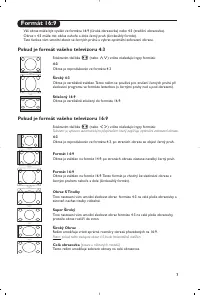
7 Formát 16:9 V áš obraz může být vysílán ve formátu 16:9 (široká obrazovka) nebo 4:3 (tradiční obrazovka). Obraz v 4:3 může mít občas nahoře a dole černý pruh (širokoúhlý formát).Tato funkce vám umožní zbavit se černých pruhů a vybrat optimální zobrazení obrazu. Pokud je formát vašeho televizoru 4:...
Page 82 - Teletext je inf
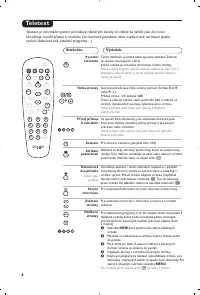
1 2 MENU VOL P 5 6 4 8 7 9 0 3 - - + + . [ Á - ª ` ù SMART SMART Ë ¤ ı AV AV P 9 0 M E N U Ë Ë ¤ ù 8 Teletext Stiskněte: Výsledek: Teletext je inf ormační systém přenášený některými kanály, do něhož se nahlíží jako do novin. Umožňuje rovněž přístup k titulkům pro sluchově postižené nebo osoby, které...
Page 83 - Použití v režimu monitor PC; Režim PC; Volba režimu PC; POZNÁMKA
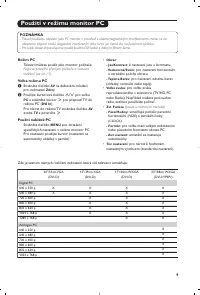
9 Použití v režimu monitor PC Režim PC Tele vizi můžete použít jako monitor počítače. Nejpr ve pro veďte připojení počítače a nastavte rozlišení (viz str. 13). Volba režimu PC & Stiskněte tlačítko AV na dálkovém ovladací pro, zobrazení Zdroj . é Použíjte kurzorová tlačítka < / > pro volbu ...
Page 84 - Režim HD; e u někter ých modelů.; Volba režimu HD
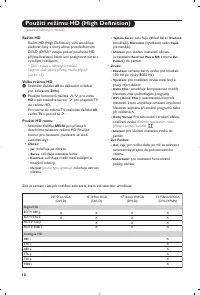
10 Použití režimu HD (High Definition) Režim HD Režim HD (High Definition) vám umožňujesledovat čistý a ostrý obraz prostřednictvímDVI-D (DVI-I)* vstupu pokud používáte HDpříjímač/zařízení, které umí poskytovat obraz svysokým rozlišením. * DVI-I : pouz e u někter ých modelů. Nejpr ve však takový při...
Page 85 - Připojení jiných přístrojů; Prov
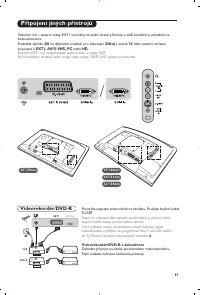
11 Připojení jiných přístrojů Prov eďte zapojení znázorněné na obrázku. Použijte kvalitní kabel SCART. Pokud na videorekordéru nemáte eurokonektor je jediné možnéspojení možné pouze pomocí kabelu antény. V tom případě musíte na televizoru naladit testovací signálvideorekordéru a přiřadit mu programo...
Page 86 - U monof; Sluchátka; Impedance sluchátek musí být mezi 32 a 600 ohmy.; Podrobnější informace o použití v režimu HD viz strana 10.; Pobočná připojení; Další přístroje
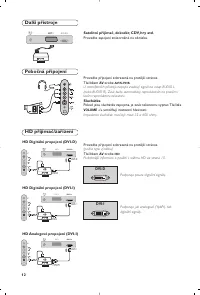
12 Prov eďte připojení zobrazená na protější stránce. Tlačítkem AV zvolte AV/S-VHS . U monof onních přístrojů napojte zvukový signál na vstup AUDIO L (nebo AUDIO R). Zvuk bude automaticky reprodukován na pravém ilevém reproduktoru televizoru. Sluchátka Pokud jsou sluchátka zapojena, je zvuk televizo...
Page 87 - Počítač; na TV; na TV. Propojte zvukový výstup; DVI Audio In; Podrobnější informace o použití v režimu PC viz strana 9.
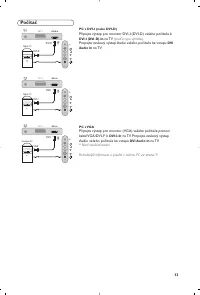
13 Počítač PC s DVI-I (nebo DVI-D) Připojte výstup pro monitor DVI-I (DVI-D) vašeho počítače k DVI-I (DVI-D)-In na TV (podl’a typu výrobku) . Propojte zvukový výstup Audio vašeho počítače ke vstupu DVI Audio In na TV. PC s VGA Připojte výstup pro monitor (VGA) vašeho počítače pomocikabel VGA/DVI-I* ...
Page 88 - Slovníček termínů; vytv; Než zavoláte technika
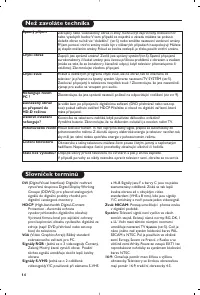
14 Slovníček termínů DVI (Digital Visual Interface): Digitální rozhraní vytv ořené skupinou Digital Display Working Groupe (DDWG) pro převod analogovýchsignálů do digitální podoby vhodné prodigitální i analogové monitory. HDCP (High-bandwidth Digital-Content Protection - Autorská ochranavysokorychlo...
Page 89 - Inštalácia
1 Úvod Obsah Ďakujeme Vám, že ste si kúpili tento televízny prijímač.Táto príručka bola zostavená s cieľom pomôcť Vám pri zapojení a ovládaní Vášhotelevízneho prijímača.Odporúčame Vám, aby ste si príručku dôkladne prečítali.Dúfame, že naša technológia do dôsledkov zabezpečí Vašu spokojnosť. Inštalác...
Page 90 - : na aktiváciu alebo deaktiváciu ponuky
2 Popis televízora LCD Diaľkové ovládanie & Tlačidlá televízora: • POWER : zapnutie a vypnutie televízora. • VOLUME -/+ : regulácia hladiny zvuku. • MENU : na aktiváciu alebo deaktiváciu ponuky stlačte súčasne obe tlačidlá - a + . Následne môžete tlačidlami > < vybrať príslušné nastavenie ...
Page 91 - Tlačidlá na diaľkovom ovládači
3 1 2 MENU VOL P 5 6 4 8 7 9 0 3 - - + + . [ Á - ª ` ù SMART SMART Ë ¤ ı AV Tlačidlá na diaľkovom ovládači Režim zvuku Umožňuje prepn úť programy vysielané v Stereo a Nicam Stereo na Mono alebo, pri dvojjazyčných programoch,voliť medzi Dual I alebo Dual II . Symbol Mono je v prípade núteného prepnut...
Page 92 - Rýchla inštalácia kanálov; eď prvýkrát zapnete televízor, objaví sa na; Umiestnenie televízora; Inštalácia tele
4 L R : PROGRAM VOLUME 5 cm 5 cm 5 cm Rýchla inštalácia kanálov K eď prvýkrát zapnete televízor, objaví sa na obrazovke ponuka.Táto ponuka Vás vyzýva kv oľbe krajiny a jazyka z ponuky: Ak sa ponuka neobjavuje, podržte tlačidlá televízora VOLUME - a VOLUME + stlačené 5 sekúnd, aby sa objavila. & ...
Page 93 - Táto pon; ma LĽ) musíte vždy zvoliť; potom potvrdiť
5 Manuálne uloženie Iné nastavenia z ponuky Inštalácia Triedenie programov Táto pon uka umožň uje ukladať programy po jednom. & Stlačte MENU . é Vyberte ponuku Inštalácia a potom Manuálne uloženie . “ Systém: zvoľte Európa (automatická detekcia*) alebo Západná Európa (norma BG), Východná Európa ...
Page 94 - Tieto nastavenia sú; Nastavenie volieb
6 Nastavenie obrazu Nastavenie zvuku & Stlačte tlačidlo MENU , potom tlačidlo ≥ . Objaví sa ponuka Obraz : é Použite tlačidlá <> na voľbu nastavenia a nastavte je tlačidlami ≤≥ . “ Akonáhle sú nastavenia vykonané, vybertevoľbu Uložiť a stlačte ≥ , aby ste ich uložili. Ponuku opustite stlač...
Page 95 - Obrazy, ktoré prijímate môžu b; Ak má váš televízn; Stlačte tlačidlom; Titulkový Zoom; (k dispozícii len pri niektor ých verziách)
7 Formát 16:9 Obrazy, ktoré prijímate môžu b yť prenášané vo formáte 16:9 (široká obrazovka), alebo 4:3 (tradičná obrazovka). Obrazy 4:3 majú niekedy čierny pruh hore i dolu (širokouhlý formát).Táto funkcia vámumožní odstrániť čierne pruhy a optimalizovať zobrazenie na obrazovke. Ak má váš televízn ...
Page 96 - Dvojstrana
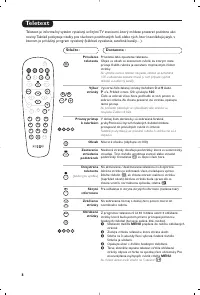
8 Teletext Stlačte : Dostanete : Teletext je inf ormačný systém vysielaný určitými TV stanicami, ktorý môžete prezerať podobne ako noviny.Taktiež poskytuje titulky pre sluchovo postihnutých ľudí, alebo tých, ktorí neovládajú jazyk, vktorom je príslušný program vysielaný (káblové vysielanie, satelitn...
Page 97 - Váš tele; Výber režimu PC; Používanie ponuky PC
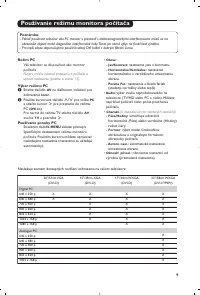
9 Používanie režim u monitora počítača Režim PC Váš tele vízor sa dá používať ako monitor počítača. Najpr v musíte vykonať pripojenia k počítaču a upraviť nastavenia (pozrite si stranu 13). Výber režimu PC & Stlačte tlačidlo AV na diaľkovom ovládaní pre zobrazenie Izvor . é Použite kurzorové tla...
Page 99 - Pripojenie periférnych zariadení; Ak v
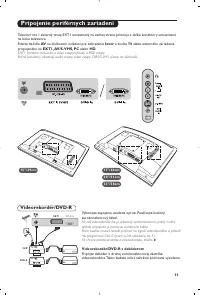
11 Pripojenie periférnych zariadení Vykonajte zapojenia uvedené oproti. Používajte kvalitnýeurokonektorový kábel. Ak v áš videorekordér nie je vybavený eurokonektorom, jediný možný spôsob pripojenia je pomocou anténneho kábla.Preto budete musieť naladiť prijímač na signál videorekordéra a priradiťmu...
Page 100 - mocou tlačidla; Slúchadlá; umožnia nastaviť hlasitosť zvuku.; Ďalšie informácie o použití režimu HD nájdete na strane 10.; Bočné pripojenia; Vykonajte zapojenia uvedené oproti.; Ostatné zariadenia
12 Vykonajte zapojenia uvedené oproti.Po mocou tlačidla AV , zvoľte AV/S-VHS. Pri monofónnom prístroji zapojte signál na vstup AUDIO L (lebo AUDIO R). Zvuk bude automaticky reprodukovaný ľavým ipravým reproduktorom televízora. Slúchadlá Akonáhle sú slúchadlá pripojené, preruší sa zvuk televízora.Tla...
Page 101 - očítač; PC s VGA; Pripojte zvukový výstup Audio vašeho počítače k vstupu; Ďalšie informácie o použití režimu PC nájdete na strane 9.
13 P očítač PC s DVI-I (alebo DVI-D) Pripojte výstup pre monitor DVI-I (D VI-D) vašeho počítača k DVI-I (DVI-D) In na TV (podle typu výrobku) . Pripojte zvukový výstup Audio vašeho počítače k vstupu DVI Audio in na TV. PC s VGA Pripojte výstup pre monitor (VGA) vašeho počítača pomocoukábel VGA/DVI-I...
Page 102 - Nefunguje diaľkový
14 Zhrnutie DVI (Digital Visual Interface): Digitálne rozhranie vytvorené skupinou Digital Display WorkingGroup (DDWG) pre prevod analógovýchsignálov do digitálnej podoby vhodnej predigitálne i analógové monitory. HDCP (High-bandwidth Digital-Content Protection - Autorská ochrana vysokorýchlostnéhod...
Page 103 - Kurulum
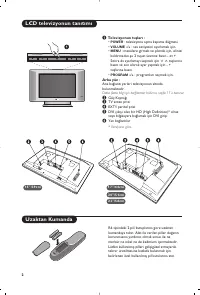
1 Girifl ‹çindekiler Bu televizyon cihaz›n› seçti¤iniz için teflekkür ederiz. Bu elkitab› televizyoncihaz›n›z› kurarken ve çal›flt›r›rken size yard›mc› olmak üzere düzenlenmifltir.Bafl›ndan sonuna kadar okuman›z› önemle tavsiye ederiz.Teknolojik seviyemizden memnun kalaca¤›n›z› ummaktay›z. Kurulum LCD te...
Page 104 - Televizyonun tufllar› :; Daha fazla bilgi için ba¤lant›lar bölümü, sayfa 11’e bak›n›z.
2 LCD televizyonun tan›t›m› Uzaktan Kumanda & Televizyonun tufllar› : • POWER : televizyonu açma kapama dü¤mesi. • VOLUME -/+ : ses seviyesini ayarlamak için. • MENU : menülere girmek ve ç›kmak için, elinizi kald›rmadan flu 2 tuflun üzerine bas›n - et + . Sonra da ayarlamay› seçmek için > < t...
Page 105 - Uzaktan Kumanda Tufllar›
3 1 2 MENU VOL P 5 6 4 8 7 9 0 3 - - + + . [ Á - ª ` ù SMART SMART Ë ¤ ı AV Uzaktan Kumanda Tufllar› Ses konumu Yay›nlar› STEREO ve NICAMSTEREO ya da Mono flekline sokarveya iki dilden yay›nlananprogramlarda ÇIFT I ya da ÇIFT II . MONO modu seçildi¤inde göstergek›rm›z› renktir. 16:9 Format› (s.7) Ó Te...
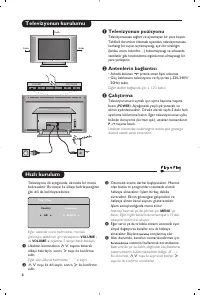
Page 106 - H›zl› kurulum; Televizyonun pozisyonu; Televizyonun kurulumu
4 L R : PROGRAM VOLUME 5 cm 5 cm 5 cm H›zl› kurulum Televizyonu ilk açt›¤›n›zda, ekranda bir menübelirecektir. Bu menü ile ülkeyi belirleyece¤inizgibi dili de belirleyeceksiniz: E¤er, ekranda menü belirmezse, menüyügörüntüye alabilmek için televizyonun VOLUME - ve VOLUME + tufllar›na 5 saniye bas›l› ...
Page 107 - seçmek durumundas›n›z.; tuflu ile seçiminizi belirlemeniz ve; ’ya bas›n. E¤er hiç görüntü
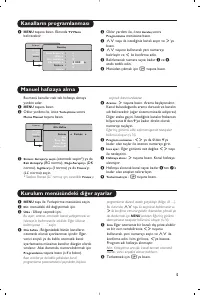
5 Manuel haf›zaya alma Kurulum menüsündeki di¤er ayarlar Kanallar›n programlanmas› Bu menü kanallar› tek tek haf›zaya almayayard›m eder. & MENU tufluna bas›n. é Oklar yard›m› ile, önce Yerlefltirme sonra Memo Manuel tufluna bas›n. “ Sistem: Avrupa’y› seçin (otomatik seçim*) ya da Bat› Avrupa’y› (BG...
Page 108 - Ayar tan›mlar›; Bu ayarlara; Opsiyonlar›n ayar›
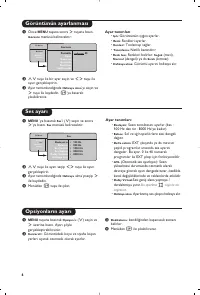
6 Görüntünün ayarlanmas› Ses ayar› & Önce MENU tufluna sonra ≥ tufluna bas›n. Görüntü menüsü belirecektir: é <> tuflu ile bir ayar seçin ve ≤≥ tuflu ile ayar› gerçeklefltirin. “ Ayar tamamland›¤›nda Haf›zaya alma ’y› seçin ve ≥ tuflu ile kaydedin. Ë ’ya basarak ç›kabilirsiniz. Ayar tan›mlar› • I...
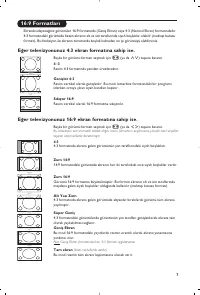
Page 109 - Baflka bir görüntü format› seçmek için; Alt Yas› Zum; Bu mod resmin tüm ekran› kaplamas›na olanak verir.
7 16:9 Formatlar› Ekranda izleyece¤iniz görüntüler 16:9 format›nda (Genifl Ekran) veya 4:3 (Normal Ekran) format›ndad›r.4:3 format›ndaki görüntüde bazen ekran›n alt ve üst taraflar›nda siyah boflluklar olabilir (mektup kutusuformat›). Bu fonksiyon ile ekran›n tamam›nda boflluk kalmadan en iyi görüntüyü...
Page 110 - Teletexte
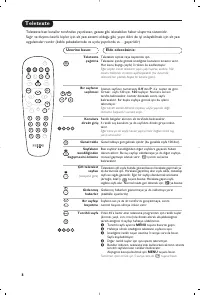
1 2 MENU VOL P 5 6 4 8 7 9 0 3 - - + + . [ Á - ª ` ù SMART SMART Ë ¤ ı AV AV P 9 0 M E N U Ë Ë ¤ ù 8 Teletexte Üzerine bas›n: Elde edeceksiniz: Teletexte baz› kanallar taraf›ndan yay›nlanan, gazete gibi izlenebilen haber ulaflt›rma sistemidir. Sa¤›r ve duyma özürlü kifliler için alt yaz› sistemi oldu¤...
Page 111 - Bilgisayar ekran› modunda kullan›m
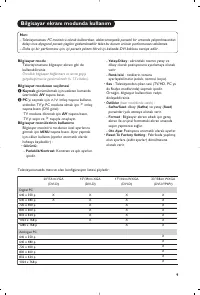
9 Bilgisayar ekran› modunda kullan›m Bilgisayar modu Televizyonunuzu bilgisayar ekran› gibi dekullanabilirsiniz. Öncelikle bilgisayar ba¤lant›s›n› ve sonra geçifligerçeklefltirmeniz gerekmektedir (s. 13’e bak›n). Bilgisayar modunun seçilmesi & Kaynak görüntülemek için uzaktan kumanda üzerindeki AV...
Page 112 - Özllikler
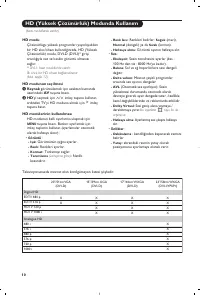
10 HD (Yüksek Çözünürlük) Modunda Kullan›m HD modu Çözünürlügu yüksek programlar› yay›nlayabilenbir HD al›c›/cihaz› kulland›¤›n›zda, HD (YüksekÇözünürlük) modu, DVI-D (DVI-I)* girifliarac›l›¤›yla net ve keskin görüntü alman›z›sa¤lar. * DVI-I : baz› modellerde vard›r.‹lk önce bir HD cihaz› ba¤lamal›s›...
Page 113 - Harici Cihazlar›n ba¤lanmas›; Kaynak; görüntülemek ve; girifline ba¤l› TV’yi veya harici cihaz› seçmek
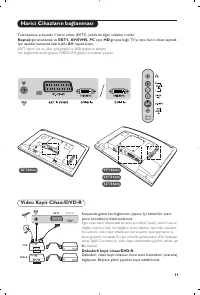
11 Harici Cihazlar›n ba¤lanmas› Karfl›s›nda gösterilen ba¤lant›lar› yap›n›z. ‹yi kaliteli bir scart(euro konnektör) kablo kullan›n›z. E¤er video kay›t cihaz›n›zda bir euro konnektör (scart) soketi mevcutde¤ilse mümkün olan tek ba¤lant› anten kablosu üzerinden olacakt›r.Bu nedenle, video kay›t cihaz›n...
Page 114 - Kulakl›k; Kulakl›k 32 ile 600 ohm aras›nda bir güçte olmal›d›r.; Sadece Dijital sinyalleri destekler; Yan ba¤lant›lar; Di¤er cihazlar
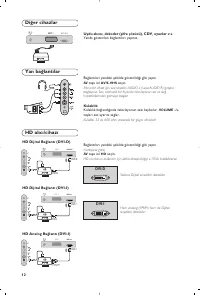
12 Ba¤lant›lar› yandaki flekilde gösterildi¤i gibi yap›n. AV tuflu iel AV/S-VHS seçin. Mono bir cihaz için, ses sinyalini AUDIO L (veya AUDIO R) giriflineba¤lay›n›z. Ses, otomatik bir biçimde televizyonun sol ve sa¤hoparlörlerinden gelmeye bafllar. Kulakl›k Kulakl›k ba¤land›¤›nda televizyonun sesi kaybo...
Page 115 - Bilgisayar; VGA giriflli bilgisayar; PC modunun kullan›m› için daha detayl› bilgiyi s.9’de bulabilirsiniz
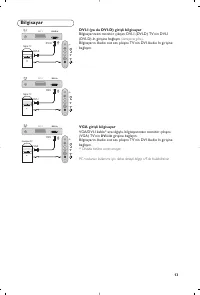
13 Bilgisayar DVI-I (ya da DVI-D) giriflli bilgisayar Bilgisayar›n›z›n monitör ç›k›fl›n› DVI-I (DVI-D) TV’nin DVI-I(DVI-D)-In girifline ba¤lay›n (versiyona göre) . Bilgisayar›n Audio out ses ç›k›fl›n› TV’nin DVI Audio In giriflineba¤lay›n. VGA giriflli bilgisayar VGA/DVI-I kablo* arac›l›¤›yla, bilgisayar›...
Page 116 - Sözlük; Ipuçlar›; Zay›f Al›fl; rançais
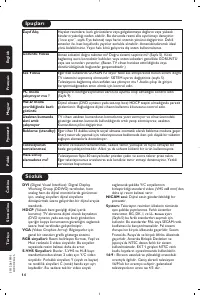
14 Sözlük DVI (Digital Visual Interface): Digital Display Working Group (DDWG) taraf›ndan, hemanalog hem de dijital monitörlerde görünmesiiçin, analog sinyalleri dijital sinyalleredönüfltürmek üzere gelifltirilen bir dijital arayüzstandard›. HDCP (Yüksek bant geniflli¤i dijital içerik koruma): TV ekran...
Page 117 - Information for users in the UK
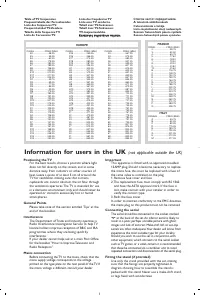
CANAL ................FREQ (MHz) E2 ........................48.25E3 ........................55.25E4 ........................62.25E5 ......................175.25E6 ......................182.25E7 ......................189.25E8 ......................196.25E9 ......................203.25E10 ...............