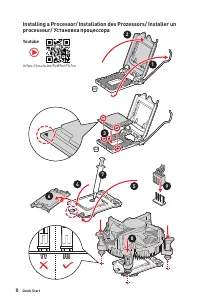
Page 2 - II; Youtube; processeur/ Установка процессора
II Quick Start 1 2 3 6 4 5 7 8 9 Youtube https://youtu.be/Xv89nhFk1vc ⚽ Installing a Processor/ Installation des Prozessors/ Installer un processeur/ Установка процессора
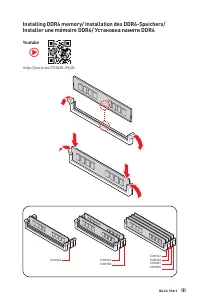
Page 3 - III; Installer une mémoire DDR4/ Установка памяти DDR4
III Quick Start DIMMA2 DIMMA2 DIMMB2 DIMMA1 DIMMA2 DIMMB1 DIMMB2 http://youtu.be/T03aDrJPyQs Youtube ⚽ Installing DDR4 memory/ Installation des DDR4-Speichers/ Installer une mémoire DDR4/ Установка памяти DDR4
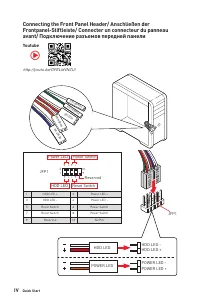
Page 4 - IV; HDD LED; Connecting the Front Panel Header/ Anschließen der
IV Quick Start HDD LED RESET SW JFP1 HDD LED HDD LED -HDD LED + POWER LED -POWER LED + POWER LED 1 2 10 9 + + + - - - - + Power LED HDD LED Reset Switch Reserved Power Switch JFP1 1 HDD LED + 2 Power LED + 3 HDD LED - 4 Power LED - 5 Reset Switch 6 Power Switch 7 Reset Switch 8 Power Switch 9 Reserv...
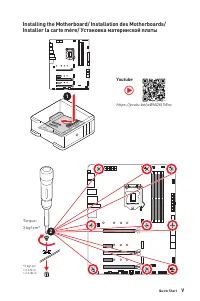
Page 5 - Installing the Motherboard/ Installation des Motherboards/
V Quick Start 1 Torque:3 kgf·cm* *3 kgf·cm = 0.3 N·m = 2.6 lbf·in 2 https://youtu.be/wWI6Qt51Wnc ⚽ Youtube Installing the Motherboard/ Installation des Motherboards/ Installer la carte mère/ Установка материнской платы
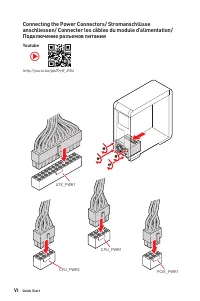
Page 6 - Connecting the Power Connectors/ Stromanschlüsse
VI Quick Start PCIE_PWR1 ATX_PWR1 CPU_PWR2 CPU_PWR1 http://youtu.be/gkDYyR_83I4 Youtube ⚽ Connecting the Power Connectors/ Stromanschlüsse anschliessen/ Connecter les câbles du module d’alimentation/ Подключение разъемов питания
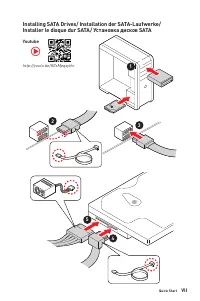
Page 7 - VII; Installer le disque dur SATA/ Установка дисков SATA
VII Quick Start http://youtu.be/RZsMpqxythc Youtube 1 2 3 4 5 ⚽ Installing SATA Drives/ Installation der SATA-Laufwerke/ Installer le disque dur SATA/ Установка дисков SATA
Page 8 - VIII; Installing a Graphics Card/ Einbau der Grafikkarte/ Installer
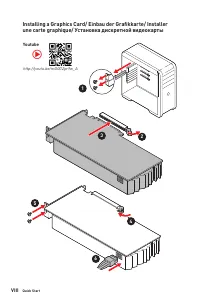
VIII Quick Start http://youtu.be/mG0GZpr9w_A Youtube 1 2 3 4 5 6 ⚽ Installing a Graphics Card/ Einbau der Grafikkarte/ Installer une carte graphique/ Установка дискретной видеокарты
Page 9 - IX; Connecting Peripheral Devices/ Peripheriegeräte/ Connecter
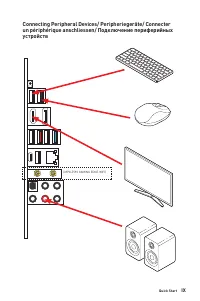
IX Quick Start (MPG Z590 GAMING EDGE WIFI) Connecting Peripheral Devices/ Peripheriegeräte/ Connecter un périphérique anschliessen/ Подключение периферийных устройств
Page 10 - питания
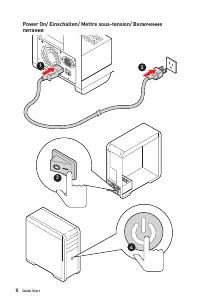
X Quick Start 4 3 1 2 Power On/ Einschalten/ Mettre sous-tension/ Включение питания
Page 11 - Contents
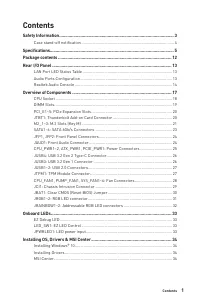
1 Contents Contents Safety Information ................................................................................................. 3 Case stand-off notification ..................................................................................... 4 Specifications .................................
Page 13 - Safety Information
3 Safety Information Safety Information ∙ The components included in this package are prone to damage from electrostatic discharge (ESD). Please adhere to the following instructions to ensure successful computer assembly. ∙ Ensure that all components are securely connected. Loose connections may cau...
Page 14 - Case stand-off notification
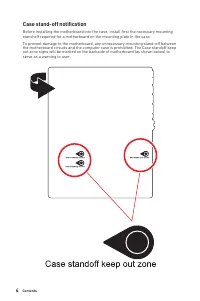
4 Contents Case stand-off notification Before installing the motherboard into the case, install first the necessary mounting stand-off required for a motherboard on the mounting plate in the case. To prevent damage to the motherboard, any unnecessary mounting stand-off between the motherboard circui...
Page 15 - Specifications; CPU; Chipset
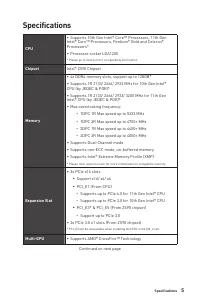
5 Specifications Specifications CPU ∙ Supports 10th Gen Intel® Core™ Processors, 11th Gen Intel® Core™ Processors, Pentium® Gold and Celeron® Processors* ∙ Processor socket LGA1200 * Please go to intel.com for compatibility information Chipset Intel® Z590 Chipset Memory ∙ 4x DDR4 memory slots, suppo...
Page 16 - Onboard Graphics
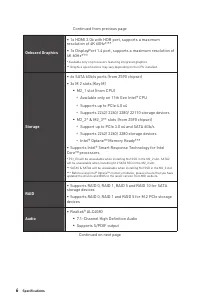
6 Specifications Continued from previous page Onboard Graphics ∙ 1x HDMI 2.0b with HDR port, supports a maximum resolution of 4K 60Hz* / ** ∙ 1x DisplayPort 1.4 port, supports a maximum resolution of 4K 60Hz* / ** * Available only on processors featuring integrated graphics.** Graphics specification...
Page 17 - USB
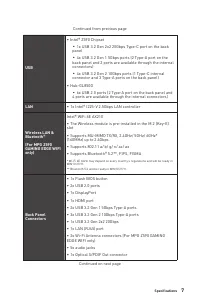
7 Specifications Continued from previous page USB ∙ Intel® Z590 Chipset ▪ 1x USB 3.2 Gen 2x2 20Gbps Type-C port on the back panel ▪ 4x USB 3.2 Gen 1 5Gbps ports (2 Type-A port on the back panel and 2 ports are available through the internal connectors) ▪ 4x USB 3.2 Gen 2 10Gbps ports (1 Type-C inter...
Page 18 - Internal Connectors
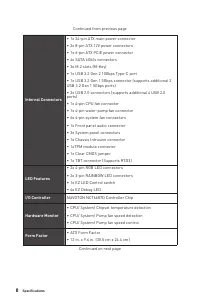
8 Specifications Continued from previous page Internal Connectors ∙ 1x 24-pin ATX main power connector ∙ 2x 8-pin ATX 12V power connectors ∙ 1x 6-pin ATX PCIE power connector ∙ 6x SATA 6Gb/s connectors ∙ 3x M.2 slots (M-Key) ∙ 1x USB 3.2 Gen 2 10Gbps Type-C port ∙ 1x USB 3.2 Gen 1 5Gbps connector (s...
Page 19 - BIOS Features
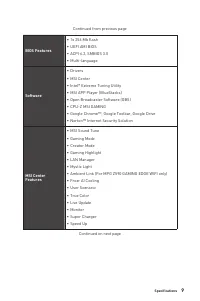
9 Specifications Continued from previous page BIOS Features ∙ 1x 256 Mb flash ∙ UEFI AMI BIOS ∙ ACPI 6.2, SMBIOS 3.0 ∙ Multi-language Software ∙ Drivers ∙ MSI Center ∙ Intel® Extreme Tuning Utility ∙ MSI APP Player (BlueStacks) ∙ Open Broadcaster Software (OBS) ∙ CPU-Z MSI GAMING ∙ Google Chrome™, G...
Page 20 - Special Features
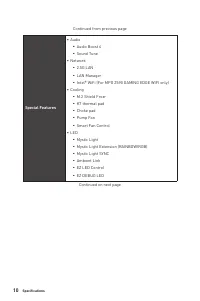
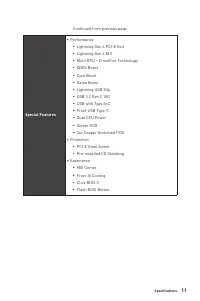
10 Specifications Continued from previous page Special Features ∙ Audio ▪ Audio Boost 4 ▪ Sound Tune ∙ Network ▪ 2.5G LAN ▪ LAN Manager ▪ Intel® WiFi (For MPG Z590 GAMING EDGE WIFI only) ∙ Cooling ▪ M.2 Shield Frozr ▪ K7 thermal pad ▪ Choke pad ▪ Pump Fan ▪ Smart Fan Control ∙ LED ▪ Mystic Light ▪ M...
Page 22 - Package contents; Important
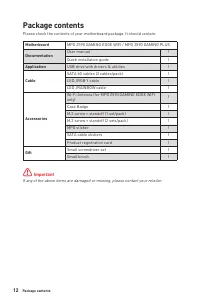
12 Package contents Package contents Please check the contents of your motherboard package. It should contain: Motherboard MPG Z590 GAMING EDGE WIFI / MPG Z590 GAMING PLUS Documentation User manual 1 Quick installation guide 1 Application USB drive with drivers & utilities 1 Cable SATA 6G cables...
Page 23 - Audio Ports Configuration; Audio Ports; LAN Port LED Status Table; Description
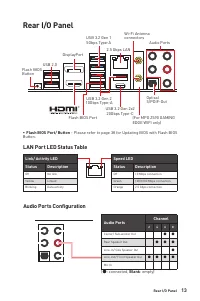
13 Rear I/O Panel Rear I/O Panel Audio Ports Configuration Audio Ports Channel 2 4 6 8 Center/ Sub-woofer Out ● ● Rear Speaker Out ● ● ● Line-In/ Side Speaker Out ● Line-Out/ Front Speaker Out ● ● ● ● Mic In (●: connected, Blank : empty) LAN Port LED Status Table Link/ Activity LEDStatus Description...
Page 24 - Realtek Audio Console; Auto popup dialog
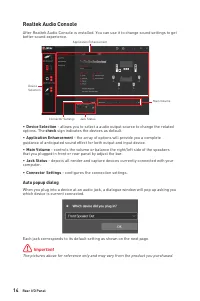
14 Rear I/O Panel Realtek Audio Console After Realtek Audio Console is installed. You can use it to change sound settings to get better sound experience. ∙ Device Selection - allows you to select a audio output source to change the related options. The check sign indicates the devices as default. ∙ ...
Page 26 - Installing antennas
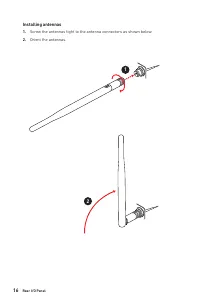
16 Rear I/O Panel Installing antennas 1. Screw the antennas tight to the antenna connectors as shown below. 2. Orient the antennas. 1 2
Page 27 - Overview of Components
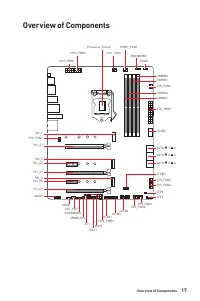
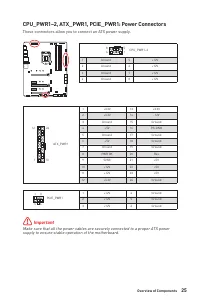
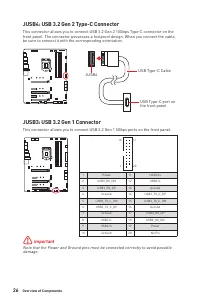
17 Overview of Components Overview of Components JUSB3 JUSB2 SYS_FAN5SYS_FAN4 SYS_FAN3 SYS_FAN2 JBAT1 JTBT1 JTPM1 JRGB1 SATA ▼ 1 ▲ 2 SATA ▼ 3 ▲ 4 SATA ▼ 5 ▲ 6 M2_3 M2_2 M2_1 SYS_FAN1 JUSB4 JUSB1 PCIE_PWR1 JCI1 CPU_FAN1 SYS_FAN6 PUMP_FAN1 PCI_E1 PCI_E2 PCI_E3 PCI_E5 PCI_E4 Processor Socket CPU_PWR1 J...
Page 28 - CPU Socket; Introduction to the LGA 1200 CPU; notches
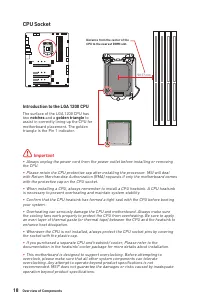
18 Overview of Components ⚠ Important ∙ Always unplug the power cord from the power outlet before installing or removing the CPU. ∙ Please retain the CPU protective cap after installing the processor. MSI will deal with Return Merchandise Authorization (RMA) requests if only the motherboard comes wi...
Page 29 - DIMM Slots; Memory module installation recommendation; DRAM Frequency
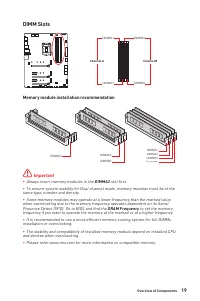
19 Overview of Components DIMM Slots DIMMA1 DIMMB1 Channel A Channel B DIMMA2 DIMMB2 Memory module installation recommendation ⚠ Important ∙ Always insert memory modules in the DIMMA2 slot first. ∙ To ensure system stability for Dual channel mode, memory modules must be of the same type, number and ...
Page 30 - MSI
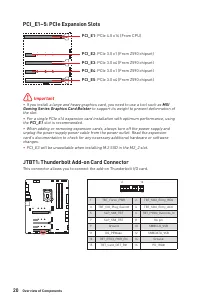
20 Overview of Components PCI_E1~5: PCIe Expansion Slots PCI_E1 : PCIe 4.0 x16 (From CPU) PCI_E2 : PCIe 3.0 x1 (From Z590 chipset) PCI_E4 : PCIe 3.0 x1 (From Z590 chipset) PCI_E3 : PCIe 3.0 x4 (From Z590 chipset) PCI_E5 : PCIe 3.0 x4 (From Z590 chipset) ⚠ Important ∙ If you install a large and heavy...
Page 31 - Installing M.2 module; Video Demonstration
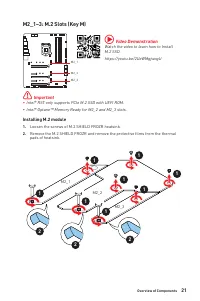
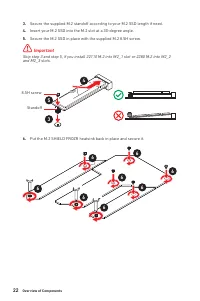
21 Overview of Components M2_1~3: M.2 Slots (Key M) Installing M.2 module 1. Loosen the screws of M.2 SHIELD FROZR heatsink. 2. Remove the M.2 SHIELD FROZR and remove the protective films from the thermal pads of heatsink. 2 2 2 1 1 1 1 1 1 1 1 M2_1 M2_2 M2_3 ⚠ Important ∙ Intel® RST only supports P...
Page 33 - Slot
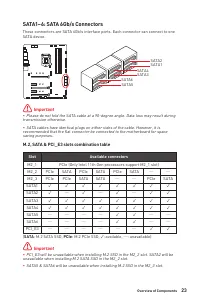
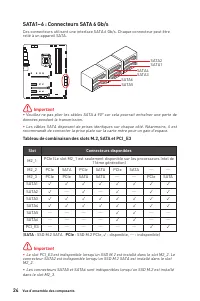
23 Overview of Components SATA1~6: SATA 6Gb/s Connectors These connectors are SATA 6Gb/s interface ports. Each connector can connect to one SATA device. SATA1 SATA3 SATA5 SATA2 SATA4 SATA6 ⚠ Important ∙ Please do not fold the SATA cable at a 90-degree angle. Data loss may result during transmission ...
Page 34 - JAUD1: Front Audio Connector
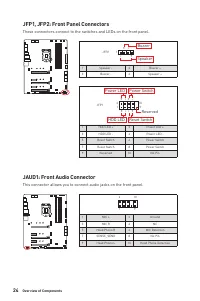
24 Overview of Components JFP1, JFP2: Front Panel Connectors These connectors connect to the switches and LEDs on the front panel. 1 2 10 9 + + + - - - - + Power LED HDD LED Reset Switch Reserved Power Switch JFP1 1 HDD LED + 2 Power LED + 3 HDD LED - 4 Power LED - 5 Reset Switch 6 Power Switch 7 Re...
Page 37 - JTPM1: TPM Module Connector
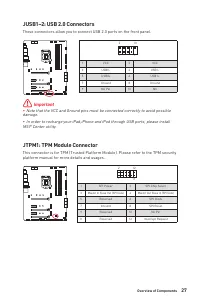
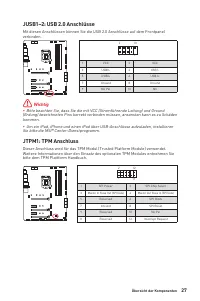
27 Overview of Components JUSB1~2: USB 2.0 Connectors These connectors allow you to connect USB 2.0 ports on the front panel. 1 2 10 9 1 VCC 2 VCC 3 USB0- 4 USB1- 5 USB0+ 6 USB1+ 7 Ground 8 Ground 9 No Pin 10 NC ⚠ Important ∙ Note that the VCC and Ground pins must be connected correctly to avoid pos...
Page 38 - Switching fan mode and adjusting fan speed; HARDWARE MONITOR; Connector
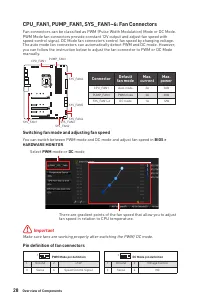
28 Overview of Components CPU_FAN1, PUMP_FAN1, SYS_FAN1~6: Fan Connectors Fan connectors can be classified as PWM (Pulse Width Modulation) Mode or DC Mode. PWM Mode fan connectors provide constant 12V output and adjust fan speed with speed control signal. DC Mode fan connectors control fan speed by ...
Page 39 - JCI1: Chassis Intrusion Connector; Using chassis intrusion detector
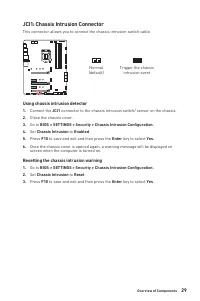
29 Overview of Components JCI1: Chassis Intrusion Connector This connector allows you to connect the chassis intrusion switch cable. Normal (default) Trigger the chassis intrusion event Using chassis intrusion detector 1. Connect the JCI1 connector to the chassis intrusion switch/ sensor on the chas...
Page 40 - Resetting BIOS to default values
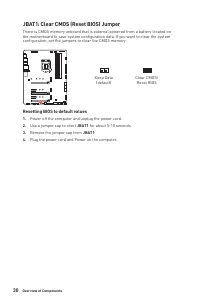
30 Overview of Components JBAT1: Clear CMOS (Reset BIOS) Jumper There is CMOS memory onboard that is external powered from a battery located on the motherboard to save system configuration data. If you want to clear the system configuration, set the jumpers to clear the CMOS memory. Keep Data (defau...
Page 41 - RGB LED Strip Connection
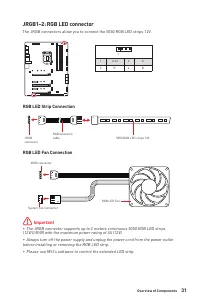
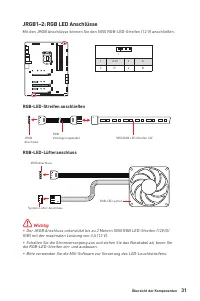
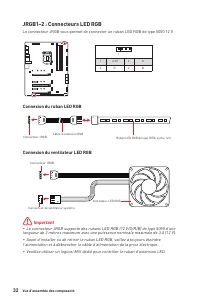
31 Overview of Components ⚠ Important ∙ The JRGB connector supports up to 2 meters continuous 5050 RGB LED strips (12V/G/R/B) with the maximum power rating of 3A (12V). ∙ Always turn off the power supply and unplug the power cord from the power outlet before installing or removing the RGB LED strip....
Page 42 - CAUTION; JRAINBOW1~2: Addressable RGB LED connectors; Addressable RGB LED Strip Connection
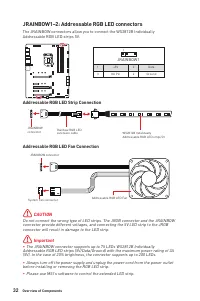
32 Overview of Components 1 1 1 D +5V ⚠ CAUTION Do not connect the wrong type of LED strips. The JRGB connector and the JRAINBOW connector provide different voltages, and connecting the 5V LED strip to the JRGB connector will result in damage to the LED strip. ⚠ Important ∙ The JRAINBOW connector su...
Page 43 - EZ Debug LED; Onboard LEDs; JPWRLED1: LED power input
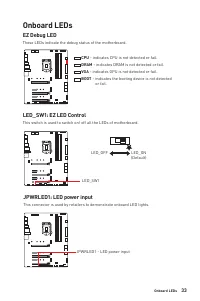
33 Onboard LEDs EZ Debug LED These LEDs indicate the debug status of the motherboard. CPU - indicates CPU is not detected or fail. DRAM - indicates DRAM is not detected or fail. VGA - indicates GPU is not detected or fail. BOOT - indicates the booting device is not detected or fail. Onboard LEDs LED...
Page 44 - Installing Windows® 10; Restart; Installing Drivers; Select to choose what happens with this disc; MSI Center; MSI Center User Guide
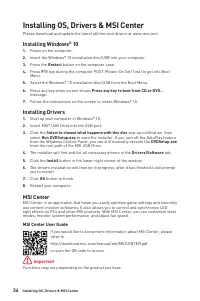
34 Installing OS, Drivers & MSI Center Installing OS, Drivers & MSI Center Please download and update the latest utilities and drivers at www.msi.com Installing Windows® 10 1. Power on the computer. 2. Insert the Windows® 10 installation disc/USB into your computer. 3. Press the Restart butt...
Page 45 - UEFI BIOS
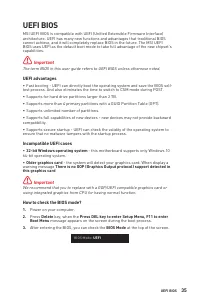
35 UEFI BIOS UEFI BIOS MSI UEFI BIOS is compatible with UEFI (Unified Extensible Firmware Interface) architecture. UEFI has many new functions and advantages that traditional BIOS cannot achieve, and it will completely replace BIOS in the future. The MSI UEFI BIOS uses UEFI as the default boot mode ...
Page 46 - BIOS Setup; always keep the default settings; HELP; Entering BIOS Setup; Delete; Function key; BIOS User Guide
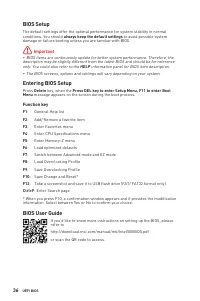
36 UEFI BIOS BIOS Setup The default settings offer the optimal performance for system stability in normal conditions. You should always keep the default settings to avoid possible system damage or failure booting unless you are familiar with BIOS. ⚠ Important ∙ BIOS items are continuously update for...
Page 47 - Resetting BIOS; Updating BIOS; Updating BIOS with M-FLASH
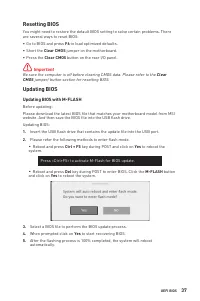
37 UEFI BIOS Resetting BIOS You might need to restore the default BIOS setting to solve certain problems. There are several ways to reset BIOS: ∙ Go to BIOS and press F6 to load optimized defaults. ∙ Short the Clear CMOS jumper on the motherboard. ∙ Press the Clear CMOS button on the rear I/O panel....
Page 48 - Updating the BIOS with MSI Center
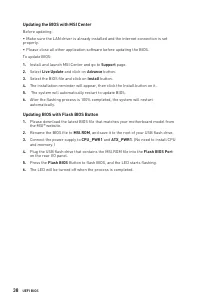
38 UEFI BIOS Updating the BIOS with MSI Center Before updating: ∙ Make sure the LAN driver is already installed and the internet connection is set properly. ∙ Please close all other application software before updating the BIOS. To update BIOS: 1. Install and launch MSI Center and go to Support page...
Page 49 - Inhalt
1 Inhalt Inhalt Sicherheitshinweis ................................................................................................. 3Hinweise zum Gehäuseabstandshalter ................................................................. 4 Spezifikationen ..................................................
Page 51 - Sicherheitshinweis
3 Inhalt Sicherheitshinweis ∙ Die im Paket enthaltene Komponenten sind der Beschädigung durch elektrostatischen Entladung (ESD). Beachten Sie bitte die folgenden Hinweise, um die erfolgreichen Computermontage sicherzustellen. ∙ Stellen Sie sicher, dass alle Komponenten fest angeschlossen sind. Locke...
Page 52 - Hinweise zum Gehäuseabstandshalter
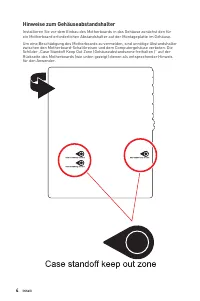
4 Inhalt Hinweise zum Gehäuseabstandshalter Installieren Sie vor dem Einbau des Motherboards in das Gehäuse zunächst den für ein Motherboard erforderlichen Abstandshalter auf der Montageplatte im Gehäuse. Um eine Beschädigung des Motherboards zu vermeiden, sind unnötige Abstandshalter zwischen den M...
Page 53 - Spezifikationen; anschlüsse
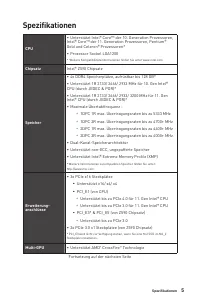
5 Spezifikationen Spezifikationen CPU ∙ Unterstützt Intel® Core™ der 10. Generation Prozessoren, Intel® Core™ der 11. Generation Prozessoren, Pentium® Gold und Celeron® Prozessoren* ∙ Prozessor Sockel LGA1200 * Weitere Kompatibilitätsinformationen finden Sie unter www.intel.com Chipsatz Intel® Z590 ...
Page 54 - Aufbewahrung
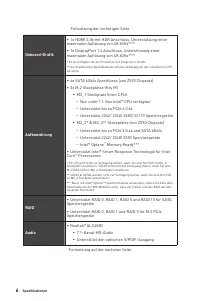
6 Spezifikationen Fortsetzung der vorherigen Seite Onboard-Grafik ∙ 1x HDMI 2.0b mit HDR Anschluss, Unterstützung einer maximalen Auflösung von 4K 60Hz* / ** ∙ 1x DisplayPort 1.4 Anschluss, Unterstützung einer maximalen Auflösung von 4K 60Hz* / ** * Es ist verfügbar für den Prozessor mit integrierte...
Page 56 - Interne Anschlüsse
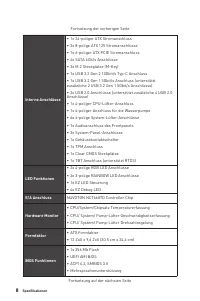
8 Spezifikationen Fortsetzung der vorherigen Seite Interne Anschlüsse ∙ 1x 24-poliger ATX Stromanschluss ∙ 2x 8-polige ATX 12V Stromanschlüsse ∙ 1x 6-poliger ATX PCIE Stromanschluss ∙ 6x SATA 6Gb/s Anschlüsse ∙ 3x M.2 Steckplätze (M-Key) ∙ 1x USB 3.2 Gen 2 10Gbit/s Typ-C Anschluss ∙ 1x USB 3.2 Gen 1...
Page 57 - Software
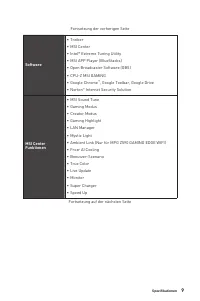
9 Spezifikationen Fortsetzung der vorherigen Seite Software ∙ Treiber ∙ MSI Center ∙ Intel® Extreme Tuning Utility ∙ MSI APP Player (BlueStacks) ∙ Open Broadcaster Software (OBS) ∙ CPU-Z MSI GAMING ∙ Google Chrome ™ , Google Toolbar, Google Drive ∙ Norton ™ Internet Security Solution MSI Center Funk...
Page 58 - Besondere
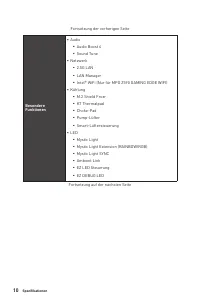
10 Spezifikationen Fortsetzung der vorherigen Seite Besondere Funktionen ∙ Audio ▪ Audio Boost 4 ▪ Sound Tune ∙ Netzwerk ▪ 2.5G LAN ▪ LAN Manager ▪ Intel® WiFi (Nur für MPG Z590 GAMING EDGE WIFI) ∙ Kühlung ▪ M.2 Shield Frozr ▪ K7 Thermalpad ▪ Choke-Pad ▪ Pump-Lüfter ▪ Smart-Lüftersteuerung ∙ LED ▪ M...
Page 60 - Packungsinhalt; Wichtig
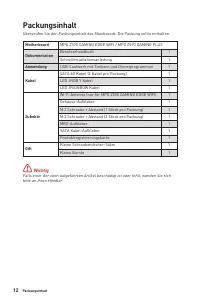
12 Packungsinhalt Packungsinhalt Überprüfen Sie den Packungsinhalt des Mainboards. Die Packung sollte enthalten: Motherboard MPG Z590 GAMING EDGE WIFI / MPG Z590 GAMING PLUS Dokumentation Benutzerhandbuch 1 Schnellinstallationsanleitung 1 Anwendung USB-Laufwerk mit Treibern und Dienstprogrammen 1 Ka...
Page 61 - Konfiguration der Audioanschlüsse; Audioanschlüsse; LAN Port LED Zustandstabelle; Bezeichnung
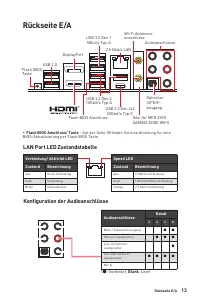
13 Rückseite E/A Rückseite E/A Konfiguration der Audioanschlüsse Audioanschlüsse Kanal 2 4 6 8 Mitte-/ Subwoofer-Ausgang ● ● Hinterer Lautsprecher ● ● ● Line-In/ Seitliche Lautsprecher ● Line-Out/ Vorderer Lautsprecher ● ● ● ● Mic-In (●: Verbindet, Blank : Leer) LAN Port LED Zustandstabelle Verbindu...
Page 62 - Geräteauswahl
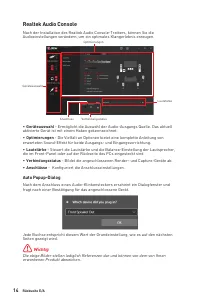
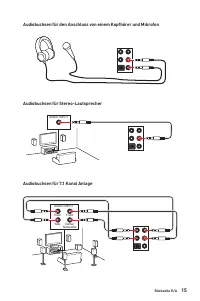
14 Rückseite E/A Realtek Audio Console Nach der Installation des Realtek Audio Console-Treibers, können Sie die Audioeinstellungen verändern, um ein optimales Klangerlebnis erzeugen. ∙ Geräteauswahl - Ermöglicht die Auswahl der Audio-Ausgangs Quelle. Das aktuell aktivierte Gerät ist mit einem Haken ...
Page 64 - Antennen installieren
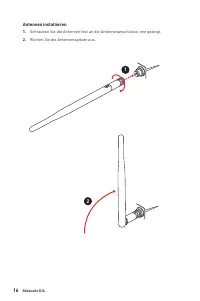
16 Rückseite E/A Antennen installieren 1. Schrauben Sie die Antennen fest an die Antennenanschlüsse, wie gezeigt. 2. Richten Sie die Antennenspitzen aus. 1 2
Page 65 - Übersicht der Komponenten
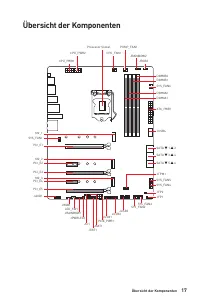
17 Übersicht der Komponenten Übersicht der Komponenten JUSB3 JUSB2 SYS_FAN5SYS_FAN4 SYS_FAN3 SYS_FAN2 JBAT1 JTBT1 JTPM1 JRGB1 SATA ▼ 1 ▲ 2 SATA ▼ 3 ▲ 4 SATA ▼ 5 ▲ 6 M2_3 M2_2 M2_1 SYS_FAN1 JUSB4 JUSB1 PCIE_PWR1 JCI1 CPU_FAN1 SYS_FAN6 PUMP_FAN1 PCI_E1 PCI_E2 PCI_E3 PCI_E5 PCI_E4 Prozessor Sockel CPU_...
Page 66 - CPU Sockel; Justierungen
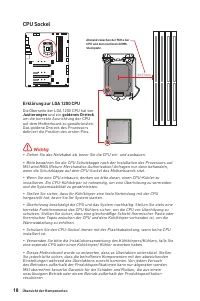
18 Übersicht der Komponenten ⚠ Wichtig ∙ Ziehen Sie das Netzkabel ab, bevor Sie die CPU ein- und ausbauen. ∙ Bitte bewahren Sie die CPU Schutzkappe nach der Installation des Prozessors auf. MSI wird RMA (Return Merchandise Authorization) Anfragen nur dann behandeln, wenn die Schutzklappe auf dem CPU...
Page 67 - DIMM Steckplätze; Speichermodul-Installationsempfehlung
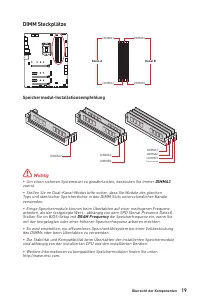
19 Übersicht der Komponenten DIMM Steckplätze DIMMA1 DIMMB1 Kanal A Kanal B DIMMA2 DIMMB2 Speichermodul-Installationsempfehlung ⚠ Wichtig ∙ Um einen sicheren Systemstart zu gewährleisten, bestücken Sie immer DIMMA2 zuerst. ∙ Stellen Sie im Dual-Kanal-Modus bitte sicher, dass Sie Module des gleichen ...
Page 68 - JTBT1: Anschluss für Thunderbolt-Erweiterungskarte
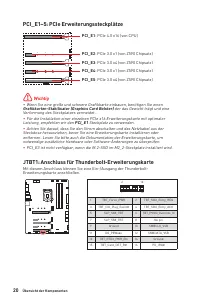
20 Übersicht der Komponenten PCI_E1~5: PCIe Erweiterungssteckplätze PCI_E1 : PCIe 4.0 x16 (von CPU) PCI_E2 : PCIe 3.0 x1 (von Z590 Chipsatz) PCI_E4 : PCIe 3.0 x1 (von Z590 Chipsatz) PCI_E3 : PCIe 3.0 x4 (von Z590 Chipsatz) PCI_E5 : PCIe 3.0 x4 (von Z590 Chipsatz) ⚠ Wichtig ∙ Wenn Sie eine große und ...
Page 69 - Installation eines M.2 Moduls
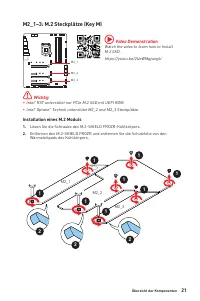
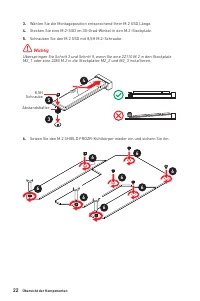
21 Übersicht der Komponenten M2_1~3: M.2 Steckplätze (Key M) Installation eines M.2 Moduls 1. Lösen Sie die Schraube des M.2-SHIELD FROZR-Kühlkörpers. 2. Entfernen den M.2-SHIELD FROZR und entfernen Sie die Schutzfolie von den Wärmeleitpads des Kühlkörpers. 2 2 2 1 1 1 1 1 1 1 1 M2_1 M2_2 M2_3 ⚠ Wic...
Page 71 - Steckplatz
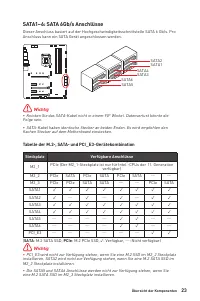
23 Übersicht der Komponenten SATA1~6: SATA 6Gb/s Anschlüsse Dieser Anschluss basiert auf der Hochgeschwindigkeitsschnittstelle SATA 6 Gb/s. Pro Anschluss kann ein SATA Gerät angeschlossen werden. SATA1 SATA3 SATA5 SATA2 SATA4 SATA6 ⚠ Wichtig ∙ Knicken Sie das SATA-Kabel nicht in einem 90° Winkel. Da...
Page 72 - JAUD1: Audioanschluss des Frontpanels
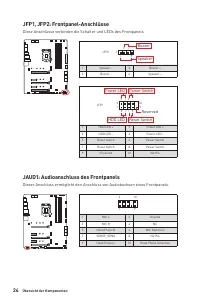
24 Übersicht der Komponenten JFP1, JFP2: Frontpanel-Anschlüsse Diese Anschlüsse verbinden die Schalter und LEDs des Frontpanels 1 2 10 9 + + + - - - - + Power LED HDD LED Reset Switch Reserved Power Switch JFP1 1 HDD LED + 2 Power LED + 3 HDD LED - 4 Power LED - 5 Reset Switch 6 Power Switch 7 Reset...
Page 76 - Umschalten des Lüfter-Modus und Anpassung der Lüfterdrehzahl; BIOS > HARDWARE MONITOR; Anschluss
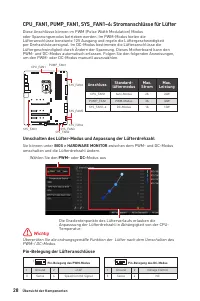
28 Übersicht der Komponenten CPU_FAN1, PUMP_FAN1, SYS_FAN1~6: Stromanschlüsse für Lüfter Diese Anschlüsse können im PWM (Pulse Width Modulation) Modus oder Spannungsmodus betrieben werden. Im PWM-Modus bieten die Lüfteranschlüsse konstante 12V Ausgang und regeln die Lüftergeschwindigkeit per Drehzah...
Page 77 - JCI1: Gehäusekontaktanschluss; Gehäusekontakt-Detektor verwenden
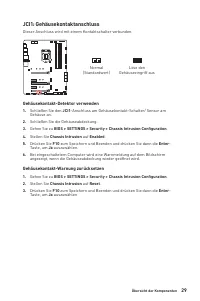
29 Übersicht der Komponenten JCI1: Gehäusekontaktanschluss Dieser Anschluss wird mit einem Kontaktschalter verbunden. Normal (Standardwert) Löse den Gehäuseeingriff aus Gehäusekontakt-Detektor verwenden 1. Schließen Sie den JCI1 -Anschluss am Gehäusekontakt-Schalter/ Sensor am Gehäuse an. 2. Schließ...
Page 78 - Rücksetzen des BIOS auf Standardwerte
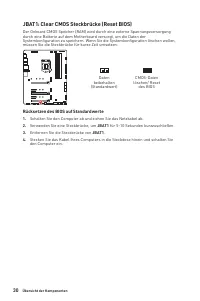
30 Übersicht der Komponenten JBAT1: Clear CMOS Steckbrücke (Reset BIOS) Der Onboard CMOS Speicher (RAM) wird durch eine externe Spannungsversorgung durch eine Batterie auf dem Motherboard versorgt, um die Daten der Systemkonfiguration zu speichern. Wenn Sie die Systemkonfiguration löschen wollen, mü...
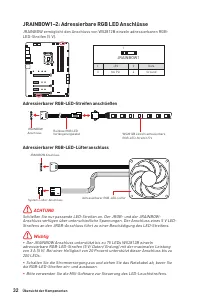
Page 80 - JRAINBOW1~2: Adressierbare RGB LED Anschlüsse; ACHTUNG
32 Übersicht der Komponenten JRAINBOW1~2: Adressierbare RGB LED Anschlüsse JRAINBOW ermöglicht den Anschluss von WS2812B einzeln adressierbaren RGB- LED-Streifen (5 V). 1 JRAINBOW1 1 +5V 2 Data 3 No Pin 4 Ground 1 D +5V ⚠ ACHTUNG Schließen Sie nur passende LED-Streifen an. Der JRGB- und der JRAINBOW...
Page 81 - JPWRLED1: LED Stromzufuhr
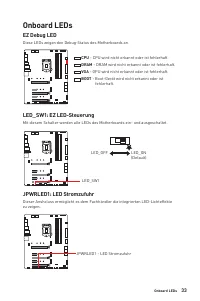
33 Onboard LEDs EZ Debug LED Diese LEDs zeigen den Debug-Status des Motherboards an. CPU - CPU wird nicht erkannt oder ist fehlerhaft. DRAM - DRAM wird nicht erkannt oder ist fehlerhaft. VGA - GPU wird nicht erkannt oder ist fehlerhaft. BOOT - Boot-Gerät wird nicht erkannt oder ist fehlerhaft. Onboa...
Page 82 - Installation von OS, Treibern & MSI Center; Installation von Windows® 10; MSI Center Benutzerhandbuch
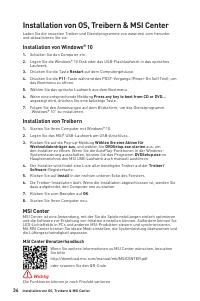
34 Installation von OS, Treibern & MSI Center Installation von OS, Treibern & MSI Center Laden Sie die neuesten Treiber und Dienstprogramme von www.msi.com herunter und aktualisieren Sie sie. Installation von Windows® 10 1. Schalten Sie den Computer ein. 2. Legen Sie die Windows® 10 Disk ode...
Page 83 - Ältere Grafikkarten -; ENTF
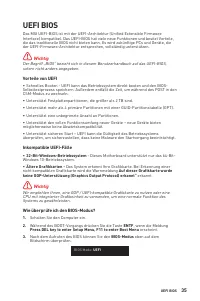
35 UEFI BIOS UEFI BIOS Das MSI UEFI-BIOS ist mit der UEFI-Architektur (Unified Extensible Firmware Interface) kompatibel. Das UEFI-BIOS hat viele neue Funktionen und besitzt Vorteile, die das traditionelle BIOS nicht bieten kann. Es wird zukünftige PCs und Geräte, die der UEFI-Firmware-Architektur e...
Page 84 - Öffnen des BIOS Setups; Funktionstasten; BIOS-Benutzerhandbuch
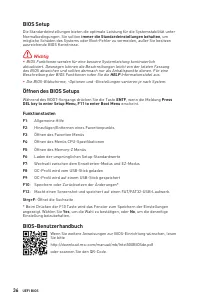
36 UEFI BIOS BIOS Setup Die Standardeinstellungen bieten die optimale Leistung für die Systemstabilität unter Normalbedingungen. Sie sollten immer die Standardeinstellungen behalten , um mögliche Schäden des Systems oder Boot-Fehler zu vermeiden, außer Sie besitzen ausreichende BIOS Kenntnisse. ⚠ Wi...
Page 85 - Reset des BIOS; Clear CMOS Steckbrücke; „Clear CMOS; Aktualisierung des BIOS; Aktualisierung des BIOS mit dem M-FLASH-Programm
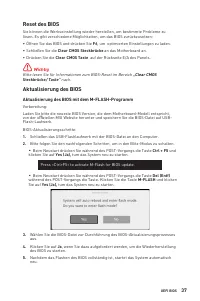
37 UEFI BIOS Reset des BIOS Sie können die Werkseinstellung wieder herstellen, um bestimmte Probleme zu lösen. Es gibt verschiedene Möglichkeiten, um das BIOS zurückzusetzen: ∙ Öffnen Sie das BIOS und drücken Sie F6 , um optimierten Einstellungen zu laden. ∙ Schließen Sie die Clear CMOS Steckbrücke ...
Page 86 - Aktualisierung des BIOS mit MSI CENTER; Support; Aktualisierung des BIOS mit Flash BIOS Taste
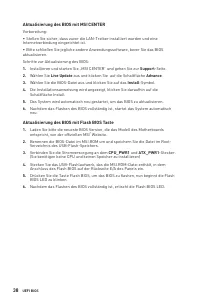
38 UEFI BIOS Aktualisierung des BIOS mit MSI CENTER Vorbereitung: ∙ Stellen Sie sicher, dass zuvor die LAN-Treiber installiert wurden und eine Internetverbindung eingerichtet ist. ∙ Bitte schließen Sie jegliche andere Anwendungssoftware, bevor Sie das BIOS aktualisieren.Schritte zur Aktualisierung d...
Page 87 - Table des matières
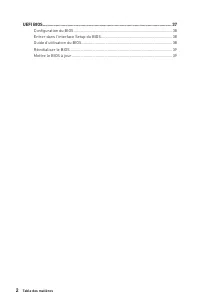
1 Table des matières Table des matières Informations de sécurité ........................................................................................ 3Avertissement pour l’installation des entretoises ................................................ 4 Spécifications ................................
Page 89 - Informations de sécurité
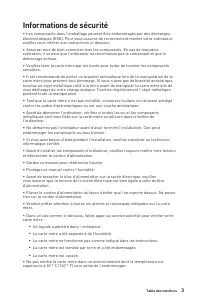
3 Table des matières Informations de sécurité ∙ Les composants dans l’emballage peuvent être endommagés par des décharges électrostatiques (ESD). Pour vous assurer de correctement monter votre ordinateur, veuillez vous référer aux instructions ci-dessous. ∙ Assurez-vous de bien connecter tous les co...
Page 90 - Avertissement pour l’installation des entretoises
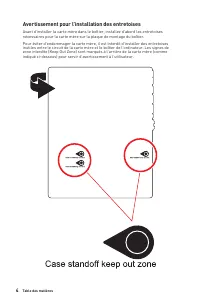
4 Table des matières Avertissement pour l’installation des entretoises Avant d’installer la carte mère dans le boîtier, installez d’abord les entretoises nécessaires pour la carte mère sur la plaque de montage du boîtier. Pour éviter d’endommager la carte mère, il est interdit d’installer des entret...
Page 91 - Spécifications
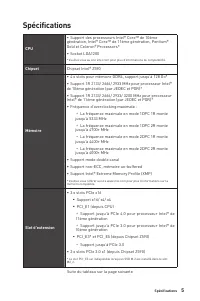
5 Spécifications Spécifications CPU ∙ Support des processeurs Intel® Core™ de 10ème génération, Intel® Core™ de 11ème génération, Pentium® Gold et Celeron® Processors* ∙ Socket LGA1200 * Veuillez vous au site intel.com pour plus d’informations de compatibilité. Chipset Chipset Intel® Z590 Mémoire ∙ ...
Page 92 - Sorties vidéo; RAID
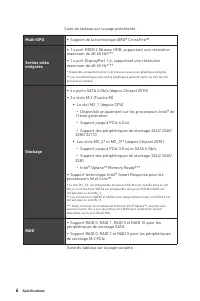
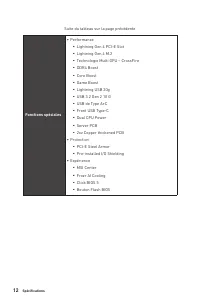
6 Spécifications Suite du tableau sur la page précédente Multi-GPU ∙ Support de la technologie AMD® CrossFire™ Sorties vidéo intégrées ∙ 1 x port HDMI 2.0b avec HDR, supportant une résolution maximum de 4K 60 Hz* / ** ∙ 1 x port DisplayPort 1.4, supportant une résolution maximum de 4K 60 Hz* / ** * ...
Page 93 - Audio
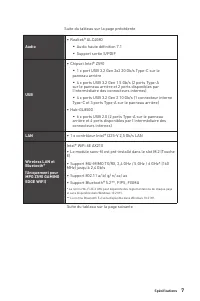
7 Spécifications Suite du tableau sur la page précédente Audio ∙ Realtek® ALC4080 ▪ Audio haute définition 7.1 ▪ Support sortie S/PDIF USB ∙ Chipset Intel® Z590 ▪ 1 x port USB 3.2 Gen 2x2 20 Gb/s Type-C sur le panneau arrière ▪ 4 x ports USB 3.2 Gen 1 5 Gb/s (2 ports Type-A sur le panneau arrière et...
Page 94 - Connecteurs sur le
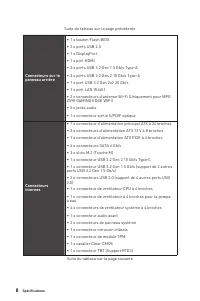
8 Spécifications Suite du tableau sur la page précédente Connecteurs sur le panneau arrière ∙ 1 x bouton Flash BIOS ∙ 2 x ports USB 2.0 ∙ 1 x DisplayPort ∙ 1 x port HDMI ∙ 2 x ports USB 3.2 Gen 1 5 Gb/s Type-A ∙ 3 x ports USB 3.2 Gen 2 10 Gb/s Type-A ∙ 1 x port USB 3.2 Gen 2x2 20 Gb/s ∙ 1 x port LAN...
Page 95 - Fonctions LED
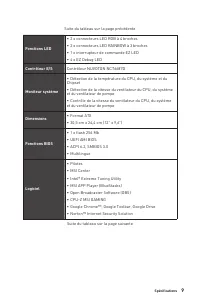
9 Spécifications Suite du tableau sur la page précédente Fonctions LED ∙ 2 x connecteurs LED RGB à 4 broches ∙ 2 x connecteurs LED RAINBOW à 3 broches ∙ 1 x interrupteur de commande EZ LED ∙ 4 x EZ Debug LED Contrôleur E/S Contrôleur NUVOTON NCT6687D Moniteur système ∙ Détection de la température du...
Page 96 - Fonctions MSI
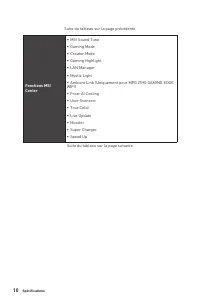
10 Spécifications Suite du tableau sur la page précédente Fonctions MSI Center ∙ MSI Sound Tune ∙ Gaming Mode ∙ Creator Mode ∙ Gaming Highlight ∙ LAN Manager ∙ Mystic Light ∙ Ambient Link (Uniquement pour MPG Z590 GAMING EDGE WIFI) ∙ Frozr AI Cooling ∙ User Scenario ∙ True Color ∙ Live Update ∙ Moni...
Page 97 - Fonctions spéciales
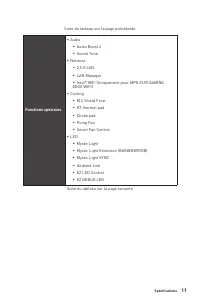
11 Spécifications Suite du tableau sur la page précédente Fonctions spéciales ∙ Audio ▪ Audio Boost 4 ▪ Sound Tune ∙ Network ▪ 2,5 G LAN ▪ LAN Manager ▪ Intel® WiFi (Uniquement pour MPG Z590 GAMING EDGE WIFI) ∙ Cooling ▪ M.2 Shield Frozr ▪ K7 thermal pad ▪ Choke pad ▪ Pump Fan ▪ Smart Fan Control ∙ ...
Page 99 - Contenu
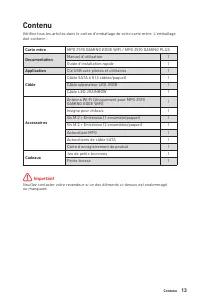
13 Contenu Contenu Vérifiez tous les articles dans le carton d’emballage de votre carte mère. L’emballage doit contenir : Carte mère MPG Z590 GAMING EDGE WIFI / MPG Z590 GAMING PLUS Documentation Manuel d’utilisation 1 Guide d’installation rapide 1 Application Clé USB avec pilotes et utilitaires 1 C...
Page 100 - Panneau arrière Entrée / Sortie; Configuration des ports audio; LED indiquant la connexion
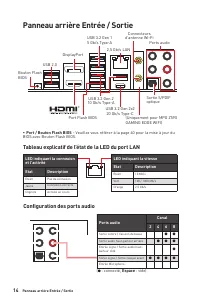
14 Panneau arrière Entrée / Sortie Panneau arrière Entrée / Sortie Configuration des ports audio Tableau explicatif de l’état de la LED du port LAN LED indiquant la connexion et l’activitéEtat Description Eteint Pas de connexion Jaune Connexion correcte Clignote Activité en cours LED indiquant la vi...
Page 101 - Sélection du périphérique
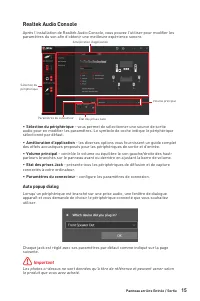
15 Panneau arrière Entrée / Sortie Realtek Audio Console Après l’installation de Realtek Audio Console, vous pouvez l’utiliser pour modifier les paramètres du son afin d’obtenir une meilleure expérience sonore. ∙ Sélection du périphérique - vous permet de sélectionner une source de sortie audio pour...
Page 103 - Installation des antennes
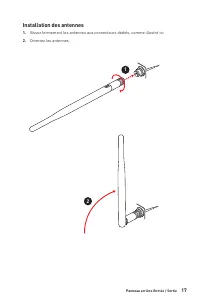
17 Panneau arrière Entrée / Sortie Installation des antennes 1. Vissez fermement les antennes aux connecteurs dédiés, comme illustré ici. 2. Orientez les antennes. 1 2
Page 104 - Vue d’ensemble des composants
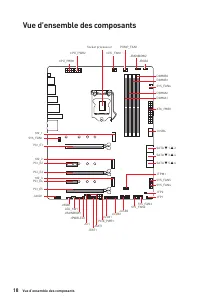
18 Vue d’ensemble des composants Vue d’ensemble des composants JUSB3 JUSB2 SYS_FAN5SYS_FAN4 SYS_FAN3 SYS_FAN2 JBAT1 JTBT1 JTPM1 JRGB1 SATA ▼ 1 ▲ 2 SATA ▼ 3 ▲ 4 SATA ▼ 5 ▲ 6 M2_3 M2_2 M2_1 SYS_FAN1 JUSB4 JUSB1 PCIE_PWR1 JCI1 CPU_FAN1 SYS_FAN6 PUMP_FAN1 PCI_E1 PCI_E2 PCI_E3 PCI_E5 PCI_E4 Socket proces...
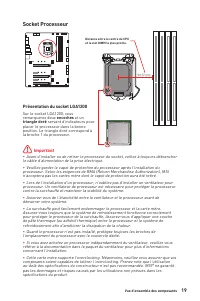
Page 105 - Socket Processeur; Présentation du socket LGA1200; encoches
19 Vue d’ensemble des composants ⚠ Important ∙ Avant d’installer ou de retirer le processeur du socket, veillez à toujours débrancher le câble d’alimentation de la prise électrique. ∙ Veuillez garder le capot de protection du processeur après l’installation du processeur. Selon les exigences de RMA ...
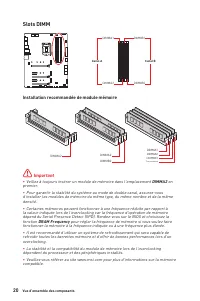
Page 106 - Slots DIMM; Installation recommandée de module mémoire
20 Vue d’ensemble des composants Slots DIMM DIMMA1 DIMMB1 Canal A Canal B DIMMA2 DIMMB2 Installation recommandée de module mémoire ⚠ Important ∙ Veillez à toujours insérer un module de mémoire dans l’emplacement DIMMA2 en premier. ∙ Pour garantir la stabilité du système au mode de double canal, assu...
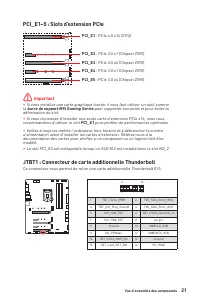
Page 107 - barre de support MSI Gaming Series; JTBT1 : Connecteur de carte additionnelle Thunderbolt
21 Vue d’ensemble des composants PCI_E1~5 : Slots d’extension PCIe PCI_E1 : PCIe 4.0 x16 (CPU) PCI_E2 : PCIe 3.0 x1 (Chipset Z590) PCI_E4 : PCIe 3.0 x1 (Chipset Z590) PCI_E3 : PCIe 3.0 x4 (Chipset Z590) PCI_E5 : PCIe 3.0 x4 (Chipset Z590) ⚠ Important ∙ Si vous installez une carte graphique lourde, i...
Page 108 - Installation du module M.2
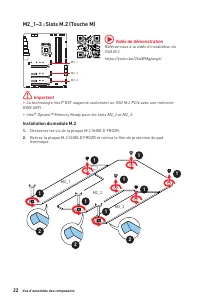
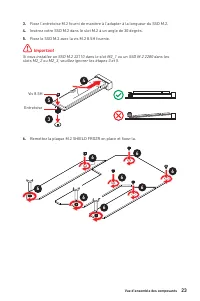
22 Vue d’ensemble des composants M2_1~3 : Slots M.2 (Touche M) Installation du module M.2 1. Desserrez les vis de la plaque M.2 SHIELD FROZR. 2. Retirez la plaque M.2 SHIELD FROZR et retirez le film de protection du pad thermique. 2 2 2 1 1 1 1 1 1 1 1 M2_1 M2_2 M2_3 ⚠ Important ∙ La technologie Int...
Page 111 - JFP1, JFP2 : Connecteurs de panneau avant
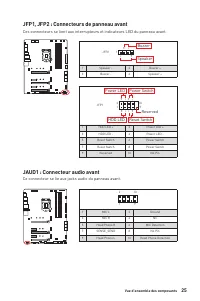
25 Vue d’ensemble des composants JFP1, JFP2 : Connecteurs de panneau avant Ces connecteurs se lient aux interrupteurs et indicateurs LED du panneau avant. 1 2 10 9 + + + - - - - + Power LED HDD LED Reset Switch Reserved Power Switch JFP1 1 HDD LED + 2 Power LED + 3 HDD LED - 4 Power LED - 5 Reset Sw...
Page 112 - d’alimentation
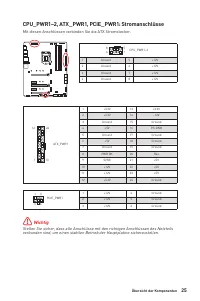
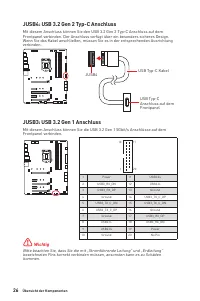
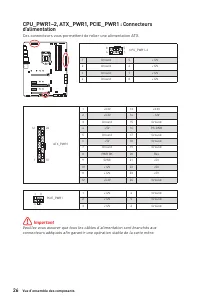
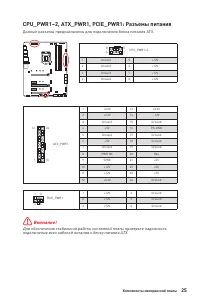
26 Vue d’ensemble des composants 24 13 1 12 ATX_PWR1 1 +3.3V 13 +3.3V 2 +3.3V 14 -12V 3 Ground 15 Ground 4 +5V 16 PS-ON# 5 Ground 17 Ground 6 +5V 18 Ground 7 Ground 19 Ground 8 PWR OK 20 Res 9 5VSB 21 +5V 10 +12V 22 +5V 11 +12V 23 +5V 12 +3.3V 24 Ground 5 4 1 8 CPU_PWR1~2 1 Ground 5 +12V 2 Ground 6 ...
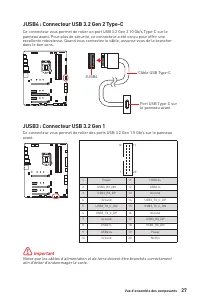
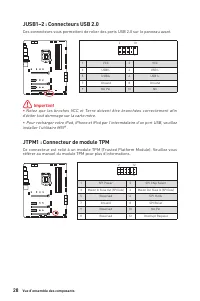
Page 114 - JTPM1 : Connecteur de module TPM
28 Vue d’ensemble des composants JUSB1~2 : Connecteurs USB 2.0 Ces connecteurs vous permettent de relier des ports USB 2.0 sur le panneau avant. 1 2 10 9 1 VCC 2 VCC 3 USB0- 4 USB1- 5 USB0+ 6 USB1+ 7 Ground 8 Ground 9 No Pin 10 NC ⚠ Important ∙ Notez que les broches VCC et Terre doivent être branché...
Page 115 - ventilateur; Basculer entre les modes des ventilateurs et ajuster la vitesse
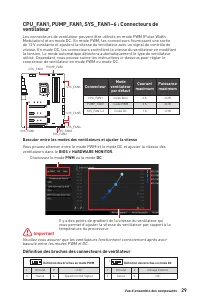
29 Vue d’ensemble des composants CPU_FAN1, PUMP_FAN1, SYS_FAN1~6 : Connecteurs de ventilateur Les connecteurs de ventilateur peuvent être utilisés en mode PWM (Pulse Width Modulation) et en mode DC. En mode PWM, les connecteurs fournissent une sortie de 12 V constante et ajustent la vitesse du venti...
Page 116 - JCI1 : Connecteur intrusion châssis; Utilisation du détecteur d’intrusion châssis; Réinitialisation de l’alerte intrusion châssis; Configuration (Configuration intrusion châssis)
30 Vue d’ensemble des composants JCI1 : Connecteur intrusion châssis Ce connecteur est relié à un câble d’interrupteur intrusion châssis. Normal (défaut) Commencer l’activité instrusion châssis Utilisation du détecteur d’intrusion châssis 1. Reliez le connecteur JCI1 à l’interrupteur ou au capteur d...
Page 117 - Réinitialiser le BIOS aux valeurs par défaut
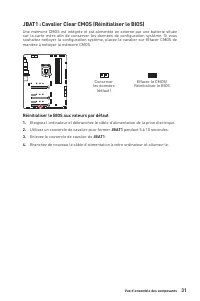
31 Vue d’ensemble des composants JBAT1 : Cavalier Clear CMOS (Réinitialiser le BIOS) Une mémoire CMOS est intégrée et est alimentée en externe par une batterie située sur la carte mère afin de conserver les données de configuration système. Si vous souhaitez nettoyer la configuration système, placez...
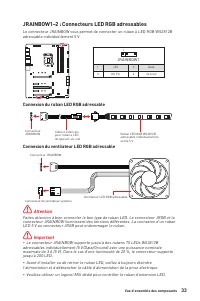
Page 119 - Attention; JRAINBOW1~2 : Connecteurs LED RGB adressables; Connexion du ruban LED RGB adressable
33 Vue d’ensemble des composants 1 1 1 D +5V ⚠ Attention Faites attention à bien connecter le bon type de ruban LED. Le connecteur JRGB et le connecteur JRAINBOW fournissent des tensions différentes. La connexion d’un ruban LED 5 V au connecteur JRGB peut endommager le ruban. ⚠ Important ∙ Le connec...
Page 120 - Indicateurs LED embarqués; JPWRLED1 : Indicateur LED de l’entrée d’alimentation
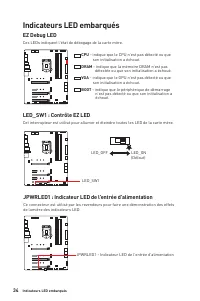
34 Indicateurs LED embarqués EZ Debug LED Ces LEDs indiquent l’état de débogage de la carte mère. Indicateurs LED embarqués LED_SW1 : Contrôle EZ LED Cet interrupteur est utilisé pour allumer et éteindre toutes les LED de la carte mère. LED_SW1 LED_OFF LED_ON (Défaut) JPWRLED1 : Indicateur LED de l’...
Page 121 - Installer OS, Pilotes et MSI Center; Installer Windows® 10; Choisir quoi faire avec ce disque (Select to choose
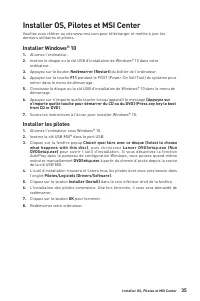
35 Installer OS, Pilotes et MSI Center Installer OS, Pilotes et MSI Center Veuillez vous référer au site www.msi.com pour télécharger et mettre à jour les derniers utilitaires et pilotes. Installer Windows® 10 1. Allumez l’ordinateur. 2. Insérez le disque ou la clé USB d’installation de Windows® 10 ...
Page 122 - Guide d’utilisation de MSI Center
36 Installer OS, Pilotes et MSI Center MSI Center MSI Center est une application qui vous aide à optimiser facilement les paramètres de jeu et à utiliser les logiciels de création de contenu de manière intuitive. Elle vous permet également de contrôler et de synchroniser les effets de lumière LED su...
Page 124 - Configuration du BIOS; toujours garder les réglages par défaut; Entrer dans l’interface Setup du BIOS; Press DEL key to enter Setup; Touches de fonction; Guide d’utilisation du BIOS
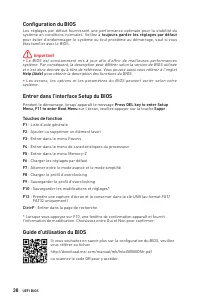
38 UEFI BIOS Configuration du BIOS Les réglages par défaut fournissent une performance optimale pour la stabilité du système en conditions normales. Veillez à toujours garder les réglages par défaut pour éviter d’endommager le système ou tout problème au démarrage, sauf si vous êtes familier avec le...
Page 125 - Réinitialiser le BIOS; Clear CMOS; Mettre le BIOS à jour; Mettre le BIOS à jour avec M-FLASH; Del
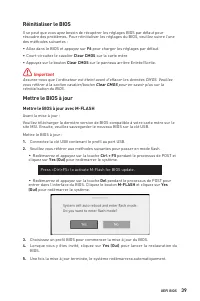
39 UEFI BIOS Réinitialiser le BIOS Il se peut que vous ayez besoin de récupérer les réglages BIOS par défaut pour résoudre des problèmes. Pour réinitialiser les réglages du BIOS, veuillez suivre l’une des méthodes suivantes : ∙ Allez dans le BIOS et appuyez sur F6 pour charger les réglages par défau...
Page 126 - Mettre le BIOS à jour avec MSI CENTER
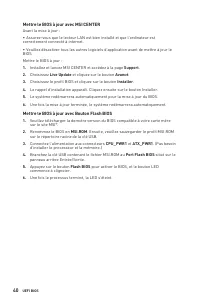
40 UEFI BIOS Mettre le BIOS à jour avec MSI CENTER Avant la mise à jour : ∙ Assurez-vous que le lecteur LAN est bien installé et que l’ordinateur est correctement connecté à internet. ∙ Veuillez désactiver tous les autres logiciels d’application avant de mettre à jour le BIOS.Mettre le BIOS à jour :...
Page 127 - Содержание
1 Содержание Содержание Безопасное использование продукции ............................................................. 3 Уведомление о стойках для крепления материнской платы ............................. 4 Технические характеристики ...................................................................
Page 129 - Безопасное использование продукции
3 Безопасное использование продукции Безопасное использование продукции ∙ Компоненты, входящие в комплект поставки могут быть повреждены статическим электричеством. Для успешной сборки компьютера, пожалуйста, следуйте указаниям ниже. ∙ Убедитесь, что все компоненты компьютера подключены должным обра...
Page 130 - Уведомление о стойках для крепления материнской платы
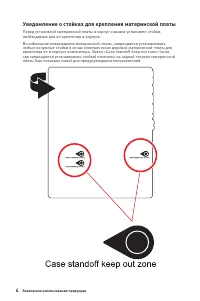
4 Безопасное использование продукции Уведомление о стойках для крепления материнской платы Перед установкой материнской платы в корпус сначала установите стойки, необходимые для ее крепления в корпусе. Во избежание повреждения материнской платы, запрещается устанавливать любые ненужные стойки в зона...
Page 131 - Технические характеристики; Процессор; Чипсет; Слоты расширения
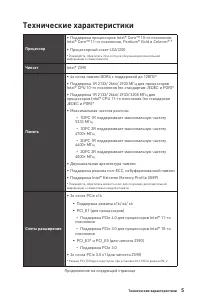
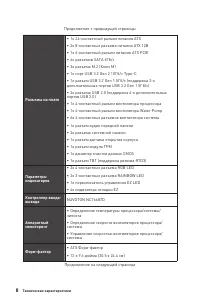
5 Технические характеристики Технические характеристики Процессор ∙ Поддержка процессоров Intel® Core™ 10-го поколения, Intel® Core™ 11-го поколения, Pentium® Gold и Celeron® * ∙ Процессорный сокет LGA1200 * Пожалуйста, обратитесь intel.com для получения дополнительной информации о совместимости Чип...
Page 132 - GPU; Подключение
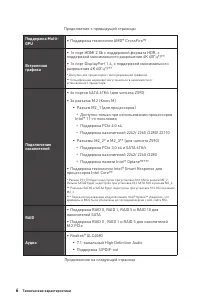
6 Технические характеристики Продолжение с предыдущей страницы Поддержка Multi- GPU ∙ Поддержка технологии AMD® CrossFire™ Встроенная графика ∙ 1x порт HDMI 2.0b с поддержкой формата HDR, с поддержкой максимального разрешения 4K 60Гц*/** ∙ 1x порт DisplayPort 1.4, с поддержкой максимального разрешен...
Page 135 - Параметры BIOS; Программное; Функции MSI
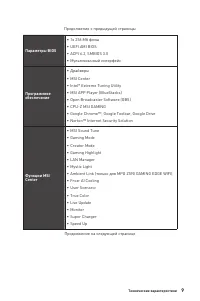
9 Технические характеристики Продолжение с предыдущей страницы Параметры BIOS ∙ 1x 256 Мб флэш ∙ UEFI AMI BIOS ∙ ACPI 6.2, SMBIOS 3.0 ∙ Мультиязычный интерфейс Программное обеспечение ∙ Драйверы ∙ MSI Center ∙ Intel® Extreme Tuning Utility ∙ MSI APP Player (BlueStacks) ∙ Open Broadcaster Software (O...
Page 136 - Эксклюзивные
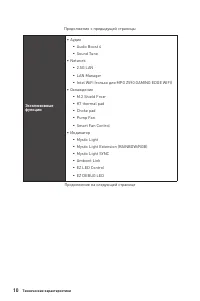
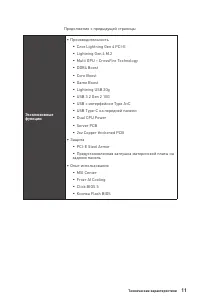
10 Технические характеристики Продолжение с предыдущей страницы Эксклюзивные функции ∙ Аудио ▪ Audio Boost 4 ▪ Sound Tune ∙ Network ▪ 2.5G LAN ▪ LAN Manager ▪ Intel WiFi (только для MPG Z590 GAMING EDGE WIFI) ∙ Охлаждение ▪ M.2 Shield Frozr ▪ K7 thermal pad ▪ Choke pad ▪ Pump Fan ▪ Smart Fan Control...
Page 138 - Комплект поставки
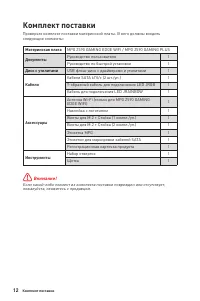
12 Комплект поставки Комплект поставки Проверьте комплект поставки материнской платы. В него должны входить следующие элементы: Материнская плата MPG Z590 GAMING EDGE WIFI / MPG Z590 GAMING PLUS Документы Руководство пользователя 1 Руководство по быстрой установке 1 Диск с утилитами USB флэш-диск с ...
Page 139 - Задняя панель портов ввода/ вывода; Конфигурация портов Аудио; Порты Аудио; Таблица состояний индикатора порта LAN; ∙ Порт/Кнопка Flash BIOS
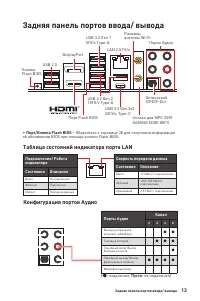
13 Задняя панель портов ввода/ вывода Задняя панель портов ввода/ вывода Конфигурация портов Аудио Порты Аудио Канал 2 4 6 8 Выход центральной колонки/ сабвуфера ● ● Тыловые колонки ● ● ● Линейный вход/ Выход боковых колонок ● Линейный выход/ Выход фронтальных колонок ● ● ● ● Микрофонный вход ( ●: п...
Page 140 - ∙ Выбор устройства; Автоматическое всплывающее диалоговое окно
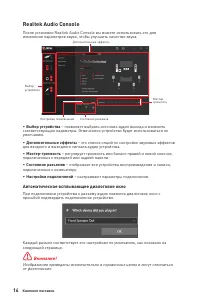
14 Комплект поставки Realtek Audio Console После установки Realtek Audio Console вы можете использовать его для изменения параметров звука, чтобы улучшить качество звука. ∙ Выбор устройства – позволяет выбрать источник аудио выхода и изменить соответствующие параметры. Отмеченное устройство будет ис...
Page 141 - Подключение наушников и микрофона
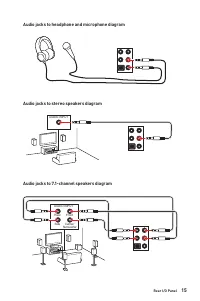
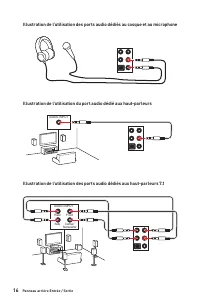
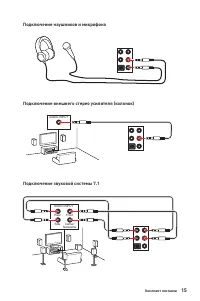
15 Комплект поставки Подключение наушников и микрофона Подключение внешнего стерео усилителя (колонок) Подключение звуковой системы 7.1 AUDIO INPUT AUDIO INPUT Rear Front Side Center/ Subwoofer
Page 142 - Установка антенн
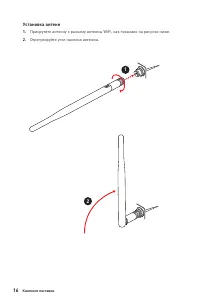
16 Комплект поставки Установка антенн 1. Прикрутите антенну к разъему антенны WiFi, как показано на рисунке ниже. 2. Отрегулируйте угол наклона антенны. 1 2
Page 143 - Компоненты материнской платы
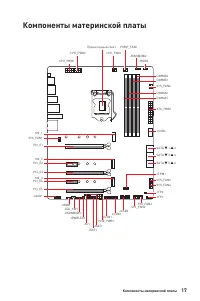
17 Компоненты материнской платы Компоненты материнской платы JUSB3 JUSB2 SYS_FAN5SYS_FAN4 SYS_FAN3 SYS_FAN2 JBAT1 JTBT1 JTPM1 JRGB1 SATA ▼ 1 ▲ 2 SATA ▼ 3 ▲ 4 SATA ▼ 5 ▲ 6 M2_3 M2_2 M2_1 SYS_FAN1 JUSB4 JUSB1 PCIE_PWR1 JCI1 CPU_FAN1 SYS_FAN6 PUMP_FAN1 PCI_E1 PCI_E2 PCI_E3 PCI_E5 PCI_E4 Процессорный со...
Page 144 - выемки
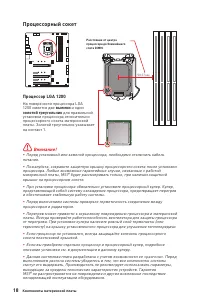
18 Компоненты материнской платы ⚠ Внимание! ∙ Перед установкой или заменой процессора, необходимо отключить кабель питания. ∙ Пожалуйста, сохраните защитную крышку процессорного сокета после установки процессора. Любые возможные гарантийные случаи, связанные с работой материнской платы, MSI® будет р...
Page 145 - Слоты DIMM; Рекомендации по установке модулей памяти
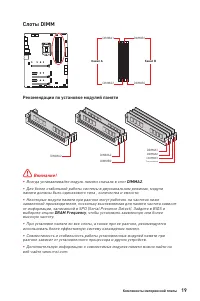
19 Компоненты материнской платы Слоты DIMM DIMMA1 DIMMB1 Канал A Канал B DIMMA2 DIMMB2 Рекомендации по установке модулей памяти ⚠ Внимание! ∙ Всегда устанавливайте модуль памяти сначала в слот DIMMA2 . ∙ Для более стабильной работы системы в двухканальном режимах, модули памяти должны быть одинаково...
Page 146 - MSI Gaming Series Graphics Card Bolster; JTBT1: Разъем для установки карты расширения Thunderbolt
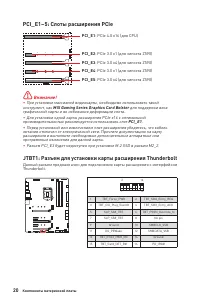
20 Компоненты материнской платы PCI_E1~5: Слоты расширения PCIe PCI_E1 : PCIe 4.0 x16 (для CPU) PCI_E2 : PCIe 3.0 x1 (для чипсета Z590) PCI_E4 : PCIe 3.0 x1 (для чипсета Z590) PCI_E3 : PCIe 3.0 x4 (для чипсета Z590) PCI_E5 : PCIe 3.0 x4 (для чипсета Z590) ⚠ Внимание! ∙ При установке массивной видеок...
Page 147 - Видео Инструкция
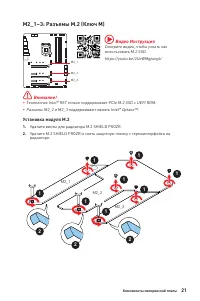
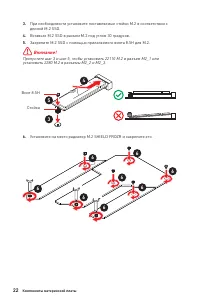
21 Компоненты материнской платы M2_1~3: Разъемы M.2 (Ключ M) Установка модуля M.2 1. Удалите винты для радиатора M.2 SHIELD FROZR. 2. Удалите M.2 SHIELD FROZR и снять защитную пленку с термоинтерфейса на радиаторе. 2 2 2 1 1 1 1 1 1 1 1 M2_1 M2_2 M2_3 ⚠ Внимание! ∙ Технология Intel® RST только подде...
Page 149 - Слот
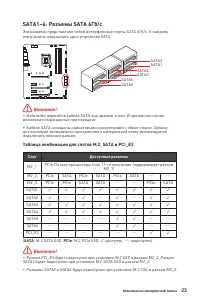
23 Компоненты материнской платы SATA1~6: Разъемы SATA 6Гб/с Эти разъемы представляют собой интерфейсные порты SATA 6Гб/с. К каждому порту можно подключить одно устройство SATA. SATA1 SATA3 SATA5 SATA2 SATA4 SATA6 ⚠ Внимание! ∙ Избегайте перегибов кабеля SATA под прямым углом. В противном случае, воз...
Page 150 - JAUD1: Разъем аудио передней панели
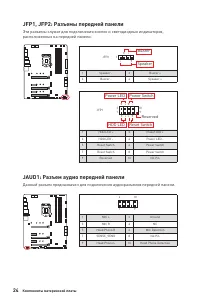
24 Компоненты материнской платы JFP1, JFP2: Разъемы передней панели Эти разъемы служат для подключения кнопок и светодиодных индикаторов, расположенных на передней панели. 1 2 10 9 + + + - - - - + Power LED HDD LED Reset Switch Reserved Power Switch JFP1 1 HDD LED + 2 Power LED + 3 HDD LED - 4 Power...
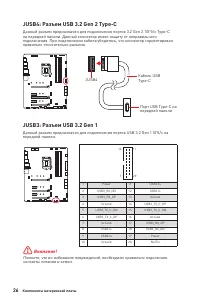
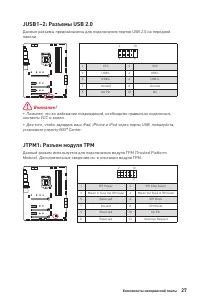
Page 153 - JTPM1: Разъем модуля ТРМ
27 Компоненты материнской платы JUSB1~2: Разъемы USB 2.0 Данные разъемы предназначены для подключения портов USB 2.0 на передней панели. 1 2 10 9 1 VCC 2 VCC 3 USB0- 4 USB1- 5 USB0+ 6 USB1+ 7 Ground 8 Ground 9 No Pin 10 NC ⚠ Внимание! ∙ Помните, что во избежание повреждений, необходимо правильно под...
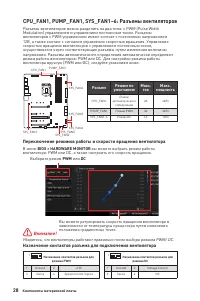
Page 154 - Переключение режимов работы и скорости вращения вентилятора; Назначение контактов разъема для подключения вентилятора; Разъем
28 Компоненты материнской платы CPU_FAN1, PUMP_FAN1, SYS_FAN1~6: Разъемы вентиляторов Разъемы вентиляторов можно разделить на два типа: с PWM (Pulse Width Modulation) управлением и управлением постоянным током. Разъемы вентиляторов с PWM управлением имеют контакт с постоянным напряжением 12В, а такж...
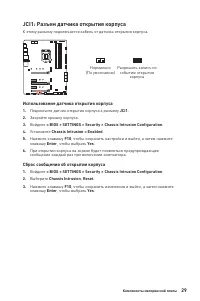
Page 155 - JCI1: Разъем датчика открытия корпуса; Использование датчика открытия корпуса
29 Компоненты материнской платы JCI1: Разъем датчика открытия корпуса К этому разъему подключается кабель от датчика открытия корпуса. Нормально (По умолчанию) Разрешить запись по событию открытия корпуса Использование датчика открытия корпуса 1. Подключите датчик открытия корпуса к разъему JCI1 . 2...
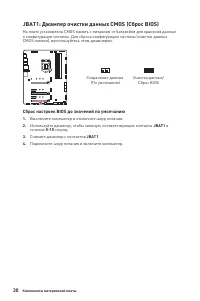
Page 156 - Сброс настроек BIOS до значений по умолчанию
30 Компоненты материнской платы JBAT1: Джампер очистки данных CMOS (Сброс BIOS) На плате установлена CMOS память с питанием от батарейки для хранения данных о конфигурации системы. Для сброса конфигурации системы (очистки данных CMOS памяти), воспользуйтесь этим джампером. Сохранение данных (По умол...
Page 157 - Подключение RGB светодиодных лент
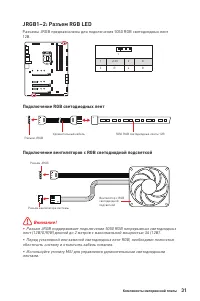
31 Компоненты материнской платы ⚠ Внимание! ∙ Разъем JRGB поддерживает подключение 5050 RGB непрерывных светодиодных лент (12В/G/R/B) длиной до 2 метров с максимальной мощностью 3А (12В). ∙ Перед установкой или заменой светодиодных лент RGB, необходимо полностью обесточить систему и отключить кабель...
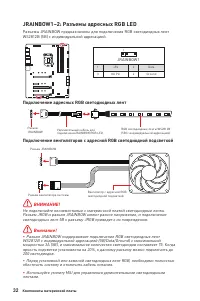
Page 158 - Подключение адресных RGB светодиодных лент
32 Компоненты материнской платы 1 1 1 D +5V ⚠ ВНИМАНИЕ! Не подключайте несовместимые с материнской платой светодиодные ленты. Разъем JRGB и разъем JRAINBOW имеют разное напряжение, и подключение светодиодных лент 5В к разъему JRGB приведет к их повреждению. ⚠ Внимание! ∙ Разъем JRAINBOW поддерживает...
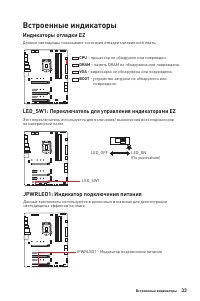
Page 159 - Индикаторы отладки EZ; Встроенные индикаторы; LED_SW1: Переключатель для управления индикаторами EZ
33 Встроенные индикаторы Индикаторы отладки EZ Данные светодиоды показывают состояния отладки материнской платы. CPU - процессор не обнаружен или поврежден. DRAM - память DRAM не обнаружена или повреждена. VGA - видеокарта не обнаружена или повреждена. BOOT - устройство загрузки не обнаружено или по...
Page 160 - Установка ОС, драйверов и MSI Center; Установка Windows® 10; Установка драйверов; Инструкции по использованию MSI Center
34 Установка ОС, драйверов и MSI Center Установка ОС, драйверов и MSI Center Скачайте и обновите по следние утилиты и драйверы с сайта: www.msi.com Установка Windows® 10 1. Включите компьютер. 2. Вставьте диск Windows® 10 в привод для оптических дисков или вставьте в разъем USB компьютера USB флэш-д...
Page 161 - Преимущества UEFI; ∙ 32-битная ОС Windows; Как проверить режим BIOS?
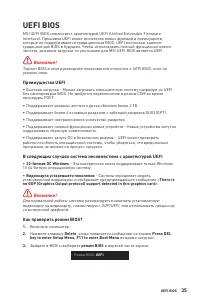
35 UEFI BIOS UEFI BIOS MSI UEFI BIOS совместим с архитектурой UEFI (Unified Extensible Firmware Interface). Прошивка UEFI имеет множество новых функций и преимуществ, которые не поддерживаются традиционным BIOS. UEFI полностью заменит традиционный BIOS в будущем. Чтобы использовать полный функционал...
Page 162 - всегда устанавливайте настройки по умолчанию; Вход в настройки BIOS; Функциональные клавиши; Инструкции по настройке BIOS
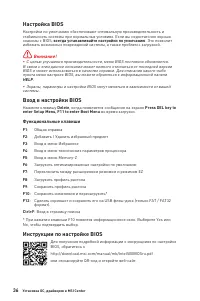
36 Установка ОС, драйверов и MSI Center Настройка BIOS Настройки по умолчанию обеспечивают оптимальную производительность и стабильность системы при нормальных условиях. Если вы недостаточно хорошо знакомы с BIOS, всегда устанавливайте настройки по умолчанию . Это позволит избежать возможных поврежд...
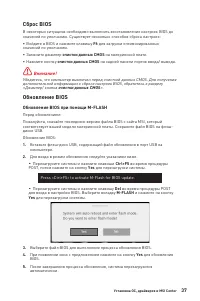
Page 163 - Сброс BIOS; очистки данных CMOS; Обновление BIOS; Обновление BIOS при помощи M-FLASH; Yes
37 Установка ОС, драйверов и MSI Center Сброс BIOS В некоторых ситуациях необходимо выполнить восстановление настроек BIOS до значений по умолчанию. Существует несколько способов сброса настроек: ∙ Войдите в BIOS и нажмите клавишу F6 для загрузки оптимизированных значений по умолчанию. ∙ Замкните дж...
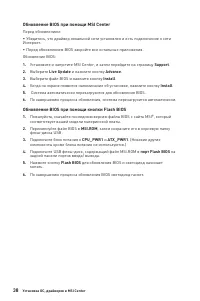
Page 164 - Обновление BIOS при помощи MSI Center; порт Flash BIOS
38 Установка ОС, драйверов и MSI Center Обновление BIOS при помощи MSI Center Перед обновлением: ∙ Убедитесь, что драйвер локальной сети установлен и есть подключение к сети Интернет. ∙ Перед обновлением BIOS закройте все остальные приложения. Обновление BIOS: 1. Установите и запустите MSI Center, и...
Page 165 - Regulatory Notices; FCC Compliance Statement; クラスB情報技術装置
i Regulatory Notices Regulatory Notices FCC Compliance Statement Note: This equipment has been tested and found to comply with the limits for a Class B digital device, pursuant to part 15 of the FCC Rules. These limits are designed to provide reasonable protection against harmful interference in a r...
Page 166 - ii; WEEE (Waste Electrical and
ii Regulatory Notices WEEE (Waste Electrical and Electronic Equipment) Statement ENGLISH To protect the global environment and as an environmentalist, MSI must remind you that...Under the European Union (“EU”) Directive on Waste Electrical and Electronic Equipment, Directive 2002/96/ EC, which takes...
Page 167 - iii; India RoHS
iii Regulatory Notices elektrikli ve elektronik malzemeler diğer atıklar gibi çöpe atılamayacak ve bu elektonik cihazların üreticileri, cihazların kullanım süreleri bittikten sonra ürünleri geri toplamakla yükümlü olacaktır. Avrupa Birliği’ne satılan MSI markalı ürünlerin kullanım süreleri bittiğind...
Page 168 - iv; MS-7D07主板产品中有害物质的名称及含量
iv Regulatory Notices MS-7D07主板产品中有害物质的名称及含量 部件名称 有害物质 铅 (Pb) 汞 (Hg) 镉 (Cd) 六价铬 (Cr(VI)) 多溴联苯 (PBB) 多溴二苯醚 (PBDE) 印刷电路板组件* ╳ ○ ○ ○ ○ ○ 电池** ╳ ○ ○ ○ ○ ○ 外部信号连接头 ╳ ○ ○ ○ ○ ○ 线材 ╳ ○ ○ ○ ○ ○ 本表格依据 SJ/T 11364 的规定编制。○: 表示该有害物质在该部件所有均质材料中的含量均在 GB/T 26572 规定的限量要求以下。╳: 表示该有害物质至少在该部件的某一均质材料中的含量超出 GB/T 26572 规定...






 MSI MAG B550 User Manual
 MSI MAG B550M User Manual
 MSI MAG B650M User Manual
 MSI MAG Z690 User Manual
 MSI MEG X570 User Manual
 MSI MPG B550 User Manual
 MSI PRO B550M-P GEN3 User Manual
 MSI PRO B660M-E DDR4 User Manual
 MSI PRO B660M-G DDR4 User Manual
 MSI PRO B660M-P DDR4 User Manual
 MSI PRO B760M-E DDR4 User Manual
 MSI PRO H410M-B User Manual
 MSI PRO H610M-B DDR4 User Manual