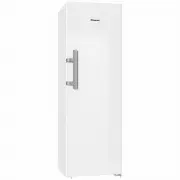
Page 2 - Contents; Safety lock
Contents 2 Warning and Safety instructions .......................................................................... 4 Caring for the environment ................................................................................ 12 How to save energy ...................................................
Page 4 - Warning and Safety instructions; Correct application; This appliance is designed for domestic use and for use in similar
Warning and Safety instructions 4 This appliance complies with all statutory safety requirements.Please note that inappropriate use can lead to personal injury anddamage to property. To avoid the risk of accidents and damage to the appliance,please read these instructions carefully before using it f...
Page 5 - Safety with children
Warning and Safety instructions 5 This appliance is not intended for use by persons (including children) with reduced physical, sensory or mental capabilities, orlack of experience and knowledge, unless they have been givensupervision or instruction concerning its use by a person responsiblefor th...
Page 6 - Technical safety
Warning and Safety instructions 6 Technical safety The refrigerant circuit has been checked for leaks. This appliance complies with all current local and national safety requirements. This appliance contains the coolant Isobutane (R600a), a natural gas which is environmentally friendly. Although...
Page 8 - Correct use
Warning and Safety instructions 8 Repairs and other work by unqualified persons could be dangerous. Maintenance work and repairs to electrical appliancesmust only be carried out by a Miele approved service technician. The manufacturer's warranty will be invalidated if the appliance is not repair...
Page 9 - Stainless steel appliances
Warning and Safety instructions 9 Do not store explosive materials in the appliance or any products containing propellants (e.g. spray cans). Flammable gas mixturescan be ignited by electrical components. Danger of fire and explosion! Do not operate any electrical equipment (e.g. an electric ice...
Page 10 - Cleaning and care
Warning and Safety instructions 10 Cleaning and care Do not use any oils or grease on the door seals, as these will cause the seals to deteriorate and become porous with time. Do not use a steam cleaning appliance to clean this appliance. Steam could reach the electrical components and cause a s...
Page 11 - Disposal of your old appliance; Symbol on the compressor (depending on model)
Warning and Safety instructions 11 Disposal of your old appliance If your old appliance has a door lock, destroy it. This way you will prevent the risk of playing children accidentally locking themselves inand endangering their lives. Splashes of coolant can damage the eyes. Be careful not to da...
Page 12 - Caring for the environment
Caring for the environment 12 Disposal of the packingmaterial The transport and protective packinghas been selected from materials whichare environmentally friendly fordisposal, and can normally be recycled. Recycling the packaging reduces theuse of raw materials in themanufacturing process and also...
Page 13 - How to save energy; In a ventilated room.
How to save energy 13 Normal energyconsumption Increased energyconsumption Installation/Maintenance In a ventilated room. In an enclosed, unventilatedroom. Protected from directsunlight. In direct sunlight. Not situated near a heatsource (radiator, oven). Situated near a heat source(radiator, oven)....
Page 14 - Use
How to save energy 14 Normal energyconsumption Increased energyconsumption Use The drawers and shelves arearranged as they were whenthe appliance was delivered. Only open the door whennecessary and for as short atime as possible. Store foodin an organised way. Frequent opening of thedoor for long pe...
Page 15 - Guide to the appliance; Control panel; Symbols in the display
Guide to the appliance 15 Control panel a On/Off sensor for the DynaCoolfunction b For setting the temperature( for warmer) c For setting the temperature( for colder) d For switching the appliance on andoff e On/Off sensor for the SuperCoolfunction f For switching the door alarm off g Display wi...
Page 17 - Accessories; Accessories supplied; Optional accessories; Bottle rack
Accessories 17 Accessories supplied Bottle rack Bottles can be stored horizontally in therefrigerator section using the bottle rackto save space.The bottle rack can be placed indifferent positions in the refrigerator. Egg tray Optional accessories A range of useful Miele accessories andcare products...
Page 18 - Miele all purpose microfibre cloth
Accessories 18 Side-by-side installation kit For installing two or more appliancesnext to each other. Miele all purpose microfibre cloth Light soiling and fingerprints onstainless steel fronts, control panelsand furniture can be easily removedwith this microfibre cloth. Accessories are available fro...
Page 19 - Switching on and off; Before using for the first time; Removing packaging material; Connecting the appliance; Switching the appliance on
Switching on and off 19 Before using for the first time Removing packaging material Remove all packaging material fromthe inside of the appliance. Removing the protective foil The stainless steel strips of the shelvesand the door shelves have a layer ofprotective foil to prevent scratchingduring t...
Page 20 - Switching off the appliance
Switching on and off 20 Switching off the appliance Touch the On/Off sensor. The temperature display will go out. If this is does not happen, the safetylock is activated (see “Further settings - Safety lock”). The cooling system is switched off. Switching off for longerperiods of time If, during...
Page 21 - The correct temperature; Temperature display; current mean
The correct temperature 21 It is very important to set the correcttemperature for storing food in theappliance. Bacteria will cause foodwhich is not stored at the correcttemperature to deteriorate rapidly.Temperature influences the growth rateof these micro-organisms. Reducing thetemperature reduces...
Page 22 - Setting the temperature; last preset
The correct temperature 22 Setting the temperature The two sensors next to the display areused for setting the temperature. Touch this sensor to lower thetemperature. Touch this sensor to increase thetemperature. While the temperature is being set, thetemperature value will flash. The following ...
Page 23 - Using SuperCool and DynaCool; SuperCool; Switching on SuperCool
Using SuperCool and DynaCool 23 SuperCool The SuperCool function can be used torapidly reduce the temperature in therefrigerator section to its lowest setting(depending on the room temperature). SuperCool is particularly recommendedfor the rapid chilling of large amounts offresh food or drinks. Swit...
Page 24 - DynaCool; Switching on DynaCool
Using SuperCool and DynaCool 24 DynaCool When the dynamic cooling function(DynaCool) is not switched on, thenatural circulation of air will causedifferent temperature zones in therefrigerator as the cold, heavy air sinksto the lowest section. Make use of thedifferent temperature zones whenplacing fo...
Page 25 - Door alarm
Door alarm 25 An alarm will sound if the appliancedoor has been left open for longer than60 seconds. As soon as the door is closed, thealarm will stop. Switching the door alarm offearly You can switch the alarm off early if youwish. Touch the sensor for switching off thedoor alarm. The alarm will ...
Page 26 - Further settings; The MENU symbol will light up and
Further settings 26 Temperature displaybrightness The temperature display brightness canbe adjusted to suit lighting conditions inthe room. The temperature display brightness canbe adjusted in stages from 0 (lighting off) to 5 (maximum brightness). Changing the brightness of thetemperature displ...
Page 27 - Switching on the safety lock
Further settings 27 Safety lock The safety lock prevents the appliancebeing switched off without yourknowledge, for example by children. Switching on the safety lock Touch the SuperCool sensor forapprox. 5 seconds. The MENU symbol will appear in thedisplay and will start flashing. Touch the ...
Page 28 - Using the refrigerator efficiently; Different storage zones; Warmest area
Using the refrigerator efficiently 28 Different storage zones Due to the natural air circulation thereare different temperature zones in therefrigerator. Cold, heavy air sinks to the lowestsection of the appliance. Make use ofthe different zones when placing food inthe appliance. Useful tip: To allo...
Page 29 - mountain cheese; Notes on buying food; Take a cooling bag when; Storing food correctly; in packaging or
Using the refrigerator efficiently 29 Food which is not suitable forstorage in the refrigerator Not all food is suitable for refrigerationat temperatures below 5 °C because itis sensitive to cold. Depending on thetype of food, the appearance,consistency, flavour and/or vitamincontent may be altered ...
Page 30 - Adjusting the interior fittings; Moving the adjustable shelves
Adjusting the interior fittings 30 Moving the adjustable shelves The shelves can be adjusted accordingto the height of the food. Raise the shelf and pull it forwardsslightly until the notch at the side is inline with the shelf support. It can thenbe raised or lowered to the requiredlevel. The rais...
Page 31 - Adjusting the bottle rack; Risk of damage due to incorrect
Adjusting the interior fittings 31 Adjusting the bottle rack The bottle rack can be placed ondifferent levels in the appliance. Raise the rack and pull it forwardsslightly until the notch at the side is inline with the shelf support. It can thenbe raised or lowered to the requiredlevel. The stop b...
Page 32 - Defrosting; Refrigerator section
Defrosting 32 Refrigerator section The refrigerator section defrostsautomatically. Condensate and frost can build up onthe back wall of the refrigerator sectionwhile the compressor is running. You donot need to remove this, as it willdefrost and evaporate automaticallywith the warmth generated by th...
Page 33 - Cleaning agents
Cleaning and care 33 Do not let water get into theelectronic unit or the lighting. Risk of damage due to moisture ingress.The steam from a steam cleaningappliance can damage plastic partsand electrical components.Do not use a steam cleaner to cleanthe appliance. Cleaning water must not get into th...
Page 34 - Switch the appliance off.
Cleaning and care 34 Preparing the appliance forcleaning Switch the appliance off. The temperature display goes dark andthe cooling system switches off. Disconnect the appliance from themains. Switch off at the wall andwithdraw the plug from the socket, orswitch off the mains circuit breaker. ...
Page 35 - interior
Cleaning and care 35 Cleaning the interior andaccessories The appliance should be cleanedregularly, or at least once a month. Clean up any spills, stains or foodimmediately. Do not allow them todry and stick to the appliance. Clean the interior with a clean sponge, lukewarm water and a littlewashi...
Page 36 - Cleaning the ventilation gaps
Cleaning and care 36 Cleaning the front of theappliance and the side panels If soiling is left on for any length oftime, it may become impossible toremove. Surfaces may sufferdiscolouration or damage.Therefore it is best to remove soilingfrom the appliance doors and sidepanels immediately. All surfa...
Page 37 - Cleaning the door seals; After cleaning
Cleaning and care 37 Cleaning the compressor andmetal grille at the back of theappliance A build-up of dust will increase theenergy consumption of the appliance. Risk of damage due to incorrect cleaning.Cables and other components canget torn off, bent or damaged.Carefully clean the compressor and...
Page 38 - Problem solving guide; Problem
Problem solving guide 38 With the help of the following guide, minor faults in the performance of theappliance, some of which may result from incorrect operation, can be remediedwithout contacting Miele. This will save you time and money because you won'tneed a service call. Please note that a call-...
Page 40 - Messages in the display; Message
Problem solving guide 40 Messages in the display Message Possible cause and remedy DEMO is shown in thedisplay. The machinedoes not get cold, butthe machine controlsare working. Demo mode has been activated. In this mode, theappliance can be presented in a showroom withoutthe cooling system working....
Page 41 - The interior lighting is not working
Problem solving guide 41 The interior lighting is not working Problem Possible cause and remedy The interior lighting isnot working. The appliance is not switched on. Switch the appliance on. To avoid overheating, the interior lighting switchesitself off automatically after approx. 15 minutes if t...
Page 42 - Other problems
Problem solving guide 42 Other problems Problem Possible cause and remedy An alarm sounds. The door alarm has been activated. Close the appliance door. The alarm will stop. An LED indicator light isflashing at the back ofthe appliance at thebottom near thecompressor (dependingon model). The electr...
Page 43 - Noises; What causes them
Noises 43 Normalnoises What causes them Brrrrr ... A humming noise is made by the motor (compressor). This noisecan get louder for brief periods when the motor switches on. Blubb,blubb ... A gurgling noise can be heard when coolant is circulatingthrough the pipes. Click ... Clicking sounds are made ...
Page 44 - Service; Contact in case of fault
Service 44 Contact in case of fault In the event of any faults which youcannot remedy yourself, please contactMiele. Contact information for Miele can befound at the end of this booklet. Please quote the model and serialnumber of your appliance whencontacting Miele. This information canbe found on t...
Page 45 - Electrical connection; The fuse rating must be at least 10 A.
Electrical connection 45 The appliance is supplied with a mainscable and moulded plug ready forconnection to an AC single-phase 220–240 V 50 Hz supply. The fuse rating must be at least 10 A. This appliance must be connected to asuitable switched socket. The electricalinstallation must be in complian...
Page 46 - Installation; Location
Installation 46 Fire risk and danger of damage from appliances which give off heat.Appliances which give off heat cancatch fire and set fire to therefrigeration appliance.Do not place appliances which giveoff heat, such as mini-ovens, doubleburner hobs or toasters on therefrigeration appliance. ...
Page 47 - Risk of damage due to; Ventilation; Risk of fire and damage due to
Installation 47 Risk of damage due to condensation on the externalappliance panels.In environments with high humidity,condensation can build up onexternal appliance panels, which cancause corrosion.To prevent this, it is advisable toinstall the appliance with sufficientventilation in a dry and/or ...
Page 48 - Two people are required for
Installation 48 Fitting the supplied wallspacers The wall spacers supplied must beused in order to achieve the statedenergy consumption values and toprevent the build-up of condensationat high ambient temperatures.Appliance depth is increased byapprox. 35 mm with the wall spacersfitted. If the wall ...
Page 49 - Aligning the appliance
Installation 49 Aligning the appliance To align the appliance, adjust thefront feet using the spanner supplied. Supporting the appliance door Ensure that you unscrew the adjustable foot from the lower hinge plate with the enclosedspanner until it sits on the floor. Thenunscrew the foot by a f...
Page 51 - Appliance dimensions
Installation 51 Appliance dimensions x: Dimensions without wall spacers fitted. Appliance depth is increased by 35 mm with thewall spacers supplied fitted.
Page 52 - Changing the door hinging; Preparing to change the door hinging; Removing the top covers
Changing the door hinging 52 The appliance is supplied with right-hand hinging. If left-hand hinging isrequired, the hinges must be changed. Please note that the hinging must notbe changed if this appliance is going tobe installed side by side with anotherrefrigeration appliance. Two people are ne...
Page 53 - Removing the door
Changing the door hinging 53 Removing the door Loosen the screws in the hinge plate and pull it upwards and off. Carefully lift the door up and off andset it aside. Changing the door handle over Take the stoppers out of the appliance door. Remove the stopper from the top of the d...
Page 55 - Inserting the upper hinge plate; Fit the hinge plate
Changing the door hinging 55 Inserting the upper hinge plate Fit the hinge plate on the opposite side and secure it in place with thescrews . If necessary, drill pilot holes for the screws or use a batteryoperated screwdriver. Replace the covers and on the opposite side. Align the ...
Page 56 - Aligning the appliance door
Aligning the appliance door 56 The appliance door can be aligned withthe appliance housing after it has beenfitted. In the following illustration the door isnot shown in the closed position tomake it easier to see what you have todo. To align the appliance door, use theouter slots in the lower hinge...
Page 59 - Miele New Zealand Limited
www.miele.com.au Miele Experience Centre and Head Office Melbourne: 1 Gilbert Park DriveKnoxfield, VIC 3180 Miele Experience Centre South Melbourne: 206-210 Coventry StreetSouth Melbourne, VIC 3205 Miele Experience Centre and Office Sydney: 3 Skyline PlaceFrenchs Forest, NSW 2086 Miele Experience Ce...