LG SPQ8-S - User Manual
LG SPQ8-S Sound Bar – User Manual, read for free online in PDF format. We hope this helps you resolve any issues you may have. If you have further questions, please contact us through the contact form.


Table of Contents:
- Page 2 – Installing and using the Product; Wireless Receiver Quick Guide
- Page 4 – Table of Contents
- Page 5 – Supported LG Sound Bar models; Installation
- Page 6 – Connecting the Product; Connecting the rear speakers to the wireless receiver; Automatic connection
- Page 8 – Attaching the ferrite core to the speaker cables
- Page 9 – Turning surround sound on/off; Setting up surround sound
- Page 10 – Safety and Regulatory; CAUTION; Safety Precautions
- Page 13 – Troubleshooting; General Errors; Before Reporting Product Malfunction
- Page 14 – Appendix
- Page 15 – Registered Trademarks and Licenses
- Page 16 – Handling the Product; When shipping the Product; Cleaning the product
OWNER’S MANUAL
Wireless
Rear Speakers Kit
Please read this manual carefully before operating your set and retain it for future
reference.
Model
SPQ8-S (SPQ8-S, S78S2-S)
2201_Rev01
www.lg.com
Copyright © 2022 LG Electronics Inc. All Rights Reserved.
"Loading the manual" means you need to wait until the file loads and becomes available for online reading. Some manuals are very large, and the time they take to appear depends on your internet speed.
Was this manual helpful?
About this manual
- Brand
- LG
- Model
- SPQ8-S
- Document type
- User Manual
- Category
- Sound Bar
- Language(s)
- English
- Pages
- 17
- File size
- 1.1 MB
- Format
Summary
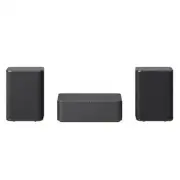
2 Wireless Receiver Quick Guide Installing and using the Product B A a a a A Rear Speakers B Wireless Receiver Wireless Receiver Quick Guide
4 Table of Contents Wireless Receiver Quick Guide 2 Installing and using the Product Installation 5 Supported LG Sound Bar models 6 Connecting the Product Setting up surround sound 9 Turning surround sound on/off Safety Precautions 10 Safety and Regulatory Before Reporting Product Malfunction 13 Tro...
5 Installation Supported LG Sound Bar models SPQ8-S can only be connected to some LG sound bar models and is not compatible with sound bars from other companies.For more information on compatible models, please scan the following QR code. (Compatible LG Sound Bar) Installation
Ask a question
Related manuals
Popular LG Sound Bars


More LG Sound Bars models
 LG SP70Y User Manual
 LG SPD7R User Manual
 LG SPD7Y User Manual
 LG SPK8-S User Manual
 LG SPM2 User Manual
 LG SPM7A User Manual
 LG SQC1 User Manual
 LG SQC2 User Manual
 LG SQC4R User Manual
 LG WTP3 User Manual
 LG GX User Manual
 LG LAP240 User Manual
 LG LAS260B User Manual
 LG LAS454B User Manual
 LG LAS465B User Manual