Page 2 - Safety Information; CAUTION
1 Getting Started Getting Started 2 Getting Star ted 1 Safety Information CAUTION RISK OF ELECTRIC SHOCK DO NOT OPEN CAUTION: TO REDUCE THE RISK OF ELECTRIC SHOCK DO NOT REMOVE COVER (OR BACK) NO USER-SERVICEABLE PARTS INSIDE REFER SERVICING TO QUALIFIED SERVICE PERSONNEL. This lightning flash with ...
Page 5 - Getting Started; Troubleshooting; Table of Contents
Table of Contents 5 1 2 3 4 5 1 Getting Started 2 Safety Information 6 Unique features 6 Introduction 7 Speaker 8 Woofer station 2 Connecting 9 Connecting the AC Adapter 9 Speaker and Woofer station connection 3 Operating 12 Charging the speaker 12 – Auto wireless charging12 – Charging with the AC a...
Page 6 - Unique features; Introduction
Getting Started 6 Getting Star ted 1 Unique features Auto power down This unit supports to turn off by itself for saving energy consumption. (Page 25) Portable In Listen to music from your portable device. (Smart phone, Notebook, etc..) BLUETOOTH ® Listens to music stored on your Bluetooth device. L...
Page 7 - Speaker
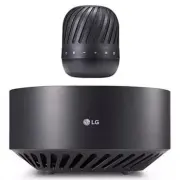
Getting Started 7 Getting Star ted 1 Speaker b i c j d g k e h lm n o f a a Microphone b Power LED c Bluetooth LED d Dual Play LED e 1 Turns On / Off : Press it. f j - Adds a Bluetooth device for multi pairing. (Press and hold j ) - Changes to Bluetooth mode in portable mode. (Press j ) * When you c...
Page 8 - Woofer station
Getting Started 8 Getting Star ted 1 Woofer station a b c d e a Levitates or descends speaker manually. b Mood LED light c / button - Turn up maximum volume of speaker . (Press ) - Initialize woofer station. (Press and hold ) d DC OUT 5 V 0 0.5 A ( USB port only for charging mobile devices ) e DC IN...
Page 9 - Connecting the; Speaker and
2 Connecting Connecting 9 Connecting 2 Connecting the AC Adapter Connect the woofer station to the power supply with the supplied AC adapter.1. Connect the supplied AC power cord to the AC adapter. 2. Connect the AC adapter cable to DC IN adapter input. 3. Plug the AC power cord into an AC outlet. O...
Page 12 - Charging the speaker; Auto wireless charging; Charging with the AC adapter
3 Operating Operating 12 Oper ating 3 Charging the speaker Auto wireless charging Battery is automatically charging, when battery is completely discharged (0 %).1. Connect the speaker and woofer station. Follow the “Setting up the woofer station” on page 9-10. 2. When battery is completely discharge...
Page 13 - Checking the charging status; Checking Battery status
Operating 13 Oper ating 3 Checking the charging status When speaker's battery is charging, you can check the charging status by Battery LED . LED Description Green Off Red Battery is fully charged. Green Off Red Battery is charging. y If you listen to the music while charging, it will take longer to...
Page 14 - Levitating
Operating 14 Oper ating 3 Levitating Creates visual effect using electromagnets housed inside the woofer station. Also you can enjoy 360–degree sound and deep bass of the subwoofer embedded inside the woofer station.1. Connect the speaker and woofer station. Follow the “Setting up the woofer station...
Page 15 - Charging mobile device
Operating 15 Oper ating 3 y Levitating is limited to only PJ9 model. Do not use other PJ series speaker. y When t he speaker completes levitation or descent, it stops melody. y When you turn off the melody, press and hold the button on woofer station for 3 seconds. To cancel it, press and hold the b...
Page 16 - Basic Operations; Using power button; Bluetooth Connection
Operating 16 Oper ating 3 Basic Operations Using power button Power On / Off Press the 1 button. Bluetooth Connection LG PJs(XX) Play the desired music on the Bluetooth device. After pairing, you can control playback using the buttons on the unit. (page 17, 20-21) Bluetooth LED status Check the Blue...
Page 17 - Simple Operation Guide
Operating 17 Oper ating 3 Simple Operation Guide Function How to Status Power On Press the 1 button. Power LED turns on with the sound. Power Off Press the 1 button. Power LED turns off with the sound. Bluetooth pairing When Bluetooth LED blinks, select LG PJs (XX) from device list on your Bluetooth...
Page 18 - Handsfree Function
Operating 18 Oper ating 3 Handsfree Function You can receive incoming call on your Bluetooth device to this unit. Connect the unit to a Bluetooth device. Function How to Receive a call. Press T . Reject a call. Press and hold T End the call. Press T . y Only smartphone is available to use this funct...
Page 19 - Listening to Music from
Operating 19 Oper ating 3 Listening to Music from Your External Device The unit can be used to listen to the music from many types of external device. (Not supplied) 1. Connect the external device to the Portable In connector of the unit. 2. Turn the power on by pressing 1 button . 3. Turn the exter...
Page 20 - Using BLUETOOTH®; Listening to music stored on the
Operating 20 Oper ating 3 Using BLUETOOTH® technology About BLUETOOTH Bluetooth i s wireless communication technology for short range connection. The sound may be interrupted when the connection interfered by the other electronic wave or you connect the Bluetooth in the other rooms. Connecting indiv...
Page 22 - Multi Pairing
Operating 22 Oper ating 3 Multi Pairing The unit can be connected to two Bluetooth devices at the same time. Pairing with Two Devices If speaker is connected with woofer station, you can not use this mode. Disconnect the speaker and the woofer station connection as follows. - Press and hold j button...
Page 23 - Dual Play Connection
Operating 23 Oper ating 3 Dual Play Connection (Optional) You can enjoy the sound in stereo by using two speakers. For enjoying Dual play, you need to purchase another speaker. 1. Press and hold the each speaker’s button for 2 seconds. Then the speakers are ready to Dual play mode. - Beep sound is h...
Page 25 - Other Operation; Initializing; Resetting; Notice for Auto Power Off
Operating 25 Oper ating 3 Other Operation Initializing When the unit does not operate normally ( Bluetooth pairing, Woofer station connection...), it need to be initialized. y Speaker : Press and hold j button for 7 seconds. Then Power and Bluetooth LED blinks 4 times. The information of Bluetooth c...
Page 26 - Troubleshooting
4 Troubleshooting Troubleshooting 26 Troubleshoo ting 4 Troubleshooting Problem Cause & Correction No Power. or power off after 10 seconds. y The battery is discharged. Recharge the battery. y Connect the unit to the power supply with the AC adapter. No sound or sound distortion. y The unit or y...
Page 27 - Trademarks and
5 Appendix Appendix 27 Appendix 5 Trademarks and Licenses The Bluetooth® word mark and logos are registered trademarks owned by the Bluetooth SIG, Inc. and any use of such marks by LG Electronics is under license. Other trademarks and trade names are those of their respective owners. Handling the Un...
Page 28 - Specifications
Appendix 28 Appendix 5 Specifications Speaker Power requirements 5 V 0 1.8 A (AC adapter) Built-in rechargeable battery Power consumption 6 W Dimensions (W x H x D) Approx. 83.5 mm X 102.3 mm X 83.5 mm (3.29 inches x 4.03 inches x 3.29 inches) Operating temperature 5 °C to 35 °C (41 °F to 95 °F) Ope...