Laser NAVC-307 - User Manual
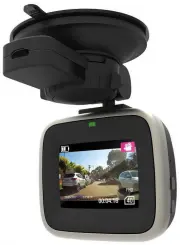
Laser NAVC-307 Dashcam – User Manual, read for free online in PDF format. We hope this helps you resolve any issues you may have. If you have further questions, please contact us through the contact form.


Table of Contents:
- Page 2 – USER MANUAL; TABLE ON CONTENTS; IMPORTANT SAFETY INSTRUCTIONS AND PRECAUTIONS
- Page 3 – PRODUCT CONNECTIONS AND USE
- Page 4 – WHATS IN THE BOX
- Page 5 – Recording; In the event of an incident / accident; STOP the Recording
- Page 6 – Digital Video
- Page 7 – Playback
- Page 8 – USB Connection; Resolution
- Page 9 – Connecting the NAVC-307 in the Car
- Page 10 – Fault
NAVC-307
USER MANUAL
1
Please read carefully before use
It is recommended to use a Class 4 ( 4Mb/s write speed) Micro SDHC card for optimal
performance.
Some “Extreme Speed” class 10 UHS 2 cards may not function correctly
"Loading the manual" means you need to wait until the file loads and becomes available for online reading. Some manuals are very large, and the time they take to appear depends on your internet speed.
Summary
NAVC-307 USER MANUAL 2 TABLE ON CONTENTS Important Safety Instructions and Precautions 2 Product Connections and Use 3 What’s in the box 4 Features and Operation 4 Power on/off function (auto on/off) 4 Auto Record when turned on 4 Installation on the car windscreen 4 Recording 5 Change between modes...
NAVC-307 USER MANUAL 3 PRODUCT CONNECTIONS AND USE 1 Microphone 9 Up Button 2 Suction Mount Fitting 10 Micro SD Card Slot 3 Power Button 11 LED Indicator Light 4 Reset Button 12 Camera 5 Menu Button 13 Speaker (Note: For button sounds only) 6 OK Button 14 Suction Mount 7 Micro USB Port 15 2 nd USB P...
NAVC-307 USER MANUAL 4 WHATS IN THE BOX FEATURES AND OPERATION Note: A memory card is required for operation The NAVC-307 requires a Micro SD card (not included) to record video / image content. (see page 8 for a table showing SD card capacity and the relevant amount of video / image content able to...

