Page 2 - USER MANUAL; TABLE OF CONTENTS
USER MANUAL NAVCAM-616GPS 2 TABLE OF CONTENTS IMPORTANT SAFETY INSTRUCTIONS AND PRECAUTIONS 3 WHAT’S IN THE BOX 3 MICRO SD CARD REQUIREMENTS 3 CAMERA BUTTON AND HARDWARE OVERVIEW 4 WHAT DO THE BUTTONS DO? 5 ON SCREEN DISPLAY 6 WHAT DO THE LED INDICTORS MEAN? 7 OPERATING THE NAVCAM-616GPS FOR THE FIR...
Page 3 - IMPORTANT SAFETY INSTRUCTIONS AND PRECAUTIONS
USER MANUAL NAVCAM-616GPS 3 IMPORTANT SAFETY INSTRUCTIONS AND PRECAUTIONS - Read all instructions carefully before use. - Retain manuals for future reference. - Use this product only in the manner described. - Only use a water-dampened soft-cloth to clean the surface of this product. - The following...
Page 4 - CAMERA BUTTON AND HARDWARE OVERVIEW
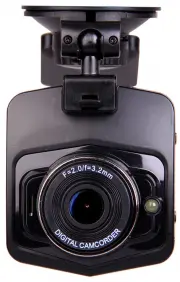
USER MANUAL NAVCAM-616GPS 4 CAMERA BUTTON AND HARDWARE OVERVIEW 1 Bracket interface 9 LED screen 2 USB interface 10 OK button 3 Speaker 11 Up button 4 LED Lamp 12 Down button 5 TF card slot 13 Emergency record button (SOS) 6 Power button 14 MODE Button (P) 7 Menu button (M) 15 Reset (R) 8 LED indica...
Page 5 - WHAT DO THE BUTTONS DO?
USER MANUAL NAVCAM-616GPS 5 WHAT DO THE BUTTONS DO? Button Button Name Video Mode Photo Mode Playback Mode Power On / Off – Press and hold to turn On and Off On / Off – Press and hold to turn On and Off On / Off – Press and hold to turn On and Off M Mute (While recording) Setting (Recording stopped)...
Page 6 - ON SCREEN DISPLAY; PHOTO SCREEN
USER MANUAL NAVCAM-616GPS 6 ON SCREEN DISPLAY PHOTO SCREEN (PRESS PLAY FROM THE MENU SCREEN) 1 Photo mode 2 Qty photos taken 3 Photo resolution 4 Time of cycle taking photo 5 SD Card (logo indicates inserted) 6 Battery status indicator PLAYBACK SCREEN (RECORDING STOPPED) 1 Menu Settings (Press to To...
Page 7 - OPERATING THE NAVCAM-616GPS FOR THE FIRST TIME; AUTO RECORD WHEN TURNED ON
USER MANUAL NAVCAM-616GPS 7 WHAT DO THE LED INDICTORS MEAN? Indicator Status Solid Green Camera is turned On. Flashing Green Camera is recording OPERATING THE NAVCAM-616GPS FOR THE FIRST TIME Connect a USB car charger to the car’s 12v Cigarette lighter socket and the other end to the Micro USB port ...
Page 9 - USER SETTINGS
USER MANUAL NAVCAM-616GPS 9 USER SETTINGS From the main screen, press the MENU button, then using a combination of the arrow keys and the OK button to confirm your choice, select settings from the following options list: Feature Options Description Size (Video Resolution) 1080p 30fps 720p 30fps Chan...
Page 10 - TRACKING SOFTWARE – QUICK GUIDE
USER MANUAL NAVCAM-616GPS 10 Auto Off If no buttons have been pressed and if no recording is taking place, the unit can be shut off automatically after set periods of time Select between 1, 3, 5 mins or [turn feature] Off. Screen Off Turn the screen light on or off according to your driving situatio...
Page 11 - THE GPS SOFTWARE - OVERVIEW
USER MANUAL NAVCAM-616GPS 11 THE GPS SOFTWARE - OVERVIEW 1 Select AVI File Click to choose an AVI file for playback. Note: Files for playback should be saved to the local hard drive. 2 Folder Click to choose from a folder for playback 3 Delete File Click to remove an unwanted file 4 Screenshot Click...
Page 13 - PRODUCT SPECIFICATIONS
USER MANUAL NAVCAM-616GPS 13 PRODUCT SPECIFICATIONS LCD Screen 2.31” TFT Colour LCD Display Video Resolution 1920 x 1080P 30 frames/s, 1920 x 720P 30 frames/s Built-in Speaker / Microphone Yes / Yes Auto Recording on power-up Yes. Recording starts on ignition power (Charging socket) Date / Time stam...