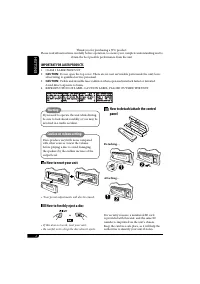
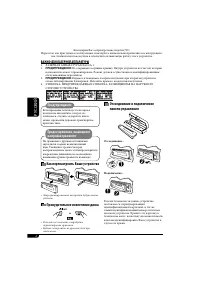
Page 2 - ENGLISH; IMPORTANT FOR LASER PRODUCTS; How to detach/attach the control; Caution on volume setting:; How to reset your unit; How to forcibly eject a disc
2 ENGLISH Thank you for purchasing a JVC product. Please read all instructions carefully before operation, to ensure your complete understanding and to obtain the best possible performance from the unit. IMPORTANT FOR LASER PRODUCTS 1. CLASS 1 LASER PRODUCT2. CAUTION: Do not open the top cover. Ther...
Page 3 - How to read this manual; CONTENTS; Control panel —
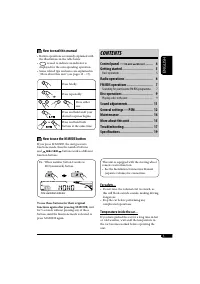
ENGLISH 3 How to read this manual • Button operations are mainly explained with the illustrations in the table below. • is used to indicate an indicator is displayed for the corresponding operation. • Some related tips and notes are explained in “More about this unit” (see pages 15 – 17). Press brie...
Page 4 - Parts identification; Display window
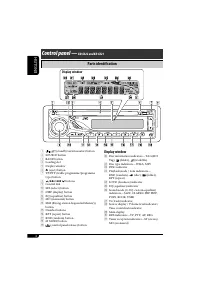
4 ENGLISH Control panel — KD-G612/KD-G611/KD-G511 Display window ; Disc information indicators—TAG (ID3 Tag), (folder), (track/file) a Disc type indicators—WMA, MP3 s DISC indicator d Playback mode / item indicators— RND (random), (disc), (folder), RPT (repeat) f LOUD (loudness) indicator g EQ (equa...
Page 5 - Basic settings; Setting the clock; The power is turned off; Getting started; Basic operations; To turn off the power
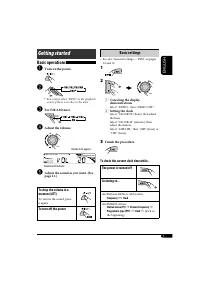
ENGLISH 5 Basic settings • See also “General settings — PSM” on pages 12 and 13. 1 2 1 Canceling the display demonstrations Select “DEMO,” then “DEMO OFF.” 2 Setting the clock Select “CLOCK H” (hour), then adjust the hour. Select “CLOCK M” (minute), then adjust the minute. Select “24H/12H,” then “24...
Page 6 - Storing stations in memory; FM station automatic presetting —; Radio operations; Start searching for a station.; To tune in to a station manually
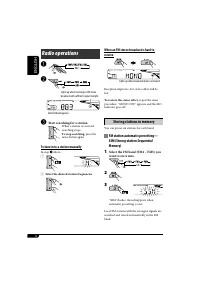
6 ENGLISH When an FM stereo broadcast is hard to receive Reception improves, but stereo effect will be lost. To restore the stereo effect, repeat the same procedure. “MONO OFF” appears and the MO indicator goes off. Storing stations in memory You can preset six stations for each band. FM station aut...
Page 7 - FM RDS operations; What you can do with RDS; Select one of your favorite; Manual presetting; Listening to a preset station
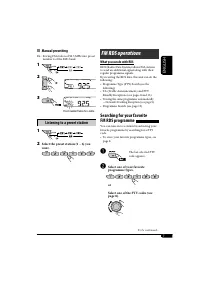
7 ENGLISH FM RDS operations What you can do with RDS RDS (Radio Data System) allows FM stations to send an additional signal along with their regular programme signals.By receiving the RDS data, this unit can do the following:• Programme Type (PTY) Search (see the following) • TA (Traffic Announceme...
Page 8 - Using the standby receptions; TA Standby Reception; Storing your favorite programme; PTY codes
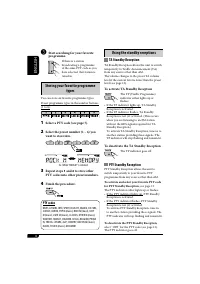
8 ENGLISH Using the standby receptions TA Standby Reception TA Standby Reception allows the unit to switch temporarily to Traffic Announcement (TA) from any source other than AM.The volume changes to the preset TA volume level if the current level is lower than the preset level (see page 13). To act...
Page 9 - Tracing the same programme—; Disc operations; Playing a disc in the unit
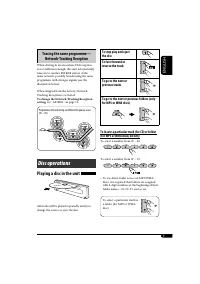
9 ENGLISH Tracing the same programme— Network-Tracking Reception When driving in an area where FM reception is not sufficient enough, this unit automatically tunes in to another FM RDS station of the same network, possibly broadcasting the same programme with stronger signals (see the illustration b...
Page 10 - Prohibiting disc ejection; Changing the display information; While playing an audio CD or a CD Text; Selecting the playback modes; Select your desired playback mode.; Mode
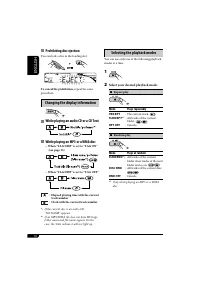
10 ENGLISH Prohibiting disc ejection You can lock a disc in the loading slot. To cancel the prohibition, repeat the same procedure. Changing the display information While playing an audio CD or a CD Text While playing an MP3 or a WMA disc • When “TAG DISP” is set to “TAG ON” (see page 13) • When “TA...
Page 11 - Sound adjustments; BAS; Adjusting the sound; Preset values
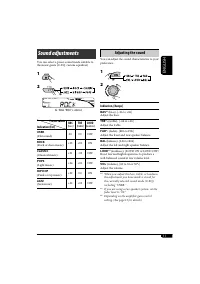
11 ENGLISH Sound adjustments You can select a preset sound mode suitable to the music genre (C-EQ: custom equalizer). 1 2 Indication (For) BAS TRE LOUD (bass) (treble) (loudness) USER (Flat sound) 00 00 OFF ROCK (Rock or disco music) +03 +01 ON CLASSIC (Classical music) +01 –02 OFF POPS (Light music...
Page 12 - Indications; General settings — PSM
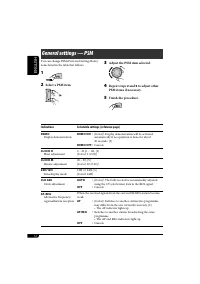
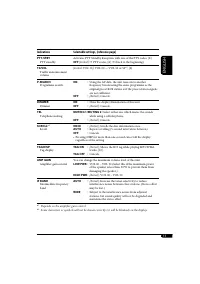
12 ENGLISH Indications Selectable settings, [reference page] DEMO Display demonstration DEMO ON : [Initial]; Display demonstration will be activated automatically if no operation is done for about 20 seconds, [5]. DEMO OFF : Cancels. CLOCK H Hour adjustment 0 – 23 (1 – 12), [5] [Initial: 0 (0:00)] C...
Page 14 - Maintenance; How to clean the connectors; To keep discs clean
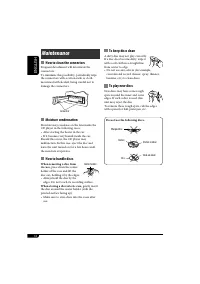
14 ENGLISH Maintenance How to clean the connectors Frequent detachment will deteriorate the connectors.To minimize this possibility, periodically wipe the connectors with a cotton swab or cloth moistened with alcohol, being careful not to damage the connectors. Moisture condensation Moisture may con...
Page 15 - More about this unit
ENGLISH 15 • When Alternative Frequency Reception is activated (with AF selected), Network-Tracking Reception is also activated automatically. On the other hand, Network-Tracking Reception cannot be deactivated without deactivating Alternative Frequency Reception. (See page 12.) • If you want to kno...
Page 16 - Playing an MP3/WMA disc
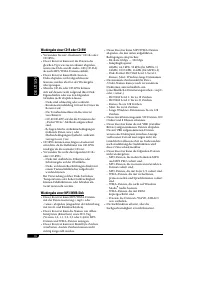
16 ENGLISH Playing a CD-R or CD-RW • Use only “finalized” CD-Rs or CD-RWs.• This unit can play back only files of the same type which are first detected if a disc includes both audio CD (CD-DA) files and MP3/WMA files. • This unit can play back multi-session discs; however, unclosed sessions will be...
Page 17 - Changing the source; General settings—PSM; Symptoms; General; Troubleshooting
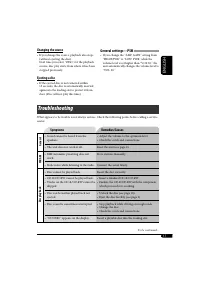
ENGLISH 17 Changing the source • If you change the source, playback also stops (without ejecting the disc). Next time you select “DISC” for the playback source, disc play starts from where it has been stopped previously. Ejecting a disc • If the ejected disc is not removed within 15 seconds, the dis...
Page 19 - Specifications; AUDIO AMPLIFIER SECTION
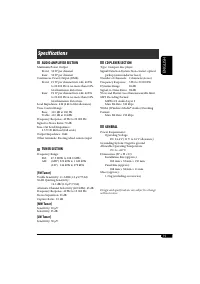
ENGLISH 19 Specifications AUDIO AMPLIFIER SECTION Maximum Power Output: Front: 50 W per channel Rear: 50 W per channel Continuous Power Output (RMS): Front: 19 W per channel into 4 Ω , 40 Hz to 20 000 Hz at no more than 0.8% total harmonic distortion. Rear: 19 W per channel into 4 Ω , 40 Hz to 20 00...
Page 20 - DEUTSCH; WICHTIG FÜR LASER-PRODUKTE; Anbringen/Abnehmen des; Achtung bei der Lautstärkeeinstellung:; Zurücksetzen des Geräts; Zwangsweises Ausschieben einer Disk
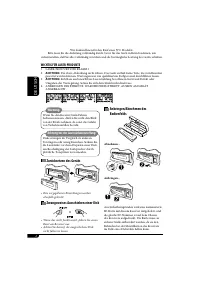
2 DEUTSCH Wir danken Ihnen für den Kauf eines JVC Produkts. Bitte lesen Sie die Anleitung vollständig durch, bevor Sie das Gerät in Betrieb nehmen, um sicherzustellen, daß Sie alles vollständig verstehen und die bestmögliche Leistung des Geräts erhalten. WICHTIG FÜR LASER-PRODUKTE 1. LASER-PRODUKT D...
Page 21 - Wie Sie diese Anleitung lesen; INHALT; Bedienfeld —
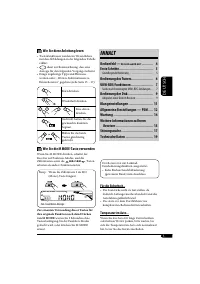
DEUTSCH 3 Wie Sie diese Anleitung lesen • Tastenfunktionen werden im Wesentlichen mit den Abbildungen in der folgenden Tabelle erklärt. • dient zur Kennzeichnung, dass eine Anzeige für den folgenden Vorgang erscheint. • Einige zugehörige Tipps und Hinweise werden unter „Weitere Informationen zu Ihre...
Page 22 - Beschreibung der Teile; Displayfenster
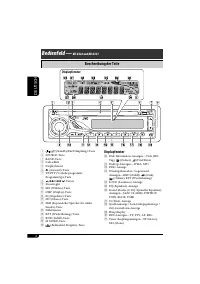
4 DEUTSCH Displayfenster ; Disk-Information-Anzeigen—TAG (ID3- Tag), (Ordner), (Titel/Datei) a Disktyp-Anzeigen—WMA, MP3 s DISC-Anzeige d Wiedergabemodus / Gegenstand- Anzeigen—RND (Zufall), (Disk), (Ordner), RPT (Wiederholung) f LOUD (Loudness)-Anzeige g EQ (Equalizer)-Anzeige h Sound-Modus (C-EQ: ...
Page 23 - Grundlegende Einstellungen; Einstellung der Uhr; Beenden Sie den Vorgang.; Erste Schritte; Grundlegende Bedienung; Stellen Sie die Lautstärke ein.; Zum Ausschalten des Geräts
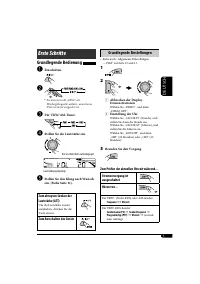
DEUTSCH 5 Grundlegende Einstellungen • Siehe auch „Allgemeine Einstellungen — PSM“ auf Seite 12 und 13. 1 2 1 Abbrechen der Display-Demonstrationen Wählen Sie „DEMO“, und dann „DEMO OFF“. 2 Einstellung der Uhr Wählen Sie „CLOCK H“ (Stunde), und stellen Sie dann die Stunde ein. Wählen Sie „CLOCK M“ (...
Page 24 - Speichern von Sendern; Automatische Voreinstellung von; Wählen Sie den UKW-; Bedienung des Tuners; Starten Sie den Sendersuchlauf.; So stellen Sie manuell Sender ein
6 DEUTSCH Wenn Sie Schwierigkeiten haben, eine UKW-Sendung in Stereo zu empfangen Der Empfang wird besser, jedoch geht der Stereo-Effekt verloren. Zum Wiederherstellen des Stereoeffekts wiederholen Sie das gleiche Verfahren. „MONO OFF“ erscheint, und die MO-Anzeige erlischt. Speichern von Sendern Si...
Page 25 - Funktionen von RDS; Wählen Sie einen ihres gewünschten; Manuelle Voreinstellung; Hören eines Festsenders; Wählen Sie den gewünschten
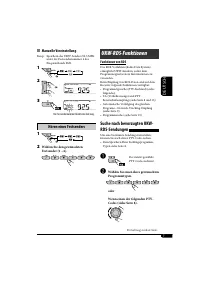
7 DEUTSCH UKW-RDS-Funktionen Funktionen von RDS Das RDS-Verfahren (Radio Data System) ermöglicht UKW-Sendern, außer dem Programmsignal weitere Informationen zu versenden.Beim Empfang von RDS-Daten sind auf dem Receiver folgende Funktionen verfügbar:• Programmtypsuche (PTY-Suchlauf) (siehe folgendes)...
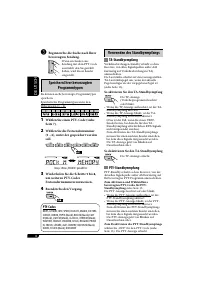
Page 26 - Verwenden des Standbyempfangs; Speichern Ihrer bevorzugten
8 DEUTSCH Verwenden des Standbyempfangs TA-Standbyempfang Verkehrsdurchsagen-Standby erlaubt es dem Receiver, von allen Signalquellen außer AM kurzzeitig auf Verkehrsdurchsagen (TA) umzuschalten.Die Lautstärke schaltet auf den voreingestellten TA-Lautstärkepegel um, wenn der aktuelle Pegel niedriger...
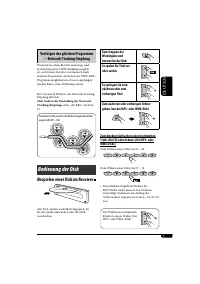
Page 27 - Verfolgen des gleichen Programms; Bedienung der Disk; Abspielen einer Disk im Receiver
9 DEUTSCH Verfolgen des gleichen Programms —Network-Tracking-Empfang Wenn Sie in einem Bereich unterwegs sind, in dem kein guter UKW-Empfang möglich ist, sucht dieser Receiver automatisch nach anderen Frequenzen, auf denen das UKW-RDS-Programm möglicherweise besser empfangen werden kann (siehe Abbil...
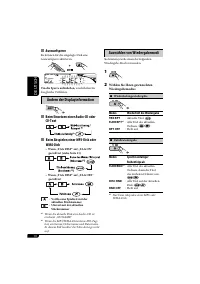
Page 28 - Auswurfsperre; Ändern der Displayinformation; Beim Einsetzen einer Audio-CD oder; Auswählen von Wiedergabemodi; Wählen Sie Ihren gewünschten; Modus
10 DEUTSCH Auswurfsperre Sie können für die eingelegte Disk eine Auswurfsperre aktivieren. Um die Sperre aufzuheben, wiederholen Sie das gleiche Verfahren. Ändern der Displayinformation Beim Einsetzen einer Audio-CD oder CD-Text Beim Abspielen einer MP3-Disk oder WMA-Disk • Wenn „TAG DISP“ auf „TAG ...
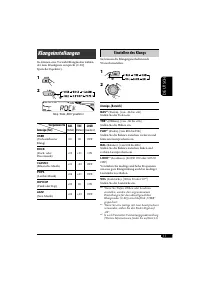
Page 29 - Klangeinstellungen; Einstellen des Klangs; Vorgabewerte
11 DEUTSCH Klangeinstellungen Sie können eine Vorwahl-Klangmodus wählen, der dem Musikgenre entspricht (C-EQ: Spezieller Equalizer). 1 2 Anzeige (Für) BAS TRE LOUD (Tiefen) (Höhen) (Loudness) USER (Unbeeinflusster Klang) 00 00 OFF ROCK (Rock- oder Discomusik) +03 +01 ON CLASSIC (Klassische Musik) +0...
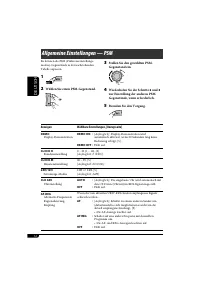
Page 30 - Anzeigen; Allgemeine Einstellungen — PSM; Wiederholen Sie die Schritte
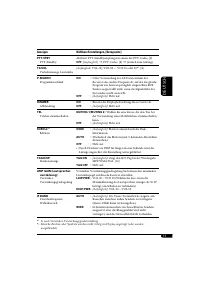
12 DEUTSCH Anzeigen Wählbare Einstellungen, [Bezugsseite] DEMO Display-Demonstration DEMO ON : [Anfänglich]; Display-Demonstration wird automatisch aktiviert, wenn 20 Sekunden lang keine Bedienung erfolgt, [5]. DEMO OFF : Hebt auf. CLOCK H Stundeneinstellung 0 – 23 (1 – 12), [5] [Anfänglich: 0 (0:00...
Page 32 - Wartung; Reinigen der Anschlüsse; Sauberhalten der Disks
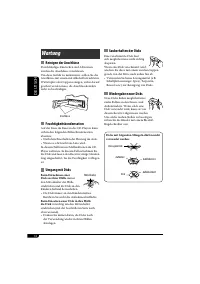
14 DEUTSCH Wartung Reinigen der Anschlüsse Durch häufiges Einstecken und Abtrennen werden die Anschlüsse verschlissen.Um diese Gefahr zu minimieren, sollten Sie die Anschlüsse mit einem mit Alkohol befeuchteten Wattetupfer oder Lappen reinigen, wobei darauf geachtet werden muss, die Anschlusskontakt...
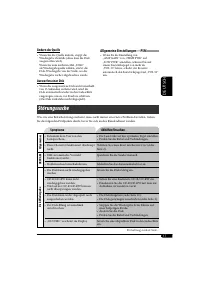
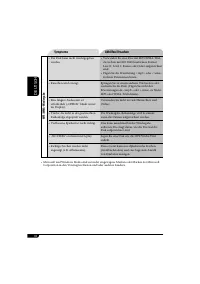
Page 35 - Ändern der Quelle; Allgemeine Einstellungen—PSM; Symptome; Allgemeines; Störungssuche
DEUTSCH 17 Ändern der Quelle • Wenn Sie die Quelle ändern, stoppt die Wiedergabe ebenfalls (ohne dass die Disk ausgeworfen wird). Wenn Sie zum nächsten Mal „DISC“ als Wiedergabequelle wählen, startet die Disk-Wiedergabe von der Stelle, wo die Wiedergabe vorher abgebrochen wurde. Auswerfen einer Disk...
Page 37 - Technische Daten; AUDIO-VERSTÄRKERSEKTION
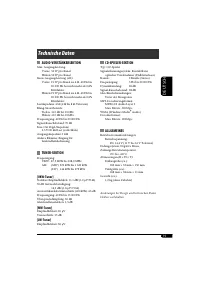
DEUTSCH 19 Technische Daten AUDIO-VERSTÄRKERSEKTION Max. Ausgangsleistung: Vorne: 50 W pro Kanal Hinten: 50 W pro Kanal Sinus-Ausgangsleistung (eff.): Vorne: 19 W pro Kanal an 4 Ω , 40 Hz bis 20 000 Hz bei nicht mehr als 0,8% Klirrfaktor. Hinten: 19 W pro Kanal an 4 Ω , 40 Hz bis 20 000 Hz bei nicht...
Page 38 - РУCCKИЙ; ВАЖНО ДЛЯ ЛАЗЕРНОЙ АППАРАТУРЫ; Отсоединение и подключение; Принудительное извлечение диска
2 РУCCKИЙ Благодарим Вас за приобретение изделия JVC. Перед тем, как приступать к эксплуатации, пожалуйста, внимательно прочитайте все инструкции с тем, чтобы полностью изучить и обеспечить оптимальную работу этого устройства. ВАЖНО ДЛЯ ЛАЗЕРНОЙ АППАРАТУРЫ 1. ЛАЗЕРНАЯ АППАРАТУРА КЛАССА 12. ПРЕДУПРЕЖ...
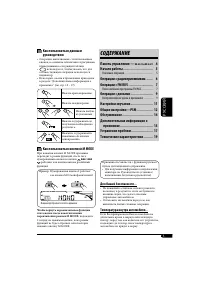
Page 39 - Как пользоваться данным; CОДЕРЖАНИЕ; Панель управления —
РУCCKИЙ 3 Как пользоваться данным руководством • Операции, выполняемые с использованием кнопок, в основном обозначаются рисунками, приведенными в следующей таблице. • используется, чтобы указать, что для соответствующей операции используется индикатор. • Некоторые советы и примечания приведены в раз...
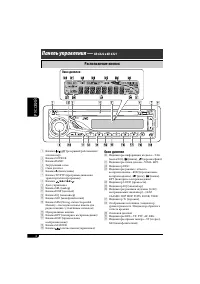
Page 40 - Расположение кнопок; Окно дисплея
4 РУCCKИЙ Панель управления — KD-G322 и KD-G321 Окно дисплея ; Индикаторы информации на диске—TAG (метка ID3), (папка), (дорожка/файл) a Индикаторы типов дисков—WMA, MP3 s Индикатор DISC d Индикаторы режима / объекта воспроизведения—RND (произвольное воспроизведение), (диск), (папка), RPT (повторное...
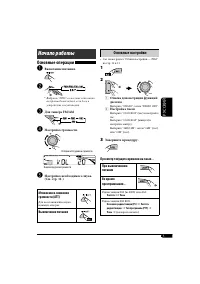
Page 41 - Основные настройки; Настройка часов; Начало работы; Основные операции; Настройка громкости.; Выключение питания
РУCCKИЙ 5 Основные настройки • См. также раздел “Общие настройки — PSM” на стр. 12 и 13. 1 2 1 Отмена демонстрации функций дисплея Выберите “DEMO”, затем “DEMO OFF”. 2 Настройка часов Выберите “CLOCK H” (час) и настройте час. Выберите “CLOCK M” (минута) и настройте минуту. Выберите “24H/12H”, затем ...
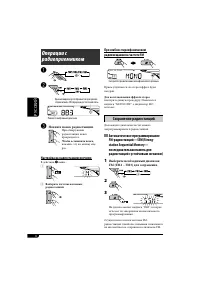
Page 42 - Сохранение радиостанций; Автоматическое программирование; Выберите необходимый диапазон; Настройка на радиостанцию вручную
6 РУCCKИЙ При слабом стереофоническом радиовещании на частоте FM Прием улучшается, но стереоэффект будет потерян. Для восстановления эффекта стерео повторите данную процедуру. Появляется надпись “MONO OFF”, а индикатор MO исчезает. Сохранение радиостанций Для каждого диапазона частот можно запрограм...
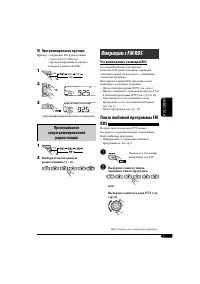
Page 43 - Операции с FM RDS; Что можно делать с помощью RDS; Выберите один из типов; Программирование вручную; Прослушивание; Выберите необходимую
РУCCKИЙ 7 Операции с FM RDS Что можно делать с помощью RDS Система RDS (Radio Data System) позволяет FM-радиостанциям отправлять дополнительный сигнал вместе с обычными сигналами программ.При приеме данных RDS приемник может выполнять следующие операции:• Поиск типа программы (PTY) (см. далее)• Прие...
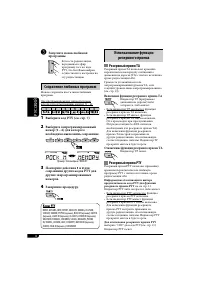
Page 44 - Использование функции; Резервный прием TA; Сохранение любимых программ; Коды PTY
8 РУCCKИЙ Использование функции резервного приема Резервный прием TA Резервный прием TA позволяет временно переключаться на передачу сообщений о движении на дорогах (TA) с любого источника, кроме радиостанции AM.Громкость устанавливается на запрограммированный уровень TA, если текущий уровень ниже з...
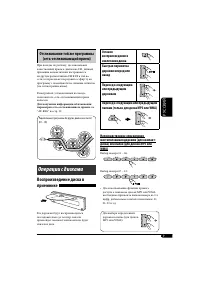
Page 45 - Отслеживание той же программы; Операции с дисками
РУCCKИЙ 9 Отслеживание той же программы (сеть-отслеживающий прием) При поездке по региону, где невозможен качественный прием в диапазоне FM, данный приемник автоматически настраивается на другую радиостанцию FM RDS в той же сети, которая может передавать в эфир ту же программу с помощью более сильны...
Page 46 - Запрещение извлечения диска; Изменение информации на дисплее; При воспроизведении звукового; Выбор режимов воспроизведения; Выберите необходимый режим; Режим
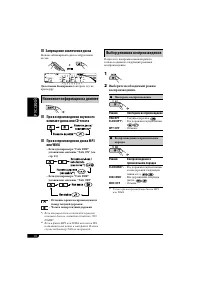
10 РУCCKИЙ Запрещение извлечения диска Можно заблокировать диск в загрузочном отсеке. Для отмены блокировки повторите эту же процедуру. Изменение информации на дисплее При воспроизведении звукового компакт-диска или CD-текста При воспроизведении диска MP3 или WMA • Если для параметра “TAG DISP” уста...
Page 47 - Настройки звучания; Настройка звучания
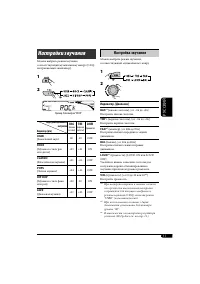
РУCCKИЙ 11 Настройки звучания Можно выбрать режим звучания, соответствующий музыкальному жанру (C-EQ: настраиваемый эквалайзер). 1 2 Индикатор (для) BAS TRE LOUD (низкие частоты) (верхние частоты) (громкость) USER (Бемольный звук) 00 00 OFF ROCK (Музыка в стиле рок или диско) +03 +01 ON CLASSIC (Кла...
Page 48 - Индикация; Общие настройки — PSM; Повторите действия
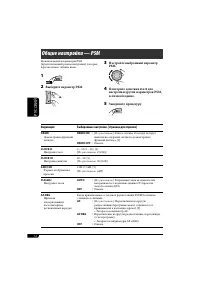
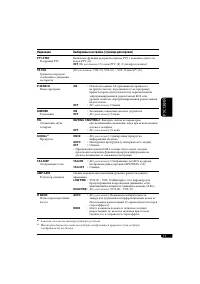
12 РУCCKИЙ Индикация Выбираемые настройки, [страница для справки] DEMO Демонстрация функций дисплея DEMO ON : [По умолчанию]; Если в течение 20 секунд не будет выполнено операций, начнется демонстрация функций дисплея, [5]. DEMO OFF : Отмена. CLOCK H Настройка часа 0 – 23 (1 – 12), [5] [По умолчанию...
Page 50 - Обслуживание; Очистка разъемов; Как обращаться с дисками; Хранение дисков в чистом виде
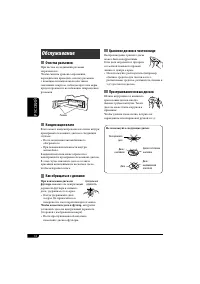
14 РУCCKИЙ Обслуживание Очистка разъемов При частом отсоединении разъемы загрязняются.Чтобы снизить уровень загрязнения, периодически проводите очистку разъемов с помощью ватных валиков или ткани, смоченных спиртом, соблюдая при этом меры предосторожности во избежание повреждения разъемов. Конденсац...
Page 52 - Воспроизведение диска MP3/WMA
16 РУCCKИЙ Воспроизведение компакт-дисков однократной и многократной записи • Используйте только “завершенные” компакт- диски однократной и многократной записи. • Данный приемник может воспроизводить только файлы одного типа, который первым будут распознан, если на диске содержатся файлы как в ф орм...
Page 53 - Смена источника звука; Общие настройки—PSM; Симптомы; Общие сведения; Устранение проблем
РУCCKИЙ 17 Смена источника звука • При смене источника воспроизведение прекращается (извлечения диска не происходит). При повторном выборе “DISC” в качестве источника звука воспроизведение диска начнется с того места, где оно было остановлено. Извлечение диска • Если в течение 15 секунд извлеченный ...
Page 54 - Воспроизведение MP3/WMA
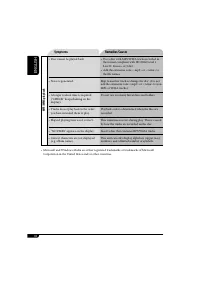
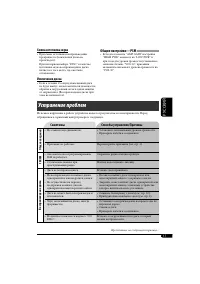
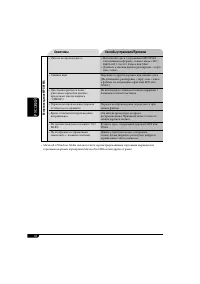
18 РУCCKИЙ Симптомы Способы устранения/Причины Воспроизведение MP3/WMA • Диск не воспроизводится.• Используйте диск с дорожками MP3/WMA, записанными в формате, совместимом с ISO 9660 Level 1, Level 2, Romeo или Joliet. • Добавьте к именам файлов расширение <.mp3> или <.wma>. • Слышен шум...
Page 55 - Технические характеристики; БЛОК УСИЛИТЕЛЕЙ ЗВУКА
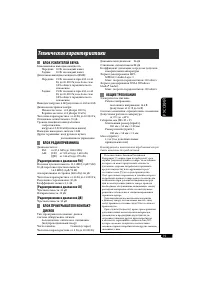
РУCCKИЙ 19 Технические характеристики БЛОК УСИЛИТЕЛЕЙ ЗВУКА Максимальная выходная мощность: Передние: 50 Вт на каждый канал Задние: 50 Вт на каждый канал Длительная выходная мощность (RMS): Передние: 19 Вт на канал в при 4 Ω , от 40 Гц до 20 000 Гц и не более чем 0,8% общего гармонического искажения...
Page 56 - Having TROUBLE with operation?; Please reset your unit; Refer to page of How to reset your unit; Haben Sie PROBLEME mit dem Betrieb?; Bitte setzen Sie Ihr Gerät zurück; Siehe Seite Zurücksetzen des Geräts; Затруднения при эксплуатации?; Пожалуйста, перезагрузите Ваше устройство; Для получения информации о перезагрузке Вашего устройства
EN, GE, RU 1105DTSMDTJEIN Having TROUBLE with operation? Please reset your unit Refer to page of How to reset your unit Haben Sie PROBLEME mit dem Betrieb? Bitte setzen Sie Ihr Gerät zurück Siehe Seite Zurücksetzen des Geräts Затруднения при эксплуатации? Пожалуйста, перезагрузите Ваше устройство Дл...