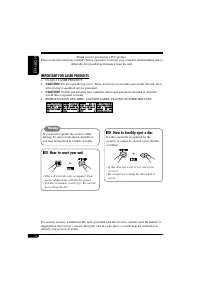
Page 2 - ENGLISH; IMPORTANT FOR LASER PRODUCTS; How to reset your unit
2 ENGLISH Thank you for purchasing a JVC product. Please read all instructions carefully before operation, to ensure your complete understanding and to obtain the best possible performance from the unit. IMPORTANT FOR LASER PRODUCTS 1. CLASS 1 LASER PRODUCT2. CAUTION: Do not open the top cover. Ther...
Page 3 - Control panel —; Contents
3 ENGLISH How to reset your unit ........................... 2How to forcibly eject a disc ................... 2How to read this manual ........................ 4How to use the MODE button ............... 4 Control panel — KD-S1501/ KD-G152/KD-G151 ................... 5 Parts identification ...........
Page 4 - How to read this manual; How to use the MODE button
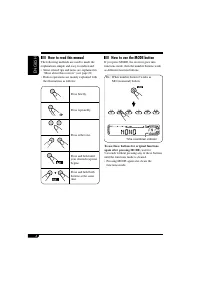
4 ENGLISH How to read this manual The following methods are used to made the explanations simple and easy-to-understand:• Some related tips and notes are explained in “More about this receiver” (see page 21). • Button operations are mainly explained with the illustrations as follows: Press briefly. ...
Page 5 - Display window; Parts identification
5 ENGLISH Control panel — KD-S1501/KD-G152/KD-G151 Display window 1 +/– buttons 2 DISP (display) button 3 Loading slot 4 Display window 5 MODE button 6 0 (eject) button 7 ¢ / 4 buttons 8 (standby/on/attenuator) button 9 SEL (select) button p EQ (equalizer) button q MO (monaural) button w SSM (Strong...
Page 6 - Getting started; Basic operations; Adjust the sound as you want.; To turn off the power; Caution on volume setting:
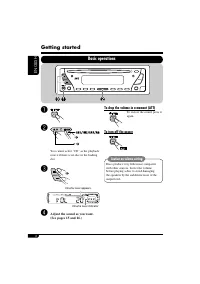
6 ENGLISH Getting started Basic operations ~ Ÿ You cannot select “CD” as the playback source if there is no disc in the loading slot. ! Volume level appears. Volume level indicator ⁄ Adjust the sound as you want. (See pages 15 and 16.) To drop the volume in a moment (ATT) To restore the sound, press...
Page 7 - Canceling the display; Finish the procedure.; To activate the display demonstration; Setting the clock; then adjust the minute.; To check the current clock time when the
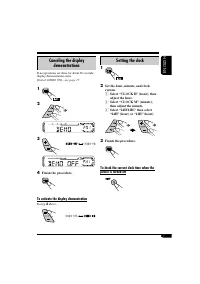
7 ENGLISH Canceling the display demonstrations If no operations are done for about 20 seconds, display demonstration starts. [Initial: DEMO ON]—see page 17. 1 2 3 4 Finish the procedure. To activate the display demonstration In step 3 above... Setting the clock 1 2 Set the hour, minute, and clock sy...
Page 8 - Radio operations; Listening to the radio; Start searching for a station.; To tune in to a station manually; When an FM stereo broadcast is hard to
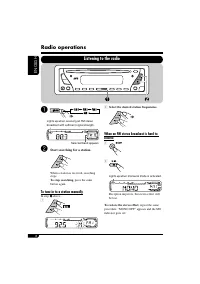
8 ENGLISH Radio operations Listening to the radio ~ Lights up when receiving an FM stereo broadcast with sufficient signal strength. Selected band appears. Ÿ Start searching for a station. When a station is received, searching stops. To stop searching, press the same button again. To tune in to a st...
Page 9 - Listening to a preset station; To check the current clock time while; Storing stations in memory; FM station automatic presetting —; you want to store into.; Manual presetting
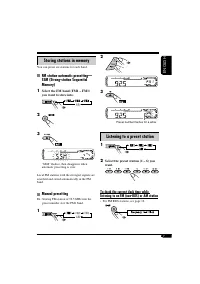
9 ENGLISH 2 3 Preset number flashes for a while. Listening to a preset station 1 2 Select the preset station (1 – 6) you want. To check the current clock time while listening to an FM (non-RDS) or AM station • For FM RDS stations, see page 12. Storing stations in memory You can preset six stations f...
Page 10 - FM RDS operations; Searching for your favorite FM RDS programme; Select one of your favorite; PTY codes
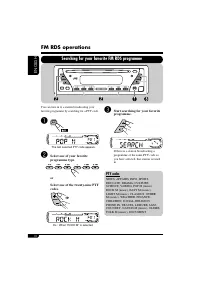
10 ENGLISH FM RDS operations Searching for your favorite FM RDS programme You can tune in to a station broadcasting your favorite programme by searching for a PTY code. ~ The last selected PTY code appears. Ÿ Select one of your favorite programme type. or Select one of the twenty-nine PTY codes. Ex....
Page 11 - What you can do with RDS; Storing your favorite programmes; TA Standby Reception
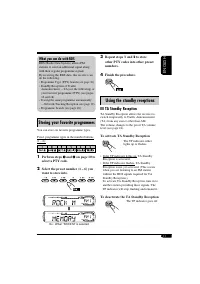
11 ENGLISH What you can do with RDS RDS (Radio Data System) allows FM stations to send an additional signal along with their regular programme signals.By receiving the RDS data, this receiver can do the following:• Programme Type (PTY) Search (see page 10)• Standby Reception of Traffic Announcement ...
Page 12 - Tracking the same programme—; PTY Standby Reception
12 ENGLISH Tracking the same programme— Network-Tracking Reception When driving in an area where FM reception is not sufficient enough, this receiver automatically tunes in to another FM RDS station of the same network, possibly broadcasting the same programme with stronger signals (see the illustra...
Page 13 - Disc operations; Playing a disc; To stop play and eject the disc
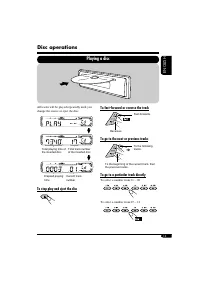
13 ENGLISH Disc operations Playing a disc All tracks will be played repeatedly until you change the source or eject the disc. To stop play and eject the disc To fast-forward or reverse the track Fast-forwards. Reverses. To go to the next or previous tracks To the following tracks. To the beginning o...
Page 14 - Prohibiting disc ejection; Selecting the playback modes; Select your desired playback mode.; Random play
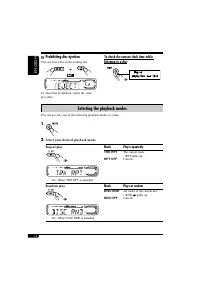
14 ENGLISH Prohibiting disc ejection You can lock a disc in the loading slot. To cancel the prohibition, repeat the same procedure. To check the current clock time while listening to a disc Selecting the playback modes You can use only one of the following playback modes at a time. 1 2 Select your d...
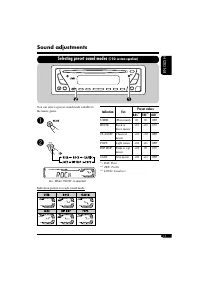
Page 15 - Sound adjustments; Selecting preset sound modes; Indication
15 ENGLISH Sound adjustments Selecting preset sound modes (C-EQ: custom equalizer) You can select a preset sound mode suitable to the music genre. ~ Ÿ Ex.: When “ROCK” is selected Indication pattern for each sound mode: Indication For: Preset values BAS * 1 TRE * 2 LOUD * 3 USER (Flat sound) 00 00 O...
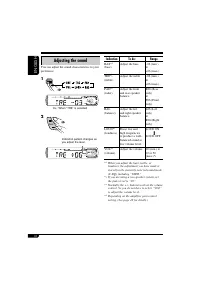
Page 16 - Adjusting the sound
16 ENGLISH Adjusting the sound You can adjust the sound characteristics to your preference. 1 Ex.: When “TRE” is selected 2 Indication pattern changes as you adjust the level. Indication To do: Range BAS* 1 (bass) Adjust the bass. –06 (min.) to +06 (max.) TRE* 1 (treble) Adjust the treble. –06 (min....
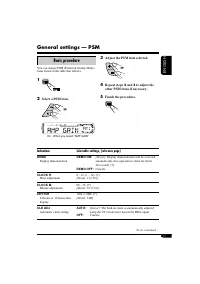
Page 17 - Indications; General settings — PSM; Basic procedure
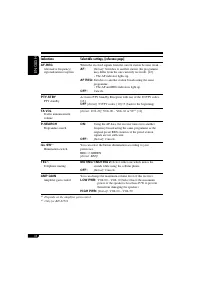
17 ENGLISH Indications Selectable settings, [reference page] DEMO Display demonstration DEMO ON: [Initial]; Display demonstration will be activated automatically if no operation is done for about 20 seconds, [7]. DEMO OFF: Cancels. CLOCK H Hour adjustment 0 – 23 (1 – 12), [7] [Initial: 0 (0:00)] CLO...
Page 19 - Detaching the control panel
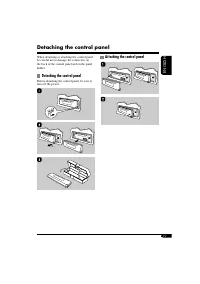
19 ENGLISH When detaching or attaching the control panel, be careful not to damage the connectors on the back of the control panel and on the panel holder. Detaching the control panel Before detaching the control panel, be sure to turn off the power. Attaching the control panel Detaching the control...
Page 20 - Maintenance; How to clean the connectors; To keep discs clean
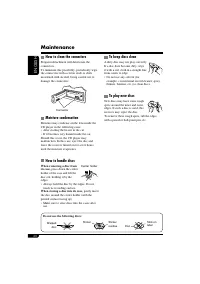
20 ENGLISH Maintenance How to clean the connectors Frequent detachment will deteriorate the connectors.To minimize this possibility, periodically wipe the connectors with a cotton swab or cloth moistened with alcohol, being careful not to damage the connectors. Connector Moisture condensation Moistu...
Page 21 - More about this receiver
21 ENGLISH More about this receiver Basic operations Turning off the power • If you turn off the power while listening to a disc, disc play will start from where playback has been stopped previously, next time you turn on the power. Tuner operations Storing stations in memory • During SSM search... ...
Page 22 - Symptoms; Troubleshooting
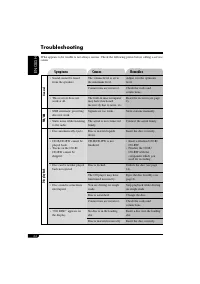
22 ENGLISH Symptoms Causes Remedies General • Sound cannot be heard from the speakers. The volume level is set to the minimum level. Adjust it to the optimum level. Connections are incorrect. Check the cords and connections. • This receiver does not work at all. The built-in microcomputer may have f...
Page 23 - Specifications; AUDIO AMPLIFIER SECTION
23 ENGLISH Specifications AUDIO AMPLIFIER SECTION Maximum Power Output: Front: 45 W per channel Rear: 45 W per channel Continuous Power Output (RMS): Front: 17 W per channel into 4 Ω , 40 Hz to 20 000 Hz at no more than 0.8% total harmonic distortion. Rear: 17 W per channel into 4 Ω , 40 Hz to 20 00...
Page 24 - DEUTSCH; WICHTIG FÜR LASER-PRODUKTE; Zurücksetzen des Geräts
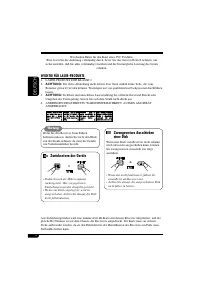
2 DEUTSCH Wir danken Ihnen für den Kauf eines JVC Produkts. Bitte lesen Sie die Anleitung vollständig durch, bevor Sie das Gerät in Betrieb nehmen, um sicherzustellen, daß Sie alles vollständig verstehen und die bestmögliche Leistung des Geräts erhalten. WICHTIG FÜR LASER-PRODUKTE 1. LASER-PRODUKT D...
Page 25 - Inhalt; Bedienfeld —; Wählen der vorgegebenen Klangmodi
3 DEUTSCH Inhalt *Für die Sicherheit.... • Die Lautstärke nicht zu laut stellen, da dadurch Außengeräusche überdeckt und das Autofahren gefährlich wird. • Das Auto vor dem Durchführen von komplizierten Bedienschritten anhalten. *Temperatur im Auto.... Wenn Sie das Auto für lange Zeit in heißem oder ...
Page 26 - Wie Sie diese Anleitung lesen; Wie Sie die MODE-Taste
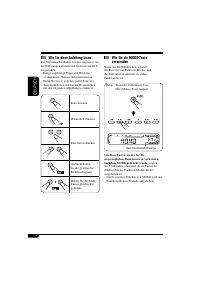
4 DEUTSCH Wie Sie diese Anleitung lesen Die folgenden Methoden werden eingesetzt, um die Erklärungen einfach und leichtverständlich zu gestalten:• Einige zugehörige Tipps und Hinweise werden unter „Weitere Informationen zu Ihrem Receiver“ gegeben (siehe Seite 21). • Tastenfunktionen werden im Wesent...
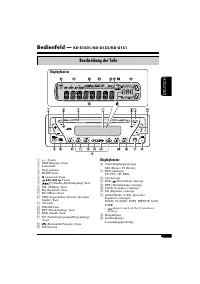
Page 27 - Displayfenster; Beschreibung der Teile
5 DEUTSCH Bedienfeld — KD-S1501/KD-G152/KD-G151 Displayfenster 1 +/– -Tasten 2 DISP (Display)-Taste 3 Ladeschlitz 4 Displayfenster 5 MODE-Taste 6 0 (Auswurf)-Taste 7 ¢ / 4 -Tasten 8 (Standby/Ein/Dämpfung)-Taste 9 SEL (Wählen)-Taste p EQ (Equalizer)-Taste q MO (Mono)-Taste w SSM (Sequentieller Speich...
Page 28 - Erste Schritte; Grundlegende Bedienung; Stellen Sie den Klang nach; Zum Ausschalten des Geräts; Achtung bei der Lautstärkeeinstellung:
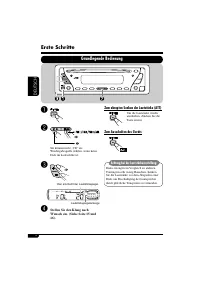
6 DEUTSCH Erste Schritte Grundlegende Bedienung ~ Ÿ Sie können nicht „CD“ als Wiedergabequelle wählen, wenn keine Disk im Ladeschlitz ist. ! Hier erscheint der Lautstärkepegel. Lautstärkepegelanzeige ⁄ Stellen Sie den Klang nach Wunsch ein. (Siehe Seite 15 und 16). Zum abrupten Senken der Lautstärke...
Page 29 - Beenden Sie den Vorgang.; Zur Aktivierung der Display-Demonstration; Einstellung der Uhr; Stellen Sie Stunde, Minute und; Zum Prüfen der aktuellen Uhrzeit, wenn
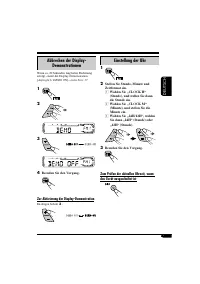
7 DEUTSCH Abbrechen der Display- Demonstrationen Wenn ca. 20 Sekunden lang keine Bedienung erfolgt, startet die Display-Demonstration. [Anfänglich: DEMO ON]—siehe Seite 17. 1 2 3 4 Beenden Sie den Vorgang. Zur Aktivierung der Display-Demonstration Im obigen Schritt 3 ... Einstellung der Uhr 1 2 Stel...
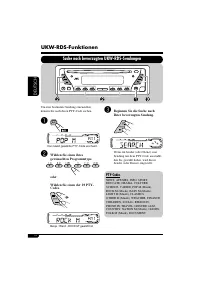
Page 30 - Bedienung des Tuners; Rundfunkempfang; Starten Sie den Sendersuchlauf.; So stellen Sie manuell Sender ein; Wenn Sie Schwierigkeiten haben, eine
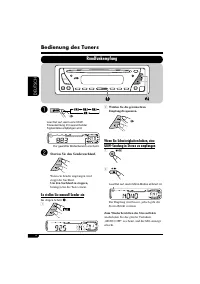
8 DEUTSCH Bedienung des Tuners Rundfunkempfang ~ Leuchtet auf, wenn eine UKW-Stereosendung mit ausreichender Signalstärke empfangen wird. Der gewählte Wellenbereich erscheint. Ÿ Starten Sie den Sendersuchlauf. Wenn ein Sender empfangen wird, stoppt der Suchlauf. Um den Suchlauf zu stoppen, betätigen...
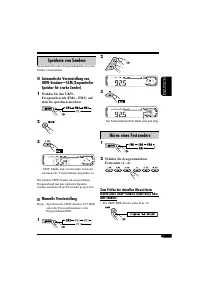
Page 31 - Hören eines Festsenders; Wählen Sie den gewünschten; Zum Prüfen der aktuellen Uhrzeit beim; Speichern von Sendern; Automatische Voreinstellung von; Wählen Sie den UKW-; Manuelle Voreinstellung
9 DEUTSCH 2 3 Die Festsendernummer blinkt eine Zeit lang. Hören eines Festsenders 1 2 Wählen Sie den gewünschten Festsender (1 – 6). Zum Prüfen der aktuellen Uhrzeit beim Hören eines UKW-Senders (nicht RDS) oder AM-Senders • Für UKW RDS-Sender siehe Seite 12. Speichern von Sendern Sie können für jed...
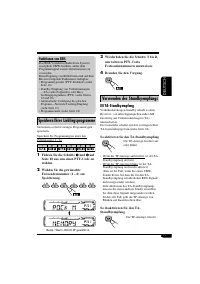
Page 33 - Funktionen von RDS; Speichern Ihrer Lieblingsprogramme
11 DEUTSCH Funktionen von RDS Das RDS-Verfahren (Radio Data System) ermöglicht UKW-Sendern, außer dem Programmsignal weitere Informationen zu versenden. Beim Empfang von RDS-Daten sind auf dem Receiver folgende Funktionen verfügbar: • Programmtypsuche (PTY-Suchlauf) (siehe Seite 10) • Standby-Empfan...
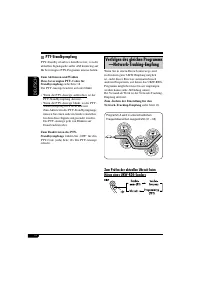
Page 34 - Verfolgen des gleichen Programms
12 DEUTSCH PTY-Standbyempfang PTY-Standby erlaubt es dem Receiver, von der aktuellen Signalquelle außer AM kurzzeitig auf Ihr bevorzugtes PTY-Programm umzuschalten. Zum Aktivieren und Wählen Ihres bevorzugten PTY-Codes für Standbyempfang siehe Seite 18. Die PTY-Anzeige leuchtet auf oder blinkt. • We...
Page 35 - Bedienung der Disk; Wiedergabe einer Disk
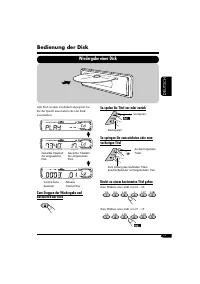
13 DEUTSCH Alle Titel werden wiederholt abgespielt, bis Sie die Quelle umschalten oder die Disk ausschieben. Zum Stoppen der Wiedergabe und Auswerfen der Disk Bedienung der Disk Wiedergabe einer Disk Gesamte Spielzeit der eingesetzten Disk Gesamte Titelzahl der eingesetzten Disk Verstrichene Spielze...
Page 36 - Auswählen von Wiedergabemodi; Wählen Sie Ihren gewünschten Wiedergabemodus.; Zufallswiedergabe; Auswurfsperre
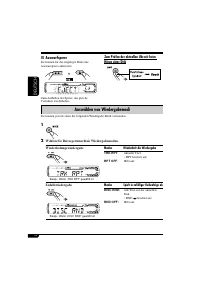
14 DEUTSCH Auswählen von Wiedergabemodi Sie können jeweils einen der folgenden Wiedergabe-Modi verwenden. 1 2 Wählen Sie Ihren gewünschten Wiedergabemodus. Wiederholungswiedergabe Beisp.: Wenn „TRK RPT“ gewählt ist Modus Wiederholt die Wiedergabe TRK RPT : Aktuelle Titel. • RPT leuchtet auf. RPT OFF...
Page 37 - Klangeinstellungen; Anzeige
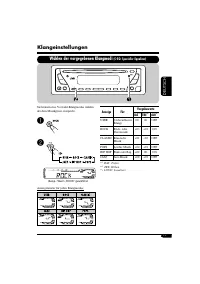
15 DEUTSCH Klangeinstellungen Wählen der vorgegebenen Klangmodi (C-EQ: Spezieller Equalizer) Sie können eine Vorwahl-Klangmodus wählen, der dem Musikgenre entspricht. ~ Ÿ Beisp.: Wenn „ROCK“ gewählt ist Anzeigemuster für jeden Klangmodus: Anzeige Für: Vorgabewerte BAS * 1 TRE * 2 LOUD * 3 USER (Unbe...
Page 38 - Einstellen des Klangs
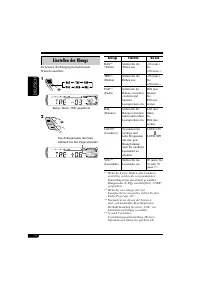
16 DEUTSCH Einstellen des Klangs Sie können die Klangeigenschaften nach Wunsch einstellen. 1 Beisp.: Wenn „TRE“ gewählt ist 2 Das Anzeigemuster wechselt, während Sie den Pegel einstellen. Anzeige Funktion Bereich BAS* 1 (Tiefen) Stellen Sie die Tiefen ein. –06 (min.) bis +06 (max.) TRE* 1 (Höhen) St...
Page 39 - Anzeigen; Allgemeine Einstellungen — PSM; Grundlegendes Verfahren; Stellen Sie den gewählten PSM-
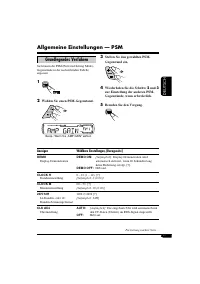
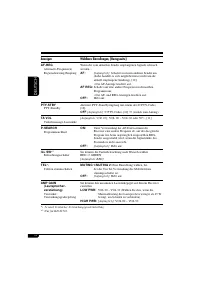
17 DEUTSCH Anzeigen Wählbare Einstellungen, [Bezugsseite] DEMO Display-Demonstration DEMO ON: [Anfänglich]; Display-Demonstration wird automatisch aktiviert, wenn 20 Sekunden lang keine Bedienung erfolgt, [7]. DEMO OFF: Hebt auf. CLOCK H Stundeneinstellung 0 – 23 (1 – 12), [7] [Anfänglich: 0 (0:00)]...
Page 41 - Abnehmen des Bedienfelds
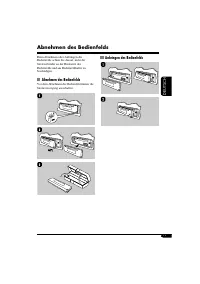
19 DEUTSCH Beim Abnehmen oder Anbringen des Bedienfelds achten Sie darauf, nicht die Steckverbinder an der Rückseite des Bedienfelds und am Bedienfeldhalter zu beschädigen. Abnehmen des Bedienfelds Vor dem Abnehmen des Bedienfeld immer die Stromversorgung ausschalten. Anbringen des Bedienfelds Abneh...
Page 42 - Wartung; Reinigen der Anschlüsse; Sauberhalten der Disks
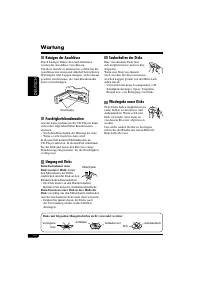
20 DEUTSCH Wartung Reinigen der Anschlüsse Durch häufiges Einstecken und Abtrennen werden die Anschlüsse verschlissen.Um diese Gefahr zu minimieren, sollten Sie die Anschlüsse mit einem mit Alkohol befeuchteten Wattetupfer oder Lappen reinigen, wobei darauf geachtet werden muss, die Anschlusskontakt...
Page 43 - Weitere Informationen zu Ihrem Receiver
21 DEUTSCH Weitere Informationen zu Ihrem Receiver Grundlegende Bedienung Ausschalten • Wenn Sie das Gerät beim Hören einer Disk ausschalten, startet die Disk-Wiedergabe beim nächsten Einschalten von der Stelle, wo die Wiedergabe vorher abgebrochen wurde. Bedienung des Tuners Speichern von Sendern •...
Page 44 - Symptome; Störungssuche
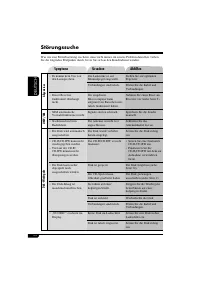
22 DEUTSCH Symptome Ursachen Abhilfen Allgemeines • Es kommt kein Ton von den Lautsprechern. Die Lautstärke ist auf Minimalpegel eingestellt. Stellen Sie auf optimalen Pegel ein. Verbindungen sind falsch. Prüfen Sie die Kabel und Verbindungen. • Dieser Receiver funktioniert überhaupt nicht. Der eing...
Page 45 - Technische Daten; AUDIO-VERSTÄRKERSEKTION
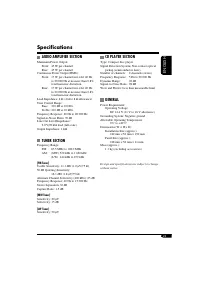
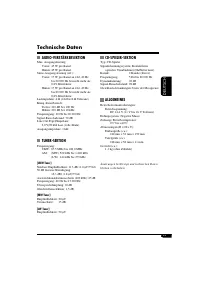
23 DEUTSCH Technische Daten AUDIO-VERSTÄRKERSEKTION Max. Ausgangsleistung: Vorne: 45 W pro Kanal Hinten: 45 W pro Kanal Sinus-Ausgangsleistung (eff.): Vorne: 17 W pro Kanal an 4 Ω , 40 Hz bis 20 000 Hz bei nicht mehr als 0,8% Klirrfaktor. Hinten: 17 W pro Kanal an 4 Ω , 40 Hz bis 20 000 Hz bei nicht...
Page 46 - РУCCKИЙ; ВАЖНО ДЛЯ ЛАЗЕРНОЙ АППАРАТУРЫ; Как перенастроить Ваше; Принудительное извлечение
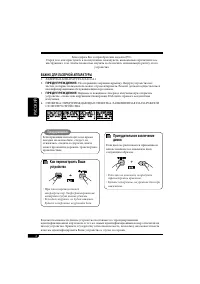
2 РУCCKИЙ Благодарим Вас за приобретение изделия JVC. Перед тем, как приступать к эксплуатации, пожалуйста, внимательно прочитайте все инструкции с тем, чтобы полностью изучить и обеспечить оптимальную работу этого устройства. ВАЖНО ДЛЯ ЛАЗЕРНОЙ АППАРАТУРЫ 1. ЛАЗЕРНАЯ АППАРАТУРА КЛАССА 12. ПРЕДУПРЕЖ...
Page 47 - Содержание; Панель управления; Выбор запрограммированных режимов
3 РУCCKИЙ *Для Вашей безопасности.... • Не повышайте слишком сильно громкость, поскольку в результате этого заглушаются внешние звуки, что делает опасным управление автомобилем. • Остановите автомобиль перед тем, как выполнять любые сложные операции. Содержание *Температура внутри автомобиля.... Есл...
Page 48 - Как пользоваться данным; Как пользоваться кнопкой MODE
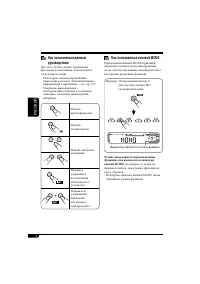
4 РУCCKИЙ Как пользоваться данным руководством Для того, чтобы сделать объяснения простыми и понятными, используются следующие методы:• Некоторые советы и примечания приведены в разделе “Дополнительная информация о приемнике” (см. стр. 21). • Операции, выполняемые с использованием кнопок, в основном...
Page 49 - Панель управления —; Окно дисплея; Расположение кнопок
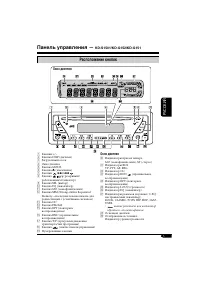
5 РУCCKИЙ Панель управления — KD-S1501/KD-G152/KD-G151 Окно дисплея 1 Кнопки +/– 2 Кнопка DISP (дисплей) 3 Загрузочный отсек 4 Окно дисплея 5 Кнопка MODE 6 Кнопка 0 (извлечение) 7 Кнопки ¢ / 4 8 Кнопка (резервный/ работающий/аттенюатор) 9 Кнопка SEL (выбор) p Кнопка EQ (эквалайзер) q Кнопка MO (моно...
Page 50 - Начало работы; Основные операции; Выключение питания
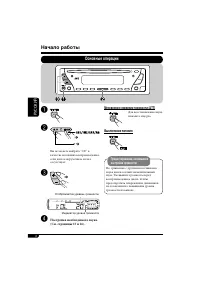
6 РУCCKИЙ Начало работы Основные операции ~ Ÿ Вы не можете выбрать “CD” в качестве источника воспроизведения, если диск в загрузочном отсеке отсутствует. ! Отображается уровень громкости. Индикатор уровня громкости ⁄ Настройка необходимого звука. (См. страницы 15 и 16). Мгновенное снижение громкости...
Page 51 - Завершите процедуру.; Включение демонстрации функций дисплея; Настройка часов; Установите час, минуту и формат
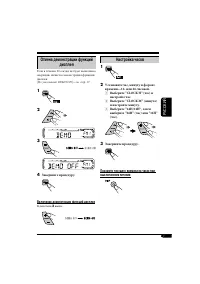
7 РУCCKИЙ Отмена демонстрации функций дисплея Если в течение 20 секунд не будет выполнено операций, начнется демонстрация функций дисплея. [По умолчанию: DEMO ON]—см. стр. 17. 1 2 3 4 Завершите процедуру. Включение демонстрации функций дисплея В действии 3 выше... Настройка часов 1 2 Установите час,...
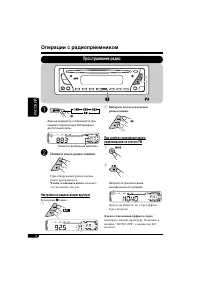
Page 52 - Операции с радиоприемником; Прослушивание радио; Начните поиск радиостанции.; Настройка на радиостанцию вручную
8 РУCCKИЙ Операции с радиоприемником Прослушивание радио ~ Данный индикатор отображается при приеме стереосигнала FM-передачи достаточной силы. Появится выбранный диапазон. Ÿ Начните поиск радиостанции. При обнаружении радиостанции поиск прекращается. Чтобы остановить поиск, нажмите эту же кнопку ещ...
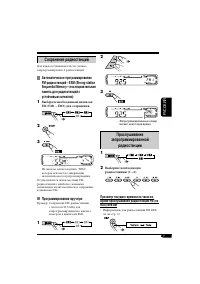
Page 53 - Прослушивание; Выберите необходимую; Сохранение радиостанций; Выберите необходимый диапазон; Программирование вручную
9 РУCCKИЙ 2 3 Запрограммированный номер мигает некоторое время. Прослушивание запрограммированной радиостанции 1 2 Выберите необходимую радиостанцию (1 – 6). Просмотр текущего времени на часах во время прослушивания радиостанции FM (не RDS) или AM • Информацию для радиостанций FM RDS см. на стр. 12....
Page 54 - Операции с FM RDS; Поиск любимой программы FM RDS; или; Запустите поиск любимой; Коды PTY
10 РУCCKИЙ Операции с FM RDS Поиск любимой программы FM RDS Посредством поиска кода PTY можно настроиться на радиостанцию, передающую Вашу любимую программу. ~ Появляется последний выбранный код PTY. Ÿ Выберите один из типов любимых типов программ. или Выберите один из двадцати девяти кодов PTY. При...
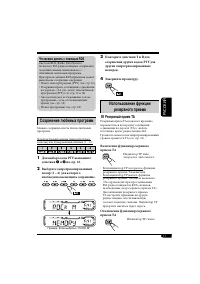
Page 55 - Что можно делать с помощью RDS; Сохранение любимых программ; Использование функции; Резервный прием TA
11 РУCCKИЙ Что можно делать с помощью RDS Система RDS (Radio Data System) позволяет FM-радиостанциям отправлять дополнительный сигнал вместе с обычными сигналами программ. При приеме данных RDS приемник может выполнять следующие операции: • Поиск типа программы (PTY) (см. стр. 10) • Резервный прием ...
Page 56 - Отслеживание той же программы; Резервный прием PTY
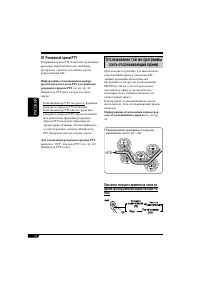
12 РУCCKИЙ Отслеживание той же программы (сеть-отслеживающий прием) При поездке по региону, где невозможен качественный прием в диапазоне FM, данный приемник автоматически настраивается на другую радиостанцию FM RDS в той же сети, которая может передавать в эфир ту же программу с помощью более сильн...
Page 57 - Операции с дисками; Воспроизведение диска
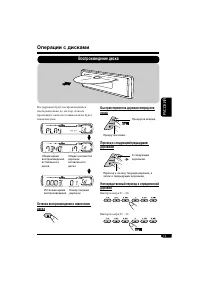
13 РУCCKИЙ Операции с дисками Воспроизведение диска Все дорожки будут воспроизводиться последовательно до тех пор, пока не произойдет смена источника или не будет извлечен диск. Останов воспроизведения и извлечение диска Общее время воспроизведения вставленного диска Общее количество дорожек вставле...
Page 58 - Запрещение извлечения диска; Выбор режимов воспроизведения; Выберите необходимый режим воспроизведения.; Режим; Режим Воспроизведение
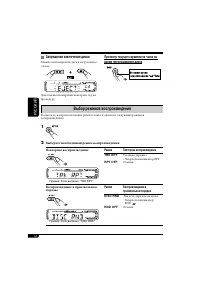
14 РУCCKИЙ Запрещение извлечения диска Можно заблокировать диск в загрузочном отсеке. Для отмены блокировки повторите эту же процедуру. Просмотр текущего времени на часах во время прослушивания диска Выбор режимов воспроизведения В одно и то же время возможна работа только в одном из следующих режим...
Page 59 - Настройки звучания; Выбор запрограммированных режимов звучания; Индикатор
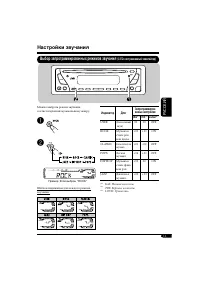
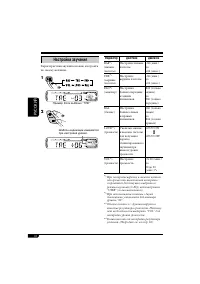
15 РУCCKИЙ Настройки звучания Выбор запрограммированных режимов звучания (C-EQ: настраиваемый эквалайзер) Можно выбрать режим звучания, соответствующий музыкальному жанру. ~ Ÿ Пример: Если выбран “ROCK” Шаблон индикации для каждого режима звучания: Индикатор Для: Запрограммиров- анные настройки BAS ...
Page 60 - Настройка звучания
16 РУCCKИЙ Настройка звучания Характеристики звучания можно настроить по своему желанию. 1 Пример: Если выбрано “TRE” 2 Шаблон индикации изменяется при настройке уровня. Индикатор Действие Диапазон BAS * 1 (низкиечастоты) Настройте низкие частоты. –06 (мин.) до +06 (макс.) TRE * 1 (верхние частоты) ...
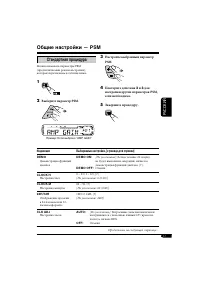
Page 61 - Индикация; Общие настройки — PSM; Стандартная процедура; Выберите параметр PSM.; Настройте выбранный параметр
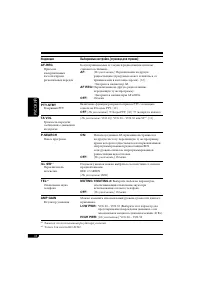
17 РУCCKИЙ Индикация Выбираемые настройки, [страница для справки] DEMO Демонстрация функций дисплея DEMO ON : [По умолчанию]; Если в течение 20 секунд не будет выполнено операций, начнется демонстрация функций дисплея, [7]. DEMO OFF: Отмена. CLOCK H Настройка часа 0 – 23 (1 – 12), [7] [По умолчанию:...
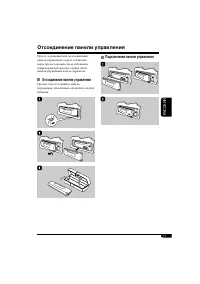
Page 63 - Отсоединение панели управления
19 РУCCKИЙ При отсоединении или подсоединении панели управления следует соблюдать меры предосторожности во избежание повреждения разъемов в задней части панели управления и на ее держателе. Отсоединение панели управления Прежде чем отсоединить панель управления, обязательно отключите подачу питания....
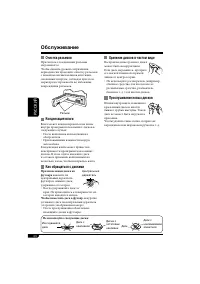
Page 64 - Обслуживание; Очистка разъемов; Конденсация влаги; Как обращаться с дисками; Хранение дисков в чистом виде
20 РУCCKИЙ Обслуживание Очистка разъемов При частом отсоединении разъемы загрязняются.Чтобы снизить уровень загрязнения, периодически проводите очистку разъемов с помощью ватных валиков или ткани, смоченных спиртом, соблюдая при этом меры предосторожности во избежание повреждения разъемов. Разъем Ко...
Page 65 - Дополнительная информация о приемнике
21 РУCCKИЙ Дополнительная информация о приемнике Основные операции Выключение питания • Если питание отключается во время прослушивания диска, при последующем включении питания воспроизведение диска начнется с того места, где оно было остановлено. Операции с тюнером Сохранение радиостанций • Во врем...
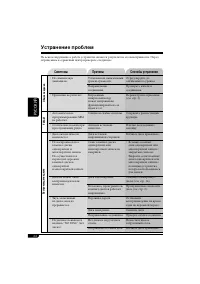
Page 66 - Симптомы; Устранение проблем
22 РУCCKИЙ Симптомы Причины Способы устранения Общие сведения • Не слышен звук динамиков. Установлен на минимальный уровень громкости. Отрегулируйте до оптимального уровня. Неправильные соединения. Проверьте кабели и соединения. • Приемник не работает. Встроенный микрокомпьютер может неправильно фун...
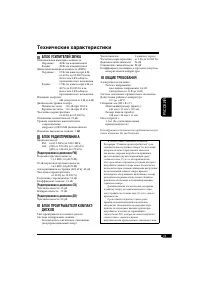
Page 67 - Технические характеристики; БЛОК УСИЛИТЕЛЕЙ ЗВУКА
23 РУCCKИЙ Технические характеристики БЛОК УСИЛИТЕЛЕЙ ЗВУКА Максимальная выходная мощность: Передние: 45 Вт на каждый канал Задние: 45 Вт на каждый канал Длительная выходная мощность (RMS): Передние: 17 Вт на канал в при 4 Ω , от 40 Гц до 20 000 Гц и не более чем 0,8% общего гармонического искажения...
Page 68 - Having TROUBLE with operation?; Please reset your unit; Refer to page of How to reset your unit; Haben Sie PROBLEME mit dem Betrieb?; Bitte setzen Sie Ihr Gerät zurück; Siehe Seite Zurücksetzen des Geräts; Затруднения при эксплуатации?; Пожалуйста, перезагрузите Ваше устройство; Для получения информации о перезагрузке Вашего
© 2004 Victor Company of Japan, Limited EN, GE, RU 1004DTSMDTJEIN Having TROUBLE with operation? Please reset your unit Refer to page of How to reset your unit Haben Sie PROBLEME mit dem Betrieb? Bitte setzen Sie Ihr Gerät zurück Siehe Seite Zurücksetzen des Geräts Затруднения при эксплуатации? Пожа...