Husqvarna 525iLXT - User Manual
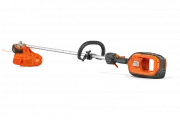
Husqvarna 525iLXT – User Manual, read for free online in PDF format. We hope this helps you resolve any issues you may have. If you have further questions, please contact us through the contact form.


Table of Contents:
- Page 2 – Product description
- Page 3 – Symbols on the product
- Page 4 – Safety; Safety definitions; Work area safety
- Page 7 – Other general safety information
- Page 8 – Personal protective equipment
- Page 9 – Safety devices on the product
- Page 10 – Trimmer head; Safety instructions for assembly
- Page 11 – Assembly; To assemble the loop handle
- Page 12 – To remove the trimmer head E35B; Operation; Introduction; Bluetooth; To connect the battery to the product
- Page 14 – To trim the grass
- Page 15 – To stop the product; Maintenance
- Page 17 – Troubleshooting; User interface; Transportation, storage and disposal; Transportation and storage
- Page 18 – Technical data
- Page 19 – Approved battery chargers; Accessories; Registered trademarks
- Page 20 – Declaration of Conformity; EU Declaration of Conformity
- Page 21 – UK Declaration of Conformity
525iLXT
EN
Operator's manual
2-21
"Loading the manual" means you need to wait until the file loads and becomes available for online reading. Some manuals are very large, and the time they take to appear depends on your internet speed.
Was this manual helpful?
About this manual
- Brand
- Husqvarna
- Model
- 525iLXT
- Document type
- User Manual
- Language(s)
- English
- Pages
- 24
- File size
- 2.1 MB
- Format
Summary
Contents Introduction..................................................................... 2Safety..............................................................................4Assembly...................................................................... 11Operation....................................
5. Power trigger lockout6. Power trigger7. Speed mode button8. Start/stop button9. User interface10. Operator's manual11. Locking pin12. Combination tool13. Charger cable14. Charger15. Power on and Warning indicator (LED)16. Ergo feed button17. Cutting attachment guard18. Drive disc19. Battery20. Ba...
Keep all parts of your body away from the hot surfaces. If the product features Bluetooth ® wireless technology. The Bluetooth ® symbol will be marked on the product name label. yyyywwxxxxx The rating plate shows the serial number. yyyy is the production year, ww is the production week and xxxxx is ...
Ask a question
Related manuals
Popular Husqvarna Other


More Husqvarna Other models
 Husqvarna 525iB Mark II User Manual
 Husqvarna 525iHE3 User Manual
 Husqvarna 525iHE4 User Manual
 Husqvarna 525iHF3 User Manual
 Husqvarna 525iLK User Manual
 Husqvarna 525iLST User Manual
 Husqvarna 525iRXT User Manual
 Husqvarna 525LK User Manual
 Husqvarna 525LS User Manual
 Husqvarna 525LST User Manual
 Husqvarna 525P4S User Manual
 Husqvarna 525PT5S User Manual