Huawei Freebuds 4i True Wireless Red - User Manual

Huawei Freebuds 4i True Wireless Red Headphones – User Manual, read for free online in PDF format. We hope this helps you resolve any issues you may have. If you have further questions, please contact us through the contact form.
6020892_01
Earphone model: T0001
Charging case model: T0001C
L
M
S
Краткое руководство пользователя
Quick Start Guide
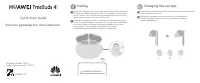
Pairing
EN
Open the charging case. Press and hold the Function button for
2s until the indicator flashes white. The earphones then enter
Pairing mode.
The earphones will automatically enter Pairing
mode when powered on for the first time.
Откройте зарядный чехол. Нажмите на функциональную
кнопку и удерживайте в течение 2 секунд, пока индикатор
не начнет мигать белым. Наушники перейдут в режим
сопряжения. При первом включении наушники
автоматически переходят в режим сопряжения.
RU
HUAWEI FreeBuds 4i
Changing the ear tips
EN
Choose the size which provides your desired noise cancellation
effect and comfort level.
Выберите насадки, которые обеспечат комфортное
использование наушников и надлежащий уровень
шумоподавления.
RU
"Loading the manual" means you need to wait until the file loads and becomes available for online reading. Some manuals are very large, and the time they take to appear depends on your internet speed.


