Page 2 - Removing your old thermostat; Check that your system is off.; Do you have thick black wires with; Read and save these instructions
2 Quick Installation Guide Removing your old thermostat 2 Check that your system is off. Change the temperature on your old thermostat to be above room temperature in heat mode or below it in cool mode. If you don’t hear the system turn on within 5 minutes, the power is off. Note: If you have a digi...
Page 3 - Y R RC
3 RTH6360 Series 5 Take a picture of how your wiring looks right now. Be sure to include the letters next to the terminals where the wires are inserted. This will be a helpful reference when wiring your thermostat. Tip: If the color of your wires has faded or if 2 terminals have the same wire color,...
Page 4 - Disconnect the wires and remove the old wall plate.; match the letter on the terminal.; Installing your RTH6360 thermostat; Bundle and insert wires through the UWP.; Pull open the UWP and insert the bundle of
4 Quick Installation Guide 9 Disconnect the wires and remove the old wall plate. Use a screwdriver to release wires from terminals. Then, use a wire label to identify each wire as it’s disconnected. The letter on the wire label should match the letter on the terminal. Tip: To prevent wires from fall...
Page 5 - up
5 RTH6360 Series 11 Insert the wall anchors. It is recommended that you use the wall anchors included in the box to mount your thermostat. You can use the UWP to mark where you want to place the wall anchors. a) Level the wall plate.b) Mark the location of the wall anchors using a pencil. c) Drill t...
Page 6 - Confirm wiring matches snapshot.; Attach your thermostat.; Connect wires from Step 8.
6 Quick Installation Guide 14 Confirm wiring matches snapshot. Please confirm wiring matches terminals from the photo you took in Step 5. 15 Mount the UWP and close the door. Mount the UWP using the provided screws. Install all three screws for a secure fit on your wall. Close the door after you’re ...
Page 7 - Choose a clock format.; Set date and time; If this is not a new installation,
7 RTH6360 Series 18 Turn your power ON. Turn on the power at the breaker box or switch that controls the heating/ cooling system. 19 Set the date. Press + or - to adjust the year. Press Select . Press + or - to adjust the month. Press Select . Press + or - to adjust the day. Press Select . 20 Choose...
Page 8 - Select System Setup options.; Select; Continue to “System operation; System Setup; System Setup options
8 Quick Installation Guide NOTE: If this is not a new installation, see page 14 for entering setup menu. 22 Select System Setup options. Press + or - to change values or select from available options. Then press Select to save changes and advance to the next System Setup number. See “System Setup op...
Page 9 - Once you have cycled through all of the System Setup numbers,; Done; is
9 RTH6360 Series Number Description Options (factory default in bold) 218 Reversing Valve O/B 0 = O (O/B in Cool) 1 = B (O/B in Heat) Note: This option is only displayed if the Heat Pump configured. Select whether reversing valve O/B should energize in cool or in heat. 220 Cool Stages / Compressor S...
Page 10 - Fan operation settings; Fan; System operation settings; Mode
10 Quick Installation Guide Fan operation settings 1 Press the Fan button to cycle to the next available Fan mode. 2 Cycle through the modes until the required Fan mode is displayed and leave it to activate. NOTE: Available Fan modes vary with system settings. Fan modes: ‒ Auto: Fan runs only when t...
Page 12 - Cancel; Wiring—conventional systems
12 Quick Installation Guide Program schedule override (permanent) Program schedule override (temporary) 1 Press + or - to adjust the temperature. 2 Once at the desired setpoint temperature, no further action is needed. The new setpoint temperature will be held until the next scheduled time period be...
Page 13 - Wiring—heat pump; NOT
13 RTH6360 Series Wiring—heat pump Connect wires: heat pump1 Match each labeled wire with same letter on new thermostat. 2 Insert the wires into the matching terminal. NOTE: If you have difficulty inserting wires, you may have to press down the terminal push button next to the corresponding terminal...
Page 14 - Advanced menu
14 Quick Installation Guide Advanced menu 1 Press and hold Menu and + buttons for approximately 5 seconds to enter advanced menu. 2 Press Select to enter System Setup (ISU) menu. 3 Press Select to cycle through System Setup numbers. NOTE: See “System Setup options” on page 8 for a full list of Syste...
Page 15 - Smart Response® Technology; Menu; Setting the time
15 RTH6360 Series Smart Response® Technology This feature allows the thermostat to “learn” how long the furnace and air conditioner take to reach programmed temperature settings, so the temperature is reached at the time you set. For example: Set the Wake time to 6 am, and the temperature to 70°. Th...
Page 16 - Set the date
16 Quick Installation Guide 1 Press Menu to enter the device menu. You will see PROG or Hold . Press + or - to choose DATE . 2 Press Select . 3 You will see the year blinking. Press + or - to adjust the year. Press Select . 4 Press + or - to adjust the month. Press Select . 5 Press + or - to adjust ...
Page 17 - Alerts codes
17 RTH6360 Series 3 When the alert icon appears, check the error code with the table below to determine the problem. 4 Snooze the alert. 5 Dismiss the alert. Number Alert/Reminder Definition 170 Internal Memory Error The memory of the thermostat has encountered an error. Please replace the thermosta...
Page 18 - Most problems can be corrected quickly and easily.; Troubleshooting
18 Quick Installation Guide If you have difficulty with your thermostat, please try the following suggestions. Most problems can be corrected quickly and easily. Display is blank Make sure fresh AA alkaline batteries are properly installed (see page 6). Cannot change system setting to Cool Check Sys...
Page 19 - -year limited warranty
19 RTH6360 Series Resideo warrants this product, excluding battery, to be free from defects in workmanship or materials, under normal use and service, for a period of one (1) year from the date of first purchase by the original purchaser. If at any time during the warranty period the product is dete...
Page 20 - Customer assistance; CAUTION: MERCURY NOTICE
Resideo Inc., 1985 Douglas Drive North Golden Valley, MN 55422 www.resideo.com 33-00201EF—09 M.S. Rev. 10-19 | Printed in United States This product is manufactured by Resideo Technologies, Inc., Golden Valley, MN, 1-800-468-1502©2019 Resideo Technologies, Inc. The Honeywell Home trademark is used u...
Page 21 - Thermostat programmable; Outils requis; Inclus dans cette boîte
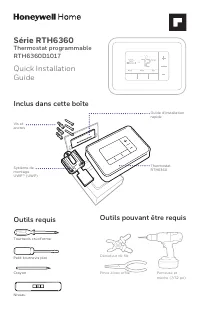
Cool PM Série RTH6360 Thermostat programmable RTH6360D1017 Quick Installation Guide Outils requis Outils pouvant être requis Dénudeur de fils Pince à bec effilé Perceuse et mèche (7/32 po) Inclus dans cette boîte Vis et ancres Système de montage UWP™ (UWP) Thermostat RTH6360 Guide d’installation rap...
Page 22 - Retrait de l’ancien thermostat; D’épais fils noirs sont-ils présents; Veuillez lire le mode d’emploi et le conserver en lieu sûr
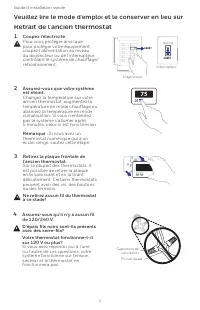
2 Guide d’installation rapide Retrait de l’ancien thermostat 2 Assurez-vous que votre système est éteint. Changez la température sur votre ancien thermostat; augmentez la température en mode chauffage ou abaissez la température en mode climatisation. Si vous n’entendez pas le système s’allumer après...
Page 24 - Débranchez les fils et retirez l’ancienne plaque murale.; Pour éviter que les fils ne tombent derrière le mur, enroulez-les; Installation de votre thermostat RTH6360; Regroupez et insérez les fils dans le; Ouvrez le système UWP et insérez le faisceau
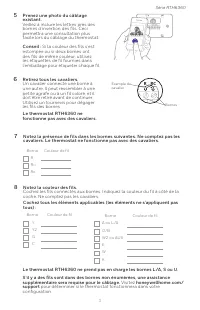
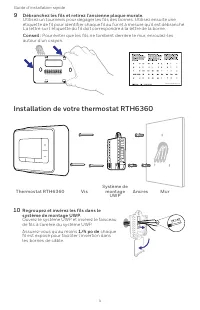
4 Guide d’installation rapide 9 Débranchez les fils et retirez l’ancienne plaque murale. Utilisez un tournevis pour dégager les fils des bornes. Utilisez ensuite une étiquette de fil pour identifier chaque fil au fur et à mesure qu’il est débranché. La lettre sur l’étiquette du fil doit correspondre...
Page 27 - Réglage de l’heure et de la date; S’il ne s’agit pas d’une
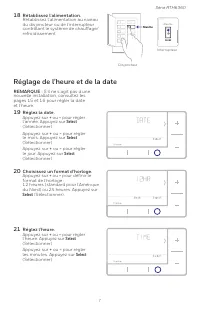
7 Série RTH6360 18 Rétablissez l’alimentation. Rétablissez l’alimentation au niveau du disjoncteur ou de l’interrupteur contrôlant le système de chauffage/ refroidissement. 19 Réglez la date. Appuyez sur + ou - pour régler l’année. Appuyez sur Select (Sélectionner).Appuyez sur + ou - pour régler le ...
Page 28 - Sélectionnez les options de; Passez à « Réglages du; Configuration du système; Options de configuration du système
8 Guide d’installation rapide REMARQUE : S’il ne s’agit pas d’une nouvelle installation, see page 14 accéder au menu de configuration. 22 Sélectionnez les options de configuration du système. Appuyez sur + ou - pour changer les valeurs ou sélectionnez l’une des options disponibles. Appuyez ensuite s...
Page 29 - Après être passé par tous les numéros de configuration du système,
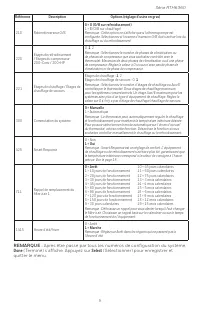
9 Série RTH6360 Référence Description Options (réglage d’usine en gras) 218 Robinet inverseur O/B 0 = O (O/B sur refroidissement) 1 = B (O/B sur chauffage) Remarque : Cette option ne s’affiche que si la thermopompe est configurée. Sélectionnez si la vanne d’inversion O/B doit s’activer lors du chauf...
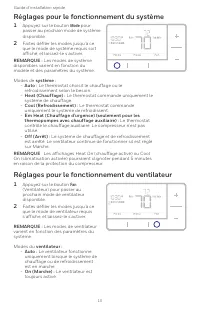
Page 30 - Réglages pour le fonctionnement du ventilateur; Réglages pour le fonctionnement du système
10 Guide d’installation rapide Réglages pour le fonctionnement du ventilateur 1 Appuyez sur le bouton Fan (Ventilateur) pour passer au prochain mode de ventilateur disponible. 2 Faites défiler les modes jusqu’à ce que le mode de ventilateur requis s’affiche, et laissez-le s’activer. REMARQUE : Les m...
Page 32 - Câblage—Systèmes conventionnels; Câblage alternatif (systèmes conventionnels)
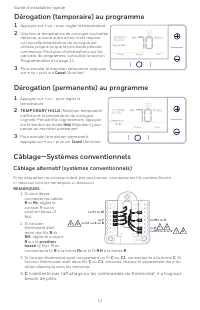
12 Guide d’installation rapide Dérogation (permanente) au programme Dérogation (temporaire) au programme 1 Appuyez sur + ou - pour régler la température. 2 Une fois la température de consigne souhaitée obtenue, aucune autre action n’est requise. La nouvelle température de consigne est utilisée jusqu...
Page 33 - Câblage—Systèmes à thermopompe; Les étiquettes ne correspondent pas?; Câblage alternatif (pour les thermopompes uniquement); position haute; REMARQUE
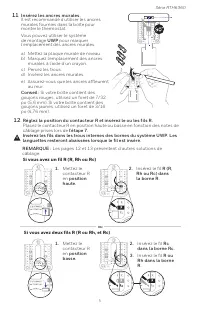
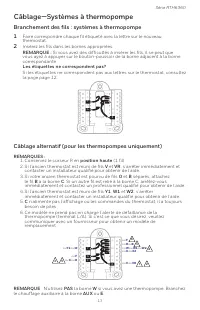
13 Série RTH6360 Câblage—Systèmes à thermopompe Branchement des fils : systèmes à thermopompe1 Faire correspondre chaque fil étiqueté avec la lettre sur le nouveau thermostat. 2 Insérez les fils dans les bornes appropriées. REMARQUE : Si vous avez des difficultés à insérer les fils, il se peut que v...
Page 34 - Menu avancé
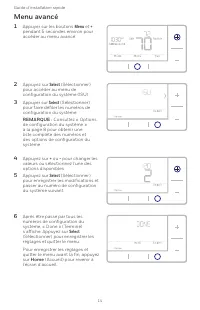
14 Guide d’installation rapide Menu avancé 1 Appuyer sur les boutons Menu et + pendant 5 secondes environ pour accéder au menu avancé. 2 Appuyez sur Select (Sélectionner) pour accéder au menu de configuration du système (ISU). 3 Appuyer sur Select (Sélectionner) pour faire défiler les numéros de con...
Page 35 - Technologie Smart Response®; PROG; Réglage de l’heure
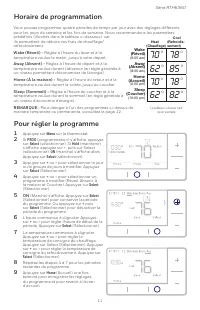
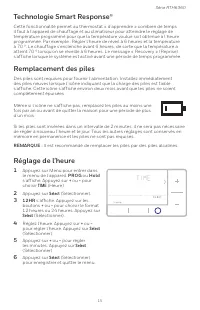
15 Série RTH6360 Technologie Smart Response® Cette fonctionnalité permet au thermostat « d’apprendre » combien de temps il faut à l’appareil de chauffage et au climatiseur pour atteindre le réglage de température programmé pour que la température voulue soit obtenue à l’heure programmée. Par exemple...
Page 36 - Réglage de la date; Écran d’alerte
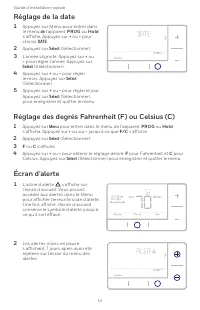
16 Guide d’installation rapide 1 Appuyez sur Menu pour entrer dans le menu de l’appareil. PROG ou Hold s’affiche. Appuyez sur + ou - pour choisir DATE . 2 Appuyez sur Select (Sélectionner). 3 L’année clignote. Appuyez sur + ou - pour régler l’année. Appuyez sur Select (Sélectionner). 4 Appuyez sur +...
Page 37 - Codes d’alerte; Mettez l’alerte en pause.
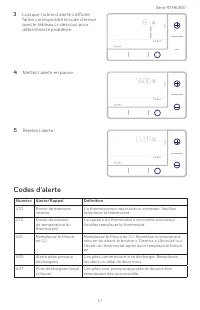
17 Série RTH6360 3 Lorsque l’icône d’alerte s’affiche, faites correspondre le code d’erreur avec le tableau ci-dessous pour déterminer le problème. Numéro Alerte/Rappel Définition 170 Erreur de mémoire interne La thermopompe nécessite un entretien. Veuillez remplacer le thermostat. 173 Erreur de cap...
Page 38 - Dépannage
18 Guide d’installation rapide En cas de difficultés avec le thermostat, essayer les suggestions suivantes. La plupart des problèmes peuvent être réglés rapidement et facilement. Rien n’apparaît à l’écran Assurez-vous que des piles alcalines AA bien chargées sont cor- rectement installées (consultez...
Page 39 - Garantie limitée de 1 an
19 Série RTH6360 Resideo garantit ce produit, à l’exception des piles, contre tout défaut de pièce ou de main-d’oeuvre, durant une période pour un (1) an à partir de la date d’achat par le consommateur d’origine si le produit est utilisé et entretenu convenablement. En cas de défaillance ou de mauva...
Page 40 - Service à la clientèle; MISE EN GARDE : AVIS RELATIF AU MERCURE
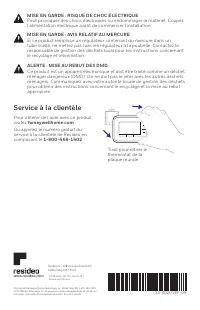
Resideo Inc., 1985 Douglas Drive North Golden Valley, MN 55422 www.resideo.com 33-00201EF-09 33-00201EF—09 M.S. Rev. 10-19 | Imprimé aux États-Unis Ce produit est fabriqué par Resideo Technologies, Inc., Golden Valley, MN, 1-800-468-1502©2019 Resideo Technologies, Inc. La marque de commerce Honeywel...






 Honeywell RTH221B User Manual
 Honeywell RTH2300B User Manual
 Honeywell RTH2410B User Manual
 Honeywell RTH2510B User Manual
 Honeywell RTH4110U2000-2PK/E User Manual
 Honeywell RTH5160 User Manual
 Honeywell RTH6360D1002 User Manual
 Honeywell RTH6580WF User Manual
 Honeywell RTH6580WF1001 User Manual
 Honeywell RTH7560E User Manual
 Honeywell RTH7600D User Manual
 Honeywell RTH8560D User Manual
 Honeywell RTH8560D1002 User Manual
 Honeywell RTH8800WF2022 User Manual