Page 2 - Change the Light Setting
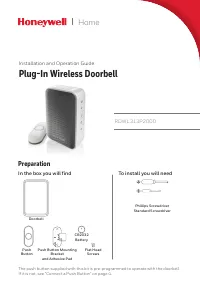
2 Overview Just follow these simple steps: 1. Install the push button battery and plug in the doorbell. 2. Set up the doorbell and your preferences. 3. Install the push button. Indoor use only. Do not expose to liquid, vapor, or rain. Power-up 1. Choose an outlet location that is not near a heat sou...
Page 3 - Change the Tune; Install Push Button; –OR–; Adjust the Volume
3 Change the Tune Press the Music button to change the doorbell tune. Every time you press the Music button, the tune will change. Stop pressing the Music button when you hear the tune you want: Ding Dong Westminster Piano Fantasy Soft Alert Smart Sax Install Push Button 1. Mount the push button bra...
Page 4 - Accessories; Connect a Motion Sensor; Connect a Push Button
4 Accessories You can connect 4 accessories to your doorbell, including other push buttons, window or door opening sensors, and motion sensors. If you try to connect more accessories than the max number, the LED on the side blinks red. Connect a Motion Sensor 1. Press and hold the Setting button on ...
Page 5 - Secret Knock; Maintenance; Low Battery Notification
5 Secret Knock You can set up a Secret Knock that makes a different ring and light setting for each push button. The Secret Knock is triggered by pressing the push button quickly 3 times. 1. Press the push button 3 times quickly. 2. Within 12 seconds of pressing the push button, press the Music butt...
Page 6 - Specifications; Troubleshooting
6 Specifications Doorbell Push Button Operating Temperature 23°F to 104°F (-5ºC to 40ºC) -4°F to 122°F (-20ºC to 50ºC) Honeywell ActivLink™ 916.8 MHz 916.8 MHz Range (open field) 250 ft. (76 m) 250 ft. (76 m) Sound Level (typical) 84dBA - RF Power - <1.2W Battery Type - CR2032 Battery Life (5 act...
Page 7 - FCC Regulations; IC Regulations
7 FCC Regulations This device complies with part 15 of the FCC Rules. Operation is subject to the following two conditions: (1) This device may not cause harmful interference, and (2) this device must accept any interference received, including interference that may cause undesired operation. The gr...
Page 8 - Automation and Control Solutions; Warranty
Automation and Control Solutions Honeywell International Inc. 1985 Douglas Drive North Golden Valley, MN 55422 yourhome.honeywell.com ® U.S. Registered Trademark. © 2016 Honey well International Inc. 33-00193EFS—01 M.S. 04-16 Printed in U.S. A . 33-00193EFS-01 Warranty 1-year limited warrantyHoney w...
Page 9 - Guide d’installation et d’utilisation; Sonnette sans fil enfichable; Résidentiel; Préparation; Vous trouverez dans la boîte
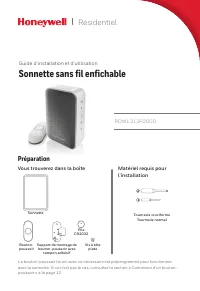
RDWL313P2000 Guide d’installation et d’utilisation Sonnette sans fil enfichable Résidentiel Préparation Sonnette Bouton- poussoir Vis à tête plate Tournevis cruciforme Tournevis normal Support de montage de bouton-poussoir avec tampon adhésif Matériel requis pour l’installation Vous trouverez dans l...
Page 10 - Aperçu; Mise sous tension; Modification de la séquence lumineuse
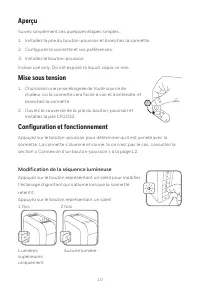
10 Aperçu Suivez simplement ces quelques étapes simples : 1. Installez la pile du bouton-poussoir et branchez la sonnette. 2. Configurez la sonnette et vos préférences. 3. Installez le bouton-poussoir. Indoor use only. Do not expose to liquid, vapor, or rain. Mise sous tension 1. Choisissez une pris...
Page 11 - Modification de la mélodie; Installation du bouton-poussoir; –OU–; Réglage du volume
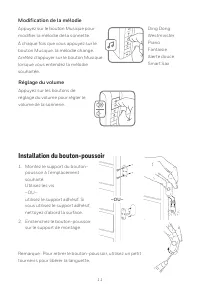
11 Modification de la mélodie Appuyez sur le bouton Musique pour modifier la mélodie de la sonnette. À chaque fois que vous appuyez sur le bouton Musique, la mélodie change. Arrêtez d’appuyer sur le bouton Musique lorsque vous entendez la mélodie souhaitée. Ding Dong Westminster Piano Fantaisie Aler...
Page 12 - Accessoires; Connexion d’un capteur de mouvement; Connexion d’un bouton-poussoir
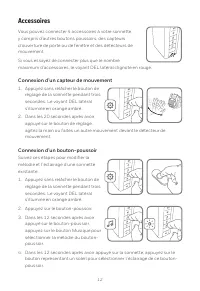
12 Accessoires Vous pouvez connecter 4 accessoires à votre sonnette, y compris d’autres boutons poussoirs, des capteurs d’ouverture de porte ou de fenêtre et des détecteurs de mouvement. Si vous essayez de connecter plus que le nombre maximum d’accessoires, le voyant DEL latéral clignote en rouge. C...
Page 13 - Mélodie secrète; Entretien; au lithium; Alerte de pile faible
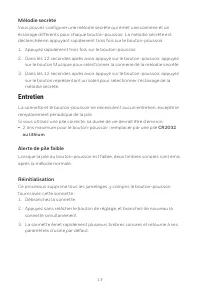
13 Mélodie secrète Vous pouvez configurer une mélodie secrète qui émet une sonnerie et un éclairage différents pour chaque bouton-poussoir. La mélodie secrète est déclenchée en appuyant rapidement trois fois sur le bouton-poussoir. 1. Appuyez rapidement trois fois sur le bouton-poussoir. 2. Dans les...
Page 14 - Caractéristiques techniques; Dépannage
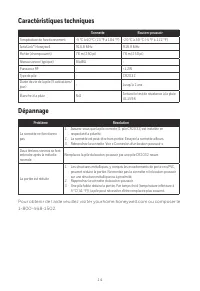
14 Caractéristiques techniques Sonnette Bouton-poussoir Température de fonctionnement -5 °C à 40 °C (23 °F à 104 °F) -20 °C à 50 °C (-4 °F à 122 °F) ActivLink™ Honeywell 916,8 MHz 916,8 MHz Portée (champ ouvert) 76 m (250 pi) 76 m (250 pi) Niveau sonore (typique) 84dBA - Puissance RF - <1,2W Type...
Page 15 - Règlement de la FCC; Réglementation IC
15 Règlement de la FCC Cet appareil est conforme à la partie 15 du règlement de la FCC. Son fonctionnement est soumis aux deux conditions suivantes : (1) Ce dispositif ne doit pas causer d’interférences nuisibles et (2) ce dispositif doit accepter toutes les interférences reçues, y compris celles po...
Page 16 - Solutions de régulation et d’automatisation; Garantie
33-00193EFS-01 ® Marque de commerce déposée aux É.-U. © 2016 Honey well International Inc. 33-00193EFS—01 M.S. 01-16 Imprimé aux États-Unis Solutions de régulation et d’automatisation Honeywell International Inc. 1985 Douglas Drive North Golden Valley, MN 55422 yourhome.honeywell.com Garantie Garant...
Page 17 - Instalación y guía del usuario; Timbre inalámbrico enchufable; Hogar; Preparación; Para instalar necesitará
RDWL313P2000 Instalación y guía del usuario Timbre inalámbrico enchufable Hogar Preparación Timbre Pulsador Tornillos de cabeza plana Destornillador de estrella Destornillador estándar Soporte de montaje del pulsador y almohadilla adhesiva Para instalar necesitará En la caja, encontrará lo siguiente...
Page 18 - Cambio del patrón de luz
18 Información general Siga estos pasos sencillos: 1. Coloque la batería del pulsador y enchufe el timbre. 2. Configure el timbre y sus preferencias. 3. Instale el pulsador. Indoor use only. Do not expose to liquid, vapor, or rain. Accionamiento 1. Elija un lugar en exteriores que no esté cerca de u...
Page 19 - Cambio de la melodía; Instale el pulsador; Regulación del volumen
19 Cambio de la melodía Presione el botón de Música para cambiar la melodía del timbre. Cada vez que presiona el botón de Música, la melodía cambiará. Deje de presionar el botón de Música cuando escuche la melodía que desea. Ding Dong Westminster Piano Fantasía Alerta suave Saxofón inteligente Insta...
Page 20 - Accesorios; Conexión de un sensor de movimiento
20 Accesorios Puede conectar hasta 4 accesorios a su timbre, incluyendo otros pulsadores, sensores de ventana o puerta abiertos y sensores de movimiento. Si trata de conectar más accesorios que los permitidos, el LED lateral destella en rojo. Conexión de un sensor de movimiento 1. Presione y sosteng...
Page 21 - Sonido del toque secreto con los nudillos; Mantenimiento; Notificación de batería con poca carga
21 Sonido del toque secreto con los nudillos Puede configurar un sonido del toque secreto con los nudillos con un sonido y una configuración de luz diferentes para cada pulsador. El toque secreto con los nudillos se activa presionando el pulsador 3 veces rápidamente. 1. Presione el pulsador 3 veces ...
Page 22 - Especificaciones; Localización y solución de problemas
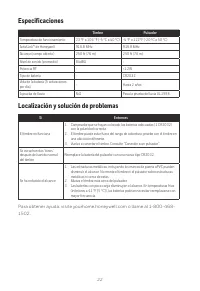
22 Especificaciones Timbre Pulsador Temperatura de funcionamiento 23 °F a 104 °F (-5 °C a 40 °C) -4 °F a 122°F (-20 °C a 50 °C) ActivLink™ de Honeywell 916.8 MHz 916.8 MHz Alcance (campo abierto) 250 ft (76 m) 250 ft (76 m) Nivel de sonido (promedio) 84dBA - Potencia RF - <1.2W Tipo de batería - ...
Page 24 - Soluciones de Control y Automatización; Garantía
33-00193EFS-01 ® Marca registrada en EE. UU. © 2016 Honey well International Inc. 33-00193EFS—01 M.S. 01-16 Impreso en EE. UU. Soluciones de Control y Automatización Honeywell International Inc. 1985 Douglas Drive North Golden Valley, MN 55422 yourhome.honeywell.com Garantía Garantía limitada de 1 a...