Page 2 - ENGLISH; Read and save these instructions.; Quick Reference Card; Grasp and pull to see basic operating instructions at a glance.; This manual covers the following models:; For 1 Heat/1 Cool systems; For assistance with this product please visit
69-1760EFS—01 ENGLISH Read and save these instructions. ® U.S. Registered Trademark. Patents pending. Copyright © 2009 Honeywell International Inc. All rights reserved. Quick Reference Card Grasp and pull to see basic operating instructions at a glance. This manual covers the following models: TH411...
Page 3 - About your new thermostat; This thermostat is ready to go!; Your new thermostat is pre-programmed; Table of contents
1 69-1760EFS—01 ENGLISH About your new thermostat Thermostat features ................................... 2Programming at a glance .......................... 3Quick reference to controls ....................... 4Quick reference to display ........................ 5 Programming & Operation Set ti...
Page 4 - Features; compliant to greatly reduce your heating/cooling expenses.; Operating Manual
69-1760EFS—01 ENGLISH Your new Honeywell thermostat has been designed to give you many years of reliable service and easy-to-use, push-button climate control. Features • Separately programmable weekday/weekend schedules.• One-touch temp control overrides program schedule at any time.• Energy Star ® ...
Page 5 - Set time and day (required for proper operation); See page 6; Select system setting:; See page 7; You can override the program schedule at any time,
PRO TH4110D / TH4210D 3 69-1760EFS—01 ENGLISH Your new thermostat is pre-programmed. Just set the time and day. Then check the settings below and change if needed: 1. Set time and day (required for proper operation) ......................... See page 6 2. Select system setting: Preset to Off...........
Page 6 - Temperature adjustment; Quick reference to controls; System switch; Emergency & Auxiliary
Operating Manual 4 69-1760EFS—01 ENGLISH M29470 Temperature adjustment (see page 11-13) Fan Switch (see page 8) On: Fan runs continuously. Auto: Fan runs only when heating or cooling system is on. Quick reference to controls • Set: Press to set time/day/ schedule. • Hold: Press to override programme...
Page 7 - Quick reference to display screen; Low battery warning; Temperature setting; Cooling; Current program period
PRO TH4110D / TH4210D 5 69-1760EFS—01 ENGLISH Wake Wed Recovery Em Aux Heat On Set To Inside AM 75 75 6:30 Replace Batt M29471 Quick reference to display screen Low battery warning (see page 16) Adaptive Intelligent Recovery TM (see page 14) Temperature setting (see pages 11-13) System status Cool o...
Page 8 - or; or; RUN; If the display flashes Set Clock, the; Set the time and day; Press; SET; SET
Operating Manual 6 69-1760EFS—01 ENGLISH Set Clock AM 6:30 Wed Set Day MCR29472 1. Press the SET button, then press s or t to set the clock time. 2. Press the SET button, then press s or t to select the day of the week. 3. Press RUN to save & exit. Note: If the display flashes Set Clock, the the...
Page 9 - switch can be set to control; SYSTEM; switch to control the
PRO TH4110D / TH4210D 7 69-1760EFS—01 ENGLISH M29473 The SYSTEM switch can be set to control your heating or cooling system, depend-ing on the season. • Cool: Cooling system control. • Off: All systems are off. • Heat: Heating system control. • Em Heat: Emergency & Auxiliary Heat control. Compre...
Page 10 - Fan switch; Set the; switch to Auto or On.; FAN; switch to choose whether the fan
Operating Manual 8 69-1760EFS—01 ENGLISH M29473 Fan switch Set the FAN switch to Auto or On. In “Auto” mode (the most commonly used setting), the fan runs only when the heat-ing or cooling system is on.If set to “On,” the fan runs continuously. Set FAN switch to choose whether the fan runs continuou...
Page 11 - Save money by setting program schedules; WAKE
PRO TH4110D / TH4210D 9 69-1760EFS—01 ENGLISH It’s easy to program your system for maximum energy savings. You can program four time periods each day, with different settings for weekdays and weekends. Set to the time you awaken and the temperature you want during the morning, until you leave for th...
Page 12 - Energy Star
Operating Manual 10 69-1760EFS—01 ENGLISH Wake (6:00 am) Leave (8:00 am) Return (6:00 pm) Sleep (10:00 pm) Cool (Mon-Fri) Heat (Mon-Fri) Heat (Sat-Sun) Cool (Sat-Sun) 70 ° 75 ° 70 ° 75 ° 62 ° 83 ° 62 ° [Or cancel period] 83 ° [Or cancel period] 70 ° 75 ° 70 ° [Or cancel period] 75 ° [Or cancel perio...
Page 13 - To adjust program schedules
PRO TH4110D / TH4210D 11 69-1760EFS—01 ENGLISH Wake Set Schedule MonTueWedThuFri Heat Set To AM 75 6:30 Wake Set Schedule MonTueWedThuFri Heat Set To AM 75 6:30 MCR29474 To adjust program schedules 1. Press SET until Set Schedule is displayed. 2. Press s or t to set your weekday Wake time (Mon-Fri),...
Page 15 - Make sure the thermostat is set to the; HOLD; to permanently adjust; to; Press to resume program schedule.
PRO TH4110D / TH4210D 13 69-1760EFS—01 ENGLISH Set To AM 70 6:30 Hold Set To AM 75 6:30 MCR29476 Note: Make sure the thermostat is set to the system you want to control (heat or cool). Press to permanently adjust temperature. Press HOLD to permanently adjust the temperature. This will override the t...
Page 16 - Adaptive Intelligent Recovery
Operating Manual 14 69-1760EFS—01 ENGLISH Adaptive Intelligent Recovery eliminates guesswork when setting your schedule. It allows the thermostat to “learn” how long your furnace and air conditioner take to reach the temperature you want.Just set your program schedule to the time you want the house ...
Page 17 - Damage can occur if the compressor is; Built-in compressor protection
PRO TH4110D / TH4210D 15 69-1760EFS—01 ENGLISH Wake Wed Cool On Set To Inside AM 75 75 6:30 MCR29477 This feature helps prevent damage to the compressor in your air conditioning or heat pump system. Damage can occur if the compressor is restarted too soon after shutdown. This fea-ture forces the com...
Page 18 - REPLACE BATT; warning begins flash-; Battery replacement
Operating Manual 16 69-1760EFS—01 ENGLISH MCR29478 Batteries are optional (for backup power) if your thermostat was wired to run on AC power when installed.Install fresh batteries when the REPLACE BATT warning begins flash- ing. The warning flashes about two months before the batteries are depleted....
Page 19 - Display is blank; • Set system switch to; In case of difficulty
PRO TH4110D / TH4210D 17 69-1760EFS—01 ENGLISH If you have difficulty with your thermostat, please try the following suggestions. Most problems can be corrected quickly and easily. Display is blank • Check circuit breaker and reset if necessary.• Make sure power switch at heating & cooling syste...
Page 20 - default settings; times to display “Set Schedule.”; and; at the same time for 4 seconds.
Operating Manual 18 69-1760EFS—01 ENGLISH Temperature settings do not change Make sure heating and cooling temperatures are set to acceptable ranges: • Heat: 40° to 90°F (4.5° to 32°C).• Cool: 50° to 99°F (10° to 37°C). “Cool On” or “Heat On” is flashing • Compressor protection feature is engaged. W...
Page 21 - Accessories/replacement parts; *Use to cover marks left by old thermostats.; Customer assistance
PRO TH4110D / TH4210D 19 69-1760EFS—01 ENGLISH MCR29479 For assistance with this product, please visit http://yourhome.honeywell.com . Or call Honeywell Customer Care toll-free at 1-800-468-1502 . To save time, please note your model number and date code before calling. Accessories/replacement parts...
Page 22 - -year limited warranty
Operating Manual 20 69-1760EFS—01 ENGLISH Honeywell warrants this product, excluding battery, to be free from defects in the workmanship or materials, under normal use and service, for a period of five (5) years from the date of pur-chase by the consumer. If at any time during the warranty period th...
Page 24 - Automation and Control Solutions
Honeywell International Inc. 1985 Douglas Drive North Golden Valley, MN 55422 http://yourhome.honeywell.com Honeywell Limited-Honeywell Limitée 35 Dynamic Drive Toronto, Ontario M1V 4Z9 ® U.S. Registered Trademark. © 2009 Honeywell International Inc. 69-1760EFS—01 M.S. 05-09 Automation and Control S...
Page 25 - Thermostat programmable
Mode d’emploi Série PRO TH4000 Thermostat programmable
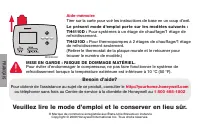
Page 26 - Veuillez lire le mode d’emploi et le conserver en lieu sûr.; MISE EN GARDE : RISQUE DE DOMMAGE MATÉRIEL.; Pour systèmes à un étage de chauffage/1 étage de; FRANÇAIS
Veuillez lire le mode d’emploi et le conserver en lieu sûr. ® Marque de commerce enregistrée aux États-Unis Brevets en instance Copyright © 2009 Honeywell International Inc. Tous droits réservés. Aide-mémoire Tirer sur la carte pour voir les instructions de base en un coup d’oeil. MISE EN GARDE : RI...
Page 27 - Comment se servir de; Annexes; Votre thermostat est prêt; page 3; Table des matières
Votre nouveau thermostat Caractéristiques du thermostat ............... 2 Programmation en un coup d’oeil ............ 3Coup d’oeil rapide sur les commandes .......................................... 4Coup d’oeil rapide sur l’affichage ............. 5 Programmation et fonctionnement Réglage de l’heu...
Page 28 - Mode d’emploi; Caractéristiques; • Appareil coté Energy Star; Votre nouveau thermostat
Mode d’emploi 2 69-1760EFS—01 FRANÇAIS Votre nouveau thermostat Honeywell a été conçu pour vous procurer de nombreuses années de service fiable et assurer la régulation de la température ambiante avec facilité, par simple bouton-poussoir. Caractéristiques • Horaires des jours de semaine et de la fin...
Page 29 - Sélectionner le réglage du système :; Préréglé à l’arrêt; Sélectionner le réglage du ventilateur :; Préréglé à; Régler la température au moyen d’une seule touche :; Votre thermostat est prêt à fonctionner!
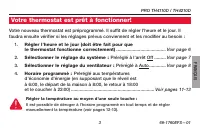
PRO TH4110D / TH4210D 3 69-1760EFS—01 FRANÇAIS Votre nouveau thermostat est préprogrammé. Il suffit de régler l’heure et le jour. Il faudra ensuite vérifier si les réglages prévus conviennent et les modifier au besoin : 1. Régler l’heure et le jour (doit être fait pour que le thermostat fonctionne c...
Page 30 - Appuyer sur cette touche pour revenir au; Sélecteur du système; Commande le fonctionnement du; Coup d’oeil rapide sur les commandes
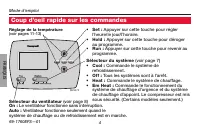
Mode d’emploi 4 69-1760EFS—01 FRANÇAIS M29470 Sélecteur du ventilateur (voir page 8) On : Le ventilateur fonctionne sans interruption. Auto : Ventilateur fonctionne seulement quand le système de chauffage ou de refroidissement est en marche. • Set : Appuyer sur cette touche pour régler l’heure/le jo...
Page 31 - Coup d’oeil rapide sur l’affichage; Le système de; Jour et heure en cours
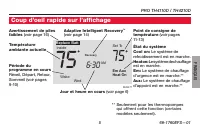
PRO TH4110D / TH4210D 5 69-1760EFS—01 FRANÇAIS Wake Wed Recovery Em Aux Heat On Set To Inside AM 75 75 6:30 Replace Batt M29471 Coup d’oeil rapide sur l’affichage Avertissement de piles faibles (voir page 16) Adaptive Intelligent Recovery TM (voir page 14) Point de consigne de température (voir page...
Page 32 - pour enregistrer les réglages et; Si les mots Set Clock clignotent; Régler l’heure et le jour; Appuyer sur
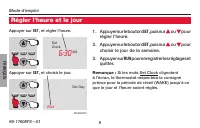
Mode d’emploi 6 69-1760EFS—01 FRANÇAIS Set Clock AM 6:30 Wed Set Day MCR29472 1. Appuyer sur le bouton SET , puis sur s ou t pour régler l’heure. 2. Appuyer sur le bouton SET , puis sur s ou t pour choisir le jour de la semaine. 3. Appuyer sur RUN pour enregistrer les réglages et quitter. Remarque :...
Page 33 - Commande le fonctionnement; Régler le sélecteur; pour; MISE EN GARDE : RISQUE DE DOMMAGE; Ne pas faire fonctionner le système de
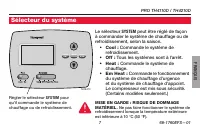
PRO TH4110D / TH4210D 7 69-1760EFS—01 FRANÇAIS M29473 Le sélecteur SYSTEM peut être réglé de façon à commander le système de chauffage ou de refroidissement, selon la saison. • Cool : Commande le système de refroidissement. • Off : Tous les systèmes sont à l’arrêt. • Heat : Commande le système de ch...
Page 34 - Sélecteur du ventilateur; Auto; Régler le sélecteur du ventilateur
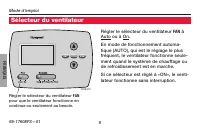
Mode d’emploi 8 69-1760EFS—01 FRANÇAIS M29473 Sélecteur du ventilateur Régler le sélecteur du ventilateur FAN à Auto ou à On. En mode de fonctionnement automa - tique (AUTO), qui est le réglage le plus fréquent, le ventilateur fonctionne seule - ment quand le système de chauffage ou de refroidisseme...
Page 35 - Dépenser moins en réglant le programme; LEVER
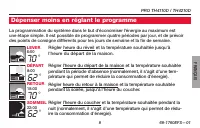
PRO TH4110D / TH4210D 9 69-1760EFS—01 FRANÇAIS La programmation du système dans le but d’économiser l’énergie au maximum est une étape simple. Il est possible de programmer quatre périodes par jour, et de prévoir des points de consigne différents pour les jours de semaine et la fin de semaine. Régle...
Page 36 - Refroidissement; Réglage Energy Star
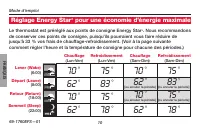
Mode d’emploi 10 69-1760EFS—01 FRANÇAIS Le thermostat est préréglé aux points de consigne Energy Star ® . Nous recommandons de conserver ces points de consigne, puisqu’ils pourraient vous faire réduire de jusqu’à 33 % vos frais de chauffage-refroidissement. (Voir à la page suivante comment régler l’...
Page 37 - Réglage de l’horaire
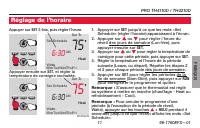
PRO TH4110D / TH4210D 11 69-1760EFS—01 FRANÇAIS Wake Set Schedule MonTueWedThuFri Heat Set To AM 75 6:30 Wake Set Schedule MonTueWedThuFri Heat Set To AM 75 6:30 MCR29474 Appuyer ensuite sur SET , et régler la température de consigne souhaitée. Appuyer sur SET 3 fois, puis régler l’heure. 1. Appuyer...
Page 41 - le compresseur qui fait partie du système de; Protection intégrée du compresseur
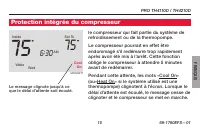
PRO TH4110D / TH4210D 15 69-1760EFS—01 FRANÇAIS Wake Wed Cool On Set To Inside AM 75 75 6:30 MCR29477 le compresseur qui fait partie du système de refroidissement ou de la thermopompe. Le compresseur pourrait en effet être endommagé s’il redémarre trop rapidement après avoir été mis à l’arrêt. Cette...
Page 42 - Remplacement des piles
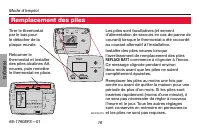
Mode d’emploi 16 69-1760EFS—01 FRANÇAIS MCR29478 Les piles sont facultatives (et servent d’alimentation de secours en cas de panne de courant) lorsque le thermostat a été raccordé au courant alternatif à l’installation. Installer des piles neuves lorsque l’avertissement de remplacement des piles REP...
Page 43 - position de marche au besoin.; En cas de difficulté
PRO TH4110D / TH4210D 17 69-1760EFS—01 FRANÇAIS Si vous éprouvez des difficultés, nous vous proposons d’essayer les solutions suivantes. La plupart des problèmes peuvent être corrigés rapidement et facilement. Rien n’apparaît à l’écran • S’assurer que le coupe-circuit n’est pas déclenché et le remet...
Page 44 - et
Mode d’emploi 18 69-1760EFS—01 FRANÇAIS Le point de consigne de la température ne change pas S’assurer que les températures de chauffage et de refroidissement sont réglées à l’intérieur des seuils de température permis : • Heat : 4,5 à 32 °C (40 à 90 °F). • Cool : 10 à 37 °C (50 à 99 °F). Les mots «...
Page 45 - Accessoires/Pièces de rechange; posant sans frais le; *Sert à masquer les marques laissées par l’ancien; Services à la clientèle; le détacher de la
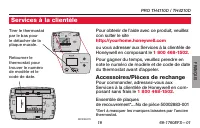
PRO TH4110D / TH4210D 19 69-1760EFS—01 FRANÇAIS MCR29479 Pour obtenir de l’aide avec ce produit, veuillez con sulter le site http://yourhome.honeywell.com ou vous adresser aux Services à la clientèle de Honeywell en composant le 1 800 468-1502 . Pour gagner du temps, veuillez prendre en note le numé...
Page 46 - OU DOMMAGES, Y COMPRIS LES DOMMAGES INDIRECTS OU ACCESSOIRES; Garantie limitée de 5 ans
Mode d’emploi 20 69-1760EFS—01 FRANÇAIS Honeywell garantit ce produit, à l’exception de la pile, contre tout vice de fabrication ou de matière dans la mesure où il en est fait une utilisation et un entretien convenables, et ce, pour cinq (5) ans à partir de la date d’achat par le consommateur. En ca...
Page 47 - restriction peut ne pas s’appliquer.
PRO TH4110D / TH4210D 21 69-1760EFS—01 FRANÇAIS Garantie limitée de 5 ans DÉCOULANT DIRECTEMENT OU INDIRECTEMENT D’UNE VIOLATION QUELCONQUE D’UNE GARANTIE, EXPRESSE OU TACITE, APPLICABLE AU PRÉSENT PRODUIT NI DE TOUTE AUTRE DÉFECTUOSITÉ DU PRÉSENT PRODUIT. Certaines provinces ne permettent pas l’exc...
Page 48 - Solutions d’automatisation et de contrôle
Honeywell International Inc. 1985 Douglas Drive North Golden Valley, MN 55422 http://yourhome.honeywell.com Honeywell Limited-Honeywell Limitée 35 Dynamic Drive Toronto, Ontario M1V 4Z9 ® Marque de commerce enregistrée aux É.U. © 2009 Honeywell International Inc. 69-1760EFS—01 M.S. 05-09 Solutions d...
Page 49 - Termostato programable
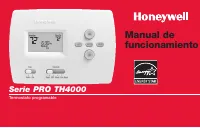
Manual de funcionamiento Serie PRO TH4000 Termostato programable
Page 50 - ESPAÑOL; Lea y guarde estas instrucciones.; Tarjeta de referencia rápida; de funcionamiento básicas.; Este manual incluye los siguientes modelos:; Para sistemas de 1 calentador y 1 refrigerador; ¿Necesita asistencia?; Para obtener asistencia relacionada con este producto, visite; PRECAUCIÓN: PELIGRO DE DAÑO EN EL EQUIPO.
69-1760EFS—01 ESPAÑOL Lea y guarde estas instrucciones. ® Marca registrada de los EE. UU. Patentes en trámite. © 2009, Honeywell International Inc. Todos los derechos reservados. Tarjeta de referencia rápida Sujete la tarjeta y tire de ella para ver rápidamente las instrucciones de funcionamiento bá...
Page 51 - Acerca de su nuevo termostato; preprogramado y listo para funcionar.; Índice
1 69-1760EFS—01 ESPAÑOL Acerca de su nuevo termostato Características del termostato. ................. 2 Programación rápida ................................. 3 Rápida referencia de los controles ........... 4 Rápida referencia de la pantalla ............... 5 Programación y funcionamiento Configur...
Page 52 - Manual de funcionamiento; Características; • Cumple con Energy Star
Manual de funcionamiento Acerca de su nuevo termostato 2 69-1760EFS—01 ESPAÑOL Su nuevo termostato ha sido diseñado para brindarle muchos años de funcionamiento confiable y para brindarle un control climático fácil de usar y con sólo apretar un botón. Características • Cronogramas separados: días de...
Page 53 - Configuración de la hora y el día (necesaria para; Predeterminados en los; CONTROL DE TEMPERATURA AL TACTO:; Usted puede anular la configuración; ¡Este termostato está listo para funcionar!
PRO TH4110D / TH4210D 3 69-1760EFS—01 ESPAÑOL Su nuevo termostato está preprogramado. Configure la hora y el día. Luego, revise las configuraciones de abajo y cámbielas si es necesario: 1. Configuración de la hora y el día (necesaria para un funcionamiento adecuado) ............................ .......
Page 54 - Ajuste de la temperatura; El ventilador funciona sin interrupción.; Rápida referencia de los controles; calor de emergencia y auxiliar. El compresor se
Manual de funcionamiento 4 69-1760EFS—01 ESPAÑOL M29470 Ajuste de la temperatura (vea las páginas 11 a 13) Interruptor “Fan” (ventilador) vea la página 8. “On” (encendido): El ventilador funciona sin interrupción. “Auto” (automático): El ventilador funciona solamente cuando la calefacción o el siste...
Page 55 - Rápida referencia de la pantalla; El sistema de refrigeración está encendido.
PRO TH4110D / TH4210D 5 69-1760EFS—01 ESPAÑOL Wake Wed Recovery Em Aux Heat On Set To Inside AM 75 75 6:30 Replace Batt M29471 Rápida referencia de la pantalla Aviso de batería baja (vea la página 16) Adaptive Intelligent Recovery TM (vea la página 14) Configuración de temperatura (vea las páginas 1...
Page 56 - Si en la pantalla titila el mensaje Set; Configuración de la hora y el día; Presione “; ” y luego seleccione el día actual.
Manual de funcionamiento 6 69-1760EFS—01 ESPAÑOL Set Clock AM 6:30 Wed Set Day MCR29472 1. Presione el botón “ SET ”, luego presione s o t para configurar la hora del reloj. 2. Presione el botón “ SET ”, luego presione s o t para seleccionar el día de la semana. 3. Presione “ RUN ” para guardar y sa...
Page 57 - El compresor se bloquea. (Solamente en los; Interruptor “System”; Mueva el interruptor “; ” para; PRECAUCIÓN: PELIGRO DE DAÑO EN; No haga que el sistema de
PRO TH4110D / TH4210D 7 69-1760EFS—01 ESPAÑOL M29473 El interruptor “ SYSTEM ” puede configurarse para controlar su sistema de calefacción o refrigeración, según la temporada. • “Cool” (frío): Controla el sistema de refrigeración. • “Off” (apagado): Apaga todos los sistemas. • “Heat” (calor): Contro...
Page 58 - Interruptor “Fan”; ” hasta la; Configure el botón “; ” para seleccionar
Manual de funcionamiento 8 69-1760EFS—01 ESPAÑOL Interruptor “Fan” Mueva el interruptor “ FAN ” hasta la posición “Auto” u “On”. En el modo “Auto”, la configuración usada comúnmente, el ventilador funciona sola-mente cuando la calefacción o el sistema de refrigeración están encendidos. Si se fija en...
Page 59 - “WAKE”; semana y los fines de semana.; Ahorre dinero configurando los cronogramas del programa
PRO TH4110D / TH4210D 9 69-1760EFS—01 ESPAÑOL “WAKE” 6:00 a. m. 70 °F “LEAVE” 8:00 a. m. 62 °F “RETURN” 6:00 p. m. 70 °F “SLEEP” 10:00 p. m. 62 °F Es fácil programar su sistema que permite un ahorro máximo de energía. Usted puede programar cuatro períodos por día, con diferentes configuraciones para...
Page 60 - “Wake”; grama Energy Star; Configuraciones de Energy Star
Manual de funcionamiento 10 69-1760EFS—01 ESPAÑOL “Wake” (6:00 a. m.) “Leave” (8:00 a. m.) “Return” (6:00 p. m.) “Sleep” (10:00 p. m.) 70 ° 75 ° 70 ° 75 ° 62 ° 83 ° 62 ° [O cancele el período] 83 ° [O cancele el período] 70 ° 75 ° 70 ° [O cancele el período] 75 ° [O cancele el período] 62 ° 78 ° 62 ...
Page 61 - ” y luego establezca la; Para ajustar los cronogramas del programa; Asegúrese de que el termostato esté configurado
PRO TH4110D / TH4210D 11 69-1760EFS—01 ESPAÑOL Wake Set Schedule MonTueWedThuFri Heat Set To AM 75 6:30 Wake Set Schedule MonTueWedThuFri Heat Set To AM 75 6:30 MCR29474 Presione “ SET ” 3 veces y luego ajuste la hora. Presione “ SET ” y luego establezca la temperatura deseada. 1. Presione “ SET ” h...
Page 62 - La nueva temperatura se mantendrá; Asegúrese de que el termostato esté configurado con el; Programación de la anulación del cronograma (temporaria)
Manual de funcionamiento 12 69-1760EFS—01 ESPAÑOL Set To AM 70 6:30 Te mporary Set To AM 75 6:30 MCR29475 Presione s o t para ajustar inmediatamente la temperatura. Esto anulará temporariamente la configuración de la temperatura para el período actual. La nueva temperatura se mantendrá solamente has...
Page 63 - Asegúrese de que el termostato esté configurado con; La función “Hold” apaga el cronograma del; Programación de la anulación del cronograma (permanente)
PRO TH4110D / TH4210D 13 69-1760EFS—01 ESPAÑOL Set To AM 70 6:30 Hold Set To AM 75 6:30 MCR29476 Nota: Asegúrese de que el termostato esté configurado con el sistema que usted quiere controlar (calor o frío). Presione para ajustar permanentemente la temperatura. Presione “ HOLD ” para ajustar perman...
Page 65 - Esta función ayuda a prevenir el daño del; El mensaje titila hasta que haya; Protección del compresor incorporada
PRO TH4110D / TH4210D 15 69-1760EFS—01 ESPAÑOL Wake Wed Cool On Set To Inside AM 75 75 6:30 MCR29477 Esta función ayuda a prevenir el daño del compresor en su acondicionador de aire o en su sistema de bomba de calor. El compresor puede dañarse si se vuelve a iniciar inmediatamente después de ser apa...
Page 66 - Las baterías son opcionales (para ofrecer; La advertencia titilará durante alrededor de; Reemplazo de la batería
Manual de funcionamiento Acerca de su nuevo termostato 16 69-1760EFS—01 ESPAÑOL MCR29478 Las baterías son opcionales (para ofrecer energía de respaldo) si su termostato fue conectado para funcionar con corriente CA cuando fue instalado.Instale las baterías nuevas inmediatamente cuando la advertencia...
Page 67 - En caso de inconvenientes
PRO TH4110D / TH4210D 17 69-1760EFS—01 ESPAÑOL Si tiene dificultades con el termostato, intente seguir las sugerencias que se indican a continuación. La mayoría de los problemas pueden corregirse rápida y fácilmente. La pantalla está vacía • Controle el interruptor de circuito y, si es necesario, re...
Page 68 - temperatura por encima; ” 3 veces para que se muestre “Set Schedule.”; ” a la vez durante 4 segundos.
Manual de funcionamiento Acerca de su nuevo termostato 18 69-1760EFS—01 ESPAÑOL Las con-figuraciones de la temperatura no cambian Asegúrese de que las temperaturas de calor y frío estén configuradas en rangos aceptables: • “Heat”: De 40 °F a 90 °F (de 4,5 °C a 32 °C).• “Cool”: De 50 °F a 99 °F (de 1...
Page 69 - Accesorios y piezas de repuesto; Ensamblado de la placa; Asistencia al cliente
PRO TH4110D / TH4210D About your new thermostat 19 69-1760EFS—01 ESPAÑOL MCR29479 Para obtener asistencia relacionada con este producto, visite http://yourhome.honeywell.com . O comuníquese con el número gratuito del servicio de atención al cliente, llamando al 1-800-468-1502 . Para ahorrar tiempo, ...
Page 70 - Si el producto tiene defectos,; Garantía limitada de 5 años
Manual de funcionamiento Acerca de su nuevo termostato 20 69-1760EFS—01 ESPAÑOL Honeywell garantiza este producto, a excepción de la batería, por el término de cinco (5) años contra cualquier defecto de fabricación o de los materiales, a partir de la fecha de compra por parte del consumidor, en cond...
Page 71 - LA PRESENTE GARANTÍA ES LA ÚNICA GARANTÍA EXPRESA QUE HONEYWELL
PRO TH4110D / TH4210D 21 69-1760EFS—01 ESPAÑOL Garantía limitada de 5 años INDIRECTAMENTE, DEL INCUMPLIMIENTO DE LAS GARANTÍAS, EXPRESAS O IMPLÍCITAS, O DE OTRAS FALLAS DE ESTE PRODUCTO. Algunos estados no permiten la exclusión o limitación del daño incidental o indirecto, entonces, esta limitación ...
Page 72 - Soluciones para automatización y control
Honeywell International Inc. 1985 Douglas Drive North Golden Valley, MN 55422 http://yourhome.honeywell.com Honeywell Limited-Honeywell Limitée 35 Dynamic Drive Toronto, Ontario M1V 4Z9 ® Marca registrada de los EE. UU. © 2009 Honeywell International Inc. 69-1760EFS—01 M.S. 05-09 Soluciones para aut...