Honeywell FOCUSPRO TH5320C- User Manual
Honeywell FOCUSPRO TH5320C– User Manual, read for free online in PDF format. We hope this helps you resolve any issues you may have. If you have further questions, please contact us through the contact form.


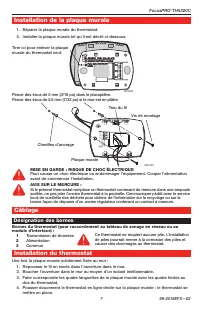
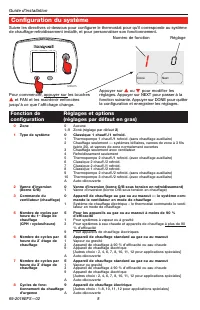
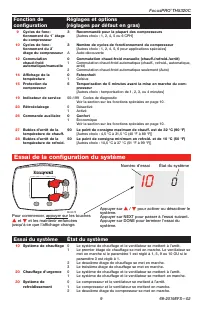
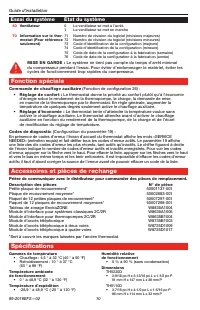

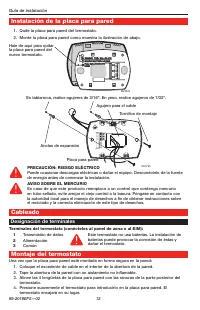


Table of Contents:
- Page 2 – Wallplate installation; Wiring; Terminal designations; Thermostat mounting
- Page 3 – Installer setup; Setup function
- Page 4 – Installer system test
- Page 5 – Special function; System test
- Page 6 – Guide; Doit être installé par un technicien expérimenté et qualifié.; Pour obtenir de l’assistance au sujet de ce produit,; À utiliser avec
- Page 7 – Installation de la plaque murale; Câblage; Désignation des bornes; Installation du thermostat
- Page 8 – Configuration du système; Fonction de
- Page 9 – Essai de la configuration du système; Essai du système
- Page 10 – Fonction spéciale; Accessoires et pièces de rechange; Spécifications
- Page 11 – Guía de; Debe ser instalado por un técnico; puede dañar el producto u ocasionar un riesgo.; ¿Necesita asistencia?; Para obtener asistencia relacionada con este producto,; Se usa con
- Page 12 – Instalación de la placa para pared; Cableado; Designación de terminales; Montaje del termostato
- Page 13 – Configuración de instalación; Funciones de la Configuraciones y opciones (las que vienen
- Page 14 – Prueba del sistema; Prueba del sistema Estado del sistema
- Page 15 – Funciones especiales; Accesorios y piezas de repuesto; Especificaciones
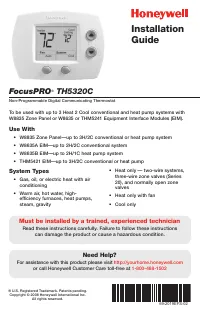
FocusPRO
®
TH5320C
Non-Programmable Digital Communicating Thermostat
® U.S. Registered Trademark. Patents pending.
Copyright © 2008 Honeywell International Inc.
All rights reserved.
Installation
Guide
Must be installed by a trained, experienced technician
Read these instructions carefully. Failure to follow these instructions
can damage the product or cause a hazardous condition.
Need Help?
For assistance with this product please visit
http://yourhome.honeywell.com
or call Honeywell Customer Care toll-free at
1-800-468-1502
69-2019EFS-02
To be used with up to 3 Heat 2 Cool conventional and heat pump systems with
W8835 Zone Panel or W8635 or THM5241 Equipment Interface Modules (EIM).
System Types
• Gas, oil, or electric heat with air
conditioning
• Warm air, hot water, high-
efficiency furnaces, heat pumps,
steam, gravity
• Heat only — two-wire systems,
three-wire zone valves (Series
20), and normally open zone
valves
• Heat only with fan
• Cool only
Use With
• W8835 Zone Panel—up to 3H/2C conventional or heat pump system
• W8635A EIM—up to 2H/2C conventional system
• W8635B EIM—up to 2H/1C heat pump system
• THM5421 EIM—up to 3H/2C conventional or heat pump
"Loading the manual" means you need to wait until the file loads and becomes available for online reading. Some manuals are very large, and the time they take to appear depends on your internet speed.
Summary
Installation Guide 69-2019EFS—02 2 Wallplate installation 1. Separate wallplate from thermostat.2. Mount wallplate as shown below. MERCURY NOTICE If this product is replacing a control that contains mercury in a sealed tube, do not place the old control in the trash. Contact your local waste managem...
FocusPRO ® TH5320 3 69-2019EFS—02 M23675 To begin, press and hold the s and FAN buttons until the display changes. Press s or t to change settings. Press NEXT to advance to the next function. Press DONE to exit and save settings. Function number Setting 1 0 Done Next Installer setup Follow the proce...
Installation Guide 69-2019EFS—02 Installer system test Setup function Settings & options (factory default in bold) M23675 Press s / t to turn system on/off. Press NEXT to advance to next test. Press DONE to terminate system test. Test number 10 System status 0 To begin, press and hold the s and ...


