Page 3 - - Introduction to the security system
It may include : • A KEYPAD WITH DISPLAY for arming and disarming operations and access to advanced user functions like detector bypass and events log. • A KEYPAD WITH PROX READER for all users arming and disarming operations of the different sets. • A KEYFOB associated to one or more users for armi...
Page 5 - - Understanding the system tones; SIRENS
3- Understanding the system tones SIRENS A siren is an effective deterrent due to its power and very irritating tone.The system has a siren built in the control panel. An optional remotesiren can be added. In addition, the panel built-in siren emits an audible confirmationtone when arming and disarm...
Page 6 - - How to use the wireless keypad with display*; ARMING USING YOUR CODE OR TAG; DISARMING USING YOUR CODE OR TAG
E N G L I S H - 5 - 4- How to use the wireless keypad with display* The wireless keypad with display offers a complete range of tools to manage youralarm system, from normal operation to dedicated user functions. The keypad is used to arm and disarm your security system using a valid accesscode or k...
Page 7 - KEYPAD DISPLAY
E N G L I S H - 6 - DURESS CODE A duress code can be used if you are forced to disarm your security system underduress. Your duress code is +1 to your code (1234 => 1235, 6789 => 6780). Thesystem will disarm as normal however a silent alert signal is transmitted to yourAlarm Receiving Centre. ...
Page 8 - EVENT MENU; TEST MENU
STATUS SCREEN When the keypad is turned off, you can view the current status of the system by pressing OK.This will display icons and fault messages if any. SETTINGS MENU When the system is disarmed, you can access the menu to modify the varioussettings of your system. • The system can have up to 10...
Page 9 - OTHER FUNCTIONS; BATTERY REPLACEMENT
E N G L I S H - 8 - OTHER FUNCTIONS You can deactivate the beeps played on the panel's built-in siren by selecting the SILENT MODE . You can also activate the chime, which may be associated to some of thedetectors in your installation by accessing the CHIME menu. Home automation functions are in a d...
Page 10 - - How to use the wireless keypad with prox reader*
5- How to use the wireless keypad with prox reader* The keypad is used to arm and disarm your security system using a valid accesscode or key TAG. To use all his functions you must have the master code chosenduring the installation or have the master key TAG. ARMING USING YOUR CODE OR TAG Press an a...
Page 13 - ARMING; DISARMING
E N G L I S H Total set arming Partial set arming Disarming - 12 - * The system can include 0-4 keyfobs of this type. ** Provided that this function has been programmed by the installer, you can choose to protect only a part of your premises whilstyou are in the other part. *** This function require...
Page 16 - - How to control your system over the phone
- 15 - 7- How to control your system over the phone Control of your system over the phone is only possible from a multi-frequencyphone (tone dialling) or from your cellular phone. This function must beconfigured by the installer.The Domonial control panel picks up your call after the number of rings...
Page 17 - - Maintenance and recommendations
E N G L I S H - 16 - 8- Maintenance and recommendations • Check your system regularly (once a month or follow your operator’s specifications). • Do not try to open or move the components. They are tamper- protected and some of them can cause electric shocks. • Except for the optional external siren,...
Page 20 - - LES VOYANTS LUMINEUX
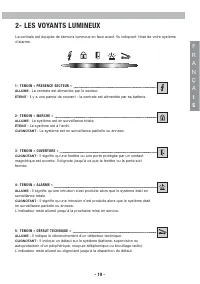
- 19 - 2- LES VOYANTS LUMINEUX La centrale est équipée de témoins lumineux en face avant. Ils indiquent l'état de votre systèmed'alarme. 1- TEMOIN « PRESENCE SECTEUR » ALLUME : La centrale est alimentée par le secteur. ETEINT : Il y a une panne de courant - la centrale est alimentée par sa batterie....
Page 21 - - Signalisation sonore; SIRENE; SIGNAUX SONORES
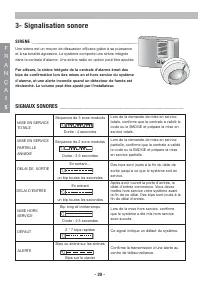
3- Signalisation sonore SIRENE Une sirène est un moyen de dissuasion efficace grâce à sa puissanceet à sa tonalité agressive. Le système comporte une sirène intégréedans la centrale d'alarme. Une sirène radio en option peut être ajoutée. Par ailleurs, la sirène intégrée de la centrale d'alarme émet ...
Page 22 - - Comment utiliser le clavier radio avec afficheur*; MISE EN SERVICE AVEC LE CODE OU LE BADGE; MISE HORS SERVICE AVEC LE CODE OU LE BADGE
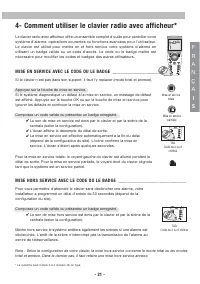
- 21 - 4- Comment utiliser le clavier radio avec afficheur* Le clavier radio avec afficheur offre un ensemble complet d'outils pour contrôler votresystème d'alarme, opérations courantes ou fonctions avancées pour l'utilisateur. Le clavier est utilisé pour mettre en et hors service votre système d'al...
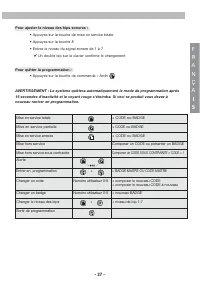
Page 23 - L'AFFICHEUR DU CLAVIER
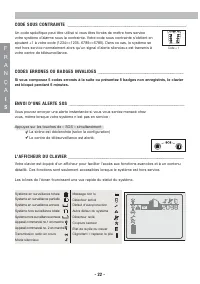
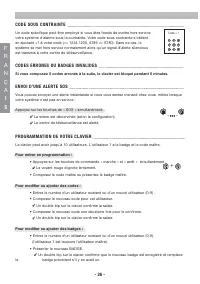
- 22 - CODE SOUS CONTRAINTE Un code spécifique peut être utilisé si vous êtes forcés de mettre hors servicevotre système d'alarme sous la contrainte. Votre code sous contrainte s'obtient enajoutant +1 à votre code (1234=>1235, 6789=>6780). Dans ce cas, le système semet hors service normalement...
Page 25 - AUTRES FONCTIONS; REMPLACEMENT DE LA PILE
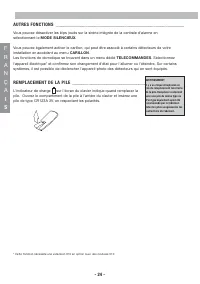
AUTRES FONCTIONS Vous pouvez désactiver les bips joués sur la sirène intégrée de la centrale d'alarme ensélectionnant le MODE SILENCIEUX . Vous pouvez également activer le carillon, qui peut être associé à certains détecteurs de votreinstallation en accédant au menu CARILLON . Les fonctions de domot...
Page 26 - - Comment utiliser le clavier sans fil avec lecteur de badge*
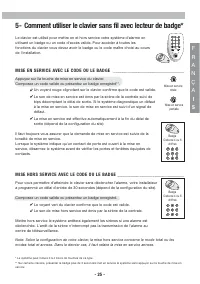
- 25 - Mise en service totale Mise en service partielle Badge Code de 4 ou 6 chiffres Badge Code de 4 ou 6 chiffres 5- Comment utiliser le clavier sans fil avec lecteur de badge* Le clavier est utilisé pour mettre en et hors service votre système d'alarme enutilisant un badge ou un code d'accès vali...
Page 29 - - Comment utiliser la télécommande à; MISE EN SERVICE
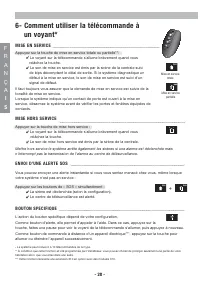
- 28 - 6- Comment utiliser la télécommande à un voyant* MISE EN SERVICE Appuyez sur la touche de mise en service totale ou partielle**: Le voyant sur la télécommande s'allume brièvement quand vous relâchez la touche. Le son de mise en service est émis par la sirène de la centrale suivi de bips décom...
Page 30 - - Comment utiliser la télécommande à 3 voyants*; MISE HORS SERVICE APRÈS ALARME
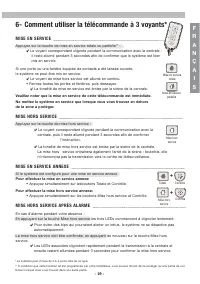
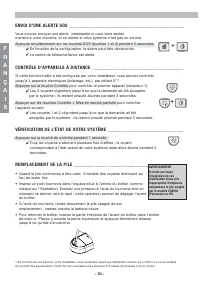
- 29 - F R A NÇ A I S Mise en service totale Mise en service partielle * Le système peut inclure de 0 à 4 porte-clés de ce type. ** À condition que cette fonction ait été programmée par votre installateur, vous pouvez choisir de ne protéger qu’une partie de voslocaux lorsque vous vous trouvez dans u...
Page 32 - - Comment contrôler votre système par téléphone
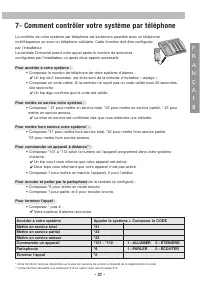
7- Comment contrôler votre système par téléphone Le contrôle de votre système par téléphone est seulement possible avec un téléphonemultifréquence ou avec un téléphone cellulaire. Cette fonction doit être configuréepar l'installateur.La centrale Domonial prend votre appel après le nombre de sonnerie...
Page 35 - - Introducción al sistema de seguridad
Puede incluir : • Un TECLADO CON PANTALLA LCD para las operaciones de armado y desarmado, y acceso a las funciones avanzadas, como la anulación de undetector y el registro de eventos. • Un TECLADO CON LECTOR DE PROXIMIDAD para las operaciones de armado y desarmado de los distintos modos para todos l...
Page 36 - - Testigos indicadores
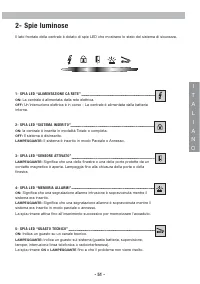
E S P A N O L - 35 - 2- Testigos indicadores La parte inferior del panel de control incluye varias LED que indican el estado del sistema deseguridad. 1- LED “SUMINISTRO DE LA RED” ON : El panel de control está alimentado por la red. OFF : Se produjo un problema de alimentación – El panel de control ...
Page 37 - - Interpretación de los sonidos del sistema; SIRENAS
E S P A N O L 3- Interpretación de los sonidos del sistema SIRENAS Una sirena es muy disuasiva por el volumen y el carácter irritante delsonido. El sistema incluye una sirena en el panel de control. Opcionalmente, se puede añadir una sirena a distancia. Además, la sirena del panel emite una confirma...
Page 38 - - Cómo utilizar el teclado vía radio con pantalla LCD*; ARMADO POR MEDIO DEL CÓDIGO O DEL TAG; DESARMADO POR MEDIO DEL CÓDIGO O DEL TAG
E S P A N O L - 37 - 4- Cómo utilizar el teclado vía radio con pantalla LCD* El teclado vía radio con pantalla LCD proporciona toda una gama de herramientaspara gestionar el sistema de alarma, ya sea el funcionamiento normal o funciones másespecíficas. El teclado se usa para armar y desarmar el sist...
Page 39 - PANTALLA LCD DEL TECLADO
E S P A N O L - 38 - Código + 1 El desarmado del sistema interrumpirá las sirenas si es que se disparó una alarma. El paro de lasirena no interrumpe la transmisión de la alarma a la Central Receptora de Alarmas. Nota: En función de la configuración de su teclado, esta acción desarmará el modo total ...
Page 41 - OTRAS FUNCIONES; CAMBIO DE BATERÍA
E S P A N O L - 40 - CUIDADOExiste un riesgo deexplosión en caso deerror en el cambio debatería. Reemplácelaexclusivamente por unabatería del mismo tipo oequivalente, tal y comolo aconseja el fabricante. OTRAS FUNCIONES Se pueden desactivar los bips que emite la sirena del panel de controlselecciona...
Page 42 - - Cómo utilizar el teclado vía radio con lector de proximidad*
E S P A N O L - 41 - Armado del modo total Armado del modo parcial TAG código de 4 ó 6 dígitos TAG código de 4 ó 6 dígitos 5- Cómo utilizar el teclado vía radio con lector de proximidad* El teclado se usa para armar y desarmar el sistema de seguridad por medio de uncódigo de acceso válido o una llav...
Page 46 - ARMADO
- 45 - E S P A Ñ O L Armado total Armado parcial * El sistema puede incluir hasta 4 llaveros de este tipo. ** Siempre y cuando esta función haya sido programada por el instalador, existe la posibilidad de proteger sólo un área del localmientras que se encuentra en otra área. Desarmado Control + 6- U...
Page 48 - - Cómo controlar el sistema por teléfono
7- Cómo controlar el sistema por teléfono El control de su sistema por teléfono sólo es posible si dispone de un aparatomultifrecuencia o por medio de su teléfono móvil. Esta función debe haberlaconfigurado anteriormente el instalador.El panel de control Domonial descuelga una vez que el teléfono so...
Page 49 - - Mantenimiento y recomendaciones
E S P A N O L - 48 - 8- Mantenimiento y recomendaciones • Verifique a menudo el sistema (una vez por mes o respete las especificaciones de su operador) • No intente abrir o desplazar los componentes. Están protegidos contra una utilización incorrecta y algunospueden ser peligrosos desde el punto de ...
Page 51 - - Introduzione al sistema di sicurezza
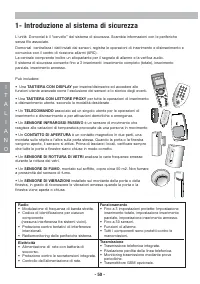
Può includere: • Una TASTIERA CON DISPLAY per inserire/disinserire ed accedere alle funzioni utente avanzate come l'esclusione dei sensori e lo storico degli eventi. • Una TASTIERA CON LETTORE PROXY per tutte le operazioni di inserimento e disinserimento utente, secondo le modalità desiderate • Un T...
Page 53 - - Descrizione degli avvisi acustici del sistema
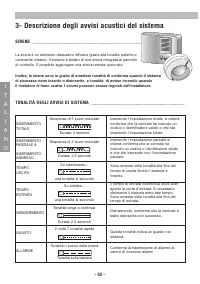
3- Descrizione degli avvisi acustici del sistema SIRENE La sirena è un elemento dissuasivo efficace grazie alla tonalità potente everamente irritante. Il sistema è dotato di una sirena integrata al pannellodi controllo. È possibile aggiungere una sirena remota opzionale. Inoltre, le sirene sono in g...
Page 54 - INSERIMENTO MEDIANTE CODICE O TAG; DISINSERIMENTO MEDIANTE CODICE O TAG
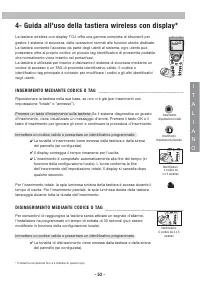
- 53 - La tastiera wireless con display TCU offre una gamma completa di strumenti pergestire il sistema di sicurezza, dalle operazioni normali alle funzioni utente dedicate.La tastiera consente l'accesso da parte degli utenti al sistema, ogni utente puòpossedere oltre al proprio codice un piccolo ta...
Page 55 - DISPLAY DELLA TASTIERA
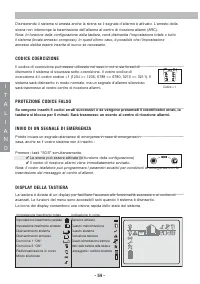
- 54 - Disinserendo il sistema si arresta anche la sirena se il segnale d'allarme è attivato. L'arresto dellasirena non interrompe la trasmissione dell'allarme al centro di ricezione allarmi (ARC). Nota: In funzione della configurazione della tastiera, verrà disinserita l'impostazione totale o tutto...
Page 57 - ALTRE FUNZIONI; SOSTITUZIONE DELLA BATTERIA
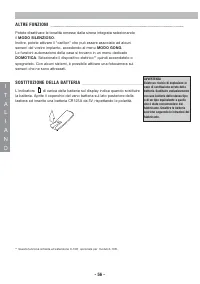
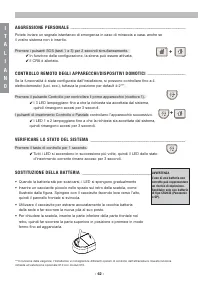
- 56 - ALTRE FUNZIONI Potete disattivare le tonalità emesse dalla sirena integrata selezionandoil MODO SILENZIOSO . Inoltre, potete attivare il "carillon" che può essere associato ad alcunisensori del vostro impianto, accedendo al menu MODO GONG . Le funzioni automazione della casa si trovan...
Page 58 - INSERIMENTO MEDIANTE CODICE O IDENTIFICATIVO TAG; DISINSERIMENTO MEDIANTE CODICE O IDENTIFICATIVO
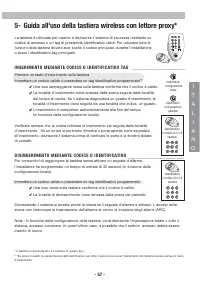
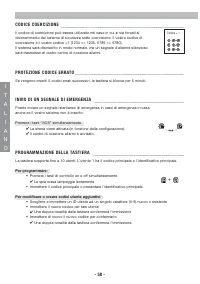
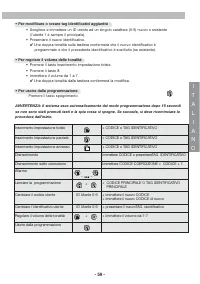
- 57 - Inserimento configurazione totale inserimento configurazione parziale Identificativo o codice di 4 o 6 caratteri 5- Guida all'uso della tastiera wireless con lettore proxy* La tastiera è utilizzata per inserire e disinserire il sistema di sicurezza mediante uncodice di accesso o un tag di pro...
Page 62 - - Come utilizzare il telecomando con 3 LED*; INSERIMENTO
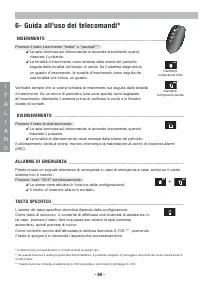
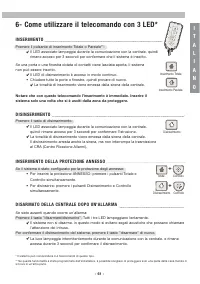
- 61 - I T A L I ANO Inserimento Totale Inserimento Parziale * Il sistema può comprendere 0-4 telecomandi di questo tipo. ** Se questa funzionalità è stata programmata dall’installatore, è possibile scegliere di proteggere solo una parte della casa mentre cisi trova in un’altra parte. Totale Control...
Page 64 - - GUIDA AL CONTROLLO DEL SISTEMA MEDIANTE TELEFONO
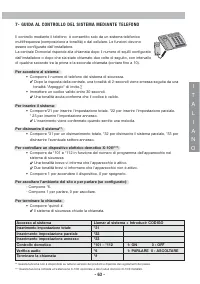
7- GUIDA AL CONTROLLO DEL SISTEMA MEDIANTE TELEFONO Il controllo mediante il telefono è consentito solo da un sistema telefonicomultifrequenza (composizione a tonalità) o dal cellulare. Le funzioni devonoessere configurate dall'installatore.La centrale Domonial risponde alla chiamata dopo il numero ...
Page 65 - - Manutenzione e raccomandazioni
- 64 - 8- Manutenzione e raccomandazioni • Verificare regolarmente il sistema (ogni mese o secondo le specifiche del vostro operatore) • Non cercare di aprire o di spostare i componenti. Sono protetti contro le manomissioni e alcuni di essi presentanorischi di scariche elettriche. • Eccetto per quan...
Page 67 - - Einführung in das Sicherheitssystem
Mögliche Komponenten Ihres Domonial Sicherheitssystems : • Ein BEDIENTEIL MIT DISPLAY zum Scharfschalten / Unscharfschalten und für den Zugriff auf erweiterte Bedienfunktionen wie die Abschaltung vonMeldern oder Ansicht des Ereignisspeichers. • Ein BEDIENTEIL MIT PROX-LESER zum Scharfschalten / Unsc...
Page 69 - - Audiosignale der Anlage; SIRENEN
D E U T S C H 3- Audiosignale der Anlage SIRENEN Eine Sirene ist aufgrund ihrer Lautstärke und ihres unangenehmenSignaltons ein wirksames Abschreckungsmittel. Die Anlage besitzt einein die Funkzentrale eingebaute Sirene. Als Option kann eine dezentraleSirene hinzugefügt werden. AKUSTISCHE SIGNALE DE...
Page 71 - ANZEIGE DES BEDIENTEILS
D E U T S C H - 70 - Durch Unscharfschalten können bei ausgelöstem Alarm auch die Sirenen gestoppt werden. BeimStoppen der Sirene wird die Übertragung des Alarms an die Empfangsstelle jedoch nichtunterbrochen. Hinweis: Je nach Konfiguration Ihres Bedienteils wird damit entweder der Haupt-/Gesamtbere...
Page 72 - EREIGNISMENÜ
D E U T S C H - 71 - Die Navigationstasten dienen dem Menüzugriff : • Pfeiltasten drücken, um zum Hauptmenü zu gelangen, zu navigieren und mit Klammern identifizierte Auswahlen “< >” anzusehen • Mit der Taste bestätigen • Zurück-Taste betätigen, um Ihre Auswahl zu beenden und zum Hauptmenü zur...
Page 73 - ANDERE FUNKTIONEN
D E U T S C H - 72 - WARNUNG Es besteht ein Explosionsrisiko beim Einsetzen der falschenBatterie. Nur mit einergleichartigen Batterie ersetzen, dievom Hersteller empfohlen wurde.Altbatterien gemäß den Hinweisendes Herstellers entsorgen. ANDERE FUNKTIONEN Die Summertöne der in die Funkzentrale eingeb...
Page 74 - SCHARFSCHALTUNG MIT IHREM CODE ODER SCHLÜSSELANHÄNGER; UNSCHARFSCHALTUNG MIT IHREM CODE ODER SCHLÜSSELANHÄNGER
D E U T S C H - 73 - Schlüsselanhänger 4- oder 6-stelliger Code Schlüsselanhänger 4- oder 6-stelliger Code 5- Einsatz des Funk-Bedienteils mit Prox-Leser* Das Bedienteil dient zum Scharf- und Unscharfschalten Ihres Sicherheitssystemsmit einem gültigen Zutrittscode oder Schlüsselanhänger. Um alle Fun...
Page 75 - PROGRAMMIER UNG DES BEDIENTEILS
D E U T S C H - 74 - Code + 1 + Durch Unscharfschalten können bei ausgelöstem Alarm auch die Sirenen gestoppt werden. BeimStoppen der Sirene wird die Übertragung des Alarms an die Empfangsstelle jedoch nichtunterbrochen. Hinweis: Je nach Konfiguration Ihres Bedienteils wird damit entweder der Haupt-...
Page 77 - - Bedienung des Schlüsselanhängers mit 1 LED*; SCHARFSCHALTUNG; PANIKALARM; LICHTTASTE (PROGRAMMIERBARE SPEZIFISCHE TASTE)
D E U T S C H - 76 - 6- Bedienung des Schlüsselanhängers mit 1 LED* SCHARFSCHALTUNG Scharfschaltungstaste für den Haupt-/Gesamtbereich oder Teilraum** betätigen: Die Anzeige-LED auf dem Schlüsselanhänger leuchtet beim Loslassen der Taste kurz auf. Die Sirene der Funkzentrale signalisiert die Scharfs...
Page 78 - - Bedienung des Schlüsselanhängers mit 3 LEDs*
- 77 - 6- Bedienung des Schlüsselanhängers mit 3 LEDs* SCHARFSCHALTUNG Die Taste Hauptbereich oder Teilraum** drücken: Die entsprechende LED blinkt während der Kommunikation mit der Zentrale und leuchtet 3 Sekunden lang, um die Scharfschaltung des Systems zu bestätigen. Ist eine mit Kontakten verseh...
Page 80 - - Telefonische Steuerung der Anlage
7- Telefonische Steuerung der Anlage Die Steuerung Ihrer Anlage per Telefon ist nur über ein Mehrfrequenztelefon(Tonwahl) oder von Ihrem Mobiltelefon aus möglich. Diese Funktion muss bei derInstallation konfiguriert werden.Die Domonial Funkzentrale nimmt Ihren Anruf nach der bei der Installationkonf...
Page 81 - - Wartung und Empfehlungen
D E U T S C H - 80 - 8- Wartung und Empfehlungen • Überprüfen Sie Ihre Anlage regelmäßig (einmal monatlich bzw. nach den Anweisungen Ihres Errichters oder Installateurs). • Versuchen Sie nicht, Komponenten zu öffnen oder abzunehmen. Sie sind sabotagegeschützt und können stromführende Teile im Gehäus...
Page 83 - - Inleiding tot het beveiligingssysteem
Het kan bestaan uit de volgende elementen: • Een BEDIENPANEEL MET DISPLAY voor het in- of uitschakelen en het bedienen van geavanceerde gebruikersfuncties zoals detectoroverbrugging en eventlog. • Een BEDIENPANEEL MET PROX LEZER voor alle in- en uitschakelingen van de verschillende zones door de geb...
Page 85 - - Verklaring van de systeemtonen; SIRENES
N E D E R L A ND S 3- Verklaring van de systeemtonen SIRENES Een sirene is een efficiënt afschrikmiddel omwille van zijn krachtige energ indringende toon. Het systeem beschikt over een ingebouwde sirenein het beveiligingspaneel. Er kan een optionele externe sirene worden aantoegevoegd. Bovendien pro...
Page 86 - INSCHAKELING MET UW CODE OF KEYTAG; UITSCHAKELING MET UW CODE OF KEYTAG; - Zo gebruikt u het draadloze bedienpaneel met display *
N E D E R L A ND S - 85 - Het draadloze bedienpaneel met display biedt een hele reeks beheersinstrumentenvoor uw alarmsysteem, van normale werking tot specifieke gebruikersfuncties. Het bedienpaneel wordt gebruikt om uw beveiligingssysteem in en uit te schakelenmet behulp van een geldige toegangscod...
Page 87 - BEDIENPANEELDISPLAY
N E D E R L A ND S - 86 - NB: Afhankelijk van de configuratie van uw bedienpaneel, wordt hierdoor de totale zone of hetgehele systeem uitgeschakeld. In het laatste geval is het mogelijk dat de naburige zone moetworden heringeschakeld. OVERVALCODE U kunt een overvalcode gebruiken wanneer u uw beveili...
Page 89 - ANDERE FUNCTIES; BATTERIJ VERVANGEN
N E D E R L A ND S - 88 - WAARSCHUWINGBij verkeerde plaatsingvan de batterij ontstaat erexplosiegevaar. Vervangde batterij alleen met eenvan hetzelfde of eengelijkwaardig type, zoalsaanbevolen door defabrikant. ANDERE FUNCTIES U kunt de pieptonen die worden gegenereerd via de in het bedienpaneelinge...
Page 90 - - Zo gebruikt u het draadloze bedienpaneel met prox lezer*
N E D E R L A ND S - 89 - Totale zone inschakelen Deelzone inschakelen TAG (keytag) met code van 4 of 6 cijfers TAG (keytag) met code van 4 of 6 5- Zo gebruikt u het draadloze bedienpaneel met prox lezer* Het bedienpaneel wordt gebruikt om uw beveiligingssysteem in en uit teschakelen met behulp van ...
Page 93 - PANIEKALARM; SPECIFIEKE TOETS
N E D E R L A ND S - 92 - 6- De handzender met 1 LED gebruiken* INSCHAKELING Druk op de toets voor inschakeling van de totale zone of de deelzone**: De lichtindicator op de handzender licht kortstondig op wanneer u de knop loslaat. De inschakeltoon wordt gegenereerd door de paneelsirene gevolgd door...
Page 96 - - ZO BEDIENT U UW SYSTEEM PER TELEFOON
7- ZO BEDIENT U UW SYSTEEM PER TELEFOON Uw systeem kan telefonisch alleen worden bediend bij gebruik van een DTMF-telefoon (toonkiezen) of via uw mobiele telefoon. Deze functie moet door deinstallateur worden geconfigureerd. Het beveiligingspaneel Domonial vangt uwoproep op na het aantal door uw ins...
Page 97 - - Onderhoud en adviezen
N E D E R L A ND S - 96 - 8- Onderhoud en adviezen • Controleer geregeld uw systeem (één keer per maand of volgens de aanwijzingen van uw alarminstallateur). • Maak de componenten niet open of verplaats ze niet Ze zijn beveiligd tegen sabotage en sommige kunnen gevaarvoor elektrische schokken opleve...