Honeywell CT31 - User Manual
Honeywell CT31 – User Manual, read for free online in PDF format. We hope this helps you resolve any issues you may have. If you have further questions, please contact us through the contact form.


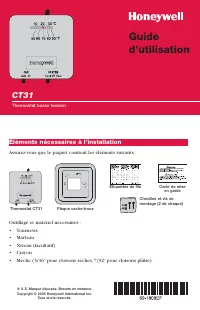
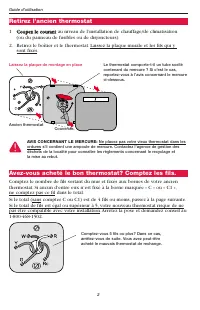
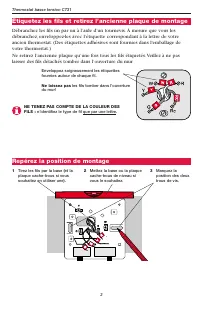
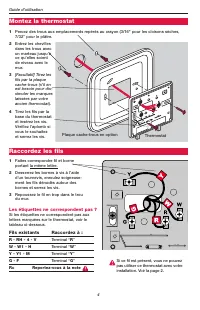
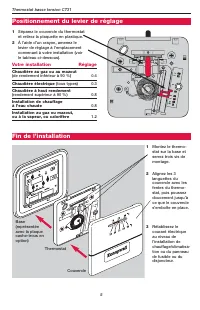
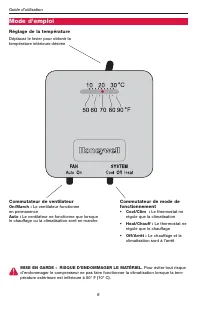

Table of Contents:
- Page 2 – Remove your old thermostat; Did you purchase right thermostat? Count wires to check.
- Page 3 – Label wires and remove old wallplate; Mark mounting position
- Page 4 – Connect wires; Existing wires; Mount thermostat base
- Page 5 – Set adjustment lever; Your system
- Page 6 – Operation; Fan switch; System switch; Temperature setting
- Page 7 – Limited Warranty; If the product is defective,
- Page 8 – Honeywell International Inc.; Automation and Control Solutions; Honeywell Limited-Honeywell Limitée
- Page 9 – Thermostat basse tension; Éléments nécessaires à l’installation; Outillage et matériel nécessaires :; Assurez-vous que le paquet contient les éléments suivants :
- Page 10 – Retirez l’ancien thermostat
- Page 11 – Étiquetez les fils et retirez l’ancienne plaque de montage; Repérez la position de montage
- Page 12 – Raccordez les fils; Fils existants; Montez la thermostat; Les étiquettes ne correspondent pas ?
- Page 13 – Positionnement du levier de réglage; Votre installation
- Page 14 – Mode d’emploi; Réglage de la température; Commutateur de ventilateur
- Page 15 – Garantie limitée; Si le produit est défectueux,
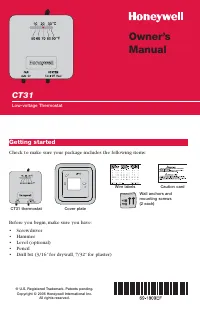
CT31
Low-voltage Thermostat
Owner’s
Manual
Getting started
Before you begin, make sure you have:
•
Screwdriver
•
Hammer
•
Level (optional)
•
Pencil
•
Drill bit (3/16” for drywall, 7/32” for plaster)
® U.S. Registered Trademark. Patents pending.
Copyright © 2005 Honeywell International Inc.
All rights reserved.
Caution card
Wire labels
Wall anchors and
mounting screws
(2 each)
CT31 thermostat
Cover plate
Check to make sure your package includes the following items:
"Loading the manual" means you need to wait until the file loads and becomes available for online reading. Some manuals are very large, and the time they take to appear depends on your internet speed.
Was this manual helpful?
About this manual
- Brand
- Honeywell
- Model
- CT31
- Document type
- User Manual
- Language(s)
- English, French
- Pages
- 16
- File size
- 608.9 KB
- Format
Other Manuals for Honeywell CT31
Summary
Owner’s Manual 2 Remove your old thermostat 1 T Tu urrn n o offff p po ow we err at heating/cooling system (or fuse/circuit-breaker panel). 2 Remove cover and thermostat, but leave wallplate with wires attached. Old thermostat Leave wallplate in place Is there a sealed tube containing mercury? If so...
CT31 Low-voltage Thermostat 3 Label wires and remove old wallplate Use a screwdriver to disconnect wires one by one. As you disconnect each wire,wrap it with the label matching the letter on your old thermostat. (Adhesive labelsare supplied in your thermostat package.) Remove the old wallplate only ...
Owner’s Manual 4 Connect wires 1 Match each labeled wirewith same letter on terminal. 2 Use a screwdriver to loosenscrew terminals, wrap barewire securely around termi-nals, then tighten screws. 3 Push any excess wire backinto the wall opening. Labels don’t match? If labels do not match letters onth...
Ask a question
Related manuals
Popular Honeywell Other




More Honeywell Other models
 Honeywell CO610PM User Manual
 Honeywell CPD User Manual
 Honeywell CS10PE User Manual
 Honeywell CS10PEI User Manual
 Honeywell CT30 User Manual
 Honeywell CT30A1005 User Manual
 Honeywell CT41A Manual
 Honeywell CT47X1N User Manual
 Honeywell CT50 User Manual
 Honeywell CT60 User Manual
 Honeywell CT60 L1N Manual
 Honeywell CT70 User Manual