Goldair GPDF30S - User Manual
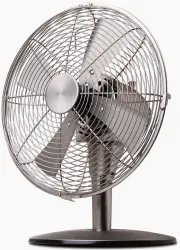
Goldair GPDF30S Fan – User Manual, read for free online in PDF format. We hope this helps you resolve any issues you may have. If you have further questions, please contact us through the contact form.


Table of Contents:
- Page 3 – General Care and Safety Guide
- Page 4 – Assembly
- Page 5 – Operating your Fan
- Page 6 – Cleaning
- Page 7 – Two Year Warranty
Platinum Series
30cm Desk Fan
Model: GPDF30S
"Loading the manual" means you need to wait until the file loads and becomes available for online reading. Some manuals are very large, and the time they take to appear depends on your internet speed.
Summary
TECHNICAL SPECIFICATION Model: GPDF30S Supply: 220 - 240VAC 50Hz Wattage: 45W General Care and Safety Guide Thank you for choosing this Goldair Platinum product. This Goldair Platinum appliancehas been designed and manufactured to high standards of engineering and with proper use and care, as descri...
The motor housing and shaft are assembled. Unscrew the base locking screw from theshaft. Insert the shaft through the hole in the centreof the fan base and twist into position.Secure the shaft to the base by locking intoplace with the base locking screw. Remove the blade cap and guard knob fromthe m...
WARNING Keep all objects at least 1 metre from the front, sides and rear of the appliance Fan control switch The control switch positions are: • 0 = Off • 1 = Low speed • 2 = Medium Speed • 3 = High Speed Place the fan on a dry, level and sturdy surface. Plug the power cord into the socket, makingsu...


