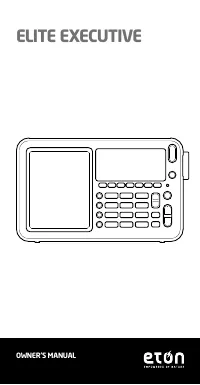
Page 2 - MEET THE ELITE EXECUTIVE; Thank you for purchasing the Etón; ELITE EXECUTIVE; FRONT
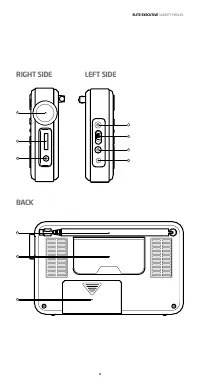
ELITE EXECUTIVE OWNER’S MANUAL 2 Features: 1 Speaker 2 LCD display panel 3 Operation buttons 4 Tuning dial 5 Volume knob 6 Line in/out jack: D 3.5mm 7 External antenna jack 8 DX/Local sensitivity selection 9 Earphone jack: D 3.5mm 10 DC jack 11 Whip antenn a 12 Kick stand 13 Battery compartment MEET...
Page 3 - RIGHT SIDE
ELITE EXECUTIVE OWNER’S MANUAL 3 7 8 12 10 11 13 9 RIGHT SIDE LEFT SIDE BACK 6 4 5
Page 4 - BUTTON FUNCTIONALITY; Tuning Dial; Rotate the dial to select clock, frequency or air squelch level.
ELITE EXECUTIVE OWNER’S MANUAL 4 BUTTON FUNCTIONALITY Tuning Dial Rotate the dial to select clock, frequency or air squelch level. With the radio on: 1. Quick press to select tuning speed as FAST-SLOW-STOP. 2. Press and hold to select the level of squelch feature. Note: all bands have squelch featur...
Page 5 - timer
ELITE EXECUTIVE OWNER’S MANUAL 5 With the radio off: quick press to turn on the radio; press and hold to set up sleep timer (to turn off the radio automatically)With the radio on: quick press to turn off the radio; press and hold to display the countdown of sleep timer With the radio off, quick pres...
Page 6 - Quick press to select FM and AIR band
ELITE EXECUTIVE OWNER’S MANUAL 6 With the radio on: in memory mode, press and hold to rename page; Quick press to select the backlight brightness level: high-medium-low-off With the radio on: in memory mode, delete preset frequency In AM band, quick press to enter SSB modeIn SSB mode, quick press to...
Page 7 - Reset hole; SETTING YOUR TIME ZONE; Time Zone Abbreviation List:; ANC-Anchorage
ELITE EXECUTIVE OWNER’S MANUAL 7 In Weekday mode: quick press to turn in station; press and hold to auto-scan station and ATS stationIn Memory mode: select preset page Reset hole SETTING YOUR TIME ZONE With the radio off, press and hold TZ/LINE IN, the time zone flashes in the display, rotate the tu...
Page 8 - NYC - New York City; SETTING THE CLOCK AND WEEKDAY; set the current time on the clock automatically.; SETTING ALARMS; Setting alarm 1 through 4
ELITE EXECUTIVE OWNER’S MANUAL 8 -5 NYC - New York City +1 PAR - Pairs -3 RIO - De Janeiro +10 SYD - Sydney +9 TYO - Tokyo +12 WLG - Wellington SETTING THE CLOCK AND WEEKDAY The clock is in 12 or 24 hour format. To change the format, press PAGE/TIME button. “12H” or “24H” will flash in the LCD displ...
Page 9 - Activating and deactivating the alarms; USING THE LOCK FEATURE
ELITE EXECUTIVE OWNER’S MANUAL 9 time. Additionally, each alarm can be programmable for a specific weekday, playtime, and frequency.1. With the radio off, perform a press and hold of one of the F1-4 buttons, causing the hour to flash, icon starts flashing. While it’s still flashing, press one of the...
Page 10 - RESETTING THE RADIO; Band selection
ELITE EXECUTIVE OWNER’S MANUAL 10 RESETTING THE RADIO If the radio has malfunction, the user should disconnect the power supply and then connect the power again to reset the radio. Or use sharp toothpick or paperclip to quick press RESET hole to reset the radio. If the user wants to set factory defa...
Page 11 - Tuning in stations; INTL
ELITE EXECUTIVE OWNER’S MANUAL 11 3. Quick press AM/METER BAND button to select SW band and switch meter band in cycle 4. Quick press PAGE/TIME button to select Weekday mode, the LCD will display “ ”, quick press F1~7 button to select 7 meter bands: F1: 49M F2: 41M F3: 31M F4: 25M F5: 22M F6: 19M F7...
Page 12 - Frequency step list below:; Manual Tuning; Auto tuning in a station then stops search
ELITE EXECUTIVE OWNER’S MANUAL 12 Frequency step list below: Tuning Method | Band | Step Manual STOP | DELAY-5 ATS FM 100K 100K 100K LW 3K 3K N/A MW 9K/10K 9K/10K N/A SW 5K 5K N/A AIR 25K 25K N/A Manual Tuning With the radio on, select one band,Quick press PAGE/TIME button to switch to Weekday modeQ...
Page 13 - Rotate Tuning; Direct key in frequency; in; STORING STATIONS INTO MEMORY; Store the frequency by pressing one of buttons F1-7 for 2
ELITE EXECUTIVE OWNER’S MANUAL 13 Press and hold or button to enter ATS then release this button, store the station to page (99~1) automatically, 7 memory locations for each page. Press any button to stop auto tuning in ATS mode. Rotate Tuning With the radio on, quickly press in the tuning knob to s...
Page 14 - ACCESS STORED MEMORIES
ELITE EXECUTIVE OWNER’S MANUAL 14 it means the storing is completed. Suggest manual storing frequency into memory from page 00. In FM mode, ATS will store memory from page 99, if the memories locations are available on page 99, ATS will replace already stored memories with new entries. ACCESS STORED...
Page 15 - LABELING MEMORY PAGE
ELITE EXECUTIVE OWNER’S MANUAL 15 4. Quick press or to select the desired page to paste to, quick press , the LCD will display “F7 Paste” and “PAGE XX” alternatively. i.e. finish paste 5. Repeat step 1~4 to continue to paste , then quick press PAGE/ TIME button to exit. LABELING MEMORY PAGE Memory p...
Page 16 - FM STEREO/MONO SELECTION
ELITE EXECUTIVE OWNER’S MANUAL 16 6. To continue to erase other memory pages, just repeat the process. 7. Press PAGE/TIME to exit delete mode. 8. If you want to delete the contents of all memory pages, you must RESET the radio. Resetting the radio deletes all memories and resets the radio to factory...
Page 17 - Squelch Selection; PS; Weekday display format:
ELITE EXECUTIVE OWNER’S MANUAL 17 Squelch Selection 1. Turn on the radio2. Press and hold down tuning dial, the display shows ”SQL-X” (X means 1~5 or OFF”, use the tuning knob to select the desired squelch level (SQL-1,SQL-2,..SQL-5” or “SQL-OFF” which means to turn off squelch function; 3. Quick pr...
Page 18 - the keypad and then pressing the AM button to enter it; USING THE SYNCHRONOUS DETECTOR
ELITE EXECUTIVE OWNER’S MANUAL 18 NOTE: if no station call-sign, will display PI CODE of current station TUNING SSB(SINGLE SIDE BAND) SSB enables listening to shortwave two way communications using the SSB mode such as amateur radio, Morse Code, weather-fax transmissions and other signals often refe...
Page 19 - USING DX/LOCAL SWITCH; ” icon appears in the display.; CHARGING NI-MH BATTERY IN THE ELITE EXECUTIVE; icon appears in the LCD
ELITE EXECUTIVE OWNER’S MANUAL 19 Turn the synchronous detector off while tuning stations or when it’s not needed. Using the Wide/Narrow button may also help. Using the synchronous detector does not always minimize interference or improve the signal. Turn the synchronous detector off while tuning st...
Page 20 - To route the audio output of your ELITE EXECUTIVE to another; VOLUME CONTROL; Etón Corporation
ELITE EXECUTIVE OWNER’S MANUAL 20 Caution: Do not attempt to charge non-charging batteries to avoid explosion. LINE-IN/OUT SOCKET This socket provides an industry standard, fixed level audio input/output source to safely route the ELITE EXECUTIVE’s audio to the line-in socket of a stereo system or r...
Page 21 - WARNING; or any object has fallen into the apparatus.; ENVIRONMENT; Disposal; WARRANTY REGISTRATION; Please go to; LIMITED WARRANTY
ELITE EXECUTIVE OWNER’S MANUAL 21 1015 Corporation Way, Palo Alto, CA 94303, USA 1-800-872-2228 (U.S.)1-800-637-1648 (Canada) 650-903-3866 (worldwide)M-F, 8:00AM-4:30PM, Pacific Standard Time https://etoncorp.com/pages/contact-us . WARNING • Do not expose this appliance to rain or moisture. • Do not...
Page 22 - SERVICE FOR YOUR PRODUCT
ELITE EXECUTIVE OWNER’S MANUAL 22 Retain your proof of purchase or the receipt. Limited Warranty information can be viewed at www.etoncorp.com in the Support section. SERVICE FOR YOUR PRODUCT To obtain service for your product, we recommend first contacting an Etón service representative at 800-872-...
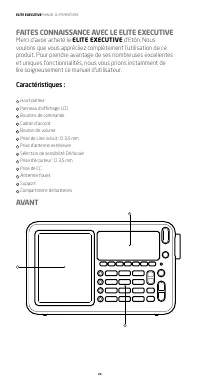
Page 24 - FAITES CONNAISSANCE AVEC LE ELITE EXECUTIVE; Merci d’avoir acheté le; AVANT
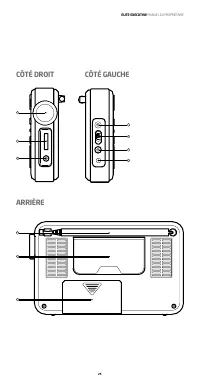
ELITE EXECUTIVE MANUEL DU PROPRIÉTAIRE 24 Caractéristiques : 1 Haut-parleur 2 Panneau d’affichage LCD 3 Boutons de commande 4 Cadran d’accord 5 Bouton de volume 6 Prise de Line in/out : D 3,5 mm 7 Prise d’antenne extérieure 8 Sélection de sensibilité DX/locale 9 Prise d’écouteur : D 3,5 mm 10 Prise ...
Page 25 - CÔTÉ DROIT
ELITE EXECUTIVE MANUEL DU PROPRIÉTAIRE 25 7 8 12 10 11 13 9 CÔTÉ DROIT CÔTÉ GAUCHE ARRIÈRE 6 4 5
Page 26 - FONCTIONS DES BOUTONS; Cadran d’accord; Maintenez appuyé pour sélectionner le niveau d’atténuation.; de mémoire
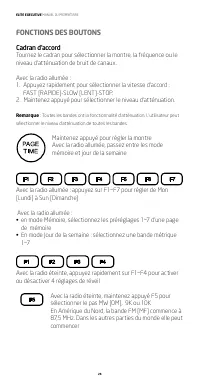
ELITE EXECUTIVE MANUEL DU PROPRIÉTAIRE 26 FONCTIONS DES BOUTONS Cadran d’accord Tournez le cadran pour sélectionner la montre, la fréquence ou le niveau d’atténuation de bruit de canaux. Avec la radio allumée :1. Appuyez rapidement pour sélectionner la vitesse d’accord : FAST [RAPIDE]-SLOW [LENT]-ST...
Page 27 - compte à rebours de mise en sommeil
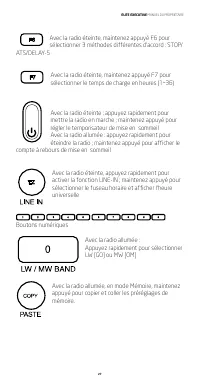
ELITE EXECUTIVE MANUEL DU PROPRIÉTAIRE 27 Avec la radio éteinte, maintenez appuyé F6 pour sélectionner 3 méthodes différentes d’accord : STOP/ ATS/DELAY-5 Avec la radio éteinte, maintenez appuyé F7 pour sélectionner le temps de charge en heures (1~36) Avec la radio éteinte : appuyez rapidement pour ...
Page 28 - recevoir et activer SYNC
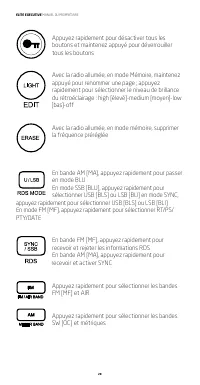
ELITE EXECUTIVE MANUEL DU PROPRIÉTAIRE 28 Appuyez rapidement pour désactiver tous les boutons et maintenez appuyé pour déverrouiller tous les boutons Avec la radio allumée, en mode Mémoire, maintenez appuyé pour renommer une page ; appuyez rapidement pour sélectionner le niveau de brillance du rétro...
Page 29 - de préréglages; RÉGLAGE DE VOTRE FUSEAU HORAIRE
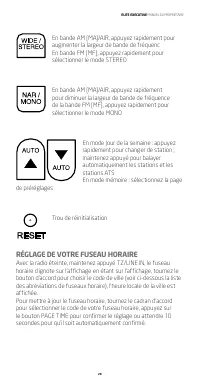
ELITE EXECUTIVE MANUEL DU PROPRIÉTAIRE 29 En bande AM [MA]/AIR, appuyez rapidement pour augmenter la largeur de bande de fréquencEn bande FM [MF], appuyez rapidement pour sélectionner le mode STEREO En bande AM [MA]/AIR, appuyez rapidement pour diminuer la largeur de bande de fréquence de la bande F...
Page 30 - Liste d’abréviations de fuseaux horaires :; RÉGLAGE DE LA MONTRE ET DU JOUR DE LA SEMAINE
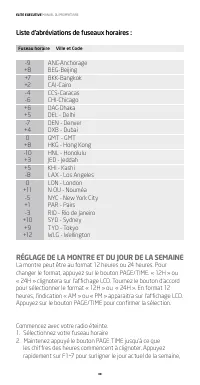
ELITE EXECUTIVE MANUEL DU PROPRIÉTAIRE 30 Liste d’abréviations de fuseaux horaires : Fuseau horaire Ville et Code -9 ANC-Anchorage +8 BEG-Beijing +7 BKK-Bangkok +2 CAI-Cairo -4 CCS-Caracas -6 CHI-Chicago +6 DAC-Dhaka +5 DEL - Delhi -7 DEN - Denver +4 DXB - Dubai 0 GMT - GMT +8 HKG - Hong Kong -10 HN...
Page 31 - sera affichée. Utilisez le bouton d’accord pour sélectionner; RÉGLAGE DES RÉVEILS; Réglage des réveils 1 à 4; Utilisez le bouton d’accord pour régler l’heure, appuyez
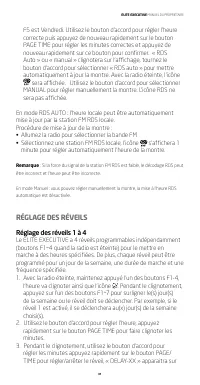
ELITE EXECUTIVE MANUEL DU PROPRIÉTAIRE 31 F5 est Vendredi. Utilisez le bouton d’accord pour régler l’heure correcte puis appuyez de nouveau rapidement sur le bouton PAGE TIME pour régler les minutes correctes et appuyez de nouveau rapidement sur ce bouton pour confirmer. « RDS Auto » ou « manual » c...
Page 32 - Activer et désactiver les réveils; UTILISATION DE LA FONCTION DE VERROUILLAGE; Appuyez rapidement une fois sur le bouton; RÉINITIALISATION DE LA RADIO
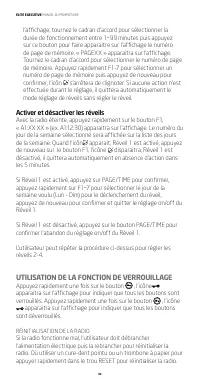
ELITE EXECUTIVE MANUEL DU PROPRIÉTAIRE 32 l’affichage, tournez le cadran d’accord pour sélectionner la durée de fonctionnement entre 1~99 minutes puis appuyez sur ce bouton pour faire apparaitre sur l’affichage le numéro de page de mémoire. « PAGEXX » apparaitra sur l’affichage. Tournez le cadran d’...
Page 33 - RÉGLAGE DU NIVEAU DE BRILLANCE DU; Sélection de bande
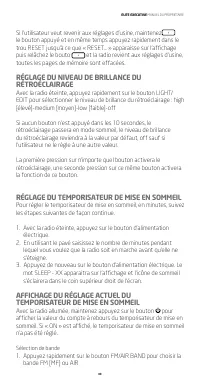
ELITE EXECUTIVE MANUEL DU PROPRIÉTAIRE 33 Si l’utilisateur veut revenir aux réglages d’usine, maintenez le bouton appuyé et en même temps appuyez rapidement dans le trou RESET jusqu’à ce que « RESET… » apparaisse sur l’affichage puis relâchez le bouto et la radio revient aux réglages d’usine, toutes...
Page 34 - ACCORD; Accorder sur une station
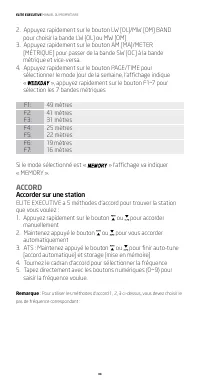
ELITE EXECUTIVE MANUEL DU PROPRIÉTAIRE 34 2. Appuyez rapidement sur le bouton LW [OL]/MW [OM] BAND pour choisir la bande LW [OL] ou MW [OM] 3. Appuyez rapidement sur le bouton AM [MA]/METER [MÉTRIQUE] pour passer de la bande SW [OC] à la bande métrique et vice-versa. 4. Appuyez rapidement sur le bou...
Page 35 - Liste de pas de fréquence :; Accord manuel; S’accorde automatiquement à une station puis s’arrête de
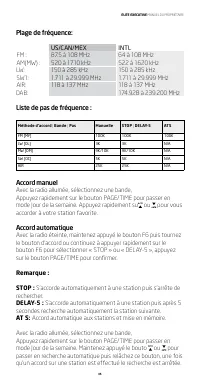
ELITE EXECUTIVE MANUEL DU PROPRIÉTAIRE 35 Plage de fréquence: US/CAN/MEX INTL FM : 87.5 à 108 MHz 64 à 108 MHz AM(MW) : 520 à 1710 kHz 522 à 1620 kHz LW: 150 à 285 kHz 150 à 285 kHz SW1: 1.711 à 29.999 MHz 1.711 à 29.999 MHz AIR: 118 à 137 MHz 118 à 137 MHz DAB: 174.928 à 239.200 MHz Liste de pas de...
Page 36 - Mise en mémoire d’accord automatique (ATS); Saisie directe de fréquence
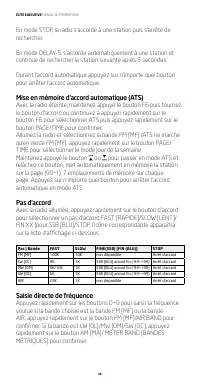
ELITE EXECUTIVE MANUEL DU PROPRIÉTAIRE 36 En mode STOP, la radio s’accorde à une station puis s’arrête de rechercher. En mode DELAY-5, s’accorde automatiquement à une station et continue de rechercher la station suivante après 5 secondes. Durant l’accord automatique appuyez sur n’importe quel bouton...
Page 37 - passera à la bande FM à 100 MHz.; MISE EN MÉMOIRE DES STATIONS; ACCÈS AUX FRÉQUENCES MISE EN MÉMOIRE; En mode mémoire, appuyez rapidement sur ou pour
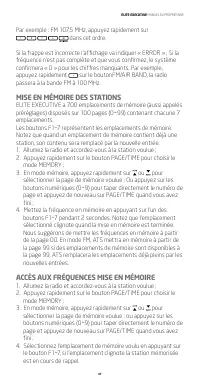
ELITE EXECUTIVE MANUEL DU PROPRIÉTAIRE 37 Par exemple : FM 107,5 MHz, appuyez rapidement sur dans cet ordre. Si la frappe est incorrecte l’affichage va indiquer « ERROR » ; Si la fréquence n’est pas complète et que vous confirmez, le système confirmera « 0 » pour les chiffres manquants. Par exemple,...
Page 38 - COPIER/COLLER UNE PAGE DE MÉMOIRE
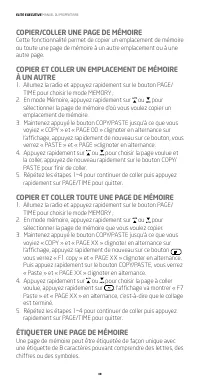
ELITE EXECUTIVE MANUEL DU PROPRIÉTAIRE 38 COPIER/COLLER UNE PAGE DE MÉMOIRE Cette fonctionnalité permet de copier un emplacement de mémoire ou toute une page de mémoire à un autre emplacement ou à une autre page. COPIER ET COLLER UN EMPLACEMENT DE MÉMOIRE À UN AUTRE 1. Allumez la radio et appuyez ra...
Page 39 - EFFACER UN EMPLACEMENT DE MÉMOIRE CHOISI
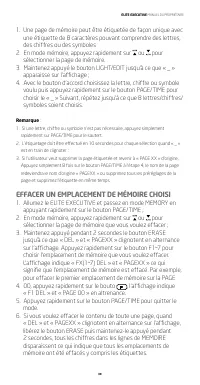
ELITE EXECUTIVE MANUEL DU PROPRIÉTAIRE 39 1. Une page de mémoire peut être étiquetée de façon unique avec une étiquette de 8 caractères pouvant comprendre des lettres, des chiffres ou des symboles 2. En mode mémoire, appuyez rapidement sur ou pour sélectionner la page de mémoire. 3. Maintenez appuyé...
Page 40 - FRÉQUENCES FM; L’affichage indique :; SÉLECTION FM STERE/MONO
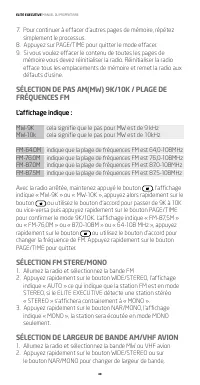
ELITE EXECUTIVE MANUEL DU PROPRIÉTAIRE 40 7. Pour continuer à effacer d’autres pages de mémoire, répétez simplement le processus. 8. Appuyez sur PAGE/TIME pour quitter le mode effacer.9. Si vous voulez effacer le contenu de toutes les pages de mémoire vous devez réinitialiser la radio. Réinitialiser...
Page 41 - Sélection de suppression de bruit
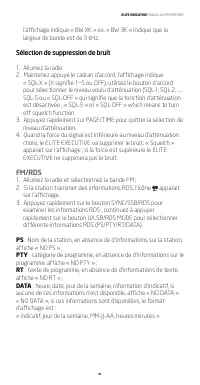
ELITE EXECUTIVE MANUEL DU PROPRIÉTAIRE 41 l’affichage indique « BW XK » ex. « BW 3K » indique que la largeur de bande est de 3 kHz. Sélection de suppression de bruit 1. Allumez la radio2. Maintenez appuyé le cadran d’accord, l’affichage indique « SQL-X » (X signifie 1~5 ou OFF), utilisez le bouton d...
Page 42 - Format d’affichage de jour de la semaine :
ELITE EXECUTIVE MANUEL DU PROPRIÉTAIRE 42 Format d’affichage de jour de la semaine : « MON » Lundi « TUE » Mardi « WED » Mercredi « THU » Jeudi « FRI » Vendredi « SAT » Samedi « SUN » Dimanche Si l’indicatif de la station est WGSS, TUE, O3-25-14 02:15 les données affichées déroulantes seront :« WGSS...
Page 43 - Accord fin en BLU : appuyez rapidement sur le bouton d’accord; UTILISATION DU DÉTECTEUR SYNCHRONE
ELITE EXECUTIVE MANUEL DU PROPRIÉTAIRE 43 4. Accord fin en BLU : appuyez rapidement sur le bouton d’accord pour sélectionner la vitesse d’accord : FAST/SLOW/FINE-XX(-99~+99)/STOP puis sélectionnez FINE-XX qui apparait sur l’affichage pour entrer en mode d’accord fin BLU. Tournez le bouton d’accord p...
Page 44 - PRISE D’ENTRÉE DE CC; » apparait sur l’affichage.; CHARGER LA PILE NI-MH DU ELITE EXECUTIVE; Pour charger les piles :; » apparait
ELITE EXECUTIVE MANUEL DU PROPRIÉTAIRE 44 PRISE D’ENTRÉE DE CC Branchez, selon la polarité indiquée, la fiche d’entrée d’un adaptateur externe pour CA à la prise DC IN, pour alimenter le ELITE EXECUTIVE. l’icôn « » apparait sur l’affichage. Remarque : Le courant alternatif peut interférer avec la ré...
Page 45 - Pour amener la sortie audio de votre ELITE EXECUTIVE à un; PRISE D’ÉCOUTEUR 3.5MM; AVERTISSEMENT; • N’exposez pas cet appareil à la pluie ou à l’humidité.
ELITE EXECUTIVE MANUEL DU PROPRIÉTAIRE 45 est en marche. Appuyez de nouveau sur ce bouton pour arrêter la fonction LINE IN. 2. Pour amener la sortie audio de votre ELITE EXECUTIVE à un autre appareil, mettez-le en marche, raccordez un cordon stéréo double de 1/8 de pouce (3,5 mm) à la prise LINE IN/...
Page 46 - ENVIRONNEMENT; Élimination; ENREGISTREMENT DE LA GARANTIE
ELITE EXECUTIVE MANUEL DU PROPRIÉTAIRE 46 • Ne le plongez pas dans l’eau ou ne l’exposez pas longtemps à l’eau. • Protégez-le de l’humidité forte et de la pluie.• Ne l’utilisez que dans la plage de température spécifiée (0°C à 40°C) • Débranchez-le immédiatement ou enlevez immédiatement les batterie...
Page 47 - GARANTIE
ELITE EXECUTIVE MANUEL DU PROPRIÉTAIRE 47 Pour obtenir un service de votre produit nous vous recommandons de contacter d’abord un représentant de service d’Etón au 800-872-2228 É.U., 800-6371648 Canada ou (650) 903-3866 pour la détermination du problème et le dépannage. Si un service plus poussé est...
Page 48 - CONOZCA LA ELITE EXECUTIVE; Gracias por adquirir Etón; FRENTE
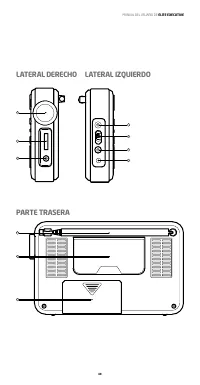
MANUAL DEL USUARIO DE ELITE EXECUTIVE 48 Características: 1 Altavoz 2 Pantalla LCD 3 Botones operativos 4 Sintonizador de dial 5 Perilla de volumen 6 Toma de entrada/salida de línea D 3.5 mm 7 Toma de antena externa 8 Selección de sensibilidad corta/larga distancia 9 Toma de audífonos: D 3.5 mm 10 T...
Page 49 - LATERAL DERECHO LATERAL IZQUIERDO
MANUAL DEL USUARIO DE ELITE EXECUTIVE 49 7 8 12 10 11 13 9 LATERAL DERECHO LATERAL IZQUIERDO PARTE TRASERA 6 4 5
Page 50 - CARACTERÍSTICAS DE LOS BOTONES; Sintonizador de dial; Presione y mantenga presionado el botón para seleccionar el
MANUAL DEL USUARIO DE ELITE EXECUTIVE 50 CARACTERÍSTICAS DE LOS BOTONES Sintonizador de dial Gire el sintonizador para seleccionar reloj, frecuencia o nivel de silenciador de la radio. Con la radio encendida: 1. Presione rápidamente para seleccionar la velocidad de sintonización en RÁPIDO-LENTO-PARA...
Page 51 - Botones numéricos
MANUAL DEL USUARIO DE ELITE EXECUTIVE 51 Con la radio apagada, presione y mantenga presionado el botón F6 para seleccionar tres métodos de sintonía distintos, PARAR/ATS/RETRASO-5 Con la radio apagada, presione y mantenga el botón F7 para seleccionar el tiempo de carga en horas (1~36) Con la radio ap...
Page 52 - cambiar SYNC
MANUAL DEL USUARIO DE ELITE EXECUTIVE 52 Con la radio encendida, en el modo Memoria, presione y mantenga para copiar y pegar las presintonías de la memoria Presione rápidamente para deshabilitar todos los botones y perillas; presione y mantenga para desbloquear todos los botones y perillas Con la ra...
Page 53 - Orificio de reset; CONFIGURACIÓN DE LA ZONA HORARIA
MANUAL DEL USUARIO DE ELITE EXECUTIVE 53 Presione rápidamente para seleccionar OC y banda de metros En la banda AM/AÉREA, presione rápidamente para aumentar la frecuencia del ancho de bandaEn la banda FM, presione rápidamente para seleccionar el modo ESTÉREO En la banda AM/ AÉREA, presione rápidamen...
Page 54 - Lista de abreviaturas de zonas horarias:; CONFIGURACIÓN DEL RELOJ Y LOS DÍAS DE LA
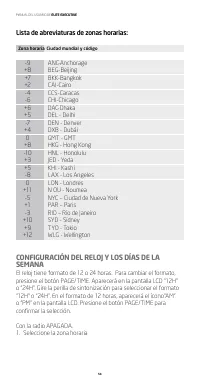
MANUAL DEL USUARIO DE ELITE EXECUTIVE 54 Lista de abreviaturas de zonas horarias: Zona horaria Ciudad mundial y código -9 ANC-Anchorage +8 BEG-Beijing +7 BKK-Bangkok +2 CAI-Cairo -4 CCS-Caracas -6 CHI-Chicago +6 DAC-Dhaka +5 DEL - Delhi -7 DEN - Denver +4 DXB - Dubái 0 GMT - GMT +8 HKG - Hong Kong -...
Page 55 - Presione y mantenga presionado el botón PAGE/TIME hasta; CONFIGURACIÓN DE ALARMAS; Configuración de alarmas 1 a 4; Utilice la perilla de sintonización para configurar la hora,
MANUAL DEL USUARIO DE ELITE EXECUTIVE 55 2. Presione y mantenga presionado el botón PAGE/TIME hasta que los dígitos de la hora comiencen a destellar. Presione rápidamente F1-7 para destacar el día de la semana actual, F5 es el viernes. Utilice la perilla de sintonización para configurar la hora corr...
Page 56 - Cuando estén destellando, utilice la perilla de sintonización; Activación y desactivación de las alarmas; UTILIZACIÓN DE LA FUNCIÓN DE BLOQUEO; Presione rápidamente el botón
MANUAL DEL USUARIO DE ELITE EXECUTIVE 56 3. Cuando estén destellando, utilice la perilla de sintonización para configurar los minutos, luego continúe y presione rápidamente el botón PAGE/TIME para programar o apagar la alarma, aparecerá en la pantalla LCD “DELAY-XX”, gire la perilla de sintonización...
Page 57 - REINICIO DE LA RADIO; por 3 segundos; AJUSTE DEL NIVEL DE BRILLO DE LA LUZ DE FONDO; que la radio suene antes de apagarse.
MANUAL DEL USUARIO DE ELITE EXECUTIVE 57 el LCD, lo que significa que todos los botones y perillas están desbloqueados. REINICIO DE LA RADIO Si la radio no funciona bien, el usuario puede desconectar el suministro de energía y conectarlo nuevamente para reiniciar la radio. O utilice un palillo fino ...
Page 58 - VISUALIZACIÓN DE LA CONFIGURACIÓN DEL; Selección de banda
MANUAL DEL USUARIO DE ELITE EXECUTIVE 58 VISUALIZACIÓN DE LA CONFIGURACIÓN DEL TEMPORIZADOR DE DESCONEXIÓN ACTUAL Con la radio encendida, presione y mantenga el botón para visualizar la cuenta regresiva del temporizador de desconexión. Si aparece “ON”, quiere decir que no hay una configuración de te...
Page 59 - Lista de frecuencias a continuación:; Sintonización manual; Autosintoniza una estación y luego para la búsqueda
MANUAL DEL USUARIO DE ELITE EXECUTIVE 59 Rango de frecuencia: US/CAN/MEX INTL FM : 87.5 - 108 MHz 64 - 108 MHz AM(OM) : 520 - 1710 kHz 522 - 1620 kHz LW: 150 - 285 kHz 150 - 285 kHz SW1: 1.711 - 29.999 MHz 1.711 - 29.999 MHz AIR: 118 - 137 MHz 118 - 137 MHz DAB: 174.928 - 239.200 MHz Lista de frecue...
Page 60 - Almacenamiento de autosintonizaciones (ATS); Indique la tecla para la frecuencia
MANUAL DEL USUARIO DE ELITE EXECUTIVE 60 En el modoDELAY-5, la radio autosintoniza una estación y continúa buscando en la siguiente estación luego de 5 segundos. Durante la autosintonización, presione cualquier botón para parar la autosintonización. Almacenamiento de autosintonizaciones (ATS) Con la...
Page 61 - , la radio cambiará a banda FM en 100; ALMACENAMIENTO DE ESTACIONES EN LA MEMORIA; En el modo memoria, presione rápidamente o para; ACCESO A LAS MEMORIA ALMACENADAS; En el modo Memoria, presione rápidamente o o seleccione
MANUAL DEL USUARIO DE ELITE EXECUTIVE 61 Por ejemplo: FM 107.5MHz, presione rápidamente en ese orden. Si la tecla que presionó es incorrecta, el LCD mostrará “ERROR”; si la frecuencia no está completa, confirme, el sistema confirmará “0” para los numeros faltantes. Por ejemplo, presione rápidamente ...
Page 62 - COPIAR/PEGAR LA PÁGINA DE LA MEMORIA
MANUAL DEL USUARIO DE ELITE EXECUTIVE 62 (0~9) para indicar la tecla en el número de página y presione PAGE/TIME nuevamente cuando haya terminado; 4. Seleccione la memoria deseada presionando el botón F1 a 7, si la ubicación preconfigurada está destellando, quiere decir que está recordando la estaci...
Page 63 - ETIQUETA DE LA PÁGINA DE MEMORIA
MANUAL DEL USUARIO DE ELITE EXECUTIVE 63 ETIQUETA DE LA PÁGINA DE MEMORIA La página de memoria se puede etiquetar con 8 letras, dígitos o símbolos intermezclados.1. Encienda la radio, presione rápidamente el botón PAGE/TIME para seleccionar el modo Memoria 2. En el modo Memoria, presione rápidamente...
Page 64 - FM ESTÉREO/SELECCIÓN MONO
MANUAL DEL USUARIO DE ELITE EXECUTIVE 64 por 2 segundos, todos los dígitos en la línea de MEMORIA desaparecerán, lo que significa que todas las memorias fueron eliminadas, incluídas las etiquetas. 6. Para continuar eliminando otras páginas de memoria, solo repita el proceso. 7. Presione PAGE/TIME pa...
Page 65 - SELECCIÓN DE ANCHO DE BANDA PARA AVIONES; Selección de silenciador
MANUAL DEL USUARIO DE ELITE EXECUTIVE 65 SELECCIÓN DE ANCHO DE BANDA PARA AVIONES AM/VHF 1. Encienda la radio y seleccione la banda para aviones de OM o VHF 2. Presione rápidamente el botón NAR/MONO para cambiar distintos anchos de banda, el LCD muestra “BW XK”, ej. “BW 3 K” indica que el ancho de b...
Page 66 - SINTONIZACIÓN DE SSB (BANDA ÚNICA LATERAL)
MANUAL DEL USUARIO DE ELITE EXECUTIVE 66 Formato del día: “MON” Lunes “TUE” Martes “WED” Miércoles “THU” Jueves “FRI” Viernes “SAT” Sábado “SUN” Domingo Si el indicativo de llamada de la estación es WGSS, TUE, 03-25-14 02:15La información que se desplegará en el LCD dirá:” WGSS TUE 03-25-2014 02 :15...
Page 67 - Sintonización fina de SSB: presione rápidamente la perilla de; USO DEL DETECTOR SINCRÓNICO
MANUAL DEL USUARIO DE ELITE EXECUTIVE 67 4. Sintonización fina de SSB: presione rápidamente la perilla de sintonización para seleccionar la velocidad de sintonización en RÁPIDO/LENTO/FINO-XX (-99~+99)/PARAR, luego seleccione FINE-XX, que aparece en la pantalla para ingresar al modo de sintonización ...
Page 68 - TOMA DE ENTRADA DE CC; ” aparecerá en la; CARGA DE BATERÍAS NI-MH EN LA ELITE EXECUTIVE; Para cargar las baterías:; CONECTOR DE LÍNEA DE ENTRADA/SALIDA
MANUAL DEL USUARIO DE ELITE EXECUTIVE 68 TOMA DE ENTRADA DE CC Enchúfe el toma de entrada en el toma de entrada de CC para conectar el adaptador CA externo al suministro de energía de la ELITE EXECUTIVE según la polaridad, el ícono “ ” aparecerá en la pantalla. Nota: La energía de CA puede experimen...
Page 69 - Para conectar la salida de audio de la ELITE EXECUTIVE a otro; TOMA DE AURICULARES 3.5MM
MANUAL DEL USUARIO DE ELITE EXECUTIVE 69 botón TZ/LINE IN y aparecerá “LINE IN” en el LCD, lo que indica que LINE IN está activado. Presione este botón nuevamente para apagar la función LINE IN 2. Para conectar la salida de audio de la ELITE EXECUTIVE a otro dispositivo, enciéndala, enchufe un cable...
Page 70 - ADVERTENCIA; Eliminación; REGISTRO DE GARANTÍA
MANUAL DEL USUARIO DE ELITE EXECUTIVE 70 ADVERTENCIA • No exponga el dispositivo a lluvia o humedad. • No lo sumerja o exponga al agua por periodos prolongados.• Protéjalo de los altos niveles de humedad y lluvia.• Debe funcionar solo dentro del rango de temperaturas especificado (0 °C a 40 °C). • D...
Page 71 - SERVICIO DE REPARACIÓN DEL PRODUCTO
MANUAL DEL USUARIO DE ELITE EXECUTIVE 71 SERVICIO DE REPARACIÓN DEL PRODUCTO Para recibir el servicio de reparación de su producto, recomendamos que primeramente se contacte con un representante de atención al 800-872-2228 Estados Unidos, 800-637-1648 Canadá o (650) 903-3866 para determinar el probl...