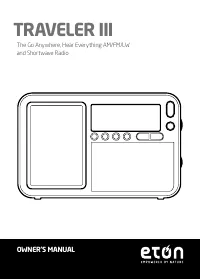
Page 2 - MEET THE TRAVELER III; Thank you for purchasing the Etón; Traveler III; FRONT
TRAVELER III OWNER’S MANUAL 2 MEET THE TRAVELER III Thank you for purchasing the Etón Traveler III . We want you to thoroughly enjoy the use of this product. To take advantage of its many excellent and unique features, we urge you to carefully read the user’s manual. 1 3 6 7 4 2 5 8 FRONT 12 14 10 1...
Page 3 - RIGHT SIDE
TRAVELER III OWNER’S MANUAL 3 Features: 1 Speaker grill 2 LCD panel 3 Power/sleep button 4 DISPLAY Mode/Lock button 5 G.M.T. cover 6 Up button 7 Down button 8 AM/LW button 9 FM/RDS button 10 Snooze/Light button 11 Step button 15 16 17 RIGHT SIDE LEFT SIDE 12 Whip Antenna 13 Back Stand 14 Battery com...
Page 4 - icon flashes in the LCD. Rotate; DISPLAY MODE/LOCK BUTTON; icon indicates slow
TRAVELER III OWNER’S MANUAL 4 POWER/SLEEP BUTTON 1. Short press to turn on radio and press again to turn off2. Long press this button, the icon flashes in the LCD. Rotate “Tuning” knob to select the desired auto shut-down time with 1~120 minutes. 3. Select “ON” indicates the radio will be on all the...
Page 5 - HOME BUTTON; , Quick press ALARM button without
TRAVELER III OWNER’S MANUAL 5 HOME BUTTON Rotate “time zone indicator knob” to your city.Long press “HOME” button,the hour will flash, rotate tuning knob to change hour. Short press Home button,the minute will flash,rotate tuning knob to change minute. Quick press again to confirm local time. ALARM ...
Page 6 - • If the above icons don’t be displayed,which indicates the alarm is; SHORTWAVE BAND/ AUTO DISPLAY BUTTON; ] button to select SW band
TRAVELER III OWNER’S MANUAL 6 • If the above icons don’t be displayed,which indicates the alarm is off. Note: Alarm timer matches the time of the indicator of time zone. If the user sets up the alarm is on at 7:00 a.m.,and the time of time zone indicator will be New York time, the unit will be alarm...
Page 7 - RDS INFORMATION DISPLAY
TRAVELER III OWNER’S MANUAL 7 • In address search status, long press [ p ]or [ q ] button to auto- display preset stations AM/LW BAND/ATS BUTTON With the radio on: • Quick press[AM/LW]button select AM(MW) or LW band• Long press [AM/LW] button to auto tuning stoarge AM(MW) or LW band FM RDS /ATS BUTT...
Page 8 - If any information available, just display format is:; MEMORY BUTTON; When pick up the station,quick press Memory button,then; BUTTON AND MEMORY; Use ATS function to fast preset stations
TRAVELER III OWNER’S MANUAL 8 If any information available, just display format is: NORTH AMERICA: Station Callsign Weekday (MON, TUE, WED, THU, FRI, SAT, SUN) Mon-Day-Year Hour:Minute WGSS TUE 03-25-2014 02 :15 INTL: Station Callsign Weekday (MON, TUE, WED, THU, FRI, SAT, SUN) Mon,Day,Year Hour:Min...
Page 9 - When pick up your favorite station,just quick press MEMORY; DELETE BUTTON; Delete one station; icon; Delete all stations; into auto presets station
TRAVELER III OWNER’S MANUAL 9 2. When pick up your favorite station,just quick press MEMORY button once to save this station,and then auto scan other stations. DELETE BUTTON Delete one station With the radio on: 1. In address scan status,long press [delete] button, icon will flash, also ”PXX DEL “ w...
Page 10 - When the user finds unfavorite stations,just quick press DELETE; RESET BUTTON; Rotate this knob to change volume up or down.; DC Jack
TRAVELER III OWNER’S MANUAL 10 2. When the user finds unfavorite stations,just quick press DELETE button to delete it then check the next one. RESET BUTTON Use a toothstick or other sharp stick to press RESET button to reset the unit completely when the unit malfunction or down. DST If the user want...
Page 11 - System setting; Set up FM frequency range
TRAVELER III OWNER’S MANUAL 11 System setting 1. Set up MW step With the radio off, long press [9/10k] button, the LCD will display AM-10K,which means MW step -10K; AM-9K means MW step-9K. Note: When MW step is 10K, temperature display format is Fahrenheit, when MW step is 9k,temperature display for...
Page 12 - SPECIFICATIONS; Supported Frequencies:
TRAVELER III OWNER’S MANUAL 12 SPECIFICATIONS 1. Supported Frequencies: US/CAN/MEX INTL FM : 87 - 108 MHz 64 - 108 MHz AM(MW) : 520 - 1710 kHz 522 - 1620 kHz LW: 153 - 513 kHz 153 - 513 kHz SW1: 2.3 - 26.1 MHz 2.3 - 26.1 MHz DAB: 174.928 - 239.200 MHz 2. Noise Limited Sensitivity: FM ≤ 3μv MW ≤ 1mv/...
Page 13 - WARNING; any object has fallen into the apparatus.; ENVIRONMENT; Disposal
TRAVELER III OWNER’S MANUAL 13 M-F, 8:00AM-4:30PM, Pacific Standard Time www.etoncorp.com . WARNING • Do not expose this appliance to rain or moisture. • Do not submerge or expose for extended period to water.• Protect from high humidity and rain.• Only operate within specified temperature range (0 ...
Page 14 - WARRANTY REGISTRATION; Please go to; LIMITED WARRANTY
TRAVELER III OWNER’S MANUAL 14 appropriate local authority to find out how to dispose of them safely and help protect the environment. WARRANTY REGISTRATION To ensure full warranty coverage or product updates, registration of your product should be completed as soon as possible after purchase or rec...
Page 15 - WARRANTY
TRAVELER III OWNER’S MANUAL 15 will instruct how to proceed based on whether the radio is still under warranty or needs non-warranty service. WARRANTY If your product is still in warranty and the Etón service representative determines that warranty service is needed, a return authorization will be i...
Page 16 - FAITES CONNAISSANCE AVEC LA TRAVELER III; Merci d’avoir acheté la; Nous voulons que vous appréciez; AVANT
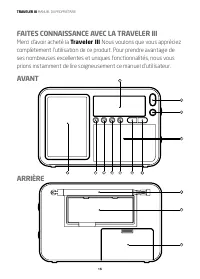
TRAVELER III MANUEL DU PROPRIÉTAIRE 16 FAITES CONNAISSANCE AVEC LA TRAVELER III Merci d’avoir acheté la Traveler III Nous voulons que vous appréciez complètement l’utilisation de ce produit. Pour prendre avantage de ses nombreuses excellentes et uniques fonctionnalités, nous vous prions instamment d...
Page 17 - CÔTÉ DROIT
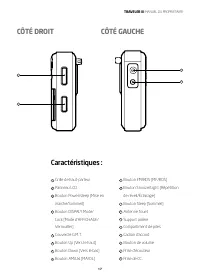
TRAVELER III MANUEL DU PROPRIÉTAIRE 17 Caractéristiques : 1 Grille de haut-parleur 2 Panneau LCD 3 Bouton Power/sleep (Mise en marche/Sommeil] 4 Bouton DISPALY Mode/ Lock [Mode d’AFFICHAGE/ Verrouiller] 5 Couvercle G.M.T. 6 Bouton Up [Vers le haut] 7 Bouton Down [Vers le bas] 8 Bouton AM/LW [MA/OL] ...
Page 19 - RÉVEIL - RÉGLAGE DU RÉVEIL; , Appuyez brièvement sur le
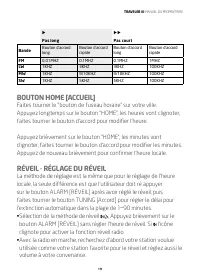
TRAVELER III MANUEL DU PROPRIÉTAIRE 19 u Pas long uu Pas court Bande Bouton d’accord long Bouton d’accord rapide Bouton d’accord long Bouton d’accord rapide FM 0.01MHZ 0.1MHZ 0.1MHZ 1MHZ LW 1KHZ 3KHZ 3KHZ 100KHZ MW 1KHZ 9/10KHZ 9/10KHZ 100KHZ SW 1KHZ 5KHZ 5KHZ 100KHZ BOUTON HOME [ACCUEIL] Faites tou...
Page 20 - • Si les icônes ci-dessus ne sont pas affichées, cela indique que le
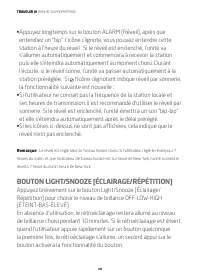
TRAVELER III MANUEL DU PROPRIÉTAIRE 20 • Appuyez longtemps sur le bouton ALARM [Réveil], après que entendiez un “bip” l’icône clignote, vous pouvez entendre cette station à l’heure du réveil. Si le réveil est enclenché, l’unité va s’allumer automatiquement et commencera à recevoir la station puis el...
Page 21 - BOUTON BANDE ONDES COURTES / AFFICHAGE AUTO; Avec la radio allumée :
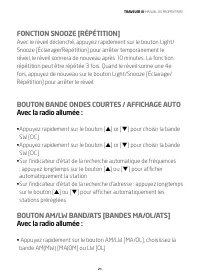
TRAVELER III MANUEL DU PROPRIÉTAIRE 21 FONCTION SNOOZE [RÉPÉTITION] Avec le réveil déclenché, appuyez rapidement sur le bouton Light/Snooze [Éclairage/Répétition] pour arrêter temporairement le réveil, le réveil sonnera de nouveau après 10 minutes. La fonction répétition peut être répétée 3 fois. Qu...
Page 22 - AFFICHAGE DES INFORMATIONS RDS
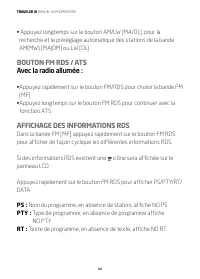
TRAVELER III MANUEL DU PROPRIÉTAIRE 22 • Appuyez longtemps sur le bouton AM/LW [MA/OL], pour la recherche et le préréglage automatique des stations de la bande AM(MW) [MA(OM] ou LW [OL] BOUTON FM RDS / ATS Avec la radio allumée : • Appuyez rapidement sur le bouton FM/RDS pour choisir la bande FM [MF...
Page 23 - Indicatif, en absence d’informations, affiche NO DATA; BOUTON MÉMOIRE; APPUYEZ RAPIDEMENT SUR LE BOUTON [; Utilisez lafonction ATS pour prérégler rapidement les stations.
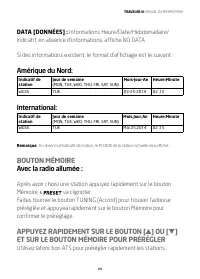
TRAVELER III MANUEL DU PROPRIÉTAIRE 23 DATA [DONNÉES] : Informations Heure/Date/Hebdomadaire/ Indicatif, en absence d’informations, affiche NO DATA Si des informations existent, le format d’affichage est le suivant : Amérique du Nord: Indicatif de station Jour de semaine(MON, TUE, WED, THU, FRI, SAT...
Page 24 - Supprimer une station
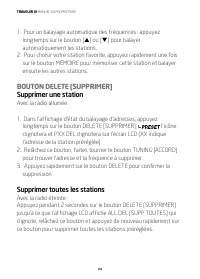
TRAVELER III MANUEL DU PROPRIÉTAIRE 24 1. Pour un balayage automatique des fréquences : appuyez longtemps sur le bouton [ p ] ou [ q ] pour balayer automatiquement les stations. 2. Pour choisir votre station favorite, appuyez rapidement une fois sur le bouton MÉMOIRE pour mémoriser cette station et ...
Page 25 - Appuyez rapidement sur le bouton [; BOUTON DE FUSEAU HORAIRE
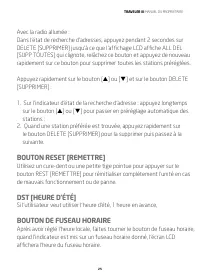
TRAVELER III MANUEL DU PROPRIÉTAIRE 25 Avec la radio allumée :Dans l’état de recherche d’adresses, appuyez pendant 2 secondes sur DELETE [SUPPRIMER] jusqu’à ce que l’affichage LCD affiche ALL DEL [SUPP TOUTES] qui clignote, relâchez ce bouton et appuyez de nouveau rapidement sur ce bouton pour suppr...
Page 26 - Faites tourner ce bouton pour augmenter ou diminuer le volume.; Prise de CC
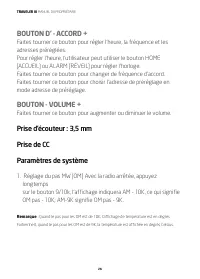
TRAVELER III MANUEL DU PROPRIÉTAIRE 26 BOUTON D’ - ACCORD + Faites tourner ce bouton pour régler l’heure, la fréquence et les adresses préréglées. Pour régler l’heure, l’utilisateur peut utiliser le bouton HOME [ACCUEIL] ou ALARM [RÉVEIL] pour régler l’horloge.Faites tourner ce bouton pour changer d...
Page 27 - Réglage de la plage de fréquence MF Avec la radio arrêtée,; SPÉCIFICATIONS; Fréquences prises en charge
TRAVELER III MANUEL DU PROPRIÉTAIRE 27 2. Réglage de la plage de fréquence MF Avec la radio arrêtée, appuyez longtemps sur le boutonFM SET puis relâchez-le, appuyez rapidement pour choisir la plage de fréquences MF comme ci-dessous : 87,5-108MHz 87.0-108MHz 64.0~108MHZ 76.0~108MHZ 3. Pour passer ou ...
Page 28 - Sensibilité limitée par le bruit :; AVERTISEMENT
TRAVELER III MANUEL DU PROPRIÉTAIRE 28 2. Sensibilité limitée par le bruit : MF ≤ 3μv OM ≤ 1mv/m OC ≤ 10mv/m OL ≤ 18μv 3. Haut-parleur : 50 mm 8 ohm 0.5 W 4. Écouteur : D 3,5 mm 5. Alimentation : Piles : 4 x AA (4x1,5 V) CC: 6 V 6. Dimensions : 135(L)x87(H)x27(D)mm 7. Poids : 213 g environ (sans pil...
Page 29 - • Débranchez-le immédiatement ou enlevez immédiatement les piles; ENVIRONNEMENT; Élimination; ENREGISTREMENT DE LA GARANTIE
TRAVELER III MANUEL DU PROPRIÉTAIRE 29 • Débranchez-le immédiatement ou enlevez immédiatement les piles si du liquide a été renversé dessus ou si un objet est tombé dans l’appareil. • Ne nettoyez qu’avec ubn tissu sec. N’utilisez pas de détergents ou de solvants chimiques car ils peuvent endommager ...
Page 30 - Veuillez visiter; GRANTIE LIMITÉE
TRAVELER III MANUEL DU PROPRIÉTAIRE 30 Veuillez visiter http://www.etoncorp.com/productregistration pour enregistrer votre produit. GRANTIE LIMITÉE Conservez une preuve de votre achat ou le reçu. Les informations sur la garantie limitée peuvent être lues surwww.etoncorp.com dans la section Assistanc...
Page 31 - HORS GARANTIE
TRAVELER III MANUEL DU PROPRIÉTAIRE 31 seront données. Ne renvoyez pas votre radio sans avoir obtenu le numéro d’autorisation de retour. HORS GARANTIE Si votre produit n’est plus sous garantie et nécessite un service notre personnel technique vous orientera vers l’installation de réparation la plus ...
Page 32 - CONOZCA LA TRAVELER III; Gracias por adquirir Etón; . Queremos que disfrute; FRENTE
MANUAL DEL USUARIO DE TRAVELER III 32 CONOZCA LA TRAVELER III Gracias por adquirir Etón Traveler III . Queremos que disfrute del uso de este producto en su totalidad. Para aprovechar todas sus magníficas y exclusivas funciones, le recomendamos que lea cuidadosamente el manual del usuario. 1 3 6 7 4 ...
Page 33 - Características; LATERAL DERECHO
MANUAL DEL USUARIO DE TRAVELER III 33 Características : 1 Rejilla para altavoz 2 Panel LCD 3 Botón de encendido/ descanso 4 Visualización de los modos y el botón de bloqueo 5 Cobertura G.M.T. 6 Botón Siguiente 7 Botón Anterior 8 Botón AM/OL 9 Botón FM/RDS 15 16 17 LATERAL DERECHO LATERAL IZQUIERDO 1...
Page 34 - BOTÓN DE ENCENDIDO/DESCANSO; en el LCD. Gire la perilla de “sintonización” para seleccionar el; VISUALIZACIÓN DE LOS MODOS Y EL BOTÓN DE; indica paso lento, el ícono
MANUAL DEL USUARIO DE TRAVELER III 34 BOTÓN DE ENCENDIDO/DESCANSO Presione el botón rápidamente para encender la radio y presiónelo nuevamente para apagarla.Presione este mismo botón prolongadamente y aparecerá el ícono en el LCD. Gire la perilla de “sintonización” para seleccionar el tiempo de desc...
Page 35 - BOTÓN HOME; , presione rápidamente el botón
MANUAL DEL USUARIO DE TRAVELER III 35 u Paso lento uu Paso rápido Banda Bouton d’accord long Bouton d’accord rapide Bouton d’accord long Bouton d’accord rapide FM 0.01MHZ 0.1MHZ 0.1MHZ 1MHZ OL 1KHZ 3KHZ 3KHZ 100KHZ OM 1KHZ 9/10KHZ 9/10KHZ 100KHZ OC 1KHZ 5KHZ 5KHZ 100KHZ BOTÓN HOME Gire la “perilla i...
Page 36 - BOTÓN DE LUZ/REPETICIÓN DE ALARMA
MANUAL DEL USUARIO DE TRAVELER III 36 • Con la radio prendida, busque primero la estación deseada, que se usará como su estación favorita para la alarma; también establezca el volumen adecuado. • Presione prolongadamente el botón ALARM, cuando el usuario escuche el sonido “bip”, el ícono destellará ...
Page 37 - FUNCIÓN DE REPETICIÓN DE ALARMA:; Con la radio prendida:
MANUAL DEL USUARIO DE TRAVELER III 37 Si no se utiliza el dispositivo, el brillo de la luz de fondo permanecerá en el nivel seleccionado o la luz de fondo se apagará en los 10 minutos siguientes. Si la luz de fondo está apagada, cuando el usuario presione cualquier botón, si presiona rápidamente par...
Page 38 - BOTÓN DE BANDAS/SINTONIZACIÓN AUTOMÁTICA; • Presione rápidamente el botón [AM/OL] para seleccionar bandas AM; BOTÓN FM RDS (SISTEMA DE RADIODIFUSIÓN; Con la radio encendida:; VISUALIZACIÓN DE INFORMACIÓN DEL RDS; Si existe información del RDS en el LCD, aparecerá el ícono.
MANUAL DEL USUARIO DE TRAVELER III 38 BOTÓN DE BANDAS/SINTONIZACIÓN AUTOMÁTICA AM/OL Con la radio encendida: • Presione rápidamente el botón [AM/OL] para seleccionar bandas AM (OM) u OL • Presione prolongadamente el botón [AM/OL] para guardar la sintonización de bandas AM(OM) u OL automáticamente BO...
Page 39 - BOTÓN DE MEMORIA
MANUAL DEL USUARIO DE TRAVELER III 39 PS: nombre de la emisora si no existe una estación, se visualizará NO PS PTY: tipo de programa si no hay programa, se visualizará NO PTY RT: radio texto si no hay texto, se visualizará NO RT DATA: información sobre hora/fecha/distintivo de llamada de programa se...
Page 40 - PRESIONE RÁPIDAMENTE EL BOTÓN [; Elimine una estación
MANUAL DEL USUARIO DE TRAVELER III 40 Gire la perilla de SINTONIZACIÓN para encontrar la dirección preestablecida y presione rápidamente el botón Memoria de nuevo para confirmar la configuración. PRESIONE RÁPIDAMENTE EL BOTÓN [ p ] O [ q ] Y EL BOTÓN DE PREESTABLECIMIENTO DE MEMORIA Utilice la funci...
Page 41 - Eliminación de todas las estaciones; Presione rápidamente el botón [; BOTÓN DE REINICIO
MANUAL DEL USUARIO DE TRAVELER III 41 Eliminación de todas las estaciones Con la radio apagada:Presione prolongadamente el botón [delete] por dos segundos hasta que el LCD muestre “ALL DEL” destellando, suelte el botón y presione rápidamente el botón de nuevo para eliminar todas las estaciones prees...
Page 42 - DST; Gire la perilla para aumentar o disminuir el volumen.; Toma de CC
MANUAL DEL USUARIO DE TRAVELER III 42 DST Si el usuario desea utilizar el horario del verano, el horario estará 1 hora adelantado. Es decir, “DST”=horario de verano PERILLA INDICADORA DE LA HORA Luego de establecer el horario local, gire la perilla indicadora de la hora, si el indicador muestra la z...
Page 43 - Configuración del paso de OM
MANUAL DEL USUARIO DE TRAVELER III 43 1. Configuración del paso de OM Con la radio apagada, presione prolongadamente el botón [9/10k], el LCD mostrará AM-10k, que significa paso de OM -10k; AM-9k significa OM paso-9k. Nota: cuando el paso de OM es 10k, el formato de la visualización de la temperatur...
Page 44 - ESPECIFICACIONES; Frecuencias compatibles; Límite de sensibilidad de ruido:
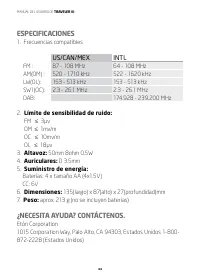
MANUAL DEL USUARIO DE TRAVELER III 44 ESPECIFICACIONES 1. Frecuencias compatibles US/CAN/MEX INTL FM : 87 - 108 MHz 64 - 108 MHz AM(OM) : 520 - 1710 kHz 522 - 1620 kHz LW(OL): 153 - 513 kHz 153 - 513 kHz SW1(OC): 2.3 - 26.1 MHz 2.3 - 26.1 MHz DAB: 174.928 - 239.200 MHz 2. Límite de sensibilidad de r...
Page 45 - ADVERTENCIA; • Desenchúfelo o quítele las baterías inmediatamente si se ha; MEDIO AMBIENTE; Eliminación
MANUAL DEL USUARIO DE TRAVELER III 45 1-800-637-1648 (Canadá)650-903-3866 (En todo el mundo)M-F, 8:00 A.M. - 4:30 P.M., hora estándar del pacífico www.etoncorp.com. ADVERTENCIA No exponga este dispositivo a lluvia o humedad.• No lo sumerja o exponga al agua por periodos prolongados.• Protéjalo de lo...
Page 46 - REGISTRO DE GARANTÍA; para registrar; GARANTÍA LIMITADA
MANUAL DEL USUARIO DE TRAVELER III 46 Elimine todos los tipos de baterías según las reglas y/o normas de su gobierno, estado o localidad. Si no está seguro, llame a la autoridad local adecuada para averiguar cómo eliminar los desechos de manera responsable y así ayudar a proteger el medio ambiente. ...
Page 47 - GARANTÍA
MANUAL DEL USUARIO DE TRAVELER III 47 GARANTÍA Si el producto continúa bajo la cobertura de la garantía y el representante de atención determina que se precisa del servicio de garantía, se emitirá una autorización de devolución e instrucciones para el envío a un taller de reparación autorizado por l...
Page 48 - HIER IST DER TRAVELER III FÜR SIE; Vielen Dank für den Kauf des Etón; VORDERSEITE
TRAVELER III -BENUTZERHANDBUCH 48 HIER IST DER TRAVELER III FÜR SIE Vielen Dank für den Kauf des Etón Traveler III . Wir möchten, dass Sie den Einsatz dieses Produkts in vollen Zügen genießen können. Um die Vorteile der vielen exzellenten und einzigartigen Funktionen zu nutzen, bitten wir Sie, die B...
Page 49 - RECHTE SEITE
TRAVELER III -BENUTZERHANDBUCH 49 Leistungsmerkmale: 1 Lautsprechergitter 2 LCD-Bildschirm 3 Taste für Betriebs/Ruhezustand 4 Taste für ANZEIGEModus/Sperre 5 G.M.T.-Abdeckung 6 Aufwärtstaste 7 Abwärtstaste 8 Taste für MITTELWELLE/ LANGWELLE 9 Taste für UKW/RDS 10 Taste für Schlummer/Licht 11 Taste f...
Page 50 - TASTE FÜR BETRIEBS/RUHEZUSTAND; in der; TASTE FÜR ANZEIGEMODUS/SPERRE; Symbol zeigt langsame Änderung an,
TRAVELER III -BENUTZERHANDBUCH 50 TASTE FÜR BETRIEBS/RUHEZUSTAND Drücken Sie kurz, um das Radio einzuschalten und drücken Sie erneut, um es auszuschaltenBei langem Drücken dieser Taste blinkt das Symbol in der LCD-Anzeige. Drehen Sie den “Sender”-Einstellungsknopf, um die gewünschte Auto-Abschaltzei...
Page 51 - ALARM - ALARM EINRICHTEN; , Drücken Sie schnell die Taste
TRAVELER III -BENUTZERHANDBUCH 51 u Langsame Änderung uu Schnelle Änderung Band Knopf für langsame Einstellung Knopf für schnelle Einstellung Knopf für langsame Einstellung Knopf für schnelle Einstellung UKW 0.01MHZ 0.1MHZ 0.1MHZ 1MHZ LANGWELLE 1KHZ 3KHZ 3KHZ 100KHZ MITTELWELLE 1KHZ 9/10KHZ 9/10KHZ ...
Page 52 - • Mit eingeschaltetem Radio suchen Sie zunächst den gewünschten
TRAVELER III -BENUTZERHANDBUCH 52 • Mit eingeschaltetem Radio suchen Sie zunächst den gewünschten Sender, den Sie als Lieblingssender für einen Alarm hören möchten, und stellen auch die passende Lautstärke ein. • Drücken Sie lange die Taste ALARM, bis Sie einen “Piepton” hören. Das Symbol blinkt, un...
Page 53 - TASTE FÜR KURZWELLENBAND/AUTOANZEIGE; Drücken Sie schnell die Taste [; Bei eingeschaltetem Radio:
TRAVELER III -BENUTZERHANDBUCH 53 ausgeschaltet ist, und Sie eine beliebige Taste drücken, drücken Sie schnell zum Einschalten der Hintergrundbeleuchtung, ein weiteres Drücken aktiviert dann die Knopfbedienung. SCHLUMMERFUNKTION (SNOOZE): Wenn der Alarm eingeschaltet ist, drücken Sie schnell die Tas...
Page 54 - RDS-INFORMATIONSANZEIGE; Programmname, wenn kein Sender, nur Anzeige NO PS
TRAVELER III -BENUTZERHANDBUCH 54 • Drücken Sie schnell die Taste [AM/LW] und wählen Sie AM (MW) oder LW-Band • Drücken Sie lange die Taste [AM/LW], um automatisch auf gespeichertes AM (MW) oder LW-Band zuzugreifen TASTE FÜR UKW-RDS/ATS (FM RDS/ATS) Bei eingeschaltetem Radio: Drücken Sie schnell die...
Page 55 - wenn keine Informationen, nur Anzeige NO DATA; DRÜCKEN SIE SCHNELL DIE TASTE [
TRAVELER III -BENUTZERHANDBUCH 55 DATA: Zeit/Datum/Wochenprogramm Rufzeicheninformationen, wenn keine Informationen, nur Anzeige NO DATA Wenn Informationen zur Verfügung stehen, sehen Sie: Nordamerika: Sender Rufzeichen Wochentag(MON, TUE, WED, THU, FRI, SAT, SUN) Mo-Tag-Jahr Stunde:Minute WGSS TUE ...
Page 56 - Wenn Sie Ihren bevorzugten Sender eingestellt haben, drücken; Einen Sender löschen; Alle Sender löschen
TRAVELER III -BENUTZERHANDBUCH 56 1. Wenn Sie die Auto-Scan-Frequenzfunktion benutzen, drücken Sie lange die Taste [ p ] oder [ q ], um automatisch nach Sendern zu suchen. 2. Wenn Sie Ihren bevorzugten Sender eingestellt haben, drücken Sie schnell einmal die Taste MEMORY, um diesen Sender zu speiche...
Page 58 - Gleichstrombuchse; Einrichtung der MITTELWELLE Bei ausgeschaltetem Radio
TRAVELER III -BENUTZERHANDBUCH 58 Zum Einstellen der Zeit können Sie die Taste HOME oder ALARM benutzenDrehen Sie diesen Knopf, um beim Einstellen des Senders die Frequenz zu ändernDrehen Sie diesen Knopf, um den voreingestellten Sender im Modus voreingestellter Sender auszuwählen. KNOPF FÜR - LAUTS...
Page 59 - LANGWELLENBAND aktivieren oder deaktivieren Bei; SPEZIFIKATIONEN; Unterstützte Frequenzen
TRAVELER III -BENUTZERHANDBUCH 59 87.0-108MHz 64.0~108MHZ, 76.0~108MHZ 3. LANGWELLENBAND aktivieren oder deaktivieren Bei ausgeschaltetem Radio drücken Sie lange auf Taste MITTELWELLE/LANGWELLE (AM/LW), und das LCD zeigt “LW ON”, d. h. LANGWELLE eingeschaltet. VS NIEDRIG AUS 4. Summer EIN oder AUS s...
Page 60 - BENÖTIGEN SIE HILFE? KONTAKTIEREN SIE UNS.; • Dieses Gerät darf nicht mit nicht Regen oder Feuchtigkeit in
TRAVELER III -BENUTZERHANDBUCH 60 5. Netzteil: Batterien: 4 x AA Größe (4x 1,5 V) Gleichstrom: 6 V 6. Abmessungen: 135 (L) x 87 (H) x 27 (T) mm 7. Gewicht: ca. 213 g (ohne Batterien) BENÖTIGEN SIE HILFE? KONTAKTIEREN SIE UNS. Etón Corporation1015 Corporation Way, Palo Alto, CA 94303, USA 1-800-872-2...
Page 61 - • Nur mit einem trockenen Tuch reinigen. Keine Reinigungsmittel; UMGEBUNG; Entsorgung
TRAVELER III -BENUTZERHANDBUCH 61 • Nur mit einem trockenen Tuch reinigen. Keine Reinigungsmittel oder chemische Lösungsmittel verwenden, da dies die Oberfläche beschädigt. • Entfernen Sie die Abdeckung [oder Rückwand] nicht. • Überlassen Sie die Wartung qualifiziertem Fachpersonal. UMGEBUNG Entsorg...
Page 62 - GARANTIE; Bitte gehen Sie zu; BEGRENZTE GARANTIE
TRAVELER III -BENUTZERHANDBUCH 62 GARANTIE Um die volle Garantieabdeckung und Produkt-Updates zu gewährleisten, sollten Sie die Registrierung Ihres Produktes so bald wie möglich nach dem Kauf oder dem Erhalt vornehmen. Bitte gehen Sie zu http://www.etoncorp.com/productregistration , um Ihr Produkt z...
Page 63 - GEWÄHRLEISTUNG
TRAVELER III -BENUTZERHANDBUCH 63 GEWÄHRLEISTUNG Wenn Ihr Produkt noch in der Garantie ist und der Kundendienst von Etón bestimmt, dass ein Garantieservice benötigt wird, wird eine Rücksendegenehmigung erteilt und Sie erhalten Informationen für den Versand an einen autorisierten Reparaturdienst. Sch...
Page 64 - TI PRESENTO TRAVELER III; Grazie per aver acquistato Etón; VISTA FRONTALE
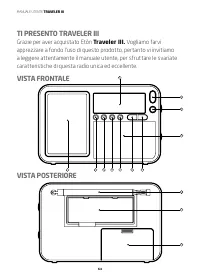
MANUALE UTENTE TRAVELER III 64 TI PRESENTO TRAVELER III Grazie per aver acquistato Etón Traveler III. Vogliamo farvi apprezzare a fondo l’uso di questo prodotto, pertanto vi invitiamo a leggere attentamente il manuale utente, per sfruttare le svariate caratteristiche di questa radio unica ed eccelle...
Page 65 - LATO DESTRO
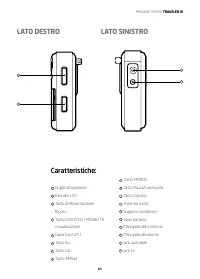
MANUALE UTENTE TRAVELER III 65 Caratteristiche: 1 Griglia altoparlante 2 Pannello LCD 3 Tasto di Alimentazione/ Riposo 4 Tasto DI BLOCCO / MODALITÀ visualizzazione 5 Copertura G.M.T. 6 Tasto Su 7 Tasto Giù 8 Tasto AM/LW 15 16 17 LATO DESTRO LATO SINISTRO 9 Tasto FM/RDS 10 Tasto Pausa/Luminosità 11 T...
Page 66 - TASTO DI ALIMENTAZIONE/RIPOSO; Premere brevemente per accendere la radio e premere di nuovo; TASTO DI BLOCCO / MODALITÀ VISUALIZZAZIONE; indica passo lento, mentre l’icona
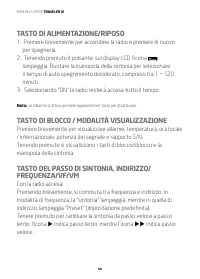
MANUALE UTENTE TRAVELER III 66 TASTO DI ALIMENTAZIONE/RIPOSO 1. Premere brevemente per accendere la radio e premere di nuovo per spegnerla. 2. Tenendo premuto il pulsante, sul display LCD l’icona lampeggia. Ruotare la manopola della sintonia per selezionare il tempo di auto spegnimento desiderato, c...
Page 67 - TASTO HOME; • Premere brevemente il tasto “ALARM” senza impostazione del
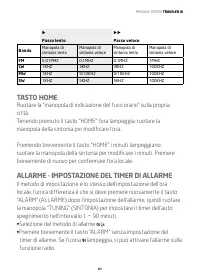
MANUALE UTENTE TRAVELER III 67 u Passo lento uu Passo veloce Banda Manopola di sintonia lenta Manopola di sintonia veloce Manopola di sintonia lenta Manopola di sintonia veloce FM 0.01MHZ 0.1MHZ 0.1MHZ 1MHZ LW 1KHZ 3KHZ 3KHZ 100KHZ MW 1KHZ 9/10KHZ 9/10KHZ 100KHZ SW 1KHZ 5KHZ 5KHZ 100KHZ TASTO HOME R...
Page 68 - TASTO LUMINOSITÀ/PAUSA
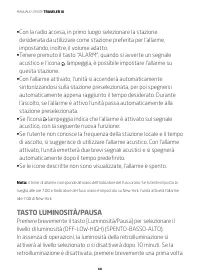
MANUALE UTENTE TRAVELER III 68 • Con la radio accesa, in primo luogo selezionare la stazione desiderata da utilizzare come stazione preferita per l’allarme, impostando, inoltre, il volume adatto. • Tenere premuto il tasto “ALARM”; quando si avverte un segnale acustico e l’icona lampeggia, è possibil...
Page 69 - TASTO BANDA A ONDE CORTE/ VISUALIZZAZIONE; Con la radio accesa:
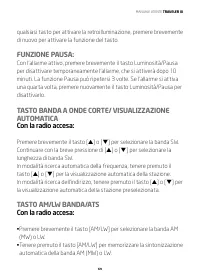
MANUALE UTENTE TRAVELER III 69 qualsiasi tasto per attivare la retroilluminazione, premere brevemente di nuovo per attivare la funzione del tasto. FUNZIONE PAUSA: Con l’allarme attivo, premere brevemente il tasto Luminosità/Pausa per disattivare temporaneamente l’allarme, che si attiverà dopo 10 min...
Page 70 - VISUALIZZAZIONE DELLE INFORMAZIONI
MANUALE UTENTE TRAVELER III 70 TASTO FM RDS /ATS Con la radio accesa: • Premere brevemente il tasto FM/RDS per selezionare la banda FM.• Tenere premuto il tasto FM/RDS per procedere con la funzione ATS. VISUALIZZAZIONE DELLE INFORMAZIONI In modalità di banda FM, premere brevemente il tasto FM/RDS pe...
Page 71 - PRESSIONE BREVE DEL TASTO [; In modalità di scansione automatica della frequenza, tenere
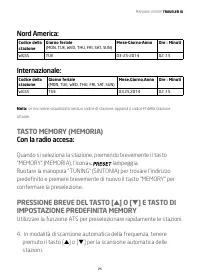
MANUALE UTENTE TRAVELER III 71 Nord America: Codice della stazione Giorno feriale(MON, TUE, WED, THU, FRI, SAT, SUN) Mese-Giorno-Anno Ore : Minuti WGSS TUE 03-25-2014 02 :15 Internazionale: Codice della stazione Giorno feriale(MON, TUE, WED, THU, FRI, SAT, SUN) Mese,Giorno,Anno Ore : Minuti WGSS TUE...
Page 72 - Quando si raggiunge la stazione preferita, basta premere; Per eliminare una stazione, con la radio accesa:; e il testo “PXX DEL” lampeggeranno sul; Per eliminare tutte le stazioni, con la radio spenta:; Premere brevemente il tasto [
MANUALE UTENTE TRAVELER III 72 5. Quando si raggiunge la stazione preferita, basta premere brevemente il tasto “MEMORY” per memorizzarla e quindi procedere con la scansione automatica delle altre stazioni. TASTO DELETE (ELIMINA) Per eliminare una stazione, con la radio accesa: 1. In modalità scansio...
Page 73 - entrare in auto preselezione delle stazioni; MANOPOLA DELL’INDICATORE DEL FUSO ORARIO
MANUALE UTENTE TRAVELER III 73 1. In modalità ricerca indirizzo, tenere premuto il tasto [ p ] o [ q ] per entrare in auto preselezione delle stazioni; 2. Quando si incontrano stazioni non desiderate, basta premere brevemente il tasto [DELETE] per eliminarle e passare a quelle successive. TASTO RESE...
Page 74 - MANOPOLA DEL VOLUME; Ruotare questa manopola per regolare il volume.; Jack CC; Impostazione del passo MW
MANUALE UTENTE TRAVELER III 74 Ruotare la manopola per selezionare l’indirizzo predefinito in modalità impostazione predefinita dell’indirizzo. MANOPOLA DEL VOLUME Ruotare questa manopola per regolare il volume. Jack auricolare: 3,5 mm Jack CC Impostazione del sistema 1. Impostazione del passo MW Co...
Page 75 - Attivare o disattivare la banda LW; SPECIFICHE TECNICHE; Frequenze supportate:
MANUALE UTENTE TRAVELER III 75 64,0 ~ 108 MHz, 76,0 ~ 108 MHz 3. Attivare o disattivare la banda LW Con la radio spenta, tenendo premuto il tasto AM/LW, il display LCD visualizzerà “LW ON” (LW ATTIVO) (“LW OFF” = LW DISATTIVO). 4. Attivare o disattivare il segnale acustico Con la radio spenta, tenen...
Page 76 - DATI DI CONTATTO PER ASSISTENZA
MANUALE UTENTE TRAVELER III 76 5. Alimentazione: Batterie: 4 x formato AA (4 x 1,5 V) CC: 6 V 6. Dimensioni: 135 (L) x 87 (A) x 27 (P) mm 7. Peso: appross. 213 g (batterie escluse) DATI DI CONTATTO PER ASSISTENZA Etón Corporation1015 Corporation Way, Palo Alto, CA 94303, USA 1-800-872-2228 (U.S.)1-8...
Page 77 - RISPETTO PER L’AMBIENTE; Smaltimento; REGISTRAZIONE DELLA GARANZIA; Si prega di visitare il sito:
MANUALE UTENTE TRAVELER III 77 • Non rimuovere il coperchio [o il retro].• Per l’assistenza rivolgersi a personale qualificato. RISPETTO PER L’AMBIENTE Smaltimento Secondo la Direttiva Europea 2002/96/CE tutti i prodotti elettrici ed elettronici devono essere raccolti separatamente tramite un sistem...
Page 78 - per registrare; LIMITI DELLA GARANZIA
MANUALE UTENTE TRAVELER III 78 http://www.etoncorp.com/productregistration per registrare il prodotto. LIMITI DELLA GARANZIA Conservare la prova di acquisto o ricevuta. Le informazioni sui limiti della garanzia possono essere visionate sul sito www.etoncorp.com nella sezione Supporto. ASSISTENZA CLI...
Page 79 - ASSISTENZA FUORI GARANZIA
MANUALE UTENTE TRAVELER III 79 Non spedire la radio senza prima aver ottenuto il numero di autorizzazione. ASSISTENZA FUORI GARANZIA Se il prodotto non è più in garanzia e necessita di assistenza il nostro staff tecnico farà riferimento alla struttura di riparazione più vicina che sarà in grado di g...