Epson WF 7210 - Installation Manual

A user manual for the Epson WF-7210 Series multifunction printer covers essential topics like setup procedures–such as unpacking, power connection, language/time selection–and core operational areas. The guide also addresses installation of ink cartridges, paper loading, and basic troubleshooting for common issues like network or print quality problems. Additionally, it includes sustainability information on recycling hardware and ink cartridges alongside compatibility details for replacement parts.


Table of Contents:
- Page 1 – Initial Printer Setup Procedures
- Page 2 – Paper Loading and Cartridge Installation
- Page 3 – Software Installation and Troubleshooting
- Page 4 – Recycling and Ink Cartridge Compatibility
Start Here
Read these instructions before using your product.
Note for Spanish speakers/Nota para hispanohablantes:
Para
obtener instrucciones de configuración en español, consulte la
Guía
de instalación en
www.epson.com/support/wf7210sp (requiere
una
conexión a Internet).
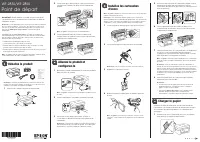
1
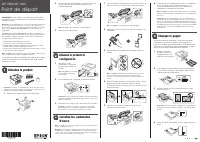
Unpack
French control
panel stickers
Note:
Do not open the ink cartridge packages until you are ready to
install the ink. Cartridges are vacuum packed to maintain reliability.
1
Remove all protective materials from the product.
2
Open the printer cover and remove all protective materials
from inside the product.
2
3
Close the printer cover.
2
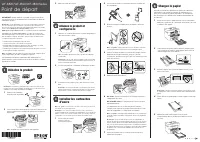
Turn on and configure
1
Connect the power cord to the back of the product and to
an electrical outlet.
Caution:
Do not connect to your computer yet.
2
2
Turn on the product.
3
Select your language and time.
Note:
You can change these settings later using the product’s
control panel. For more information, see the online User’s Guide.
3
Install ink cartridges
Caution:
Keep the ink cartridges out the reach of children and do not
drink the ink.
1
Open the printer cover and the ink cartridge cover.
2
2
Gently shake the ink cartridges.
3
Unpack the ink cartridges.
WF-7210 Series
WF7210_SH_E_CPD53890.indd 1
"Loading the manual" means you need to wait until the file loads and becomes available for online reading. Some manuals are very large, and the time they take to appear depends on your internet speed.
Was this manual helpful?
About this manual
- Brand
- Epson
- Model
- WF 7210
- Document type
- Installation Manual
- Language(s)
- English
- Pages
- 4
- File size
- 1.6 MB
- Format
Other Manuals for Epson WF 7210
Summary
Steps for unpacking, powering on the printer, setting time and language, and installing ink cartridges, including associated safety notes.
Step-by-step instructions and cautions for safely preparing the printer, loading paper, and installing ink cartridges.
Instructions for installing printer software, establishing wireless and USB connections, mobile printing options, and solutions for network setup failures, print quality issues, and screen darkness.
Ask a question
Related manuals
Popular Epson Other
 Epson PictureMate Flash - PM 280 - PictureMate Flash Compact Photo Printer User Manual
 Epson TM-T70II Troubleshooting Guide
 Epson U925 - TM B/W Dot-matrix Printer User Manual
 Epson RR 70W User Manual
 Epson 9890 Manual
 Epson 206636 - PocketJet 3 Plus User Manual
 Epson Printer TM-H5000II User Manual
 Epson TM-T88V User Manual