Epson WF 3820 - Manual

This user manual covers the Epson WF-3820/WF-4820/WF-4830 series multifunction printers, focusing on essential topics like initial setup, safety guidelines, and compatibility requirements. The document addresses basic installation–such as unpacking, powering on, and configuring printer settings–and highlights key operational areas like ink cartridge replacement, paper loading, and network connectivity options (wireless, USB, or wired). It also includes troubleshooting for common issues, including print quality problems and network setup challenges, while emphasizing support resources and recycling programs.


Table of Contents:
- Page 1 – Initial Setup and Compatibility Notes
- Page 2 – Ink Cartridge and Paper Loading Procedures
- Page 3 – Network and Software Configuration
- Page 4 – Troubleshooting and Support Resources
Start Here
4
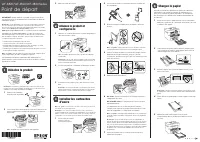
Load paper
See the online User’s Guide for information about loading
capacity, available paper types and sizes, loading envelopes,
and using the ADF.
1
Make sure the product is done charging the ink, and then
lower the control panel, lift the output tray, and pull out the
paper cassette.
2
Slide the side edge guides all the way out and set the
front edge guide to the paper size you are using.
3
Insert paper with the glossy or printable side down.
Note:
Make sure the paper is loaded against the front edge
guide and not sticking out from the end of the cassette.
4
Slide the edge guides against the paper, but not too
tightly.
5
Keep the cassette flat as you insert it all the way, then
lower the output tray.
IMPORTANT: Before using this product, make sure you read
these instructions and the safety instructions in the online User’s
Guide.
Note:
This printer is designed for use with Epson
®
cartridges only, not
third-party cartridges or ink. For important ink information, visit
www.epson.com/epsonink (U.S.) or www.epson.ca/epsonink (Canada)
or see your printer box.
Important Safety Instructions:
When using telephone equipment, you
should always follow basic safety precautions to reduce the risk of fire,
electric shock, and personal injury, including the following:
• Do not use the Epson product near water.
• Always keep this guide handy.
• Avoid using a telephone during an electrical storm. There may be a
remote risk of electric shock from lightning.
• Do not use a telephone to report a gas leak in the vicinity of the leak.
Caution:
To reduce the risk of fire, use only a No. 26 AWG or larger
telecommunication line cord.
The illustrations show the WF-4830, but the steps are the same
for all models, unless otherwise specified.
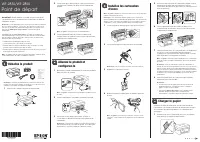
1
Unpack
Note:
Do not open the ink cartridge packages until you are ready to
install the ink. Cartridges are vacuum packed to maintain reliability.
1
Remove all
protective materials
from the product.
2
Lift up the scanner unit until it locks into place and remove
all protective materials from inside the product.
Caution:
Do not touch the flat white cable.
2
Gently shake th
e ink cartridges, and remove them from the
packaging.
3
Remove only the yellow tape from each ink cartridge.
Caution:
Do not touch the areas shown above. Doing so may
prevent normal operation and printing.
4
Insert the cartridge in the holder for each color. Press each
cartridge down until it clicks. Make sure all cartridges are
pushed down into place.
5
Lower the scanner unit.
6
WF-3820: Follow the on-screen instructions to start
charging the ink.
WF-4820/WF-4830: Ink charging begins automatically.
Ink charging takes approximately 5 minutes. When you
see a completion message on the product’s LCD screen,
charging is complete.
Caution:
Don’t turn off the printer or raise the scanner unit while
the printer is charging or you’ll waste ink.
Note:
As part of setup, your product’s serial number will be sent
to a secure Epson server so that you can be eligible to participate
in programs we may offer from time to time, including the Epson
ink replenishment program. You will have a separate opportunity
to consent to participating in such programs.
7
Follow the on-screen instructions to select paper settings.
3
Lower the scanner unit.
2
Turn on and configure
1
Connect the power cord to the back of the product and to
an electrical outlet.
Caution:
Do not connect to your computer yet.
Note:
If an error code appears, turn off the product and
check that no protective material has been left inside the
product.
2
Raise the control panel and turn on the product.
3
Select your language, country, date, and time on the
LCD screen.
Note:
You can change these settings later using the product’s
control panel. For more information, see the online User’s Guide.
3
Install ink cartridges
Caution:
Keep the ink cartridges out the reach of children and do not
drink the ink.
Note:
The included initial cartridges are designed for reliable printer
setup and cannot be used as replacement cartridges or resold. After
setup, the remaining ink is available for printing.
1
Lift up the scanner
unit until it locks into
place.
WF-3820/WF-4820/WF-4830 Series
"Loading the manual" means you need to wait until the file loads and becomes available for online reading. Some manuals are very large, and the time they take to appear depends on your internet speed.
Was this manual helpful?
About this manual
- Brand
- Epson
- Model
- WF 3820
- Document type
- Manual
- Language(s)
- English
- Pages
- 4
- File size
- 1.6 MB
- Format
Summary
Instructions for unpacking, powering on, configuring basic settings, installing ink cartridges, and safety/compatibility guidelines for the printer series.
Step-by-step instructions for installing ink cartridges and loading paper, including procedures for removing cartridges, inserting them, lowering the scanner unit, and specific notes on ink charging and paper orientation for various models.
Instructions for setting up the printer, connecting fax lines, installing software, configuring network connections (wireless, USB, wired), enabling mobile/voice printing, and troubleshooting network setup.
Ask a question
Related manuals
Popular Epson Other
 Epson PictureMate Flash - PM 280 - PictureMate Flash Compact Photo Printer User Manual
 Epson TM-T70II Troubleshooting Guide
 Epson U925 - TM B/W Dot-matrix Printer User Manual
 Epson RR 70W Manual
 Epson 9890 Manual
 Epson 206636 - PocketJet 3 Plus User Manual
 Epson Printer TM-H5000II User Manual
 Epson TM-T88V User Manual